

Meet the Minnesota Paralympians heading to Milano Cortina for the Winter Games


Over the course of 10 days, around 600 athletes from around the world will compete in the 50th annual Paralympic games. Among them, seven athletes with connections to Minnesota will be vying for the gold in Italy across four sports.

The Paralympic opening ceremony will officially kick off the games this Friday and run through Sunday, March 15. See the full Paralympic schedule and results as they happen here.

Liam Cunningham, para ice hockey

An athlete skates on the ice.
Liam Cunningham is the youngest player on the U.S. National Sled Hockey Team.
Micheline Veluvolu | USA Hockey

The youngest player on the U.S. National Sled Hockey team, 17-year-old Liam Cunningham has been playing sled hockey since he was seven, after being diagnosed with a degenerative bone disorder in his legs.

Originally from River Falls, Wisconsin, Cunningham is currently a student at St. Thomas Academy in Mendota Heights.

His older brothers Bobby and Patrick both play hockey for the U.S. Naval Academy.

The eight-team Para Ice Hockey Tournament begins Friday and concludes on March 15. See the full schedule and results as they happen here.

Max Nelson, para cross-country skiing

a man is seen cross-country skiing
Max Nelson of Team United States competes in the Men's Sprint Free Technique Vision Impaired Qualification on Day 5 of the Beijing 2022 Winter Paralympics at Zhangjiakou National Biathlon Centre on March 9, 2022, in Zhangjiakou, China.
Lintao Zhang | Getty Images

Max Nelson is a visually-impaired skier who made his first Olympic appearance as the youngest member of the U.S. Nordic skiing team in Beijing 2022. Fighting brain cancer and a retinal disease, he has faced serious health challenges on his way to the Paralympics.

He is from Grant and graduated from Mahtomedi High School in 2022. In 2021, he won a high school conference race against sighted skiers.

Outside of skiing, Nelson enjoys playing piano.

The para cross-country skiing events begin March 10. See the full schedule and results as they happen here.

Sydney Peterson, para cross-country skiing

An athlete pushing forward on cross country skis.
USA's Sydney Peterson competes during the mixed relay para cross-country skiing event on March 13, 2022, at the Zhangjiakou National Biathlon Centre during the Beijing 2022 Winter Paralympic Games.
Lillian Suwanrumpha | AFP via Getty Images

Returning to her second Paralympic Games, Sydney Peterson has set a high bar for herself. In the 2022 Beijing Paralympics she competed in four events and won medals in three of them.

In addition to her gold, silver and bronze Paralympic medals, she has an impressive world championship record, earning seven medals over the past four years.

Peterson, who is from Lake Elmo, graduated from St. Lawrence University with a bachelor’s degree in neuroscience. Now, her goal is to get a Ph.D. in neuroscience.

The para cross-country skiing events begin March 10. See the full schedule and results as they happen here.

Aaron Pike, para cross-country skiing
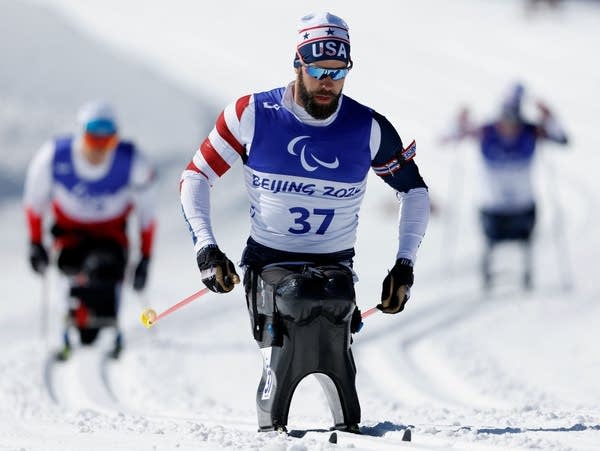
An athlete pushes forward with ski poles
Aaron Pike of Team United States competes in the Para Biathlon Men's Middle Distance Sitting during day four of the Beijing 2022 Winter Paralympics on March 8, 2022 in Zhangjiakou, China.
Christian Petersen | Getty Images

One of the few Paralympians to compete in both the summer and winter Games, Aaron Pike is heading to his eighth Paralympics.

Pike’s journey to the Paralympics started after a hunting accident left him with a serious spinal cord injury when he was 13.

Since then, the Park Rapids native has made a name for himself on the world stage.

The para cross-country skiing events begin March 10. See the full schedule and results as they happen here.

Mike Schultz, para snowboarding

Beijing 2022 Winter Paralympics - Day 3
Mike Schultz of Team United States competes in the Men's Snowboard Cross SB-LL1 Quarterfinals at Genting Snow Park during Day 3 of the Beijing 2022 Winter Paralympics on March 7, 2022, in Zhangjiakou, China.
Steph Chambers | Getty Images

An avid racer his whole life, Mike Schultz sustained a leg injury during a snowmobile race, leading to an amputation in 2008.

Wanting to continue racing, Schultz invented a prosthetic that allowed him to snowboard. His company, BioDapt, supplies all of Team USA’s paralympic snowboarders with prosthetics.

Returning for his third Winter Paralympic Games, Schultz has an impressive Paralympic and world championship record, earning two silvers and a gold medal in his previous Paralympic Games and seven medals overall in world events.

The para snowboarding events begin Friday and conclude March 14. See the full schedule and results as they happen here.

Oyuna Uranchimeg, wheelchair curling

Curlers compete at the Paralympics
Oyuna Uranchimeg of the U.S. competes against Team Canada in mixed wheelchair curling at the Winter Paralympics on Monday, March 7, 2022 in Beijing.
Zhe Ji | Getty Images for International Paralympic Committee

Originally from Mongolia, Oyuna Uranchimeg became paralyzed following a car accident in 2000. She started curling at age 43 after seeing a wheelchair curling club in action in Blaine.

In just a few years, she joined the U.S. national team and went to the 2022 Winter Paralympics in Beijing, finishing fifth in the mixed team competition. At the 2024 World Wheelchair Mixed Doubles Curling Championship, she and her partner Matt Thums went 6-0 in round-robin play before losing in the quarterfinals.

Uranchimeg lives in Burnsville and attended Hamline University.

She says the United States is “the country where I was reborn.”

Mixed doubles curling events begin March 4, two days before the opening ceremony. Pool play starts on March 7. See the full curling schedule and results as they happen here.

Landon Uthke, para ice hockey

Team United States Welcome Experience At Milan-Cortina 2026 Paralympics
Para Sled Hockey athlete Landon Uthke poses with a New Era hat during the Team United States Welcome Experience At Milan-Cortina 2026 Paralympics on Feb. 28, 2026, in Venice, Italy.
Elsa | Getty Images

Before joining team USA, Landon Uthke played for the Minnesota Wild’s sled hockey team with fellow Paralympian Liam Cunningham.

Uthke helped the U.S. secure a win last year at the 2025 Para Hockey Cup, beating China, Canada and Czechia.

The Albert Lea native has been playing sled hockey most of his life, after an accident required an amputation when he was three.

This will be his Paralympic debut.

The eight-team Para Ice Hockey Tournament begins Friday and concludes on March 15. See the full schedule and results as they happen here.




Source link

Leave a Reply

Subscribe to Our Newsletter

Get our latest articles delivered straight to your inbox. No spam, we promise.

Recent Reviews


Lost a crucial document because your system crashed before you could save it? Worry no more! Microsoft Word has introduced an automatic save option that regularly backs up your work, so you’ll never lose your progress again.

Users will now be able to manage their Word documents without thinking about saving them manually. The new Microsoft Word update allows users to automatically save their documents to the cloud as soon as they start documenting any content piece.

Raul Munoz, the Senior Product Manager at Microsoft, has stated about the new feature, “We are modernizing the way files are created and stored in Word for Windows! Now you don’t have to worry about saving your documents: Anything new you create will be saved automatically to OneDrive or your preferred cloud destination.

Microsoft additionally hints at introducing similar features for Windows Excel and PowerPoint, which are now live.

How Does the Auto-save Feature Work?

The auto-save option can be accessed and used effectively with the compatible Word for Windows version. Let’s understand how the process works-

Primarily, users need to create a fresh document in Word and switch the AutoSave option on. Unlike the previous default document name- DocumentN, the autosave feature saves the files with the date.

Microsoft Word Update - Step 1

Source: Microsoft Tech Community

To change the name of the file and its location, users need to select Save or press Ctrl+S. After selecting the file name and location, press Confirm to save the changes.

Microsoft Word Update - Step 2

Source: Microsoft Tech Community

In case users try to close the file before it gets saved, a dialog displays on the screen asking whether they intend to Discard or Keep the file. If users try to close empty files, Word discards them without asking for confirmation.

Microsoft Word Update - Step 3

Source: Microsoft Tech Community

Availability of the Auto-Save Feature of Microsoft Word Update-

The AutoSave feature of Microsoft Word update is available to users with Version 2509 (Build 19221.20000) or newer. This advancement is set to enhance accessibility and address the challenge of lost files. Similar features have been introduced on Windows Excel and PowerPoint as well.

Advantages of the Latest Microsoft Word Update

Microsoft Word’s new auto-save feature will unlock several benefits for users. Alongside increased security, it offers flexible file management capabilities. Let us discuss other significant advantages-

Flexibility in File Storage and Control: Users can store and manage their files more flexibly than ever. As users are in charge of the documents, they can adjust file names and locations to save, organizing the files according to convenience.

Never Lose Your Files: The auto-save feature in Microsoft Word addresses the challenge of losing files due to not saving them manually. As soon as you start making progress in a file, it automatically gets saved.

Enhanced Security and Compliance: Files saved in your organization’s cloud servers already adhere to the set security guidelines and practices. Hence, users do not need to think about protecting the files separately.

Increased Accessibility: The auto-save feature enables enhanced accessibility of Word files. It can be accessed from diverse types of devices and platforms once shared, including Android, iOS, and web browsers. Changes made to the file will get synced on all devices and platforms.

Better Collaboration: The AutoSave feature has made collaboration within and across teams easier. Users can easily share the cloud file and initiate collaboration by making changes, adding comments, and resolving comments in real time.

Agentic AI Support: The Word files are now equipped with Copilot agentic AI support. Users can unlock AI-powered capabilities whenever they need to improve or update their documents. Nevertheless, to use Copilot in Word, a Microsoft 365 Copilot license is needed.

Additional Tips: 

  • Users will be able to easily change the location for new documents. Right-click on any cloud folder in the File section of Word, then select Set as Default Location to choose the location.
  • Users can manage how their files are created, whether in the traditional manner or automatically in the cloud, in the Save tab of Word Options, and opt in or opt out for Create new files in the cloud automatically.

Key Elements to Keep in Mind-

  • When a new Word session is started while another is running, the new file does not autosave. Hence, users need to close the previous file to enable the auto-save option for new files.
  • Users may sometimes encounter a delay in refreshing the recent files list while changing the name of a document.
  • If users disable the option for Show the Start screen when this application starts, remember that the first file they create will not autosave automatically.

Concluding Remarks!

Microsoft has been making significant advancements in its 365 Office platforms for better collaboration and enhanced productivity of diverse teams within an organization. With the integration of Copilot and flexible features, the firm is aiming to boost user experience and accessibility of the tools, including Word for Windows.

Learn about the major technological shifts and practices with KnowledgeNile!


FAQs:

1. What is the AutoSave feature in Microsoft Word?

Answer: The AutoSave feature in Microsoft Word lets users save their files automatically.

2. What is the purpose of AutoSave?

Answer: The AutoSave feature aims to reduce the challenges of data loss in unwanted circumstances, such as power shortages and device failures.

3. Where are AutoSave Word documents stored?

Answer: Automatically saved Word files are stored in cloud storage, like OneDrive.


Recommended For You:

Oracle identity cloud vs Microsoft Active Directory: Which to opt for and why?


Source link




