
By Lauren Costantino, Miami Herald
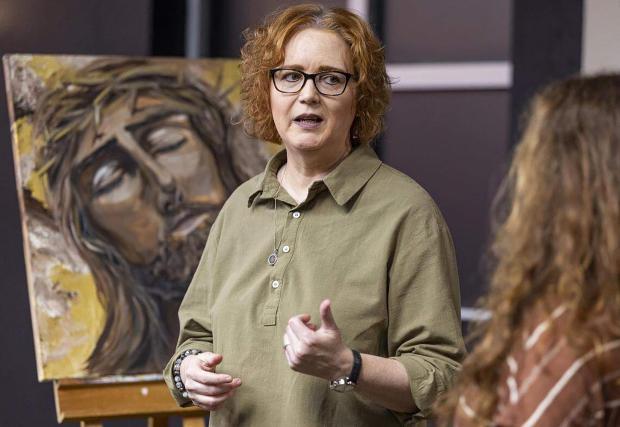
MIAMI – When a man named Sergio messaged Pastor Jennifer LeClaire insisting she had promised him a personal phone call and prophetic counseling, she assumed it was a misunderstanding.
Though he was an avid follower of the South Florida pastor’s morning prayer broadcast on Facebook, LeClaire didn’t know him.
Sergio told LeClaire that he was still waiting for her to deliver on what she had promised him. He even threatened to call the police.
But what Sergio had encountered was a deepfake video of LeClaire circulating online. The artificial intelligence–generated video was made to look and sound like LeClaire, preaching in what looked like her familiar home setting and addressing Sergio in her distinctive tone. The scammer used the fabricated video to gain Sergio’s trust — and eventually asked him for money.

“I felt sorry for him and tried to explain that this was not me, but he could not be convinced,” said LeClaire, pastor of a nondenominational Christian church in Davie called Awakening House of Prayer.
LeClaire, who has a following of nearly 600,000 on YouTube, joins a small but growing number of faith leaders who have encountered a concerning technological trend: AI-generated videos, called deepfakes, imitating pastors to spread false messages and scam congregants out of their money.
Deepfakes are a type of synthetic content created or modified by artificial intelligence. Though they have been around for years, the methods to create them are becoming more accessible, opening the door for scammers. Now, the deepfakes have found their way to church.
“This is essentially hijacking someone’s identity and putting words in their mouth, making promises they don’t intend to keep, and potentially compromising the integrity of the pastor,” said LeClaire.
Rev. Christopher Benek, pastor at First Miami Presbyterian Church in Miami and an expert in the field of religion and technology, said it’s important for church leaders to build trust with congregants and teach them how to spot the scammers.
“We have to tell people, just because someone’s in the church, if they ask you for money, don’t give it to them,” he said. “It’s teaching people to actually have some discernment about it.”
Benek sees deepfakes as the next iteration of the email phishing scams that became a problem for pastors in the early 2000s.
“Little old ladies would send money, thinking they’re helping the church, only to find out they got scammed,” said Benek.
According to the Federal Bureau of Investigation, some aspects to look for in a deepfake are visual distortions and warped images, unsettling silences and distorted sound. Things like video inconsistencies, unnatural movement, poor video or audio quality can also be signs of synthetic content.
In March 2025, LeClaire posted a video warning her followers about the deepfake that had been circulating of her. She posted part of the AI-generated video, asking her followers to spot the differences. Being proactive and educating people is key, she said, in helping followers spot similar scams.
“They’re preying on the trusted believers on my good name, exploiting their faith for their own wicked ends,” she said in the video with over 14,000 views.
Beyond her church in Fort Lauderdale, LeCLaire has built a robust online community, made up of thousands of followers — many who look to her for advice on topics she preaches about daily, including how to engage in spiritual warfare and defeat worldly demons.
She has international followers, some of whom, like Sergio, don’t speak English as their first language. LeClaire said she thinks this could be a factor in why he believed the deepfake to be real.
In the deepfake, pastor LeClaire, though a bit fuzzy and distorted, spoke with authority.
“Please be at peace, this is Jennifer. Now Satan is just trying to confuse you,” the AI LeClaire said. “Cheer up and let’s get more better in Christ Jesus together.”
The biggest tell of the fake video, LeClaire said, was the poor grammar. Some commenters took note.
“Wow, anyone who has ever seen or heard Jennifer would be able to tell something was off,” one said. “You don’t speak like this, and you don’t blink that much,” said another.
Religious influencers at risk
Father Rafael Capó, a Catholic priest in Miami with a growing social media following, said he has experienced similar AI-perpetuated scams.
A religious digital influencer, Capó uses social media as a way to spread the message of the Catholic Church. His bodybuilding videos blend faith with fitness, gaining him international attention and over 112,000 followers on Instagram. But with that celebrity-like status also comes risk.
Over the past few years, he’s started to see more and more fake profiles of himself popping up on the internet. Using AI, scammers created a false profile of Capó and then sent messages to his followers, often asking for money for a made-up ministry.
“It all comes down to identity theft, creating images and videos and using their tools to try to get your identity and misuse it to get money. It’s unfortunate,” said Capó, who is also the vice president of mission and ministry and dean of Theology at St. Thomas University.
It’s been struggle to keep the scams under control, Capó said. And the target is not just older people.
“I would get messages from young people. ‘Father, is this social media profile yours?,’’” he said.
Capó received hundreds of messages from followers who came across the fake profiles. The scams decreased, he said, after social media platforms started using multifactor verifications to secure his real profile.
Another 21st century scam he’s encountered: clergy are being targeted by scammers who have created fake charities and reached out to Capó online, hoping the empathetic faith leader might donate money.
The Catholic Church is aware of the implications of emerging technologies such as AI. At a recent conference for digital evangelizers and Catholic influencers, Pope Leo XIV noted how to harness the potential benefits of AI while recognizing that there are bad actors out there using it to accumulate wealth and power for the few.
Leo said humans are meant to be “co-workers in the work of creation,” not merely passive consumers of AI-generated content. He raised other issues, including the potential impacts AI can have on a child’s growth and development, and the concerns he has about AI’s effects on “humanity’s openness to truth and beauty,” and capacity for creativity.
Father Capó sums it up: “Churches need to be a voice for how AI and all the digital platforms … are at the service of the human person and not attacking the human person.”
Destroying trust in churches
Benek said these new sophisticated scams further erode trust in religious institutions — most of which have dealt with some sort of scandal in recent memory.
“We’ve had so many failures in the church that we should be learning from those things,” he said.
Benek said he understands being fearful of powerful technology, but points out that AI is already being used by churches and other institutions. He believes that it’s up to faith leaders to embrace AI and adapt the church accordingly — just like religious institutions have done with past technological advancements.
Ultimately, the goal for pastors, Benek said, is to protect the message of the church amid the new technological advancement. It’s also about identifying the potential risks, he said.
“If you’re online, and you’re using more tech tools, you’re going to be more susceptible to some of those things,” he said. “But it’s not to say ‘don’t use tech tools.’ It’s to discern and say ‘what are our risks?’”
For LeClaire, the deepfake experience brought up other concerns about how AI can be used to harm a pastor’s reputation. She worries that AI could also be used to spread “polarizing messages, false prophecies,” or be used to generate images of religious leaders doing illicit activities like “snorting cocaine.”
As long as people are seeking help from pastors and faith leaders, the scams will arise, she said.
“AI is going to get better and better, and it will be more and more difficult to discern the true from the false, unless you really know someone’s heart,” she said.
This story was produced with financial support from Trish and Dan Bell and donors in South Florida’s Jewish and Muslim communities, including Khalid and Diana Mirza and the Mohsin and Fauzia Jaffer Foundation, in partnership with Journalism Funding Partners. The Miami Herald maintains full editorial control of this work.
©2026 Miami Herald. Visit at miamiherald.com. Distributed by Tribune Content Agency, LLC.









