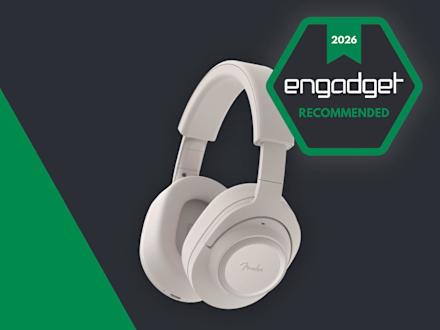
I know what you’re thinking: “Isn’t Fender a guitar company?” It sure is, and has been one of the most iconic names in guitars and amplifiers since 1946. So what is the company doing making headphones and speakers? Well, it isn’t, exactly. Like Zound Industries used to do with Marshall (before buying the amp business), another company is licensing the Fender name for its consumer audio products. Fender Audio, the brand that’s on the headphones I’m reviewing, is owned by the Fender Corporation, but Riffsound oversees the design and production of portable audio gear.
The first products from Fender Audio are the Mix headphones and the Elie speaker (in two sizes). The company revealed these in January before properly showing them off at CES. I’ll get to those speakers in a few weeks, but the Mix headphones are first up on the review docket.
With the Mix, Fender Audio seeks to offer a set of premium over-ear, noise-canceling headphones at a lower price than the likes of Sony, Bose and Sennheiser. There’s also marathon battery life, several smart design touches, a lossless Bluetooth transmitter and swappable parts that combine for a unique formula to take on those big names. I’m honestly impressed that Fender Audio could cram all of that in a more affordable package, but the final verdict on the Mix isn’t so straightforward.
Fender Audio/Engadget
Fender Audio’s first set of headphones makes a strong initial impression, but a deft hand with tuning and some added utility would’ve made them even better.
Pros
Smart design touches
Ready for lossless streaming
Cons
Bass-heavy stock tuning
Lacks modern features like wear detection and head gestures
What’s good about the Fender Mix headphones?
Fender Audio made numerous smart design decisions on the Mix headphones, and they resulted in my favorite things about using them. To start, you can swap out the ear pads, ear cups and headband as you see fit. The ear cups attach to the headband via USB-C ports, so they’re easy to snap on and off. Obviously, this allows you to change the look of the Mix over time, within the bounds of Fender’s available colors.
Underneath the ear pads, Fender put a storage slot for the lossless dongle on the left side and gives you access to the removable battery on the right. I’m thrilled that I can enjoy higher quality Bluetooth connectivity without having to remember to bring along such a small accessory. Plus, it’s nice to know that users will be able to install a fresh battery, provided the company sells those at some point.
I also enjoy how Fender Audio designed the onboard controls. First, they’re physical buttons, which are always my preference over touch- or gesture-based options. Second, the main one is a five-way joystick, so they’re very simple. Press it to play/pause, press and hold for pairing mode or press longer to power on or off. If you push the joystick up or down, you can adjust the volume, while moving it left and right skips the track forward or backward. You can also push down twice to enable Auracast pairing right on the headphones. A second button, which is just the regular kind, is used to cycle through noise canceling modes: ANC, transparency and both off.
The lossless Bluetooth dongle inside the left ear cup (Billy Steele for Engadget)
Sonically, the Mix headphones are at the height of their powers in lossless mode, which is enabled by the Bluetooth dongle hidden inside the ear cup. Bass tuning that’s otherwise overpowering in most cases is restrained, and you can pick up finer details in the more balanced mix. When listening to Watchhouse’s Rituals, I got the sense that I was surrounded by the band, with strings, drums and vocals enveloping my ears with sound — rather than it simply being projected from the left and right channels. There’s more nuance with the lossless mode, and it kept calling me back to the Mix headphones at the times when I’d probably opt for the conveniences of earbuds or a speaker.
ANC performance is respectable, although it’s not on the level of Bose. It’s good enough to block out mild-to-moderate distractions, but it struggles with louder human voices and sudden jolts of noise. It will certainly do the job in the office or coffee shop, but you may notice some sounds invade your ears during a commute. For calls, transparency mode provides natural sound and it picks up enough of my voice that I never felt the need to shout. Call quality, though, is a different matter (more on that in a bit).
Another big perk of the Mix is its long battery life. Fender Audio says you’ll get up to 52 hours with ANC on or a whopping 100 hours with it off. The company is forthcoming with the fact that the latter number is achieved at 50 percent volume, which will be too low for most “regular” use. Still, with noise canceling enabled and the volume around 70 percent, I had 52 percent battery left after nearly 30 hours of use. I spent most of that time with either ANC or transparency mode on.
What’s not so good about the Fender Mix?
The five-way joystick and ANC button on the Fender Mix (Billy Steele for Engadget)
Out of the box, Fender Mix’s tuning is too bass heavy. I realize a lot of people prefer a thundering low-end tone out of their headphones, but I found it to be too overpowering here. The stock sound profile is my biggest issue with this model, although it’s somewhat alleviated by using the lossless Bluetooth dongle. In that mode, the bass is slightly subdued, but it’s still quite prominent at times when it shouldn’t be.
On that Watchhouse album, the kick drum starts to drive the sound, rather than the guitars, mandolin and other instruments. When I listen to the same songs on other headphones, I’ve noticed a better blend of drums and strings. With more intense genres, like the hardcore riffs and breakdowns of Incendiary’s Product of New York, the booming bass isn’t as much of an issue. The distorted guitars still cut through, and there’s plenty of texture in their tone. And when each song hits its climax, the cranked up lows offer extra oomph. It works for metal, but it isn’t always nice for bluegrass, jazz and synth-laiden electronic tunes where the extra bass can muddy the mix.
The Fender Mix also lacks many of the smart features that are present in premium headphones today, which is probably how the company is able to sell them for $299. Things like automatic EQ tweaks and adaptive ANC are missing, as is automatic pausing when you speak or things like head gestures. These headphones don’t have wear detection either, so they don’t pause the audio when you take them off. There’s also no app available to dial in the EQ or adjust other settings (it’s coming soon).
These headphones only have two microphones for calls, and you can tell almost instantly that those are insufficient. Despite claims of “crystal clear calls,” your voice will just sound okay to the person on the other end. Honestly, I would’ve sounded better just using my iPhone with no headphones. The Mix works to get your voice across, but don’t dream of dialing into a podcast recording with them. What’s more, the Mix isn’t good at blocking background noise, so you’ll need to use them in a quiet location to have a chance at sounding decent. Which, again, is about the best these headphones can muster.
While the modular design allows for a decent degree of customization, the extra parts you’ll need aren’t on sale yet. What’s more, only two colors — white, which is really more of a light gray, and black — are currently available. So, for now, one of the perks of the Mix remains untapped.
Wrap-up
The Fender Mix headphones (Billy Steele for Engadget)
There’s a lot to like about the Fender Mix, from the clever design choices to the crisp, detailed sound. The lack of finesse with the bass tuning and the omission of advanced features, particularly the absence of an app for settings changes, keeps these headphones firmly planted in the midrange category.
Clearly that’s not what the company is aiming for with tools like the lossless Bluetooth dongle, but that’s where it lands for me at the end of the day. So, at $299, the Mix is a tough call when a $250 price tag would make these an easier sell. Sure, there’s enough here to make these a capable daily audio accessory, but not everything I’d need to call them a must buy.
Who can use the Salesforce Lightning Design System?
The Salesforce Lightning Design System gives you everything you need to develop user interfaces that follow Salesforce Lightning’s concepts, design style, and practice guidelines. Developers may concentrate on app logic instead of pixels, whereas developers could concentrate on customer experience, interfaces, and workflows. The website offers a variety of services for developers and designers, including:
Component markup that is both meaningful and accessible.
CSS that is cross-browser compatible.
Design guidelines, icons, and fonts
The three users are as follows:
Developers
Make sure you’re familiar with the ones that follow:
Have a quick rundown of the Markup and Style rules, along with the CSS class naming practices.
Examine the Components; for each offers semantically valid and readily available markup and documentation.
Take a look at the platform-specific setup instructions beneath.
Designers Begin with the following:
Learn about the Salesforce product development patterns and concepts by looking through the Guidelines.
Examine the Components section to become familiar with the current components that you can use in your projects.
Design Guidelines
The Lightning Design System is based on the Salesforce product’s designs and components. While creating applications and solutions inside the Salesforce ecosystem, such designs and elements could provide specific language and uniform appearance and experience.
Design Concepts:
When we make design choices at Salesforce, we always keep those key points into consideration, and also inspire you to do the same.
Clarity: Get rid of any ambiguity. Allow individuals to confidently perceive, comprehend, and act.
Efficiencies: Simplify and improve workflows. Predict requirements wisely to help individuals perform better, wiser, and quicker.
Employing the very same approach to a certain situation creates familiarity and strengthens instinct.
Beauty: By deliberate and exquisite craftsmanship, show respect for a person’s attention and time.
Lightning
In Lightning, begin using the Lightning Design System. Kindly give particular attention to the criteria for such Lightning technology you’re using:
There’s a great deal of discussion nowadays about Salesforce Lightning Components being used in Salesforce App solutions. Salesforce administrators use such components to build mono web apps that have an end-to-end encounter for just a variety of roles on the system. It’s important to keep in mind that:
Lightning components has end .cmp extensions.
Web components seem to be the foundation for Lightning components.
The Salesforce lightning application is installed with Apex, HTML, JavaScript, and CSS.
Salesforce Lightning and Lightning Components were developed in response to the growing demand for mobile devices and fully responsive website development. There are three different types of Lightning Components you should know about. They are –
Standard Lighting Components:
These are pre-installed in the templates of the salesforce object pages. You could prefer to cover them or not use them, however, you can’t take advantage of them. It’s for this reason that they’re known as Standard Lighting Components. Each edition has been added to the list of Standard Lightning Components. The types accessible in Salesforce’s Lightning App Builder are determined by the Page Type and Object you choose. An App Page, for example, has the fewest Standard Lightning Components whereas a Record Page has the most. Certain Standard Components, like Tabs and linked Lists, serve as containers for many other Page Components.
Custom Developed Lighting Components:
All of those are advanced lightning components that are created to meet the organization’s specific requirements. Custom Lightning Components can be developed by somebody with development expertise. This enables us to search and format information in Salesforce in new ways, draw information from external platforms for presentation, and develop custom functions in a system. Designers test and validate Components in a Sandbox or a Developer Org. When the Component is ready, a programmer elevates it to Production so it can be used in a Lightning Page.
AppExchange Lightning Components:
Most of the elements you’ll require may already be constructed and accessible on the AppExchange platform. All you have to do now is install them and then drag – and – drop them into the area where you wish to use them. Custom Managed Lightning Components can be created by Salesforce and its partners. These components are available for download and installation on Salesforce’s AppExchange. There are about 200 Components accessible on the AppExchange until this type, with 160 of them being free. Catalogs, grid layouts for Related Lists, or maps are common among some of the free ones. There are indeed several that give you access to third-party systems like Box, Vidyard, DocuSign, TaskRay, and others. Whereas the paid listing of Lightning Components remains currently limited, it will keep growing as Lightning becomes more widely adopted. Here’s an example of a free component named USA Heatmap included in an account page.
Considerations for Components
Lightning Components have diverse attributes and could be rendered conditionally displayed on the page, which are two crucial concerns. Tap on an item in the Lightning App Builder to view its Data from an existing to the right. Filters can also be applied to control the component’s presentation related to data contents in the Record. As example, we could opt to reveal the Component solely to clients while hiding it from buyers and partners. To do the same, go to Set Component Visibility and select Add Filter. The Account Type element is then used to declare that the Component should only be visible to Customers. Additional thing to keep in mind is that many Components could be placed in the same Lightning page template slot.
Subscribe to our YouTube channel to get new updates..!
Components
Components seem to be the application’s self-contained, replaceable units. These are reusable pieces of the user interface that can be as small as a single line of text or as large as a full app. A collection of prebuilt components is incorporated within the framework. Inside an application, you could combine and adjust components to create new ones. Components are displayed in the browser to create HTML DOM elements. HTML, CSS, JavaScript, or other Web-enabled code could be included in a component. This allows you to create apps with advanced user interfaces. The specifics of a component are contained. This lets the component’s user to concentrate on developing their application, whereas the author of the component can experiment and implement modifications without disrupting users. The named properties that components reveal in their definition are used to configure them. Responding to or broadcasting events allows components to interact with their surroundings.
Lightning Component Framework
The Lightning Component framework’s functional units are called components. A component is a flexible and presumably reusable UI piece that can be as small as a single line of text or as large as an entire program. This is a Lightning Platform framework for creating single-page apps with a flexible, adaptable User Interface.
Creating Components
In the Developer Console, build Lightning Components.
The Developer Console is a built-in tool that allows you to create new Lightning components and other packages as well as edit existing ones.
Component resources include a.cmp suffix and contain markup. The markup might include text or links to certain other components, as well as provide metadata for the component.
A component bundle is a collection of resources that includes a component or an application.
Component IDs In JavaScript, you can obtain a component by using its local ID. A universal ID could be beneficial for debugging or distinguishing between several instances of a component.
The framework treats an HTML tag as a first-class component. Each HTML tag is converted into a component, giving the same liberties and facilities as other components.
CSS is used to style the components.
In Apex, component attributes are similar to member variables on a class. They are specified fields that are established on a particular example of a component and could be retrieved through the use of an expression syntax from inside component’s HTML. You can use attributes to create elements more flexible.
Composition of components
You may create highly intriguing components and apps by combining perfectly alright components in a bigger component. Every component’s root-level tag is called the component body.
Any Aura attribute is referred to as a facet.
Component[]. A facet is something like the body attribute.
Conditional Markup Best Practices
To conditionally show markup, use the tag. You can also use JavaScript logic to dynamically modify markup. While designing components, keep in mind the cost of functionality and also the manageability of the code. Your optimal design option is determined by your use case.
Component versioning allows you to express dependencies on certain revisions of a managed package that has been installed.
Putting Expressions to Work
Within component markup, phrases attempt to perform computations and retrieve property prices and other data. Use expressions to generate dynamic output or to send values to components via attributes.
The Label is a text which displays data about the user interface in places like the headers (1), input boxes (2), and buttons (3). (3). While you can define labels using text variables in components markup, you could also use the $Label worldwide value providers in expression syntax to obtain labels maintained beyond your code.
In input and output components, the framework supports client-side localization.
Versioning of individual components
You can indicate dependencies on individual components by using component versioning. Documentation for your components aids others in comprehending and using them.
The Lightning Component framework is depicted in the diagram below. There are three parts to this:
Client-side: JavaScript is in charge of this.
Salesforce Cloud is used to link both the server and the client.
Apex Controller is in charge of this on the server-side.
Salesforce Lightning Component is based on the Aura Component, which allows for the creation of dynamic web pages with just a scalable lifecycle to facilitate the development of growth-oriented apps. Aura Components are customizable UI parts represented by reusable components. Aura Components can be used in anything from a single statement to a full application. Aura Component is the foundation for Salesforce Lightning Component. Aura Component allows for the creation of dynamic web pages using a scalable lifetime to serve growth-oriented applications. The client and browser are linked through a multi-tier divided component in Aura Component. It features a responsive web design because it is built on the Aura framework. The lightning component in this way utilizes the very same code for all computers, mobile devices, and tablets, however, display based on the screen.
Lightning strikes quickly and will not replicate its sequence in real life; similarly, the Salesforce lightning design methodology is easy to use and isn’t using a similar model with different service customers. It allows you to deliver customer service, technical expertise, and varied instances all in one place.
Lightning Component Structure
In a word, Lightning Web Components have customized HTML objects created on the front end utilizing JavaScript, HTML, and CSS, with the potential to link to Apex as a console on the backend. The best part is that you can use both Lightning Web Components & Aura Components on a very similar page. The lighting component is adaptable, dynamic, and aids in focusing on the business visualization. Both the client and server sides of the lightning component employ separate technologies: the client-side uses JavaScript and the server-side uses Apex. When you start using the lightning component framework, you’ll discover that it will have a lot of benefits.
The Salesforce Lightning framework makes it easier to create and develop apps.
Many Salesforce users can access and use these components.
All browser technologies, including CSS, HTML5, and others, are enabled by the Lightning framework.
It allows for more engagement between users.
Data was exchanged between customer and server via JSON.
It has reusability, as well as adaptive and appealing designs.
It has an appealing user interface.
The framework aids in the development of various apps for mobile and desktop platforms.
It aids in the rapid performance of applications.
How to start building lighting components?
To make Salesforce Lightning Components, you’ll need to do the following:
Go to Developer Console after logging into the Salesforce developer account.
Then select File, then New, after that choose Lightning Component from the File menu.
Give the lightning component a name and a description that you like. and then press the Save button.
Configure the new component with component configurations. Inside the Component Configuration section, you could choose quite as many parameters as you want.
To develop the component, click Submit.
Where can you use Lightning Components?
Lightning is a CRM solution that responds to customer requests for a quicker, easier application development method and more efficient cycles in between business, IT, and client. Lightning components can be used to personalize your Salesforce organization in a variety of ways. It could be used to develop self-contained applications that are shared on Salesforce. You’ll gain a better understanding of Salesforce once you learn how to use Lightning Components.
Why we should be using the Lightning Component Framework?
An out-of-the-box set of characteristics, event-driven design, and a performance-optimized framework are among the advantages.
The following are some reasons to use the Lightning component.
Comes with a pre-installed collection of components to get you started designing apps right away. You won’t have to waste time customizing your applications for various devices because the components will do it for you.
The ecology in use is made up of several different elements. Develop business-ready components for Lightning Experience, Salesforce1, and Communities and give them access. The navigation menu allows Salesforce1 consumers to connect your components. Drag-and-drop components on such a Lightning Page inside the Lightning App Builder or even use Community Builder to personalize the Lightning Experiences or Communities. The AppExchange has more elements for your organization. You could also share and distribute your components with certain other users.
Faster and more effective performance. Provides a domain-specific consumer and stateless server architecture to handle Ui metadata and app data on the consumer side, relying on JavaScript. The user only communicates with the server when it becomes absolutely essential, such as to obtain additional metadata or information. To enhance productivity and effectiveness, the server simply provides data that the user requires. The framework communicates information between both the client and the server using JSON. It uses the server, browsers, gadgets, and networking smartly so you can concentrate just on the structure and interactivity of your apps.
Architecture that is based on events. For improved dissociation between components, it employs an event-driven architecture. Every component that really can observe an application event or a component event could subscribe to it.
Design that is both responsive and reusable. Allows members to work more quickly with out-of-the-box parts working on both desktop and mobile platforms. Using components to build an app allows for parallel design, which enhances overall production efficiency. Components are wrapped, and its internal components are kept private, but its public form is available to component users. Such tight separation allows component authors to modify core details of the implementation while shielding component users from them.
Cross-benefits browsability’s, Apps are designed to be responsive and give a pleasant user experience. The Lightning Component framework is compatible with the most up-to-date browser technology, including CSS3, HTML5, and tap events.
The user interface is stunning.
Visualization is compelled.
More user-interactive features.
Benefits of SLDS :
SLDS offers a variety of tools to construct applications that follow Lightning Experience’s concepts, design language, & methodologies. The following are some of the advantages that could create SLDS so beneficial:
By enhancing existing functionality or combining it with peripheral devices, it gives a seamless experience and simplified workflows.
Padding and margins are not over-enforced by default.
It is updated frequently. Till you’re utilizing the most recent edition of SLDS, the pages will be Lightning Experience compliant.
The CSS foundation contains accessibility.
It is compatible with various CSS frameworks, such as Bootstrap.
Using SLDS to Create Visualforce Pages
Visualforce pages which could mimic the appearance of the Salesforce application can be created with the Lightning Design System (SLDS). For using SLDS, you’ll need to make a few changes to the code and memorize a few points. Visualforce programming which employs SLDS, in the most portion, functions without a hitch.
In Visualforce, utilize SLDS Icons.
The actions, customized, doctype, basic, and utility logos are available in PNG and SVG (individual and sprite map) formats in the Lightning Design System (SLDS).
Using SLDS, construct a Visualforce page for the Salesforce Mobile App.
Now let us add a Visualforce page to the mobile navigation bar which shows your frequently accessed profiles and is designed using the Lightning Design System (SLDS).
SLDS for Responsive Page Design
Responsive design is indeed a website design technique that aims to create digital user interfaces that deliver the best visual experience possible, incorporating simple reading and navigation, on such a variety of devices.
Lightning Components are simple to generate, divide, and combine with some other parts, allowing you to make extremely customizable pages. Designers can expand lightning web components, encouraging different components to be created on top of existing ones, rather than constructing distinct components all across the app. Salesforce’s lightning component architecture benefits from the usage of HTML, CSS, Java, and other internet techniques to provide a complex user experience. This article would be helpful in making you familiar with the Lightning components and their benefits to some extent.
To provide the best experiences, we use technologies like cookies to store and/or access device information. Consenting to these technologies will allow us to process data such as browsing behavior or unique IDs on this site. Not consenting or withdrawing consent, may adversely affect certain features and functions.
Functional
Always active
The technical storage or access is strictly necessary for the legitimate purpose of enabling the use of a specific service explicitly requested by the subscriber or user, or for the sole purpose of carrying out the transmission of a communication over an electronic communications network.
Preferences
The technical storage or access is necessary for the legitimate purpose of storing preferences that are not requested by the subscriber or user.
Statistics
The technical storage or access that is used exclusively for statistical purposes.The technical storage or access that is used exclusively for anonymous statistical purposes. Without a subpoena, voluntary compliance on the part of your Internet Service Provider, or additional records from a third party, information stored or retrieved for this purpose alone cannot usually be used to identify you.
Marketing
The technical storage or access is required to create user profiles to send advertising, or to track the user on a website or across several websites for similar marketing purposes.