What Your Australian Transport Business Needs to Handle More


Taking on more jobs in an Australian transport business is not primarily about adding more vehicles. It is about how well your on-site operations support throughout, turnaround time, and workforce coordination.

Key Takeaways

  • Taking on more jobs is not about adding more vehicles, but how well on-site operations support throughput, turnaround time, and workforce coordination.
  • Storage and yard organization are the first constraints, and poor layout creates friction, longer queues, and inconsistent coordination.
  • The site must function as an integrated system where storage, dispatch, and movement are aligned to reduce idle time and improve job completion.
  • Transport businesses that scale effectively focus on maintaining flow, matching infrastructure to demand, and identifying constraints early.

Transport businesses operate within extended supply chains where distance, timing, and handling efficiency are tightly linked. In Australia, this becomes more pronounced due to regional spread and long-haul routes. If your site infrastructure is not aligned with operational demand, growth will expose constraints rather than improve output.

The focus, therefore, shifts to how your yard, storage, and on-site facilities function together as a system.

Storage Is the First Constraint You Hit with Your Transport Business

Before workforce or fleet becomes a limiting factor, most transport businesses encounter bottlenecks in storage and yard organization.

Storage is not just about having enough space. It is about how that space is structured, accessed, and integrated into daily operations.

Yard Layout and Flow Efficiency

A transport yard must prioritize movement over static storage. Poorly planned layouts create friction at every stage of the process. Trucks queue longer, loading times increase, and coordination between teams becomes inconsistent.

An effective layout considers turning radiuses, entry and exit separation, and positioning of high-frequency goods. These decisions directly influence how many loads can move through the site in a given day.

Warehousing as an Operational Layer

Warehousing should not be treated as an optional add-on. It is a core part of transport operations.

When storage is aligned with dispatch and routing, it enables faster load consolidation, reduces handling steps, and improves scheduling accuracy. Businesses that integrate warehousing into their workflow gain more control over timing and delivery performance.

Location also plays a role. Warehousing positioned near key transport corridors or customer clusters reduces unnecessary travel and supports more efficient job allocation.

Australian transport

Scalable Storage Structures

As demand increases, storage capacity must expand in a controlled way. Many transport operators rely on modular structures that can be deployed quickly and adjusted over time.

These structures provide covered storage for goods, protect equipment, and allow the site to scale without long construction timelines. The advantage is flexibility. Capacity can be added where and when it is needed, rather than committing to large permanent builds too early.

Inventory Visibility and Control

Storage without visibility introduces hidden delays. Goods that cannot be located quickly slow down dispatch and increase handling time.

The most important operational improvements in this area come from:

  • Centralized tracking of inventory across the site
  • Integration between storage systems and dispatch planning

When these are in place, goods move through the system predictably, and loading operations become more consistent.

The Site as an Integrated System

A transport site is often viewed as a place to park vehicles and store goods. At higher volumes, this approach breaks down.

The site must function as an integrated system where storage, dispatch, and movement are aligned.

Coordination Between Storage and Dispatch

If warehouse operations and transport scheduling are not synchronized, inefficiencies appear immediately. Trucks arrive before loads are ready or wait for access to loading zones. This increases idle time and reduces the number of jobs completed per day.

Alignment between these functions requires both process discipline and system-level coordination. Timing must be managed, not assumed.

Compliance and Operational Requirements

Australian transport businesses operate under strict safety and operational regulations. These extend to how sites are organized and maintained.

Loading zones, equipment handling areas, and storage of regulated goods must meet defined standards. As job volume increases, maintaining compliance becomes more complex and requires deliberate planning.

Equipment Storage and Maintenance

Handling more jobs increases pressure on equipment. Without designated areas for maintenance and storage, downtime increases.

Sites that scale effectively allocate space for servicing, protect critical equipment from exposure, and ensure that tools and parts are organized for quick access. This reduces delays and supports consistent performance.

more than profit a client achievement of small business coach associates

People on Site: Where Throughput Is Won or Lost

Once storage and layout are structured correctly, the next limiting factor is how people operate within that environment.

On-site teams determine how efficiently jobs move from arrival to dispatch.

Workforce Structure and Role Clarity

As operations grow, informal role distribution becomes a constraint. Clear separation of responsibilities improves coordination and reduces delays.

The most effective setups define roles such as yard coordination, loading operations, dispatch management, and maintenance support. This ensures that each part of the process is managed without overlap or confusion.

On-Site Facilities for Staff

Handling more jobs also means supporting more people on site. Basic facilities become operational infrastructure rather than optional extras.

Drivers on long routes require rest areas. Staff need spaces for coordination and administration. Without these, productivity declines and operational strain increases.

Practical Building Solutions for Workforce Support

This is where on-site structures become critical. As transport businesses scale, they need covered, adaptable spaces that support both operations and staff without slowing down expansion.

Steel-based building systems are widely used across Australian transport yards because they are engineered for durability, fast deployment, and flexibility. Widespan Sheds Australia supply pre-engineered shed and building kits that are commonly used for industrial and logistics environments.

These systems are not just storage units. They function as operational infrastructure, including:

  • On-site offices and dispatch coordination areas
  • Break and rest facilities for drivers
  • Covered workspaces for loading and maintenance
  • Secure storage zones for tools and equipment

What makes these structures particularly relevant is their clear-span design. With no internal columns, they allow full use of internal space, which improves vehicle movement, equipment placement, and workflow flexibility.

In practical terms, this means fewer constraints when reorganizing the site as job volume increases.

Flexible Expansion Through Kit Structures

For transport businesses managing growth in stages, kit-based steel buildings provide a controlled way to expand site capacity.

Systems supplied by companies like Widespan Sheds are designed to be site-specific and scalable, with configurations that can extend in length, width, or internal use depending on operational needs.

This allows operators to align infrastructure investment directly with workload increases rather than overbuilding in advance.

The operational advantages here are practical:

  • Faster installation compared to traditional construction
  • Ability to expand incrementally without redesigning the entire site

In a transport environment, where contract volumes and regional demand can shift, this flexibility is a structural advantage, not just a cost decision.

Scaling Without Creating New Bottlenecks for Your Transport Business

Growth introduces complexity, but it does not need to introduce inefficiency. Transport businesses that scale effectively focus on maintaining flow as volume increases.

Matching Infrastructure to Demand

Infrastructure should expand in line with operational needs. This includes storage capacity, on-site buildings, and system capabilities.

Expanding too quickly ties up resources. Expanding too slowly creates bottlenecks. The balance comes from incremental development supported by flexible structures and clear planning.

Identifying Hidden Constraints Early

As job volume increases, smaller inefficiencies become significant.

Loading access, internal coordination, and storage positioning often become limiting factors before they are formally recognized. Addressing these early allows the business to maintain consistent performance as demand grows.

Treating the Site as a Performance Driver

The site is not just a physical location. It is a system that determines how efficiently work is completed.

When storage, workforce support, and operational flow are aligned, transport businesses can increase capacity without proportionally increasing complexity.

That is what allows an operation to take on more jobs, maintain reliability, and scale in a controlled, sustainable way

Looking for guidance from the best small business coaching services? Let’s connect and grow your business with confidence..

Frequently Asked Questions

What is the first constraint most transport businesses hit when taking on more jobs?

Before workforce or fleet becomes a limiting factor, most transport businesses encounter bottlenecks in storage and yard organization.

Why must a transport site function as an integrated system?

The site must function as an integrated system where storage, dispatch, and movement are aligned. When these are not synchronized, trucks wait longer, idle time increases, and the number of jobs completed per day is reduced.

What allows a transport business to scale in a controlled, sustainable way?

When storage, workforce support, and operational flow are aligned, transport businesses can increase capacity without proportionally increasing complexity. That is what allows an operation to take on more jobs, maintain reliability, and scale in a controlled, sustainable way.

google business page


Source link

Leave a Reply

Subscribe to Our Newsletter

Get our latest articles delivered straight to your inbox. No spam, we promise.

Recent Reviews


Azure IoT Hub – Table of Content

What is Azure IoT Hub?

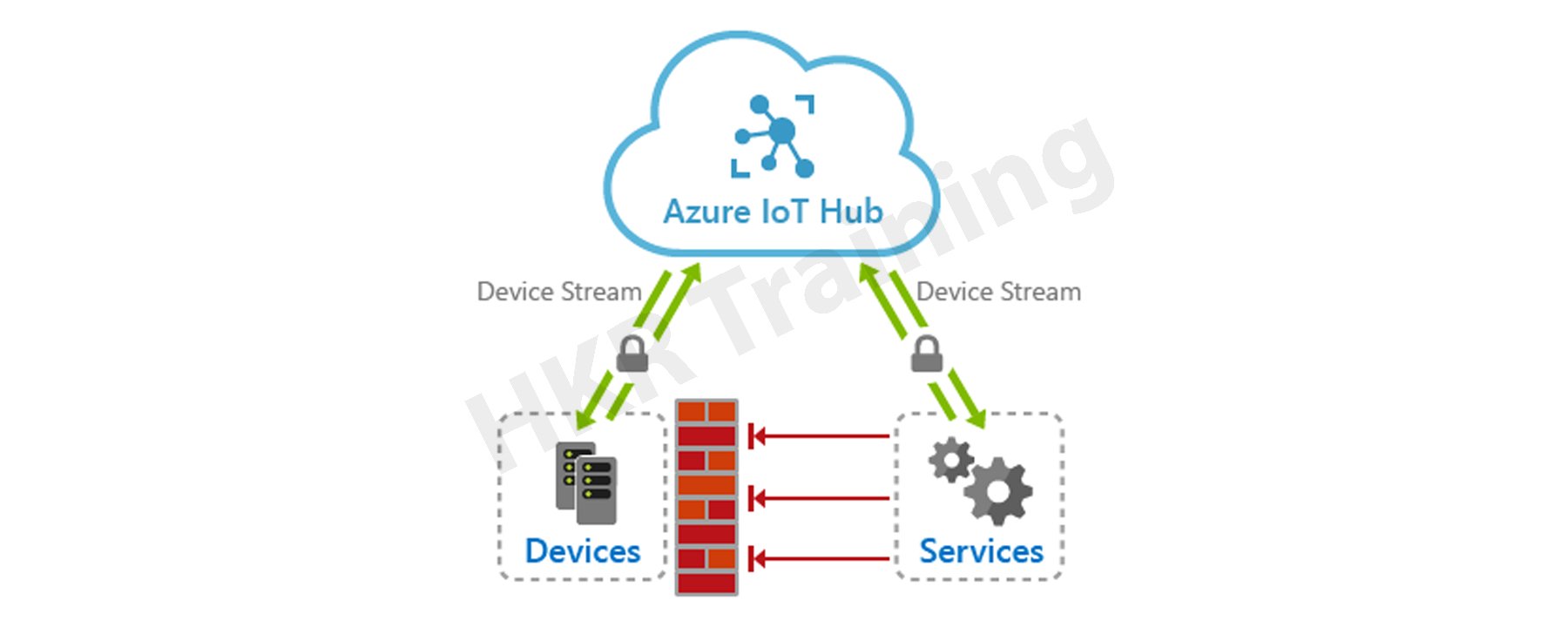
Microsoft’s Azure IoT Hub is a cloud-hosted manageable IoT service that acts as a central hub for messages. It provides bi-directional communication between the millions of devices it manages and the IoT apps. Further, it enables completely scalable IoT solutions, and virtually, we can connect multiple devices with Azure IoT Hub. It supports various messaging patterns like telemetry data from Device-to-cloud, file uploading from the device, and request-to-reply methods to control devices through the cloud. Moreover, through hybrid communication, it can connect from cloud to device and device to cloud. This feature makes IoT Hub more popular in the market. 

Azure IOT HUB

Azure IoT Hub helps to track and monitor multiple events like development, failurr, and connecting devices. It supports various IoT workloads for the users by scaling to millions of devices concurrently. Also, it rises to millions of events quickly, enhancing productivity. It enables the building of completely scalable IoT solutions such as tracking and monitoring valuable healthcare assets, managing various manufacturing equipment, etc. Further, Azure IoT Hub also offers a secure communication channel with enhanced security. However, Azure IoT Hub provides reliable and safe solutions to various businesses by connecting millions of devices and applications. 

Become a master of IoT by going through this HKR IoT Online Training!

Azure IoT Hub offers

  • Device library professionals are available for most commonly used systems and languages, allowing for simple device connectivity.
  • Stable communication with various device-to-cloud and cloud-to-device hyper-scale communication channels.
  • Processing of per-device state data as well as meta-data that can be queried.

IoT Hub device management:

The needs and priorities of IoT operators vary markedly across industries, from transportation to manufactured goods to agriculture to utilities. There is also a wide range of different devices used by IoT operators. IoT Hub can provide developers with the abilities, patterns, and code libraries they need to create management tools which can manage large amounts of data.

Related Article: IoT Solutions Architect

Microsoft Azure Certification Training

  • Master Your Craft
  • Lifetime LMS & Faculty Access
  • 24/7 online expert support
  • Real-world & Project Based Learning

Device configuration and control

Devices that are connected to the IoT Hub can be handled using a variety of built-in features. That is to say-

  • All of your devices’ metadata and state data can be saved, synchronized, and queried.
  • Device states can be set per-device or in groups based on common power devices.
  • Using message routing integration, a device’s state change can be instantly reacted to.

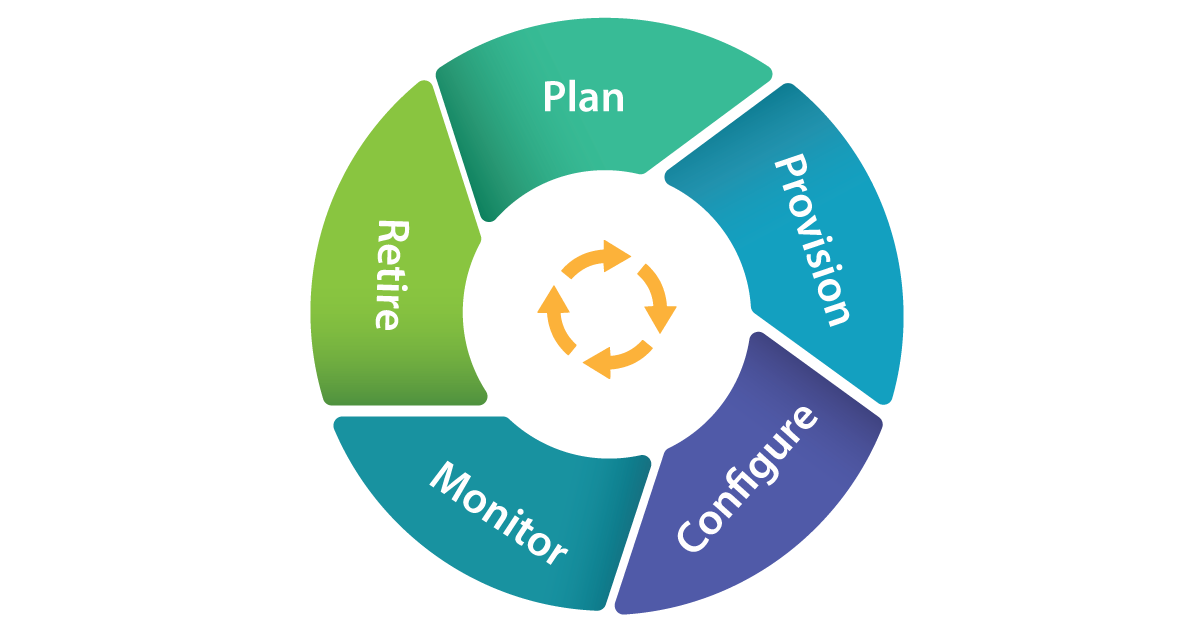
The LifeCycle of Devices with IOT Hub:

lifecycle of devices with IOT Hub

Plan Operators could really generate a device metadata scheme which really aims to facilitate bulk risk management with ease.

Provision

  • New devices can indeed be safely added to IoT Hub, and operators could indeed soon realize about mobile applications. Device identifications and credentials are created using the IoT Hub identity registry.
  • Configure Data management activities, including such configuration changes and software installations, can be performed in bulk or directly while maintaining system security.
  • Monitor Operators could be quickly notified to any problems that arise, while also monitoring the device collection’s wellbeing and the position of every continuing operation.
  • Devices must be substituted, retired, or dismantled. To withdraw device identifications and qualifications, the IoT Hub identity registry is used.

Plan

It enables operators with a plan to build a device metadata scheme that allows them to easily and accurately perform bulk management activities. You can use the device twin to save device metadata in the style of properties and tags. 

Configure

Azure IoT Hub allows device management activities such as configuration changes in bulk and firmware updates. You can do these operations either in bulk or by direct methods. 

Monitor

Using IoT Hub, we can alert operators on the occurrence of issues by monitoring device collection health. Also, we can check the status of multiple ongoing activities. Here, we can apply a device twin that enables devices to report the conditions of real-time operations and update operations status.

Retire

At the end of the lifetime of service, the devices need replacement or deactivation after a failure or cycle update. Here, we can use the IoT Hub identity registry to rescind the credentials and identities of devices securely.

Device Management Operators:

  • IoT Hub contains a range of device management patterns, such as,
  • Factory Reset Reboot
  • Firmware update for configuration
  • Progress and status updates
  • These patterns can be tailored to your specific situation. Alternatively, these templates can be used to create new patterns.

Connecting Devices:

By using Azure IoT device SDK, you can create applications that run on your devices and interact with IoT Hub. Platforms supported include Windows, Linux distributions, and real-time operating systems. Currently supported languages includes C,C#,Java ,Python, and Node.js.IoT Hub is a key component of the solution accelerators and can be used to address IoT challenges in the implementation such as:

  • Device connectivity and management at a high volume.
  • Ingestion of large amounts of telemetry.
  • Device command and control
  • Enforcing device security.

Integrating with Other Devices:

IoT Hub can be combined with other Azure services to create complete, end-to-end solutions. As an example, use:

  • Azure Event Grid enables your company to respond quickly to critical events while remaining reliable, scalable, and secure.
  • To streamline business operations, use Azure Logic Apps.
  • Azure Machine Learning can be used to incorporate machine learning and AI models into your solution.
  • Using Azure Stream Analytics, you can perform real-time analytic calculations on information broadcasting from one’s devices.

frequently asked IoT Interview questions and Answers !!

HKR Trainings Logo

Subscribe to our YouTube channel to get new updates..!

Messaging Patterns:

Azure IoT Hub includes a variety of messaging patterns, such as,

  • Telemetry from a device to the cloud
  • Device-based file upload
  • Methods of request-response that allow devices to be monitored from the cloud.

Related Article: Future Scope of IoT

Messaging routing and event grid

Streaming data from your connected devices is possible thanks to IoT Hub message routing and IoT Hub integration with Event Grid. There are, however, distinctions.Message routing lets customers to route device-to-cloud messages to the a variety of endorsed service endpoints, including Event Hubs and Azure Storage containers, whereas IoT Hub assimilation with Event Grid is a highly scalable routing service that can be increased in to the third-party enterprise applications.

Routing the device data:

The message routing capabilities are built into Azure IoT Hub. This enables you to automate message fan-out based on rules. Message routing allows you to direct at which your hub sends telemetry from your devices. Routing messages to seamless access is free of charge.

Building end to end solutions:

Incorporating IoT Hub with other Azure services allows for the creation of end-to-end solutions. As an example,

  • Azure Logic Apps can be used to optimize business operations.
  • Using Azure Stream Analytics, you can perform real-time analytic computations on data from your devices.Azure Machine Learning could be used to add AI models and machine learning.
  • With Azure Event Grid, you can react promptly to important incidents.

Azure IoT Hub and Azure Event Hub

Azure IoT Hub and Azure Event Hub both are cloud services capable of ingesting, processing, and storing large amounts of data. They were, however, created for distinct purposes.Event Hub was created for big data streaming, whereas IoT Hub was created to connect IoT devices at scale to the Azure Cloud. As a result, which one you use will be determined by the needs of your company.

Security:

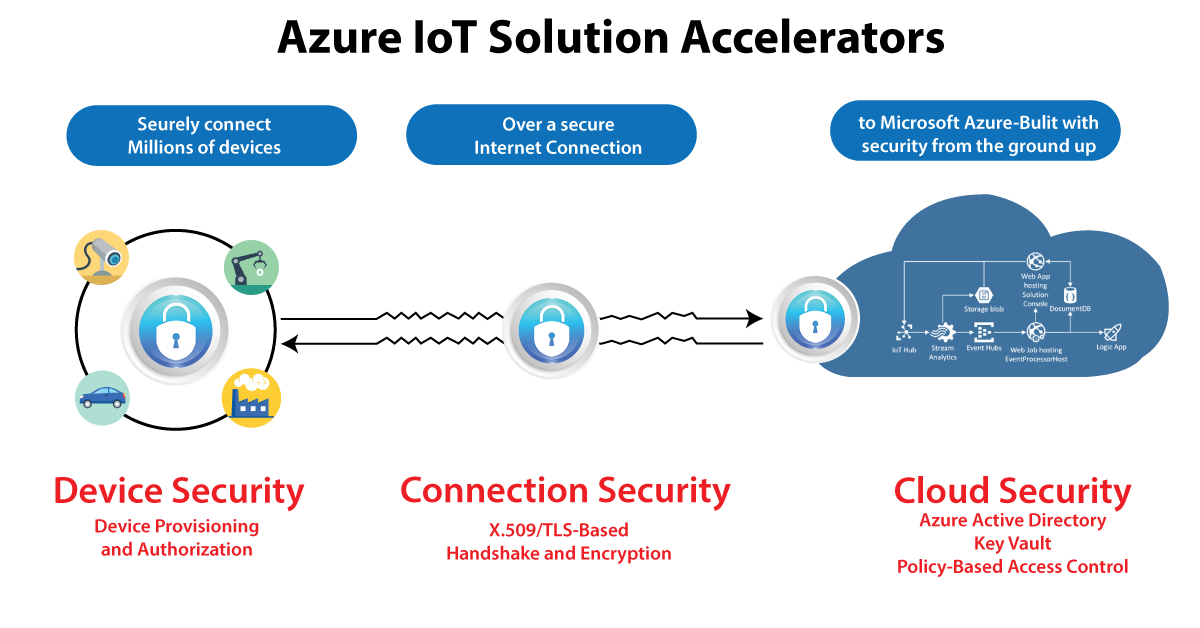
Businesses face new security, confidentiality, and compliance challenges as a result of the Internet of Things. Security for IoT solutions entails securely provisioning devices, step is implementation among devices and the cloud, and ensure security data security in the cloud all through handling and preparation.

Azure-IoT-Hub-2

IoT Hub enables information to be processed over secure channels of communication. So every device securely connects to a hub and can be handled securely. You could indeed gain access on a per-device basis, and devices are made available to the appropriate hub when they first boot up.

There are also a variety of authentication methods available depending on mobile applications, such as SAS SAS token-based authentication, individual X.509 certificate authentication for secure, standards-based authentication, and X.509 CA authentication.

HA and disaster recovery

The goals for uptime differ from one company to the next. Azure IoT Hub provides three main High Availability (HA) and Disaster Recovery (DR) features, which are as follows:

  • Intra-region HA: The IoT Hub provider implements layoffs with almost all layers of the service to provide intra-region HA. The SLA published by the IoT Hub service is achieved through the use of these redundancies, which are made available to developers automatically. However, while using cloud computing, transient faults must be anticipated; thus, appropriate retry regulations must be built into components that can be interacted with the cloud services.
  • DR across borders
  • Issues may occur when a datacenter experiences prolonged outages or other physical inability. It is rare, but intra-region HA capability will be unable to assist in these circumstances.IoT Hub, on the other hand, has a range of potential solutions for regaining from elongated outages or physical failures. In these cases, a consumer can choose between a Microsoft-initiated failover and a manual failover.

Obtaining cross-region HA

If the RTOs supplied either by the Microsoft initiated failover or manual failover are insufficient to meet your throughput goals, you can incorporate a per-device automatic cross-region failover component. The IoT solution in this framework operates in two separate data centers, one primary and one secondary.If the primary region experiences an outage or a lost opportunity of network connectivity, the technologies could use the secondary location.

Selecting the Best IoT Hub Tier

Azure IoT hub is divided into two tiers: basic and standard. If data is to be collected from devices and analyzed centrally, the basic tier, which is unidirectional from devices to the cloud, is preferable.However, when you require bi-directional interaction, such as the ability to control connected devices, the standard tier is preferable. The security and authentication features are the same in both tiers.

Azure IoT Hub Benefits:

There are multiple benefits of using Azure IoT Hub in real-time.:

  • Azure IoT offers different shortcuts for fast prototyping and deployment of code. It allows less coding to develop app templates, SDKs, plug-and-play device connections, etc. However, Microsoft has developed the best and simple IoT platform for multiple users.
  • Each Azure IoT service provides perks such as pre-built app templates with desired use cases within Azure IoT Central. In this regard, Azure Maps is the best example that enriches your IoT App with geospatial data. 
  • Each service in this platform has a flexible pricing model based on its particular feature sets. Its simple approach and transparency help to separate the Azure IoT Hub. 
  • Azure IoT has a strong support of partner networks similar to AWS. These include manufacturers of IoT hardware and solution developers. 
  • Moreover, the major benefit of Azure IoT Hub is its strongest security feature. Further, Microsoft invests billions of dollars in Cybersecurity solutions every year. 

What are the Microsoft Azure IoT Hub features?

Scaling your solution

  • Azure IoT Hub helps scale concurrently connected millions of devices and events/second. 
  • It supports multiple IoT workloads easily. Thus, it gives you a highly scalable solution to ease your workload.

Securing your communications

Azure IoT Hub offers a safe and secure connectivity channel for smart devices to send and receive data. 

  • It provides complete control over device access and connections with each device. 
  • Each device authentication allows them to connect with IoT Hub securely, and they are securely managed. 
  • Further, it supplies devices and appliances to the right IoT Hub upon booting the device. 

Routing device data

IoT Hub offers an in-built message routing functionality with the flexibility to set up an automatic rule-based message expansion.

  • At first, use message routing to manage where your hub sends device telemetry. 
  • There will be no extra cost for routing messages to various endpoints. 
  • Further, no-code routing protocols will take the place of unique message dispatcher codes. 

Integrating with other services

Azure IoT Hub provides integration with other Azure services to develop full-fledged solutions. The following integrations it supports:-

  • Azure Event Grid integration helps your business respond securely and reliably to important events. 
  • Moreover, Azure Logic App integration will help automate various business processes
  • Azure Stream Analytics is useful for real-time analysis of data streams in your device. 
  • Further, the Azure Machine Learning combination will add ML and AI models to the solutions. 

Configuring and controlling your devices

Using an order of various in-built functions, you can easily control your devices linked with IoT Hub. 

  • At first, it needs storing, syncing, and inquiring about device metadata and the status of all the devices.
  • Next, device condition setting, whether per-device or based on common features of devices. 
  • Finally, through message routing combination, it automatically responds to a device-reported condition change. 

Connect your devices

To create applications that run on your devices and interact with IoT Hub through Azure IoT device SDK libraries. It supports various languages, such as:-

  • C, C#, Python, Java, Node.js, etc.

Also, there are some protocols that IoT Hub and the device SDKs support to link devices. These include:-

  • HTTPS
  • MQTT
  • AMQP
  • MQTT over WebSockets
  • AMQP over WebSockets

Organizing bidirectional communication with millions of IoT devices

  • Utilize device-to-cloud measuring data to know the condition of your devices and define message routes to other Azure services without putting down the code. 
  • Further, in the cloud-to-device messages, send commands and notifications to the linked devices and track message delivery with the approval of receipts.

Developing and running hybrid IoT apps throughout data centers

  • Azure Stack Hub is an extension of Azure helpful to offer a path to run apps in an on-premises ecosystem. And it delivers Azure services within your data centers. 
  • Additionally, partners & customers will have the flexibility to create hybrid IoT apps that run wholly or partially on-premises. It is possible with Azure IoT Hub’s availability on Azure Stack Hub.

Create An Azure IoT Hub

Developing an Azure IoT Hub needs to follow the below steps.

  1. Creating Azure IoT Hub
  • First, you must register and sign in to the Azure portal using credentials.
  • Then, you have to select the “Create a Resource” tab. After thiss, you need to enter “IoT Hub” within the search marketplace field.
  • Then, choose “IoT Hub” from the search outcomes and select the “Create” option.

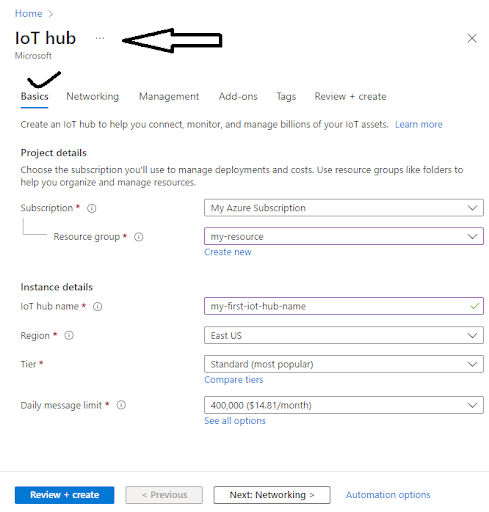
Now, navigate to the Basics tab and complete the fields given:

  • Subscription: Choose the appropriate subscription to use within the IoT Hub.
  • Resource Group: Select the required “Resource Group.” Although, to build a new group, select “Create New” and enter the name you wish to use for it. 
  • Region: Select the exact region/place for the IoT Hub location.
  • IoT Hub Name: Enter a unique/uncommon Azure IoT Hub name.

Creating IOT HUB

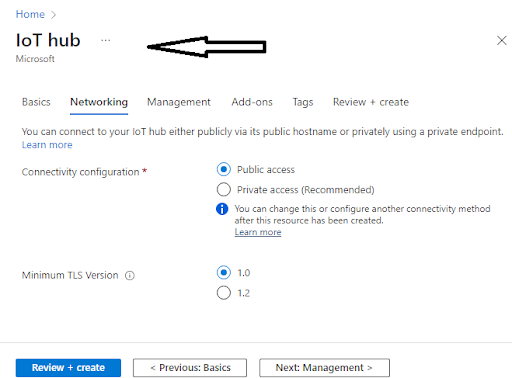
Then select “Next: Networking>” to continue Hub creation.

  • Here, you can choose the endpoints to connect to your IoT Hub. Further, you can select the default setting as Public EndPoint & Private EndPoint. 

Next Networking

Now, go to Next: Management> to continue the process of IoT Hub creation. 

Here, you will be given the option to accept the default settings. 

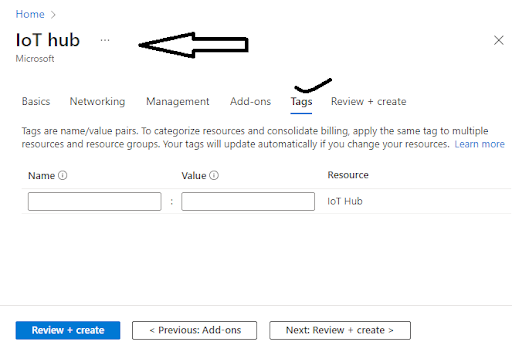
Then, to move to the next screen, you need to select the “Next: Tags” choice. 

  • Here, Tags include name/value pairs where you can assign the same tag to different resources and their groups to divide them and combine billing.

IOT HUB Tags

After completing the above, choose the “Next: Review + Create” tab to review/check your choices. Then go to the “Create” option to build your new IoT Hub.

  1. Changing/Updating the IoT Hub

Here, you can modify the settings of your current IoT Hub that you built from the Azure IoT Hub pane. Below are the various properties that you8 can set for the IoT Hub.:-

  • Scale & Pricing: This property will be helpful to migrate to a new tier or to set the number of IoT Hub Units. 
  • IP Filter: This property is useful to set the range of IP addresses the Azure IoT Hub can accept or reject. 
  • Properties: It consists of various properties like resource ID, group, resource location, etc., available for copying and use anywhere else.

Shared Access Policies

Go to Settings and click on the “Shared Access Policies” option to view or change the list of various Shared Access Policies. Further, these policies mention the necessary consent to connect the devices and services with the IoT Hub. 

Click the button Add and you will see a window “Add Shared Access Policies” opens. Here, it allows you to insert the new policy name and the permissions list that you wish to link with this policy. The permissions include the following:-

  • Registry Read and Write Policy
  • Service Connect Policy
  • Device Connect Policy

After this, click on the “Create” tab to add this new policy to the current list of guidelines.

  1. Registration of New Devices to the IoT Hub

To register a new device-

  • Go to the IoT Hub navigation menu and open IoT devices.
  • Then insert a name for the new device within Create Device. After giving the device name, choose the “Save” option to create the device identity of the Azure IoT Hub.
  • Finally, go to the IoT Devices pane after device creation and open the device from the list. Then to connect with the IoT Hub, you need to copy the Primary Connection String. 
  1. Message Routing for Azure IoT Hub
  • For this, click on the “Message Routing” option within the “Messaging” section to see the Message Routing pane. 
  • Then you have to mention the custom endpoints and routes for the IoT Hub.  
  • Further, Message Routing is useful to manage how data is sent to your endpoints from the IoT devices. 
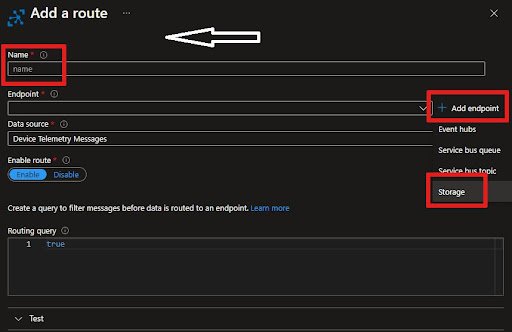
  • Here, the first and foremost step is to add a new route. Then it allows you to add an existing endpoint to the Route or build a new one of the various types that supports it—for example, Blob storage.

Routes

  • You will find “Routes” as the first tab on the Message Routing Pane. Then click the +Add, to add a new route.
  • Then insert a Name for the Route.
  • After that, you will see Endpoint, from which you will have a dropdown list, or you can add a new one. To add it, click +Add Next to the Endpoint list and choose Blob Storage.
  • Then, after adding the Endpoint name, click on “Pick a Container” to select the Storage Account and the container.
  • For the “Data Source,” choose the Device Telemetry Messages. 
  • Further, you need to add a Routing Query. In this instance, the messages with an Application property with the name “Level” equal to “Critical” are directed to the storage account.  
  • Finally, you have to save the Routing file. Then you can go back to the Message Routing Pane and see a new “Routing Rule” appear.

Routes

Custom Endpoints 

Go to the “Custom Endpoints” option, where many are already built. 

  • Here, you can easily build new or remove the existing Endpoints. 
  • Moreover, you can only specify up to 10 Custom Endpoints for the Azure IoT Hub.
  1. Finding a particular IoT Hub

First Step:-

  • Go to the homepage in Microsoft Azure and choose the IoT Hub from the given list.
  • You click on the “Resource Groups” if you already know the resource group to which the Azure IoT Hub belongs.
  • Now select the option- “Resource Group,” and the drop down list will display.
  • Then the “Resource Group” screen presents all that group’s resources along with the Azure IoT Hubs. 
  • After that, you choose your IoT Hub. 

Second Step-

  • Click on the “All Resources” tab. You will find a dropdown list over there.
  • Then click on the Drop Down list and uncheck the Select All option.
  • After that, find “IoT Hub” and check the same.
  • Finally, click on the appearing “Drop Down” list to close it. It filters all the entries and displays them on your IoT Hubs.
  1. Deleting/Removing the IoT Hub

You can also delete your IoT Hub in the following way.:-

  • Go to the Azure Portal.
  • Select the “Delete” option to remove the IoT Hub.

Microsoft Azure Certification Training

Weekday / Weekend Batches

Conclusion

In the above blog post we discussed the Azure IOT hub, configuration, integrations,routing, communication and security in a more detailed way. Had any doubts please drop your queries in the comments section. 

Related Article:

Azure IoT Edge Overview


Source link