Top 10 Front end Technologies and their Usage in 2023


Front End Technologies – Table of Content

You will get several search results whenever you search for any specific topic over the internet. Among them, you will go with user-friendly websites that are attractive and easy to use. Moreover, the attractive web pages we browse online result from front-end development. The front-end development includes the creation of attractive user interfaces. It helps users interact with and use the web application directly to find information.

However, front-end development is quite difficult for developers as it requires continuous updates with the inception of new tools and technologies. Hence, the developer needs to update and improve with every new release of the technologies.

This blog will teach you about the various front-end technologies and their pros and cons. But before you dive into this blog, you should grasp the basic idea of front-end development.

What is Front End Development?

Front-end development is the crucial part of web development that deals with the user interface and user experience of a website/application. It makes the website or application visible to the end user. Also, front-end development involves creating attractive visual elements that users interact with. These include menus, buttons, GUI components, images, forms, etc. Moreover, the front-end view is simply the website we see, which includes our interaction with the web and its various actions.

Many developers use the best front-end development languages that give the website attractive looks and designs, such as HTML, CSS, and JavaScript. Further, the front-end developers make the web app or website more responsive and mobile-friendly so that it fits best to different screen sizes and devices.

Front-end developers also ensure that the website or web application is responsive and mobile-friendly, which can adapt to different screen sizes and devices. Also, they look after the performance optimation of the website, which helps in faster loading and ensures smooth interactions.

Front End Technologies

Front-end technologies include languages, frameworks, tools, and libraries to build attractive web pages or apps. To become a front-end developer, you must know the following list of the most trending and highly useful front-end technologies.

  • HTML5 Boilerplate
  • CSS
  • React.Js
  • Angular.Js
  • Vue.Js
  • Bootstrap
  • JavaScript
  • Flutter
  • NPM
  • GraphQL

HTML5 Boilerplate

HTML5 Boilerplate is the most popular among the leading front-end technologies list. It offers a front-end template that allows developers to create fast, adaptable, and robust websites/apps. Moreover, HTML5 is a markup language that helps to build a document displayed over multiple web browsers without any issues.

Pros

  • HTML5 Boilerplate is a popular professional front-end template that offers a vast set of documentation.
  • It helps developers build faster, more adaptable, and more robust web apps and websites.
  • It allows web developers/designers to use clean and improved code.
  • HTML5 comes with rich media elements that support audio and video features.
  • It offers short and simple syntax that is highly smart and has great security.

Cons

  • It doesn’t support old browsers like IE.
  • Less security to local storage.
  • Client-side rendering.

Do you want to collaborate in the Nuget world? Begin by learning Nuget Training!

React JS Training

  • Master Your Craft
  • Lifetime LMS & Faculty Access
  • 24/7 online expert support
  • Real-world & Project Based Learning

CSS

CSS, or Cascading Style Sheet, is another top one of the top front-end technologies. It adds additional styling and presentation to the earlier-developed HTML document. It helps to manage the visual details of the web page, such as fonts, colours, layout, etc., to make it look good across screen sizes. Further, it also makes your web pages more responsive.

Pros

  • CSS can be applied to multiple sites consistently.
  • A specific CSS style can be applied automatically multiple times.
  • It also minimizes the file size while transferring.
  • Moreover, it helps users to customize the online page easily.
  • Provides better maintenance and time-saving.

Cons

  • Less Security.
  • It comes in different levels, such as CSS 1 to CSS 3, confusing developers and browsers.
  • Cross-browser issues while using.

React.Js

React is one of the popular front-end technologies and a JavaScript library. It is useful in developing user interfaces and UI components. Many popular global companies and social platforms like Facebook and Instagram use React in thier web development. Also, it helps developers to build web apps quickly.

Pros

  • It is very simple to use and easy to learn for developers with basic JavaScript skills.
  • React Js offers high reusability that helps reduce development time and improve efficiency.
  • It has vast community support.
  • React offers a high-level developer experience, allowing developers to build fast and highly scalable user interfaces.
  • Makes template designing much easier and supports cross-platform.

Cons

  • It is not beginner-friendly, thus making it difficult to set up and configure.
  • It may need additional support from libraries and frameworks when dealing with more complex tasks.
  • There is a lack of proper documentation.

Take your career to next level in React JS with HKR. Enroll now to get React JS Training !

Angular.Js

Angular or AngularJs is one of the leading front-end technologies with a TypeScript-based framework with open-source availability. It is the most popular front-end development language that helps to build mobile and web apps much more attractive. Further, Angular offers MVC design and supports various platforms.

Pros

  • It is not browser-specific and supports almost all browsers and mobile devices too.
  • Since it is an open-source framework, learning and implementing the language is very easy.
  • It provides multiple features to develop web apps, including data binding, form validation, etc.
  • Angular has a large and active community to offer support.
  • Many large global companies adopted Angular.

Cons

  • It is difficult for beginners to learn.
  • It has a steep learning curve.
  • Compared to the new frameworks React and VueJs, its popularity declined.

Want to learn more about Angular js, Enroll with HKR Trainings Latest Angular js Online Training !

Generals, front-end-technologies-description-0, Generals, front-end-technologies-description-1

Subscribe to our YouTube channel to get new updates..!

Vue.Js

Vue.js is a popular JavaScript framework and front-end technology requiring HTML and CSS skills. It is primarily useful to develop SPAs (Single Page Apps) and UIs, including lightweight UI elements. Moreover, the functions of Vue.js are readily accessible, which helps coders to name these functions as per need.

Pros

  • Vue.js is a lightweight framework and easy to use, especially for beginners.
  • It provides a high level of awareness that makes it easy for developers to build complex UIs.
  • Moreover, the Vue framework has a vast community that supports developers well.
  • It helps developers to complete small projects much more quickly.
  • It is very simple to understand, which makes it easier for developers.

Cons

  • There is no active community of developers to support it as it’s a new front-end development language.
  • Its over-flexibility is the major barrier for large projects where using it may lead to many errors in the project.
  • There is limited support for plugins as it is a new language and is still in its initial stage.

Bootstrap

It is one of the top front-end technologies and CSS frameworks with open-source availability. It helps to develop responsive and mobile-first web pages. Further, it includes various templates based on HTML and CSS. Also, it helps developers build websites much faster without coding from scratch.

Pros

  • It supports all browsers.
  • It is highly responsive and automatically resizes the design to fit the webpage.
  • Bootstrap helps to resize images and other elements automatically.
  • It comes with pre-built templates and components that help to reduce development time and cost.
  • Moreover, it has a large community of developers that actively contributes towards its development and support.

Cons

  • Its large file size makes the page loading time much longer when the internet speed is slower.
  • It is not compliant with HTML.
  • It has limited flexibility due to pre-build components that can limit the freedom to make creative designs.

Take your career to next level in Grunt with HKR. Enroll now to get Grunt Training !

JavaScript

JavaScript is a top front-end development language that dynamically allows developers to alter website content, like images, multimedia, etc. It is a high-level language to develop interactive web apps. Further, it is a simplified language with object-oriented features.

Pros

  • It is highly compatible with cross-platforms, such as browsers and OS.
  • JavaScript’s large active community contributes well.
  • It is a universal language useful for both front-end and back-end.
  • Moreover, it is very easy to learn the language due to its simple-to-understand syntax.

Cons

  • It can behave differently on multiple web browsers due to the complexity of writing cross-platform compatible code.
  • JavaScript is a loosely typed language.
  • It lacks strong security, so it can be used to execute malicious code.

React JS Training

Weekday / Weekend Batches

Flutter

Flutter is also a popular front-end UI development framework with open-source availability. It allows developers to build many smooth-running mobile apps that support various platforms. Moreover, it can build expressive elements on the platforms like Android and iOS, which increases its popularity.

Pros

  • Its hot reload feature allows developers to build applications much faster.
  • Flutter offers a rich set of highly attractive, intuitive, and customizable UI that allows developers to build responsive UI easily.
  • It also delivers higher performance by using a reactive coding model.
  • Flutter has the support of a growing developers’ community worldwide who contribute well.
  • Flutter’s huge library makes it easier to create apps without writing lengthy codes.

Cons

  • Flutter is a relatively new technology and has a steep learning curve.
  • It has limited third-party integrations.
  • There can be debugging issues as Flutter doesn’t offer any debugging tools.

Wish to make a career in the world of Flutter? Start with HKR’S Flutter Training !

NPM

NPM refers to Node Package Manager, which is a JavaScript-based coding language and one of the front-end technologies. It allows developers to install and use many third-party libraries and tools easily. Moreover, it is one of the most highly used web development tools.

Pros

  • NPM makes it easier for developers to install and manage various packages through a CLI interface with quick downloads and installations.
  • It allows its developers access to a wide range of tools and libraries with its large ecosystem.
  • Developers are allowed to customize the packages as per needs.
  • Due to open-source availability, developers of NPM can contribute well towards the development of the tool.

Cons

  • Developers must be very cautious while installing NPM packages as they can contain malicious code.
  • It is not beginner friendly, which makes it complex to use.
  • The large file size can be an issue for applications and their performance.

GraphQL

GraphQL is a popular open-source manipulation coding language for APIs developed by Facebook. It is neither front-end nor back-end. It gets the request and reverts to only the specific data requested in the JSON form.

Pros

  • It is strongly typed language.
  • GraphQL is a highly efficient and very flexible language.
  • It uses simple syntax that makes developers start with it easily and quickly.
  • It offers many tools and libraries that make it easier to use.

Cons

  • Very complex to set up and maintain.
  • Due to dynamic requests, caching can be an issue.

Conclusion
Thus, these are some of the various front-end technologies useful for different purposes for developers. Apart from these, there are many useful front-end technologies such as Remix, ThreeJS, React Native, Next.js, etc. We hope you got an overall idea of the front-end technologies. Stay tuned to get informative blogs in this space.

Related Article:

frontend vs backend


Source link

Leave a Reply

Subscribe to Our Newsletter

Get our latest articles delivered straight to your inbox. No spam, we promise.

Recent Reviews


Azure IoT Hub – Table of Content

What is Azure IoT Hub?

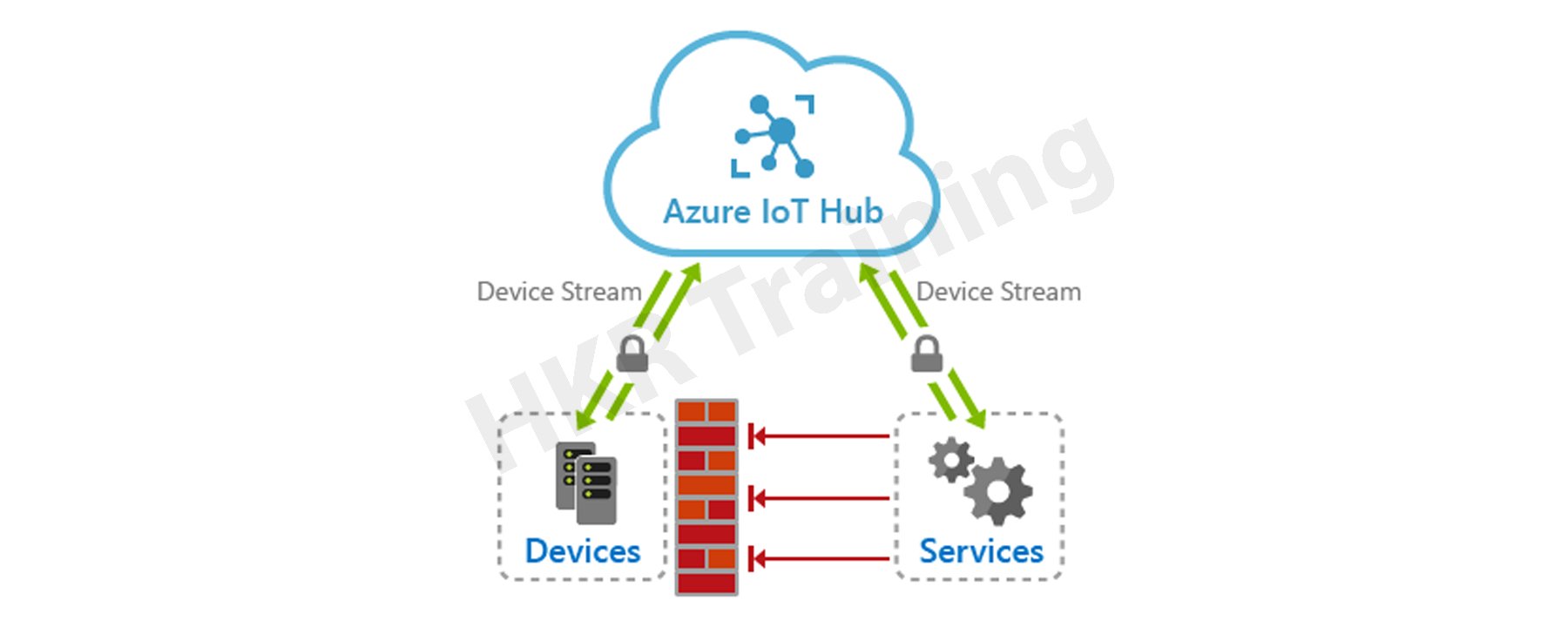
Microsoft’s Azure IoT Hub is a cloud-hosted manageable IoT service that acts as a central hub for messages. It provides bi-directional communication between the millions of devices it manages and the IoT apps. Further, it enables completely scalable IoT solutions, and virtually, we can connect multiple devices with Azure IoT Hub. It supports various messaging patterns like telemetry data from Device-to-cloud, file uploading from the device, and request-to-reply methods to control devices through the cloud. Moreover, through hybrid communication, it can connect from cloud to device and device to cloud. This feature makes IoT Hub more popular in the market. 

Azure IOT HUB

Azure IoT Hub helps to track and monitor multiple events like development, failurr, and connecting devices. It supports various IoT workloads for the users by scaling to millions of devices concurrently. Also, it rises to millions of events quickly, enhancing productivity. It enables the building of completely scalable IoT solutions such as tracking and monitoring valuable healthcare assets, managing various manufacturing equipment, etc. Further, Azure IoT Hub also offers a secure communication channel with enhanced security. However, Azure IoT Hub provides reliable and safe solutions to various businesses by connecting millions of devices and applications. 

Become a master of IoT by going through this HKR IoT Online Training!

Azure IoT Hub offers

  • Device library professionals are available for most commonly used systems and languages, allowing for simple device connectivity.
  • Stable communication with various device-to-cloud and cloud-to-device hyper-scale communication channels.
  • Processing of per-device state data as well as meta-data that can be queried.

IoT Hub device management:

The needs and priorities of IoT operators vary markedly across industries, from transportation to manufactured goods to agriculture to utilities. There is also a wide range of different devices used by IoT operators. IoT Hub can provide developers with the abilities, patterns, and code libraries they need to create management tools which can manage large amounts of data.

Related Article: IoT Solutions Architect

Microsoft Azure Certification Training

  • Master Your Craft
  • Lifetime LMS & Faculty Access
  • 24/7 online expert support
  • Real-world & Project Based Learning

Device configuration and control

Devices that are connected to the IoT Hub can be handled using a variety of built-in features. That is to say-

  • All of your devices’ metadata and state data can be saved, synchronized, and queried.
  • Device states can be set per-device or in groups based on common power devices.
  • Using message routing integration, a device’s state change can be instantly reacted to.

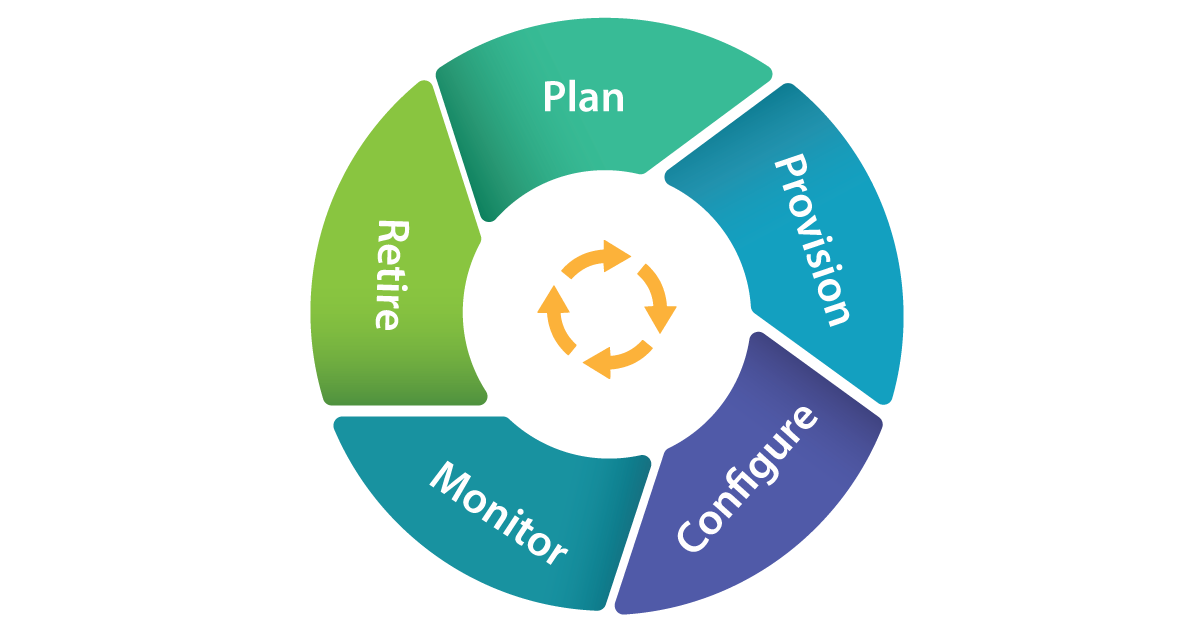
The LifeCycle of Devices with IOT Hub:

lifecycle of devices with IOT Hub

Plan Operators could really generate a device metadata scheme which really aims to facilitate bulk risk management with ease.

Provision

  • New devices can indeed be safely added to IoT Hub, and operators could indeed soon realize about mobile applications. Device identifications and credentials are created using the IoT Hub identity registry.
  • Configure Data management activities, including such configuration changes and software installations, can be performed in bulk or directly while maintaining system security.
  • Monitor Operators could be quickly notified to any problems that arise, while also monitoring the device collection’s wellbeing and the position of every continuing operation.
  • Devices must be substituted, retired, or dismantled. To withdraw device identifications and qualifications, the IoT Hub identity registry is used.

Plan

It enables operators with a plan to build a device metadata scheme that allows them to easily and accurately perform bulk management activities. You can use the device twin to save device metadata in the style of properties and tags. 

Configure

Azure IoT Hub allows device management activities such as configuration changes in bulk and firmware updates. You can do these operations either in bulk or by direct methods. 

Monitor

Using IoT Hub, we can alert operators on the occurrence of issues by monitoring device collection health. Also, we can check the status of multiple ongoing activities. Here, we can apply a device twin that enables devices to report the conditions of real-time operations and update operations status.

Retire

At the end of the lifetime of service, the devices need replacement or deactivation after a failure or cycle update. Here, we can use the IoT Hub identity registry to rescind the credentials and identities of devices securely.

Device Management Operators:

  • IoT Hub contains a range of device management patterns, such as,
  • Factory Reset Reboot
  • Firmware update for configuration
  • Progress and status updates
  • These patterns can be tailored to your specific situation. Alternatively, these templates can be used to create new patterns.

Connecting Devices:

By using Azure IoT device SDK, you can create applications that run on your devices and interact with IoT Hub. Platforms supported include Windows, Linux distributions, and real-time operating systems. Currently supported languages includes C,C#,Java ,Python, and Node.js.IoT Hub is a key component of the solution accelerators and can be used to address IoT challenges in the implementation such as:

  • Device connectivity and management at a high volume.
  • Ingestion of large amounts of telemetry.
  • Device command and control
  • Enforcing device security.

Integrating with Other Devices:

IoT Hub can be combined with other Azure services to create complete, end-to-end solutions. As an example, use:

  • Azure Event Grid enables your company to respond quickly to critical events while remaining reliable, scalable, and secure.
  • To streamline business operations, use Azure Logic Apps.
  • Azure Machine Learning can be used to incorporate machine learning and AI models into your solution.
  • Using Azure Stream Analytics, you can perform real-time analytic calculations on information broadcasting from one’s devices.

frequently asked IoT Interview questions and Answers !!

HKR Trainings Logo

Subscribe to our YouTube channel to get new updates..!

Messaging Patterns:

Azure IoT Hub includes a variety of messaging patterns, such as,

  • Telemetry from a device to the cloud
  • Device-based file upload
  • Methods of request-response that allow devices to be monitored from the cloud.

Related Article: Future Scope of IoT

Messaging routing and event grid

Streaming data from your connected devices is possible thanks to IoT Hub message routing and IoT Hub integration with Event Grid. There are, however, distinctions.Message routing lets customers to route device-to-cloud messages to the a variety of endorsed service endpoints, including Event Hubs and Azure Storage containers, whereas IoT Hub assimilation with Event Grid is a highly scalable routing service that can be increased in to the third-party enterprise applications.

Routing the device data:

The message routing capabilities are built into Azure IoT Hub. This enables you to automate message fan-out based on rules. Message routing allows you to direct at which your hub sends telemetry from your devices. Routing messages to seamless access is free of charge.

Building end to end solutions:

Incorporating IoT Hub with other Azure services allows for the creation of end-to-end solutions. As an example,

  • Azure Logic Apps can be used to optimize business operations.
  • Using Azure Stream Analytics, you can perform real-time analytic computations on data from your devices.Azure Machine Learning could be used to add AI models and machine learning.
  • With Azure Event Grid, you can react promptly to important incidents.

Azure IoT Hub and Azure Event Hub

Azure IoT Hub and Azure Event Hub both are cloud services capable of ingesting, processing, and storing large amounts of data. They were, however, created for distinct purposes.Event Hub was created for big data streaming, whereas IoT Hub was created to connect IoT devices at scale to the Azure Cloud. As a result, which one you use will be determined by the needs of your company.

Security:

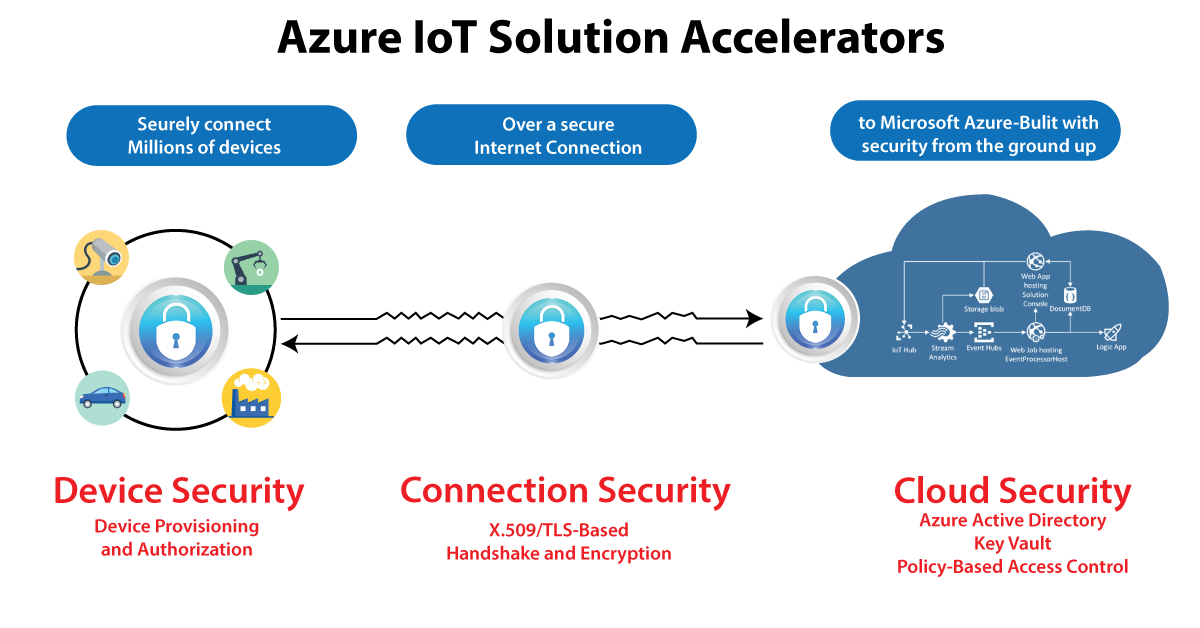
Businesses face new security, confidentiality, and compliance challenges as a result of the Internet of Things. Security for IoT solutions entails securely provisioning devices, step is implementation among devices and the cloud, and ensure security data security in the cloud all through handling and preparation.

Azure-IoT-Hub-2

IoT Hub enables information to be processed over secure channels of communication. So every device securely connects to a hub and can be handled securely. You could indeed gain access on a per-device basis, and devices are made available to the appropriate hub when they first boot up.

There are also a variety of authentication methods available depending on mobile applications, such as SAS SAS token-based authentication, individual X.509 certificate authentication for secure, standards-based authentication, and X.509 CA authentication.

HA and disaster recovery

The goals for uptime differ from one company to the next. Azure IoT Hub provides three main High Availability (HA) and Disaster Recovery (DR) features, which are as follows:

  • Intra-region HA: The IoT Hub provider implements layoffs with almost all layers of the service to provide intra-region HA. The SLA published by the IoT Hub service is achieved through the use of these redundancies, which are made available to developers automatically. However, while using cloud computing, transient faults must be anticipated; thus, appropriate retry regulations must be built into components that can be interacted with the cloud services.
  • DR across borders
  • Issues may occur when a datacenter experiences prolonged outages or other physical inability. It is rare, but intra-region HA capability will be unable to assist in these circumstances.IoT Hub, on the other hand, has a range of potential solutions for regaining from elongated outages or physical failures. In these cases, a consumer can choose between a Microsoft-initiated failover and a manual failover.

Obtaining cross-region HA

If the RTOs supplied either by the Microsoft initiated failover or manual failover are insufficient to meet your throughput goals, you can incorporate a per-device automatic cross-region failover component. The IoT solution in this framework operates in two separate data centers, one primary and one secondary.If the primary region experiences an outage or a lost opportunity of network connectivity, the technologies could use the secondary location.

Selecting the Best IoT Hub Tier

Azure IoT hub is divided into two tiers: basic and standard. If data is to be collected from devices and analyzed centrally, the basic tier, which is unidirectional from devices to the cloud, is preferable.However, when you require bi-directional interaction, such as the ability to control connected devices, the standard tier is preferable. The security and authentication features are the same in both tiers.

Azure IoT Hub Benefits:

There are multiple benefits of using Azure IoT Hub in real-time.:

  • Azure IoT offers different shortcuts for fast prototyping and deployment of code. It allows less coding to develop app templates, SDKs, plug-and-play device connections, etc. However, Microsoft has developed the best and simple IoT platform for multiple users.
  • Each Azure IoT service provides perks such as pre-built app templates with desired use cases within Azure IoT Central. In this regard, Azure Maps is the best example that enriches your IoT App with geospatial data. 
  • Each service in this platform has a flexible pricing model based on its particular feature sets. Its simple approach and transparency help to separate the Azure IoT Hub. 
  • Azure IoT has a strong support of partner networks similar to AWS. These include manufacturers of IoT hardware and solution developers. 
  • Moreover, the major benefit of Azure IoT Hub is its strongest security feature. Further, Microsoft invests billions of dollars in Cybersecurity solutions every year. 

What are the Microsoft Azure IoT Hub features?

Scaling your solution

  • Azure IoT Hub helps scale concurrently connected millions of devices and events/second. 
  • It supports multiple IoT workloads easily. Thus, it gives you a highly scalable solution to ease your workload.

Securing your communications

Azure IoT Hub offers a safe and secure connectivity channel for smart devices to send and receive data. 

  • It provides complete control over device access and connections with each device. 
  • Each device authentication allows them to connect with IoT Hub securely, and they are securely managed. 
  • Further, it supplies devices and appliances to the right IoT Hub upon booting the device. 

Routing device data

IoT Hub offers an in-built message routing functionality with the flexibility to set up an automatic rule-based message expansion.

  • At first, use message routing to manage where your hub sends device telemetry. 
  • There will be no extra cost for routing messages to various endpoints. 
  • Further, no-code routing protocols will take the place of unique message dispatcher codes. 

Integrating with other services

Azure IoT Hub provides integration with other Azure services to develop full-fledged solutions. The following integrations it supports:-

  • Azure Event Grid integration helps your business respond securely and reliably to important events. 
  • Moreover, Azure Logic App integration will help automate various business processes
  • Azure Stream Analytics is useful for real-time analysis of data streams in your device. 
  • Further, the Azure Machine Learning combination will add ML and AI models to the solutions. 

Configuring and controlling your devices

Using an order of various in-built functions, you can easily control your devices linked with IoT Hub. 

  • At first, it needs storing, syncing, and inquiring about device metadata and the status of all the devices.
  • Next, device condition setting, whether per-device or based on common features of devices. 
  • Finally, through message routing combination, it automatically responds to a device-reported condition change. 

Connect your devices

To create applications that run on your devices and interact with IoT Hub through Azure IoT device SDK libraries. It supports various languages, such as:-

  • C, C#, Python, Java, Node.js, etc.

Also, there are some protocols that IoT Hub and the device SDKs support to link devices. These include:-

  • HTTPS
  • MQTT
  • AMQP
  • MQTT over WebSockets
  • AMQP over WebSockets

Organizing bidirectional communication with millions of IoT devices

  • Utilize device-to-cloud measuring data to know the condition of your devices and define message routes to other Azure services without putting down the code. 
  • Further, in the cloud-to-device messages, send commands and notifications to the linked devices and track message delivery with the approval of receipts.

Developing and running hybrid IoT apps throughout data centers

  • Azure Stack Hub is an extension of Azure helpful to offer a path to run apps in an on-premises ecosystem. And it delivers Azure services within your data centers. 
  • Additionally, partners & customers will have the flexibility to create hybrid IoT apps that run wholly or partially on-premises. It is possible with Azure IoT Hub’s availability on Azure Stack Hub.

Create An Azure IoT Hub

Developing an Azure IoT Hub needs to follow the below steps.

  1. Creating Azure IoT Hub
  • First, you must register and sign in to the Azure portal using credentials.
  • Then, you have to select the “Create a Resource” tab. After thiss, you need to enter “IoT Hub” within the search marketplace field.
  • Then, choose “IoT Hub” from the search outcomes and select the “Create” option.

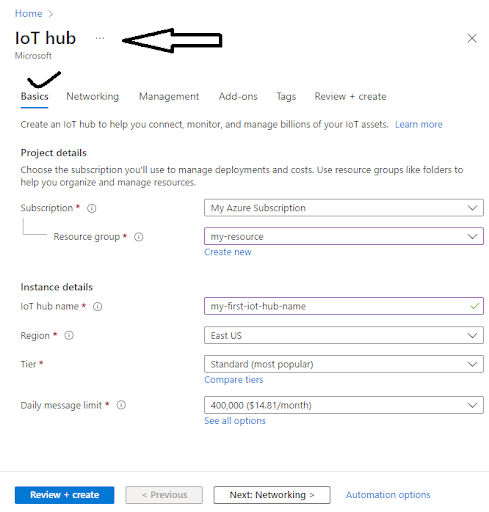
Now, navigate to the Basics tab and complete the fields given:

  • Subscription: Choose the appropriate subscription to use within the IoT Hub.
  • Resource Group: Select the required “Resource Group.” Although, to build a new group, select “Create New” and enter the name you wish to use for it. 
  • Region: Select the exact region/place for the IoT Hub location.
  • IoT Hub Name: Enter a unique/uncommon Azure IoT Hub name.

Creating IOT HUB

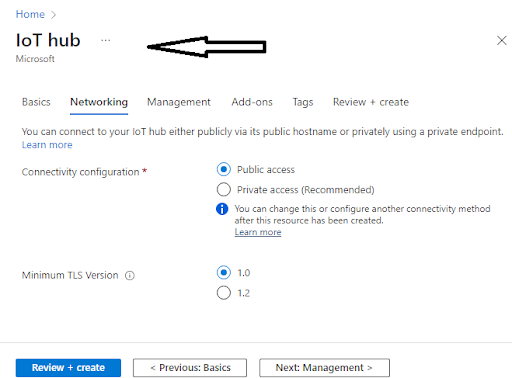
Then select “Next: Networking>” to continue Hub creation.

  • Here, you can choose the endpoints to connect to your IoT Hub. Further, you can select the default setting as Public EndPoint & Private EndPoint. 

Next Networking

Now, go to Next: Management> to continue the process of IoT Hub creation. 

Here, you will be given the option to accept the default settings. 

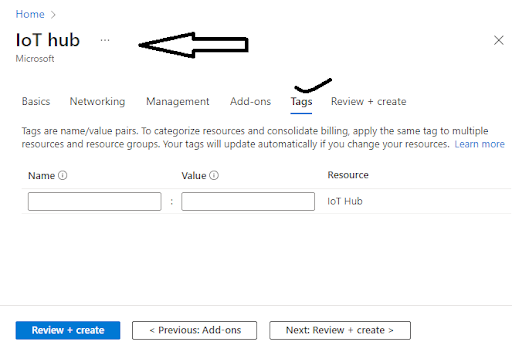
Then, to move to the next screen, you need to select the “Next: Tags” choice. 

  • Here, Tags include name/value pairs where you can assign the same tag to different resources and their groups to divide them and combine billing.

IOT HUB Tags

After completing the above, choose the “Next: Review + Create” tab to review/check your choices. Then go to the “Create” option to build your new IoT Hub.

  1. Changing/Updating the IoT Hub

Here, you can modify the settings of your current IoT Hub that you built from the Azure IoT Hub pane. Below are the various properties that you8 can set for the IoT Hub.:-

  • Scale & Pricing: This property will be helpful to migrate to a new tier or to set the number of IoT Hub Units. 
  • IP Filter: This property is useful to set the range of IP addresses the Azure IoT Hub can accept or reject. 
  • Properties: It consists of various properties like resource ID, group, resource location, etc., available for copying and use anywhere else.

Shared Access Policies

Go to Settings and click on the “Shared Access Policies” option to view or change the list of various Shared Access Policies. Further, these policies mention the necessary consent to connect the devices and services with the IoT Hub. 

Click the button Add and you will see a window “Add Shared Access Policies” opens. Here, it allows you to insert the new policy name and the permissions list that you wish to link with this policy. The permissions include the following:-

  • Registry Read and Write Policy
  • Service Connect Policy
  • Device Connect Policy

After this, click on the “Create” tab to add this new policy to the current list of guidelines.

  1. Registration of New Devices to the IoT Hub

To register a new device-

  • Go to the IoT Hub navigation menu and open IoT devices.
  • Then insert a name for the new device within Create Device. After giving the device name, choose the “Save” option to create the device identity of the Azure IoT Hub.
  • Finally, go to the IoT Devices pane after device creation and open the device from the list. Then to connect with the IoT Hub, you need to copy the Primary Connection String. 
  1. Message Routing for Azure IoT Hub
  • For this, click on the “Message Routing” option within the “Messaging” section to see the Message Routing pane. 
  • Then you have to mention the custom endpoints and routes for the IoT Hub.  
  • Further, Message Routing is useful to manage how data is sent to your endpoints from the IoT devices. 
  • Here, the first and foremost step is to add a new route. Then it allows you to add an existing endpoint to the Route or build a new one of the various types that supports it—for example, Blob storage.

Routes

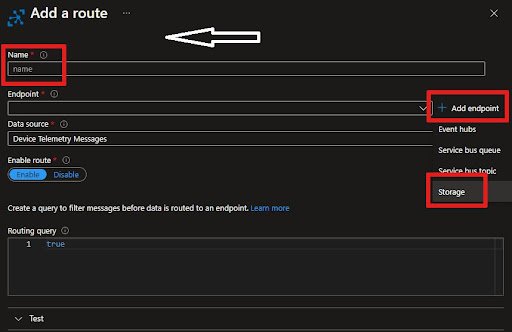
  • You will find “Routes” as the first tab on the Message Routing Pane. Then click the +Add, to add a new route.
  • Then insert a Name for the Route.
  • After that, you will see Endpoint, from which you will have a dropdown list, or you can add a new one. To add it, click +Add Next to the Endpoint list and choose Blob Storage.
  • Then, after adding the Endpoint name, click on “Pick a Container” to select the Storage Account and the container.
  • For the “Data Source,” choose the Device Telemetry Messages. 
  • Further, you need to add a Routing Query. In this instance, the messages with an Application property with the name “Level” equal to “Critical” are directed to the storage account.  
  • Finally, you have to save the Routing file. Then you can go back to the Message Routing Pane and see a new “Routing Rule” appear.

Routes

Custom Endpoints 

Go to the “Custom Endpoints” option, where many are already built. 

  • Here, you can easily build new or remove the existing Endpoints. 
  • Moreover, you can only specify up to 10 Custom Endpoints for the Azure IoT Hub.
  1. Finding a particular IoT Hub

First Step:-

  • Go to the homepage in Microsoft Azure and choose the IoT Hub from the given list.
  • You click on the “Resource Groups” if you already know the resource group to which the Azure IoT Hub belongs.
  • Now select the option- “Resource Group,” and the drop down list will display.
  • Then the “Resource Group” screen presents all that group’s resources along with the Azure IoT Hubs. 
  • After that, you choose your IoT Hub. 

Second Step-

  • Click on the “All Resources” tab. You will find a dropdown list over there.
  • Then click on the Drop Down list and uncheck the Select All option.
  • After that, find “IoT Hub” and check the same.
  • Finally, click on the appearing “Drop Down” list to close it. It filters all the entries and displays them on your IoT Hubs.
  1. Deleting/Removing the IoT Hub

You can also delete your IoT Hub in the following way.:-

  • Go to the Azure Portal.
  • Select the “Delete” option to remove the IoT Hub.

Microsoft Azure Certification Training

Weekday / Weekend Batches

Conclusion

In the above blog post we discussed the Azure IOT hub, configuration, integrations,routing, communication and security in a more detailed way. Had any doubts please drop your queries in the comments section. 

Related Article:

Azure IoT Edge Overview


Source link