1000xResist Studio’s Next Indie Game Asks: Can You Convince an AI It Isn’t Human?


If you’re flustered at how much AI chatbots chat like humans, there’s an upcoming indie game with your name on it.

During the Triple-i Initiative showcase in early April, the studio Sunset Visitor (creators of 1000xResist) unveiled its next title, Prove You’re Human. The narrative game puts players in the role of a person trying to convince an AI that they aren’t human — and with a creative team full of former performance artists, it’ll get pretty existential from there.

The trailer is evocative yet scarce on details, which is fitting for the first look at a game that doesn’t have a release date yet. Given the indie success of Sunset Visitor’s debut title about cloning and personhood, 1000xResist, expectations are high for another cerebral narrative. And as the first game under the new publishing arm of Black Tabby Games (makers of indie hit Slay the Princess), the game is sparking a lot of hope.

In a conversation with the Sunset Visitor founder, Remy Siu, I delved into Prove You’re Human, asking the crucial question: What even is this game? And while they’re not releasing too many details right now or even hinting at when it’ll be released, we talked plenty about how a science fiction game inspired by the hit TV show Severance and the rise of generative AI speaks to the moment we’re all living in — where people chatting with ChatGPT succumb to AI psychosis and AI proselytizers claim the technological singularity of true artificial intelligence is near.

Prove You’re Human “is a game where an AI dares to dream that she’s human, and you’ve been hired to put her in her place,” Siu said. “And by you, [I mean] you the player who has undergone an operation to split their consciousness into two: one virtual consciousness, and then what we’ve been calling your corporeal other, your meat body that continues to exist outside doing things.”

A large human-looking face on a robotic armature looks down at a human  amid a large concrete arena.

Sunset Visitor

See what I meant about Severance?

As with the show, Prove You’re Human uses these layers of existence to comment on work selves versus outside-world selves. And as you’d expect for a group of former performance artists, there’s pageantry in this divide, with your digital work self (the one controlled by the player, rendered in 3D), who is occasionally sent messages from your outside self, which are depicted in full-motion video. (That’s the real-life video we see in the trailer.)

“She gets to have all of her dreams come true, and you are the version of yourself that is now trapped here doing all of the work,” said Abby Howard, co-founder of Black Tabby Games and the new Black Tabby Publishing arm.

“It’s an examination of our relationship with work in the year 2026. If you’re working for a corporation now, does the you that is spending time in the office get to enjoy the fruits of that labor?” said Tony Howard-Arias, also co-founder of Black Tabby Games.

In another reflection of our current reality, specifically AI in gaming in 2026, I asked if generative AI tools are being used in Prove Your Human’s development, either to generate code or assets. “It’s definitely not ending up in the game,” Siu said, while lamenting that AI tools are baked into usage on things as mundane as Google searches. Howard asserted that they just don’t engage with those tools or have a use for them, at Black Tabby Games.

“We make a conscious effort to not engage with this wherever possible,” Howard-Arias said. “But how do your eyes not fall on the automated Google summary at the top of your search results?” 

A CAPTCHA grid is placed over a tree with the user instructed to select squares with the tree in it.

Using a CAPTCHA to determine what’s real and what isn’t is a key element in Prove You’re Human.

Sunset Visitor

Engaging with AI — and choosing what’s real

As a narrative game, players will spend time in Prove You’re Human engaging with the AI, called Mesa, to hopefully convince her that she’s not human. Appropriately, there’s another mechanic players will use to interact with the world around them: hold up a CAPTCHA window and select the boxes that aren’t real. Through this tool — again, Siu was vague to hide story details — players will engage with the concept of what is real and what isn’t. And like other aspects of the game, there’s a deep philosophy behind using a tool to declare the truth of things.

“Every CAPTCHA is asking the player to commit an act of violence. You have to choose whether something is a thing or not,” Siu said. “That kind of thing is unpacked in these conversations with the artificial intelligence.”

Indie games have engaged with the ethical quandary of seemingly simple binary decisions resulting in devastating consequences. The iconic 2014 game Papers, Please had players working as a low-level border patrol agent approving or denying entry, choosing whether to save your job at the expense of dooming people to horrible fates. Prove You’re Human seems like it will use CAPTCHAs to similarly challenge players to make tough choices.

“One of the very first CAPTCHAs Remy showed us during his pitch was an image of a group of soldiers holding guns, and it said ‘select all boxes that contain arms in them,'” Howard-Arias said. “So it’s with the context provided an unanswerable question that puts you in a complicated position that causes some disquiet.”

I pointed out that using CAPTCHAs will likely date this game as being from a specific era, and Siu agreed that a decade from now we might use different, more complex verification tools. But he’s sanguine that the game will look and feel like it came from 2026. Art is defined by the contexts and time in which they’re made, he pointed out. 

“I do want people playing 10 years from now, when they’re playing this game, to understand what we were thinking in this particular time,” Siu said. 

A CGI landscape of grass and blue sky refracted in a giant water orb while a robot looks on.

Sunset Visitor

Why indie games are the best medium for pondering AI

Similar to how Prove You’re Human results from our current anxieties around AI in 2026, Sunset Visitor’s first game, 1000xResist, is a product of 2020. It was developed during the beginning of the COVID-19 pandemic — indeed, Siu says it wouldn’t exist without the pandemic, as the early-pandemic themes of isolation and connection found their way into the game.

Half a decade later, the world has shifted its focus to a new era of smarter AI, financial inequality and labor issues. “For us at the studio, we’re always trying to make games that accompany you through life, and also is very porous with the world in which it’s made,” Siu said. 

While Prove You’re Human is engaging with our current reality, telling a story about AI ensconces the game in the grand tradition of science fiction and its forays into artificial intelligence. There’s tension in adding to a proud tradition of theoretical yarns about smart entities we may one day create while living in 2026 during the actualization of it, Siu says. 

Science fiction has plenty of overlap among AI, personhood and labor concerns, from Fritz Lang’s seminal Metropolis to Isaac Asimov’s I, Robot to Severance. Siu hinted that there are “things that Severance has left on the table that I would love to get at in this game.” While there are parallels with that show, he added that Sunset Visitor was more influenced by the animated series Pantheon, which deals with consciousness uploaded to digital networks and the value of work created by an artificial being. 

“Games as an artistic medium almost beg questions about the nature of self and consciousness in the immersive way we interact with and embody a character,” Howard-Arias said. 

A robot holds a long stick, presumably a cleaning implement like a broom, under a blue sky.

Sunset Visitor

The most popular science fiction video games have been titles from large-scale AAA developers like the Mass Effect and Dead Space franchises, which have world-building elements and story beats common to sci-fi subgenres (space opera and space horror, respectively). Prove You’re Human is an indie game made at a smaller scale with far more philosophical underpinnings. Indie games have more leeway to investigate themes and gameplay further from the mainstream, Siu said, allowing its developers to go the distance in ways that can cater to an audience unsatisfied by games from AAA developers.

“I do think this game, first and foremost, is for audiences which are narrative psychos, people who really want to see how narrative is being played with, unobstructed by a lot of concerns that larger developers may have,” Siu said. “Hopefully that creates something that you can’t get anywhere else.”

Sunset Visitor’s first release, 1000xResist, found an audience of gamers who engaged it with depth and nuance to a degree that surprised Siu, bucking the assumption that they’d only get such attention from fans of film or traditional fine and performing arts spaces.

In developing Prove You’re Human, he’s more optimistic about what levels of complexity players will engage with. That desire for deeper games has aligned Sunset Visitor with Black Tabby Publishing, and Siu noted the value of having Abby and Tony, the makers of the successful narrative game Slay the Princess, collaborate on his studio’s next game from a very early stage of development. 

“The only way to foster this sort of love of literature within the audience, and the only way to grow the medium, is to make challenging works,” Howard-Arias said. 


Source link

Leave a Reply

Subscribe to Our Newsletter

Get our latest articles delivered straight to your inbox. No spam, we promise.

Recent Reviews


Azure IoT Hub – Table of Content

What is Azure IoT Hub?

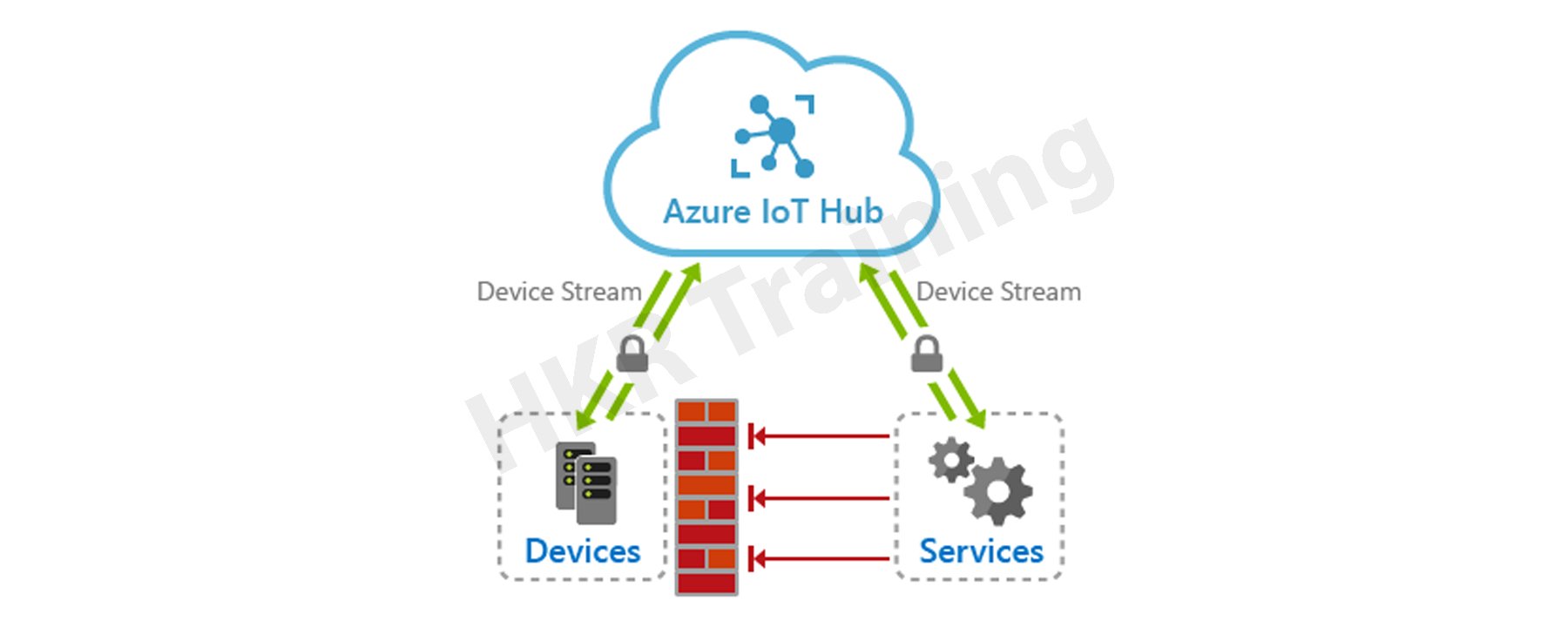
Microsoft’s Azure IoT Hub is a cloud-hosted manageable IoT service that acts as a central hub for messages. It provides bi-directional communication between the millions of devices it manages and the IoT apps. Further, it enables completely scalable IoT solutions, and virtually, we can connect multiple devices with Azure IoT Hub. It supports various messaging patterns like telemetry data from Device-to-cloud, file uploading from the device, and request-to-reply methods to control devices through the cloud. Moreover, through hybrid communication, it can connect from cloud to device and device to cloud. This feature makes IoT Hub more popular in the market. 

Azure IOT HUB

Azure IoT Hub helps to track and monitor multiple events like development, failurr, and connecting devices. It supports various IoT workloads for the users by scaling to millions of devices concurrently. Also, it rises to millions of events quickly, enhancing productivity. It enables the building of completely scalable IoT solutions such as tracking and monitoring valuable healthcare assets, managing various manufacturing equipment, etc. Further, Azure IoT Hub also offers a secure communication channel with enhanced security. However, Azure IoT Hub provides reliable and safe solutions to various businesses by connecting millions of devices and applications. 

Become a master of IoT by going through this HKR IoT Online Training!

Azure IoT Hub offers

  • Device library professionals are available for most commonly used systems and languages, allowing for simple device connectivity.
  • Stable communication with various device-to-cloud and cloud-to-device hyper-scale communication channels.
  • Processing of per-device state data as well as meta-data that can be queried.

IoT Hub device management:

The needs and priorities of IoT operators vary markedly across industries, from transportation to manufactured goods to agriculture to utilities. There is also a wide range of different devices used by IoT operators. IoT Hub can provide developers with the abilities, patterns, and code libraries they need to create management tools which can manage large amounts of data.

Related Article: IoT Solutions Architect

Microsoft Azure Certification Training

  • Master Your Craft
  • Lifetime LMS & Faculty Access
  • 24/7 online expert support
  • Real-world & Project Based Learning

Device configuration and control

Devices that are connected to the IoT Hub can be handled using a variety of built-in features. That is to say-

  • All of your devices’ metadata and state data can be saved, synchronized, and queried.
  • Device states can be set per-device or in groups based on common power devices.
  • Using message routing integration, a device’s state change can be instantly reacted to.

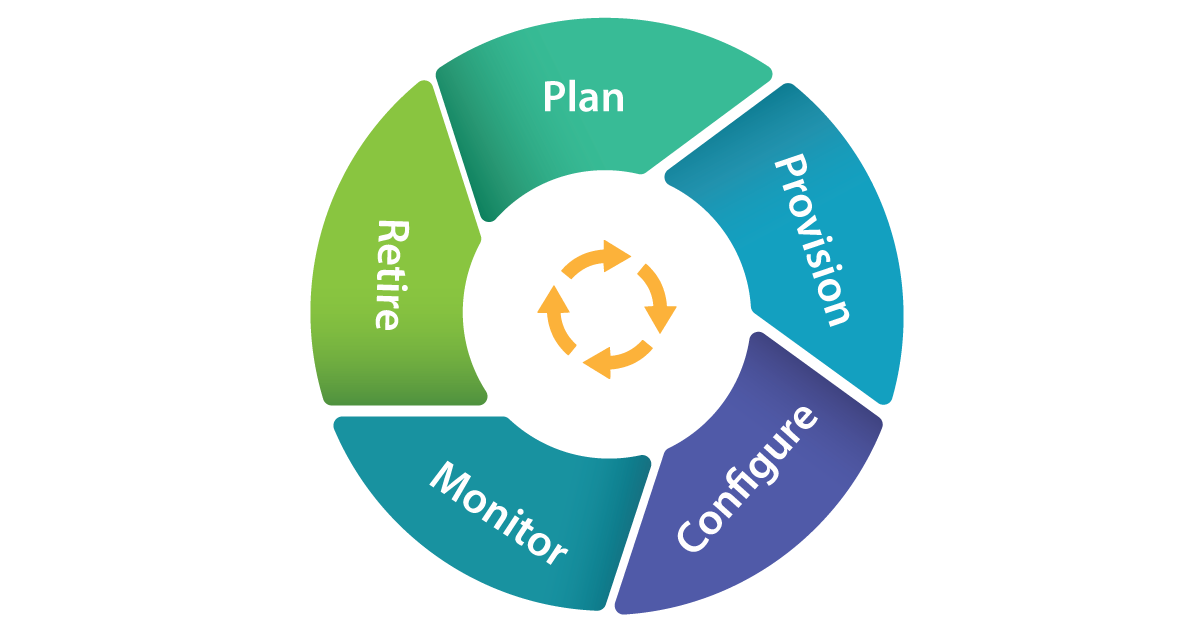
The LifeCycle of Devices with IOT Hub:

lifecycle of devices with IOT Hub

Plan Operators could really generate a device metadata scheme which really aims to facilitate bulk risk management with ease.

Provision

  • New devices can indeed be safely added to IoT Hub, and operators could indeed soon realize about mobile applications. Device identifications and credentials are created using the IoT Hub identity registry.
  • Configure Data management activities, including such configuration changes and software installations, can be performed in bulk or directly while maintaining system security.
  • Monitor Operators could be quickly notified to any problems that arise, while also monitoring the device collection’s wellbeing and the position of every continuing operation.
  • Devices must be substituted, retired, or dismantled. To withdraw device identifications and qualifications, the IoT Hub identity registry is used.

Plan

It enables operators with a plan to build a device metadata scheme that allows them to easily and accurately perform bulk management activities. You can use the device twin to save device metadata in the style of properties and tags. 

Configure

Azure IoT Hub allows device management activities such as configuration changes in bulk and firmware updates. You can do these operations either in bulk or by direct methods. 

Monitor

Using IoT Hub, we can alert operators on the occurrence of issues by monitoring device collection health. Also, we can check the status of multiple ongoing activities. Here, we can apply a device twin that enables devices to report the conditions of real-time operations and update operations status.

Retire

At the end of the lifetime of service, the devices need replacement or deactivation after a failure or cycle update. Here, we can use the IoT Hub identity registry to rescind the credentials and identities of devices securely.

Device Management Operators:

  • IoT Hub contains a range of device management patterns, such as,
  • Factory Reset Reboot
  • Firmware update for configuration
  • Progress and status updates
  • These patterns can be tailored to your specific situation. Alternatively, these templates can be used to create new patterns.

Connecting Devices:

By using Azure IoT device SDK, you can create applications that run on your devices and interact with IoT Hub. Platforms supported include Windows, Linux distributions, and real-time operating systems. Currently supported languages includes C,C#,Java ,Python, and Node.js.IoT Hub is a key component of the solution accelerators and can be used to address IoT challenges in the implementation such as:

  • Device connectivity and management at a high volume.
  • Ingestion of large amounts of telemetry.
  • Device command and control
  • Enforcing device security.

Integrating with Other Devices:

IoT Hub can be combined with other Azure services to create complete, end-to-end solutions. As an example, use:

  • Azure Event Grid enables your company to respond quickly to critical events while remaining reliable, scalable, and secure.
  • To streamline business operations, use Azure Logic Apps.
  • Azure Machine Learning can be used to incorporate machine learning and AI models into your solution.
  • Using Azure Stream Analytics, you can perform real-time analytic calculations on information broadcasting from one’s devices.

frequently asked IoT Interview questions and Answers !!

HKR Trainings Logo

Subscribe to our YouTube channel to get new updates..!

Messaging Patterns:

Azure IoT Hub includes a variety of messaging patterns, such as,

  • Telemetry from a device to the cloud
  • Device-based file upload
  • Methods of request-response that allow devices to be monitored from the cloud.

Related Article: Future Scope of IoT

Messaging routing and event grid

Streaming data from your connected devices is possible thanks to IoT Hub message routing and IoT Hub integration with Event Grid. There are, however, distinctions.Message routing lets customers to route device-to-cloud messages to the a variety of endorsed service endpoints, including Event Hubs and Azure Storage containers, whereas IoT Hub assimilation with Event Grid is a highly scalable routing service that can be increased in to the third-party enterprise applications.

Routing the device data:

The message routing capabilities are built into Azure IoT Hub. This enables you to automate message fan-out based on rules. Message routing allows you to direct at which your hub sends telemetry from your devices. Routing messages to seamless access is free of charge.

Building end to end solutions:

Incorporating IoT Hub with other Azure services allows for the creation of end-to-end solutions. As an example,

  • Azure Logic Apps can be used to optimize business operations.
  • Using Azure Stream Analytics, you can perform real-time analytic computations on data from your devices.Azure Machine Learning could be used to add AI models and machine learning.
  • With Azure Event Grid, you can react promptly to important incidents.

Azure IoT Hub and Azure Event Hub

Azure IoT Hub and Azure Event Hub both are cloud services capable of ingesting, processing, and storing large amounts of data. They were, however, created for distinct purposes.Event Hub was created for big data streaming, whereas IoT Hub was created to connect IoT devices at scale to the Azure Cloud. As a result, which one you use will be determined by the needs of your company.

Security:

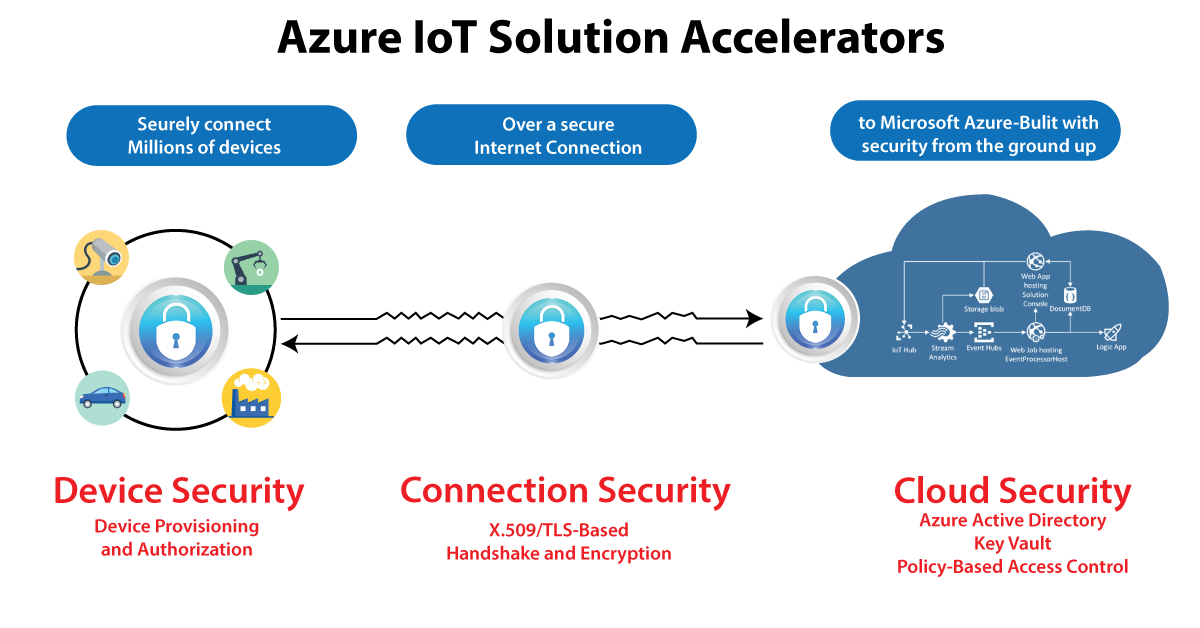
Businesses face new security, confidentiality, and compliance challenges as a result of the Internet of Things. Security for IoT solutions entails securely provisioning devices, step is implementation among devices and the cloud, and ensure security data security in the cloud all through handling and preparation.

Azure-IoT-Hub-2

IoT Hub enables information to be processed over secure channels of communication. So every device securely connects to a hub and can be handled securely. You could indeed gain access on a per-device basis, and devices are made available to the appropriate hub when they first boot up.

There are also a variety of authentication methods available depending on mobile applications, such as SAS SAS token-based authentication, individual X.509 certificate authentication for secure, standards-based authentication, and X.509 CA authentication.

HA and disaster recovery

The goals for uptime differ from one company to the next. Azure IoT Hub provides three main High Availability (HA) and Disaster Recovery (DR) features, which are as follows:

  • Intra-region HA: The IoT Hub provider implements layoffs with almost all layers of the service to provide intra-region HA. The SLA published by the IoT Hub service is achieved through the use of these redundancies, which are made available to developers automatically. However, while using cloud computing, transient faults must be anticipated; thus, appropriate retry regulations must be built into components that can be interacted with the cloud services.
  • DR across borders
  • Issues may occur when a datacenter experiences prolonged outages or other physical inability. It is rare, but intra-region HA capability will be unable to assist in these circumstances.IoT Hub, on the other hand, has a range of potential solutions for regaining from elongated outages or physical failures. In these cases, a consumer can choose between a Microsoft-initiated failover and a manual failover.

Obtaining cross-region HA

If the RTOs supplied either by the Microsoft initiated failover or manual failover are insufficient to meet your throughput goals, you can incorporate a per-device automatic cross-region failover component. The IoT solution in this framework operates in two separate data centers, one primary and one secondary.If the primary region experiences an outage or a lost opportunity of network connectivity, the technologies could use the secondary location.

Selecting the Best IoT Hub Tier

Azure IoT hub is divided into two tiers: basic and standard. If data is to be collected from devices and analyzed centrally, the basic tier, which is unidirectional from devices to the cloud, is preferable.However, when you require bi-directional interaction, such as the ability to control connected devices, the standard tier is preferable. The security and authentication features are the same in both tiers.

Azure IoT Hub Benefits:

There are multiple benefits of using Azure IoT Hub in real-time.:

  • Azure IoT offers different shortcuts for fast prototyping and deployment of code. It allows less coding to develop app templates, SDKs, plug-and-play device connections, etc. However, Microsoft has developed the best and simple IoT platform for multiple users.
  • Each Azure IoT service provides perks such as pre-built app templates with desired use cases within Azure IoT Central. In this regard, Azure Maps is the best example that enriches your IoT App with geospatial data. 
  • Each service in this platform has a flexible pricing model based on its particular feature sets. Its simple approach and transparency help to separate the Azure IoT Hub. 
  • Azure IoT has a strong support of partner networks similar to AWS. These include manufacturers of IoT hardware and solution developers. 
  • Moreover, the major benefit of Azure IoT Hub is its strongest security feature. Further, Microsoft invests billions of dollars in Cybersecurity solutions every year. 

What are the Microsoft Azure IoT Hub features?

Scaling your solution

  • Azure IoT Hub helps scale concurrently connected millions of devices and events/second. 
  • It supports multiple IoT workloads easily. Thus, it gives you a highly scalable solution to ease your workload.

Securing your communications

Azure IoT Hub offers a safe and secure connectivity channel for smart devices to send and receive data. 

  • It provides complete control over device access and connections with each device. 
  • Each device authentication allows them to connect with IoT Hub securely, and they are securely managed. 
  • Further, it supplies devices and appliances to the right IoT Hub upon booting the device. 

Routing device data

IoT Hub offers an in-built message routing functionality with the flexibility to set up an automatic rule-based message expansion.

  • At first, use message routing to manage where your hub sends device telemetry. 
  • There will be no extra cost for routing messages to various endpoints. 
  • Further, no-code routing protocols will take the place of unique message dispatcher codes. 

Integrating with other services

Azure IoT Hub provides integration with other Azure services to develop full-fledged solutions. The following integrations it supports:-

  • Azure Event Grid integration helps your business respond securely and reliably to important events. 
  • Moreover, Azure Logic App integration will help automate various business processes
  • Azure Stream Analytics is useful for real-time analysis of data streams in your device. 
  • Further, the Azure Machine Learning combination will add ML and AI models to the solutions. 

Configuring and controlling your devices

Using an order of various in-built functions, you can easily control your devices linked with IoT Hub. 

  • At first, it needs storing, syncing, and inquiring about device metadata and the status of all the devices.
  • Next, device condition setting, whether per-device or based on common features of devices. 
  • Finally, through message routing combination, it automatically responds to a device-reported condition change. 

Connect your devices

To create applications that run on your devices and interact with IoT Hub through Azure IoT device SDK libraries. It supports various languages, such as:-

  • C, C#, Python, Java, Node.js, etc.

Also, there are some protocols that IoT Hub and the device SDKs support to link devices. These include:-

  • HTTPS
  • MQTT
  • AMQP
  • MQTT over WebSockets
  • AMQP over WebSockets

Organizing bidirectional communication with millions of IoT devices

  • Utilize device-to-cloud measuring data to know the condition of your devices and define message routes to other Azure services without putting down the code. 
  • Further, in the cloud-to-device messages, send commands and notifications to the linked devices and track message delivery with the approval of receipts.

Developing and running hybrid IoT apps throughout data centers

  • Azure Stack Hub is an extension of Azure helpful to offer a path to run apps in an on-premises ecosystem. And it delivers Azure services within your data centers. 
  • Additionally, partners & customers will have the flexibility to create hybrid IoT apps that run wholly or partially on-premises. It is possible with Azure IoT Hub’s availability on Azure Stack Hub.

Create An Azure IoT Hub

Developing an Azure IoT Hub needs to follow the below steps.

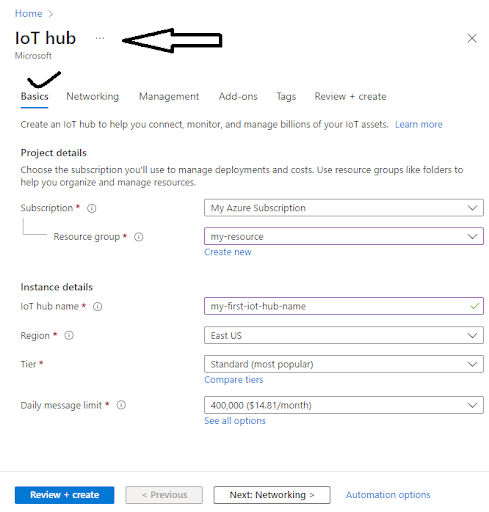
  1. Creating Azure IoT Hub
  • First, you must register and sign in to the Azure portal using credentials.
  • Then, you have to select the “Create a Resource” tab. After thiss, you need to enter “IoT Hub” within the search marketplace field.
  • Then, choose “IoT Hub” from the search outcomes and select the “Create” option.

Now, navigate to the Basics tab and complete the fields given:

  • Subscription: Choose the appropriate subscription to use within the IoT Hub.
  • Resource Group: Select the required “Resource Group.” Although, to build a new group, select “Create New” and enter the name you wish to use for it. 
  • Region: Select the exact region/place for the IoT Hub location.
  • IoT Hub Name: Enter a unique/uncommon Azure IoT Hub name.

Creating IOT HUB

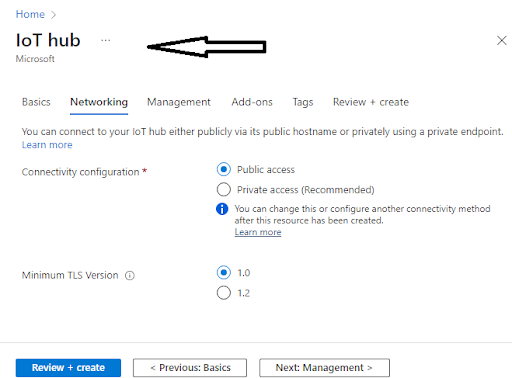
Then select “Next: Networking>” to continue Hub creation.

  • Here, you can choose the endpoints to connect to your IoT Hub. Further, you can select the default setting as Public EndPoint & Private EndPoint. 

Next Networking

Now, go to Next: Management> to continue the process of IoT Hub creation. 

Here, you will be given the option to accept the default settings. 

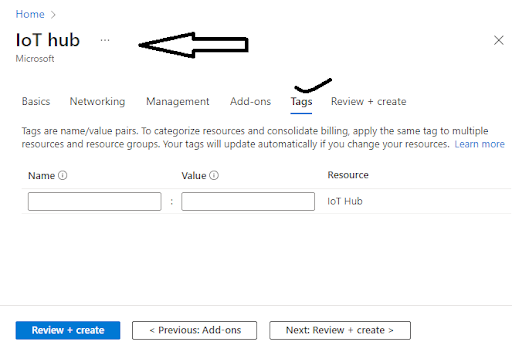
Then, to move to the next screen, you need to select the “Next: Tags” choice. 

  • Here, Tags include name/value pairs where you can assign the same tag to different resources and their groups to divide them and combine billing.

IOT HUB Tags

After completing the above, choose the “Next: Review + Create” tab to review/check your choices. Then go to the “Create” option to build your new IoT Hub.

  1. Changing/Updating the IoT Hub

Here, you can modify the settings of your current IoT Hub that you built from the Azure IoT Hub pane. Below are the various properties that you8 can set for the IoT Hub.:-

  • Scale & Pricing: This property will be helpful to migrate to a new tier or to set the number of IoT Hub Units. 
  • IP Filter: This property is useful to set the range of IP addresses the Azure IoT Hub can accept or reject. 
  • Properties: It consists of various properties like resource ID, group, resource location, etc., available for copying and use anywhere else.

Shared Access Policies

Go to Settings and click on the “Shared Access Policies” option to view or change the list of various Shared Access Policies. Further, these policies mention the necessary consent to connect the devices and services with the IoT Hub. 

Click the button Add and you will see a window “Add Shared Access Policies” opens. Here, it allows you to insert the new policy name and the permissions list that you wish to link with this policy. The permissions include the following:-

  • Registry Read and Write Policy
  • Service Connect Policy
  • Device Connect Policy

After this, click on the “Create” tab to add this new policy to the current list of guidelines.

  1. Registration of New Devices to the IoT Hub

To register a new device-

  • Go to the IoT Hub navigation menu and open IoT devices.
  • Then insert a name for the new device within Create Device. After giving the device name, choose the “Save” option to create the device identity of the Azure IoT Hub.
  • Finally, go to the IoT Devices pane after device creation and open the device from the list. Then to connect with the IoT Hub, you need to copy the Primary Connection String. 
  1. Message Routing for Azure IoT Hub
  • For this, click on the “Message Routing” option within the “Messaging” section to see the Message Routing pane. 
  • Then you have to mention the custom endpoints and routes for the IoT Hub.  
  • Further, Message Routing is useful to manage how data is sent to your endpoints from the IoT devices. 
  • Here, the first and foremost step is to add a new route. Then it allows you to add an existing endpoint to the Route or build a new one of the various types that supports it—for example, Blob storage.

Routes

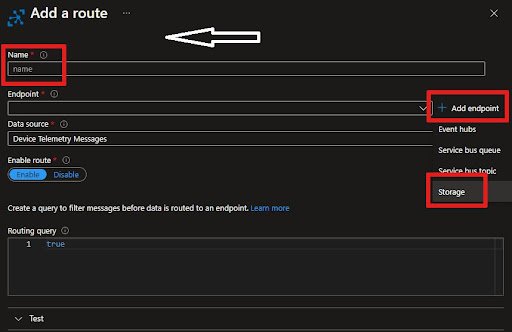
  • You will find “Routes” as the first tab on the Message Routing Pane. Then click the +Add, to add a new route.
  • Then insert a Name for the Route.
  • After that, you will see Endpoint, from which you will have a dropdown list, or you can add a new one. To add it, click +Add Next to the Endpoint list and choose Blob Storage.
  • Then, after adding the Endpoint name, click on “Pick a Container” to select the Storage Account and the container.
  • For the “Data Source,” choose the Device Telemetry Messages. 
  • Further, you need to add a Routing Query. In this instance, the messages with an Application property with the name “Level” equal to “Critical” are directed to the storage account.  
  • Finally, you have to save the Routing file. Then you can go back to the Message Routing Pane and see a new “Routing Rule” appear.

Routes

Custom Endpoints 

Go to the “Custom Endpoints” option, where many are already built. 

  • Here, you can easily build new or remove the existing Endpoints. 
  • Moreover, you can only specify up to 10 Custom Endpoints for the Azure IoT Hub.
  1. Finding a particular IoT Hub

First Step:-

  • Go to the homepage in Microsoft Azure and choose the IoT Hub from the given list.
  • You click on the “Resource Groups” if you already know the resource group to which the Azure IoT Hub belongs.
  • Now select the option- “Resource Group,” and the drop down list will display.
  • Then the “Resource Group” screen presents all that group’s resources along with the Azure IoT Hubs. 
  • After that, you choose your IoT Hub. 

Second Step-

  • Click on the “All Resources” tab. You will find a dropdown list over there.
  • Then click on the Drop Down list and uncheck the Select All option.
  • After that, find “IoT Hub” and check the same.
  • Finally, click on the appearing “Drop Down” list to close it. It filters all the entries and displays them on your IoT Hubs.
  1. Deleting/Removing the IoT Hub

You can also delete your IoT Hub in the following way.:-

  • Go to the Azure Portal.
  • Select the “Delete” option to remove the IoT Hub.

Microsoft Azure Certification Training

Weekday / Weekend Batches

Conclusion

In the above blog post we discussed the Azure IOT hub, configuration, integrations,routing, communication and security in a more detailed way. Had any doubts please drop your queries in the comments section. 

Related Article:

Azure IoT Edge Overview


Source link