
Caption by Hyatt Sydney review: A Globalist’s first stay


Hyatt announced the Caption by Hyatt brand in September 2019 and opened the first property in June 2022. Former TPG writer Cameron Sperance reviewed this Caption property in Memphis, shortly after it opened, and noted that the property was “a charming place to stay that mixes history with modern Memphis and excels spectacularly where its peers fall short.”

The Caption by Hyatt brand now has six open properties. As a reminder, Caption by Hyatt is a select-service lifestyle brand that focuses on vibe and convenience and strives to foster a connection to the hotel’s surrounding neighborhood. So when a guest asks for a recommendation for a coffee shop, hotel staff are encouraged to note the on-site options and also recommend their favorite local coffee shops in the local area.

Ever since reading Cameron’s review, I’ve had the Caption by Hyatt brand on my list to try out. After all, the combination of colorful rooms, communal areas and wallet-friendly rates sounded like a good fit for me. Luckily, my chance finally came during a recent stay in Australia, where the Caption by Hyatt Sydney Central just opened in October 2025.

Caption by Hyatt Central Sydney
KATIE GENTER/THE POINTS GUY

Here’s what I thought of my first stay at a Caption by Hyatt.

Checking in to Caption by Hyatt Sydney

Stays at Caption by Hyatt properties start with check-in at a kiosk. A staff member greeted me and asked me to enter my last name and checkout date at the kiosk.
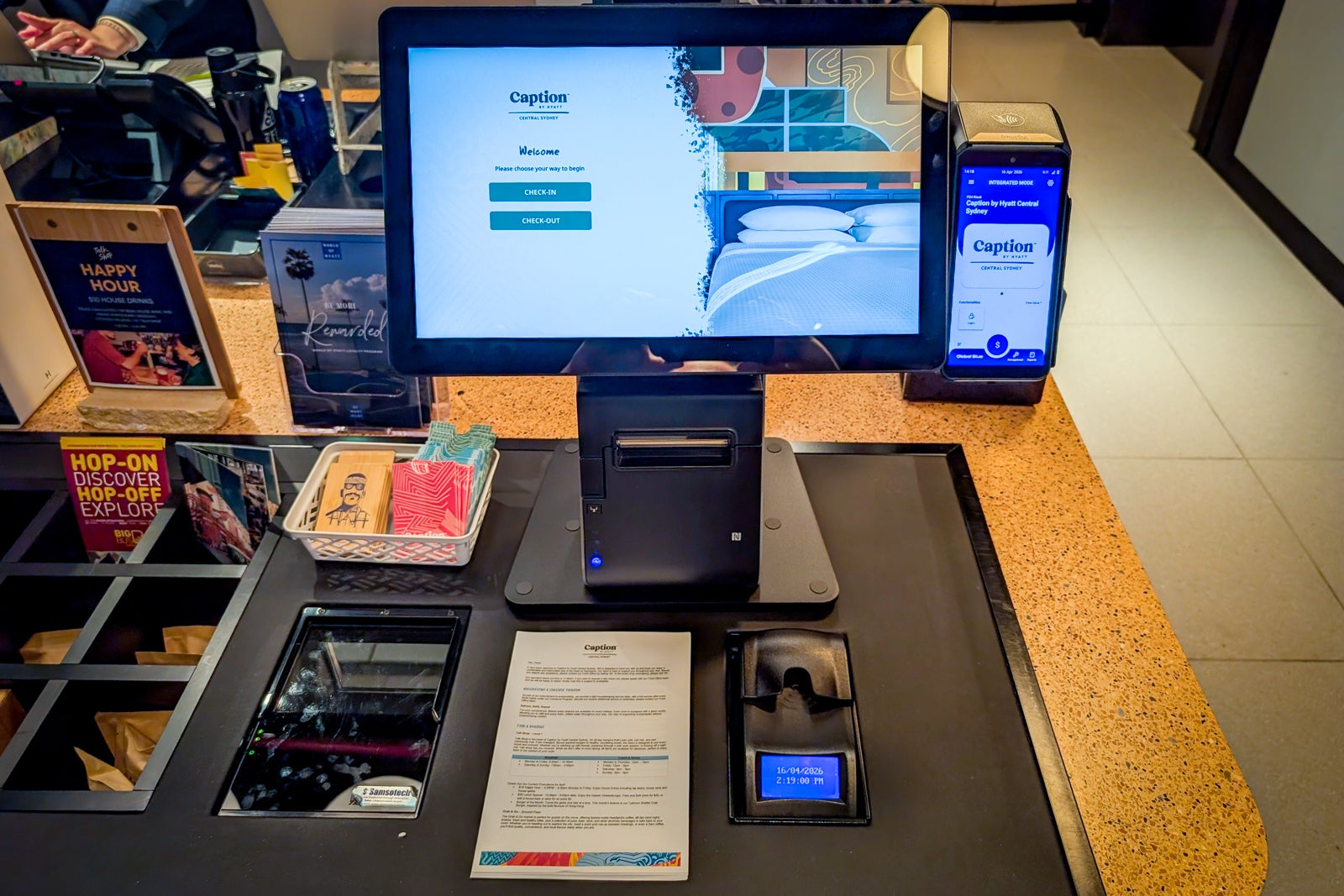
Caption by Hyatt Central Sydney check-in kiosk
KATIE GENTER/THE POINTS GUY

It seems that you can normally enter this information, scan your ID and create your own room keys. But after I entered my initial information and saw my reservation details, I got a message saying my check-in request was being routed to a staff member. This seemed to surprise the staff member, but he completed my check-in at his computer without issue.

Interestingly, when I arrived back at the lobby to checkout two days later, a staff member called me over to his desk, noting that it would be faster that way.

Related: Your ultimate guide to Hyatt hotel brands

Globalist perks at Caption by Hyatt Central Sydney

As a Hyatt Globalist member, I was curious to see what benefits my status would unlock at the Caption by Hyatt Central Sydney.

Reward your inbox with the TPG Daily newsletter

Join over 700,000 readers for breaking news, in-depth guides and exclusive deals from TPG’s experts

Similar to Hyatt Place and Hyatt House, Caption by Hyatt doesn’t participate in the “best room available” Globalist benefit. As such, I didn’t expect any upgrade and was surprised when the receptionist said they’d upgraded me from a standard queen room to a king premium room. The upgraded room provided more seating, additional space and a larger bed, all of which I certainly appreciated.
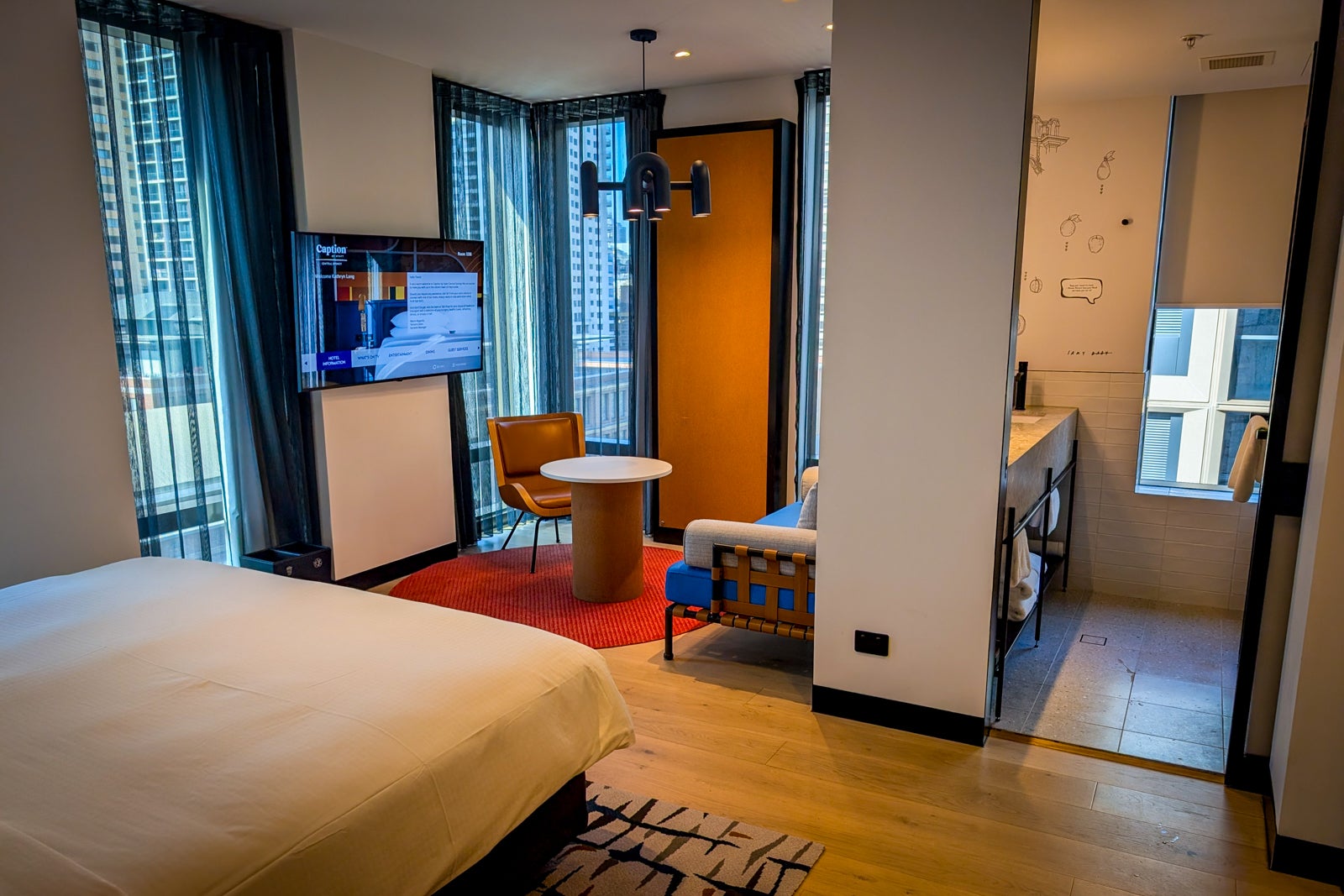
King premium room at Caption by Hyatt Central Sydney
KATIE GENTER/THE POINTS GUY

The Globalist breakfast benefit is also a bit different at Caption by Hyatt properties. Based on the program terms, I expected to get “a breakfast consisting of one (1) ‘elevated’ coffee and one (1) ‘small plate’ option for each registered guest in the room.”

However, Caption by Hyatt Central Sydney offered me the “breakfast package” (typically 32 Australian Dollars, or $23) as a Globalist benefit, which includes a main breakfast item, a coffee (choice of flat white, latte, cappuccino, Americano or long black) or tea, a juice (orange, apple or pineapple) and a mini croissant and fruit plate.
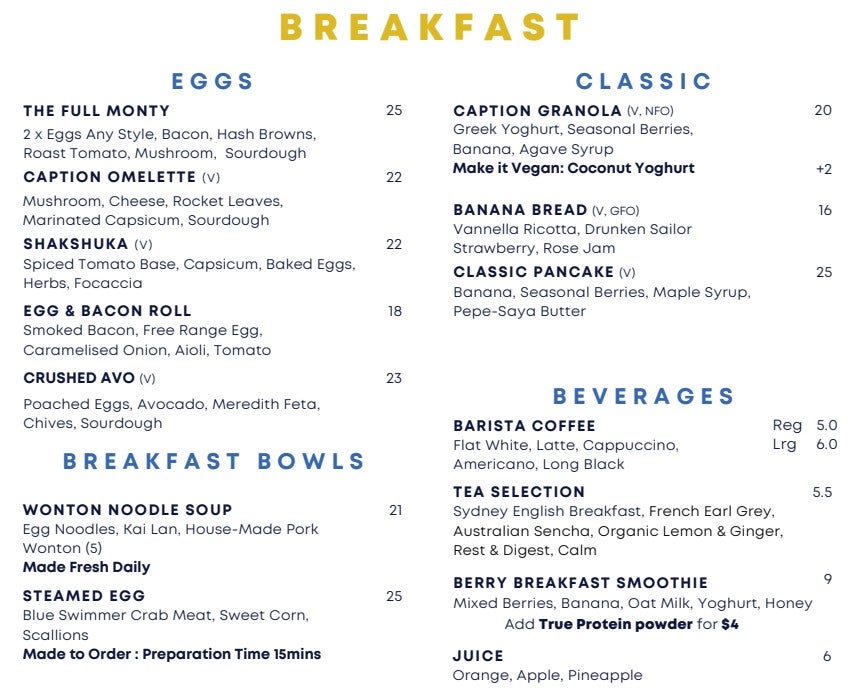
Breakfast menu at the Caption by Hyatt Central Sydney
Breakfast menu at the Caption by Hyatt Central Sydney (prices are in Australian Dollars). CAPTION BY HYATT CENTRAL SYDNEY

However, if you order your Globalist breakfast via the QR code at your table, be sure you aren’t charged for it at checkout. In my case, the breakfast order I placed on my first morning with a staff member didn’t appear on my bill at checkout, but the one I placed via QR code the second morning did. The receptionist quickly removed the erroneous charge once I pointed it out.

I had no issues getting a 4 p.m. late checkout as a Globalist benefit. And the stay — including Globalist bonus points and my 15th brand for the Hyatt brand explorer promotion — posted as expected.

Related: How much value does World of Hyatt status provide when you book directly?

The rooms at Caption by Hyatt Central Sydney

The Caption by Hyatt Central Sydney has 174 rooms. I booked a 215-square-foot room with a queen bed, but was upgraded to a 301-square-foot premium room with a king bed as a Globalist. From what I could tell, this is the largest room type the property offers.
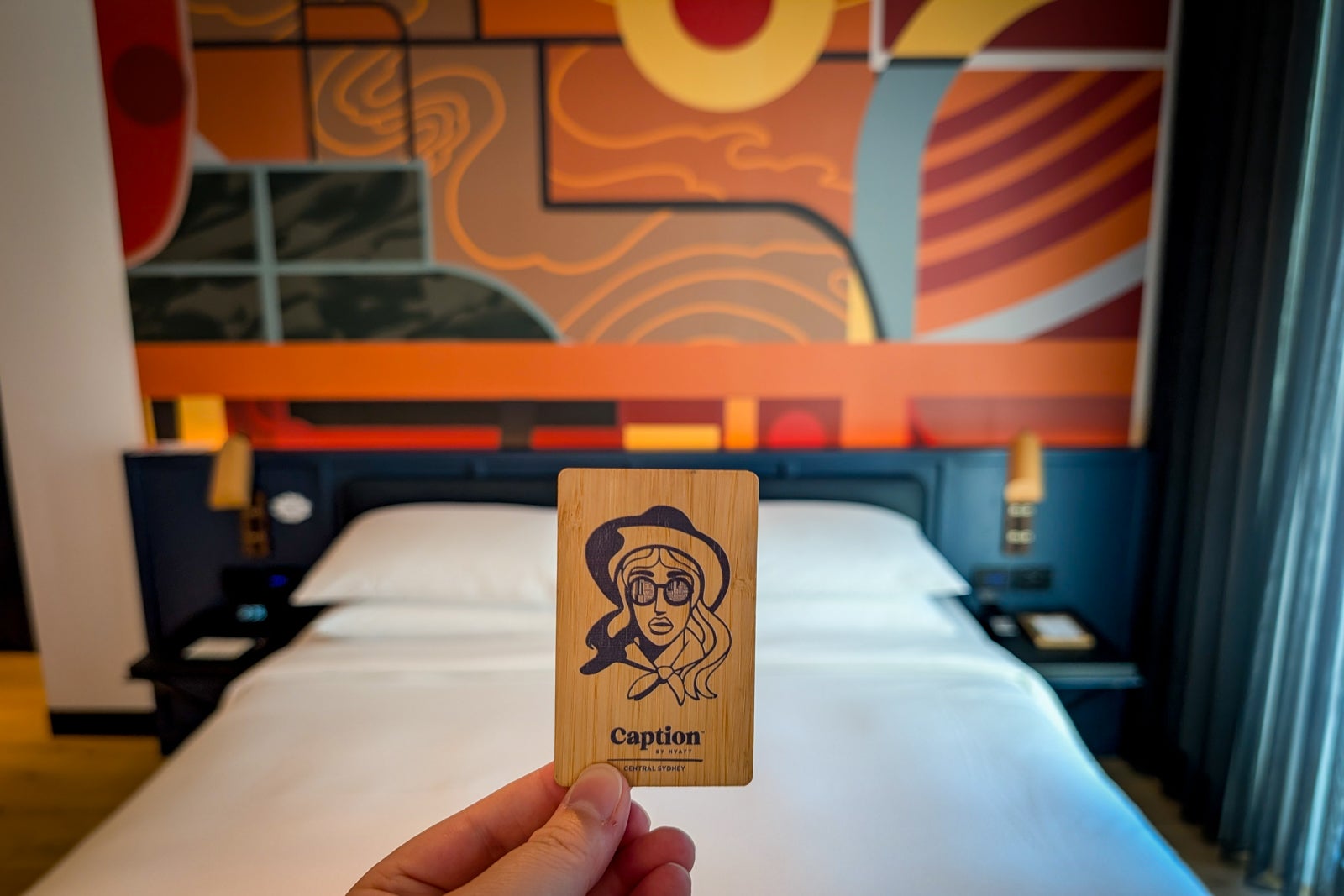
Room at the Caption by Hyatt Central Sydney
KATIE GENTER/THE POINTS GUY

The premium king rooms are located in the building’s corners overlooking the Capital Theatre. The seating area occupied the corner of the guest room with windows on both sides. As such, it was a nicely lit space to work or relax during the day with both a two-seat couch and a single seat at a table.
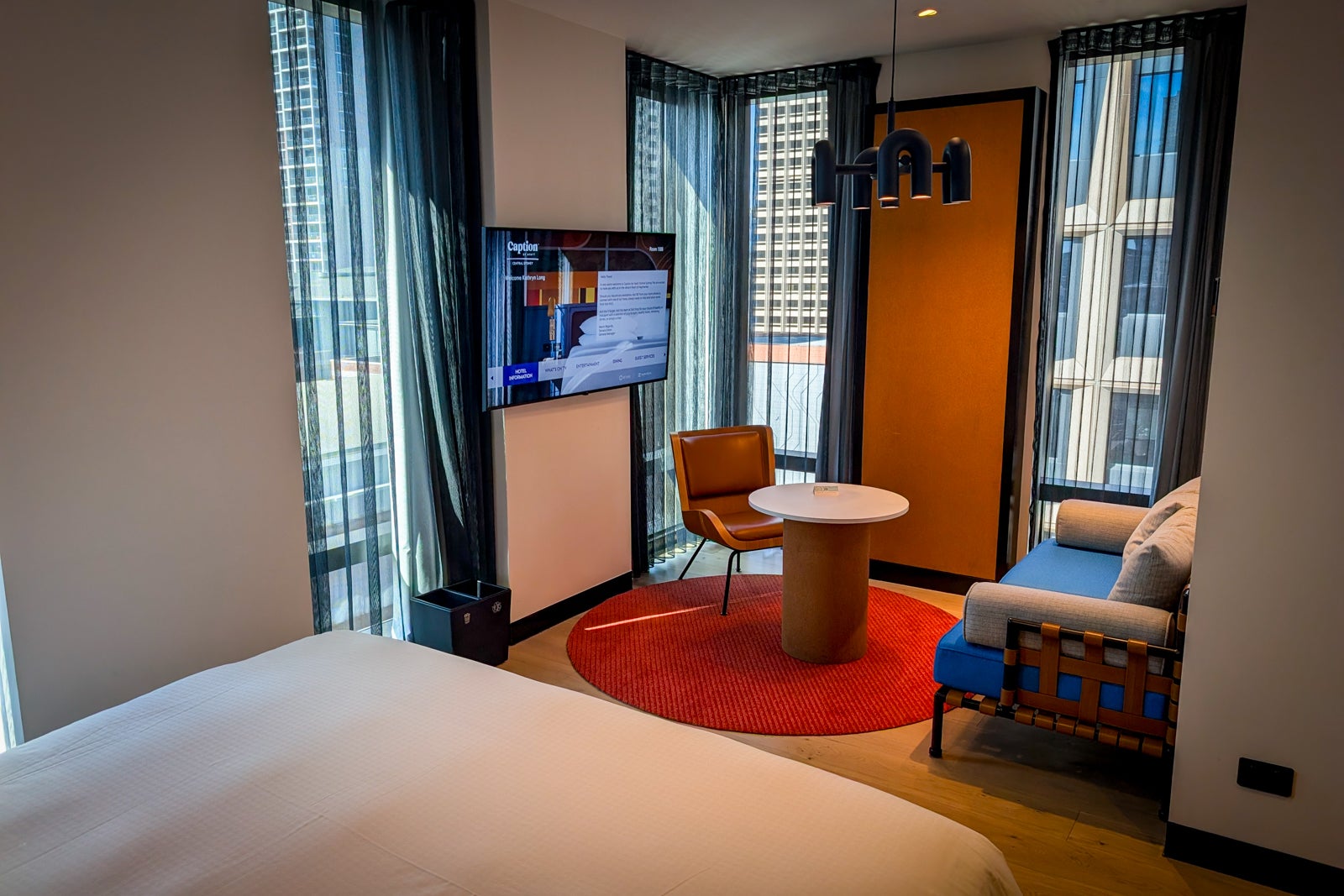
King premium room at Caption by Hyatt Central Sydney
KATIE GENTER/THE POINTS GUY

Next to the seating area was the bed, which came stocked with four pillows and an alarm clock. Both sides of the bed featured a reading light, nightstand, two power outlets and a USB-A outlet. I loved the bedding, which was fluffy yet breathable.

King premium room at Caption by Hyatt Central Sydney
KATIE GENTER/THE POINTS GUY

On the other side of the seating area was the bathroom, featuring two sinks, a walk-in shower stall and a toilet. I appreciated the plush towels and the lightly scented Apotheke-branded toiletries.

Closer to the room’s entry door was an open-air closet with a minifridge, a tea and coffee station, a water kettle, glasses and a carafe for the filtered water station (located down the hall). I found the Caption-branded mugs adorable and a really nice touch.

Especially given the room’s modest size, I felt it made the most of the space and was relatively comfortable. I just wish it had a few shelves for packing cubes and easier-to-access outlets near the seating area.

Dining at Caption by Hyatt Central Sydney

A bar and restaurant are available in the Talk Shop on the hotel’s first floor. You can order food and drinks with the staff, or via a QR code on your table.

Talk Shop at the Caption by Hyatt Central Sydney
KATIE GENTER/THE POINTS GUY

While the hours may change, breakfast was served until 10:30 a.m. during the week and until 2 p.m. on Saturday and Sunday during my stay. That’s by far the latest I’ve ever seen a hotel offer breakfast.

Talk Shop at the Caption by Hyatt Central Sydney
KATIE GENTER/THE POINTS GUY

As a Globalist, my husband and I received the breakfast package each morning. On the first morning, I opted for The Fully Monty, which turned out to be a massive portion. I especially appreciated the freshly toasted bread, lightly seasoned mushrooms and made-to-order eggs.

Breakfast at Caption by Hyatt Central Sydney
KATIE GENTER/THE POINTS GUY

On my second morning, I ordered the Caption Omelet, which was stacked with greens and roasted bell peppers and served with toasted sourdough bread.

Breakfast at Caption by Hyatt Central Sydney
KATIE GENTER/THE POINTS GUY

My husband opted for the Crushed Avo both mornings, which included poached eggs and a generous serving of avocado spread.
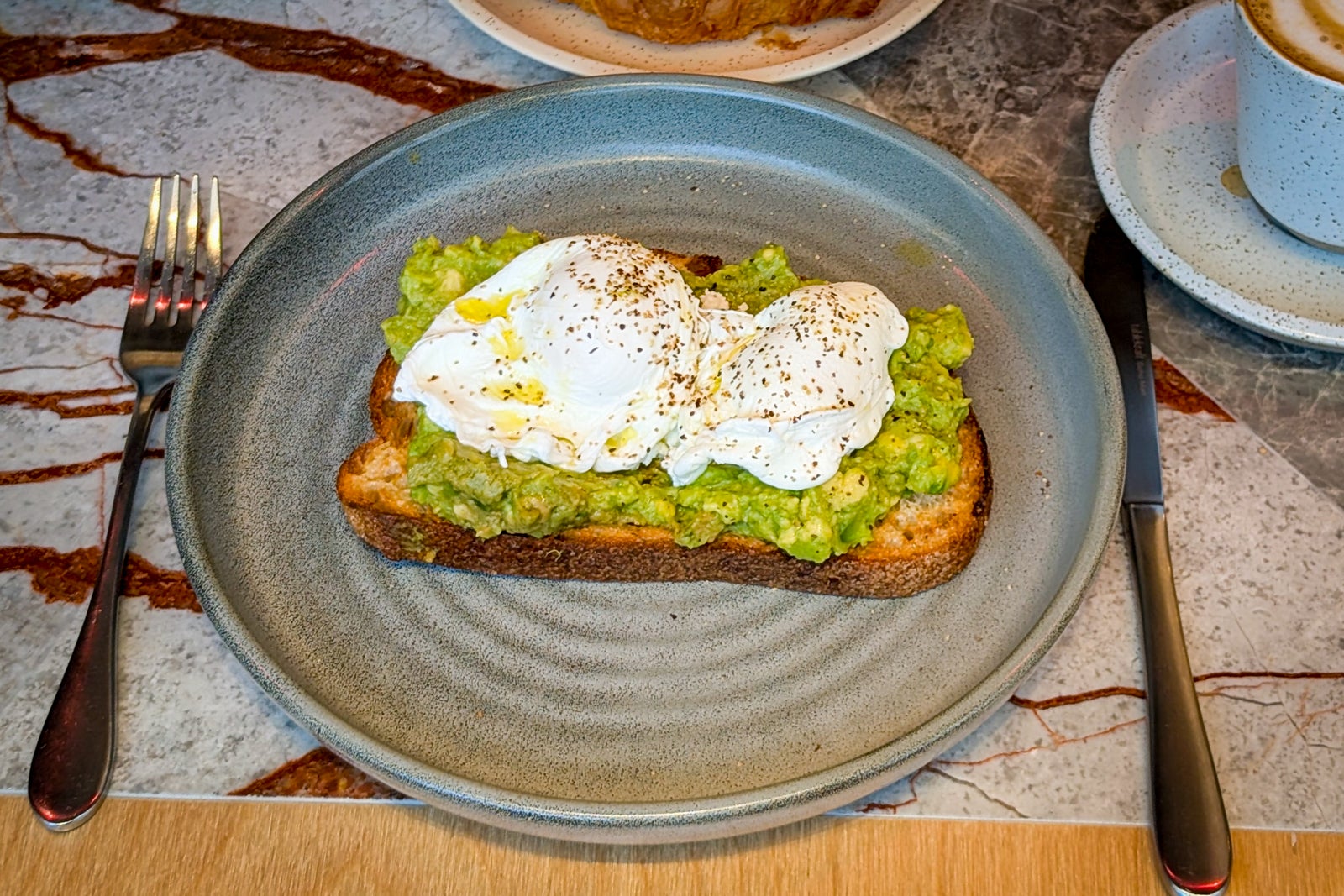
Crushed Avo at Caption by Hyatt Central Sydney
KATIE GENTER/THE POINTS GUY

Our second night, we stopped by the Talk Shop for a meal before heading out to a concert.
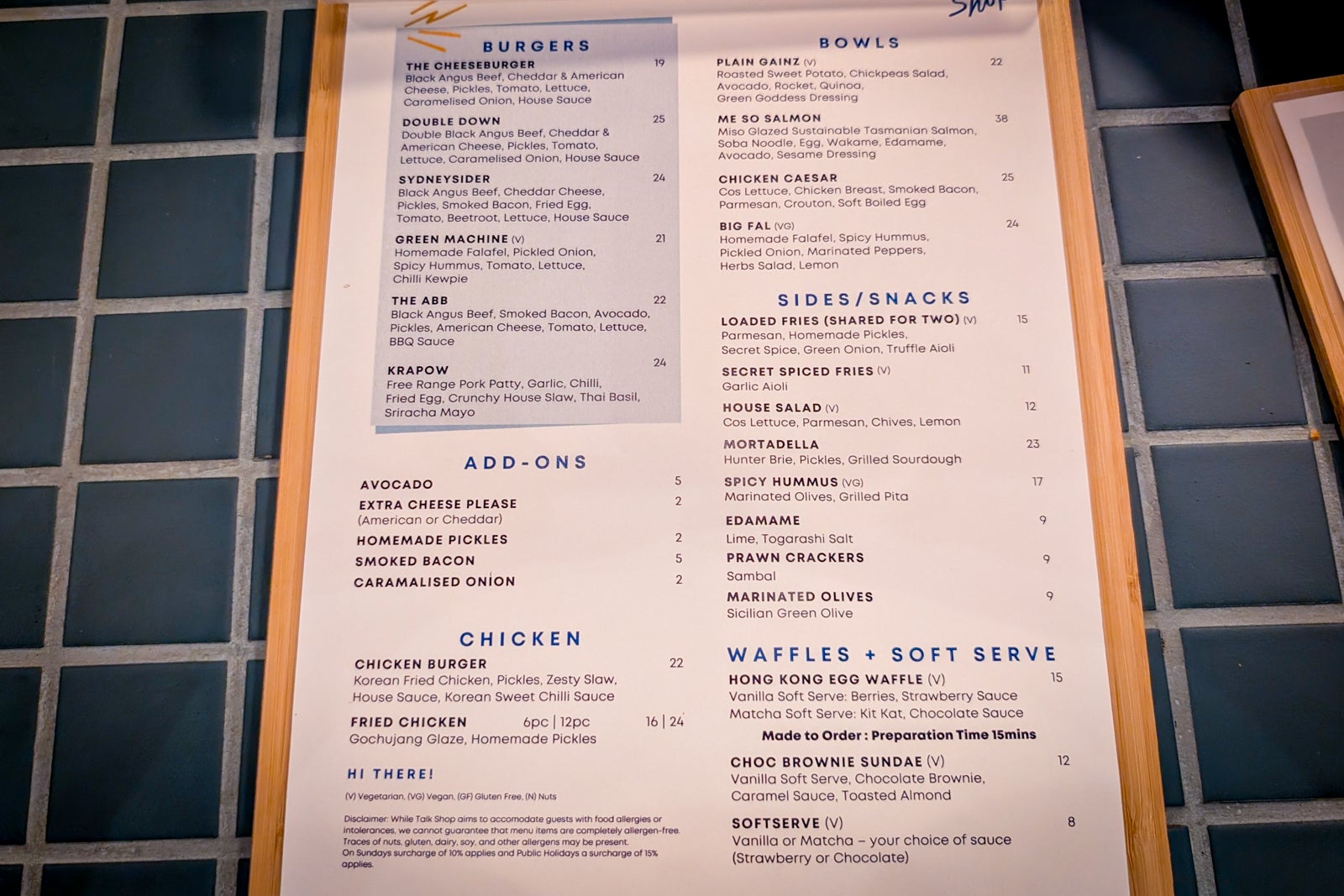
Talk Shop menu at the Caption by Hyatt Central Sydney
KATIE GENTER/THE POINTS GUY

My Plain Gainz bowl ($16) was fresh and filling, and the chef didn’t skimp on the avocado. Meanwhile, my husband’s The ABB burger ($16) — which cost about the same as my bowl — was more modest but also included a lot of avocado. The Secret Spiced Fries ($8) were indeed nicely seasoned with a delicious spice mix.

Bowl, burger and fries at Caption by Hyatt Central Sydney
KATIE GENTER/THE POINTS GUY

Amenities and service

At its core, Caption by Hyatt properties are designed to let guests get what they need when they want it. For example, you can get filtered water whenever you wish from a tap on each floor.
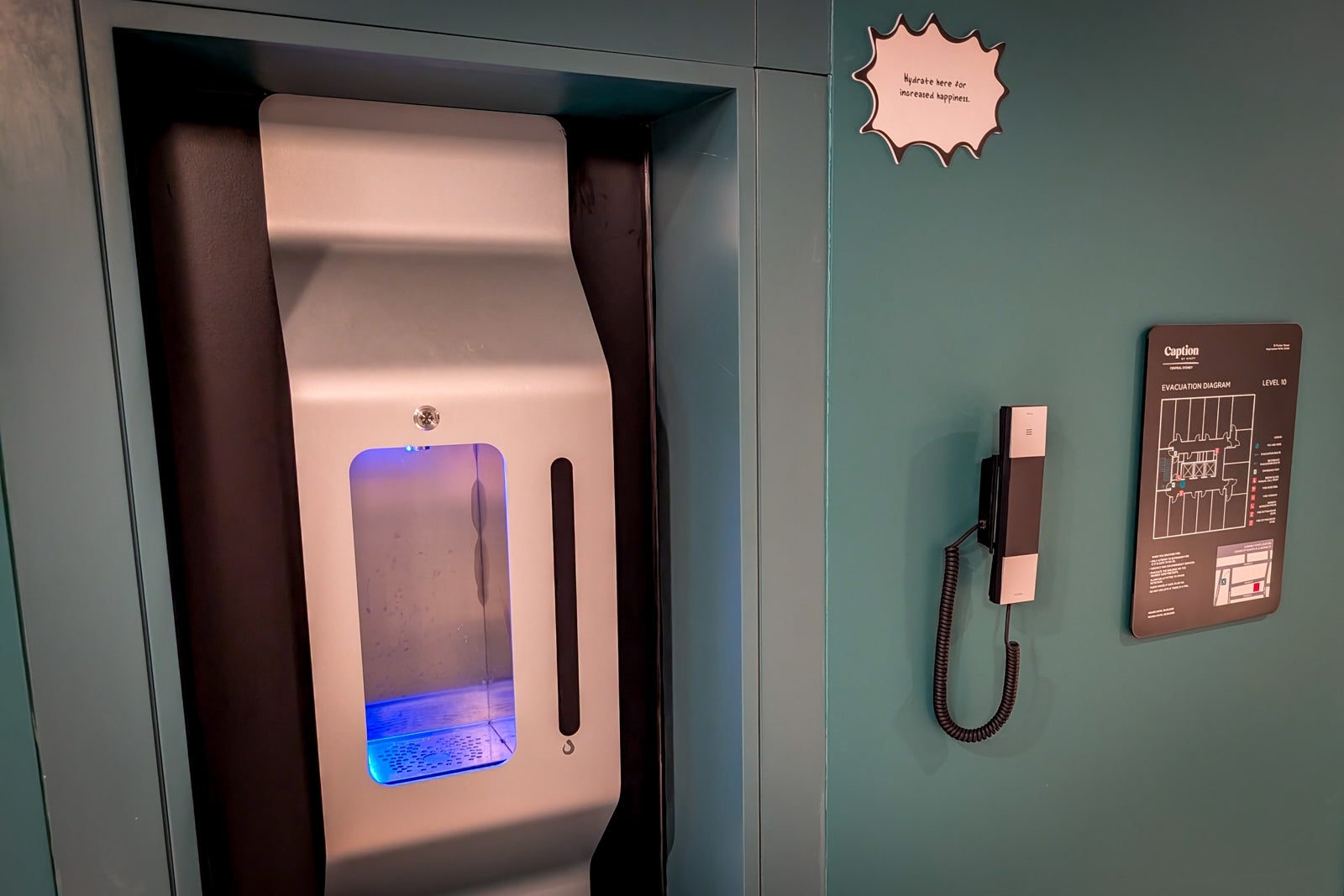
Filtered water tap at Caption by Hyatt Central Sydney
KATIE GENTER/THE POINTS GUY

And although the hotel doesn’t offer room service, anything from the Talk Shop can be made for takeaway.

Talk Shop at Caption by Hyatt Central Sydney
KATIE GENTER/THE POINTS GUY

You can also get fresh coffee, snacks and drinks 24 hours a day from the Grab & Go market near reception.
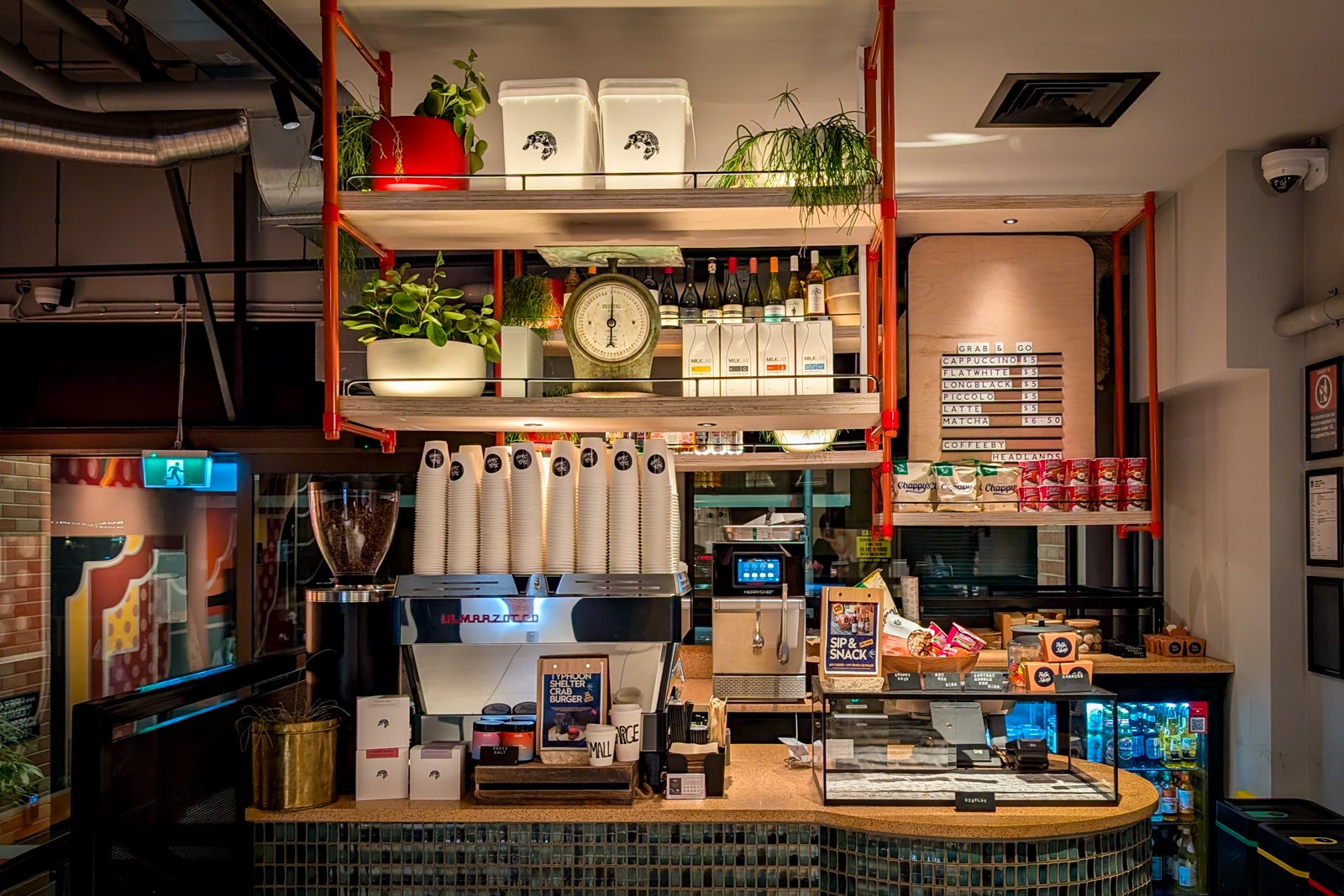
Caption by Hyatt Central Sydney grab and go market
KATIE GENTER/THE POINTS GUY

The hotel has a 24-hour fitness studio with Technogym equipment.
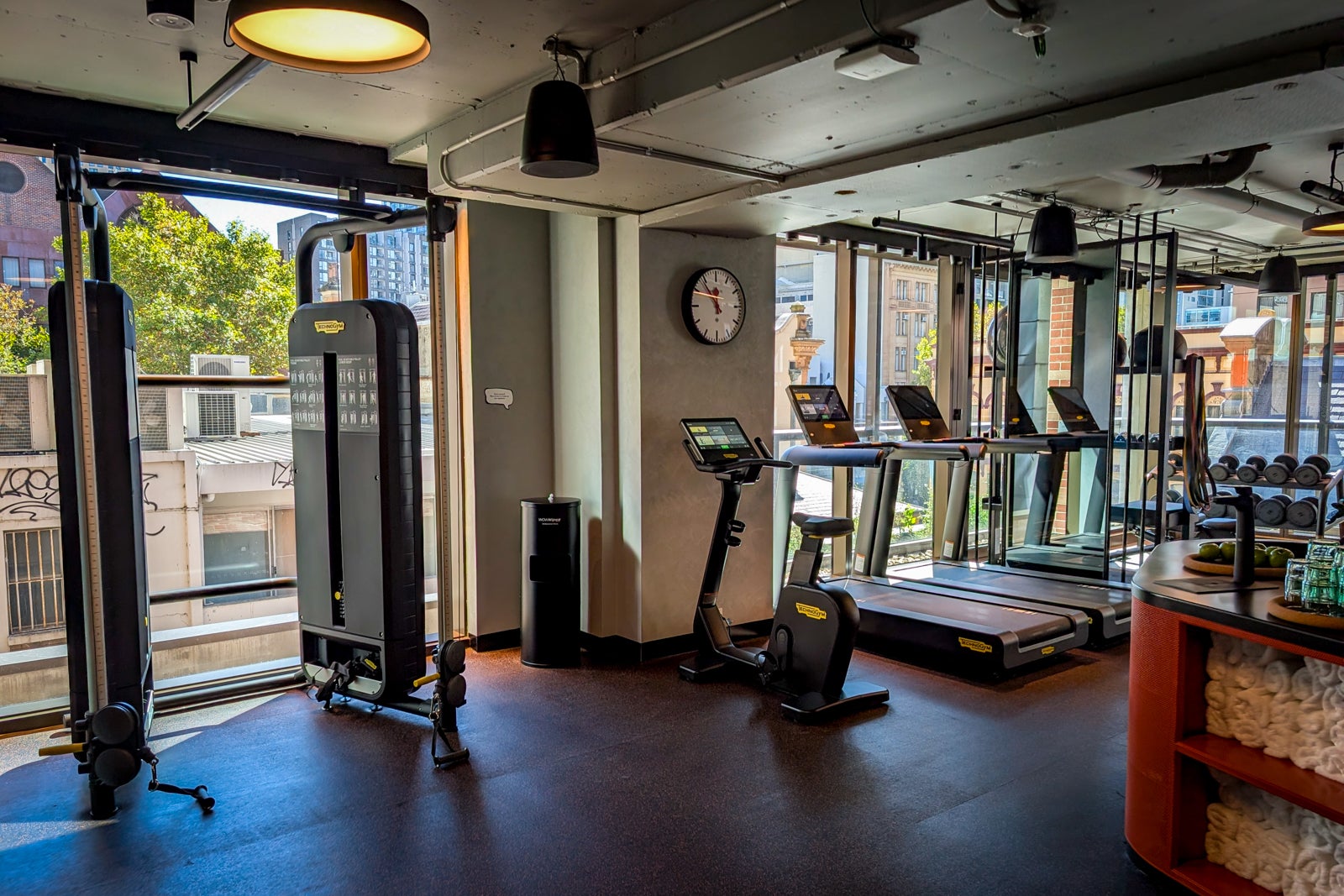
Gym at Caption by Hyatt Central Sydney
KATIE GENTER/THE POINTS GUY

You’ll find a small conference room on the first floor near the elevator bank.

Conference room at the Caption by Hyatt Central Sydney
KATIE GENTER/THE POINTS GUY

Free Wi-Fi is available throughout the hotel. I experienced no issues with the Wi-Fi; in my room, a speed test clocked the Wi-Fi at 49.6 Mbps download and 32.8 Mbps upload.

Finally, guests can expect light housekeeping services daily and full service every three days. However, if you want more frequent full service, you can make a request at reception.

Booking Caption by Hyatt Central Sydney

If you have World of Hyatt status or want to earn it, I recommend booking the Caption by Hyatt Central Sydney directly. Rates start around $155 per night.

You can also redeem Hyatt points for your stay. The Caption by Hyatt Central Sydney is a Hyatt Category 3 property, so you can currently book a queen room for 9,000 points per night on off-peak dates, 12,000 points per night on standard dates and 15,000 points per night on peak dates. However, keep in mind that Hyatt is moving to a five-tier award chart on May 20, at which point award nights at Category 3 properties will range from 8,000 to 20,000 points per night.
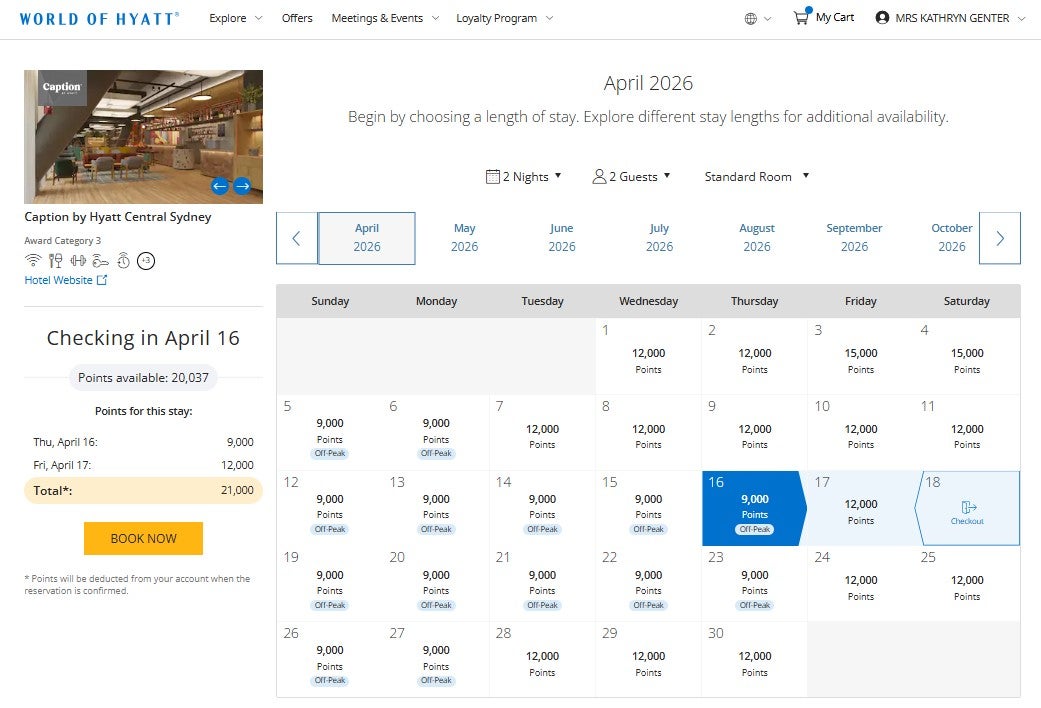
Award pricing at Caption by Hyatt Central Sydney
HYATT

On some dates, you may find you get better value by booking at a paid rate and saving your points for other stays. For example, I paid 511 Australian Dollars ($366.54) for my two-night stay. In comparison, I could have redeemed 21,000 points for the same stay, getting 1.745 cents per point. While TPG’s May 2026 valuations peg Hyatt points at 1.65 cents each, I generally don’t redeem Hyatt points for my stays unless I get 2 cents per point or higher.

As a select-service property, you won’t find the Caption by Hyatt Central Sydney in any premium hotel programs, such as Amex’s Hotel Collection or The Edit by Chase Travel. However, you can book it through most online travel agencies, including Chase Travel and Amex Travel, if you don’t need World of Hyatt elite benefits or points.

Accessibility

From listing the hotel areas accessible from the property’s accessible public entrance on its webpage to providing Braille signage in many public areas, the Caption by Hyatt Central Sydney was clearly built with accessibility in mind. Accessible guest rooms with mobility features also have doorways with a clear width of 32 inches.

I’d injured my back shortly before my stay, so I was happy to find a higher table at TalkShop that I could stand at. Likewise, although I wasn’t in an accessible room, I appreciated the walk-in shower and open closet.

Bottom line

At first blush, I assumed the Caption by Hyatt brand would be like Marriott’s Moxy brand, but with a stronger community focus and, hopefully, more comfortable bedding. But in practice, the two brands aren’t all that comparable. The Caption by Hyatt felt more mature than a Moxy, and its staff more proactive and service-oriented than you typically get at a Moxy. Plus, the rooms — including the bedding — were far more comfortable.

After this stay in Sydney, I wouldn’t hesitate to stay at another Caption by Hyatt if one came up along my travels.

Related reading:


Source link

Leave a Reply

Subscribe to Our Newsletter

Get our latest articles delivered straight to your inbox. No spam, we promise.

Recent Reviews


About Big Data Tool?

Big data is open source software where java frames work is used to store, transfer, and calculate the data. This type of big data software tool offers huge storage management for any kind of data. Big data helps in processing enormous data power and offers a mechanism to handle limitless tasks or operations. The major purpose to use this big data used to explain a large volume of complex data. Big data can be differentiated into three types such as structured data format, semi-structured data format, and unstructured data format. One more point to remember, it’s impossible to process and access big data using traditional methods due to big data growing exponentially. As we know that traditional methods consist of the relational database system, sometimes it uses different structured data formats, which may cause failure in the data processing method.

Here are the few important features of big data;

1. Big data helps in managing the traffic on streets and also offers streaming processing.

2. Supports content management and archiving emails method.

3. This big data helps to process rat brain signals using computing clusters.

4. provides fraud detections and prevention.

5. Offers manage the contents, posts, images, and videos on many social media platforms.

6. Analyze the customer data in real-time to improve business performance.

7. Fortune 500 company called Facebook daily ingests more than 500 terabytes of data in an unstructured format.

8. The main purpose to use big data is to get full insights into their business data and also help them to improve their sales and marketing strategies.

Become a master of ETL Testing by going through this HKR ETL Testin Training !

Introduction to ETL Tools in Big Data:

ETL can be abbreviated as “Extract, transform, and Load”. ETL is a simple process to move your data from one source to multiple warehouses. The ETL process is considered to be a crucial step in the big data analysis process. ETL tools in big data applications help users to perform fundamental three processes. (they are ETL processes). With the help of this ETL tool, users can move their data from one source to a destination. The main functions of the ETL process included data migration, coordinating the data flow, and executing all the large or complex volume of data. The following are basic fundamental concepts of ETL tools;

1. Overview

2. Pricing

3. Use case

Big Data Hadoop Training

  • Master Your Craft
  • Lifetime LMS & Faculty Access
  • 24/7 online expert support
  • Real-world & Project Based Learning

Best Big Data ETL Tools used:

In this section, we are going to explain the topmost ETL tools used in big data. These tools are used to remove the issues involved while searching for the appropriate data flow.

Let us explain them one by one;

1. Hevo big data type or No code data pipeline tool:

Hevo is also known as a no-code data pipeline. This tool supports integrating pre-built data across 100+ data sources. Hevo is one of the fully managed solutions to migrate your data and also automates the data flow. Hevo has come up with a fault-tolerant architecture that makes sure that your data is secured and consistent to use. This big data tool also offers an efficient and fully automated data solution to manage your data in real-time.

The features of the Hevo big data tool are;

1. Hevo is a fully managed tool and this tool offers a high-level data transformation process.

2. Offers real-time data migration and effective schema management.

3. Supports live monitoring and 24/7 live support.

2. Talend or Talend open studio for data integration tool:

Talend is one of the popular big data tools, and also a cloud integration software tool. This tool is built on an architecture type known as Eclipse graphics. The talend big data tool also supports cloud-based and on premise database structure. This tool also provides important software popularly known as “SaaS”. It provides a smooth workflow and easy to adapt to your business.

3. Informatica big data tool:

Informatica is one of the on-premise big data ETL tools. This tool also supports the data integration method by using traditional databases. So this tool enables users to deliver data-on demand, we can also call it real-time and data capturing support. This tool is best suited for large scale business organizations.

The following are the key features of the Informatica tool:

1. Advanced level data transformation

2. Dynamic partitioning

3. Data masking.

4. IBM infosphere information server:

IBM infosphere information server works similar to the Informatica tool. This tool is widely used in an enterprise product for large business organizations. IBM infosphere also supports cloud version and hosted on IBM cloud software. This big data tool works well with mainframe computer devices. It also supports data integration with various cloud data storage are, AWS S3, and Google storage. Parallel data processing is one of the prominent features of the IBM infosphere information tool.

5. Pentaho data integration tool:

Pentaho is an open-source big data ETL tool. This tool is also known as Kettle. The Pentaho tool mainly focuses on batch-level ETL and on-premise use cases. This is designed on the basis of hybrid and multiple cloud-based architectures. The main functions of Pentaho included are data migration, loading large volumes of data, and data cleansing. It also provides a drag and drop interface and a minimum level of the learning curve. In the case of ad-hoc network analysis, the Pentaho tool is better than Talend as it offers ETL procedures in markup languages such as XML.

Acquire Big Data Hadoop Testing certification by enrolling in the HKR Big Data Hadoop Testing Training program in Hyderabad!

Cloud Technologies, big-data-etl-tools-description-0, Cloud Technologies, big-data-etl-tools-description-1

Subscribe to our YouTube channel to get new updates..!

6. Clover DX big data tool:

Clover DX big data tools is a fully java-based ETL tool to perform rapid automation and data integration processes. This tool supports data transformations across multiple data sources and data integration with emails, JSON, and XML data sources. The clover DX offers job scheduling and data monitoring methods. Clover DX also provides a distributed environment set up so that you can get high scalability and availability. If you are looking for an open-source big data ETL tool with a real-time data analysis process, then using Clover DX is the best choice. With the help of this Clover DX user can also perform deployment of data workloads on a cloud level on-premise.

7. Oracle data Integrator big data tool:

Oracle data integrator is one of the popular tools developed by Oracle Company. It also combines the features of the proprietary engine with the ETL big data tool. This is a fast tool and requires minimal maintenance tasks. With the help of this tool, users can also load plans by using one or more data sources. Oracle data integrator tool also capable of identifying the fault data and recycles them before it reaches the destination. Some of the examples for oracle data integrator tools is, IBM DB2 and Exadata, etc.

The important features included are;

1. Perform business intelligence

2. Data migration operation

3. Big data integration

4. Application integration.

If you want to have big data that should be deployed on the cloud management service, then Oracle data integrator is the right choice. It also supports data deployment using a bulk load, cloud and web services, batch and real-time services.

8. StreamSets big data ETL tool:

Stream sets are Data ops ETL tools. This tool supports monitoring and various data sources and destinations for data integration. The stream set is a cloud-optimized and real-time big data ETL tool. Many business enterprises make use of stream set tools to consolidate data sources for data analysis purposes. This tool also supports data protectors with larger data security guidelines such as GDPR and HIPAA.

9. Matillion tool:

Matillion ETL tool built especially for Amazon Redshift, Google Big Query, Azure Synapse, and Snowflake. This is the best suited tool used between raw data and Business intelligence tools. It is also used for the compute-intensive activity of loading your data on-premise environment. This is a highly scalable tool due to it being specially built to take over the data warehouse features. The matillion tool also helps to automate the data flows and provides a drag-drop web browser user interface to ease the ETL tasks.

Enroll in our ODI Training program today and elevate your skills!

Big Data Hadoop Training

Weekday / Weekend Batches

Conclusion:

In this Big data ETL tool blog, we have discussed popular big data tools, which are designed based on various terms and factors. With the help of this blog, you can choose any type of ETL tool according to your business requirements. For example, if you want to work with an open-source big data ETL tool, then you can choose Clover DX and Talend tool. If you want to work with pipelines, then you can choose the Hevo ETL tool. As per Gartner’s report, almost 65% of big companies use big data software to control an enormous amount of data. So learning this blog may help you to be a master in big data software.


Source link