Alienware’s First Affordable Gaming Laptop Is Arriving At The Perfect Time


Even though Alienware has been around for 30 years, the company hasn’t really made an affordable, entry-level gaming laptop. But that changes today with the succinctly named Alienware 15, and based on the rising price of seemingly every gadget, it couldn’t have come at a better time.

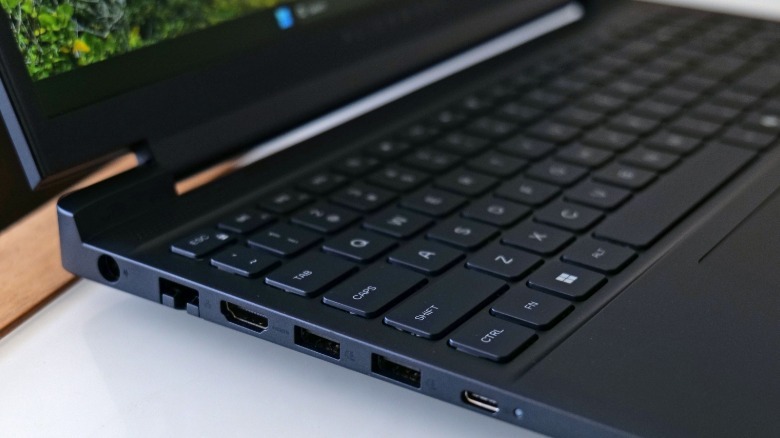
Let’s start with the basics. The Alienware 15 will be available with both AMD and Intel CPUs, starting at $1,299 for a config with a Ryzen 5 220 processor, 16GB of RAM, 512GB M.2 SSD and an NVIDIA RTX 4050 GPU. If you opt for a system with a Core 5 210H chip and the same memory, graphics and storage, expect to pay $1,349. (Note: There will be a variant with an RTX 3050 GPU in certain regions, but not in North America.) The laptop also features a 15.3-inch LCD display with decent brightness (300 nits), a 1,920 x 1,200 resolution (16:10) and a relatively speedy 165Hz refresh rate. You also get a surprisingly wide assortment of ports including two USB-C, two USB-A (all of them are least Gen 3.1), HDMI 2.1, 3.5mm audio and even an onboard Ethernet jack. So just going by its core components, the Alienware 15 is off to a good start.
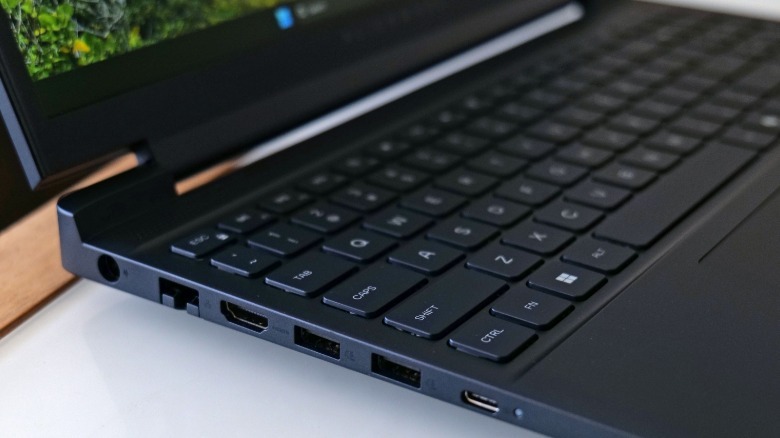
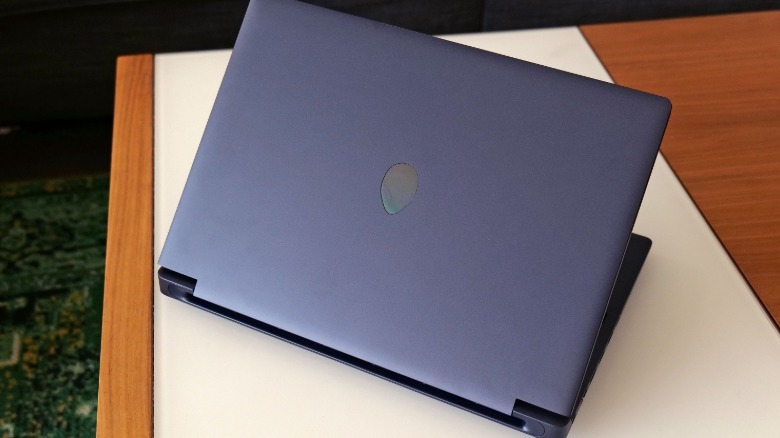
That said, I’ve had a chance to check out a pre-production model and while I can’t benchmark it quite yet as it’s still running unfinished software, there’s a lot to like about Alienware’s first proper budget gaming laptop. In addition to a new nova black paint scheme, this model features a more toned-down, understated design that I really like. Instead of a light up logo on its lid with built-in RGB LEDs, Alienware opted for a simple iridescent sticker that allows this thing to be a bit more incognito in case you ever need to bring it out in public. Subtle touches like a pronounced V-rail make it easy to open the lid, while the lack of a thermal shelf like you get on its more expensive siblings results in a more portable compact design that measures less than an inch thick at any point (0.81 inches in the front and 0.9 inches in the back). All told, the Alienware 15 brings some welcome subtlety from a company known for far out designs, so it should be even better at pulling double duty as a gaming rig and a portable productivity machine.
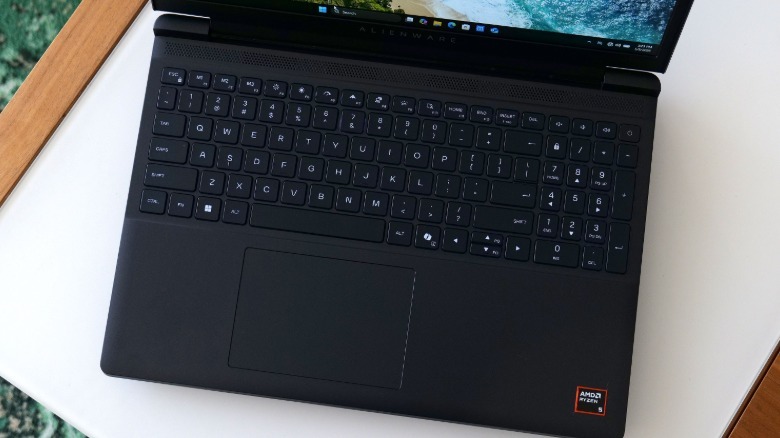
Unlike a lot of modern gaming laptops, Alienware also included a full numpad, which adds even more tools to its arsenal of productivity features. And because the 15 still has a Stealth key, you can disable all of its lighting while activating its Quiet performance mode with a single touch, which would be great for a college student who just wants to take notes without attracting a ton of attention. Another nice detail is that while the config I previewed features a single 16GB stick of DDR5 RAM, there’s a second open SO-DIMM slot inside, so it’ll be very easy to add more down the line.

So far, the Alienware 15’s two small shortcomings are that it doesn’t have any kind of onboard microSD card reader and that its built-in webcam is rather mediocre. Its resolution tops out at 720p at just 30 fps, so it’s not ideal for anyone who needs to look their best on video calls. Initially, I was also a bit concerned with its display topping out at 300 nits of brightness, but I’ve found that unless you’re sitting outside in direct sunlight, visibility generally isn’t an issue.
Regardless, starting at under $1,300 for the base model with an AMD CPU, the Alienware 15 has a lot to offer for a very reasonable price. For comparison, its flagship sibling — the 16-inch Area 51 — costs around $1,000 more. Meanwhile, Alienware’s middle child — the refreshed Aurora 16x — goes for at least $2,000, so at a minimum, you’re looking at an extra $700 there. In a time when the price of seemingly every piece of gaming hardware is getting more expensive, including consoles like the Switch 2, it’s just really nice to see Alienware expanding its portfolio with its first truly affordable gaming notebook. And if you do have a little wiggle room in your budget, you can always upgrade some of its components like its GPU, which can go up to an RTX 5060.

The Alienware 15 is available today on Dell.com.


Source link

Leave a Reply

Subscribe to Our Newsletter

Get our latest articles delivered straight to your inbox. No spam, we promise.

Recent Reviews


Last updated on
Jun 12, 2024

SQLite vs PostgreSQL – Table of Content

What is SQLite? 

SQLite is an auto, file-based, and completely open-source relational database management system (RDBMS) that is noted because of its mobility, reliability, and excellent performance even when in low-memory applications. Even if the system fails or there is a power outage, its transactions are ACID-compliant. The SQLite project touts itself as a “serverless” database on its website. Typical relational database systems are deployed as a server process, with programs communicating with the host server via interprocess communication. SQLite, on the other hand, enables any system that utilizes the databases to read and write directly to the database disc file. This makes it easier to set up SQLite because it eliminates the requirement to set up a server process. Similarly, apps using the SQLite database don’t need to be configured; everything they need is to access.

What is PostgreSQL? 

PostgreSQL, or Postgres, describes itself as “the world’s most sophisticated open-source relational database.” It was built with the intention of being highly expandable and consistent with industry standards. PostgreSQL is indeed an object-relational database, which means that while it’s essentially a relational database, it also has features that are more commonly associated with object databases, such as table inheritance and feature overloading. Concurrency is a feature of Postgres that allows it to efficiently handle numerous processes at the same time. It does so without using read locks because it uses Multiversion Concurrency Control (MVCC), maintains the synchronization, coherence, exclusivity, and durability of its transactions, often known as ACID compliance. Although PostgreSQL isn’t as popular as MySQL, it still has a variety of third-party libraries and tools, such as pgAdmin and Postbird, that make dealing with it easier.

Take your career to next level in PostgreSQL with HKR. Join PostgreSQL online training now

Difference between SQLite and PostgreSQL

However both SQLite & PostgreSQL are available as open Relational Database Management Systems (RDBMS), there may be a few distinctions to consider when picking which one to utilize for your company. The following are the significant distinctions that influence the SQLite vs. PostgreSQL decision:

Database Model
  • SQLite is indeed an embedded database management system. This means it’s a Serverless DBMS that can be used within your apps.
  • To set up and run across a network, the PostgreSQL DBMS uses a Client-Server Model thus needs a Database Server.
Setup Size
  • SQLite is much smaller than PostgreSQL, with a data size of less than 500KB. Its installation files are over 200MB in size.
Data Types Supported
  • INTEGER, NULL, BLOB, TEXT, & REAL are the only data types supported by SQLite. In SQLite, the phrases “data type” and “storage class” are interchangeable.
  • PostgreSQL, on either hand, can store almost any type of information that you could need to put in your database. This could be an INTEGER,  CHARACTER, SERIAL, VARIABLE, or something else entirely.

PostgreSQL Training

  • Master Your Craft
  • Lifetime LMS & Faculty Access
  • 24/7 online expert support
  • Real-world & Project Based Learning
Portability
  • SQLite keeps its database as a single conventional disc file that may be found anywhere in the directory. The file is also saved in a cross-platform form, making copying and moving it a breeze. SQLite is among the most transportable Relational Database Management Systems because of this (RDBMS). PostgreSQL, on either hand, is only portable when the database is exported to something like a file and afterward uploaded to a server. It can be a time-consuming task.
Multiple Access
  • When this comes to user management, SQLite falls short. This also misses the capacity to control several users accessing the system at the same time.
  • PostgreSQL is excellent at managing users. It provides well-defined authorizations for users, which decide which database actions they are allowed to do. It can also support numerous users accessing the system at the same time.
Functionality 
  • Because SQLite is indeed a simple database management system, it includes basic capabilities that are appropriate for all sorts of users. PostgreSQL, on either hand, is a sophisticated database management system with a wide range of capabilities. As a result, users can accomplish a lot more using PostgreSQL than they can with SQLite.
Speed
  • SQLite is quick given the fact that this is a lightweight database management system having simple operations and a minimalist design.
  • PostgreSQL might not have been the best database for quick read queries. This is due to its sophisticated design as well as the reality that this is a large database management system. It is, nevertheless, a robust database management system for conducting complex processes.
Security Features 
  • Authentication is not included with SQLite. Anyone with database access has the capacity to read and modify the database file. It renders it inefficient for storing sensitive and private information. Many security features come included with PostgreSQL. It also necessitates extensive configurations from its users in order for it to be secure. As a result, PostgreSQL is a secure database management system for storing private and sensitive information.
HKR Trainings Logo

Subscribe to our YouTube channel to get new updates..!

Features of SQLite 

  • Small footprint: The SQLite module is quite light, as its name implies. Although the amount of space it takes up fluctuates based on the system on which it is installed, it can be less than 600KiB. Additionally, SQLite is completely self-contained, which means you don’t need to install any extra dependencies for it to work.
  • SQLite is known for being a “zero-configuration” database that is ready to use right out of the box. SQLite doesn’t operate as just a server process, so it doesn’t need to be halted, restarted, or resumed, and it doesn’t arrive with just about any configuration files to handle. These capabilities make the process of installing SQLite and incorporating this with an app much easier.
  • SQLite is an excellent database choice for embedded applications that require portability but do not require future expansion. Single-user local apps, mobile applications, and games are examples.
  • A whole SQLite database is kept in a single file, unlike many other database systems, that often store data as a vast batch of distinct files. This file could be transferred through external devices and file transfer protocol and can be found everywhere in a directory structure.
  • Testing: Using a DBMS that utilizes a dedicated servers process to test the functionality of multiple applications can be excessive. SQLite features an in-memory mode that allows you to run tests rapidly without having to worry about the expense of entire database transactions, making it an excellent choice for testing.
  • SQLite can be used as a disc access alternative in circumstances in which an app wants to study and modify files to disc directly. This is because SQLite has more capability and is simpler to use.

Features of PostgreSQL

  • PostgreSQL, more than SQLite, strives to follow SQL standards to the letter. PostgreSQL offers 160 of the 179 characteristics needed for proper core SQL:2011 compliance, as well as a vast range of optional capabilities, as per the authorized PostgreSQL documentation.
  • Community-driven and open-source: The source code for PostgreSQL is created by a huge and dedicated community as a fully open-source project. Likewise, the Postgres society preserves and provides a number of online resources that explain how to use the database management system, such as the official paperwork, the PostgreSQL website, and several online forums.
  • Extensible: PostgreSQL’s catalog-driven operation and dynamic loading allow users to enhance it dynamically and on the fly. An object code file, including a shared library, can be designated.
  • Data consistency is critical: PostgreSQL has indeed been completely ACID-compliant from 2001 and uses multi-version monetary control to guarantee data consistency, making it an excellent option of RDBMS where data consistency is crucial.
  • PostgreSQL is interoperable with a wide range of computing languages and systems. This means that migrating your database to a different operating system or integrating it with a specific tool will be simpler with such a PostgreSQL database compared with some other database management system.
  • Complex operations: Postgres provides query strategies that make use of several CPUs to speed up query processing. This, together with its extensive support for numerous simultaneous writers, makes it an excellent candidate for data warehousing and other complex tasks.

Click here to get latest PostgreSQL interview questions and answers

PostgreSQL Training

Weekday / Weekend Batches

Conclusion

SQLite and PostgreSQL,  are the most widely used open-source relational database management platforms today. It has its own set of characteristics and limits and shines in specific situations. When choosing an RDBMS, there are many factors to consider, and the decision is rarely as straightforward as selecting the quickest or most feature-rich option. If you require a relational database system in the future, do some study on these and other technologies to identify the one that best fits your needs.

Related Article:


Source link