Free Ways to Recycle Your Old Laptop, PC and Printer This Spring


Most people don’t throw away old electronics –they relocate them. The laptop goes from the desk to the closet, the closet to a storage bin, the bin to the garage, where it joins a growing collection of devices that stopped being useful years ago. It’s a very human response to a decision that feels more complicated than it should be. Where does it go? Does it cost money? What about the data on it? In reality, the answers are simpler than most people expect, and properly getting rid of old tech can usually be done for free in a single afternoon.

Major retailers such as Best Buy and Staples have become drop-off hubs for digital junk. You can walk into a store with a dead PC or a clunky old scanner and hand it over for free, regardless of where you bought it. Some of these places will even give you a discount on new gear or a trade-in credit just for helping them reclaim the heavy metals and plastics that don’t belong in a landfill. It’s the easiest way to recover your storage space without feeling like a jerk for tossing electronics in the trash.

CNET Home Tips badge; click for more

The only real “work” on your end is making sure you aren’t handing over your entire life history along with the hardware. Before you dump a device, you need to do a legitimate data wipe — not just drag files to the trash can. A 10-minute factory reset or a dedicated drive-scrubbing tool ensures your old tax returns and saved passwords don’t become someone else’s property. Stop acting like you’re going to “fix” that laptop from 2015 and let a professional recycler break it down for parts instead.

What to do before you recycle your old computer

Wherever you take or mail in your items to be recycled, you’ll want to protect your data by removing it as best you can. One way to do this is to perform a factory reset on your computer. Our guide walks you through the process.

Where to recycle your old printers and computers

Some retail stores will accept computers and printers for recycling, but it’s not always a free service. Policies vary by company.

Apple

You can recycle your old Apple computers, monitors and peripherals, such as printers, for free at an Apple store, but there’s a costly catch. According to the Apple Free Recycling program, you must purchase a qualifying Apple computer or monitor to receive this service. Need another option? A third-party company called Gazelle buys old MacBooks to recycle them. After accepting Gazelle’s offer, you print a prepaid label or request a prepaid box and ship the machine to them.

Read more: Phone and Laptop Repair Goes Mainstream With Push From iFixit

Best Buy

Best Buy generally accepts up to three household items per household per day to be recycled for free, including desktop computers and printers, as well as other items ranging from e-readers to vacuum cleaners. While three is the limit for most items, there’s a higher limit for laptops — Best Buy will take five of those per household per day. Note that rules for dropping off monitors vary by state, and it’s not always free to do so. Best Buy also offers a mail-in recycling service for select items, but that’s also not free. A small box that holds up to 6 pounds costs $23, while a large box (up to 15 pounds) costs $30. One CNET editor recently lugged in an old, nonworking tube TV-VCR combo for e-cycling, and was happy to pay $30 to be rid of it.

Office Depot 

Office Depot and OfficeMax merged in 2013. The retailers offer a tech trade-in program both in-store and online, where you may be able to get a store gift card in exchange for your old computers and printers. If the device has no trade-in value, the company will recycle it for free. Office Depot also sells e-waste recycling boxes that you can fill with electronics to be recycled and then drop off at the stores, but they aren’t free. The small boxes cost $8.39 and hold up to 20 pounds, the medium ones cost $18.29 and hold up to 40 pounds, and the large boxes cost $28 and hold up to 60 pounds.

Staples 

You can bring your old desktop computers, laptops, printers and more to the Staples checkout counter to be recycled for free, even if they weren’t purchased there. According to a Staples rep, the retailer also has a free at-home battery recycling box, which has led customers to recycle thousands of batteries per week, up from an earlier average of 50 per week. Here’s a list of everything that can be recycled at Staples.

Watch this: Give Your Old Phone a Second Life: The Right Way to Recycle and Reuse It

Where to find electronics recycling centers

If you don’t live near a major retailer or would rather take your computers and printers to a recycling center, you can locate places near you by using search tools provided by Earth911 and the Consumer Technology Association.

Earth911

Use the recycling center search function on Earth911 to find recycling centers near your ZIP code that accept laptops, desktops and printers. Note that the results may also turn up places that accept mobile phones and not computers or printers, so you may have to do a little filtering.

Greener Gadgets

Consult the Consumer Technology Association’s Greener Gadgets Recycle Locator to find local recycling centers in your area that will take old items. The search function also allows you to filter the results to separately hunt for places that take computers versus printers.


Source link

Leave a Reply

Subscribe to Our Newsletter

Get our latest articles delivered straight to your inbox. No spam, we promise.

Recent Reviews


A Brief Introduction to The SAP HANA:

SAP HANA is in-memory management, data-oriented, and relational development management system developed and produced by SAP SE enterprise corporation. The primary function of SAP HANA is to manage database applications, store, and retrieve the data as requested by the enterprises. SAP HANA stands for “High-performance analytic appliances” and is a combination of both hardware and software appliances. This module is a data foundation technology that offers advanced-level data analytical and multi-dimensional management data-driven applications. SAP HANA product written in JAVA, and C programming languages.

  Become a SAP Hana Certified professional by learning this HKR SAP Hana Training 

SAP HANA – Core Architecture

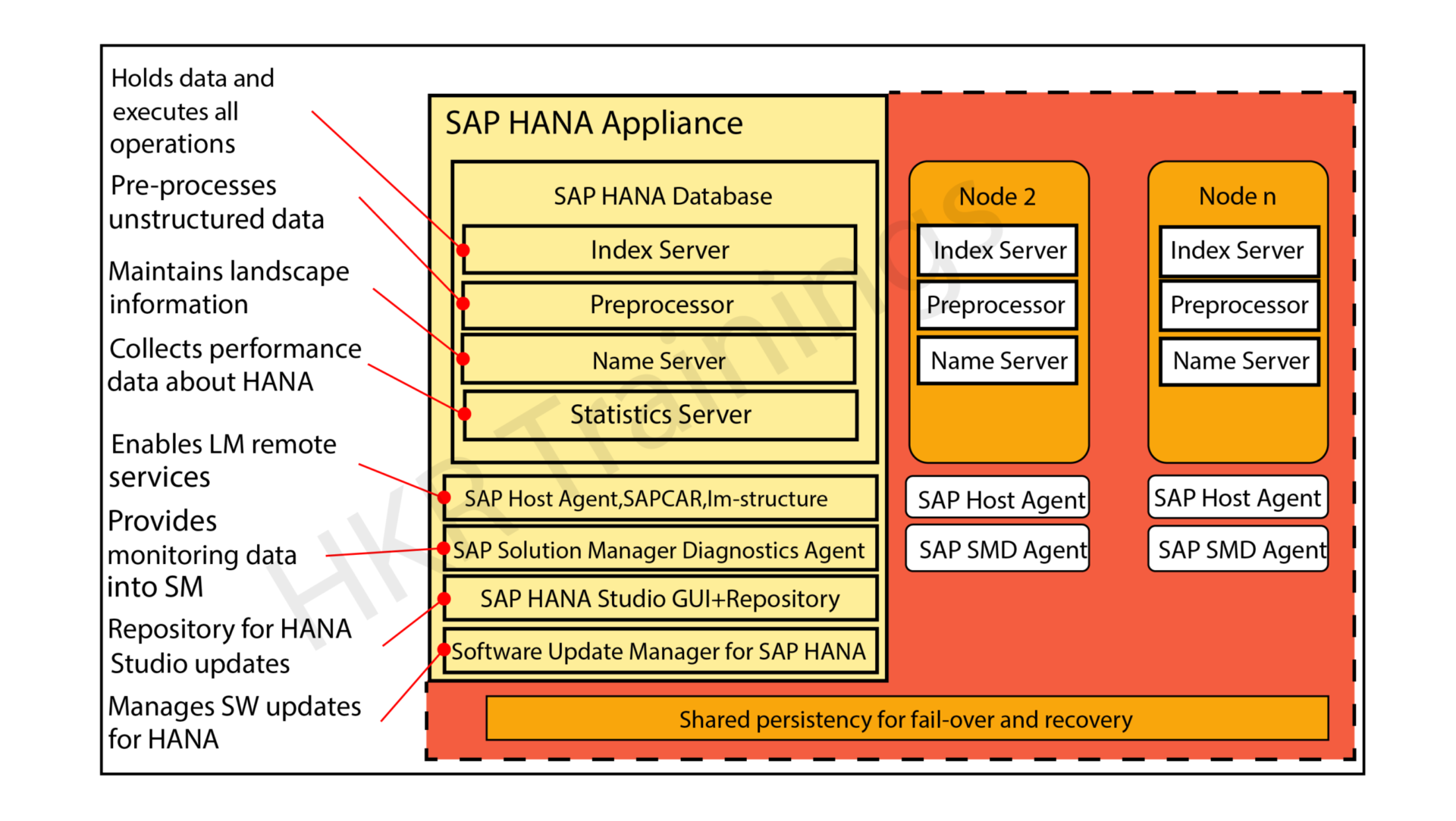
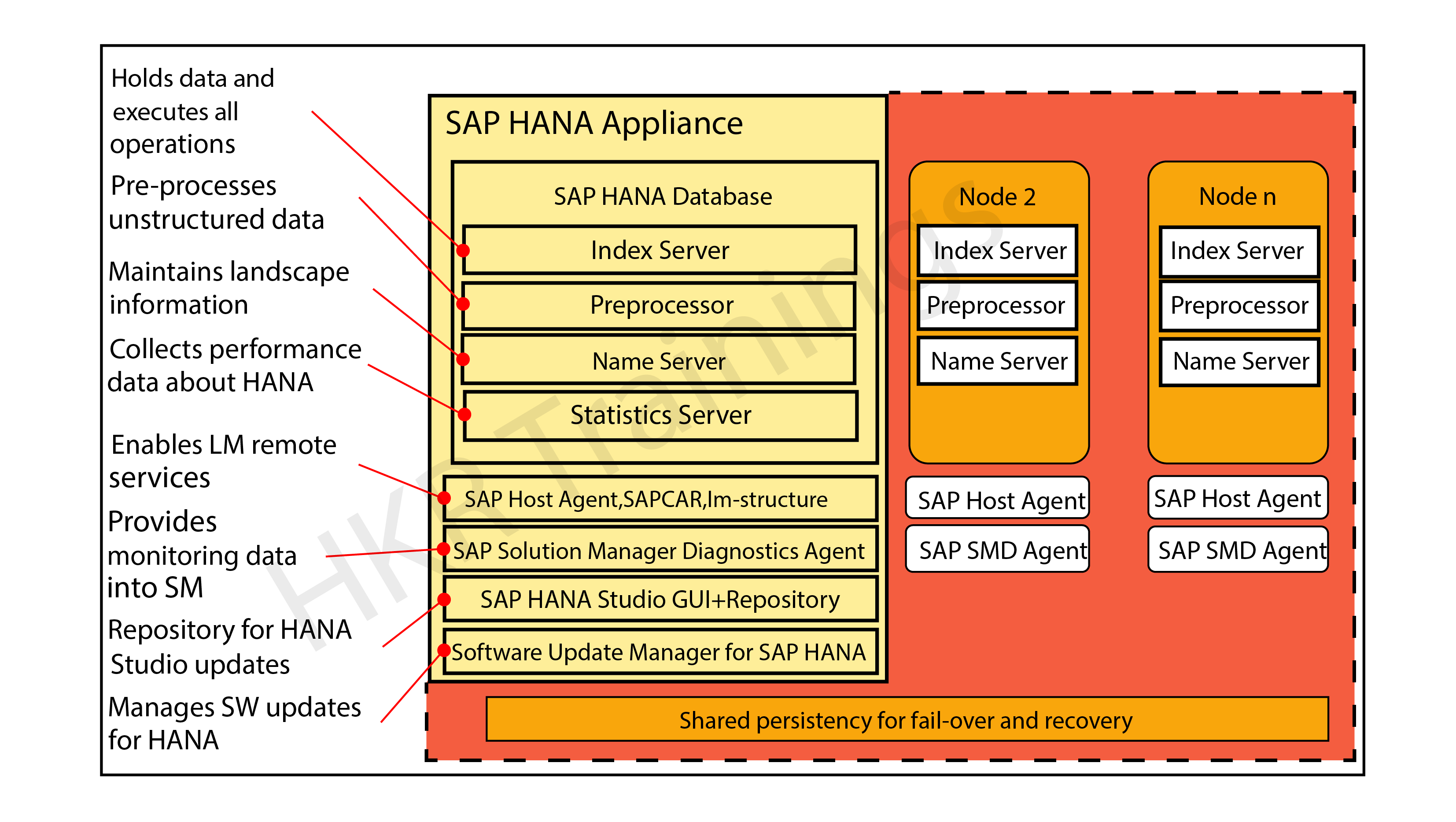
The below diagram explains the core components and work nature of the SAP HANA module:

SAP HANA  Core Architecture

As we already know, the SAP HANA platform is developed with the help of C and JAVA programming languages and designed to run on operations systems like LINUX server enterprise edition 11. Sap HANA consists of multiple components that help to perform many activities. The most important component of SAP HANA architecture is an Index server which consists of an SQL/ MDX processor to handle any type of query statement. The SAP HANA system contains different servers like name servers, statistics servers, XS engines, and preprocessor servers. All these servers are used to communicate and host multiple web applications.

 Let’s know the core components one by one:

Index server:

The index server is an important component of SAP HANA architecture. This server is also known as the heart of the SAP HANA database system. An index server contains the original data and engines to process the data. This type of server takes care of the entire data request and processes them when they are mixed with SQL and MDX. The index server also consists of a data engine to handle all the query statements (SQL/MDX). This also holds a persistent layer used to check the durability of the HANA system and restore the data.

This figure illustrates the overall architecture of the Index server:

Index server

In the above diagram, you can see Index server also consists of a session and transaction manager, this is used to manage transactions and keep tracking of them.

SQL/MDX Processor:

The SQL/MDX processor type is responsible for processing the SQL/MDX data transactions with data engines to run different queries. It requests all the segments to correct the engine for performance optimization. In this processor type, data authorization also handles all types of errors. MDX or multi-dimensional expression is a query language used in OLAP systems like sequential query language and relational database management systems. The planning engine is responsible to run the planning operations within the database. The calculation engine converts the data into calculation models to build logical data execution. The stored processor executes the procedure call to optimize data processing. The persistent layer is also responsible to check durability and atomicity in SAP HANA systems and also manages the data and transaction logs to manage data backup, HANA system configuration, and log backups.

Preprocessor: This component of the SAP HANA architecture enables users to preprocess the data.
Name server: This SAP HANA component allows users to maintain landscape information.
Statistics server: This SAP HANA component collects information about the SAP HANA server.

Check It the Sample Resume SAP HANA SAMPLE RESUME!

Why SAP HANA is so popular?

The following are the important features of SAP HANA that make the technology so popular in the current business platform:

1. SAP HANA acts as an eclipse editor and web-based editor (also known as pick-up and drop services) to support the graphical creation of business applications.

2. Provides Source agnostic data access and integration services that allow accessing and indexing external data from across the entire organization. Add these analytical services to existing analytical models.

3. Real-time data analytical processing can be performed to analyze business operations in real-time using the huge volume of detailed information while business happening.

4. Data can be accumulated from many applications and data sources without disturbing in any way that continuing business operation.

5. View of business information can be carried on in a persistent data repository and built again in case of a crash.

Key benefits of the SAP HANA:

After knowing all the major factors and core architecture of the SAP HANA, now it is time to have a basic idea of the key benefits of the tool. It is necessary to know the importance of the platform before relying on implementation.

Below are the few advantages of SAP HANA:

1. Offers in-memory management: this type of in-memory allows for sophisticated data calculations.

2. Acts as calculation engine: In-memory processing gives more time for relatively slow updates to column data.

3. Provides massively parallel processing: MPP optimized software enables linear performance scaling making sophisticated calculations like allocations possible.

4. Larger storage: The columnar storage increases the amount of data that can be stored in limited memory (compared to disk).

5. Row +Column database: Column databases enable easier parallelization of queries. And Row database provides fast transactional processing.

SAP HANA Tutorials for beginners get started with your SAP carrier 

HKR Trainings Logo

Subscribe to our YouTube channel to get new updates..!

Differences between SAP and SAP HANA:

We think that before getting into the SAP HANA, it is mandatory to know the standard differences between the SAP and SAP HANA. Let us know them one by one:

SAP:

1. SAP is a traditional ECC business enterprise application.

2. In SAP, nearly all the SAP transaction codes are available and there is no concept of data simplification.

3. it’s easy to access all the functional modules of SAP and helps you to create real-time data reporting.

4. Also offers additional performance and the SAP solution also boasts amended transactions.

5. Upgrade to ECC6 enhancement package 7 and then perform a database management activity.

SAP HANA:

1. Helps to rebuilt to capitalize the significant simplification that the SAP HANA platform provides.

2. This is a packaged solution that has SAP ERP at its core optimized to run on the HANA platform.

3. Helps to integrate and leverage various solutions and technologies in SAP arsenal.

4. Achieve data simplification. This is achieved by replacing the core tables within certain processes with a single table.

5. SAP HANA is designed with SAP flori for a richer user experience and is easily configurable on cloud technology.

Different types of SAP HANA system monitors:

The SAP HANA system monitors are used to control various tasks like Log disks, Data Disks, trace disks, and alerts on resource usage.

Let me explain them one by one:

1. System ID: this helps in the ID assigned to the system when added to the studio environment.

2. Operational state: maintains the overall system status.

3. Alerts: This monitor is used to check the system issue alerts when resource usage and thresholds are violated. In general, these alerts are categorized into low, medium, or high priority.

4. Data Disks in (GB): this indicates the size of the data volume available on disk.

5. Log disks in (GB): this indicates the size of the log volume on the disk.

6. Database Resident Memory management: this indicates the size of the memory used in an operating system to manage SAP HANA database processes.

7. Used memory: Here is the amount of physical memory that is used by the SAP HANA database.

8. CPU in (%): This helps to know the percentage of CPU that has been used by the SAP HANA database.

9. Hostname: it indicates the name of the server hosting used in the SAP HANA database.

10. Instance Number: here the Instance number is the administrative unit that consists of the various server software components.

11. System trace disk in GB: it gives the total disk space used on the disk that contains trace files.

12. System physical memory in GB: this gives the total amount of physical memory used.

13. Distributed: this indicates whether the system is running on any single web host or this will be distributed in the system.

14. Start time first: this indicates when the time that first started and value is restarted for any important reason.

15. Versions: this indicates the software versions of the SAP HANA environment studio.

16. Platform: this indicates the different operating systems where the SAP HANA studio is running.

17. Number of crash dump files: here is the number of crash dump files removed in the SAP HANA system.

Top 30 Frequently asked SAP HANA Interview Questions 

SAP Hana Training Certification

Weekday / Weekend Batches

Final words:

SAP ERP market is booming like a rocket and it is a good career choice to pursue your IT profession latest Gartner report. The real reason behind developing this SAP HANA architecture is to get some knowledge concerning workflow and design factors. Reading this post has given our readers a complete idea to learn and explore concepts like Key benefits, reasons for SAP HANA’s popularity, differences between SAP and SAP HANA, and the architecture components. 

Related Articles:

  1. SAP HANA Modules


Source link