Amex and Fanatics launch new partnership and new credit card


American Express and Fanatics are teaming up on a sweeping new partnership that will give sports fans new ways to earn and redeem rewards.

The partnership includes a new Fanatics American Express® Card launching later this year, expanded perks at Fanatics events and retail locations and — perhaps most notably for points and miles enthusiasts — plans for Fanatics to become an American Express Membership Rewards transfer partner within the next year.

Once live, eligible U.S. Membership Rewards cardmembers will be able to transfer Amex points into Fanatics FanCash, Fanatics’ rewards currency that can be redeemed for sports merchandise, trading cards, collectibles and exclusive fan experiences.

The information for the Fanatics American Express has not been reviewed by the card issuer.

Here’s what we know so far.

Fanatics will become a Membership Rewards transfer partner

For current Amex cardholders who are passionate sports fans, the most exciting part of this announcement may be that Fanatics is slated to become the first-ever sports-focused Amex Membership Rewards transfer partner.

U.S. consumer and business cards with Membership Rewards and corporate cards with individual Membership Rewards will be eligible to eventually convert their points into FanCash. FanCash can be redeemed across the Fanatics ecosystem for purchases like officially licensed apparel, trading cards and collectibles, as well as experiences tied to Fanatics events.

Amex says the new transfer partnership will launch within the next year.

American Express Centurion Lounge Seattle
American Express Centurion Lounge in Seattle. ZACH GRIFF/THE POINTS GUY

While Amex has not yet revealed the transfer ratio, this move marks an notable expansion for the Membership Rewards program, which has traditionally focused heavily on airline and hotel transfer partners.

Reward your inbox with the TPG Daily newsletter

Join over 700,000 readers for breaking news, in-depth guides and exclusive deals from TPG’s experts

For many travelers, transferring Membership Rewards points to airline partners will likely continue to provide the most value. However, the addition of Fanatics gives sports fans another redemption option — especially those interested in memorabilia, or exclusive experiences that aren’t accessible with traditional travel rewards.

A new Fanatics American Express Card is coming

The companies also announced plans to launch the new Fanatics American Express Card later this year.

This cobranded card will run on the Amex network and be issued by First Electronic Bank and managed by Imprint.

According to the announcement, the card will offer several sports-focused perks and rewards, including:

  • The ability to earn FanCash on purchases
  • Elevated status and exclusive benefits within the Fanatics ONE loyalty program
  • Access to American Express offers, experiences, benefits and protections

Basketball arena
GORODENKOFF/GETTY IMAGES

FanCash is Fanatics’ digital rewards currency and can be redeemed throughout the Fanatics platform for purchases including sports apparel, trading cards, collectibles and tickets and experiences.

At this point, many of the card’s key details remain unknown, such as:

  • The card’s annual fee
  • Earning rates
  • Welcome bonus details
  • Redemption rates

More details are expected to come in the coming months ahead of the card’s launch.

Amex is becoming Fanatics’ official payments partner

As part of the broader agreement, American Express will also become the Official Payments Partner across select Fanatics online and retail locations globally.

The partnership extends to Fanatics Fest NYC, where Amex will serve as a presenting sponsor for the 2026 event, scheduled for July 16-19 in New York City.

FANATICS

According to the announcement, eligible American Express cardmembers can expect special perks and interactive experiences at the event, though additional details have not yet been released.

The move further expands Amex’s already sizable sports portfolio, which includes partnerships with organizations and events such as the NFL, NBA, WNBA, Formula 1, Wimbledon and the U.S. Open Golf Championship.

Amex’s Fanatics deal reflects a broader rewards shift

This partnership underscores a broader trend in the credit card and loyalty world: rewards programs are increasingly moving beyond traditional travel perks.

Over the past several years, issuers have expanded access to entertainment benefits, dining experiences, concert pre-sales and lifestyle-focused redemptions. By partnering with Fanatics, American Express is leaning even further into experiential rewards aimed at dedicated fans.

The move could also help Amex appeal to consumers who value sports-focused experiences as much as traditional travel redemptions.

Whether the Fanatics American Express Card ultimately becomes compelling will likely depend on its earning rates, annual fee and redemption value — details that are still under wraps.

Bottom line

American Express and Fanatics are launching a broad partnership that will bring a cobranded credit card, exclusive fan perks and (eventually) Fanatics as a Membership Rewards transfer partner.

While key details are still unknown, the move expands Amex’s rewards ecosystem beyond traditional travel and gives sports fans a new redemption option.

Related reading:


Source link

Leave a Reply

Subscribe to Our Newsletter

Get our latest articles delivered straight to your inbox. No spam, we promise.

Recent Reviews


What is XPath in Selenium – Table of Content

What is XPath in Selenium?

Selenium is an open-source, most popular web automation testing tool that supports multiple browsers & OS. XPath in Selenium is an XML Path and a syntax useful for locating an element on a web page. Locating any element on the web page uses XML path or XPath expression. Further, XPath in Selenium is useful for navigating through the HTML structure of the web page. 

Moreover, XPath uses HTML DOM structure to find any element on a web page for both HTML and XML documents. 

The syntax for XPath In Selenium 

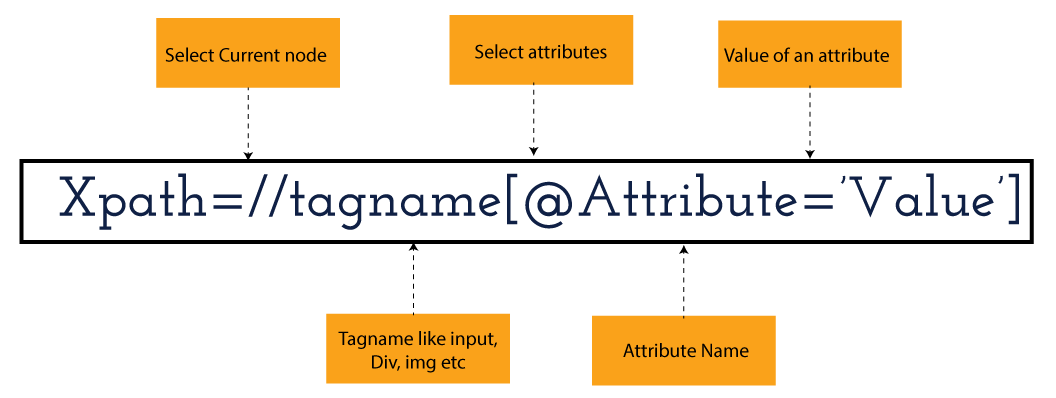
XPath in Selenium holds the element’s location on the web page. The basic syntax for XML Path Selenium is as follows-

Xpath=//tagname[@attribute="value"]

The meaning of each expression in the syntax is-

  • // : Choose the existing node.
  • Tagname: Particular node’s tagname.
  • @: This symbol denotes the “Select” attribute.
  • Attribute: Node’s attribute name.
  • Value: Attribute’s Value.

Become a master of Selenium by going through this HKR Selenium Training!

XML Document

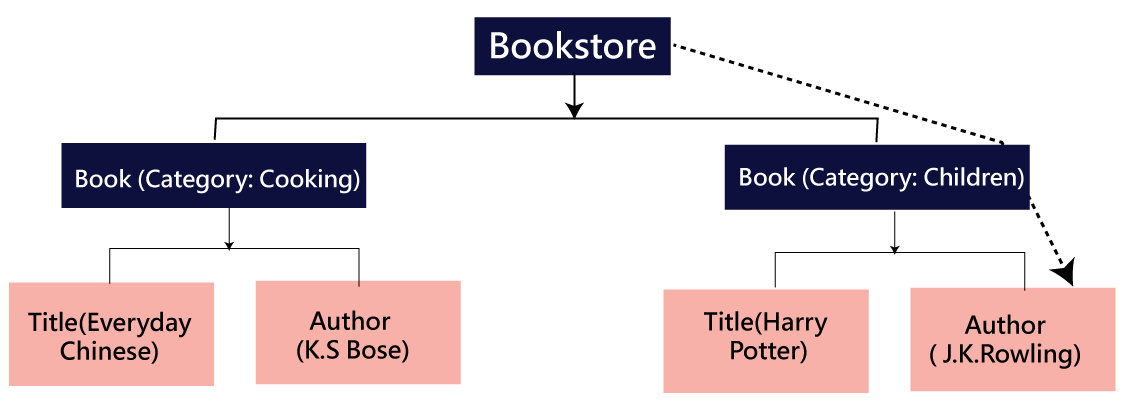
The XML documents are the text files that contain XML data, including elements and other markups, in a sequential package. Further, it can include a wide variety of data such as numbers databases, numbers of a mathematical equation, etc. You can understand XML document with an example:-

 Kumar

   AK & Co.

    032456123

Here, the above code is divided into two parts- Document Prolog & Document Elements. Let us discuss them in brief.

Document Prolog

The document prolog appears at the top of the document, beforE the root document element. It includes XML and Document type declaration. 

Document Elements

These major building blocks of XML segregate the document into different sections. Each of these document sections perform a particular purpose. Moreover, you can easily segregate a document into different sections so that search engines can use it. Further, these document elements can be the containers having text and other elements combined. 

Types of XPath

  1. Absolute XPath:
  2. Relative XPath:
Absolute XPath

In Selenium, the absolute XPath is the direct path to find the element. This Xpath begins with the “/” (Slash) symbol and helps select the element from the root. The major drawback of this XPath is that if you change the path of the element or attribute, the absolute XPath will fail.

Relative XPath:

The Relative XPath in Selenium begins with the double forward slash “//” symbol and from the middle of the HTML DOM. You can search elements anywhere on the web page as it doesn’t need to write a lengthy Xpath. This XPath is mainly considered as it is not a complete path from the root element.

For example: //input[@id=‘ap_email’]

Suppose You launch Google Chrome and navigate to google.com. Then locate the search bar utilising XPath. By analysing the web element there is an input tag and attributes like class and id. Utilise the tag name and given attributes to create XPath that will locate the search bar.

If you want to Explore more about Selenium? then read our updated article – Selenium Tutorial

What-is-xpath-in-Selenium-1

Click the Elements tab and press Ctrl + F to open a search box in chromes developers tool.  Write XPath string selector and it will try to search based on that criteria. In the image given above, it has an input tag.  //input implies tagname. Use the name attribute and pass ‘q’ as its value. It provides XPath expression as shown below:

//input[@name=’q’]

XPath string

It has focused on the element that implies this specific element was located utilising XPath.

If you want to Explore more about Selenium? then read our updated article – Selenium Tutorial!

Check out our Latest Tutorial video. Register Now Selenium Online Course to Become an expert in Selenium.


Acquire Selenium with jenkins certification by enrolling in the HKR Selenium with jenkins Training program in Hyderabad!

Selenium Certification Training

  • Master Your Craft
  • Lifetime LMS & Faculty Access
  • 24/7 online expert support
  • Real-world & Project Based Learning

XPath Functions

Automation utilizing Selenium is unquestionably an incredible innovation which gives numerous approaches to distinguish an article or component on the website page. Be that as it may, in some cases we do deal with issues in recognizing the articles on a page that have similar credits. Some cases can be: components having similar credits and names or with more than one button with similar name and ids. It’s trying to train selenium to distinguish a specific item on a website page and it is the place where XPath functions to serve as the hero. 

Frequently asked Selenium Interview Questions and Answers !!

Types of XPath Functions

Selenium involves different functions. The three of the most broadly utilized functions are given below:

1) Basic XPath

The basic XPath expression selects nodes or a list of many nodes based on various elements or attributes such as ID, Name, ClassName, etc. It selects them from the XML documents. The syntax we can use for the basic XPath is –

Xpath=//input[@name="uid"
2.Contains()

It is a method used in XPath expression when the value of an attribute or element dynamically changes. You can easily find the elements with a partial text using the “Contains” feature in the XPath expression. Now understand this with the below example.:-

Xpath=//*[contains(@type,'sub')]

The above example denotes that the full value of the element type is submitted, but we use the partial text ‘sub’ here to find the element. Thus, in the above example, we tried to find the element by giving a partial text of the attribute “submit”. 

3) Using OR & AND

Here, we use two conditions, first or second condition, among which one condition must be “True” to execute it. This method is still applicable if any one or both conditions are “true”. It means that any conditions should be true to find the element. The expression we can use for this is-

Xpath=//*[@type="submit" or @name="btnReset"]

The above XPath expression will help determine whether a single or both conditions are ‘True’.

Similarly, in the “And” XPath expression, also we use two conditions, but both conditions should be “true” to locate the element. If any one of the conditions becomes “false”, then the expression cannot find the element. The syntax we can use for this function is-

Xpath=//input[@type="submit" and @name="btnLogin"]
4) Xpath Starts-with

The function Xpath-Starts-with() in the Xpath functions is useful to find the element whose attribute value changes in some conditions. Here the value changes with the refresh of the page or by performing dynamic actions on the webpage. In this method, the initial text of the attribute should be in parallel to locate the element whose attribute value changes interactively. 

Further, you can also find the elements whose attribute value doesn’t change or remain static. You can understand this function’s use by the following example:-

Xpath=//label[starts-with(@id,'message')]

The above syntax shows that two different elements start with the initial id “message”. Here, you can use the Xpath-starts with function to check whose attribute value changes or remains static.

Become a master of Selenium by going through this HKR Selenium Training in Delhi!

HKR Trainings Logo

Subscribe to our YouTube channel to get new updates..!

5) XPath Text() Function

In Selenium WebDriver, the function XPath Text() is a built-in function useful to locate elements based on the web element’s text. Using this function, you can find the same text element. Moreover, the elements that you locate must be in a string format.

Xpath=//td[text()='UserID']

Using the above expression having text function, you can locate the element that will show the exact match of the text.

6) XPath axes methods

This method in XPath functions is useful for finding complex or changing elements. However, we can see the following XPath axes methods which we can use:-

  1. a) Following- It is useful to select all the elements in the document of the existing node(). The expression you can use for this method is-
 Xpath=//*[@type="text"]//following::input
  1. b) Ancestor- The ancestor axes method is useful to select all the ancestor elements of the existing node, like parents, grandparents, etc. Here, the expression you can use is-
Xpath=//*[text()='Enterprise Testing']//ancestor::div
  1. c) Child- This axes method selects all the child elements in the documents’ current node. The expression you can use here is-
Xpath=//*[@id='java_technologies']//child::li
  1. d) Preceding- This method helps select the nodes that come before the existing ones. Here is the example expression:-
Xpath=//*[@type="submit"]//preceding::input

The above expression helps to identify all the input elements before the currently given nodes.

  1. e) Following-sibling- This method helps to select the following siblings of the existing node. All the siblings will be equivalent to the existing node, and the method will find the sibling next to the existing node. Moreover, the syntax you can use here for this method is-
xpath=//*[@type="submit"]//following-sibling::input
  1. f) Parent- It helps to select the parent from the existing node of the element. The following is the syntax you can use here.
Xpath=//*[@id='rt-feature']//parent::div

Many div(s) match with the parent, but if you want to focus on a specific element. For this you can use the below xpath syntax-

Xpath=//*[@id='rt-feature']//parent::div[1]
  1. g) Self- In this method, it selects the existing node where it selects itself only. That means the node here is the “self”. The expression you can use for self is-
Xpath =//*[@type="password"]//self::input
  1. h) Descendant- It helps to select the descendants of the existing element where it recognizes all the element descendants of the existing element. 
Xpath=//*[@id='rt-feature']//descendant::a

Selenium Certification Training

Weekday / Weekend Batches

Conclusion

XPath or an XML Path is used to locate any element or navigate through the HTML structure of a webpage. It is generally used for automation purposes and in cases where it is difficult to find elements using locators like name, class, ID, etc. However, it is the most important among the locators useful in Selenium to identify web elements. Also, it is a handy locator for the testers of web pages.

Thus, learning about XPath in Selenium will help you quickly identify a web element on a web page. 

Related Articles:


Source link