Russian Hackers Are Inside American Home Routers. The FBI Has a 5-Step Fix


Most home routers sit in a corner, ignored, and that’s exactly what Russia’s military intelligence unit was counting on. The GRU group known as APT28, responsible for some of the most significant state-sponsored hacks of the past decade, spent years exploiting that neglect, working its way into thousands of home and small office routers across 23 US states and using the access to intercept traffic, steal credentials and build a shadow network of compromised devices. A joint federal advisory issued April 7 outlined the scope of the attack and the court-authorized operation that disrupted it. It also came with a clear instruction: There are five steps every router owner should take immediately.

The attack targeted small-office/home-office routers, also known as SOHO routers, and was carried out by a unit in the Russian military intelligence agency, the GRU. Government agencies are urging people to follow basic router hygiene steps, such as updating to the latest firmware and changing default login credentials. The UK’s National Cyber Security Centre includes a number of TP-Link routers specifically targeted by the hackers.

While that news sounds pretty alarming, it’s worth keeping in mind that the attack compromised enterprise routers specifically, so your home Wi-Fi router likely isn’t at risk. That said, some of the affected routers can be used as standard home routers, so it’s worth checking whether your model was exploited in the attack.

“There is a big trend of exploiting routers these days, and that goes both for the consumer and enterprise or corporate routers,” Daniel Dos Santos, vice president of research at the cybersecurity company Forescout, told CNET.

What type of attack is this?

A news release from the NSA notes that the attack indiscriminately targeted a wide pool of routers, with the goal of gathering information on “military, government, and critical infrastructure.”

This attack is linked to threat actors within the Russian GRU — which go by APT28, Fancy Bear, Forest Blizzard and other names — and has been ongoing since at least 2024, according to the FBI. 

It’s known as a Domain Name System hijacking operation, in which DNS requests are intercepted by changing the default network configurations on SOHO routers, allowing the actors to see a user’s traffic unencrypted. 

“For nation-state actors like Forest Blizzard, DNS hijacking enables persistent, passive visibility and reconnaissance at scale,” says a Microsoft Threat Intelligence report on the attack. 

Microsoft identified more than 200 organizations and 5,000 consumer devices impacted by the GRU’s attack. 

Which routers were affected?

The FBI’s announcement refers to one router specifically, the TP-Link TL-WR841N, a Wi-Fi 4 model that was originally released in 2007. The UK’s National Cyber Security Centre lists 23 TP-Link models that were targeted, but notes that it is likely not exhaustive.

Here is the list of affected devices:

  • TP-Link LTE Wireless N Router MR6400
  • TP-Link Wireless Dual Band Gigabit Router Archer C5
  • TP-Link Wireless Dual Band Gigabit Router Archer C7
  • TP-Link Wireless Dual Band Gigabit Router WDR3600
  • TP-Link Wireless Dual Band Gigabit Router WDR4300
  • TP-Link Wireless Dual Band Router WDR3500
  • TP-Link Wireless Lite N Router WR740N
  • TP-Link Wireless Lite N Router WR740N/WR741ND
  • TP-Link Wireless Lite N Router WR749N
  • TP-Link Wireless N 3G/4G Router MR3420
  • TP-Link Wireless N Access Point WA801ND
  • TP-Link Wireless N Access Point WA901ND
  • TP-Link Wireless N Gigabit Router WR1043ND
  • TP-Link Wireless N Gigabit Router WR1045ND
  • TP-Link Wireless N Router WR840N
  • TP-Link Wireless N Router WR841HP
  • TP-Link Wireless N Router WR841N
  • TP-Link Wireless N Router WR841N/WR841ND
  • TP-Link Wireless N Router WR842N
  • TP-Link Wireless N Router WR842ND
  • TP-Link Wireless N Router WR845N
  • TP-Link Wireless N Router WR941ND
  • TP-Link Wireless N Router WR945N

A TP-Link Systems spokesperson told CNET in a statement that the affected models all reached End of Service and Life status several years ago.

“While these products are outside our standard maintenance lifecycle, TP‑Link has developed security updates for select legacy models where technically feasible,” the spokesperson said. 

TP-Link is urging people with these outdated routers to upgrade to a newer device if possible. You can find a list of available security patches on its security advisory page addressing the recent attack. 

How to keep your router safe

The NSA referred organizations to a list of best practices for securing your home network. The most important thing you can do if you’re using one of the impacted devices is to upgrade your router as soon as possible. It likely hasn’t received firmware updates in years, which is like leaving the door to your network unlocked. 

“The longer you carry on doing that, the greater the risk,” said Rik Ferguson, vice president of security intelligence at Forescout. “The router sits in such a privileged position within any network. All of your communication, all of your traffic, has to pass through that device.”

In addition to using a newer device that’s still getting security updates, there are a few other steps you can take to lock down your network: 

  • Update your firmware regularly: Many networking devices allow you to enable automatic firmware updates in the settings. If this is an option, I’d highly recommend doing it. If it’s not, you can find updates for your router by logging into its web interface or using its app.
  • Reboot your router: The NSA’s guidance recommends rebooting your router, smartphone and computers at least once a week. “Regular reboots help to remove implants and ensure security,” the agency says. 
  • Change default usernames and passwords: One of the most common ways hackers gain access is by trying default, manufacturer-set login credentials. “There’s a whole underground economy that underlies all of that,” says Ferguson. “Basically, they just harvest credentials, either through attacks of their own, or by stockpiling them from other sources and buying them.” This username and password combination is different from your Wi-Fi login, which should also be changed every six months or so. The longer and more random your password, the better
  • Disable remote management: Most regular users don’t need to remotely manage their Wi-Fi router, and this is one of the primary ways threat actors can change your router’s settings without your knowledge. You can typically find this option in your router’s admin settings
  • Use a VPN: The FBI’s announcement on the attack specifically recommends that organizations with remote workers use a VPN when accessing sensitive data. These services encrypt your traffic as it passes through a remote server, keeping it safe from hackers.


Source link

Leave a Reply

Subscribe to Our Newsletter

Get our latest articles delivered straight to your inbox. No spam, we promise.

Recent Reviews


How to open the Power BI service?

The following steps need to be followed to open the Power BI service.

Assuming the left route sheet is imploded, select the nav sheet symbol to grow it.

1. Select Learn and look down to Sample reports. Here is some example information to use for our visit through the Power BI administration. There is a wide range of test information given to you to investigate. This time, we’ll utilize the information about the open-door examination.

2. Select the sample to open it. The Opportunity examination test report begins in the Power BI administration.

3. The Power BI administration introduces the example in your My work area. My work area is your private sandbox for learning and testing. No one but you can see the substance in My work area. Select My work area to see insights concerning this example report.

The example incorporates one report and one dataset. Regularly, business clients will not get datasets, yet this example is intended for all clients, and it includes one.

As a business client, most happy that you are imparted will exclude direct admittance to the hidden datasets. Since the Power BI tests are made for all Power BI clients, datasets are incorporated.

Become a Power BI Certified professional by learning this HKR Power BI Training !

View content (dashboards and reports) :

Content is coordinated inside the setting of a work area. Each business client has no less than one work area, and it’s called My work area. At the point when originator partners share satisfaction with you, you might wind up with extra work areas. For instance, assuming an originator doles out your access consents to one of their work areas, that work area will appear on your Power BI site.

My work area stores all the substances that you own and make. Consider it your sandbox or workspace for your meaning. My work area stays void for some Power BI business clients because your occupation doesn’t include making new happy. Business clients, by definition, consume information created by others and utilize that information to pursue business choices. Assuming you observe that you are making content, consider perusing the Power BI articles for report makers.

A work area is significantly more than an essential posting of content. You can gain some significant experience with the work area’s dashboards and reports on this page.

In this segment of the instructional exercise, we’ll put the Opportunity examination test to the side for some time and take a gander at a work area with both a dashboard and a report. On the off chance that you might want to track, look down to the lower-left corner of the Power BI administration and select Get information > Samples > Sales and Marketing Sample > Connect. Resume My Work area to see your new satisfaction.

A work area is one of the ways into your information. You can open a dashboard or report from a work area by choosing it from the rundown. You can most love a dashboard or report by floating and selecting the star symbol. Assuming that the originator gave you sharing authorizations, you can share from here too.

We should begin by opening a dashboard.

1. Select the name of the dashboard to open it.

2. The dashboard opens in the Power BI administration. Dashboards are something that separates the Power BI administration from Power BI Desktop. Find out about dashboards.

3. The moves you can make on a dashboard are shown in the top menu bar. Select More activities (…) to see the total rundown.

4. The visuals on the dashboard are organized as tiles. Float over a dashboard tile and select More choices (…) to see your options for associating with that tile.

5. Select a dashboard tile to open the report utilized to make that tile. The report extends to the page containing the visual on the tile. Here, I’ve chosen the dashboard tile with the treemap. The Power BI administration opens the YTD Category report page.

Reports have a few areas. On the left is the interactive rundown of report pages. Across the top is the menu bar containing moves you can make with the report. The choices accessible will rely upon the job and authorization the reported architect allocated to you. On the right side is the Filters sheet. Also, the middle material contains the actual report. Like the dashboard, there are moves that you can make for the whole piece, for unique visuals and a solitary report page.

Power BI Training

  • Master Your Craft
  • Lifetime LMS & Faculty Access
  • 24/7 online expert support
  • Real-world & Project Based Learning

Using the left navigation pane :

The nav sheet will be more valuable as associates share satisfaction with you. In this part of the instructional exercise, we’ll take a gander at a dashboard and report that have a place with a Power BI business client who has a ton of shared content.

1. Home is the default greeting page when you sign in to the Power BI administration. Home is an excellent leaping-off point and substitute method for exploring your substance. Content on Home is coordinated in a few distinct ways: by suggested, top choices, later, and applications. The Getting begun area is handy for new clients, with tabs containing tests, documentation, and preparing content. Select a thing to open it.

Home unites the looking and arranging instruments, the nav sheet, and material with cards that you can choose to open your dashboards, reports, and applications. You probably won’t have many cards on your Home material from the outset. However, that will change as you utilize Power BI with your partners. Your Home material likewise refreshes with suggested content and learning assets.

2. Favorites and Recent both have bolted. Select a bolt to see the leading five top picks or five most recently visited content rapidly from the flyout, and select a substance to open it.

Select the word or symbol to see your complete rundown of top choices or recent ones. These substance records give insights into the reports, applications, and dashboards.

See Recents in Power BI and Favorites in Power BI to find out additional.

3. Select Apps to show all applications that have been imparted to you or introduced. Also, select Shared with me to see dashboards and reports imparted to you. These substance regions will be unfilled since you’re simply beginning with the Power BI administration.

Top 50 frequently asked Power BI Interview Questions !

HKR Trainings Logo

Subscribe to our YouTube channel to get new updates..!

Search and sort content :

Whenever you’re new to the Power BI administration, you’ll have a couple of bits of content. As associates start offering a range to you and you start downloading applications, you might wind up with extensive arrangements of content. That is the point where you’ll see looking and arranging incredibly accommodating.

Search is accessible from pretty much all aspects of the Power BI administration. Search for the hunt box or search amplifying glass symbol.

In the Search field, type all or part of the name of a dashboard, report, exercise manual, application, or proprietor. Power BI looks through the entirety of your substance.

There are likewise numerous ways of arranging content. Drift over segment headers and search for bolts showing that the section can be set. Not everything segments can be arranged.

Or on the other hand, search for the Search Filters close to the upper right corner of your substance records. Observe content rapidly by sifting for things like kind of satisfied or proprietor.

Filters

Steps to Create a Quick Report

In the Power BI service’s navigation pane, click the Create button to open a page where you can choose your data source. It’s also available from the New report button on the Home page.

create-entry-point

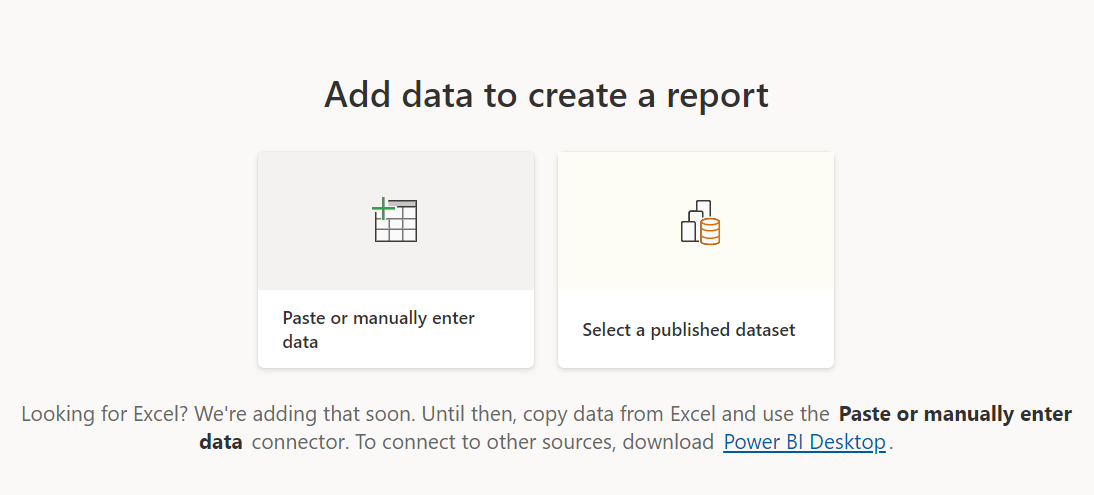
We currently only support creating a report based on an existing dataset or directly typing or pasting data into a table. Other sources, such as uploading an Excel file, will become available over time.

create-source-options

If you choose to type or paste data, you are presented with a grid into which you can begin typing. You can also use Ctrl + V or the context menu to paste data.

create-enter-data-window

Columns can be added and removed using the context menu. Select Use first row as headers if your pasted data contains a header row to promote the first row to the header row automatically. Power BI detects data types automatically, but you can also set them manually. Next to the column name, click the Data type button.

change-data-type

Power BI creates a new dataset for you and autogenerates a summarised view of your data as you go through the creation process. These automatically generated visuals get you from raw data to insights faster than ever before.

select-data-fields-generate-new-visuals

Altering the data in the report is also simple. To add or remove fields from the information, use the Your data pane. Select and deselect areas to change what you want to measure and analyze. Power BI generates meaningful charts based on your field selection.

Want to know more about Power BI,visit here Power BI Tutorial !

Power BI Training

Weekday / Weekend Batches

Conclusion :

Power BI documentation highlights some crucial steps in the complete tutorial or learning of power BI. These steps are straightforward to follow, and Microsoft has released several e-books to document them. If you have any queries, please write back to us.

Related Article :


Source link