Hilton Honors Amex review: Some perks for no annual fee


If you want Hilton perks without paying an annual fee, the Hilton Honors American Express Card (see rates and fees) is the simplest way to get started.

This entry-level Hilton card offers automatic elite status, strong bonus categories and useful travel protections — all for no annual fee. While it doesn’t come with premium statement credits or free night awards, it can deliver solid value for casual Hilton guests.

We recommend that applicants have good to excellent credit to improve their approval odds.

Here’s everything you need to decide if the card is right for your wallet.

Card rating*: ⭐⭐⭐

*Card rating is based on the opinion of TPG’s editors and is not influenced by the card issuer.

Hilton Honors American Express Card: The basics

The Hilton Honors American Express Card is an entry-level option in Hilton’s cobranded card portfolio. It’s best suited for travelers who want to dip their toes into the Hilton Honors program without committing to an annual fee.

The card earns elevated rewards at Hilton properties and in several everyday spending categories, making it accessible for beginners building a Hilton points balance. However, its greatest value lies directly in Hilton stays.

We’ll dive into all the card’s benefits further down, but a few standout features include:

Reward your inbox with the TPG Daily newsletter

Join over 700,000 readers for breaking news, in-depth guides and exclusive deals from TPG’s experts

  • Earning 7 points per dollar spent on eligible purchases made directly with Hilton hotels and resorts
  • Enjoying automatic Silver elite status, which includes a 20% bonus on base points and a fifth night free on award stays
  • Having the opportunity to earn Hilton Honors Gold status after spending $20,000 on your card in a calendar year

ERIC ROSEN/THE POINTS GUY

That said, because it has no annual fee, it also lacks the richer benefits found on Hilton’s higher-tier cards. For example:

The Hilton Honors Amex doesn’t compete with those cards on premium perks, but it also doesn’t charge you to carry it.

Related: 7 ways to redeem points with the Hilton Honors program

Hilton Honors American Express Card pros and cons

Pros Cons

  • No annual fee
  • Automatic Hilton Honors Silver elite status
  • Strong earning rates on Hilton hotels and resorts purchases and those made at U.S. restaurants (including takeout and delivery), U.S. supermarkets and U.S. gas stations
  • No foreign transaction fees (see rates and fees)

  • No annual free night award
  • No statement credits
  • Gold status requires high spending
  • Limited value if you don’t stay at Hilton properties

Hilton Honors American Express Card benefits

As a no-annual-fee card, the Hilton Honors Amex offers a respectable mix of rewards and protections.

Hilton Honors Silver elite status

Cardmembers automatically receive Hilton Honors Silver status, which includes:

  • A 20% bonus on base points earned during paid stays
  • A fifth night free on award stays
  • Elite rollover nights
  • Member-exclusive discounts

The fifth-night-free benefit can significantly boost the value of your points when redeeming for stays lasting five or more nights.

CLINT HENDERSON/THE POINTS GUY

You can earn Hilton Honors Gold elite status through the end of the next calendar year by spending $20,000 in a calendar year. Gold status includes:

  • An 80% bonus on base points earned during stays
  • Complimentary breakfast at select properties
  • Space-available room upgrades

However, it’s worth noting that other Hilton credit cards offer Gold status automatically, so spending $20,000 to reach it isn’t a good value.

Related: Hilton Honors elite status: What it is and how to earn it

Amex experiences

Through Amex Experiences, cardmembers can access exclusive ticket presales and cardmember-only events, including Broadway shows, concert tours and sporting events.

Related: Best ways to use Amex Membership Rewards points, from business-class flights to Europe to budget-friendly hotel stays

Travel and purchase protections

Even without an annual fee, the card includes several protections (terms apply):

  • Extended warranty*: Adds up to one year to an original manufacturer’s warranty of five years or less
  • Purchase protection*: Covers eligible items for up to 90 days against accidental damage or theft (up to $1,000 per covered purchases; up to $50,000 per calendar year)
  • Secondary car rental loss and damage coverage**: Covers damage or theft when you decline the rental company’s insurance

*Eligibility and benefit levels vary by card. Terms, conditions and limitations apply. Visit americanexpress.com/benefitsguide for details. Policies are underwritten by AMEX Assurance Company.

**Eligibility and benefit levels vary by card. Terms, conditions and limitations apply. Visit americanexpress.com/benefitsguide for details. Policies are underwritten by AMEX Assurance Company. Car rental loss or damage coverage is offered through American Express Travel Related Services Company, Inc.

Related: Everything you need to know about American Express purchase protection

How to earn and use your rewards

Earning points on the Hilton Honors Amex

With the Hilton Honors Amex, you’ll earn:

  • 7 points per dollar spent on stays at Hilton hotels and resorts (including paying for your room and on-site spending at restaurants and spas)
  • 5 points per dollar spent at U.S. restaurants (including takeout and delivery)
  • 5 points per dollar spent at U.S. gas stations and U.S. supermarkets
  • 3 points per dollar spent on other eligible purchases

Overwater bungalows at Hilton Moorea
KYLE OLSEN/THE POINTS GUY

Based on TPG’s May 2026 valuation of Hilton points at 0.4 cents apiece, you’ll earn a 2.8% base return at Hilton properties. However, with the bonus points you’ll receive with Silver elite status, you’ll earn 12 points per dollar spent on eligible Hilton purchases on top of your card earnings. This bumps your return to 19 points per dollar, or an impressive 7.6% return on your spending.

Additionally, you’ll receive a 2% return on spending at U.S. supermarkets, U.S. gas stations and U.S. restaurants (including takeout and delivery) and a 1.4% return on all other eligible purchases.

If you’re looking for higher earning opportunities covering a wider swath of travel purchases, including flights and rental cars, you won’t get that with this card. Generally, we don’t recommend using a hotel card for non-hotel purchases unless you’re working toward a welcome bonus or you need to top off your points balance. Instead, consider a transferable points credit card.

Related: Which credit card should you use for Hilton stays?

Redeeming points on the Hilton Honors Amex

You’ll typically get the best value redeeming Hilton points for hotel stays. Award pricing is dynamic, so redemption rates vary by property and date.

The Points Explorer tool can show you what other guests have paid recently, giving you an idea of how much a given award stay might cost.

Algrave Portugal Hilton Conrad
CARLY HELFAND/THE POINTS GUY

You can also transfer your Hilton Honors points to over 25 airline loyalty programs worldwide, but transfer ratios are typically poor. Unless you’re topping off an airline account for a specific award, hotel redemptions will provide better value.

You’ll do even better when you redeem points for a stay of five nights or longer. That’s because you get a fifth night free on points stays, thanks to your Hilton Silver status.

Eric Rosen, TPG’s director of travel content, used the fifth-night-free benefit to maximize the value of his points for a stay at the Waldorf Astoria Los Cabos Pedregal in Mexico. Thanks to this feature, he saved 120,000 Hilton points on his stay.

Related: How (and why) you should earn transferable credit card points

Potential drawbacks to the Hilton Honors American Express Card

Although the Hilton Honors Amex offers solid value for a no-annual-fee card, it’s clearly an entry-level product.

If you want, automatic Gold or Diamond status, annual free night awards, statement credits and higher Hilton earning rates, I recommend looking into Hilton’s mid-tier or premium cards, where you can extract more value — albeit at a cost.

Related: How to choose the best credit card for you

Is the Hilton Honors American Express Card worth it?

You might assume the Hilton Honors Amex is worth it by default since it has no annual fee, but the real question is whether you’ll use its Hilton-specific benefits.

It’s a good fit if you:

  • Stay at Hilton properties at least a couple of times per year
  • Want entry-level elite status without paying a fee
  • Are new to hotel rewards cards
CARLY HELFAND/THE POINTS GUY

It’s less compelling if you:

  • Rarely stay at Hilton properties
  • Want instant premium perks like complimentary breakfast
  • Prefer flexible, transferable points

Related: The best no-annual-fee hotel credit cards

When to apply for the Hilton Honors American Express Card

New Hilton Honors Amex Card members can earn 100,000 bonus points and a $100 statement credit after spending $2,000 on purchases in the first six months of card membership.

According to TPG’s May 2026 valuations, Hilton points are worth 0.4 cents apiece, making the points portion of this welcome offer worth $400. Combined with the $100 statement credit, the offer has a total value of $500.

Man making an online purchase at home
XAVIER LORENZO/GETTY IMAGES

Remember that Amex only allows you to earn one welcome bonus per card, per lifetime, so it’s very important to apply at the right time. Amex will alert you before submitting an application if you’re not eligible for a welcome bonus.

Related: Best time to apply for Hilton American Express cards based on offer history

Other cards to consider if you don’t want the Hilton Honors American Express Card

The Hilton Honors Amex has natural competitors with “Hilton” in their names, but a general travel rewards credit card may also do better in your wallet. Here are a few of the options you should consider.

For additional options, see our list of the best hotel credit cards, the best Hilton credit cards and the best American Express credit cards.

Related: Hilton Surpass vs. Hilton Amex: Is it worth paying $150 for extra perks?

Bottom line

The Hilton Honors American Express Card is best viewed as a no-frills way to earn Hilton points and enjoy entry-level perks without paying an annual fee.

It won’t wow frequent travelers with premium benefits, but for casual Hilton guests who want to earn rewards and unlock the fifth-night-free perk at no cost, it’s a smart, low-risk addition to your wallet.


Apply here: Hilton Honors American Express Card


For rates and fees of the Hilton Honors Amex Card, click here.
For rates and fees of the Hilton Honors Amex Surpass Card, click here.
For rates and fees of the Hilton Honors Amex Aspire Card, click here.


Source link

Leave a Reply

Subscribe to Our Newsletter

Get our latest articles delivered straight to your inbox. No spam, we promise.

Recent Reviews


What is XPath in Selenium – Table of Content

What is XPath in Selenium?

Selenium is an open-source, most popular web automation testing tool that supports multiple browsers & OS. XPath in Selenium is an XML Path and a syntax useful for locating an element on a web page. Locating any element on the web page uses XML path or XPath expression. Further, XPath in Selenium is useful for navigating through the HTML structure of the web page. 

Moreover, XPath uses HTML DOM structure to find any element on a web page for both HTML and XML documents. 

The syntax for XPath In Selenium 

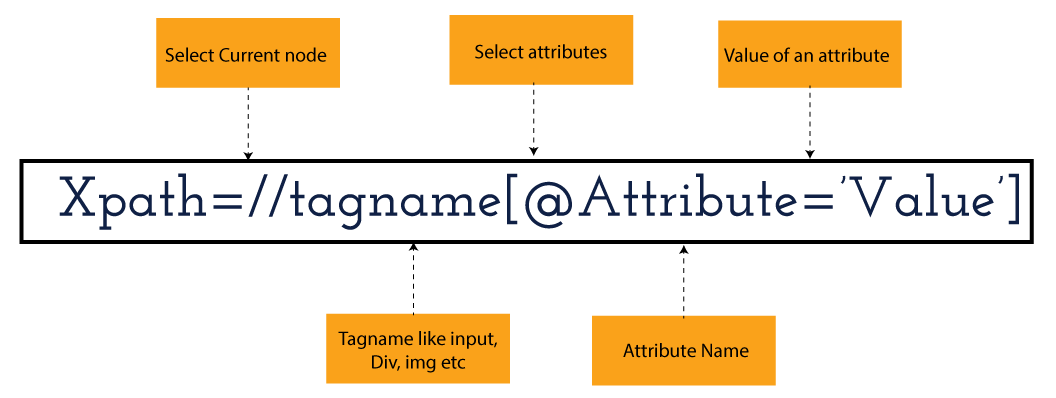
XPath in Selenium holds the element’s location on the web page. The basic syntax for XML Path Selenium is as follows-

Xpath=//tagname[@attribute="value"]

The meaning of each expression in the syntax is-

  • // : Choose the existing node.
  • Tagname: Particular node’s tagname.
  • @: This symbol denotes the “Select” attribute.
  • Attribute: Node’s attribute name.
  • Value: Attribute’s Value.

Become a master of Selenium by going through this HKR Selenium Training!

XML Document

The XML documents are the text files that contain XML data, including elements and other markups, in a sequential package. Further, it can include a wide variety of data such as numbers databases, numbers of a mathematical equation, etc. You can understand XML document with an example:-

 Kumar

   AK & Co.

    032456123

Here, the above code is divided into two parts- Document Prolog & Document Elements. Let us discuss them in brief.

Document Prolog

The document prolog appears at the top of the document, beforE the root document element. It includes XML and Document type declaration. 

Document Elements

These major building blocks of XML segregate the document into different sections. Each of these document sections perform a particular purpose. Moreover, you can easily segregate a document into different sections so that search engines can use it. Further, these document elements can be the containers having text and other elements combined. 

Types of XPath

  1. Absolute XPath:
  2. Relative XPath:
Absolute XPath

In Selenium, the absolute XPath is the direct path to find the element. This Xpath begins with the “/” (Slash) symbol and helps select the element from the root. The major drawback of this XPath is that if you change the path of the element or attribute, the absolute XPath will fail.

Relative XPath:

The Relative XPath in Selenium begins with the double forward slash “//” symbol and from the middle of the HTML DOM. You can search elements anywhere on the web page as it doesn’t need to write a lengthy Xpath. This XPath is mainly considered as it is not a complete path from the root element.

For example: //input[@id=‘ap_email’]

Suppose You launch Google Chrome and navigate to google.com. Then locate the search bar utilising XPath. By analysing the web element there is an input tag and attributes like class and id. Utilise the tag name and given attributes to create XPath that will locate the search bar.

If you want to Explore more about Selenium? then read our updated article – Selenium Tutorial

What-is-xpath-in-Selenium-1

Click the Elements tab and press Ctrl + F to open a search box in chromes developers tool.  Write XPath string selector and it will try to search based on that criteria. In the image given above, it has an input tag.  //input implies tagname. Use the name attribute and pass ‘q’ as its value. It provides XPath expression as shown below:

//input[@name=’q’]

XPath string

It has focused on the element that implies this specific element was located utilising XPath.

If you want to Explore more about Selenium? then read our updated article – Selenium Tutorial!

Check out our Latest Tutorial video. Register Now Selenium Online Course to Become an expert in Selenium.


Acquire Selenium with jenkins certification by enrolling in the HKR Selenium with jenkins Training program in Hyderabad!

Selenium Certification Training

  • Master Your Craft
  • Lifetime LMS & Faculty Access
  • 24/7 online expert support
  • Real-world & Project Based Learning

XPath Functions

Automation utilizing Selenium is unquestionably an incredible innovation which gives numerous approaches to distinguish an article or component on the website page. Be that as it may, in some cases we do deal with issues in recognizing the articles on a page that have similar credits. Some cases can be: components having similar credits and names or with more than one button with similar name and ids. It’s trying to train selenium to distinguish a specific item on a website page and it is the place where XPath functions to serve as the hero. 

Frequently asked Selenium Interview Questions and Answers !!

Types of XPath Functions

Selenium involves different functions. The three of the most broadly utilized functions are given below:

1) Basic XPath

The basic XPath expression selects nodes or a list of many nodes based on various elements or attributes such as ID, Name, ClassName, etc. It selects them from the XML documents. The syntax we can use for the basic XPath is –

Xpath=//input[@name="uid"
2.Contains()

It is a method used in XPath expression when the value of an attribute or element dynamically changes. You can easily find the elements with a partial text using the “Contains” feature in the XPath expression. Now understand this with the below example.:-

Xpath=//*[contains(@type,'sub')]

The above example denotes that the full value of the element type is submitted, but we use the partial text ‘sub’ here to find the element. Thus, in the above example, we tried to find the element by giving a partial text of the attribute “submit”. 

3) Using OR & AND

Here, we use two conditions, first or second condition, among which one condition must be “True” to execute it. This method is still applicable if any one or both conditions are “true”. It means that any conditions should be true to find the element. The expression we can use for this is-

Xpath=//*[@type="submit" or @name="btnReset"]

The above XPath expression will help determine whether a single or both conditions are ‘True’.

Similarly, in the “And” XPath expression, also we use two conditions, but both conditions should be “true” to locate the element. If any one of the conditions becomes “false”, then the expression cannot find the element. The syntax we can use for this function is-

Xpath=//input[@type="submit" and @name="btnLogin"]
4) Xpath Starts-with

The function Xpath-Starts-with() in the Xpath functions is useful to find the element whose attribute value changes in some conditions. Here the value changes with the refresh of the page or by performing dynamic actions on the webpage. In this method, the initial text of the attribute should be in parallel to locate the element whose attribute value changes interactively. 

Further, you can also find the elements whose attribute value doesn’t change or remain static. You can understand this function’s use by the following example:-

Xpath=//label[starts-with(@id,'message')]

The above syntax shows that two different elements start with the initial id “message”. Here, you can use the Xpath-starts with function to check whose attribute value changes or remains static.

Become a master of Selenium by going through this HKR Selenium Training in Delhi!

HKR Trainings Logo

Subscribe to our YouTube channel to get new updates..!

5) XPath Text() Function

In Selenium WebDriver, the function XPath Text() is a built-in function useful to locate elements based on the web element’s text. Using this function, you can find the same text element. Moreover, the elements that you locate must be in a string format.

Xpath=//td[text()='UserID']

Using the above expression having text function, you can locate the element that will show the exact match of the text.

6) XPath axes methods

This method in XPath functions is useful for finding complex or changing elements. However, we can see the following XPath axes methods which we can use:-

  1. a) Following- It is useful to select all the elements in the document of the existing node(). The expression you can use for this method is-
 Xpath=//*[@type="text"]//following::input
  1. b) Ancestor- The ancestor axes method is useful to select all the ancestor elements of the existing node, like parents, grandparents, etc. Here, the expression you can use is-
Xpath=//*[text()='Enterprise Testing']//ancestor::div
  1. c) Child- This axes method selects all the child elements in the documents’ current node. The expression you can use here is-
Xpath=//*[@id='java_technologies']//child::li
  1. d) Preceding- This method helps select the nodes that come before the existing ones. Here is the example expression:-
Xpath=//*[@type="submit"]//preceding::input

The above expression helps to identify all the input elements before the currently given nodes.

  1. e) Following-sibling- This method helps to select the following siblings of the existing node. All the siblings will be equivalent to the existing node, and the method will find the sibling next to the existing node. Moreover, the syntax you can use here for this method is-
xpath=//*[@type="submit"]//following-sibling::input
  1. f) Parent- It helps to select the parent from the existing node of the element. The following is the syntax you can use here.
Xpath=//*[@id='rt-feature']//parent::div

Many div(s) match with the parent, but if you want to focus on a specific element. For this you can use the below xpath syntax-

Xpath=//*[@id='rt-feature']//parent::div[1]
  1. g) Self- In this method, it selects the existing node where it selects itself only. That means the node here is the “self”. The expression you can use for self is-
Xpath =//*[@type="password"]//self::input
  1. h) Descendant- It helps to select the descendants of the existing element where it recognizes all the element descendants of the existing element. 
Xpath=//*[@id='rt-feature']//descendant::a

Selenium Certification Training

Weekday / Weekend Batches

Conclusion

XPath or an XML Path is used to locate any element or navigate through the HTML structure of a webpage. It is generally used for automation purposes and in cases where it is difficult to find elements using locators like name, class, ID, etc. However, it is the most important among the locators useful in Selenium to identify web elements. Also, it is a handy locator for the testers of web pages.

Thus, learning about XPath in Selenium will help you quickly identify a web element on a web page. 

Related Articles:


Source link