Who should (and shouldn’t) get the Chase Sapphire Reserve?


The Chase Sapphire Reserve® (see rates and fees) charges a hefty $795 annual fee — so is it worth adding to your wallet?

For travelers who value luxury perks, it’s likely worth it.

The Sapphire Reserve delivers exceptional value to those ready to maximize its benefits. However, budget-minded travelers may not appreciate what the card offers.

Here’s who might — and might not — want to add the Sapphire Reserve to their wallet.

Key Sapphire Reserve benefits

The Sapphire Reserve is currently offering a stellar welcome bonus to new cardholders.

Right now, new applicants can earn a welcome bonus of 150,000 bonus points after spending $6,000 on purchases in the first three months from account opening.

This bonus is worth $3,075 per TPG’s May 2026 valuations of Chase points, and is an excellent way to earn a substantial amount of points upfront.

hotel pool
ISAAC MAISELMAN/MARRIOTT

When you consider the Sapphire Reserve’s numerous statement credits and perks, it may be easier to justify the high annual fee, especially if you can easily maximize many of them. These include:

  • Annual $300 travel credit
  • Chase Sapphire Lounge access
  • Complimentary subscriptions for Apple TV and Apple Music (through June 22, 2027)
  • Complimentary IHG Platinum Elite status (through Dec. 31, 2027)
  • DoorDash DashPass subscription (activate by Dec. 31, 2027).
  • The Edit hotel credit
  • Global Entry, TSA PreCheck or Nexus application fee credit every four years
  • Lyft in-app credits (earned monthly; through Sept. 30, 2027)
  • OpenTable credit (no prepayment, payment or reservation through OpenTable required)
  • Peloton membership credits (through Dec. 31, 2027)
  • Priority Pass Select membership
  • Spending-incentivized credits, including IHG, Hyatt and Southwest Airlines status and credits with Southwest Airlines and The Shops at Chase
  • StubHub and Viagogo credit (through Dec. 31, 2027; activation required)
  • Travel and purchase protections

Reward your inbox with the TPG Daily newsletter

Join over 700,000 readers for breaking news, in-depth guides and exclusive deals from TPG’s experts

hotel room
WAIKIKI BEACH MARRIOTT RESORT & SPA

And, the card comes with high earning rates to create ongoing value, including:

  • 10 points per dollar spent on eligible Peloton equipment and accessory purchases over $150 (through Dec. 31, 2027)
  • 8 points per dollar spent on all Chase Travel℠ purchases
  • 5 points per dollar spent on Lyft rides (through Sept. 30, 2027)
  • 4 points per dollar spent on flights and hotels booked directly
  • 3 points per dollar spent on dining purchases worldwide
  • 1 point per dollar spent on all other purchases

Purchases that qualify for the annual $300 travel credit will not earn points.

Related: Chase Sapphire Reserve 150,000-point bonus: Your frequent questions answered

Who should get the Sapphire Reserve?

Let’s explore why you may want to add the Sapphire Reserve to your wallet.

People who spend a lot on travel

The Sapphire Reserve’s $300 annual travel credit is very flexible and automatically applies to the first $300 in travel purchases made with the card.

Travel is a broadly defined category on the Sapphire Reserve, so it’s easy for frequent travelers to use. However, it’s worth noting that you won’t earn points on purchases that qualify for the statement credit.

People who value airport lounge access

The Sapphire Reserve grants access to Chase Sapphire Lounges and over 1,300 Priority Pass lounges for cardholders and up to two guests at no charge. When traveling with a Star Alliance airline, cardholders also receive access to Air Canada Maple Leaf lounges.

Chase Sapphire Lounge Philadelphia
ZACH GRIFF/THE POINTS GUY

If you fly frequently in or out of an airport with a Chase lounge or value a Priority Pass membership, this card is the ticket.

People who want luxury hotel perks

Sapphire Reserve cardholders also receive access to The Edit by Chase Travel, Chase’s luxury hotel collection. This program is only open to those who hold a Sapphire Reserve, Chase Sapphire Reserve for Business℠ (see rates and fees) or J.P. Morgan Reserve® Card.

The information for the J.P. Morgan Reserve Card has been collected independently by The Points Guy. The card details on this page have not been reviewed or provided by the card issuer.

If you don’t have elite status with popular programs such as Marriott Bonvoy or Hilton Honors — or you want to stay at boutique properties outside of these programs and still receive perks — The Edit properties provide comparable benefits like complimentary breakfast, early check-in, late checkout and complimentary upgrades (when available).

Plus, the Sapphire Reserve offers up to $500 per calendar year in The Edit credits for stays of two nights or more (split into two up-to-$250 credits that can be used at any time, but not combined).

Cardholders also receive a separate one-time credit of up to $250 for select hotels booked through Chase Travel in 2026.

If you enjoy staying at IHG properties, this card also provides automatic IHG One Platinum elite status (through Dec. 31, 2027). And, if you put $75,000 in spending on the card in a calendar year, you’ll receive IHG One Diamond elite status and World of Hyatt Explorist status.

People who want to maximize point redemptions

Sapphire Reserve cardholders are eligible to redeem Chase points through the Chase Travel portal with the Points Boost accelerator.

With Points Boost, you can redeem your Chase points for select hotel bookings and flights through Chase Travel at a value of up to 2 cents per point; a select number of luxury hotels unlock up to 2.5 cents per point in value. (This depends on the redemption you choose. See your rewards program agreement for full details.)

Nobu Hotel Hilton
CHARLY SIMON/SMALL LUXURY HOTELS OF THE WORLD

With Points Boost, we’ve seen hotels near Disneyland for just 17,000 Chase points a night — instead of 57,000 Marriott Bonvoy points.

People willing to book through Chase Travel to earn more points

If you’re open to booking with the Sapphire Reserve through the Chase Travel portal, you’ll earn 8 points per dollar spent on those purchases. This is double the return you’d receive with the card on flight or hotel bookings made directly with the airline or property (4 points per dollar spent).

If you don’t have elite status or loyalty to a particular airline or hotel, booking with the portal could help you earn more on your booking.

People who have a Chase card that earns cash back

Pairing the Sapphire Reserve with a Chase cash-back card is a smart way to boost your rewards.

That’s because you’ll be able to transfer your points to one of Chase’s loyalty program partners when you also hold the Sapphire Reserve. Transferring to partners allows you to unlock the value of Chase points at 2.05 cents per point, per TPG’s valuations.

If you have a Chase cash-back card — but not one that allows you to transfer Chase points to transfer partners — adding the Sapphire Reserve could be a good option.

These are the other cards that allow you to transfer Chase points to transfer partners:

If you don’t have one of these, it may be a good idea to add the Sapphire Reserve.

woman using a smartphone
ALEXANDR DUBYNIN/GETTY IMAGES

Some cards that pair well with the Sapphire Reserve are:

People who value strong travel protections

The Sapphire Reserve is an excellent card for travel and shopping protections. The card provides trip cancellation and interruption insurance, baggage delay insurance, purchase protection and extended warranty coverage.

Related: The ultimate guide to the best credit card combinations

Who shouldn’t get the Sapphire Reserve?

The Sapphire Reserve is a great choice for many travelers, but it isn’t for everyone. Here are some reasons this card may not be ideal for you.

People who rarely travel

The Sapphire Reserve is designed for frequent travelers. Its flexible annual travel credit and multiple statement credits toward travel-related purchases are geared toward them. Plus, if you don’t need airport lounge access because you aren’t flying much, the Sapphire Reserve likely isn’t the card for you.

People who prefer cash back

The Sapphire Reserve earns Chase Ultimate Rewards points for spending. If you’d prefer cash-back rewards, apply for a card that earns cash back instead.

People who won’t maximize most of the statement credits

The Sapphire Reserve offers a long list of statement credits for various types of spending. This includes up to $300 in annual StubHub and Viagogo credits through Dec. 31, 2027 (up to $150 biannually), up to $300 in annual dining credits with Sapphire Reserve Exclusive Tables (up to $150 biannually) and up to $300 in annual promos with DoorDash through Dec. 31, 2027 (up to $25 in monthly promos).

High angle view of woman passing platter of food to friend during brunch in an outdoor restaurant against beautiful sunlight
D3SIGN/GETTY IMAGES

Maximizing these credits is a sure-fire way to get the full value out of the card in exchange for its high $795 annual fee. However, if you aren’t interested in tracking statement credits or prefer a simpler card, the Sapphire Reserve may not be for you.

People who have applied for 5 or more cards in the last 24 months

Chase’s 5/24 rule prevents those who have opened five or more cards in the last 24 months from being approved for a Chase card.

If you’re over 5/24, you may want to consider another premium card until you’re back under the threshold. The American Express Platinum Card® or Capital One Venture X Rewards Credit Card could be good options instead — or you could wait to submit your Sapphire Reserve application.

As with most premium cards, you may also have trouble qualifying if you’re new to credit entirely.

Bottom line

Despite its high $795 annual fee, the Sapphire Reserve could make an excellent addition to the luxury traveler’s wallet. This is especially true if you’re a frequent traveler who values lounge access, wants to maximize your points redemptions and plans to book through the Chase Travel portal regularly.

Occasional travelers, budget-conscious consumers and those who prefer cash-back rewards would be better with another option.

To learn more, read our full review of the Sapphire Reserve.


Apply here: Chase Sapphire Reserve


Source link

Leave a Reply

Subscribe to Our Newsletter

Get our latest articles delivered straight to your inbox. No spam, we promise.

Recent Reviews


What is XPath in Selenium – Table of Content

What is XPath in Selenium?

Selenium is an open-source, most popular web automation testing tool that supports multiple browsers & OS. XPath in Selenium is an XML Path and a syntax useful for locating an element on a web page. Locating any element on the web page uses XML path or XPath expression. Further, XPath in Selenium is useful for navigating through the HTML structure of the web page. 

Moreover, XPath uses HTML DOM structure to find any element on a web page for both HTML and XML documents. 

The syntax for XPath In Selenium 

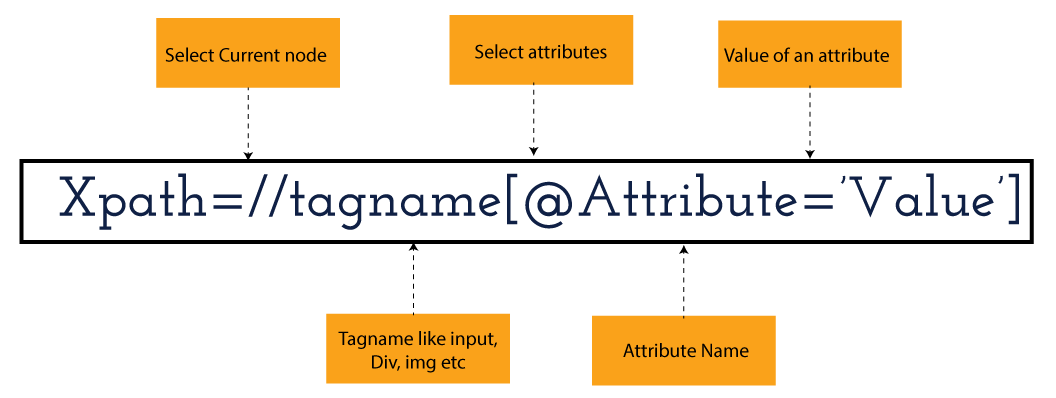
XPath in Selenium holds the element’s location on the web page. The basic syntax for XML Path Selenium is as follows-

Xpath=//tagname[@attribute="value"]

The meaning of each expression in the syntax is-

  • // : Choose the existing node.
  • Tagname: Particular node’s tagname.
  • @: This symbol denotes the “Select” attribute.
  • Attribute: Node’s attribute name.
  • Value: Attribute’s Value.

Become a master of Selenium by going through this HKR Selenium Training!

XML Document

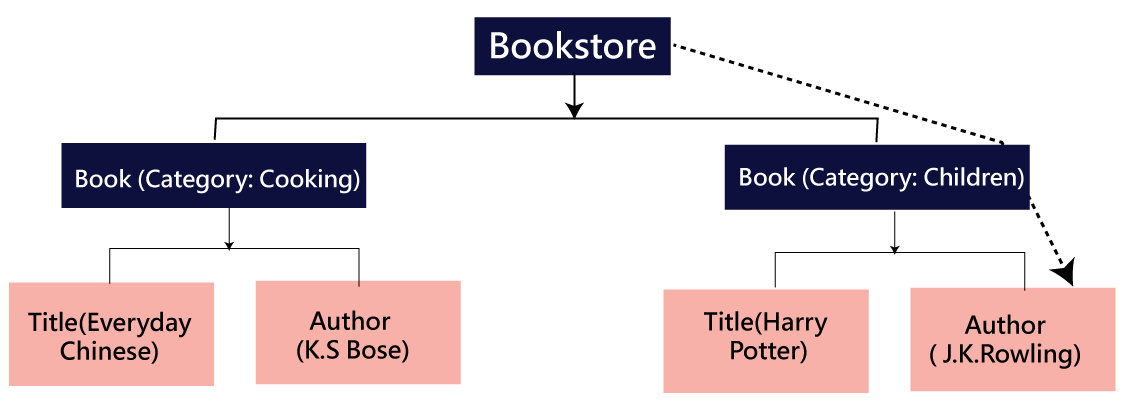
The XML documents are the text files that contain XML data, including elements and other markups, in a sequential package. Further, it can include a wide variety of data such as numbers databases, numbers of a mathematical equation, etc. You can understand XML document with an example:-

 Kumar

   AK & Co.

    032456123

Here, the above code is divided into two parts- Document Prolog & Document Elements. Let us discuss them in brief.

Document Prolog

The document prolog appears at the top of the document, beforE the root document element. It includes XML and Document type declaration. 

Document Elements

These major building blocks of XML segregate the document into different sections. Each of these document sections perform a particular purpose. Moreover, you can easily segregate a document into different sections so that search engines can use it. Further, these document elements can be the containers having text and other elements combined. 

Types of XPath

  1. Absolute XPath:
  2. Relative XPath:
Absolute XPath

In Selenium, the absolute XPath is the direct path to find the element. This Xpath begins with the “/” (Slash) symbol and helps select the element from the root. The major drawback of this XPath is that if you change the path of the element or attribute, the absolute XPath will fail.

Relative XPath:

The Relative XPath in Selenium begins with the double forward slash “//” symbol and from the middle of the HTML DOM. You can search elements anywhere on the web page as it doesn’t need to write a lengthy Xpath. This XPath is mainly considered as it is not a complete path from the root element.

For example: //input[@id=‘ap_email’]

Suppose You launch Google Chrome and navigate to google.com. Then locate the search bar utilising XPath. By analysing the web element there is an input tag and attributes like class and id. Utilise the tag name and given attributes to create XPath that will locate the search bar.

If you want to Explore more about Selenium? then read our updated article – Selenium Tutorial

What-is-xpath-in-Selenium-1

Click the Elements tab and press Ctrl + F to open a search box in chromes developers tool.  Write XPath string selector and it will try to search based on that criteria. In the image given above, it has an input tag.  //input implies tagname. Use the name attribute and pass ‘q’ as its value. It provides XPath expression as shown below:

//input[@name=’q’]

XPath string

It has focused on the element that implies this specific element was located utilising XPath.

If you want to Explore more about Selenium? then read our updated article – Selenium Tutorial!

Check out our Latest Tutorial video. Register Now Selenium Online Course to Become an expert in Selenium.


Acquire Selenium with jenkins certification by enrolling in the HKR Selenium with jenkins Training program in Hyderabad!

Selenium Certification Training

  • Master Your Craft
  • Lifetime LMS & Faculty Access
  • 24/7 online expert support
  • Real-world & Project Based Learning

XPath Functions

Automation utilizing Selenium is unquestionably an incredible innovation which gives numerous approaches to distinguish an article or component on the website page. Be that as it may, in some cases we do deal with issues in recognizing the articles on a page that have similar credits. Some cases can be: components having similar credits and names or with more than one button with similar name and ids. It’s trying to train selenium to distinguish a specific item on a website page and it is the place where XPath functions to serve as the hero. 

Frequently asked Selenium Interview Questions and Answers !!

Types of XPath Functions

Selenium involves different functions. The three of the most broadly utilized functions are given below:

1) Basic XPath

The basic XPath expression selects nodes or a list of many nodes based on various elements or attributes such as ID, Name, ClassName, etc. It selects them from the XML documents. The syntax we can use for the basic XPath is –

Xpath=//input[@name="uid"
2.Contains()

It is a method used in XPath expression when the value of an attribute or element dynamically changes. You can easily find the elements with a partial text using the “Contains” feature in the XPath expression. Now understand this with the below example.:-

Xpath=//*[contains(@type,'sub')]

The above example denotes that the full value of the element type is submitted, but we use the partial text ‘sub’ here to find the element. Thus, in the above example, we tried to find the element by giving a partial text of the attribute “submit”. 

3) Using OR & AND

Here, we use two conditions, first or second condition, among which one condition must be “True” to execute it. This method is still applicable if any one or both conditions are “true”. It means that any conditions should be true to find the element. The expression we can use for this is-

Xpath=//*[@type="submit" or @name="btnReset"]

The above XPath expression will help determine whether a single or both conditions are ‘True’.

Similarly, in the “And” XPath expression, also we use two conditions, but both conditions should be “true” to locate the element. If any one of the conditions becomes “false”, then the expression cannot find the element. The syntax we can use for this function is-

Xpath=//input[@type="submit" and @name="btnLogin"]
4) Xpath Starts-with

The function Xpath-Starts-with() in the Xpath functions is useful to find the element whose attribute value changes in some conditions. Here the value changes with the refresh of the page or by performing dynamic actions on the webpage. In this method, the initial text of the attribute should be in parallel to locate the element whose attribute value changes interactively. 

Further, you can also find the elements whose attribute value doesn’t change or remain static. You can understand this function’s use by the following example:-

Xpath=//label[starts-with(@id,'message')]

The above syntax shows that two different elements start with the initial id “message”. Here, you can use the Xpath-starts with function to check whose attribute value changes or remains static.

Become a master of Selenium by going through this HKR Selenium Training in Delhi!

HKR Trainings Logo

Subscribe to our YouTube channel to get new updates..!

5) XPath Text() Function

In Selenium WebDriver, the function XPath Text() is a built-in function useful to locate elements based on the web element’s text. Using this function, you can find the same text element. Moreover, the elements that you locate must be in a string format.

Xpath=//td[text()='UserID']

Using the above expression having text function, you can locate the element that will show the exact match of the text.

6) XPath axes methods

This method in XPath functions is useful for finding complex or changing elements. However, we can see the following XPath axes methods which we can use:-

  1. a) Following- It is useful to select all the elements in the document of the existing node(). The expression you can use for this method is-
 Xpath=//*[@type="text"]//following::input
  1. b) Ancestor- The ancestor axes method is useful to select all the ancestor elements of the existing node, like parents, grandparents, etc. Here, the expression you can use is-
Xpath=//*[text()='Enterprise Testing']//ancestor::div
  1. c) Child- This axes method selects all the child elements in the documents’ current node. The expression you can use here is-
Xpath=//*[@id='java_technologies']//child::li
  1. d) Preceding- This method helps select the nodes that come before the existing ones. Here is the example expression:-
Xpath=//*[@type="submit"]//preceding::input

The above expression helps to identify all the input elements before the currently given nodes.

  1. e) Following-sibling- This method helps to select the following siblings of the existing node. All the siblings will be equivalent to the existing node, and the method will find the sibling next to the existing node. Moreover, the syntax you can use here for this method is-
xpath=//*[@type="submit"]//following-sibling::input
  1. f) Parent- It helps to select the parent from the existing node of the element. The following is the syntax you can use here.
Xpath=//*[@id='rt-feature']//parent::div

Many div(s) match with the parent, but if you want to focus on a specific element. For this you can use the below xpath syntax-

Xpath=//*[@id='rt-feature']//parent::div[1]
  1. g) Self- In this method, it selects the existing node where it selects itself only. That means the node here is the “self”. The expression you can use for self is-
Xpath =//*[@type="password"]//self::input
  1. h) Descendant- It helps to select the descendants of the existing element where it recognizes all the element descendants of the existing element. 
Xpath=//*[@id='rt-feature']//descendant::a

Selenium Certification Training

Weekday / Weekend Batches

Conclusion

XPath or an XML Path is used to locate any element or navigate through the HTML structure of a webpage. It is generally used for automation purposes and in cases where it is difficult to find elements using locators like name, class, ID, etc. However, it is the most important among the locators useful in Selenium to identify web elements. Also, it is a handy locator for the testers of web pages.

Thus, learning about XPath in Selenium will help you quickly identify a web element on a web page. 

Related Articles:


Source link