How you can book a hotel room with an airplane factory view


The Hyatt Regency Lake Washington at Seattle’s Southport sits on the shore of Lake Washington and offers views of downtown Seattle and the Olympic Mountains.

It also sits right next to Boeing’s Renton Production Facility, which currently operates around the clock to push out more than 40 737-MAX narrow-body airplanes every month.

hyatt regency renton
HYATT REGENCY LAKE WASHINGTON

Other hotels might try to downplay the fact that some of their rooms have a factory view, but staff at this Hyatt Regency property know that AvGeeks make a point of checking into this hotel and requesting the corner king rooms specifically for the views.

From their rooms, these guests can see freshly made planes sitting outside the hangar waiting for finishing touches before heading next door to the Renton Municipal Airport (RNT) for their test flights.

boeing factory view
HARRIET BASKAS FOR THE POINTS GUY

The proximity to the factory has long been considered a niche, under-the-radar amenity at this property. But now, the hotel is leaning into the experience with a special “Hangar Hideaway” package.

The package includes a guaranteed lake-view room overlooking the factory and a selection of aviation-themed welcome amenities (such as a tote bag, a rubber 3D airplane puzzle and Balsa wood stunt planes).

Four passes to Seattle’s Museum of Flight are also included in the package. The museum is about 20 minutes from the hotel, and it houses the first Boeing 737 ever built. That plane was constructed in 1966, took its first flight April 9, 1967, and was sold to NASA in 1974.

SEATTLE MUSEUM OF FLIGHT

Why create an aviation-themed package now?

This resort-style hotel opened in 2017 in the Seattle suburb of Renton. Guests can expect to see seaplanes dock by the outdoor deck, and they can enjoy summertime activities such as kayaking, paddleboarding and floating pickleball.

lake view Hyatt Regency Renton
A view of Lake Washington from the dock at the Hyatt Regency in Renton. SEAN CUDAHY/THE POINTS GUY

The Hangar Hideaway package comes in response to “a growing guest interest in experiential travel that connects people more deeply with place,” Tayna Zasada, the hotel’s director of sales, events and marketing, said. “And our prime lakeside location offers a unique vantage point to take in aviation thrills right from your room or our dock.”

Reward your inbox with the TPG Daily newsletter

Join over 700,000 readers for breaking news, in-depth guides and exclusive deals from TPG’s experts

In addition to the aviation-themed welcome gifts and museum passes, guests booking this new package receive a welcome letter detailing some of the history of the Renton plant. (Fun fact: It began producing aircraft in the early 1940s and, for a few years in the late 1940s, served as a temporary home for a circus, complete with elephants and other animals.)

The letter also offers some insight into what is happening with the aircraft visible outside the windows, including those taking their very first flights.

“These brand-new aircraft are easy to spot,” the letter tells guests, because they have “a distinctive green color before their final paint.”

Boeing factory view at night
HARRIET BASKAS FOR THE POINTS GUY

Guests who stay up late at night are encouraged to “glance toward the factory after 10 p.m.” That is because “during the overnight shift, aircraft are sometimes quietly moved out of the hangar — a unique behind-the-scenes moment few get to see.”

Unlike Boeing’s factory in Everett, Washington — which houses the 777 and 777X assembly lines — there are no public tours at the Renton factory.

Hangar Hideaway hotel guests at the Hyatt Regency in Renton might get a glimpse inside the hangar late at night when the giant doors are rolled open to move out an airplane. But this report from TPG contributing editor David Slotnick, who toured the plant in 2022, offers great inside-the-factory views.

For a unique perspective, check out Matthew Herbert’s Blue Dingo Bricks Instagram account.

Herbert is a Boeing aircraft structures mechanic currently working on the 777X program in Everett; he previously worked for about three years as a mechanic on the 737 MAX program in Renton.

“I loved working there and knew from the second I walked in, I wanted to combine my love for Boeing aircraft with my second interest: Lego,” Herbert told TPG.

Digital LEGO
MATTHEW HERBERT

Since 2021, Herbert has been working on recreating the Boeing Renton factory using Lego digital brick building software.

“You are not restricted to the large amount of space you might need otherwise to build the design,” he said about why he chose to go digital. “You also have an unlimited number of bricks and pieces to play with and can easily swap parts out.”

Booking your visit

You can use the code “TAKEOFF” to book the Hangar Hideaway package at the Hyatt Regency Lake Washington at Seattle’s Southport.

Because the package is an exclusive hotel offer, you cannot book it with World of Hyatt redemption points or certificates.

Hyatt Regency Renton
Hyatt Regency Lake Washington at Seattle’s Southport in Renton, Wash. SEAN CUDAHY/THE POINTS GUY

If you do want to use points or a certificate and are willing to skip the bonus amenities, you can book a King Lake View corner room and request a view of the Boeing factory.

Related: Hyatt’s new award charts have arrived — here are our first impressions

Note that on May 20, the hotel changed from Category 3 to Category 4 in the World of Hyatt program. The redemption range for Category 4 hotels starts at 12,000 points and peaks at 25,000 points.


Source link

Leave a Reply

Subscribe to Our Newsletter

Get our latest articles delivered straight to your inbox. No spam, we promise.

Recent Reviews


What is XPath in Selenium – Table of Content

What is XPath in Selenium?

Selenium is an open-source, most popular web automation testing tool that supports multiple browsers & OS. XPath in Selenium is an XML Path and a syntax useful for locating an element on a web page. Locating any element on the web page uses XML path or XPath expression. Further, XPath in Selenium is useful for navigating through the HTML structure of the web page. 

Moreover, XPath uses HTML DOM structure to find any element on a web page for both HTML and XML documents. 

The syntax for XPath In Selenium 

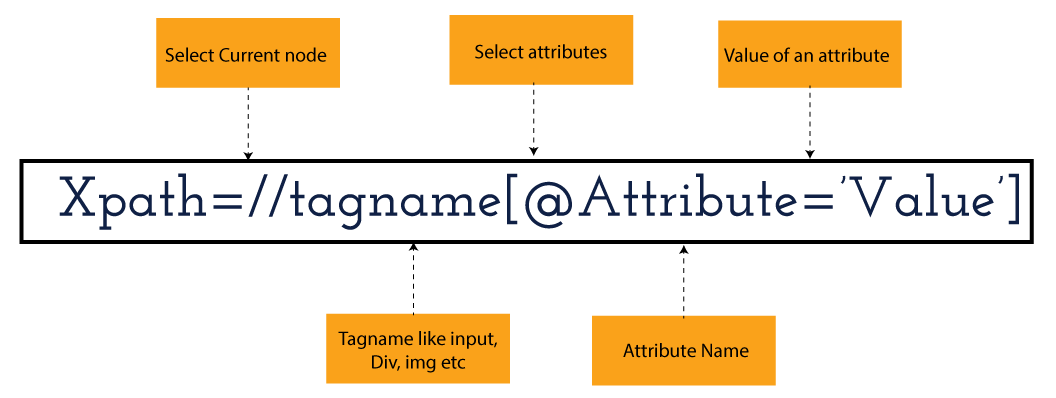
XPath in Selenium holds the element’s location on the web page. The basic syntax for XML Path Selenium is as follows-

Xpath=//tagname[@attribute="value"]

The meaning of each expression in the syntax is-

  • // : Choose the existing node.
  • Tagname: Particular node’s tagname.
  • @: This symbol denotes the “Select” attribute.
  • Attribute: Node’s attribute name.
  • Value: Attribute’s Value.

Become a master of Selenium by going through this HKR Selenium Training!

XML Document

The XML documents are the text files that contain XML data, including elements and other markups, in a sequential package. Further, it can include a wide variety of data such as numbers databases, numbers of a mathematical equation, etc. You can understand XML document with an example:-

 Kumar

   AK & Co.

    032456123

Here, the above code is divided into two parts- Document Prolog & Document Elements. Let us discuss them in brief.

Document Prolog

The document prolog appears at the top of the document, beforE the root document element. It includes XML and Document type declaration. 

Document Elements

These major building blocks of XML segregate the document into different sections. Each of these document sections perform a particular purpose. Moreover, you can easily segregate a document into different sections so that search engines can use it. Further, these document elements can be the containers having text and other elements combined. 

Types of XPath

  1. Absolute XPath:
  2. Relative XPath:
Absolute XPath

In Selenium, the absolute XPath is the direct path to find the element. This Xpath begins with the “/” (Slash) symbol and helps select the element from the root. The major drawback of this XPath is that if you change the path of the element or attribute, the absolute XPath will fail.

Relative XPath:

The Relative XPath in Selenium begins with the double forward slash “//” symbol and from the middle of the HTML DOM. You can search elements anywhere on the web page as it doesn’t need to write a lengthy Xpath. This XPath is mainly considered as it is not a complete path from the root element.

For example: //input[@id=‘ap_email’]

Suppose You launch Google Chrome and navigate to google.com. Then locate the search bar utilising XPath. By analysing the web element there is an input tag and attributes like class and id. Utilise the tag name and given attributes to create XPath that will locate the search bar.

If you want to Explore more about Selenium? then read our updated article – Selenium Tutorial

What-is-xpath-in-Selenium-1

Click the Elements tab and press Ctrl + F to open a search box in chromes developers tool.  Write XPath string selector and it will try to search based on that criteria. In the image given above, it has an input tag.  //input implies tagname. Use the name attribute and pass ‘q’ as its value. It provides XPath expression as shown below:

//input[@name=’q’]

XPath string

It has focused on the element that implies this specific element was located utilising XPath.

If you want to Explore more about Selenium? then read our updated article – Selenium Tutorial!

Check out our Latest Tutorial video. Register Now Selenium Online Course to Become an expert in Selenium.


Acquire Selenium with jenkins certification by enrolling in the HKR Selenium with jenkins Training program in Hyderabad!

Selenium Certification Training

  • Master Your Craft
  • Lifetime LMS & Faculty Access
  • 24/7 online expert support
  • Real-world & Project Based Learning

XPath Functions

Automation utilizing Selenium is unquestionably an incredible innovation which gives numerous approaches to distinguish an article or component on the website page. Be that as it may, in some cases we do deal with issues in recognizing the articles on a page that have similar credits. Some cases can be: components having similar credits and names or with more than one button with similar name and ids. It’s trying to train selenium to distinguish a specific item on a website page and it is the place where XPath functions to serve as the hero. 

Frequently asked Selenium Interview Questions and Answers !!

Types of XPath Functions

Selenium involves different functions. The three of the most broadly utilized functions are given below:

1) Basic XPath

The basic XPath expression selects nodes or a list of many nodes based on various elements or attributes such as ID, Name, ClassName, etc. It selects them from the XML documents. The syntax we can use for the basic XPath is –

Xpath=//input[@name="uid"
2.Contains()

It is a method used in XPath expression when the value of an attribute or element dynamically changes. You can easily find the elements with a partial text using the “Contains” feature in the XPath expression. Now understand this with the below example.:-

Xpath=//*[contains(@type,'sub')]

The above example denotes that the full value of the element type is submitted, but we use the partial text ‘sub’ here to find the element. Thus, in the above example, we tried to find the element by giving a partial text of the attribute “submit”. 

3) Using OR & AND

Here, we use two conditions, first or second condition, among which one condition must be “True” to execute it. This method is still applicable if any one or both conditions are “true”. It means that any conditions should be true to find the element. The expression we can use for this is-

Xpath=//*[@type="submit" or @name="btnReset"]

The above XPath expression will help determine whether a single or both conditions are ‘True’.

Similarly, in the “And” XPath expression, also we use two conditions, but both conditions should be “true” to locate the element. If any one of the conditions becomes “false”, then the expression cannot find the element. The syntax we can use for this function is-

Xpath=//input[@type="submit" and @name="btnLogin"]
4) Xpath Starts-with

The function Xpath-Starts-with() in the Xpath functions is useful to find the element whose attribute value changes in some conditions. Here the value changes with the refresh of the page or by performing dynamic actions on the webpage. In this method, the initial text of the attribute should be in parallel to locate the element whose attribute value changes interactively. 

Further, you can also find the elements whose attribute value doesn’t change or remain static. You can understand this function’s use by the following example:-

Xpath=//label[starts-with(@id,'message')]

The above syntax shows that two different elements start with the initial id “message”. Here, you can use the Xpath-starts with function to check whose attribute value changes or remains static.

Become a master of Selenium by going through this HKR Selenium Training in Delhi!

HKR Trainings Logo

Subscribe to our YouTube channel to get new updates..!

5) XPath Text() Function

In Selenium WebDriver, the function XPath Text() is a built-in function useful to locate elements based on the web element’s text. Using this function, you can find the same text element. Moreover, the elements that you locate must be in a string format.

Xpath=//td[text()='UserID']

Using the above expression having text function, you can locate the element that will show the exact match of the text.

6) XPath axes methods

This method in XPath functions is useful for finding complex or changing elements. However, we can see the following XPath axes methods which we can use:-

  1. a) Following- It is useful to select all the elements in the document of the existing node(). The expression you can use for this method is-
 Xpath=//*[@type="text"]//following::input
  1. b) Ancestor- The ancestor axes method is useful to select all the ancestor elements of the existing node, like parents, grandparents, etc. Here, the expression you can use is-
Xpath=//*[text()='Enterprise Testing']//ancestor::div
  1. c) Child- This axes method selects all the child elements in the documents’ current node. The expression you can use here is-
Xpath=//*[@id='java_technologies']//child::li
  1. d) Preceding- This method helps select the nodes that come before the existing ones. Here is the example expression:-
Xpath=//*[@type="submit"]//preceding::input

The above expression helps to identify all the input elements before the currently given nodes.

  1. e) Following-sibling- This method helps to select the following siblings of the existing node. All the siblings will be equivalent to the existing node, and the method will find the sibling next to the existing node. Moreover, the syntax you can use here for this method is-
xpath=//*[@type="submit"]//following-sibling::input
  1. f) Parent- It helps to select the parent from the existing node of the element. The following is the syntax you can use here.
Xpath=//*[@id='rt-feature']//parent::div

Many div(s) match with the parent, but if you want to focus on a specific element. For this you can use the below xpath syntax-

Xpath=//*[@id='rt-feature']//parent::div[1]
  1. g) Self- In this method, it selects the existing node where it selects itself only. That means the node here is the “self”. The expression you can use for self is-
Xpath =//*[@type="password"]//self::input
  1. h) Descendant- It helps to select the descendants of the existing element where it recognizes all the element descendants of the existing element. 
Xpath=//*[@id='rt-feature']//descendant::a

Selenium Certification Training

Weekday / Weekend Batches

Conclusion

XPath or an XML Path is used to locate any element or navigate through the HTML structure of a webpage. It is generally used for automation purposes and in cases where it is difficult to find elements using locators like name, class, ID, etc. However, it is the most important among the locators useful in Selenium to identify web elements. Also, it is a handy locator for the testers of web pages.

Thus, learning about XPath in Selenium will help you quickly identify a web element on a web page. 

Related Articles:


Source link