Pope Leo XIV makes historic apology for Vatican's role in legitimizing slavery


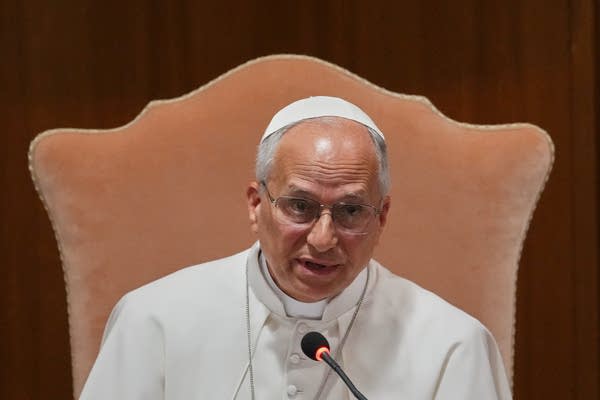
Pope Leo XIV speaking during a presentation

Pope Leo XIV made a historic apology on Monday for the role the Holy See played in legitimizing slavery and for having failed to condemn it for centuries, calling the Vatican’s record a “wound in Christian memory.”

Past popes have apologized for Christians’ involvement in the trans-Atlantic slave trade. But no pope had ever publicly acknowledged, much less apologized for, the role that past popes played in giving European sovereigns explicit authority to subjugate and enslave “infidels.”

History’s first U.S.-born pope, whose family history includes both enslaved people and slave owners, delivered the apology in his first encyclical, “Magnifica Humanitas,” (Magnificent Humanity), which was released Monday.

The sweeping manifesto is about safeguarding humanity in an era of increasing reliance on artificial intelligence. Leo raised the trans-Atlantic slave trade in relation to what he called the new forms of slavery and colonialism that the digital revolution is fueling, such as the unregulated labor practices in procuring rare minerals needed for AI chips.

Anthea Butler, senior fellow at the Koch History Center, Oxford University, said Leo needed to acknowledge and atone for the Catholic Church's complicity in historic slavery if he wanted to credibly “speak to the current issues of technological enslavement.”

“For descendants of enslaved persons, this is once again a much needed apology from the pope,” said Butler, who is Black.

Black American Catholics, activists and scholars have long called for the Holy See to atone for its role in the colonial-era trade in human beings, beyond more generic apologies for the involvement of individual Christians.

“It is impossible not to feel deep sorrow when contemplating the immense suffering and humiliation endured by so many in stark contrast to their immeasurable dignity as persons infinitely loved by the Lord,” Leo wrote. “For this, in the name of the church, I sincerely ask for pardon.”

Centuries of legitimizing slavery for European colonizers

The Vatican has insisted that it always upheld the dignity of all human beings as children of God. But a series of 15th-century directives from the Vatican authorized Portuguese sovereigns to conquer Africa and the Americas and enslave non-Christians.

In 1452, for example, Pope Nicholas V issued the papal bull Dum Diversas, which gave the Portuguese king and his successors the right “to invade, conquer, fight and subjugate” and take all possessions — including land — of “Saracens, and pagans, and other infidels, and enemies of the name of Christ” anywhere.

The bull also gave the Portuguese permission “to reduce their persons to perpetual slavery.”

That bull and another issued three years later, Romanus Pontifex, formed the basis of the Doctrine of Discovery, the theory that legitimized the colonial-era seizure of land in Africa and the Americas.

Nicholas V’s permissions to the Portuguese were confirmed or renewed by Pope Callixtus III in 1456, Pope Sixtus IV in 1481 and Pope Leo X in 1514, according to the Rev. Christopher J. Kellerman, a Jesuit priest and author of “All Oppression Shall Cease: A History of Slavery, Abolitionism, and the Catholic Church.”

Spanish kings received the rights for the Americas.

In 2023, the Vatican formally repudiated the Doctrine of Discovery, but it never formally rescinded, abrogated or rejected the bulls themselves. The Vatican insists that a later bull, Sublimis Deus in 1537, reaffirmed that Indigenous peoples shouldn’t be deprived of their liberty or the possession of their property, and weren't to be enslaved.

Holy See late to condemn slavery, Leo says

In his encyclical, Leo recalled that his namesake, Pope Leo XIII, was the first pope to explicitly condemn slavery in 1888, long after many countries had abolished it. Before that, in antiquity and the Middle Ages, even church institutions had slaves.

In acknowledging the Holy See’s role and the 15th-century papal bulls, Leo wrote in his encyclical: “Already in the early modern period, the Apostolic See of Rome, responding to the requests of sovereigns, intervened several times in order to regulate and legitimize forms of subjugation, and, in certain cases, including the enslavement of ‘infidels.’”

Leo said that it wasn't possible to judge the morality of the decisions with today’s standards.

“Yet neither can we deny or diminish the delay with which both society and the church came to denounce the scourge of slavery,” he said.

The pope said that the church has long affirmed the dignity of every human being as the basis of its doctrine, “even if it took eighteen centuries for its full incompatibility with slavery to be explicitly recognized.”

“This constitutes a wound in Christian memory, one from which we cannot consider ourselves detached,” he said.

Leo said that the church must firmly condemn all forms of trafficking related to the digital technological revolution “if we want to avoid the need to ask for pardon again in the future for having failed to respect the treasure of human dignity that is required by our faith.”

Leo’s own family history and past apologies

Kellerman, the scholar, welcomed Leo’s apology but said more needs to be done to further acknowledge and atone for how the Catholic Church legitimized and expanded slavery.

“Pope Leo has strengthened the moral credibility of the church with this admission and apology today,” he told The Associated Press. “Hopefully a future document will explain in more detail the church’s involvement with slaveholding. As a scholar I have some quibbles with the wording, but this is a truly remarkable moment.”

During a 1985 visit to Cameroon, St. John Paul II asked forgiveness of Africans for the slave trade on behalf of Christians who participated in it. In a 1992 visit to Goree Island, Senegal, which was the largest slave-trading center in West Africa, he denounced the injustice of slavery and called it a “tragedy of a civilization that called itself Christian.”

According to genealogical research published by Henry Louis Gates Jr., 17 of Leo’s American ancestors were Black, listed in census records as mulatto, Black, Creole or a free person of color. His family tree includes slaveholders and enslaved people, Gates wrote in The New York Times.

During a visit to Angola last month, Leo prayed at a Catholic shrine at the site of an important hub of the African slave trade during Portugal’s colonial rule. While at the Sanctuary of Mama Muxima, Leo recalled the “sorrow and great suffering” Angolans endured for centuries, but he didn’t refer specifically to slavery.




Source link

Leave a Reply

Subscribe to Our Newsletter

Get our latest articles delivered straight to your inbox. No spam, we promise.

Recent Reviews


Exception Handling in SQL Server – Table of Content

Introduction to Exception handling in SQL server:

An Exception is nothing but an error mechanism that occurs in any program during the time of program execution.The methods used to resolve these errors are called Exception handling. Now Exception handling methods are widely used in the SQL Server because it’s easy to use methodology.There are several Exception handling available in SQL servers such as TRY and CATCH methods.We will be going to explain these sections later. SQL server 2005 has introduced the new Exception handling methods to help programs to run effortlessly and error-free. Sometimes it difficult to capture the errors which occurred during the time of end programming execution. Even user needs to know these kinds of mistakes happened in the end-users with programming codes.

To gain in-depth knowledge with practical experience in SQL server, then explore  SQL server Training!

TRY and CATCH methods:

SQL server 2005 has introduced these two methods to handle exceptions, such as TRY and CATCH. Both these TRY and CATCH statements work similarly to any other programming language. First, this statement is executed in the SQL server statement, which the user has written in the TRY block. If the Error occurred again, then TRY will automatically get executed the CATCH block.

EXAMPLE:

BEGIN TRY # executing first the TRY statement
// now insert the SQL statements
END TRY # ending of TRY statement
Now it’s time to execute the CATCH statement
BEGIN CATCH # executing the CATCH statement
// now this statement handle the exception details
END CATCH # ending of CATCH statement
The following are the numbers of Error handling property statements in the TRY…CATCH statements;
ERROR_NUMBER () # handling the Error in NUMBER property
ERROR_STATE () # handling the Error in STATE property
ERROR_SEVERITY () # handling the SEVERITY errors
ERROR_LINE () # handling the errors in LINE property
ERROR_PROCEDURE () # handling the PROCEDURAL errors
ERROR_MESSAGE () # handling the Message errors

NOTE: Normally, SQL Server stores the Error as a message; this Error has occurred in the execution of the following statement table;
Select * from sys.messages

HANDLING EXCEPTION using TRY AND CATCH statements:

In this section, I am going to explain the steps involved in handling the Exception using TRY and CATCH statements,

Steps:

Step1: user need to create the Custom error table with the name “Error Tracer,”

Step2: user needs to write the common stored procedure for handling the current Exception in the table name Proc_InsertErrorDetails, which helps the user insert the error details into the given step1 created table already.

Step3: Now, need to write a simple procedure and execute the exception handling statement using TRY……CATCH. When you get the errors, it will automatically call the Procs_InsertErrorDeatils and inserts the Error details.

Step4: Now, it’s time to check the ErrorTracer table that will list out all the occurred error details.

Programming example:

USE [Northwind] #create the NorthWind table 
GO
IF OBJECT_ID (‘databaseobject.ErrorTarcer’) IS NOT NULL value
BEGIN
DROP TABLE database object.ErrorTracer
PRINT ‘Table database object.ErrorTarcer Dropped’
END
GO

CREATE TABLE ErrorTracer
(
…………………
…………………# inserting table values
…………………..
)

IF OBJECT_ID (‘Proc_InsertErrorDetails’) IS NOT NULL

BEGIN
DROP PROCEDURE [databaseobject]. [Proc_InsertErrorDetails]
PRINT ‘procedure Proc_InsertErrorDetails Dropped’
END
GO

Syntax of Exception Handling:

TRY BLOCK
SET of SQL Statement
Throws error
> CATCH BLOCKS
Handling Exception
(Error log, Rollback)
The code is as follows;
/* SQL statements*/
END TRY #end of the try statement
BEGIN CATCH # start of the BEGIN statement
Print ERROR OR
ROLLBACK Transaction
END CATCH

In this Exception handling, SQL statements were inserted into try Blocks. If all the inserted statements were executed without any error, then the try statement ‘OK’ will go to the CATCH Block.

Types of SQL server Exceptions:

There are two types of SQL server Exceptions available; such as

  • System defined Exception handling
  • User-defined Exception handling

 Let us discuss them one by one,

System defined Exception handling:

The system defined Exception handling is the system generates nothing but Exceptions.

Example:

Declare @Valu1 int;
Declare @Valu2 int;
BEGIN TRY
Set @Valu1 = 9;
Set @Valu2 = @Valu1/0; /*Error has occurred */
END TRY
BEGIN CATCH
Print ‘An error occurred:’
Print Error_Message () /* property of exception handling
END CATCH

OUTPUT:
An Error Occurred
Divided by Zero error encountered

User-Defined Exception handling:

This type of Exception is generated by the users, not by any system.

SQL Server Certification Training

  • Master Your Craft
  • Lifetime LMS & Faculty Access
  • 24/7 online expert support
  • Real-world & Project Based Learning

Programming example:

Declare @valu1 int;
Declare @valu2 int;
BEGIN TRY
Set @valu1 = 9;
Set @Valu2 = @Valu1 % 2;
If @Valu1 = 1
Print ‘Error Not occurred’
Else
BEGIN
Print ‘Error Occurs’;
Throw 80000, ‘Number is even’, 5
End

END TRY
BEGIN CATCH
Print ‘Error occurs that is: ‘
Print Error_Message ()
END CATCH

Output:

Error occurs
The Error occurs that is:
Number is even

Here 80000 denote the error number, and 5 represents the state where the error message has occurred.

System functions and keywords used within the CATCH block:

Now we are going to explain the few programming examples to define these functions and system keyword;
First, we need to create a table and enter some value into the table as follow;

CREATE TABLE emp
(
Emp_ID int Identify (1,1),
First_name Nvarchar (MAX) not Nullval,
Last_name Nvarchar (MAX) not Nullval,
Salary Int Not Null check (Salary > 20,000),
City Nvarchar (max) Not Nullval
)
Insert data into the table values;
Select ‘Kavya,’ ‘Gowda,’ 50000, ‘Alwar’ Union ALL
Select ‘Rahul,’ ‘chowdary,’ 25000, ‘Alwar’ Union ALL
Select ‘Sandeep,’ ‘Prajapati,’ 23000, ‘Alwar’ Union ALL
Select ‘Sanjeev,’ ‘Jangid,’ 27000, ‘Alwar’ Union ALL
Select ‘Neeraj,’ ‘Baldia,’ 24000, ‘Alwar’ Union ALL
Select ‘Narendra,’ ‘Saini,’ 22000, ‘Alwar’ Union ALL
è Now it’s time to execute the ‘SELECT’ statements by using the command,
Select * from Employee
Serl.no
Emp_id
First_name
Last_name
Salary
City

1
1
Kavya
Gowda
50000
Alwar

2
2
Rahul
Chowdary
25000
Alwar

3
3
Sandeep
Prajapat
23000
Alwar

4
4
Sanjeev
Jangid
27000
Alwar

5
5
Neeraj
Baldia
24000
Alwar

6
6
Narendra
Saini
22000
Alwar

Exception handling properties:

Example1: @ERROR;

This statement returns the error number for the last executed SQL statements. It returns zero if the previous transaction SQL statements were encountered, and it will not return an error number.

UPDATE Employee SET Salary = 20000 WHERE Emp_ID = 5
IF @ERROR = 547
PRINT ‘A check constraints violation error occurred. ‘;

Output:
Msg 557, level 14, State 0, Line 1

The UPDATE statement conflicted with the method CHECK constraint ‘CK_Employee_salary_68487DD7’.

Example 2: ERROR_NUMBER

This Exception handling property returns the number values which causes the errors. It would replace the ZERO if we called outside the CATCH block statement.

BEGIN TRY
UPDATE Employee SET salary_val = 20000 WHERE Emp_ID = 6
END TRY
BEGIN CATCH
SELECT ERROR_NUMBER () AS errorNumber;
END CATCH;

OUTPUT:
ERRORNUMBER = 557

Example 3:

ERROR_MESSAGE returns the errors which are caused by the messages. This returns the type of ERROR_MESSAGE is the type of nvarchar (5000).

BEGIN TRY
UPDATE Employee SET Salary =20000 WHERE EMP_ID = 6
END TRY
BEGIN CATCH
SELECT ERROR_MESSAGE () AS ERRORMSG;

END CATCH;

OUTPUT:
The UPDATE statement conflict the CHECK Constraint ‘CK_EMPLOYEE_SALARY_68487DD7’. This conflict method will be stored in HOME_MANAGMENT.

EXAMPLE 4: ERROR_STATE

ERROR_STATE returns the number of state errors. The data type of ERROR_STATE is Integer.

BEGIN TRY
SELECT SALARY+ FIRST _NAME from EMPLOYEE WHERE Emp_ID = 6
END TRY
BEGIN CATCH
SELECT ERROR_STATE () AS ERRORState, ERROR_MESSAGE () ErrorMSG;
END CATCH;

OUTPUT:

ErrorState = 1
ErrorMsg = Conversion failed error message where it returns the value in Nvarchar.

Example 5: ERROR_LINE

ERROR_LINE exception handling returns the line number where the Error has occurred. The return type of ERROR_LINE is Integer.

BEGIN TRY
SELECT SALARY + First_name from Employee WHERE EMP_ID = 6
END TRY
BEGIN CATCH
SELECT ERROR_STATE () As ErrorLine;
END CATCH;

OUTPUT:
ErrorLine = 1

Example 6: ERROR_PROCEDURE

ERROR_PROCEDURE returned the name of the stored triggers and procedure when an error occurred. The return type is ERROR_PROCEDURE is nvarchar (128).

Join our BMC Marimba training today and enhance your skills to new heights!

HKR Trainings Logo

Subscribe to our YouTube channel to get new updates..!

RETURN VALUE:

Return Value Returns the stored procedure Name if any Error has occurred in the stored procedure or trigger once the CATCH statement is blocked.

It returns the NULL value if the Error does not occur within a stored procedure or any type of trigger that is called outside the CATCH block.

The code is as follows;

CREATE procedure My_prnc
AS
BEGIN TRY
SELECT SALARY + First_Name FROM Employee Where Emp_ID = 6
END TRY
BEGIN CATCH
SELECT ERROR_PROCEDURE () As Prnc;
END CATCH;
END

OUTPUT:
01. Exec My_Prnc,

Prnc:
My_Prnc

Example 7: ERROR_SEVERITY

ERROR_SEVERITY returns the severity of the Error. The data type of ERROR_SEVERITY is Int.

The code is as follows;

BEGIN TRY

SELECT SALARY + First_Name from Employee WHERE EMP_ID = 6

END TRY

BEGIN CATCH

SELECT ERROR_SEVERITY () AS ErrorSeverity;

END CATCH;

OUTPUT:

ErrorSeverity

16

The severity level of the error message provides an indication of error type that occurred in Microsoft SQL Server. In the below example the Severity level is 15 so the system will give you a message like Permission denied.

Some Important Severity levels are;
Serial.no of severity
Description

13
Which indicates the transaction deadlock errors

14
Indicates the security-related error levels, by that time system will generate an error message like permission denied

15
This severity indicates the syntax error in the form of Transact-SQL command

16
This severity level indicates the general errors that will be corrected by the user

TRANSACTION management in Exception handling

This is a very important type of exception handling; let’s get into the full details

BEGIN TRANSACTION Trans
BEGIN TRY
DELETE From Employee Where Employee. Emp_ID <4
UPDATE EMPLOYEE SET Employee. First_Name = ‘Kavya’ where Employee. EMP_ID = ‘5
IF @@TRANSCount > 0
BEGIN COMMIT Transaction Transt
END
END TRY
BEGIN CATCH
If @@TransCount > 0
Print ‘ERROR is occurred in Transaction’
BEGIN Rollback Transaction Transt
END
END CATCH
SELECT *FROM Employee

OUTPUT:
Serial number
Emp_id
First_name
Last_name
Salary
City

1
1
Kavya
Gowda
50000
Alwar

2
2
Rahul
Chowdary
25000
Alwar

3
3
Sandeep
Prajapat
23000
Alwar

4
4
Sanjeev
Jangid
27000
Alwar

5
5
Neeraj
Baldia
24000
Alwar

6
6
Narendra
Saini
22000
Alwar

Top 30 frequently asked Maximo Interview Questions!

SQL Server Certification Training

Weekday / Weekend Batches

INSIGHT:

In this article, I have explained the important concepts about Exception handling in SQL server. The Exception is nothing but Errors that occur during the time of programming execution.The mechanism which is used to handle the Errors is called Handling. And also I have explained the properties and types of the Exception handling mechanism in the SQL server.I hope this article may help a few of you to learn the important concepts of Error handling and also enables you to communicate with experts across the world via social forums.

Related Articles:

1. Isolation Levels in SQL Server

2. SQL Server Joins

3. SQL Server Data Tools


Source link