▶ SAP EWM Tables | 17 Most Important tables [2023]


SAP EWM Tables – Table of Content

Introduction to SAP EWM :

SAP EWM is a crucial functional module that is pivotal in helping organizations manage their inventories and streamline the movement of goods within their warehouse operations. This advanced software solution offers a complete suite of functions. It includes handling inbound and outbound delivery processes, (GR) receipt of goods, order success, and efficient goods distribution.

SAP EWM Tables:

SAP EWM tables deal with the storage for key warehouse management and stock control data. The EWM tables play a vital role in ensuring the smooth functioning of warehouse activities. Here, we will delve into the various categories of SAP EWM tables and provide brief descriptions for each:

1) Stock

  • /SCWM/AQUA: Describes available quantity.
  • /SCWM/QUAN: Defines quant attributes.
  • /LIME/NQUAN: Details LIME quantity attributes.
  • /SCWM/STOCK_IW01: Manages stock key material (WME).
  • /SCWM/STOCK_IW02: Manages stock key material with batch (WME).
  • /SCWM/STOCK_IW03: Manages stock key material with batch and reference documents (WME).
  • /SCWM/STOCK_IW04: Manages stock key material with sales order and project (WME).

Become a master of SAP EWM by going through this HKR SAP EWM Online Training! 

SAP EWM Training

  • Master Your Craft
  • Lifetime LMS & Faculty Access
  • 24/7 online expert support
  • Real-world & Project Based Learning

2) Warehouse Task

  • /SCWM/ORDIM_C: Defines confirmed warehouse tasks.
  • /SCWM/ORDIM_CS: Specifies serial numbers for confirmed warehouse task items.
  • /SCWM/ORDIM_E: Specifies exception codes for warehouse tasks.
  • /SCWM/ORDIM_H: Manages warehouse task movements for handling unit (HU) items.
  • /SCWM/ORDIM_HS: Handles serial numbers for HU item movements.
  • /SCWM/ORDIM_L: Logs warehouse task information.
  • /SCWM/ORDIM_LS: Logs serial numbers for warehouse task entries.
  • /SCWM/ORDIM_O: Open warehouse tasks.
  • SCWM/ORDIM_OS: It handles serial number items for available warehouse tasks.
  •  

3) Transportation Unit

  • /SCWM/TU_DLV: Describes the assignment of deliveries and HUs to transportation units.
  • /SCWM/TU_DOOR: Assigns transport units to doors.
  • /SCWM/TUNIT: Defines transportation units.
  • /SCWM/TU_SR_ACT: Specifies S and R activities of transportation units.
  • /SCWM/TU_STATUS: Manages the status of transportation unit activities.
  • /SCWM/TU_VEH: Assigns transport units to vehicles.
  • /SCWM/DOOR_SRACT: Defines S & R activities of doors.
  •  

4) Wave

  • /SCWM/WAVEHDR: Manages wave header data.
  • /SCWM/WAVEITM: Contains wave item data.
  •  

5) Outbound Delivery

  • /SCDL/DB_DLVH_O: Handles outbound delivery header data.
  • /SCDL/DB_DLVI_O: Manages outbound delivery item details.
  • /SCDL/DB_PROCH_O: Oversees outbound delivery order header.
  • /SCDL/DB_PROCI_O: Manages outbound delivery order items.
  •  

6) Inbound Delivery

  • /SCDL/DB_PROCH_I: Manages inbound delivery header information.
  • /SCDL/DB_PROCI_I: Details inbound delivery item information.

Interested in learning python Join HKR Python certification training! 


7) References

  • /SCDL/DB_REFDOC: Determines reference information.
  • /SCDL/DB_REQH: Defines header information for inbound delivery notifications or outbound delivery requests.
  • /SCDL/DB_REQI: Manages item information for inbound delivery notifications or outbound delivery requests.
  •  

8) Handling Units (HUs)

  • /SCWM/HUHDR: Oversees handling unit header information.
  • /SCWM/GMHUIDENT: Manages additional handling units for goods movement logs.
  • /SCWM/HUSSTAT: Specifies individual status for each handling unit.
  • /SCWM/HUREF: Manages handling unit references.
  • /SCWM/HUSTOBJ: Details information about handling unit status objects.
  • /SCWM/GMHUSTAT: Tracks HU status from goods movement logs.
  • /SCWM/GMHUITM: Manages handling unit items.
  • /SCWM/GMHUHDR: Maintains handling unit header data in goods movement logs.
  •  

9) Storage Bins

  • /SCWM/LAGP: Provides storage bin details.
  • /SCWM/LAGPS: Offers comprehensive information on available storage bins for various execution areas and activities.
  •  

10) Master Data

  • /SAPAPO/MATKEY: Defines product details.
  • /SAPAPO/MATMAP: Manages mapping table details for products.
  • /SAPAPO/MATEXEC: This table contains product execution data.
  • /SAPAPO/MATTXT: It provides material descriptions.
  • /SAPAPO/MATLWHST: This table states the location-specific product information by storage types.
  • /SAPAPO/MATLWH: It specifies location product information for warehouse locations.
  •  

11) Physical Inventory Documents

  • /LIME/PI_DCTYTXT: It describes physical inventory procedure details.
  • /LIME/PI_DOCTYPE: It defines document types for physical inventory and internal settings.
  • /LIME/PI_DOC_IT: It manages physical inventory document items.
  • /LIME/PI_DOC_SER: This table tracks serial numbers for physical inventory document items.
  • /LIME/PI_DOC_TB: This table contains quantities for physical inventory document items.
  • /LIME/PI_IT_BIZ: Specifies business key objects for physical inventory documents.
  • /LIME/PI_LOGHEAD: It logs header data of physical inventory log entries.
  • /LIME/PI_LOGHIST: Maintains a history table for physical inventory log entries.
  • /LIME/PI_LOGITEM: This table logs item data of a physical inventory document.
  • /LIME/PI_PAR_BIZ: It manages parent objects for physical inventory document business keys.
  •  

12) Route

  • /SCMB/ROUTE: Provides route information.
  • /SCMB/ROUTET: Contains route table information.
  • /SCMB/TOENTITYT: Specifies text information about supply chain units.
  • /SCDL/TSRVLVLT: It specifies the details of shipping condition text information.
  • /SCMB/ROUTE_SC: Manages shipping conditions for routes.
  • /SCMB/ROUTE_RT: Defines request types for routes.
  • /SCMB/STOP: Offers information about route stop logs.
  • /SCMB/ZONE: Contains transportation zone details.
  • /SCMB/ZONE_D: Provides details on transportation unavailability zones.
  • /SCMB/TOENTITY: Manages the details of the supply chain unit header.
  •  

13) Location

  • /SCWM/LOC_IW01: this table specifies location table numbers and storage bin details.
  • /SCWM/LOC_IW02: This table offers details on warehouse resources.
  • /SCWM/LOC_IW03:- Provides location table warehouse views.
  • /SCWM/LOC_IW04:- Contains location table transport details.

frequently asked SAP EWM Interview Questions and Answers

HKR Trainings Logo

Subscribe to our YouTube channel to get new updates..!

14) APO Location

  • /SAPAPO/LOC:- Describes location details.
  • /SAPAPO/LOCMAP:- Manages mapping tables for locations.
  • /SAPAPO/LOCT: Offers short text descriptions for sites/locations.
  • /SAPAPO/LOCVER:- Maintains version-dependent location data.
  •  

15) RF (Radio Frequency)

  • /SCWM/TTRNS_CAT:- It specifies logical transactions.
  • /SCWM/TSTEP_CAT:- It manages steps of logical transactions.
  • /SCWM/TPRDV_CAT:- This table specifies presentation devices.
  • /SCWM/TPRES_CAT:- This table defines presentation profiles.
  •  

16) Communications 

  • TRFCQIN:- Describes TRFC queue details for inbound delivery processes.
  • EDIDC:- Contains control record details.
  •  

17) Business Partner (BP)

  • ADRC:- Provides business address server details.
  • SCDL/DB_BPLOC:- Manages partner location searches for delivery information.
  • BUT000:- Contains general data for BP.
  • BUT020:- Specifies BP address details.

[Related Article : Dell Boomi Tutorial]

SAP EWM Training

Weekday / Weekend Batches

Final Thoughts:

This detailed overview of SAP EWM tables offers valuable insights into the critical components of warehouse management and inventory control. By exploring these tables, readers can gain a more profound knowledge of the functional modules and capabilities of SAP EWM. It also equips them to excel in real-time projects with expert guidance.


Other Related articles: 


Source link

Leave a Reply

Subscribe to Our Newsletter

Get our latest articles delivered straight to your inbox. No spam, we promise.

Recent Reviews


SAP EWM Process Flow – Table of Content

Introduction to the SAP EWM:

The  SAP EWM (extended warehouse management) is one of the functional modules which is used to manage warehouse inventory and supports the processing of goods movements. The SAP EWM also allows organizations to control both inbound and outbound delivery process delivery. and movements in the warehouse. The main purpose to use EWM is to manage the outbound and inbound delivery process, maintain goods receipts, solve goods issues, fulfill customer orders, and goods distributions. 

               We have the perfect professional SAP EWM Training for you. Enroll now!

SAP EWM key features:

SAP EWM signifies the major key features which are considered so important in any organization; Let us explain one by one;

  • With the help of SAP EWM, users can control the various warehouse activities such as picking, posting, managing storage, and good sales document types.
  • The SAP EWM helps you to set the alert before the goods receipt transfer from EWM to the SAP ERP system along with this feature, users are also able to perform corrections, reversal, and inbound delivery split from the SAP EWM to the SAP ERP system.
  • Users can also perform deconsolidation of the handling of various units that contain product details and their storage locations.
  • Users can also determine the storage concepts like product slotting, and optimize the goods arrangements for the warehouse automatically.
  • The SAP EWM functional module allows users to perform various tasks like work packaging, and also monitor the warehouse activities which are performed by the warehouse employees.
  • The SAP EWM also helps organizations to keep track of the vehicles, and other transportation units (it consists of a yard-in check in and yard-out checkout) activities.
  • SAP EWM also comprises storage and handling of various hazardous substances (such as SAP environmental health, and safety EHS).
  • SAP EWM allows organizations to store the labor time, and resource usage effectively( managing the resources effectively).
  • The SAP EWM cockpit allows users to perform the transportation of products to various warehouse centers.

Overview of SAP EWM Process Flow:

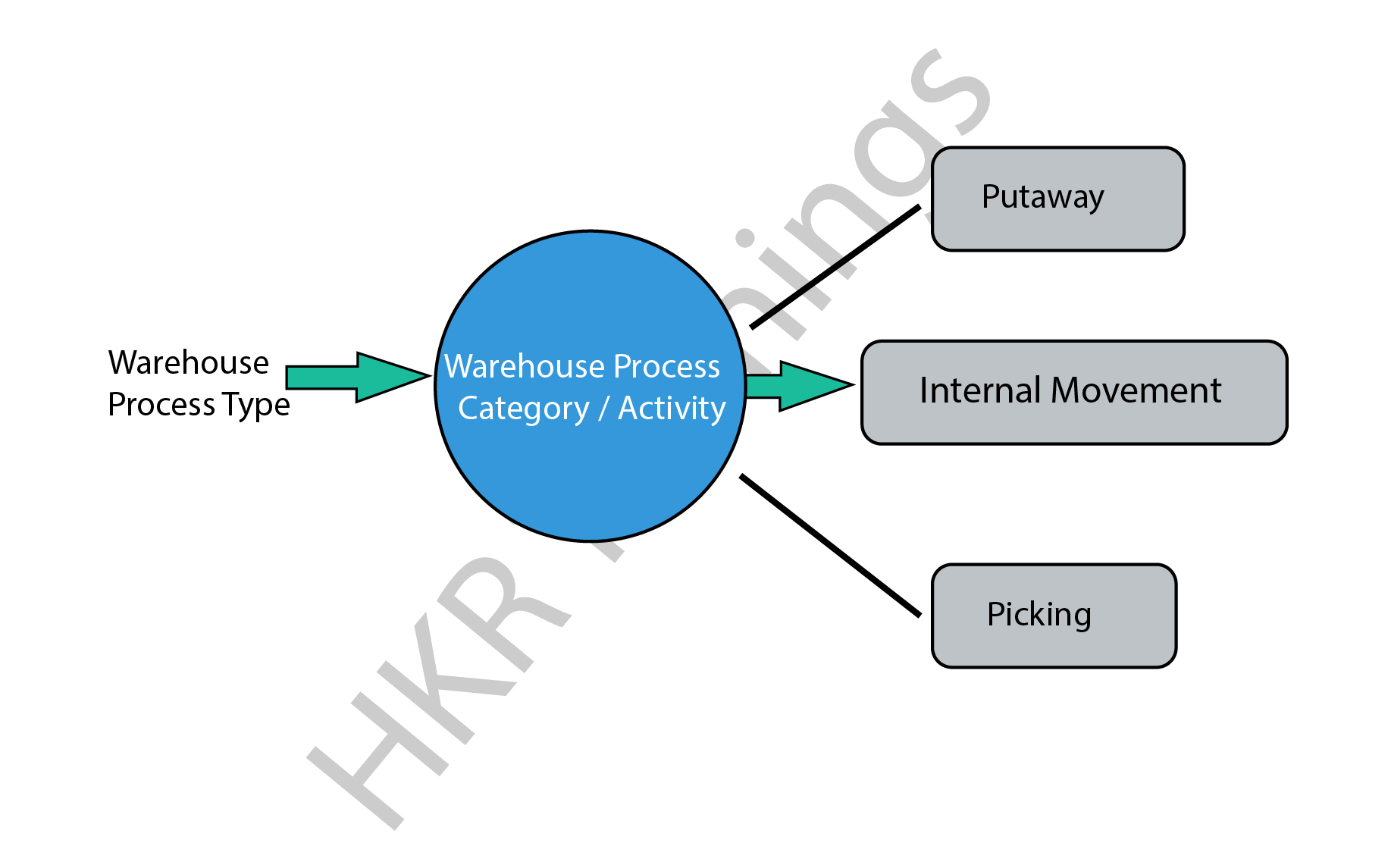
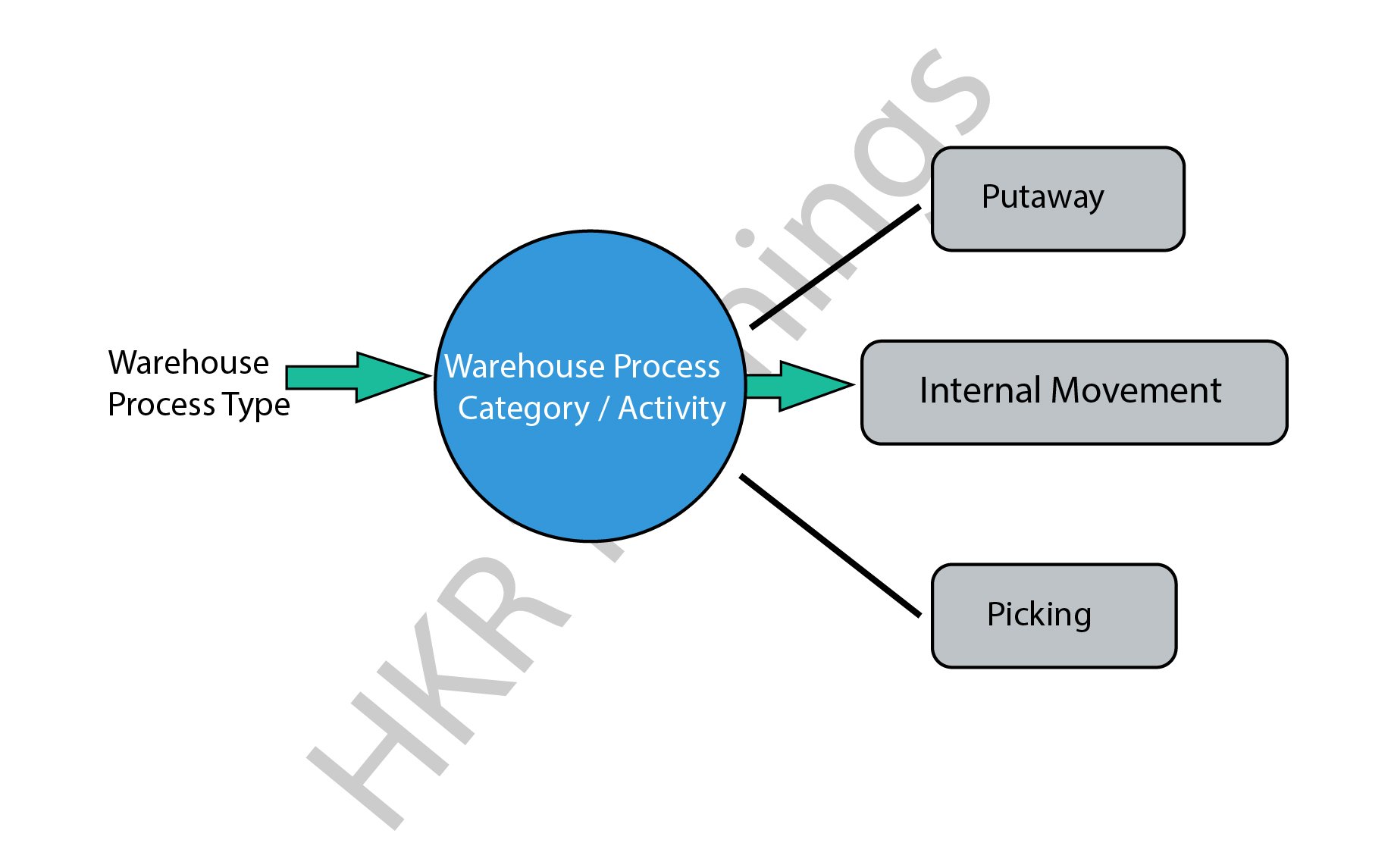
In general, SAP EWM process flow defines the type of activities that have been performed in a warehouse. We can consider the type of activities such as packing, goods receipt, goods issues, and they are assigned to each warehouse document. 

All warehouse process flow is further divided into warehouse categories. The warehouse categories also define the goods movement in the organization’s warehouses.

The following diagram explains the process flow of the SAP EWM;

SAP EWM

There are various process types also categorized in the SAP EWM system, we would like to mention them as well ;

  • Stock removal 
  • Putaway
  • Internal movement 
  • Goods receipt posting 
  • Goods issue posting 
  • Physical inventory 
  • Crossline putaway

               We have the perfect professional SAP Training in chennai for you. Enroll now!

SAP EWM Training

  • Master Your Craft
  • Lifetime LMS & Faculty Access
  • 24/7 online expert support
  • Real-world & Project Based Learning

Example 1: Here we are going to explain the internal process type for the picking type as follows;

The steps include are;

  • To create a picking type process type, go to the navigation EWM ->click on “cross-process setting” -> select warehouse tasks -> now choose to define warehouse process types.
  • You can also select the process type to copy -> then click on the copy at the top.
  • To save all the process type details -> then click on the Save button.

Example 2: internal process type for selling and receiving goods:

This process involves internal process types for selling and receiving goods/products in the warehouse. In general, the receiving goods process begins in the SAP ERP system once you have detected the purchase requisition and purchase order created. The purchase order composes the quantity of the material stored and plants in the storage location. 

There are two ways available to handle the purchase order requests;

  • Firstly you need to send the purchase order to the supplier for the goods deliveries, once you receive the goods, the receipt of the goods will keep posted.
  • Receive the order announcement from the supplier that is all about the goods arrival and purchase order request.

SAP EWM

Note: when you create the purchase order -> you can set the CTRL key to enabling the notification from the supplier. An inbound delivery will be created once you set the control. In a few cases, inbound delivery cannot be created even though you have set the control key. 

All the inbound delivery process consists of the following information;

  • Goods arrival
  • Quantity of goods
  • Store details
  • Plant location

An inbound process includes;

  • Goods receipt and optimization 
  • Transportation unit inspections
  • Quality inspection 
  • Routing of goods in warehouse 

The following image illustrates the inbound delivery process flow,

 inbound delivery process flow

Points to remember:

  • Whenever you make any changes to the inbound delivery, it will affect the SAP system.
  • The status of the inbound delivery report can be updated as per goods delivery.
  • Successful completion of the goods delivery report will also be updated on the SAP system.

          If you want to Explore more about SAP EWM? then read our article – SAP EWM Tutorial

HKR Trainings Logo
Subscribe to our YouTube channel to get new updates..!

SAP EWM outbound delivery process flow:

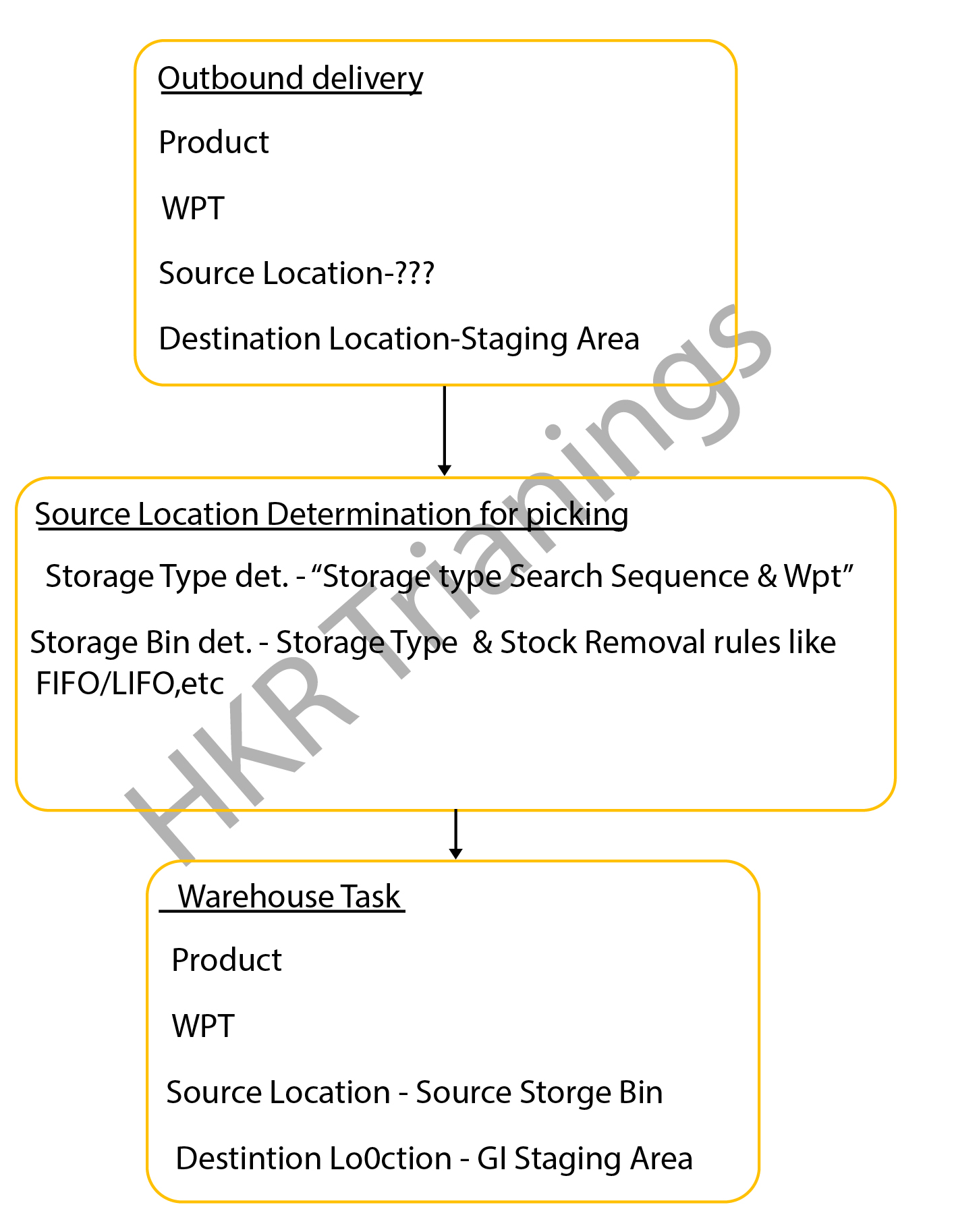
The SAP EWM outbound delivery process flow can also be known as the “Picking process”. This process type in the SAP system defines the store bin types in the warehouse. The outbound delivery process also helps to remove the stocks in the outbound goods issue process, this process is often known as the “picking process” in the SAP system.

The below diagrams explain the outbound delivery process in detail;

outbound delivery process

The types of the outbound delivery process;

  • Customer sales order: An outbound delivery process can be created with reference to the sales order to perform various tasks like picking products from a warehouse bin, packing the picked products, and resolving the goods issues which are related to the shipment.
  •  Stock transport order: this step involves moving the goods within the organization once the supply management issues it and receiving the receipt. The outbound delivery process can be created at the supplying plant, goods packed, shipment, and delivery of the products.
  • Vendor returns order: The return order is created within the ERP system if the product delivered failed to meet the customer’s expectations. 
    Production staging process: in this stage, the appropriate raw materials will be picked from the warehouse bin that is completely based on the order picking strategies and then moved to the production supply area. 

The following image explains the types of the outbound delivery processes and overall functionalities;

overall functionalities

The important documents created during the outbound delivery process;

  • Outbound delivery order: this document popularly known as the warehouse request is the source document that usually initiates the picking activity while creating a specific task.
    Warehouse task: The warehouse task consists of information like source bin, quality, search, batch, and destination bin. 
  • Warehouse orders: The warehouse orders are also the documents that are assigned to a warehouse employee to execute the product picking tasks at a specific time. The steps included in the storage bin determination in the SAP picking process:The storage bin ty             

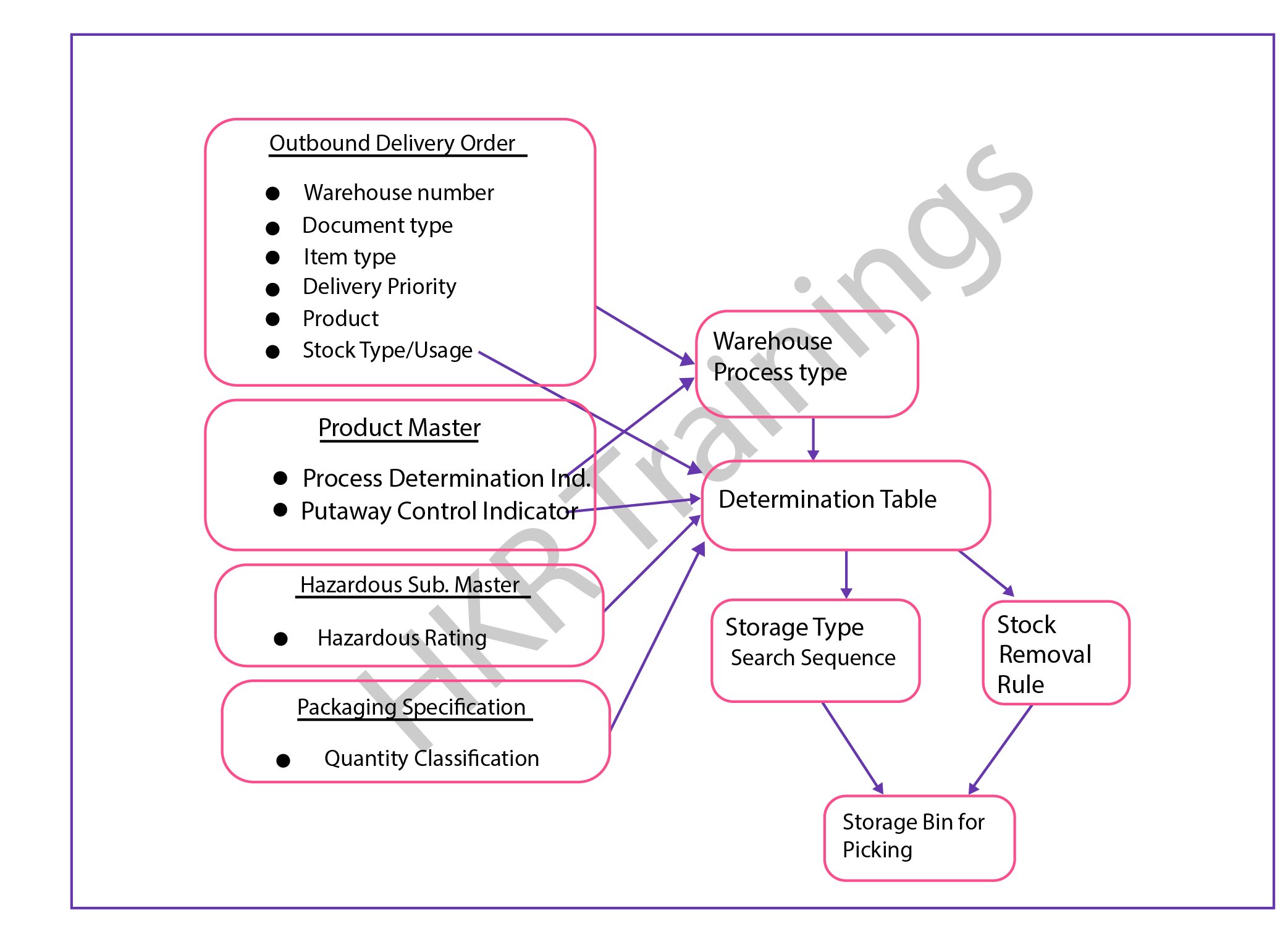
The steps included in the storage bin determination in the SAP picking process:

  • The storage bin type determination in the SAP picking process:The configuration process consists of the following parameters;Warehouse process types, stock removal control indicator (this will be maintained in the master data process), and packing specifications.
  • Stock removal determination type in the SAP picking process;This process can be performed based on the system looks available for the storage type or group of the storage types and the storage area where the stocks can be picked. 

The overall outbound determination process is shown below,

outbound determination process

                              frequently asked SAP EWM Interview Questions and Answers

SAP EWM Training

Weekday / Weekend Batches

Final note:

The latest survey report suggests that the SAP EWM is emerging as a powerful warehouse inventory management tool. The SAP EWM process flow plays a vital role in delivering efficient outcomes and also managing the storage bin. Our main aim to design this SAP EWM process flow article is to reach a global audience and shape their professional careers. This SAP EWM process flow article helps you to know both the inbound as well as process flow activities and how to perform them in the organizations to maintain the proper inventories.

Related Article:

  1. What is SAP EWM?
  2. SAP EWM Certifications


Source link