SAP EWM Process Flow | Quick guide on SAP EWM Process Flow


SAP EWM Process Flow – Table of Content

Introduction to the SAP EWM:

The  SAP EWM (extended warehouse management) is one of the functional modules which is used to manage warehouse inventory and supports the processing of goods movements. The SAP EWM also allows organizations to control both inbound and outbound delivery process delivery. and movements in the warehouse. The main purpose to use EWM is to manage the outbound and inbound delivery process, maintain goods receipts, solve goods issues, fulfill customer orders, and goods distributions. 

               We have the perfect professional SAP EWM Training for you. Enroll now!

SAP EWM key features:

SAP EWM signifies the major key features which are considered so important in any organization; Let us explain one by one;

  • With the help of SAP EWM, users can control the various warehouse activities such as picking, posting, managing storage, and good sales document types.
  • The SAP EWM helps you to set the alert before the goods receipt transfer from EWM to the SAP ERP system along with this feature, users are also able to perform corrections, reversal, and inbound delivery split from the SAP EWM to the SAP ERP system.
  • Users can also perform deconsolidation of the handling of various units that contain product details and their storage locations.
  • Users can also determine the storage concepts like product slotting, and optimize the goods arrangements for the warehouse automatically.
  • The SAP EWM functional module allows users to perform various tasks like work packaging, and also monitor the warehouse activities which are performed by the warehouse employees.
  • The SAP EWM also helps organizations to keep track of the vehicles, and other transportation units (it consists of a yard-in check in and yard-out checkout) activities.
  • SAP EWM also comprises storage and handling of various hazardous substances (such as SAP environmental health, and safety EHS).
  • SAP EWM allows organizations to store the labor time, and resource usage effectively( managing the resources effectively).
  • The SAP EWM cockpit allows users to perform the transportation of products to various warehouse centers.

Overview of SAP EWM Process Flow:

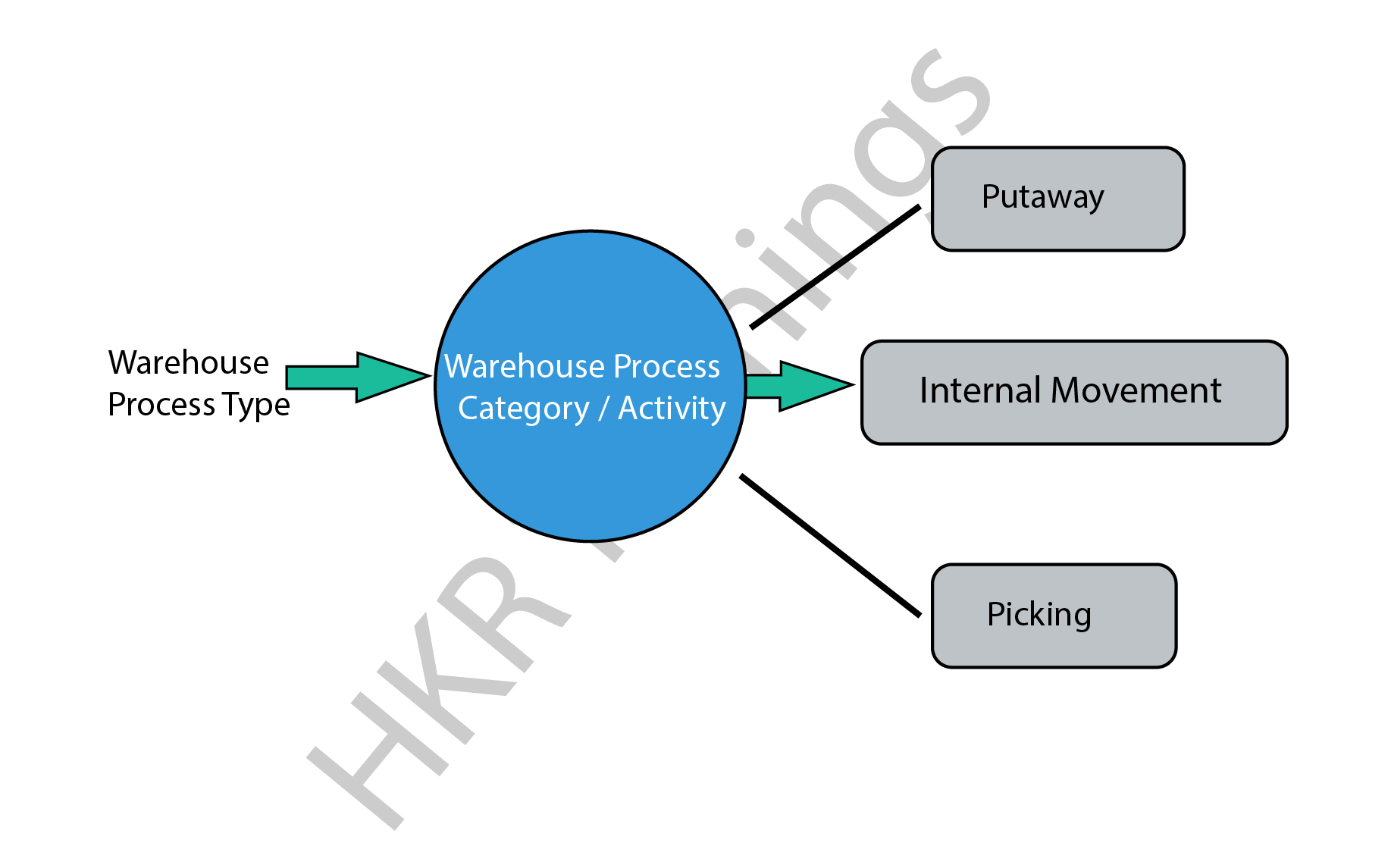
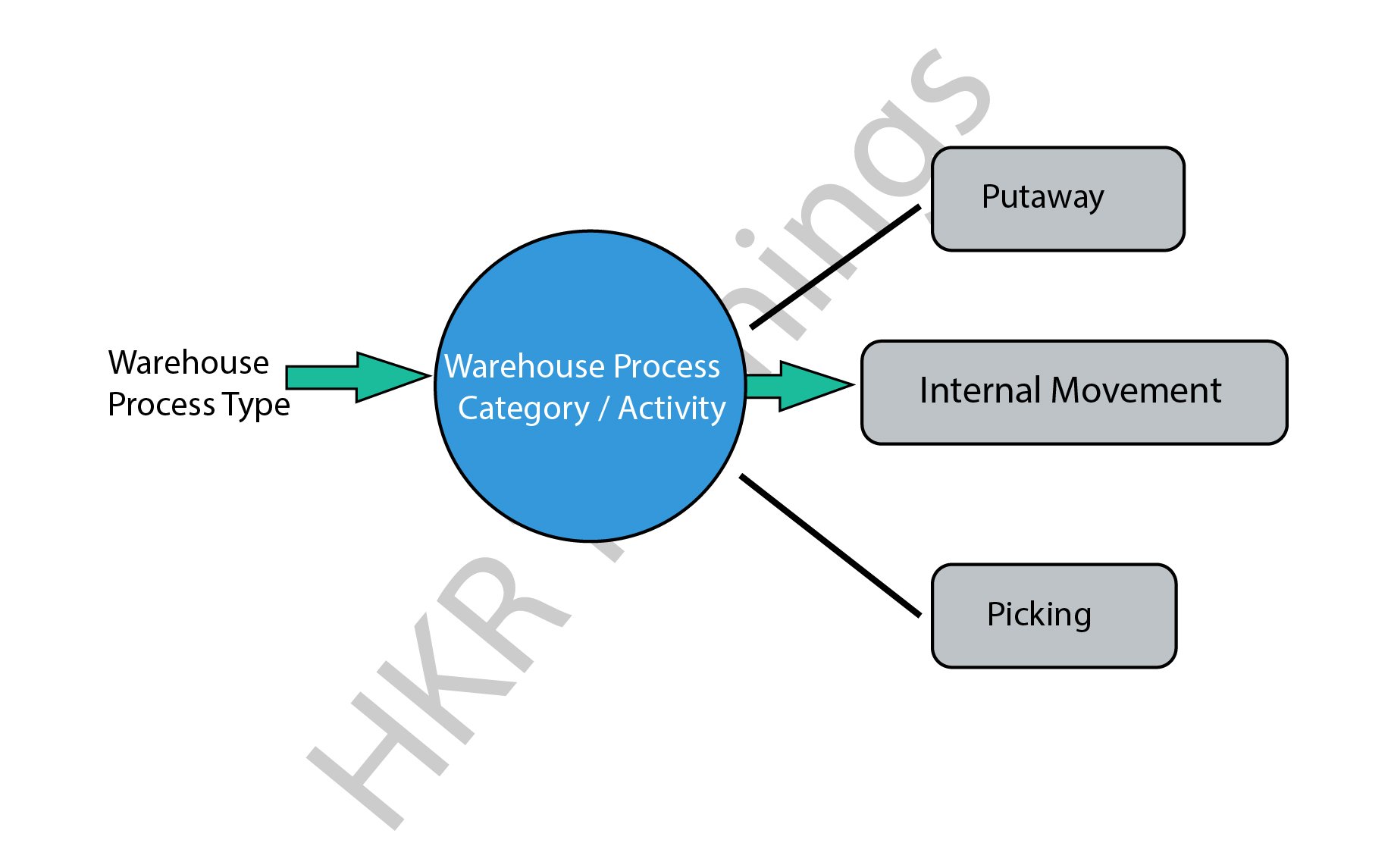
In general, SAP EWM process flow defines the type of activities that have been performed in a warehouse. We can consider the type of activities such as packing, goods receipt, goods issues, and they are assigned to each warehouse document. 

All warehouse process flow is further divided into warehouse categories. The warehouse categories also define the goods movement in the organization’s warehouses.

The following diagram explains the process flow of the SAP EWM;
SAP EWM

There are various process types also categorized in the SAP EWM system, we would like to mention them as well ;

  • Stock removal 
  • Putaway
  • Internal movement 
  • Goods receipt posting 
  • Goods issue posting 
  • Physical inventory 
  • Crossline putaway

               We have the perfect professional SAP Training in chennai for you. Enroll now!

SAP EWM Training

  • Master Your Craft
  • Lifetime LMS & Faculty Access
  • 24/7 online expert support
  • Real-world & Project Based Learning

Example 1: Here we are going to explain the internal process type for the picking type as follows;

The steps include are;

  • To create a picking type process type, go to the navigation EWM ->click on “cross-process setting” -> select warehouse tasks -> now choose to define warehouse process types.
  • You can also select the process type to copy -> then click on the copy at the top.
  • To save all the process type details -> then click on the Save button.

Example 2: internal process type for selling and receiving goods:

This process involves internal process types for selling and receiving goods/products in the warehouse. In general, the receiving goods process begins in the SAP ERP system once you have detected the purchase requisition and purchase order created. The purchase order composes the quantity of the material stored and plants in the storage location. 

There are two ways available to handle the purchase order requests;

  • Firstly you need to send the purchase order to the supplier for the goods deliveries, once you receive the goods, the receipt of the goods will keep posted.
  • Receive the order announcement from the supplier that is all about the goods arrival and purchase order request.

SAP EWM

Note: when you create the purchase order -> you can set the CTRL key to enabling the notification from the supplier. An inbound delivery will be created once you set the control. In a few cases, inbound delivery cannot be created even though you have set the control key. 

All the inbound delivery process consists of the following information;

  • Goods arrival
  • Quantity of goods
  • Store details
  • Plant location

An inbound process includes;

  • Goods receipt and optimization 
  • Transportation unit inspections
  • Quality inspection 
  • Routing of goods in warehouse 

The following image illustrates the inbound delivery process flow,

 inbound delivery process flow

Points to remember:

  • Whenever you make any changes to the inbound delivery, it will affect the SAP system.
  • The status of the inbound delivery report can be updated as per goods delivery.
  • Successful completion of the goods delivery report will also be updated on the SAP system.

          If you want to Explore more about SAP EWM? then read our article – SAP EWM Tutorial

HKR Trainings Logo
Subscribe to our YouTube channel to get new updates..!

SAP EWM outbound delivery process flow:

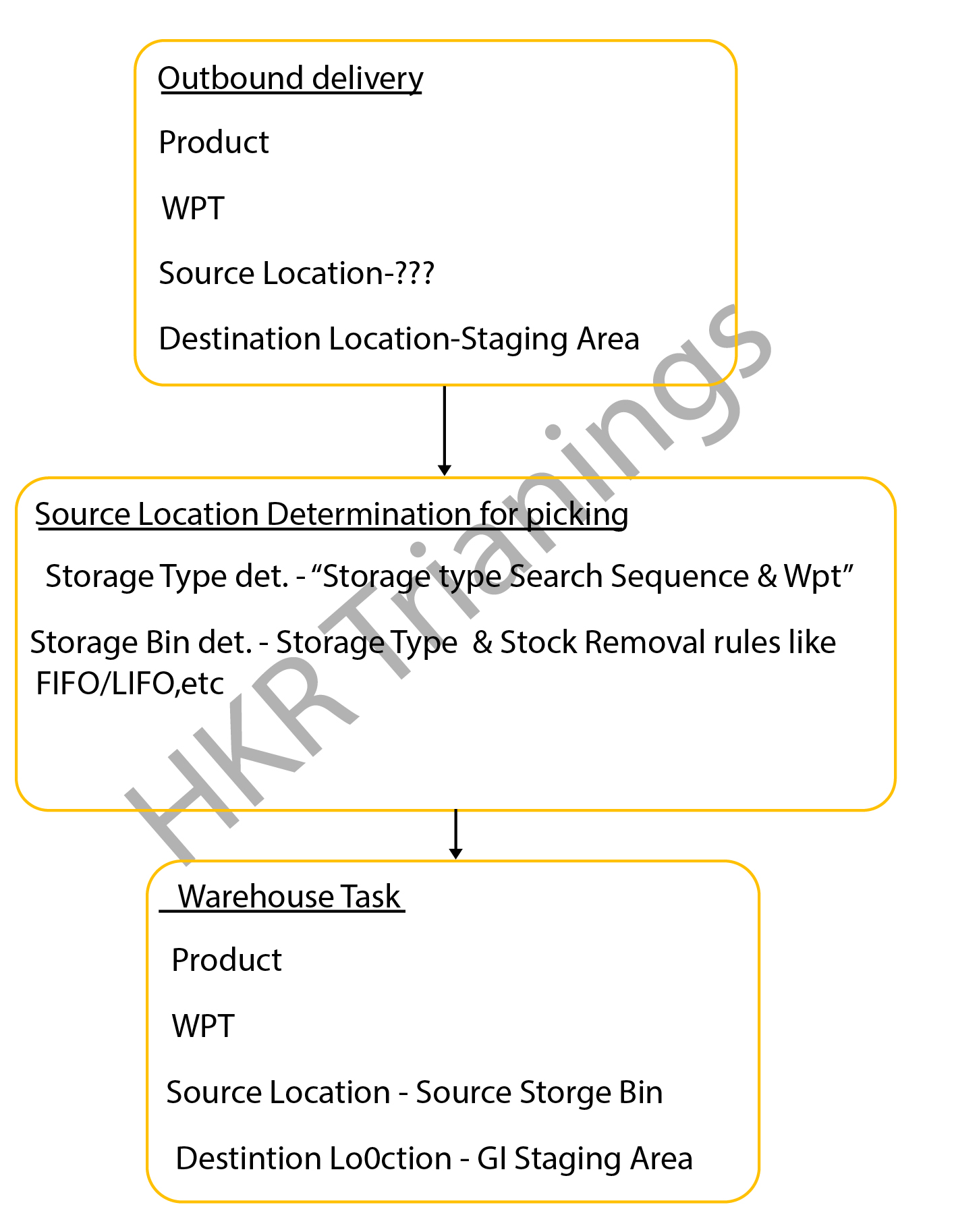
The SAP EWM outbound delivery process flow can also be known as the “Picking process”. This process type in the SAP system defines the store bin types in the warehouse. The outbound delivery process also helps to remove the stocks in the outbound goods issue process, this process is often known as the “picking process” in the SAP system.

The below diagrams explain the outbound delivery process in detail;
outbound delivery process

The types of the outbound delivery process;

  • Customer sales order: An outbound delivery process can be created with reference to the sales order to perform various tasks like picking products from a warehouse bin, packing the picked products, and resolving the goods issues which are related to the shipment.
  •  Stock transport order: this step involves moving the goods within the organization once the supply management issues it and receiving the receipt. The outbound delivery process can be created at the supplying plant, goods packed, shipment, and delivery of the products.
  • Vendor returns order: The return order is created within the ERP system if the product delivered failed to meet the customer’s expectations. 
    Production staging process: in this stage, the appropriate raw materials will be picked from the warehouse bin that is completely based on the order picking strategies and then moved to the production supply area. 

The following image explains the types of the outbound delivery processes and overall functionalities;

overall functionalities

The important documents created during the outbound delivery process;

  • Outbound delivery order: this document popularly known as the warehouse request is the source document that usually initiates the picking activity while creating a specific task.
    Warehouse task: The warehouse task consists of information like source bin, quality, search, batch, and destination bin. 
  • Warehouse orders: The warehouse orders are also the documents that are assigned to a warehouse employee to execute the product picking tasks at a specific time. The steps included in the storage bin determination in the SAP picking process:The storage bin ty             

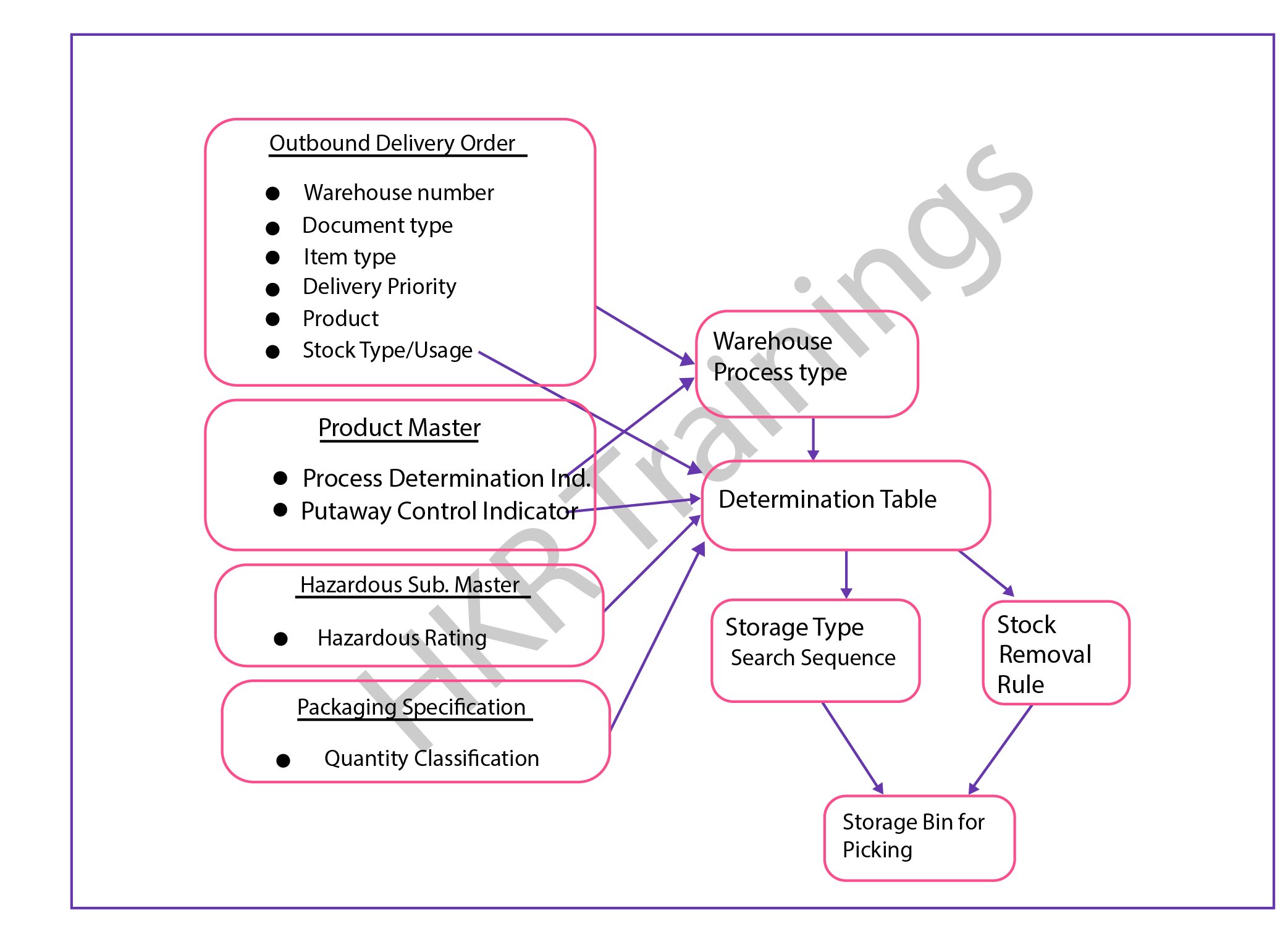
The steps included in the storage bin determination in the SAP picking process:

  • The storage bin type determination in the SAP picking process:The configuration process consists of the following parameters;Warehouse process types, stock removal control indicator (this will be maintained in the master data process), and packing specifications.
  • Stock removal determination type in the SAP picking process;This process can be performed based on the system looks available for the storage type or group of the storage types and the storage area where the stocks can be picked. 

The overall outbound determination process is shown below,
outbound determination process

                              frequently asked SAP EWM Interview Questions and Answers

SAP EWM Training

Weekday / Weekend Batches

Final note:

The latest survey report suggests that the SAP EWM is emerging as a powerful warehouse inventory management tool. The SAP EWM process flow plays a vital role in delivering efficient outcomes and also managing the storage bin. Our main aim to design this SAP EWM process flow article is to reach a global audience and shape their professional careers. This SAP EWM process flow article helps you to know both the inbound as well as process flow activities and how to perform them in the organizations to maintain the proper inventories.

Related Article:

  1. What is SAP EWM?
  2. SAP EWM Certifications


Source link

Leave a Reply

Subscribe to Our Newsletter

Get our latest articles delivered straight to your inbox. No spam, we promise.

Recent Reviews


A Brief Introduction to The SAP HANA:

SAP HANA is in-memory management, data-oriented, and relational development management system developed and produced by SAP SE enterprise corporation. The primary function of SAP HANA is to manage database applications, store, and retrieve the data as requested by the enterprises. SAP HANA stands for “High-performance analytic appliances” and is a combination of both hardware and software appliances. This module is a data foundation technology that offers advanced-level data analytical and multi-dimensional management data-driven applications. SAP HANA product written in JAVA, and C programming languages.

  Become a SAP Hana Certified professional by learning this HKR SAP Hana Training 

SAP HANA – Core Architecture

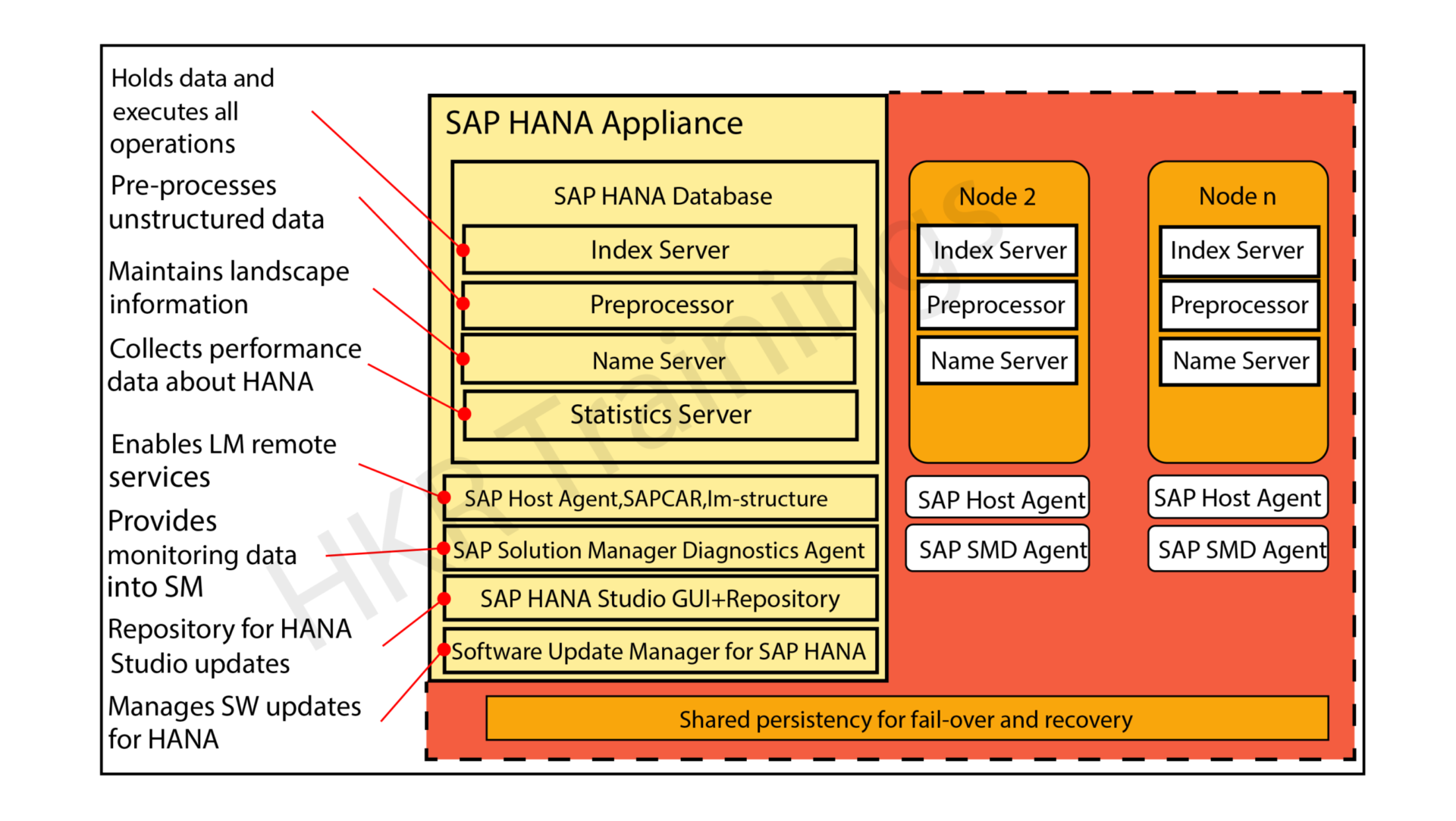
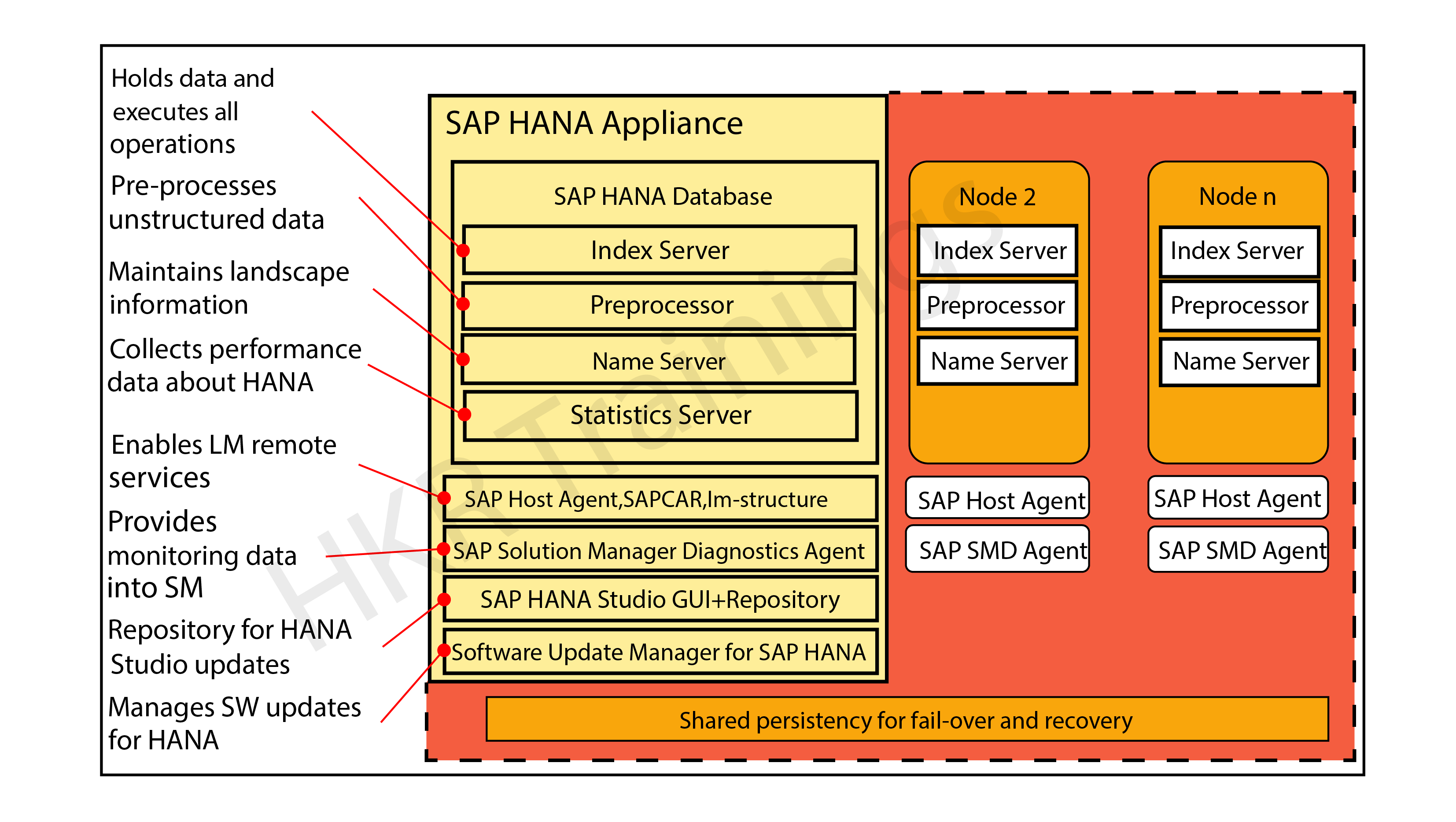
The below diagram explains the core components and work nature of the SAP HANA module:

SAP HANA  Core Architecture

As we already know, the SAP HANA platform is developed with the help of C and JAVA programming languages and designed to run on operations systems like LINUX server enterprise edition 11. Sap HANA consists of multiple components that help to perform many activities. The most important component of SAP HANA architecture is an Index server which consists of an SQL/ MDX processor to handle any type of query statement. The SAP HANA system contains different servers like name servers, statistics servers, XS engines, and preprocessor servers. All these servers are used to communicate and host multiple web applications.

 Let’s know the core components one by one:

Index server:

The index server is an important component of SAP HANA architecture. This server is also known as the heart of the SAP HANA database system. An index server contains the original data and engines to process the data. This type of server takes care of the entire data request and processes them when they are mixed with SQL and MDX. The index server also consists of a data engine to handle all the query statements (SQL/MDX). This also holds a persistent layer used to check the durability of the HANA system and restore the data.

This figure illustrates the overall architecture of the Index server:

Index server

In the above diagram, you can see Index server also consists of a session and transaction manager, this is used to manage transactions and keep tracking of them.

SQL/MDX Processor:

The SQL/MDX processor type is responsible for processing the SQL/MDX data transactions with data engines to run different queries. It requests all the segments to correct the engine for performance optimization. In this processor type, data authorization also handles all types of errors. MDX or multi-dimensional expression is a query language used in OLAP systems like sequential query language and relational database management systems. The planning engine is responsible to run the planning operations within the database. The calculation engine converts the data into calculation models to build logical data execution. The stored processor executes the procedure call to optimize data processing. The persistent layer is also responsible to check durability and atomicity in SAP HANA systems and also manages the data and transaction logs to manage data backup, HANA system configuration, and log backups.

Preprocessor: This component of the SAP HANA architecture enables users to preprocess the data.
Name server: This SAP HANA component allows users to maintain landscape information.
Statistics server: This SAP HANA component collects information about the SAP HANA server.

Check It the Sample Resume SAP HANA SAMPLE RESUME!

Why SAP HANA is so popular?

The following are the important features of SAP HANA that make the technology so popular in the current business platform:

1. SAP HANA acts as an eclipse editor and web-based editor (also known as pick-up and drop services) to support the graphical creation of business applications.

2. Provides Source agnostic data access and integration services that allow accessing and indexing external data from across the entire organization. Add these analytical services to existing analytical models.

3. Real-time data analytical processing can be performed to analyze business operations in real-time using the huge volume of detailed information while business happening.

4. Data can be accumulated from many applications and data sources without disturbing in any way that continuing business operation.

5. View of business information can be carried on in a persistent data repository and built again in case of a crash.

Key benefits of the SAP HANA:

After knowing all the major factors and core architecture of the SAP HANA, now it is time to have a basic idea of the key benefits of the tool. It is necessary to know the importance of the platform before relying on implementation.

Below are the few advantages of SAP HANA:

1. Offers in-memory management: this type of in-memory allows for sophisticated data calculations.

2. Acts as calculation engine: In-memory processing gives more time for relatively slow updates to column data.

3. Provides massively parallel processing: MPP optimized software enables linear performance scaling making sophisticated calculations like allocations possible.

4. Larger storage: The columnar storage increases the amount of data that can be stored in limited memory (compared to disk).

5. Row +Column database: Column databases enable easier parallelization of queries. And Row database provides fast transactional processing.

SAP HANA Tutorials for beginners get started with your SAP carrier 

HKR Trainings Logo

Subscribe to our YouTube channel to get new updates..!

Differences between SAP and SAP HANA:

We think that before getting into the SAP HANA, it is mandatory to know the standard differences between the SAP and SAP HANA. Let us know them one by one:

SAP:

1. SAP is a traditional ECC business enterprise application.

2. In SAP, nearly all the SAP transaction codes are available and there is no concept of data simplification.

3. it’s easy to access all the functional modules of SAP and helps you to create real-time data reporting.

4. Also offers additional performance and the SAP solution also boasts amended transactions.

5. Upgrade to ECC6 enhancement package 7 and then perform a database management activity.

SAP HANA:

1. Helps to rebuilt to capitalize the significant simplification that the SAP HANA platform provides.

2. This is a packaged solution that has SAP ERP at its core optimized to run on the HANA platform.

3. Helps to integrate and leverage various solutions and technologies in SAP arsenal.

4. Achieve data simplification. This is achieved by replacing the core tables within certain processes with a single table.

5. SAP HANA is designed with SAP flori for a richer user experience and is easily configurable on cloud technology.

Different types of SAP HANA system monitors:

The SAP HANA system monitors are used to control various tasks like Log disks, Data Disks, trace disks, and alerts on resource usage.

Let me explain them one by one:

1. System ID: this helps in the ID assigned to the system when added to the studio environment.

2. Operational state: maintains the overall system status.

3. Alerts: This monitor is used to check the system issue alerts when resource usage and thresholds are violated. In general, these alerts are categorized into low, medium, or high priority.

4. Data Disks in (GB): this indicates the size of the data volume available on disk.

5. Log disks in (GB): this indicates the size of the log volume on the disk.

6. Database Resident Memory management: this indicates the size of the memory used in an operating system to manage SAP HANA database processes.

7. Used memory: Here is the amount of physical memory that is used by the SAP HANA database.

8. CPU in (%): This helps to know the percentage of CPU that has been used by the SAP HANA database.

9. Hostname: it indicates the name of the server hosting used in the SAP HANA database.

10. Instance Number: here the Instance number is the administrative unit that consists of the various server software components.

11. System trace disk in GB: it gives the total disk space used on the disk that contains trace files.

12. System physical memory in GB: this gives the total amount of physical memory used.

13. Distributed: this indicates whether the system is running on any single web host or this will be distributed in the system.

14. Start time first: this indicates when the time that first started and value is restarted for any important reason.

15. Versions: this indicates the software versions of the SAP HANA environment studio.

16. Platform: this indicates the different operating systems where the SAP HANA studio is running.

17. Number of crash dump files: here is the number of crash dump files removed in the SAP HANA system.

Top 30 Frequently asked SAP HANA Interview Questions 

SAP Hana Training Certification

Weekday / Weekend Batches

Final words:

SAP ERP market is booming like a rocket and it is a good career choice to pursue your IT profession latest Gartner report. The real reason behind developing this SAP HANA architecture is to get some knowledge concerning workflow and design factors. Reading this post has given our readers a complete idea to learn and explore concepts like Key benefits, reasons for SAP HANA’s popularity, differences between SAP and SAP HANA, and the architecture components. 

Related Articles:

  1. SAP HANA Modules


Source link