Are Meal Kits a Good Value vs. Grocery Store Prices in 2026? I Did the Math to Find Out


Meal kits cost a little more per pound than groceries — that’s the trade-off for convenience. But there’s a hidden perk: no wilting half-bunches of herbs or forgotten produce. You get exactly what you need, nothing more.

CNET We Do the Math badge; click here for more

Across the meal kit landscape, you’ll find services ranging from around $6 to $15 per serving. At the top end, you’re paying for premium cuts and restaurant-style recipes. At the lower end, expect straightforward meals built around just a handful of ingredients.

Among the options, you may be wondering which meal kit services offer the best overall value. To find out, we’ve calculated how meal kit delivery services compare with 2026 grocery prices. 

Here’s what the numbers say about meal kits and value. And while these represent the best value, we’ve also dug into them to find the overall cheapest meal kits in 2026.

Meal kits, ranked by value

Meal kit service % savings to make the same meals yourself
Home Chef 35%
HelloFresh 35%
Blue Apron 37%
EveryPlate 40%
Marley Spoon 42%
Green Chef 45%
Sunbasket 48%

home chef box on kitchen counter

Home Chef scored top marks in our meal kit value ranking.

David Watsky/CNET

Home Chef

Home Chef cost (2 servings) DIY cost DIY savings
Idiot Proof Crispy Chicken Sandwich $23.98 $12.14 49%
Arrabbiata Cream Shrimp and Feta Peppers $23.98 $16.55 31%

three HelloFresh meal cards and brown paper bags sitting on a counter.

HelloFresh tied with Home Chef as the best value meal kit.

Corin Cesaric-Epple/CNET

HelloFresh

HelloFresh cost (2 servings) DIY cost DIY savings
Green Curry Coconut Shrimp and Rice $22.98 $16.58 26%
Cumin Lamb Chops with Spiced Yogurt Sauce (Premium +$12.99/serving) $48.96 $26.96 45%

  • Cost: $11.49 per serving plus upcharges for premium items  
  • Aggregate savings on this HelloFresh box to make it yourself: 35%
  • Full review of HelloFresh

blue apron box with ingredients spilling out

Blue Apron’s subscription-free* meal kits placed 3rd.

Blue Apron

Blue Apron

Blue Apron cost (2 servings) DIY cost DIY savings
Brown Butter Steaks and Fried Rosemary ($13.29/serving) $26.58 $15.24 43%
Chicken Caesar Wraps ($8/serving) $16.00 $10.88 32%

Note that Blue Apron recently changed its pricing structure and has moved away from a subscription model. Each dish now has a specific price per serving, and you can buy meal kits whenever you want without having to keep track of a recurring weekly delivery.

A hand holding three recipe cards from EveryPlate

EveryPlate’s recipe cards guide you carefully through each meal kit.

David Watsky/CNET

EveryPlate

EveryPlate cost (2 servings) DIY cost DIY savings
Banh Mi Style Chicken Tacos $13.98 $8.40 40%
Herbed White Bean Tomato Stew with Feta and Garlic Toasts $13.98 $8.25 41%

  • Cost: $6.99 per serving plus upcharges for premium items
  • Aggregate savings on this EveryPlate box to make it yourself: 40%
  • Full review of EveryPlate

marley spoon box

Our top pick for best meal kit, Marley Spoon, was in the middle of the pack in terms of value.

Corin Cesaric-Epple/Zooey Liao/CNET

Marley Spoon

Marley Spoon cost (2 servings) DIY cost DIY savings
Steak with Truffle Butter and Fondant Potatoes $25.98 $15.58 40%
Lemon & Herb Pan Seared Shrimp with Broccoli & Pasta $25.98 $14.63 44%

green chef-box

Green Chef is one of our favorite healthy meal kit services but didn’t prove as good of a value in our evaluation.

David Watsky/CNET

Green Chef

Green Chef cost (2 servings) DIY cost DIY savings
Blackened Shrimp and Grits with Bacon $29.98 $15.45 48%
Butter-Basted Sirloin Steak with Potatoes $29.98 $17.33 42%

Sunbasket meal kits in delivery box.

Sunbasket fared the worst in our value analysis.

Anna Gragert/CNET

Sunbasket

Sunbasket cost (2 servings) DIY cost DIY savings
New Orleans Style Shrimp Creole $22.98 $12.10 47%
Sheet Pan Chicken Sausage with Potatoes, Broccoli and Chimichurri $22.98 $11.58 50%

How I did the math

screen-shot-2022-04-14-at-6-22-54-pm.png

A vegan potsticker meal kit ready for action. 

David Watsky/CNET

Using weekly menus available online for each of the seven meal kit services, I selected two standard offerings from each, making sure to mix up the protein type: a steak or premium red meat dish, a shrimp dish or a chicken or poultry option. (Sometimes the sandwich took the form of a burrito, wrap or tacos.)

Armed with in-store grocery prices from a Kroger in suburban Michigan (pretty much the median for current grocery prices in the US), I added up the prorated amounts for the specified quantities of each ingredient, then calculated the savings between the meal kit price and what you’d pay to make the same recipe by sourcing the ingredients yourself. 

To show my algebra, here’s an example from one of the kits:

Home Chef Crispy Chicken Sandwich

Ingredient In-store price Prorated cost
2 sweet potatoes $1.49/lb $1.11
1 cucumber $1.50/ea $1.50
10 oz boneless, skinless chicken cutlet $5.99/lb $3.74
2 brioche buns $5/4 buns $2.50
1.76 oz mayonnaise $4.29/15 oz $0.50
1 oz roasted, salted peanuts $1.99/12 oz $0.17
¼ C panko breadcrumbs $2.59/8 oz $0.65
½ fl oz seasoned rice vinegar $4.49/12 oz $0.19
2 tsp sriracha $5.79/12 oz $0.16
¼ oz cilantro $2.49/.5 oz $1.25
2 tsp umami seasoning $7.49/6.75 oz $0.37

  • Meal kit cost: $11.99 per serving for two servings: $23.99
  • Cost to make two servings via groceries: $12.14
  • Savings to make this recipe yourself: 49%

Note that the only cost I was calculating here was food cost for a traditional meal kit model. I didn’t factor in delivery cost or promotional offers (which many meal kits offer on start-up, or for lapsed customers who return to the service)

I had to make some estimates for certain ingredients (e.g., approximately 6 teaspoons per fluid ounce or the weight of an average-sized potato), but those estimates were kept consistent across all meal kits. I chose the least expensive available brand for the ingredient, except when a particular brand or standard (such as organic) was specified. 

I indicated the percentage savings per item to do it yourself, but to come up with the aggregate savings per box, I added up the total value of all the ingredients in the box and divided it by the total price of the box, rather than taking the average of each of the three savings percentages. 

Some observations on value

Green Chef recipe cards

Green Chef meal kits are easy to love but don’t offer the best value, pound for pound.

David Watsky/CNET

“Value” can be difficult to quantify because your personal values shape how you perceive cost. Organic produce, more responsible packaging or a wider variety of recipes to choose from may play a greater role in your decision-making than the actual food costs calculated here. 

That said, the biggest disparity in value among the meals I calculated was indeed in the organic options: Green Chef and Sunbasket, because organic produce and the highest-quality proteins bought in-store were closer in price to their conventional items than the higher prices in those meal kit brands would have you believe. Sunbasket, curiously, has a pretty low cost per serving, but my calculations showed that you’re getting less in those boxes than in those with conventional ingredients.

I also calculated the cost of each ingredient, but your perception of cost may depend on whether you already have certain items in stock. For example, if you already have garlic powder on hand, you might not really count that as a cost, as you didn’t have to shell out for it in this week’s grocery purchase. (Those 11 cents’ worth of garlic powder aren’t probably making a huge difference in the bottom line anyway.)

Ingredients from a Sunbasket meal kit.

Curiously, Sunbasket has a low cost per serving, but my calculations showed that you’re getting less in those boxes than in those with conventional ingredients.

Sunbasket

On the other hand, a specialty ingredient that isn’t a staple — truffle dust, for example — will feel more expensive because you have to buy it outright to use only a portion of it, even though more remains for use in other recipes. (That particular specialty ingredient is going to hit you especially hard at the point of purchase, because it’s truffles.) 

Another consideration worth noting is that every recipe here calls for 10 ounces of shrimp. If your supermarket doesn’t have a seafood counter that allows you to buy in bulk, you might find that packaged frozen shrimp is only available in 12 ounces. I calculated the price for only the 10 ounces called for, but the actual outlay is higher, and chances are you’ll use all 12 ounces and not save 2 for the future.

Getting the most for your money with any meal kit

Given these calculations, I found that the best value, no matter which service you choose, is for premium-ish items that don’t come with a premium markup. Meat and seafood-based dishes will pretty much always incur higher DIY costs than vegetarian or pasta-based meals, which are cheaper for you to put together yourself, such that the difference between making those meals yourself versus getting them through a meal kit is far greater. 

Ingredients for a fish meal kit

Many of EveryPlate’s cheap meal kit recipes are simple and fuss-free.

David Watsky/CNET

The value really comes down to the availability of inexpensive proteins in your area. Shrimp availability in suburban Michigan in January inflated those DIY costs, which may not be the case on the coasts or in other seasons. To make the most of your meal kit money, no matter which brand’s menu you prefer, check local protein prices and choose your meals accordingly.

What more? Here are seven ways to maximize your meal kit service and the best meal kits for staying healthy in 2026.


Source link

Leave a Reply

Subscribe to Our Newsletter

Get our latest articles delivered straight to your inbox. No spam, we promise.

Recent Reviews


Introduction to SAP SD (Sales and Distribution):

SAP SD (Sales and distribution) is one of the significant functional modules of any enterprise resource planning (ERP). The SAP SD module helps in the bills management, shipping, services, transportation, and selling of the products. This functional module is closely integrated with other modules like Material Management (MM), product planning (PP), and logistics. 

 Become a SAP SD Certified professional by learning this HKR SAP SD Training !

SAP SD: creating master and material data

Master data management is a key factor in the SAP sales and distribution functional module. 

Primarily, there are two levels of master data available they are;

First, let’s discuss the first level;

   a. Customer master data.

   b. Material master and 

   c. Pricing conditions

Now discuss the second level;

It includes only;

Output conditions

It’s time for us to know how to create customer master records;

In general, the master record consists of information about the business transactions and also information about the customers where the organization uses this information to collaborate with them. 

Let us know the important transactions being used in the creation of customer master records.

  • XD01, XD02, and XD03 -> used to create/ modify/ display the customer data.
  • VD01, VD02, and VD03 -> used to create/ modify/ display the sales data.
  • FD01, FD02, and FD03 -> used to create/modify/ display the customer company code.
  • XD04 and XD05 -> display the change document and used to block the customers (global orders, delivery, and billing, etc).
  • XD06 and XD07 -> used for deletion of unwanted data and create contact person details.

To create a master data all you need to do is use an account group;

  • Use the T-codes XD01, VD01, and FD01.

*Note: XD01 -> this includes the sales area details, and that will be stored in the tables like KNA1, KNVV, and KNB1.

             VD01 -> this includes the sales data and no company code data will be included.

              FD01 -> this includes all about the company code levels, and the data will be stored in the tables KNA1 and KNB1.

  • The steps included are, 

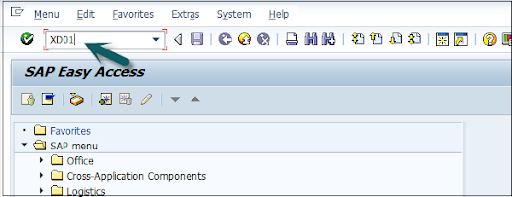
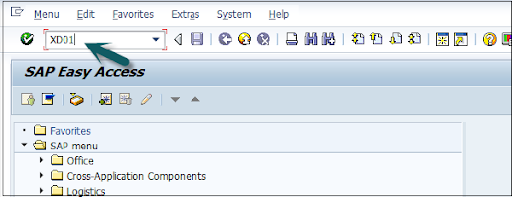
Open the SAP editor, then enter the T-code “XD01”, as shown below;

XD01

  • Then the new window will open, enter the following details;

               a. First, choose the account group from the given list

               b. Enter the customer number and select the proper company code.

  • Now enter the sales area details like;   

              a. Sales organization 

              b. Distribution channel 

              c. Various divisions details.

  • Once you have entered all the details, click on “Tick mark” as shown below;

Tick mark

  • In the next step, enter the general details like title, name, address, company code data, and sales area data, etc.

enter the general details

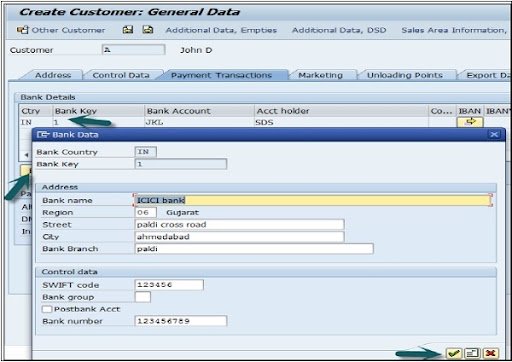
  •  The next step is to add the control data details, and the image as given below;

control data details

  • Now go to the sales area details and enter the details like shipping data, partner function, and customer pricing, etc.

sales area details

  • Click on the “save” button to view the customer details;

save data

Top 30 frequently asked SAP SD Interview Questions !

SAP SD Training

  • Master Your Craft
  • Lifetime LMS & Faculty Access
  • 24/7 online expert support
  • Real-world & Project Based Learning

SAP SD: creating partner function

The partner function in SD allows users to identify which partner functions need to be performed with the business process. Consider a simple example; when all the customer functions are performed by partner function, this process is known as an obligatory function in Sales and distribution.

Related Articles SAP SD Modules !

All the partner functions can be categorized on the basis of a partner type. The partner types can be named as;

1. Partner type customers consist of four sub-modules;

        a. Sold to party type

        b. Ship to party type 

        c. Bill to party type 

        d. Payer 

2. Partner type contact persons 

3. Partner type vendors 

4. Forwarding agents 

5. Employee responsible 

6. Sales personnel type 

7. Partner type personnel

Related Articles SAP SD Flow ! 

In the below section, we would like to mention a few important partners type and their core functionalities ;

Customer type -> Sold-to-party 

                             Payers 

                             Ship-to-party 

                             Bill-to-party 

Vendors type -> Forwarding agents (fwdg agents)

Human resource type -> Employee responsible
                                       Sales personnel 

Contact person types -> contact person (CP)

Now it’s time for us to know how to create the partner functions;

The steps included are;

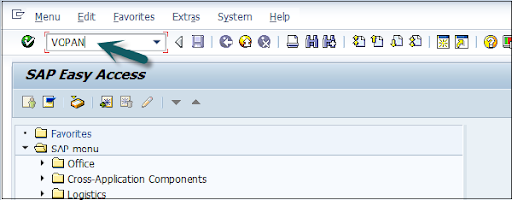
  • First, go to the SAP Access window -> type the T-code VOPAN as shown below;

VOPAN

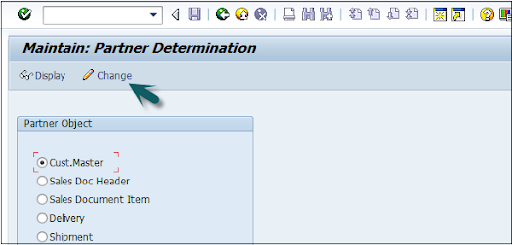
  • Then a new window will pop up -> select the partner type -> then click on the change button.

select the partner type

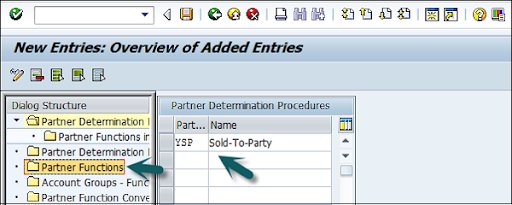
  • This window also opens the new browser -> click on the partner determination procedures -> click on the partner function that is available on the left panel as shown in the below image;

click on the partner determination procedures

  • Click on the new entries;

Click on the new entries

  • The last step includes entering the general information like name, type, and customerd

entering the general information

  • Now click on the “Save” button to save all the details which you have entered. 
SAPS, sap-sd-tutorial-description-6, SAPS, sap-sd-tutorial-description-12

Subscribe to our YouTube channel to get new updates..!

SAP SD: Creating a material stock

Suppose you have already adopted SAP in the organization and now it’s time to add all your stock in the Sales and distribution module. 

The steps included creating a material stock;

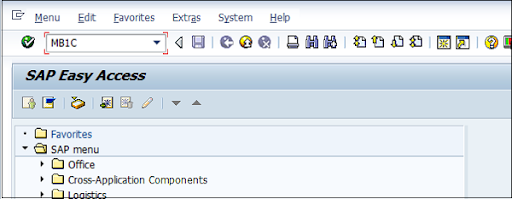
  • Use the transaction code MB1C and movement type 561 to receive the purchase order.

MB1C

  • Now a new window will pop up, enter the date, storage, plant, and movement type details as shown below;

new window

  • Now select the movement as per your requirements-> click enter as shown in the below image;

movement as per your requirements

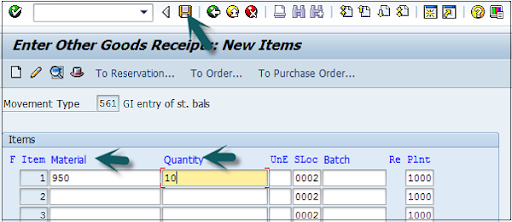
  •  A new window will pop up, now enter the material code ->create the quantity for the stocks -> click save as shown below;

create the quantity for the stocks

  • Finally, a material document with a stock number will be displayed.

SAP SD Training

Weekday / Weekend Batches

SAP SD: pre-sales order activities 

All sales order activities can be divided into pre-order and post-order sales activities. Pre-order sales take place before the product is sold out and post-order sales take place after the product is sold out. 

There are two types of pre-sales order activities that take place, they are;

Related Articles SAP SD Tables ! 

Inquiries 

Inquiries are nothing but questionaries about if the product is available or not, the cost of the products, and the delivery of the product. 

The t-codes which are used to perform inquiries;

1. VA11: Create inquiry logistics -> sales and distribution -> sales -> inquiry -> create.

2. VA12: Change inquiry

3. VA13: display or inquiry search

Quotations:

A quotation is a legal document or blueprint, which enables customers to know about the products or services. 

The following are the T-codes used to create the quotations:

1. VA21: Creating a quotation.

2. VA22: Changing of quotation.

3. VA23: display or quotation search

First, let’s start with creating inquiries:

Foremost, an inquiry is not about the blueprint or a document, but it is all about information that is related to products or materials, and goods quality.

The navigation is as follows:

First, go to the logistics -> sales, and distributions -> click on “sales” -> Inquiry -> create a T-code (VA11).

Note: when you use this T-code, create the below details to access this t-code.

Inquiry type -> ZEC 1 (IECPP inquiry)

Sales organization ->  4000

Distribution channel -> 40

Division ->  00

The steps included are;

  • Open the SAP easy access menu -> enter the T-code VA11 as shown below;

VA11

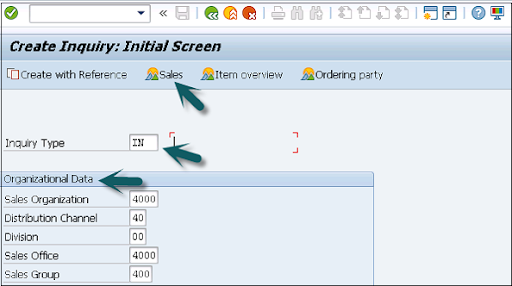
  • Now enter the Inquiry type as “IN” -> then organizational details -> click on save button as shown in the below image;

organizational details

  • Now the new window will pop up -> enter the partner functions such as; sold-to-party and shift-to-party -> enter the material code -> quanity details -> click save.

sold-to-party and shift-to-party

A message like inquiry type “123456789” will be created and displayed. 

Benefits of using SAP Sales and Distribution:

{ Related Articles: SAP SD Training in Pune }

The following are the benefits of using SAP sales and distribution;

  • SAP Sales and distribution helps to track the overall sales distributions.
  • Helps to track organizational sales data along with the team performance.
  • Recording pre-order and post-order sales activities.
  • Define the important process for the sales and distribution methods.
  • Helps users to categorize the diverse sales and distribution process.
  • Offers effective management in order to manage the material management, pricing, and stocks.

Conclusion:

From this article, we can consider that Sales and distribution is an important functional module. In every ERP based organization, they prefer to adopt Material management along with sales and distribution to manage/track the overall sales. I hope this SAP SD tutorial may help a few SAP communities to learn, and explore the basic sales knowledge. 


Source link