
Introduction to SAP SD (Sales and Distribution):
SAP SD (Sales and distribution) is one of the significant functional modules of any enterprise resource planning (ERP). The SAP SD module helps in the bills management, shipping, services, transportation, and selling of the products. This functional module is closely integrated with other modules like Material Management (MM), product planning (PP), and logistics.
Become a SAP SD Certified professional by learning this HKR SAP SD Training !
SAP SD: creating master and material data
Master data management is a key factor in the SAP sales and distribution functional module.
Primarily, there are two levels of master data available they are;
First, let’s discuss the first level;
a. Customer master data.
b. Material master and
c. Pricing conditions
Now discuss the second level;
It includes only;
Output conditions
It’s time for us to know how to create customer master records;
In general, the master record consists of information about the business transactions and also information about the customers where the organization uses this information to collaborate with them.
Let us know the important transactions being used in the creation of customer master records.
- XD01, XD02, and XD03 -> used to create/ modify/ display the customer data.
- VD01, VD02, and VD03 -> used to create/ modify/ display the sales data.
- FD01, FD02, and FD03 -> used to create/modify/ display the customer company code.
- XD04 and XD05 -> display the change document and used to block the customers (global orders, delivery, and billing, etc).
- XD06 and XD07 -> used for deletion of unwanted data and create contact person details.
To create a master data all you need to do is use an account group;
- Use the T-codes XD01, VD01, and FD01.
*Note: XD01 -> this includes the sales area details, and that will be stored in the tables like KNA1, KNVV, and KNB1.
VD01 -> this includes the sales data and no company code data will be included.
FD01 -> this includes all about the company code levels, and the data will be stored in the tables KNA1 and KNB1.
- The steps included are,
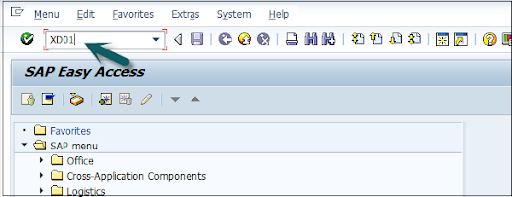
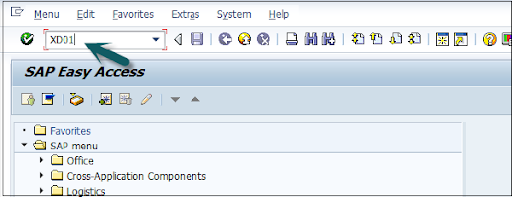
Open the SAP editor, then enter the T-code “XD01”, as shown below;
- Then the new window will open, enter the following details;
a. First, choose the account group from the given list
b. Enter the customer number and select the proper company code.
- Now enter the sales area details like;
a. Sales organization
b. Distribution channel
c. Various divisions details.
- Once you have entered all the details, click on “Tick mark” as shown below;

- In the next step, enter the general details like title, name, address, company code data, and sales area data, etc.

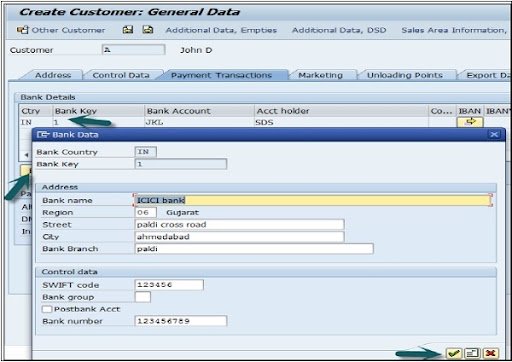
- The next step is to add the control data details, and the image as given below;
- Now go to the sales area details and enter the details like shipping data, partner function, and customer pricing, etc.

- Click on the “save” button to view the customer details;

Top 30 frequently asked SAP SD Interview Questions !

SAP SD Training
- Master Your Craft
- Lifetime LMS & Faculty Access
- 24/7 online expert support
- Real-world & Project Based Learning
SAP SD: creating partner function
The partner function in SD allows users to identify which partner functions need to be performed with the business process. Consider a simple example; when all the customer functions are performed by partner function, this process is known as an obligatory function in Sales and distribution.
Related Articles SAP SD Modules !
All the partner functions can be categorized on the basis of a partner type. The partner types can be named as;
1. Partner type customers consist of four sub-modules;
a. Sold to party type
b. Ship to party type
c. Bill to party type
d. Payer
2. Partner type contact persons
3. Partner type vendors
4. Forwarding agents
5. Employee responsible
6. Sales personnel type
7. Partner type personnel
Related Articles SAP SD Flow !
In the below section, we would like to mention a few important partners type and their core functionalities ;
Customer type -> Sold-to-party
Payers
Ship-to-party
Bill-to-party
Vendors type -> Forwarding agents (fwdg agents)
Human resource type -> Employee responsible
Sales personnel
Contact person types -> contact person (CP)
Now it’s time for us to know how to create the partner functions;
The steps included are;
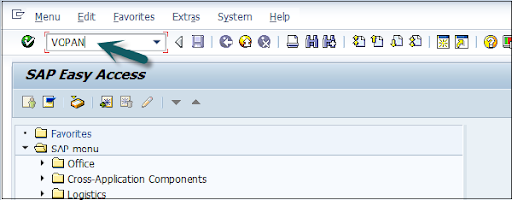
- First, go to the SAP Access window -> type the T-code VOPAN as shown below;
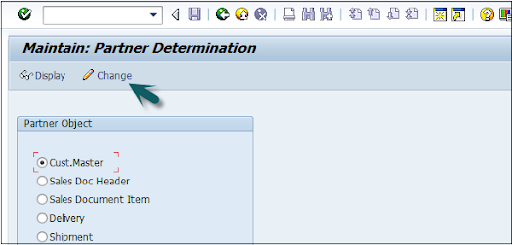
- Then a new window will pop up -> select the partner type -> then click on the change button.
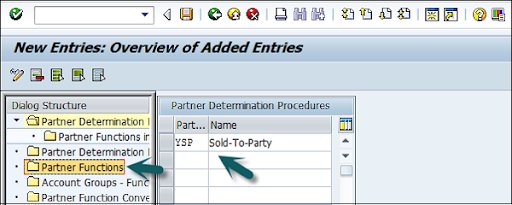
- This window also opens the new browser -> click on the partner determination procedures -> click on the partner function that is available on the left panel as shown in the below image;
- Click on the new entries;

- The last step includes entering the general information like name, type, and customerd

- Now click on the “Save” button to save all the details which you have entered.

Subscribe to our YouTube channel to get new updates..!
SAP SD: Creating a material stock
Suppose you have already adopted SAP in the organization and now it’s time to add all your stock in the Sales and distribution module.
The steps included creating a material stock;
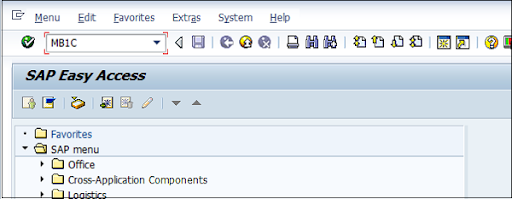
- Use the transaction code MB1C and movement type 561 to receive the purchase order.
- Now a new window will pop up, enter the date, storage, plant, and movement type details as shown below;

- Now select the movement as per your requirements-> click enter as shown in the below image;

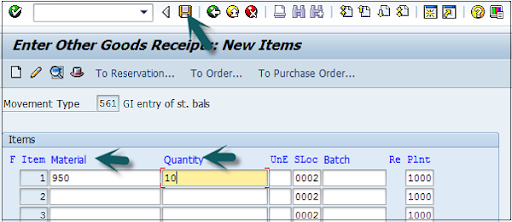
- A new window will pop up, now enter the material code ->create the quantity for the stocks -> click save as shown below;
- Finally, a material document with a stock number will be displayed.
SAP SD Training
Weekday / Weekend Batches
SAP SD: pre-sales order activities
All sales order activities can be divided into pre-order and post-order sales activities. Pre-order sales take place before the product is sold out and post-order sales take place after the product is sold out.
There are two types of pre-sales order activities that take place, they are;
Related Articles SAP SD Tables !
Inquiries
Inquiries are nothing but questionaries about if the product is available or not, the cost of the products, and the delivery of the product.
The t-codes which are used to perform inquiries;
1. VA11: Create inquiry logistics -> sales and distribution -> sales -> inquiry -> create.
2. VA12: Change inquiry
3. VA13: display or inquiry search
Quotations:
A quotation is a legal document or blueprint, which enables customers to know about the products or services.
The following are the T-codes used to create the quotations:
1. VA21: Creating a quotation.
2. VA22: Changing of quotation.
3. VA23: display or quotation search
First, let’s start with creating inquiries:
Foremost, an inquiry is not about the blueprint or a document, but it is all about information that is related to products or materials, and goods quality.
The navigation is as follows:
First, go to the logistics -> sales, and distributions -> click on “sales” -> Inquiry -> create a T-code (VA11).
Note: when you use this T-code, create the below details to access this t-code.
Inquiry type -> ZEC 1 (IECPP inquiry)
Sales organization -> 4000
Distribution channel -> 40
Division -> 00
The steps included are;
- Open the SAP easy access menu -> enter the T-code VA11 as shown below;

- Now enter the Inquiry type as “IN” -> then organizational details -> click on save button as shown in the below image;
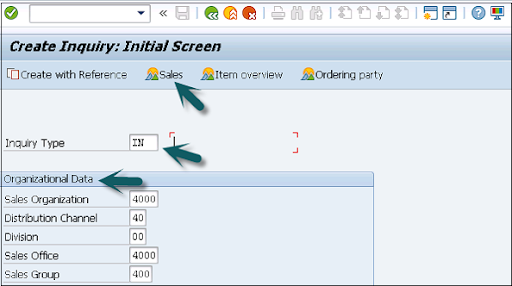
- Now the new window will pop up -> enter the partner functions such as; sold-to-party and shift-to-party -> enter the material code -> quanity details -> click save.

A message like inquiry type “123456789” will be created and displayed.
Benefits of using SAP Sales and Distribution:
{ Related Articles: SAP SD Training in Pune }
The following are the benefits of using SAP sales and distribution;
- SAP Sales and distribution helps to track the overall sales distributions.
- Helps to track organizational sales data along with the team performance.
- Recording pre-order and post-order sales activities.
- Define the important process for the sales and distribution methods.
- Helps users to categorize the diverse sales and distribution process.
- Offers effective management in order to manage the material management, pricing, and stocks.
Conclusion:
From this article, we can consider that Sales and distribution is an important functional module. In every ERP based organization, they prefer to adopt Material management along with sales and distribution to manage/track the overall sales. I hope this SAP SD tutorial may help a few SAP communities to learn, and explore the basic sales knowledge.

Stephan is the sports journalist for the Maple Grove Report.