President Donald Trump's name was added to the Kennedy Center in December of 2025. This photo was taken in April 2026.
Julia Demaree Nikhinson | AP
A federal judge has blocked President Donald Trump from adding his name to the Kennedy Center, saying that the Washington, D.C. arts complex was named for the late president John F. Kennedy. In a ruling on Friday, the judge also temporarily blocked the administration from closing the Kennedy Center for a planned two-year renovation that was slated to begin in July.
U.S. District Court Judge Christopher Cooper wrote in his ruling that: "The Kennedy Center's organic statute makes crystal clear that the Center is to be named for President Kennedy, and it cannot bear any other formal name or public memorial based on the Board's unilateral say-so. Congress gave the Kennedy Center its name, and only Congress can change it."
A Kennedy Center spokesperson told NPR in an email Friday afternoon that it will appeal the decision. Roma Daravi, vice president of public relations for the complex, wrote: "We will review the decision carefully though the reality remains — the Center requires an urgent and significant restoration – a truth that even the plaintiff acknowledges. With $257 million secured by President Trump and approved by Congress, the resources are in place and we remain committed to pursuing every lawful avenue to ensure the Trump Kennedy Center is restored as a national cultural landmark for all Americans to enjoy."
In a post on Truth Social President Trump blasted Judge Cooper for blocking his plans for the Kennedy Center, and said that the institution is financially and structurally troubled. Trump said he would work with Congress to relinquish the administration's role in overseeing the Kennedy Center, "Unless I am free to do what I do better than anyone else, bring this Institution back, physically, financially, and artistically, I have no interest in continuing what could only be a hopeless journey into "NEVER NEVER LAND.""
As part of his ruling, Judge Cooper ordered that all signage and online materials referring to the "Donald J. Trump and John F. Kennedy Memorial Center for the Performing Arts," the "Trump Kennedy Center," or anything similar must be removed within 14 days.
The judge also blocked, for now, plans to close the Kennedy Center for two years of renovations. Trump and the center's current voting board members – all of whom were selected by the president, who also became chairman of the center last year – had planned to start the renovations in early July, just after the 250th anniversary celebrations. In his 94-page ruling, Judge Cooper called the renovation plans "murky," and wrote: "None of the board members had sufficient information in advance of the March 16 meeting to make a well-considered decision to close the center." The center has been winding down its programming and has already dismissed most of its programming staff.
Referring to a Truth Social post written by President Trump in February, the judge also wrote: "There was no 'one year review of the Trump Kennedy Center, that has taken place with Contractors, Musical Experts, Art Institutions, and other Advisors and Consultants, deciding between' complete and partial closure, as President Trump claimed."
Cooper's ruling resulted from a lawsuit filed in March by Rep. Joyce Beatty of Ohio, an ex-officio member of the Kennedy Center board whose voting rights there were stripped last year. Today's ruling rightly affirms that this administration's efforts to rename and close the Center have no basis in law," Rep. Beatty said in a statement to NPR. "The Kennedy Center is an institution that belongs to the American people, not to Donald Trump. He has desecrated this sacred memorial for his own vanity. I am proud to have fought for the rule of law and to protect this sacred institution."
The ruling does not prevent the Kennedy Center's board from a future closure, but the judge said that it should do so only after the board has "sufficient information to make a considered, independent decision, taking account of its obligation to both maintain and operate a premiere arts venue and its solemn duty to memorialize a fallen President."
The practice of loading only new or modified records from a database into an existing QVD is known as an incremental load. As compared to complete loads, incremental loads are more effective, which is especially useful for large data sets. In QlikView, an incremental load occurs when new data from a source database is loaded while previously retrieved data is loaded from a local store. QVD files or the QVW format used with a binary load are commonly used to save data.
Why incremental load?
Is your BI application storing large amounts of data in a atabase? Is it happening regularly, if so? Because BI applications are expected to handle larger data sets, frequent refreshes must obtain the most up-to-date information. In both cases, loading all of the data historically every time to get the most recent updated records on a timely basis is inefficient. This is where the concept of “Increment Load” comes in handy for making BI applications more efficient.
To gain in-depth knowledge with practical experience in QlikView, Then explore HKR’S QlikView Online Course!
What is the intention of the incremental load?
The “Incremental Load” is the answer to all of the previous questions. The loading process’s performance is improved by pulling only new and updated records rather than the entire data set and appending them to the existing data set (QVD). To keep it simple, incremental load updates old table/QVD data with newly modified records at each refresh. It increases the loading process 100 times over conventional loads in this manner.
How exactly incremental load works?
Let’s take a closer look at it by putting it to use. The workflow steps for implementing the same are described below.
1. You must load the whole data without the incremental Load. Either time you need to update new records, you must reload the whole data, which takes a long time to load and save on the local drive (QVD). You can only load new/updated records with incremental loading.
2. In a table, find the last revised record date from the QVW.
3. Connect to the data repository based on the last updated date and pull the recently inserted records that are older than the last modified date. The “where” clause of the load script can be used to do this.
4. To get live data, attach the recently modified records to the current table locally.
5. The incremented table should be added to the BI application.
Qlikview Training Certification
Master Your Craft
Lifetime LMS & Faculty Access
24/7 online expert support
Real-world & Project Based Learning
Illustration of Incremental Load in Real Time
The practice of loading only new or modified records from a database into an existing QVD is known as an incremental load. As compared to complete loads, incremental loads are more effective, which is especially useful for large data sets. The incremental load can be applied in various ways, with the following being the most common:
Insert only (Do not validate for duplicate records).
Insert and update.
Insert, update and delete.
1. Insert Only:
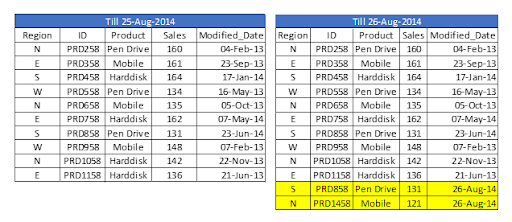
Let’s assume we have sales raw data (in Excel) updated with necessary details about the transaction by modified date if a new sale is registered. We already had a QVD produced before yesterday because we are working on QVDs (25-Aug-14 in this case). Now you can load incremental data (Highlighted in yellow below).
To begin, build a QVD for data up until August 25, 2014. We need to know the date on which QVD was last changed to find new incremental data. The maximum Modified_date in the available QVD file will be used to determine this. As previously stated, It is concluded that “Sales. qvd” is up to date with data until August 25, 2014. The following code will be used to determine the last updated date of “Sales. qvd”:
We have loaded the most recent QVD into memory and then identified the most recent modified date by storing the maximum number of “Modified_Date” values. We then save this date in a variable called “Last_Updated_Date” and delete the “Sales” table. I used the Peek() function to store the maximum number of changed dates in the above code. The syntax is as follows:
This function retrieves the contents of a given field from an internal table row. FieldName and TableName must be string values, while Row must be an integer value. The first record is indicated by a 0, the second by a 1, and so on. Negative numbers indicate the order of the table from the top. The last record is indicated by a -1.
We can load incremental records of the data set (Where clause in Load statement) and merge them with available QVD because we know when the records will be considered new records after that date (Look at the snapshot below).
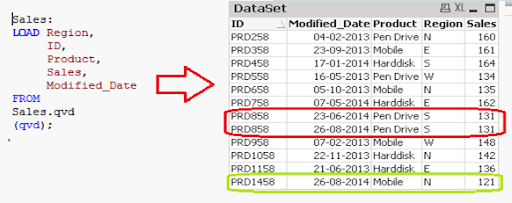
Now, load the most recent QVD (Sales), which will have incremental records.
As you can see, two records from August 26, 2014, have been added. However, we’ve also added a duplicate record. Since we haven’t accessed the available records, we may tell that an INSERT is the only approach that will not validate duplicate records.
Furthermore, we are unable to update the value of existing records using this method.
To recap, the steps to load only incremental records to QVD using the INSERT only method are as follows:
1. Recognize and load new records. 2. Combine this data with the QVD file. 3. Replace the old concatenated table with the new QVD file.
2. Insert and Update method:
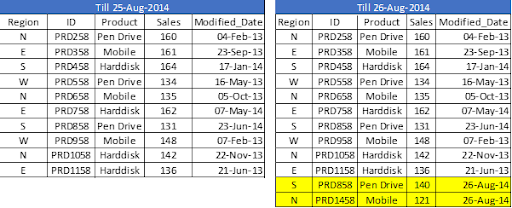
We can’t search for duplicate records or update existing records, as seen in the previous case. The Insert and Update approach comes in handy here:
Assume ID is the primary key, and we should be able to define and distinguish new or updated records based on change date and ID.
To use this process, repeat the steps for identifying new records as in the INSERT the only method. Then, apply the search for duplicated records or change old records’ value when concatenating incremental data with existing records.
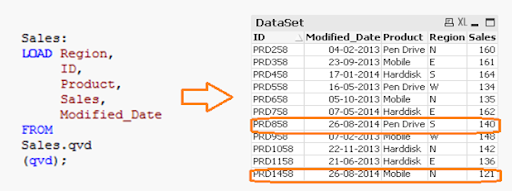
We’ve only loaded records where the Primary Key(ID) is new. The Exists() feature prevents the QVD from loading old records because the Latest version is already in memory, so expired record values are immediately updated.
Both specific records are now available in QVD, along with an updated sales value for ID (PRD858).
Subscribe to our YouTube channel to get new updates..!
3. INSERT, UPDATE, and DELETE method:
This method’s script is somewhat similar to the INSERT & UPDATE method, except there is an additional step to remove deleted records.
We’ll use an inner join with a concatenated data set (Old+Incremental) to load primary keys for all records in the new data set. Only common records shall be maintained, and unnecessary records will be deleted due to the inner join. Assume that in the previous case, we want to remove a record with the ID PRD1058.
We have a data set of one record added (ID PRD1458), one record modified (ID PRD158), and one record deleted (ID PRD1058).
Qlikview Training Certification
Weekday / Weekend Batches
Advantages of Incremental Load
The following are the benefits of the incremental load.
By removing the maximum load of data, it provides a productive load at any time.
As opposed to the standard model, it lowers the time it takes to get complete data by 100 times.
Incremental load reduces the database’s traffic load.
It reduces the workload for data source drivers.
The Incremental load minimizes the load on RAM.
It functions as a JIT (Just-In-Time) engine in the Data Extraction layer, fetching data in real-time.
It makes use of QVD file formatted tables, which significantly compresses the results.
Data Localization
The incremental load uses newly added data and attaches it to the recently incremented table, resulting in data access that is still local to the BI application.
Conclusion
This blog has addressed how incremental loads are faster and more effective than FULL loads for loading data. You should make regular backups of your data as the best idea, and if there are problems with your database server or network, your data can be affected or lost. It would be best to choose which approach is best for you based on your business and application needs. Insert and Update is used in the majority of BFSI applications. In most cases, records are not deleted.
To provide the best experiences, we use technologies like cookies to store and/or access device information. Consenting to these technologies will allow us to process data such as browsing behavior or unique IDs on this site. Not consenting or withdrawing consent, may adversely affect certain features and functions.
Functional
Always active
The technical storage or access is strictly necessary for the legitimate purpose of enabling the use of a specific service explicitly requested by the subscriber or user, or for the sole purpose of carrying out the transmission of a communication over an electronic communications network.
Preferences
The technical storage or access is necessary for the legitimate purpose of storing preferences that are not requested by the subscriber or user.
Statistics
The technical storage or access that is used exclusively for statistical purposes.The technical storage or access that is used exclusively for anonymous statistical purposes. Without a subpoena, voluntary compliance on the part of your Internet Service Provider, or additional records from a third party, information stored or retrieved for this purpose alone cannot usually be used to identify you.
Marketing
The technical storage or access is required to create user profiles to send advertising, or to track the user on a website or across several websites for similar marketing purposes.