

Pros
- Compact size
- Fairly accurate colors
- Optical zoom
Cons
- VIDAA OS is fine but not common
- Maybe a little overpriced
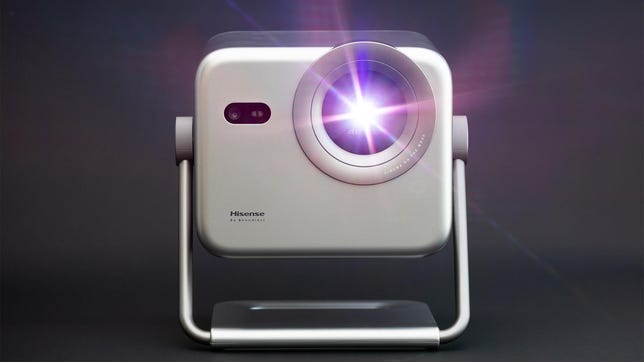
You’d think big TV manufacturers would have plenty of engineering know-how to make a great projector. In my experience, though, that’s not always the case. The Hisense M2 Pro, however, exceeded my expectations and does a lot of things really well. It’s decently bright, has fairly accurate color, a really good contrast ratio and even an optical zoom. Combine that with a price of around $1,300 and it’s a pretty easy projector to recommend.
The M2 Pro’s negatives are largely unrelated to performance, but to price. You can spend a bit more and get a better, brighter projector, or you can spend less and get fairly similar performance. In addition, its onboard VIDAA OS has all the major apps, but perhaps not as many of the smaller ones compared to Google TV. So, basically, the M2 Pro is very good for the money, but at a lower price it’d be amazing.
Specs and such
- Resolution: 4K
- Lumens: 1,300 (claimed)
- Zoom: 1-1.3:1
- Lens shift: No
- Light source type: RGB laser
The compact M2 Pro uses RGB lasers for its light source — not uncommon these days — and it pairs them with a zoom lens, which is fairly uncommon at this price. Combine these features with a built-in gimbal stand and you can put the M2 Pro just about anywhere without issue. It’s also 4K resolution, whereas many models at a similar price are 1080p.
Hisense claims 1,300 lumens. In its most accurate mode, I measured 803. With the Brightness Enhancement feature set to Ultra, the image is noticeably green, but I measured 1,183 lumens. Given unit-to-unit variation, not to mention different measurement techniques, I’d say this is pretty close to its claimed specs. Each of the other two Brightness Enhancer modes became progressively closer to the projector’s most accurate image but with decreasing brightness boosts. High mode produced 1,006 lumens but skewed noticeably blue, while Standard mode delivered 957 lumens and was only slightly cooler than the most accurate picture mode.
Connections
- HDMI inputs: 1
- USB port: 1
- Audio: eARC, 2x10W speakers
- Internet: Wi-FI
- Streaming interface: VIDAA OS
- Remote: Backlit
Like most small projectors, there’s only one HDMI input on the Hisense. Since streaming is built in, this is fine. If you want to connect a streaming dongle, there is a USB output to power it. Plus, unlike most projectors in this price range, the Hisense uses its own OS called VIDAA. It’s fairly simple to operate and comes with a row of apps to choose from. All the major options are here, but if you have a more obscure favorite streamer, you may want to check it’s available first. This is the second projector I’ve reviewed with VIDAA onboard. Coincidentally, I reviewed the other one immediately before — the much more expensive Leica Cine Play 1.
The two 10-watt speakers don’t have much bass — or treble, for that matter — but they do get quite loud. Sound quality deteriorates noticeably at higher volumes, with a fair amount of distortion, but if you need the extra volume, it’s there. Like all projectors, you’re better off connecting a soundbar or to a receiver with speakers.
Picture quality comparisons
The JMGO N1S 4K is similar in size, similar in original MSRP and, broadly speaking, similar in performance. It’s compact, on a pivot gimbal and uses lasers for its light source. When I reviewed the JMGO, the price was the same as the M2 Pro is now, but it has since fallen to under $800. I connected both of the projectors to a distribution amplifier and viewed them side by side on a 102-inch, 1.0-gain screen.
Once set up as similarly as possible, a number of things were instantly apparent. The first has to do with color temperature. Both are fairly close to accurate, but wrong in opposite ways: The M2 Pro looks a little blueish/greenish (lacking red), while the N1S 4K looks a little reddish. Subjectively, the N1S 4K looks slightly more natural, as the slight green push on the M2 Pro gives skin tones a mild pallor. However, on its own, the M2’s slight color tint isn’t as noticeable and there are plenty of ways to adjust it in the settings, even if you don’t have the projector professionally calibrated. Neither has the spot-on color of something like the BenQ HT2060, but they’re acceptably close enough.
The M2 Pro is brighter, producing 803 lumens versus the Hisense’s 575. Light output is especially important with projectors because it also determines how large an image you can create while keeping it bright enough to watch. Viewed side by side, the M2 Pro is noticeably brighter, though subjectively the difference doesn’t seem as dramatic as the roughly 33% gap in measured brightness suggests. It’s more a case of “the Hisense looks a little brighter” than “why is the JMGO so dim?”
Contrast, too, is fairly close, with the M2 Pro measuring a highly respectable 1,482:1 compared to the N1S’s ~1,196:1 (which is more of an estimate due to how that projector handles black levels). The difference is large enough that, combined with the greater light output, the M2 Pro’s image has a little more punch. It’s not massive, but it is noticeable. Both projectors’ brightness and contrasts are better than the average of the projectors I’ve reviewed for CNET, while the M2 Pro is closer to the best performing DLP projectors, all of which are more expensive.
A quick word of caution about RGB lasers, though. Like all RGB laser projectors, the M2 Pro can present an issue for some people who wear glasses. Depending on your prescription and lens material, you may see chromatic aberration, or color fringing, around bright objects. This is especially noticeable when the objects are on a dark background, such as white credits on a black screen or streetlights at night. It will look like the image “splits” with a single-color “ghost” on either side and is separate from the rainbows some people see with DLP projectors. For what it’s worth, I notice it and find it annoying enough that I personally wouldn’t buy an RGB laser projector. If you think this might be an issue for you, check out the TK705STi instead, as it uses LEDs and doesn’t have this issue.
Speaking of the TK705STi and its standard-throw sibling, the TK705i, I didn’t have either on hand for a direct comparison. Both, however, are priced similarly to the M2 Pro. The STi is significantly brighter than the M2 Pro, though in my testing, its color was slightly less accurate and its contrast ratio was lower. It’s also a short-throw projector, which may make it a better fit for smaller rooms but a less practical choice for larger ones.
I didn’t review the TK705i, and because it uses a different lens, I can’t say how its performance compares with either projector. It’s likely closer to the TK705STi than the M2 Pro in terms of brightness, however. Both BenQ models use LED light sources, so they avoid the RGB laser issues mentioned above.
There’s also the HT2060, one of my picks for best projector. While brighter and, as mentioned earlier, more accurate, it’s not gimbaled and is “only” 1080p. It’s not exactly a direct competitor, but if you’re looking for more permanent placement for your projector, check that one out, too.
TV 2 PJ
I’m concerned I may have damned the M2 Pro with faint praise. There just isn’t a lot to complain about, but it’s also not the most amazing PJ I’ve seen. It’s solid. It’s an A-. It’s one of the best options for the price. My only real issue is that it’s in this weird place where spending a little more can get you a lot more performance, and spending a lot less only gets you a little less. While technically you could say it’s a little overpriced, it performs better than some other projectors around the same price, meaning “overpriced” isn’t exactly accurate either.
I’ve been reviewing devices for a long time, and products like this are among the hardest to write about. Bad products are challenging to review because you end up double- and triple-checking your results, but they’re fairly easy to explain. Great products are easy for obvious reasons. It’s the good-but-not-great products that are tricky. The M2 Pro falls into that category. It’s a solid projector with few major flaws, but it doesn’t stand out in any one area. That makes it relatively easy to review and surprisingly difficult to write about — hence this paragraph.
I guess the spoiler in the M2 Pro conversation is the JMGO N1S 4K, which is why I mentioned it above. It’s currently going for under $800. Is the M2 Pro better? Yes, but not ~65% better as the prices suggest. The Hisense does have an optical zoom and, for better or worse, does not have Google TV. Basically, if you don’t care about that price difference, or you see it on sale, get the M2 Pro. If you want to save some money and don’t mind not having a zoom, get the N1S 4K.

Stephan is the sports journalist for the Maple Grove Report.