How to get upgraded on your Delta flight


Delta Air Lines’ Medallion elite status has plenty of perks, including same-day confirmed changes, international lounge access and Choice Benefits. Still, one perk sits above all others when it comes to chasing status: a free seat upgrade.

While free upgrades are becoming harder and harder to get on Delta, they still happen. However, the upgrade process remains shrouded in mystery. Who is eligible for upgrades, and when do these upgrades occur? How does Delta prioritize upgrade lists? And how can you increase your odds of getting a seat in the pointy end of the plane?

From complimentary elite upgrades, SkyMiles upgrades, and Global and Regional Upgrade Certificates to understanding the upgrade priority process, we’re here to demystify it all. Here’s how you can snag a seat in the front of a Delta plane.

Complimentary Delta upgrades

All Delta Medallion elite members and Reserve credit card holders are eligible for complimentary upgrades on flights within the U.S., including flights to Hawaii, subject to various terms, conditions and restrictions explained below.

Delta is systematically selling more premium-cabin tickets. Its revenue-maximization models set Delta First ticket prices to encourage more people to buy them outright. Therefore, you may notice this when you view a Delta reservation and are offered a buy-up upgrade.

Unfortunately, the more first-class tickets Delta sells, the fewer there are available for complimentary upgrades.

Below are the Delta products that are eligible for complimentary upgrades, including paid tickets, SkyMiles award tickets, Pay with Miles tickets, and SkyMiles Companion Certificates:

  • Delta Comfort (typically offered on all Delta-operated domestic and international flights)
  • Delta Premium Select (within the U.S., including Hawaii)
  • Delta First (typically offered on Delta-operated domestic flights and flights to nearby destinations like the Caribbean and Central America)
  • Delta One (on certain cross-country domestic flights)

Diamond and Platinum Medallion members can immediately clear from Delta Main into Delta Comfort upon booking if space is available.

Reward your inbox with the TPG Daily newsletter

Join over 700,000 readers for breaking news, in-depth guides and exclusive deals from TPG’s experts

Gold members must wait until 72 hours before departure to clear into Delta Comfort, and Silver members must wait until 24 hours before departure.

For Delta One domestic upgrades, Medallion members will clear on the day of departure following the same clearance priority hierarchy as with first-class upgrades, subject to upgrade availability.

Even if your upgrade doesn’t clear in advance, it may still clear at the gate. If an upgrade is still not confirmed at your upgrade window or when you check in, your pending upgrade request will automatically be added to the airport standby list for a potential gate upgrade before you board.

Medallion members are also eligible for complimentary upgrades on Aeromexico-operated flights within Mexico and between Mexico and the U.S., Central America, the Caribbean, Colombia and Ecuador. Upgrades are available to all ticketed passengers except those seated in Delta Basic.

Complimentary upgrade hierarchy

Here’s how Delta will determine your spot on the upgrade list:

1. Medallion status

2. Product purchased (including all post-purchase upsells), in this order: refundable Delta Premium Select, nonrefundable Delta Premium Select and award Premium Select, refundable Delta Comfort, nonrefundable Delta Comfort and award Delta Comfort, refundable Delta Main and award Delta Main (Delta Basic is not eligible)

3. Million Miler status

4. Travel Experience tier (Extra clearing before Classic, then Refundable)

5. Delta SkyMiles® Reserve American Express Card or Delta SkyMiles® Reserve Business American Express Card holders

6. Delta SkyMiles® Platinum American Express Card or Delta SkyMiles® Platinum Business American Express Card holders

7. Delta corporate travelers (ticket must include your employer’s corporate ticket designator)

8. Medallion Qualification Dollars earned in the current calendar year

9. Date and time of upgrade request

If two members are identical at a given level, the process continues down the list until the tie is broken.

Diamond and Platinum Medallion members will clear Delta First upgrades beginning 120 hours (or five days) before departure. Gold Medallion members will clear beginning 72 hours (three days) before departure. Silver Medallion members will clear beginning 24 hours (one day) before departure, subject to upgrade availability.

It’s also worth noting that upgrade certificates (Regional Upgrade Certificates and Global Upgrade Certificates) and upgrades with miles are prioritized ahead of these complimentary upgrades.


Delta SkyMiles Reserve American Express Card: Earn up to 125,000 bonus miles: 100,000 bonus miles after spending $6,000 on purchases in the first six months of card membership, plus earn an additional 25,000 bonus miles after spending $3,000 on purchases ($9,000 total) in the first six months of card membership.


Exclusions and fine print on Delta upgrades

Unfortunately, not all tickets are eligible for complimentary upgrades — here’s what’s excluded:

  • Delta Basic experiences — including Delta Main Basic/Basic Economy and Delta Comfort Basic, where sold, are not eligible for paid or Medallion complimentary upgrades, regardless of Medallion or other elite status.
  • Delta Premium Select fares are not eligible for a complimentary Medallion upgrade outside of the U.S.
  • Delta One seats on flights that start or end outside of the U.S. do not qualify for a complimentary Medallion upgrade.
  • No passenger, regardless of status or fare class, can select complimentary upgrades while aboard the aircraft.
  • Companions who change their itinerary and no longer travel with the higher-tiered Medallion after the change are not eligible for a complimentary upgrade at the higher-tiered member’s clearance window.

Improving your chances of a Delta upgrade

Beyond racing for a higher tier of Delta’s Medallion status, you can better your chances of receiving a complimentary upgrade by opening a Delta SkyMiles Reserve American Express Card or Delta SkyMiles Reserve Business American Express Card. These cards also net you 15 visits per year to Delta’s global network of Sky Club airport lounges. To earn unlimited visits each year, the total eligible purchases on the card must equal $75,000 or more in each calendar year thereafter.

You’ll often have a better shot at an upgrade if you avoid peak business travel periods. This lets you compete with fewer frequent flyers. Generally, this means avoiding flying Sunday night, Monday morning and pretty much all day Friday if you want to sidestep top-tier business travelers.

Delta upgrade certificates

Delta First Class Airbus A321neo LAX-SEA
KYLE OLSEN/THE POINTS GUY

Delta offers two types of dedicated upgrade certificates: Global Upgrade Certificates and Regional Upgrade Certificates. You can only get them by earning Platinum or Diamond Medallion status and selecting them using your Choice Benefits.

Upgrade certificates have a higher priority than complimentary upgrades; they may be requested and, subject to availability, cleared at the time you book your ticket. In other words, they’re a hyperexclusive way to sit in the front of the plane.

GUCs, available exclusively for Diamond Medallion members, offer upgrades on both international and domestic flights with Delta, along with select flights with KLM, Air France, Virgin Atlantic, Korean Air and Aeromexico. RUCs, available for Diamond and Platinum Medallion members, offer upgrades on the same routes as complimentary upgrades, including all flights with Delta First and the domestic Delta One experience.

As a Choice Benefits selection, Diamond Medallion members may choose any of the following three options:

1. Four global upgrades

2. Eight regional upgrades

3. Two global upgrades and four regional upgrades

Platinum Medallion members may choose four regional upgrades as their single Choice Benefits selection.

Important notes about Global and Regional Upgrade Certificates

These certificates come with several quirks and nuances to bear in mind.

They only offer confirmed upgrades to one cabin higher than the one originally purchased. Upgrade certificates can be cleared immediately when confirmable upgrade inventory is available; open seats on the seat map do not necessarily mean upgrade space is available. GUCs have expanded access to unsold domestic Delta First and Delta Premium Select seats. Delta Main tickets will be upgraded to Premium Select on flights with a Premium Select cabin. If you’ve upgraded to Premium Select, you will be placed on a Delta One upgrade waitlist 24 hours before departure.

Therefore, it’s possible to book Delta Main and eventually make it to Delta One, though you may end up only in Premium Select if there are no more Delta One seats left.

An RUC or GUC is for one-way travel, so you’d need to burn four to take a guest with you on a round-trip itinerary. You can apply an RUC or GUC to a paid ticket, a SkyMiles award ticket, a Pay with Miles ticket, a companion ticket or a ticket booked as part of a Delta Vacations package. Crucially, you cannot apply an RUC or a GUC to a Delta Basic ticket, regardless of your Medallion status.

While these certificates are not fully transferable to others, Delta will allow you to apply your RUC or GUC to a guest’s ticket if that person is traveling on the same flight as you. Even if you’re booked on separate reservations (e.g., your company books your economy ticket, and you book your spouse’s economy ticket later), you can use your upgrade certificates for both passengers.

Each GUC or RUC will expire at the end of the Medallion year that was associated with the Choice Benefits selection. Each certificate may be used to upgrade flights operated by Delta Air Lines or Delta Connection booked in the P, A, G, S, W, Y, B, M, H, Q, K, L, U, T, X or V fare classes and upgrade into RV/OK/OV class for GUCs or RX/OX/OL for RUCs. They may also be used to upgrade on SkyMiles awards, Pay with Miles tickets and companion certificates.

Upgrading on Delta partner flights with certificates

ZACH GRIFF/THE POINTS GUY

You can also use GUCs to upgrade select partner flights. GUCs applied to Air France and Virgin Atlantic flights will only move you from economy to premium economy unless you book a premium economy ticket outright. Note that all partner upgrades must be booked by Delta 24 hours before departure (waitlisting is not allowed).

These are the rules for upgrading partner-operated flights:

Upgrading KLM flights

  • Delta-marketed, KLM-operated flights: Delta Main economy seats booked in Y, B, M, H, Q, K, L, U, T, X or V class can be upgraded to A class (premium economy), or from P, G or A class to Z class (business class).
  • KLM-marketed, KLM-operated flights: Economy seats booked in Y, B, M, K, H, L, Q, T, N, R, or V class can be upgraded to A class (premium economy), or from W, S or A class to Z class (business class).
  • Air France-marketed, KLM-operated flights: Economy seats booked in Y, B, M, K, H, L, Q, T, N, R or V class can be upgraded to A class (premium economy), or from W, S or A into Z class (business class).
  • For flights departing Amsterdam Airport Schiphol (AMS), Global Upgrade Certificates must be applied prior to check-in with a KLM ticketing agent or at a KLM Crown Lounge.

Upgrading Air France flights

  • Air France-marketed, Air France-operated flights: Economy seats booked in Y, B, M, K, H, L, Q, T, N, R or V class can be upgraded to A class (premium economy), or from W, S or A class to Z class (business class).
  • KLM-marketed, Air France-operated flights: Economy seats booked in Y, B, M, K, H, L, Q, T, N, R or V class can be upgraded to A class (premium economy) or from W, S or A class to Z class (business class).
  • Delta-marketed, Air France-operated flights: Economy seats booked in Y, B, M, H, Q, K, L, U, T, X or V class can be upgraded to A class (premium economy) or from W, S or A class to Z class (business class), or from P, A or G class to Z class (business class).

Upgrading Virgin Atlantic flights

  • Delta-marketed, Virgin Atlantic-operated flights: Economy seats booked in W, S, Y, B, M, H, Q, K, L, U, T, X or V class can be upgraded to P class (premium economy), or from P, A or G class to Virgin Atlantic’s G class (business class).

Upgrading Aeromexico flights

  • Delta-marketed, Aeromexico-operated flights: Economy seats booked in W, Y, B, M, H, Q, K, L, U, T, X or V class can be upgraded to O class (business class).

Upgrading Korean Air flights

  • Delta-marketed, Korean-operated flights: Seats booked in J class can be upgraded to Korean Air’s A class, Y or B class can be upgraded to Z class, or if you’re booked in M class, you can be upgraded to Korean Air’s O class.

How to use a Delta upgrade certificate

ZACH GRIFF/THE POINTS GUY

Until recently, you had to call to apply a GUC or RUC to a Delta-operated ticket. Now, you only have to do this for existing tickets and partner-operated flights, as new tickets for Delta-operated flights can be upgraded online.

Upgrading a new Delta booking with a certificate

Delta lets you upgrade new bookings online and through the Fly Delta app. On the checkout page, you’ll see the option to upgrade your ticket with a GUC or an RUC.

Look for the “Upgrade Certificate Request” box and select the flight you’d like to upgrade. Then, select the type of upgrade certificate you’d like to use.
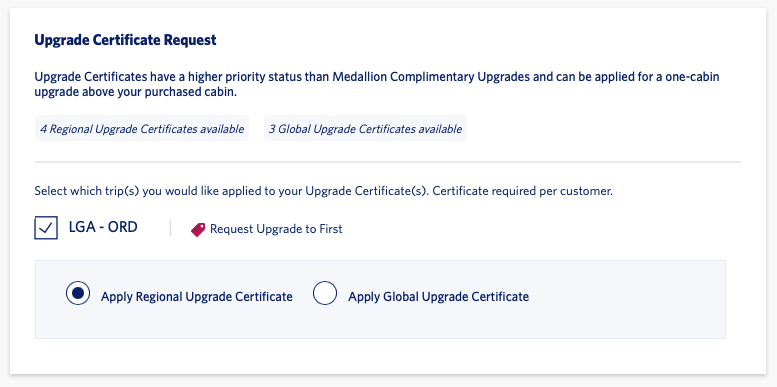
Applying an upgrade certificate to a Delta booking
DELTA AIR LINES

The upgrade certificate will be automatically applied when you complete your booking.

Upgrading an existing Delta booking with a certificate

For existing bookings, you must call 800-323-2323 (and select your associated Medallion tier) to make your request. Be sure to call at least three hours before departure to apply your certificate (24 hours before departure is strongly recommended).

If you want to confirm an upgrade immediately, search for your flight on the Delta website. You’ll see upgrade availability displayed underneath the flight times. Make sure you’re logged in to your Delta account, as upgrade availability only shows on elite accounts.
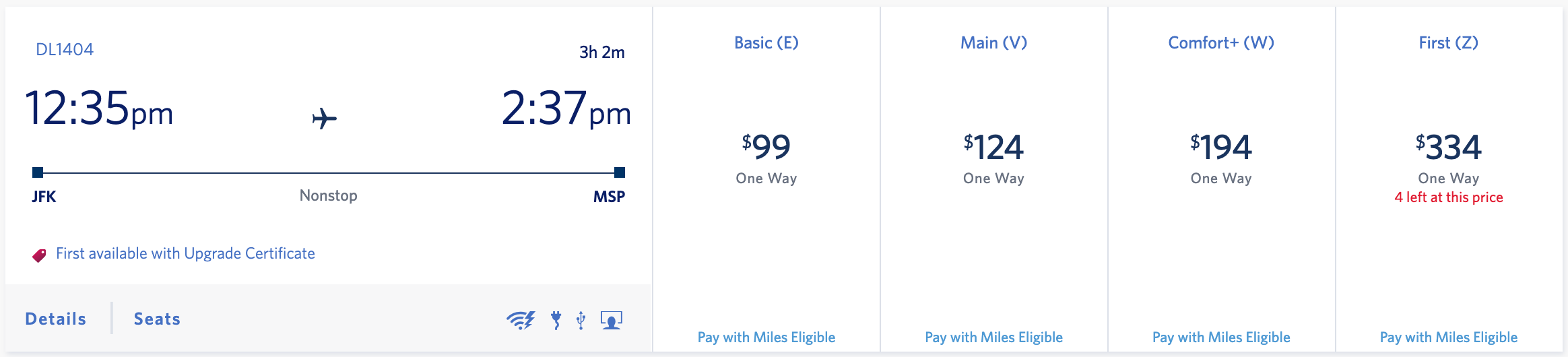
Flight search with upgrade space on Delta website
DELTA AIR LINES

If you can avoid waitlisting, do so. Waitlist upgrades are not guaranteed to clear, and they rarely do on particular routes, such as from U.S. West Coast gateways to Hawaii.

On itineraries with connections, ask the Delta agent to prioritize the upgrade for the leg that matters most to you. If you don’t clarify this, upgrades might clear on relatively unimportant or short legs while you remain waitlisted on the long leg. The upgrade certificate is considered used if you don’t prioritize the hard-to-get leg, and the upgrade clears on any other leg of your itinerary.

For example, you don’t want to burn a valuable GUC on a 45-minute domestic positioning leg when the leg that matters is the long-haul ride from the U.S. to Europe, Asia or Oceania. Remember, there’s no way to “undo” an upgrade clearing. Once it’s burned, it’s burned.

While upgrade requests on the waitlist can be cleared before you get to the gate, they are more likely to be cleared at the gate before departure. If your certificate doesn’t clear, it will be automatically reissued to your account and can be used on a future flight.

Delta SkyMiles mileage upgrades

CLINT HENDERSON/THE POINTS GUY

While we typically recommend storing up SkyMiles until you can exchange them for a true award ticket, that’s not always practical for infrequent flyers. Delta allows its passengers to upgrade their existing tickets with SkyMiles regardless of status.

You can use Delta’s Upgrade with Miles feature to upgrade to Delta One, Delta Premium Select, Delta First or Delta Comfort for eligible flights. If your reservation is eligible for an upgrade, you’ll see the option to upgrade in your trip summary.

Delta mileage upgrade
DELTA AIR LINES

Delta typically prices mileage upgrades by assigning a value of roughly 1.07 cents per SkyMile. In other words, if Delta is charging $60 for a particular seat upgrade, it’ll also allow you to part ways with roughly 5,600 SkyMiles to achieve the same upgrade. Just note that you may be able to achieve a marginally higher value by booking an award ticket outright.

Buy-up upgrades can also come in handy if you’re chasing elite status. You’ll earn Medallion Qualification Dollars on the cash or SkyMiles you spend on an upgrade, boosting you toward the next status tier.

Bottom line

Getting upgraded for “free” is a glorious thing, and you can better your chances by climbing Delta’s Medallion elite ranks and holding the right credit card. You’ll also be wise to choose flights that aren’t during peak business travel periods.

Using a stash of SkyMiles to upgrade can be a great way to boost your flight experience. Still, you’ll want to think carefully before using Upgrade with Miles — Delta will only let you redeem roughly 1.07 cents per SkyMile via this method (prices vary by market).

Upgrade certificates are the most exciting option, but you must reach Platinum or Diamond status to secure them. If you’re fortunate enough to have a few in your account, you can strategically plan a dream trip, pay cash for an OK seat and fly there in a great seat.

Related reading:


Source link

Leave a Reply

Subscribe to Our Newsletter

Get our latest articles delivered straight to your inbox. No spam, we promise.

Recent Reviews


The following article presents the frequently asked JIRA interview questions and answers for both freshers and experienced. If you are going to attend an interview for QA professional or software testing, then these interview questions and answers will be helpful to learn. JIRA is a popular software testing tool that is useful in development and project management. You can ace the interview by reviewing these Jira testing interview questions and answers.

Let us discuss the top JIRA Interview Questions and Answers. 

Most Frequently Asked JIRA Interview Questions and Answers

1. What Is Jira?

Ans. JIRA is a popular software testing tool and an issue-tracking product from Atlassian, an Australian IT company. It is also a famous bug-tracking tool that tracks various issues in project management. This tool is popularly used in software development and testing projects. Also, JIRA covers multiple reporting tools that help manage projects related to development and track many potential bugs and software errors. 

Become a master of Jira by going through this HKR Jira Course!

[ Related Article: Jira Course ]

2. Why JIRA is used?

Ans. JIRA is popularly known as a software testing, issue tracking, and project management tool. JIRA can be used for different purposes in software development and project tracking. Here are some benefits of using the JIRA tool:

  • It helps in tracking the progress of various IT projects. 
  • This tool is platform-independent.
  • Jira can run on different Operating Systems with compatibility. 
  • It is easy to customize the platform as per user needs.
  • Further, it is a very user-friendly and cost-efficient tool.
  • It also helps to automate various workflows.

3. Explain the JIRA workflow?

Ans. JIRA workflow is a group of various software activities helpful in tracking the different transitions of a bug or issue in the SDLC process. Transitions connect the two statuses when an issue transits from one status to another. Hence, the status mentions the nature of work performed by the tester. However, the three essential stages of JIRA workflow are as follows:

  • Open/Started
  • Work in Progress
  • Close/Finally done.

4. What are the important differences between JIRA and Bugzilla?

Ans. The following are the key differences between JIRA and Bugzilla:

  • JIRA is a popular commercial tool, whereas Bugzilla is an open-source tool.
  • Bugzilla is mainly a bug-tracking tool, but JIRA is a complete project management and issue-tracking tool. 
  • JIRA is a highly intuitive and user-friendly tool, but Bugzilla needs a more interactive UI.
  • JIRA can be easily customizable per various business needs, but Bugzilla has limitations. 
  • Bugzilla cannot integrate with other tools seamlessly, whereas JIRA can easily integrate with other Atlassian tools.
  • JIRA has no advanced search options feature, but Bugzilla has such an option. 

5. Is it possible to access the JIRA cloud site through a mobile device?

Ans. Yes, using the JIRA cloud site URL, you can access the JIRA cloud site through your mobile’s web browser.

6. Can JIRA be used for test case management?

Ans. As far as we know, the server’s test case management functionality was not well-integrated into the JIRA architecture. The test case management system will be set up in two alternative ways to support the test case management system. After that, customers have the following two options: they may either modify the built-in JIRA components to conform to the requirements of the test case management system, or they can utilize the add-ons that the parent business offers.

7. Explain labeling and linking issues in JIRA?

Ans.

Labeling is also known as “tagging,” which allows you to categorize an issue as information that can be allocated to any component later. You can find this issue through labels. 

You can use this functionality to establish a relationship between two issues on separate or identical JIRA servers.

8. List the types of reports generated in JIRA?

Ans. JIRA produces the following reports on the issues based on versions, projects, etc. Here are a few examples of the various reports:

  • Pie Chart Report
  • Average Age Report
  • Resolution Time Report
  • Recently created issue report
  • User-defined Workload report
  • Pie-chart workload report
  • Created issue Vs. Resolved issue report
  • Project Time-Tracking report
  • Single-level group report

9. What is cloning an issue in JIRA?

Ans. In JIRA, cloning an issue enables users to produce a copy of the actual/original issue. It allows multiple teams or developers to work on a single issue. Further, a clone issue can also be connected to the actual issue, containing the following information. 

  • Summary details
  • Assignee
  • Work environment info
  • Security info
  • Description Details
  • Issue type
  • Reporter 
  • Priority 
  • Component detail

10. How does a service desk work in JIRA?

Ans. A service desk plays a key role in a company’s IT infrastructure and is a central point of contact. A service desk agent works to address customer issues, inquiries, and technical support requirements. The service desk aims to provide seamless delivery of various IT services, improve efficiency, and increase user satisfaction.

The process typically starts with a request submission by a user through a web portal, email, or phone call. In the JIRA service desk line, they find the request sent and start action against it. Further, the service desks also follow IT best practices to resolve customer queries. Thus, they complete the customer requests and make them satisfied. 

If you want to Explore more about Jira? then read our updated article – Jira Tutorial

Jira Training Certification

  • Master Your Craft
  • Lifetime LMS & Faculty Access
  • 24/7 online expert support
  • Real-world & Project Based Learning

11. How are reports generated in JIRA?

Ans. The below-listed steps how to produce a report in JIRA:

  • Select the desired JIRA dashboard -> click reports -> a variety of report kinds are now available.
  • Go to “Switch report” to view an alternative report.
  • To view other report options, click on the report.

12. What is an issue in JIRA?

Ans. In JIRA, an issue refers to anything that is a software bug or a task related to a project. For the JIRA software projects, issues are the primary building blocks. However, multiple companies use JIRA to track issues occurring during the software development project. 

13. Explain how an issue is created in JIRA?

Ans. The following is the process to follow during the creation of an issue within JIRA:

  • To open the “create issue” dialog box, hit the “create” button at the top of the screen.
  • Next, choose the relevant project and issue category from the “Create Issue” box options list.
  • Type the “Summary” and fill in the appropriate fields. 
  • Before producing the subsequent issue on the dashboard, confirm that you have correctly filled out all the fields.
  • Click the “Create” button if all the information is correct.

14. What are the color indicators in JIRA and mention their significances?

Ans. In JIRA, the following are the primary color indicators:

  • Blue color: The blue color indicates the actual evaluated time.
  • Green color: The time spent or logging details are indicated by this color.

Orange color: This color indicates the balance estimated time.

15. What is a Kanban board in JIRA?

Ans: JIRA Kanban board  refers to the board built through DIY options or using the Kanban preset. Moreover, this board is perfect for people only interested in managing and restricting their ongoing work time.

16. What is a SCRUM board in JIRA?

Ans. In JIRA, the Scrum board is most useful for IT teams who want to work in Sprints or phases. 

Further, this board aids in bringing all the teams together to work toward a single goal. Moreover, Scrum is quite helpful in the software development process.

17. How to create a burndown and burn up charts in JIRA?

Ans

Steps for creating a Burn Up chart:

  • Visit the official JIRA website.
  • Click on the project you are currently working on.
  • Select the reports icon, which will display on the left.
  • The Burn-up chart option needs to be chosen here.

Steps for creating a Burndown chart:

  • Visit the official JIRA website.
  • Click on the project you are currently working on.
  • Select the reports icon that displays on the panel’s left side.
  • Now, choose the burndown option from the drop-down menu of reports.

18. Define the components used in JIRA?

Ans. The components in JIRA are simply project divisions used to divide software project issues into more manageable chunks.

19. Define the validator in JIRA?

Ans. Before the transition runs in JIRA, the validator verifies that the input provided to the transition, whether the transition is valid. Moreover, the issue won’t progress to the target state of change if the validator fails.

Become a master of Jira by going through this HKR Jira Training!

20. How is the security setting helpful in JIRA?

Ans. By using the JIRA security setting, only those individuals who have been granted permission to work on issues can access the issue. Every issue’s security level can be adjusted during creation or change.

21. How can you modify multiple bulk issues?

Ans. Use the bulk change choices -> tool menu -> choose all the issues on the current page that can now be used for the bulk activities to alter any bulk issue.

You will receive the following information when you carry out a bulk operation, for example:

  • Workflow change 
  • Remove
  • Move
  • Modify

22. What are some of the popular add–on for JIRA?

  • Ans. 

    Suites utilities for JIRA

  • Script Runner
  • Zephyr for JIRA
  • JIRA toolkits
  • REST API browser
  • JIRA portfolio
  • MISC workflow extensions
  • Tempo timesheets

23. Define schemas in JIRA?

Ans. In JIRA configuration systems, Schemes are essential components. However, these are a group of configured settings that one or more Jira projects may use in the future. Further, there are seven different kinds of schemas: issue type schemes, permission schemas, and notification schemas. 

24. In JIRA workflow, is it possible to transition an issue back to its previous status?

Ans. A problem cannot be changed back to its original state. However, you can complete this task using the “On hold” option in an emergency.

25. For any agile project, how user stories in JIRA are created?

Ans. The steps below will walk you through creating user stories in JIRA: issue type -> epic and types of issues -> then the related agile stories. To do this, navigate to the “create issue” page, click the “configure fields,” and then move to “epic link.”

Alternatively, the user can build subtasks under the main user story by creating a product backlog feature.

26. What is the JIRA dashboard?

Ans: JIRA dashboard is an online website with various tools and features. They are easy to use while working on any issue.

27. What is the use of move issue wizard in JIRA?

Ans. Users can specify the JIRA project through the move issue wizard in JIRA. Hence, it allows users to alter any aspect of the issue along with the issue status and the custom field values.

HKR Trainings Logo

Subscribe to our YouTube channel to get new updates..!

28. What is an audit log?

Ans. In JIRA, a user can view all the information on the issues produced and their changes in the audit log.

29. How to add your gadgets in the JIRA dashboard?

Ans. You can follow these steps to add gadgets to the JIRA dashboard:

First, move to the JIRA dashboard and hit the dashboard link. Then, click on the “Add gadgets” option. Next, choose the gadgets you want to add through the gadget wizard.

30. What are the limitations when editing an active workflow?

Ans. Users cannot alter the workflow name and description in an active JIRA workflow.

  • The user cannot remove workflow steps.
  • It is impossible to alter the status-related stages.
  • It is impossible to edit or modify a step ID.

31. Why Use Jira?

Ans: The reason behind using JIRA is

  • Upfront and fair licensing policy
  • Features that is not available elsewhere
  • Get latest update on the progress of projects
  • It run anywhere and recognized with many famous companies
  • Easily extensible and customizable

32. Explain Labelling And Linking Issue In Jira?

Ans: 

Labelling Issue: It enables you to categorize an issue in a more informal way than assigning it to a component or version. You can then search issues according to label.
Linking Issue: This feature enables you to link an association between two issues on either on the same or different JIRA servers.

33. Explain How You Can Share An Issue With Other Users?

Ans. You can email an issue to others by using JIRA’s share feature to share it. Additionally, you can email other JIRA users a link to the problem or include a note of it in the issue’s Comment or Description section.

34. Explain How You Can Disable Mail Notification For Bulk Operations?

Ans. To turn off mail notifications for a specific bulk activity, you must deselect the “Send Notification” button in the bulk operation wizard.

35. What Does An Issue Change History Include?

Ans. The history of issue changes comprises the following:

  • Removal of a comment
  • removing a work log
  • Building or removing an issue link
  • An attached file
  • Modifications to a field of issue

36. Explain What Does The Three Color Indicates Tracking Times Or Duration For An Issue?

Ans. Three colors will be shown to indicate how long the issue has been ongoing:

  • Actual Estimate (Blue): The time initially projected to address the problem
  • Remaining Estimate (Orange): The amount of time needed to finish the problem
  • Time Spent or Logged (Green): The total time invested in fixing the issue so far.

37. Mention Some Of The Popular Add-ons For Jira?

Ans: Some popular add-ons for JIRA include,

  • Suites utilities for JIRA
  • ScriptRunner for JIRA
  • Zephyr for JIRA – Test Management
  • JIRA Toolkit Plugin
  • Atlassian REST API Browser
  • Portfolio for JIRA
  • JIRA Misc Workflow Extensions
  • Tempo Timesheets for JIRA
  • JIRA Charting Plugin

38. Mention What Is Schemes In Jira?

Ans. A key part of JIRA configuration is the schemes. One or more JIRA projects may use these schemes as the group of set-up values. Notification schemes, permission schemes, and issue-type schemes are a few examples. Further, there are seven different kinds of schemes.

  • Screens
  • Permissions
  • Notification
  • Issue types
  • Field configurations
  • Custom fields
  • Workflows

39. Mention Is It Possible To Get Back Up Your Jira Cloud Data?

Ans. You can use the Backup Manager in JIRA to back up your cloud data. However, only one backup file is kept on file at once. New backup files replace the old ones.

40. Mention What Data Can Be Backed Up?

Ans. The following data can be backed up in Jira:

  • Attached files if selected
  • Users and their group settings
  • Issues & Avatars

41. Mention Some Useful Tips On Jira Workflow?

Ans. In JIRA, statuses are the global objects. Any workflow that uses a certain status will have its status changed if its name is altered.

  • To view the appropriate transition labels, hover over a status or transition.
  • In the workflow designer, transitions cannot be copied.
  • It is not possible to make annotations inside the workflow designer.
  • You cannot instantly fix the property issue.editable.

42. Mention What Is The Role Of Validators In Jira?

Ans. Validators play a great role in JIRA software. They check the various inputs used in the transition are valid or not before the execution of transition. In case of failure, there will be no further progress in the issue to transition’s target status.

43. What Is An Event In Jira?

Ans. An event contains information about its state, default template, notification system, workflow transition, and event’s post-function interactions. In JIRA, the events can be divided into System Events and Custom Events. These are JIRA-defined and user-defined events, respectively.

Jira Training Certification

Weekday / Weekend Batches

44. What issues can we not clone in JIRA?

Ans. The following issues can’t be cloned in Jira such as time tracking, comments, and history of an issue.

45. Define JQL.

Ans. JQL refers to JIRA Query Language, which provides many advanced and adaptable methods for identifying a wide range of JIRA issues. Field, operator, keyword, and value are all included in JQL. This language is helpful for developers, managers, testers, business users, etc. 

46. What is meant by JIRA Core?

Ans. An application called JIRA Core provides an adaptable workflow management solution. By offering a framework for automating numerous business processes, it facilitates a company of different tasks and projects into a single, central location. As a result, it increases the team’s total productivity.

47. What elements make up a JIRA Schema?

AnsJIRA Schema includes the following elements:-

  • Issue Types
  • Notifications
  • Screens
  • Permissions
  • Field Configuration
  • Workflows

48. What is meant by Issue Collector?

Ans. Users can use the issue collector to integrate a JIRA feedback form into their website. Generally, a user can open a form by clicking on a trigger tab in the margin of the website’s webpage.

49. Name the Agile methodologies that support JIRA.

Ans. The following Agile methodologies support JIRA: Kanban and Scrum.

50. List the various Issue types in a Scrum project within JIRA.

Ans. The Scrum project in JIRA comes with the following issue forms by default: 

  • Epic 
  • Story 
  • Task 
  • Bug

51. Name the various source control tools that JIRA integrates.

Ans. The different source control applications that are simple to combine with JIRA include the following:-

  • Helix Core
  • Subversions
  • Git 
  • ClearCase 
  • Mercurial

52. How can you schedule an issue in JIRA?

Ans. We can quickly set up issue due dates within JIRA, which makes it easier to monitor, assess, and alert the team about the due date. The fantastic feature of issue scheduling is that it does a secure and comparable date search based on due dates. As a result, scheduling an issue within JIRA with the date field is simple. We can modify the current issue type or create a new one to do this.

53. Name the Post Functions performed after the execution of the transition.

Ans. The following post functions executed after the transition’s execution:

  • Updates to the issue field
  • Adding a remark to an issue
  • Creating events to initiate email notifications
  • Modify the production history of an issue.

50. Mention the ways to ensure data security and privacy in JIRA.

Ans. Any company using JIRA software should prioritize privacy and data security. The following are the security best practices to use in JIRA:

  • Using a firewall.
  • Using a two-factor validation system.
  • Using data encryption.
  • Updating JIRA software.
  • Taking data backup.

Conclusion

After going through these JIRA interview questions and answers, you can feel more confident attending the interview. These questions are compiled with the help of experts in the industry so that you can easily ace the interview of a QA Tester. 

About Author

author-image

As a Senior Writer for HKR Trainings, Sai Manikanth has a great understanding of today’s data-driven environment, which includes key aspects such as Business Intelligence and data management. He manages the task of creating great content in the areas of Digital Marketing, Content Management, Project Management & Methodologies, Product Lifecycle Management Tools. Connect with him on LinkedIn and Twitter.

Upcoming Jira Training Certification Online classes

Batch starts on
27th Jun 2026
Mon – Fri (18 Days)
Weekend
Timings – 10:30 AM IST
Batch starts on
1st Jul 2026
Mon & Tue (5 Days)
Weekday
Timings – 08:30 AM IST
Batch starts on
5th Jul 2026
Mon – Fri (18 Days)
Weekend
Timings – 10:30 AM IST


Source link