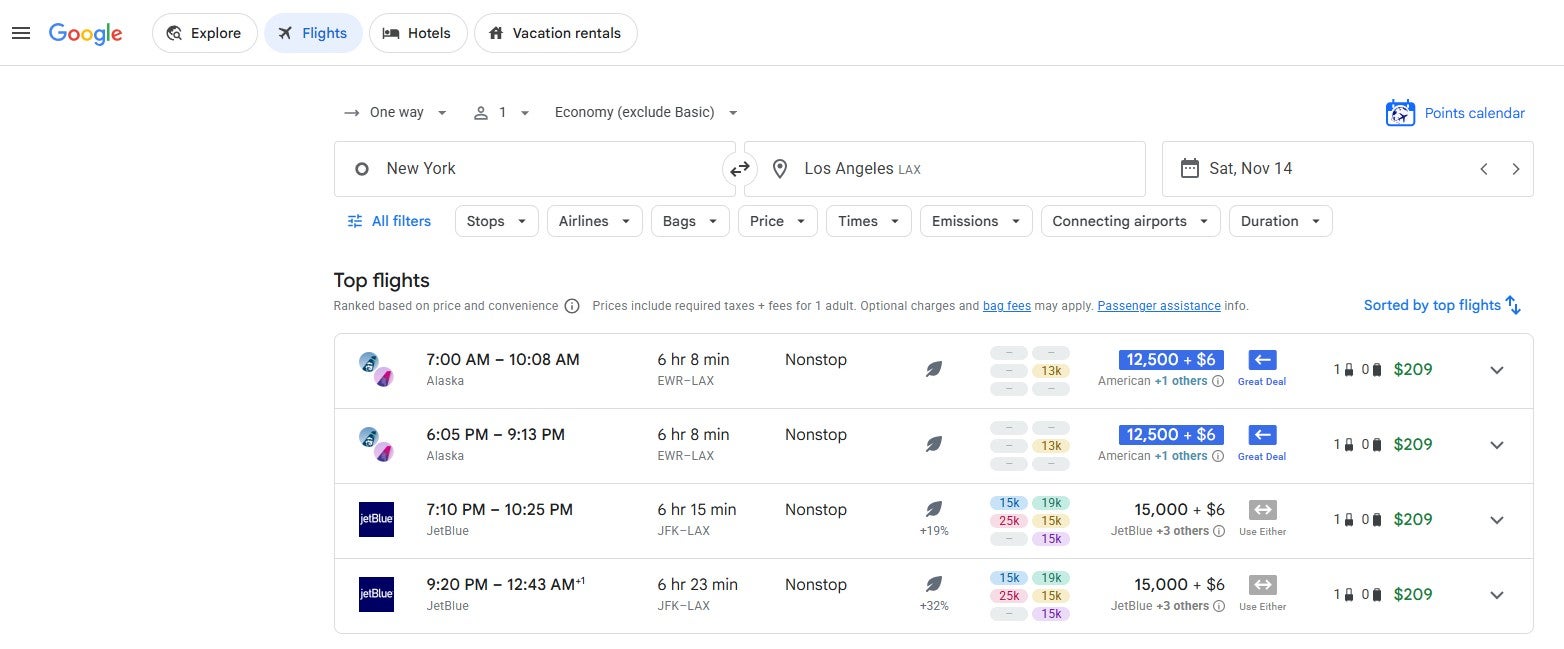

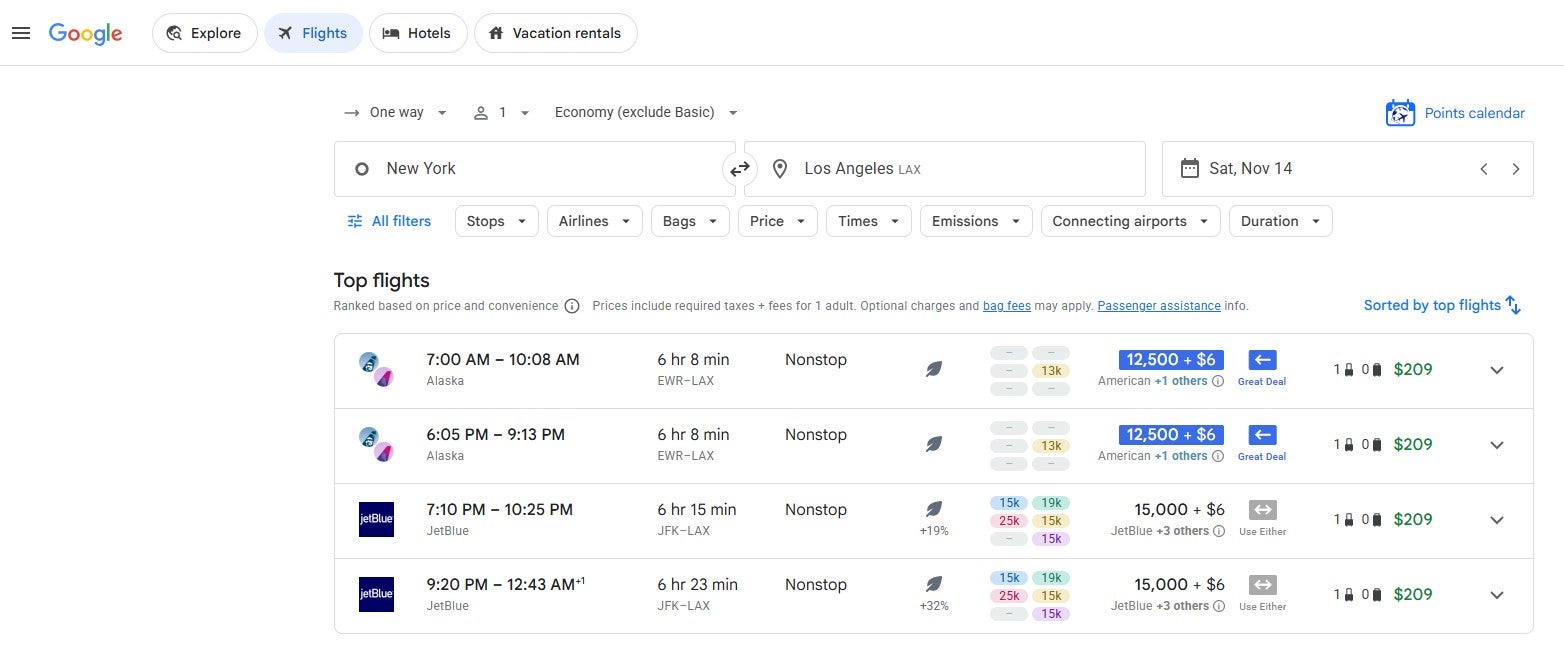
In 2024, Points Path launched a Google Flights web browser extension that displays award rates alongside cash fares for flights sold by select airlines. This extension has been extremely useful, especially for travelers just getting started with points and miles.
Recently, Points Path launched two new features: one that calculates Points Boosts on the Chase Travel portal and another that compares hotel prices across multiple sites. So, let’s take a closer look at the Points Path extension, including what it is, how to install it and how it can help you.
What is Points Path?
Points Path is a web browser extension that works on Google Flights, Chase Travel, and select online travel agencies.
On Google Flights, the Points Path extension shows award rates alongside cash prices and indicates whether it’s better to redeem rewards or book at a paid rate for each itinerary. Once you select an itinerary, you can book a paid rate as you typically would with Google Flights or redeem an award directly with the airline loyalty program.
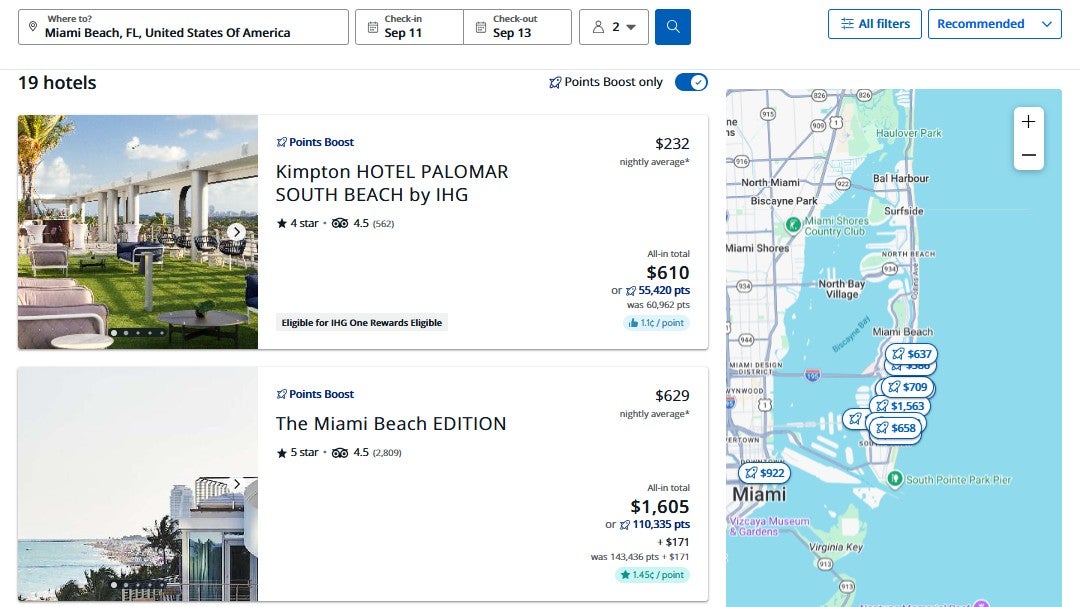
Meanwhile, within the Chase Travel portal, the Points Path extension shows Points Boost redemption rates for flights and hotels. This is particularly important, as redemption rates through Points Boost can vary, with some offering significantly better value than others.
And on select online travel agencies, such as Expedia, the Points Path extension shows when you can book a specific property at a lower rate.

How to install the Points Path extension
To install the Points Path extension, you must be a Google Chrome, Apple Safari, Microsoft Edge, Brave or Opera browser user. To get started with Points Path, head to its website and click the blue “Download the free extension” button near the top of the page.
Doing so will take you to the installation page for your browser, which, for me, was the Points Path Chrome Web Store page. I clicked the “Add to Chrome” button on this page to install the Points Path Chrome extension. The installation only took a few seconds, after which I could begin using the Points Path extension.
How much does Points Path cost?
Points Path offers a free standard version and several paid membership tiers. All tiers offer access to the full Chase Points Boost and hotel comparison features; the differences lie in the Google Flights extension. However, some paid tiers also provide new members with longer free trials for Dollar Flight Club Premium+ and HotelSlash.

Reward your inbox with the TPG Daily newsletter
Join over 700,000 readers for breaking news, in-depth guides and exclusive deals from TPG’s experts
The standard version of Points Path lets you see award pricing in Google Flights for select domestic airline programs, shows which transfer partners let you access flights booked through these programs and shows recommendations on whether to book using cash or rewards. Specifically, standard Points Path members can see award options in the following programs:
- Alaska Atmos Rewards
- American AAdvantage
- Delta SkyMiles
- JetBlue TrueBlue
- United MileagePlus

Points Path also offers two elevated paid membership tiers: Alerts for $34.99 per year and Pro for $79.99 per year (or $7.99 per month). The Alerts tier lets you track one-way award price drops (or, if there are none, availability) for up to 10 itineraries.
Meanwhile, the Pro tier lets you set up to 30 award price alerts at once, see seven-day points calendars, account for United and Delta cardholder award discounts and set your own points valuations. Pro members can also see award options through many additional loyalty programs, including those offered by:
- Aer Lingus
- Air Canada
- Air France-KLM
- Avianca
- Emirates
- Etihad
- Qantas
- Qatar
- TAP Air Portugal
- Virgin Atlantic
- Virgin Australia
TPG readers can get 15% off the first year of an annual Points Path Pro membership when using TPG15 as the promotional code at checkout. However, this discount is only valid for first-time paid subscribers.
Occasionally, Points Path allows its members to subscribe to a higher tier, called Founders Club. Founders Club members can track up to 50 flights at a time, enjoy access to special online meetups and get early access to new features.
Related: These 14 apps and websites make award redemptions easier to find
How to use the Points Path extension for Google Flights
Once you’ve installed the Points Path extension, head to Google Flights. You’ll need to use the basic Google Flights page at flights.google.com, select “English (United States)” as your language and choose U.S. dollars as your currency for Points Path to work properly. If needed, you can change your language and currency to meet these requirements at the bottom of the Google Flights website.
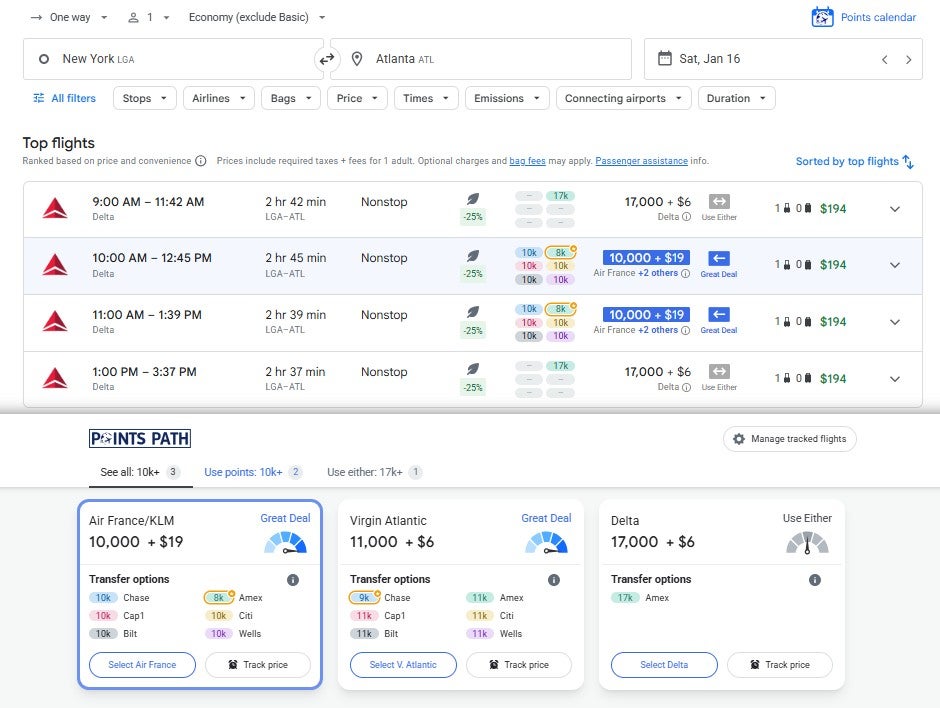
Then, search as you typically would in Google Flights. When you do so, you should see an extra column in the results that shows the lowest award rate Points Path found across its supported programs and a recommendation on whether to book a paid or award rate for each itinerary.
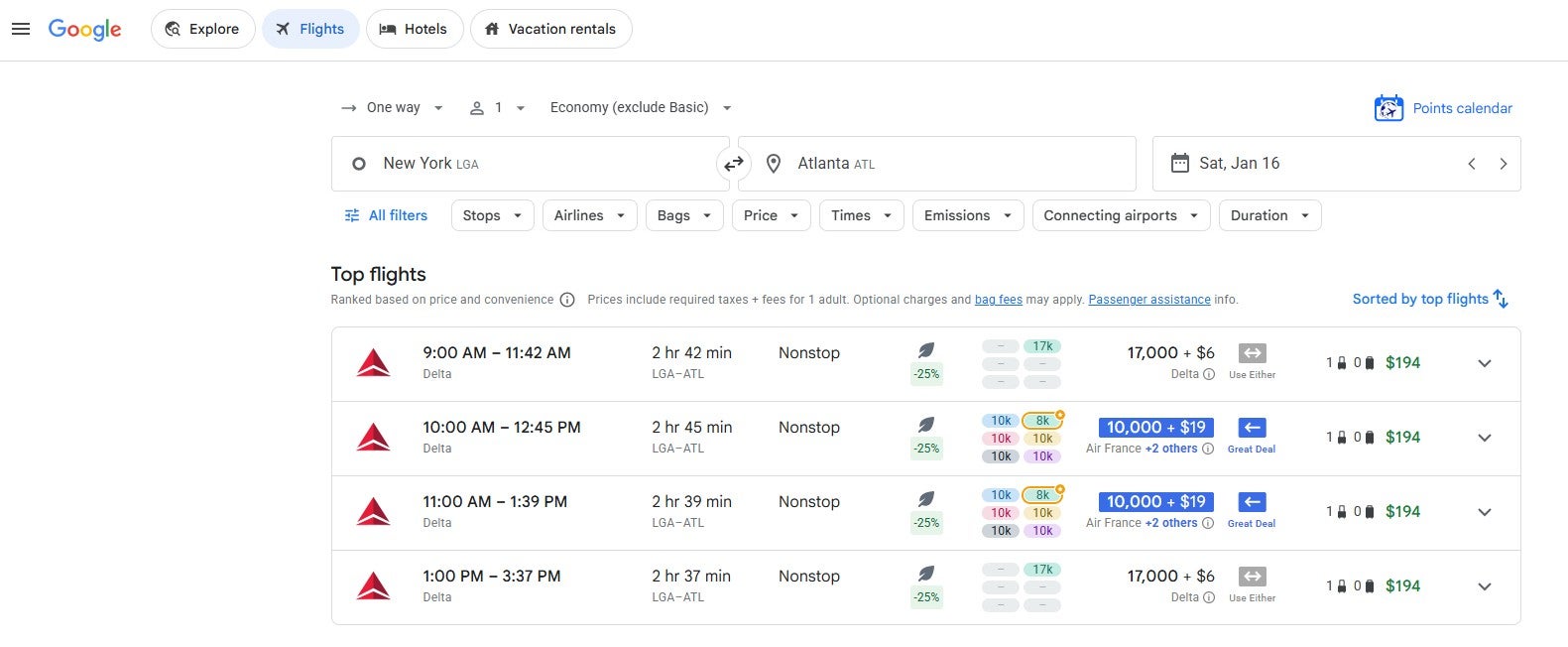
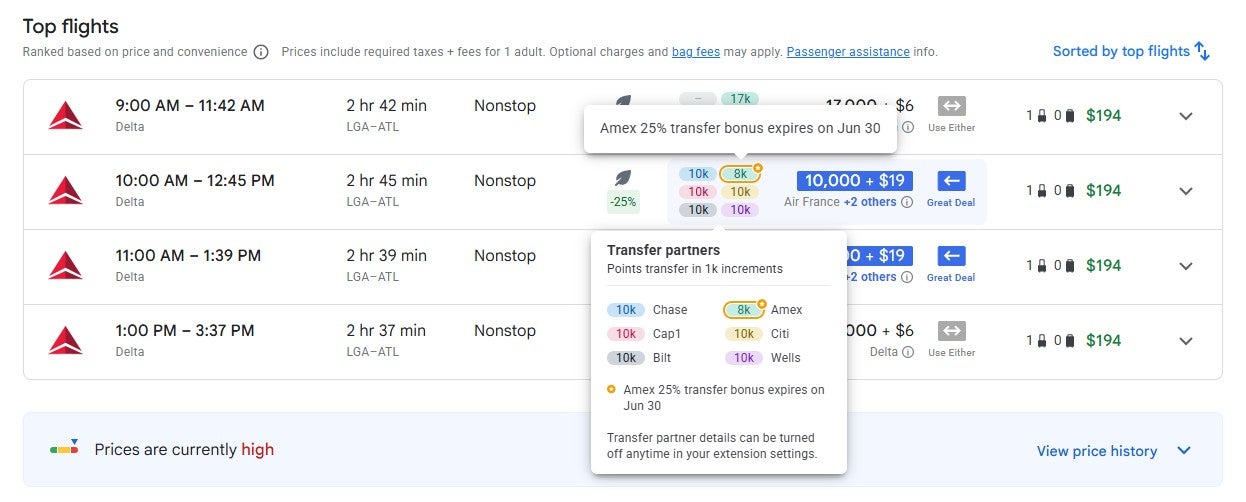
If you hover over the block of six award prices for a particular itinerary, you can see which transfer partners can be used to book this itinerary. Note that you’ll even see active transfer bonuses accounted for in these rates.
If you click a specific itinerary, you’ll see award rates for the loyalty programs Points Path supports, and the transfer points you can transfer to each program. Alerts, Pro and Founders Club members can also click “Track price” to set an alert if the award price drops.
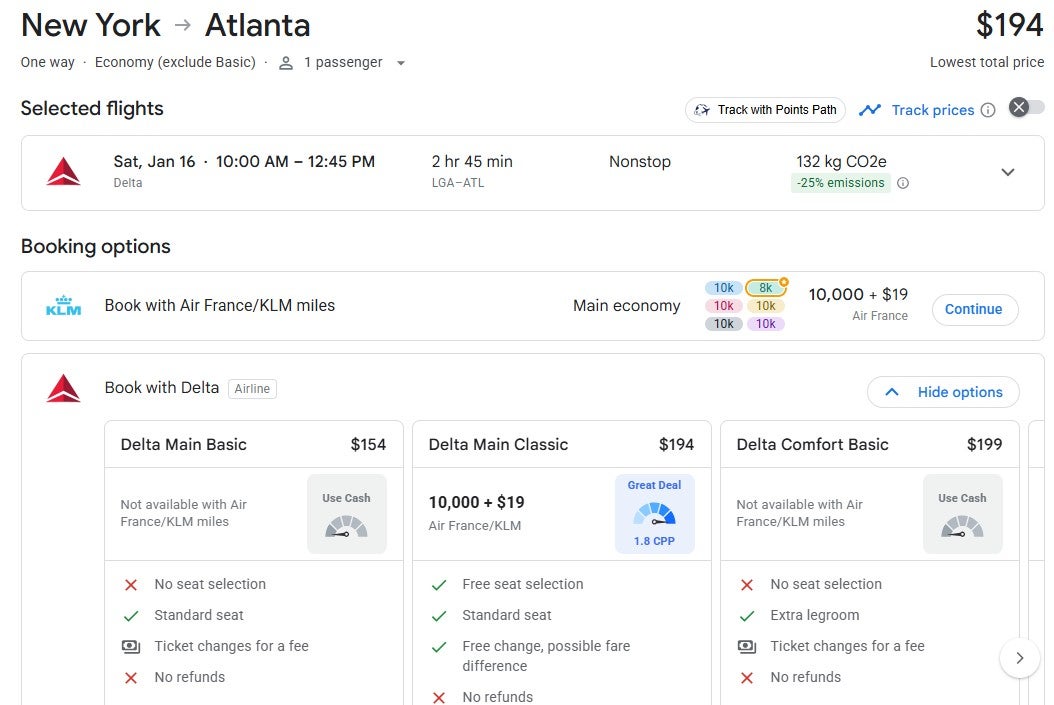
If you select a program, such as Air France-KLM Flying Blue, you’ll end up on a page that shows the award rate and comparable paid rates. If you click “Continue” next to the award option, your browser will open the loyalty program’s website in a new tab, where you can book your award.
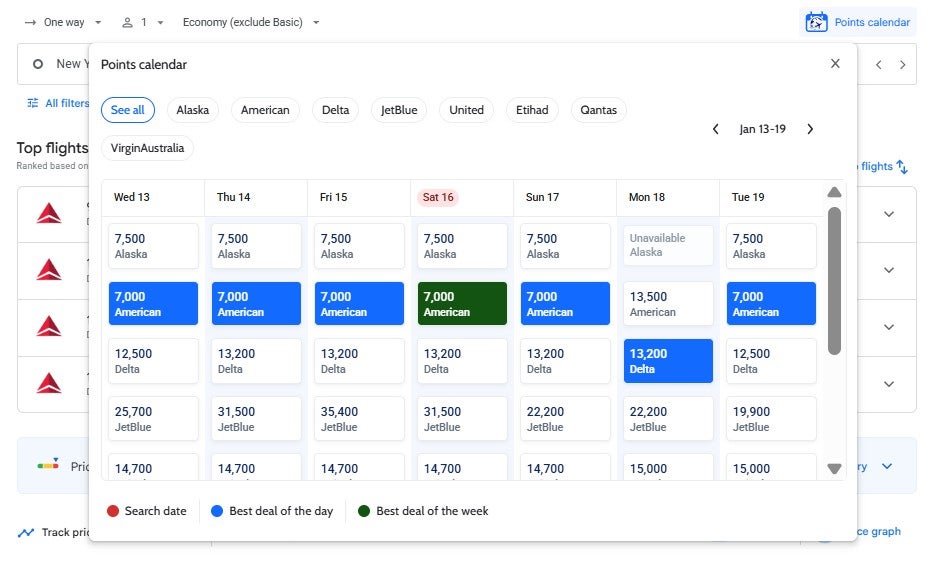
Back on the initial Google Flights results page, Pro and Founders Club members can also click “Points Calendar” above the results to load a seven-day calendar of award options bookable through American, Alaska, Delta, JetBlue, United, Qantas, Virgin Australia and Etihad.
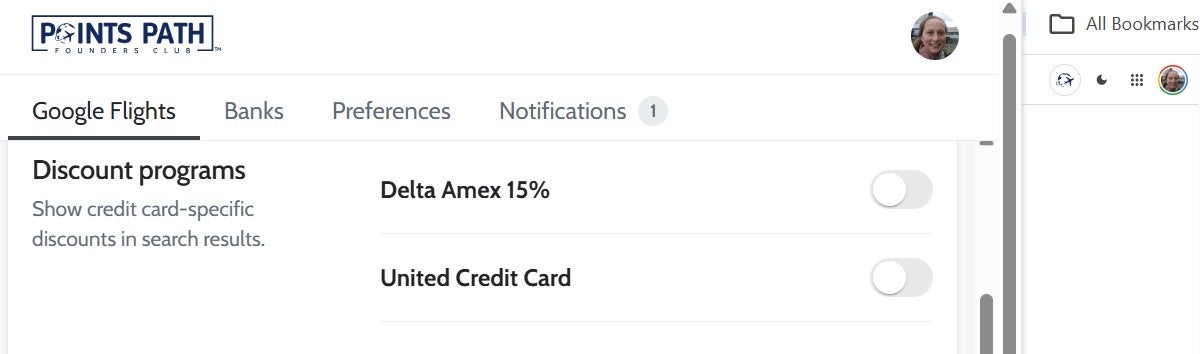
Pro and Founders Club members who have a Delta or United cobranded credit card that unlocks award flight discounts can also toggle on these savings by selecting the Points Path logo in the top-right corner of Google Flights and clicking “Discount programs.”
Of course, keep in mind that you should always verify award pricing with the airline program you plan to book through before transferring points.
Related: 10 tools that help you get money back on flights
How to use the Points Path extension for Chase Travel
You can opt-in to a Points Path extension for Chase Travel that calculates the cents per point redemption rate for Points Boost flights and hotels. To opt-in, head to your Points Path account page, click “Additional Permissions” in the left-hand menu bar, click “Enable” next to “Enhance your Chase travel experience,” and grant the necessary permissions.
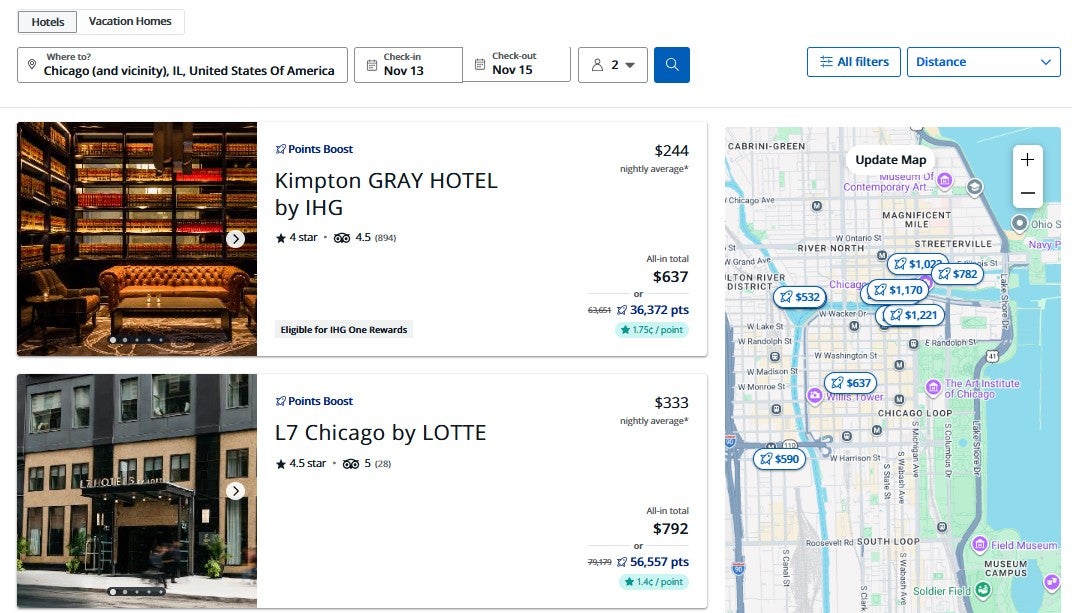
Then, head to the Chase Travel portal. On hotel searches, you’ll see a small overlay with the redemption rate on each hotel result eligible for Points Boost.
On flight searches, you’ll see a similar small overlay with the redemption rate on each flight eligible for Points Boost.
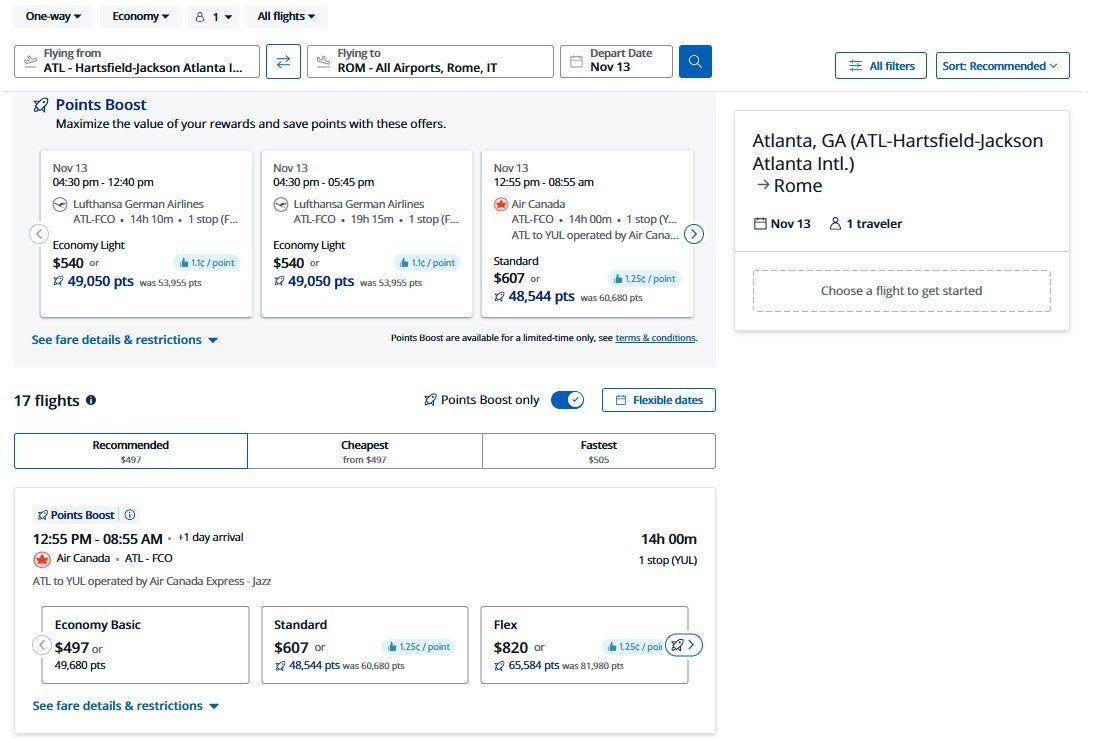
Especially since Points Boost doesn’t provide a consistently high redemption rate, these overlays can help you determine when you’re getting enough value to justify redeeming Chase points for a booking.
Related: 10 best ways to redeem 150,000 Chase Ultimate Rewards points
Using Points Path to compare hotel prices
Finally, Points Path says its extension also works on “100+ online travel agencies and their international sites” to help you find lower rates for the same properties. So, while I’ve only noticed the extension showing lower prices in Expedia searches since I installed it a few weeks ago, you may see it working on other online travel agencies as well.
For example, when I search for a hotel on Expedia, Points Path adds boxes showing lower rates it has found through other sites. If Points Path doesn’t add a box for a result, it means it couldn’t find a lower rate.

Similarly to the Points Path extension for Chase Points Boost, you must opt in to the “Compare hotel prices across sites, instantly” option in your Points Path account and grant the required browser permissions.
Related: 10 truly special luxury hotels and resorts you can book with points
Bottom line
Points Path is a useful browser extension for travelers who want help deciding when to use points and miles and when to pay cash. Its Google Flights integration can save time by showing award rates alongside cash fares, while its Chase Travel and hotel comparison tools can help you spot better-value redemptions and lower hotel prices. Just be sure to verify award availability, taxes and fees, and transfer requirements directly with the loyalty program before moving any rewards.

Stacie Harris is a local resident and reporter of the Maple Grove area. Stacie reports on medicine and science for the Maple Grove Report.