Death toll climbs to 164 killed, 971 injured in major earthquakes in Venezuela


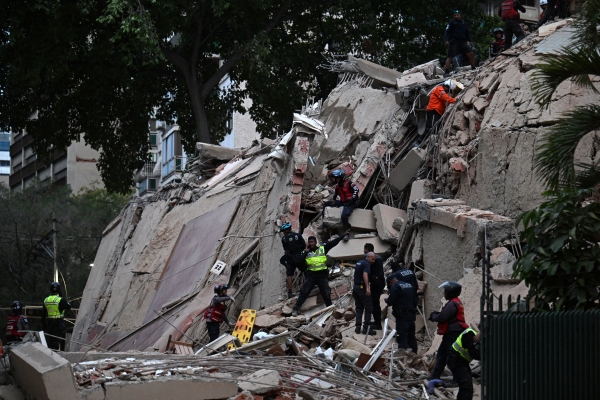
Rescuers search for victims in a collapsed building following an earthquake in Caracas on June 24, 2026.

Rescuers search for victims in a collapsed building following an earthquake in Caracas on June 24, 2026.
Rescuers search for victims in a collapsed building following an earthquake in Caracas on Wednesday.
Juan Barreto | Getty Images

Venezuela's acting President Delcy Rodríguez said Thursday that at least 164 people were killed and 971 were injured after two major, back-to-back earthquakes struck northern Venezuela, reducing many buildings to rubble in the nearby capital of Caracas.

The death toll rose from 32 killed and 700 injured that Venezuelan authorities provided in the early hours of Thursday.

An initial earthquake at about 6 p.m. on Wednesday, a 7.2-magnitude foreshock, was followed less than a minute later by a 7.5-magnitude earthquake in the same area, according to the U.S. Geological Survey.

Rodríguez said the initial toll was expected to increase as rescuers and emergency workers searched through the rubble. Dozens of buildings collapsed in the city of La Guaira, about 19 miles (30 kilometers) north of Caracas, she added.

Rescue workers carry a person on a stretcher out of a collapsed building.
Juan Barreto | Getty Images

Rodríguez called for national unity to save lives. "Together we will overcome this tragedy," she wrote on social media.

The epicenters, which USGS estimated to be about 3 miles apart, were near the town of Morón on Venezuela's Caribbean coast, some 100 miles west of Caracas.

In the wake of the destruction, President Trump said he had instructed his administration to help Venezuela, saying that the earthquakes were "both massive in scale and have left a devastating number of deaths."
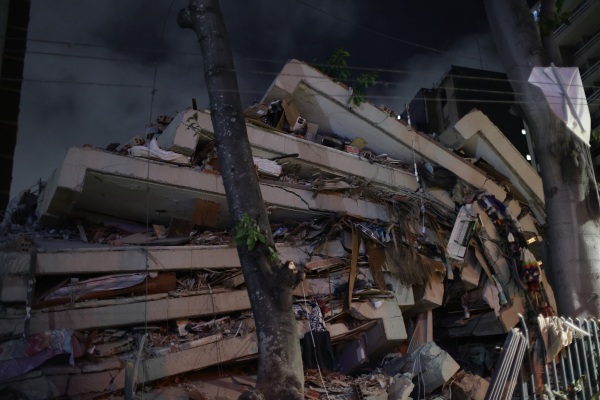
A damaged building at Los Palos Grandes after a magnitude 7.2-foreshock struck Venezuela.
Jesus Vargas | Getty Images

"We will be there for our new and great friends. Early reports are not good!!!" Trump wrote on social media.

The U.S. State Department said it mobilized a disaster assistance team and would be sending search and rescue teams, medical and humanitarian supplies and other resources to Venezuela.

Humanitarian aid, search and rescue missions and medical personnel were also offered by Colombia, Ecuador, Dominican Republic, Brazil, Chile and El Salvador as messages of support to Venezuelans poured in.

Rodriguez announced a $200 million reconstruction fund for hospitals and homes damaged by the earthquakes, as reported by the Associated Press.

"When the earthquakes are this close together" in time, said Paul Earle, a seismologist at USGS, "it can be difficult to unravel the exact magnitudes and the exact locations, especially for the second event," due to the way the signals on seismograms overlap in these cases.

 People run into a street following an earthquake in Caracas.
People run into a street following an earthquake in Caracas.
Federico Parra | Getty Images

Photos and video posted to social media showed leveled buildings, people running for safety, and falling debris from structural damage at Simón Bolívar International Airport in Caracas. The airport has since closed.

The total number of deaths and injuries is not yet clear. On Wednesday evening, USGS modeling of the 7.5-magnitude earthquake estimated deaths could be in the thousands to tens of thousands, with economic losses reaching billions to tens of billions of dollars, Earle said.

"This doesn't happen very often," Earle said. "When they're right together it's hard to understand what would happen."

A man jumps on a collapsed building after an earthquake in Caracas, Venezuela.
Adrian Naranjo | AP

The strongest of the "doublet," as the USGS described the twin quakes, is the largest earthquake to strike Venezuela since 1900, when a 7.7-magnitude quake hit the country, according to USGS.

About a half-hour after the Venezuela quakes, a 7.2-magnitude earthquake hit the east coast of Japan. Earlier Wednesday, a 5.6-magnitude quake struck Northern California. There was no major damage reported in either quake.

In Venezuela, significant aftershocks are likely to follow in the coming days.

Evacuated people speak by phone waiting at Parque Central urban development complex.
Jesus Vargas | Getty Images

According to USGS forecasting, there's a 40 percent chance that, in the next week, a 6-magnitude or larger earthquake will strike in the same region, Earle said, and an "almost certainty" of an earthquake measuring at least a magnitude 5.

Tsunami warnings previously issued for Puerto Rico and the Virgin Islands were recalled, and no such advisory was in effect as of Wednesday night.

On Wednesday evening, Venezuela's acting President Rodríguez declared a state of emergency, and said several Venezuelan states had sustained damage. She also called for unity, and urged "our population to remain calm."

Copyright 2026, NPR


Source link

Leave a Reply

Subscribe to Our Newsletter

Get our latest articles delivered straight to your inbox. No spam, we promise.

Recent Reviews


What is Salesforce approval process ?

Approval Process in Salesforce is an automated process that automates the approval of Salesforce records in your org. In Salesforce, an approval process is a series of steps that allow a record to be approved or rejected by a user, queue, or public groups. An approval process also specifies the actions to be taken when a record is approved, rejected, recalled, or submitted for approval for the first time.

For instance, when an employee requests time off, Salesforce should automatically send an approval request to the employee’s manager. 

Wish to make a career in the world of salesforce? Start with HKR’S  salesforce online training !

Why the salesforce approval process?

Salespeople are frequently required to confirm their transactions with internal departments (for example: legal, accounting).

Typically, it entails sending numerous emails to various people, after which you must ensure that it is confirmed.It’s no secret that this process could take a long time.As a result, Salesforce created a built-in approval process that you can use to automate approval requests.Once configured, you can request approval with the click of a button.

Salesforce Training

  • Master Your Craft
  • Lifetime LMS & Faculty Access
  • 24/7 online expert support
  • Real-world & Project Based Learning

Steps for approval process in salesforce:

Here are the important steps in the salesforce approval process. They are:

  • Setup -> Create -> Workflow and Approval -> Approval Process
  • Select object for approval process to be written
  • Click on Create New Approval Process
  • Select Standard Setup Wizard from drop down
  • Enter the Process name, Unique Name and description for your process
  • Specify Entry criteria 

Salesforce approval process example:

The following are the sections that must be configured in the salesforce approval process:

  • Process Definition Detail – Approval Process Header level information such as name, email template, and so on.
  • Initial Submission Actions – It would be executed whenever the customers click on the object record’s ‘Submit for Approval’ button.
  • Approval Steps – Specifics on the Steps criteria and approvers
  • Final Approval Actions – It will be carried out once all of the approval process steps have been approved.
  • Final Rejection Actions – This action will be taken if one of the approval process steps is rejected.
  • Recall Actions – This will be carried out if one of the approval process steps is recalled.

Create an Approval Process:

Let’s create an approval process in which the sales manager approves possibilities with a total opportunity value greater than $500,000. The opportunity’s approval status should be reflected: Approved or Rejected.

Planning:

Carefully plan ahead of time before you begin configuring the Approval process in Salesforce, as this will allow you to design the approval process in the most efficient manner. Preparation entails the following steps:

  • creation of mandatory fields
  • Determine the object for the Approval procedure.
  • Final Approval of the Email Template Actions such as unlocking the record or changing the record’s status

Wish to make a career in the world of salesforce? Start with HKR’S  salesforce training in London !

HKR Trainings Logo

Subscribe to our YouTube channel to get new updates..!

Creating approval process:
  • Log in to Salesforce; however, if you are already logged in, you can skip this step.
  • To Manage Approval Processes, go to Setup and search for ‘Approval Process’ in Quick Find, or go to ‘Create’->Workflow & Approvals -> Approval Process. For, choose Opportunity.

Create an Approval Process

  • Select Create New Approval Process | Use Jump Start Wizard from the drop-down menu.
  • By making some decisions for you, the Jump Start Wizard assists you in creating a simple approval process.
  • Set up the approval procedure.

Set up the approval procedure

  • Keep the approval process in mind.
  • View the Approval Process Detail Page by clicking the View Approval Process Detail Page button.
  • Click Add New | Field Update under Final Approval Actions and fill in the blanks with these values.

Field Update under Final Approval

  • Then click on the save option.
  • Under Final Rejection Actions, tap Add New | Field Update and fill in the blanks with the following principles.
  • Click on save.so that your approval process has been successfully configured.

Click here to get frequently asked Salesforce interview questions & answers

Approval Actions:

In the preceding example, we only used ‘Field Update.’ I’d like to go over Approval Actions in more detail, such as Final Approval Actions and Final Rejection Actions, which include:

Task – If a job is selected, the user will input a task for a record, such as Opportunity, once the application process has indeed been approved/rejected.

If an Email Alert is selected, the message will be displayed via email once the approval process has been approved or rejected.

Field Update – You already saw an example within the preceding section, but once the approval process has indeed been approved/rejected, the framework would then update the field towards the specified value.

Outbound Message – This will assist in notifying third-party systems. Consider a scenario in which you would like to inform the derived or provisioning system of the approval results; for instance, once orders are approved, begin generating bills; this will assist you in meeting the requirement.

Approval Actions

Wish to make a career in the world of salesforce? Start with HKR’S  Salesforce Training in Atlanta !

Salesforce Training

Weekday / Weekend Batches


Email to approve request:

We can configure the approval process via email; to allow email approval response, follow the directions below.

Setup -> Process Automation Settings -> Enable Email Approval Response checkbox, and then click Save.

Some words could be used in the first line of a response to an approval request with periods or exclamation marks. Approved, Approved, and Yes are used for approval, while Reject, Rejected, and No are used for rejection.

Conclusion:

In the above blog post we had discussed the salesforce approval process steps in depth. Had any doubts drop your queries in the comments section to get them clarified.

Related Articles:


Source link