Which Hilton hotels offer free breakfast?


Hilton breakfast benefits can be surprisingly confusing. Some Hilton brands include breakfast for every guest, while others offer breakfast or a food-and-beverage credit only to travelers with select Hilton Honors elite status tiers. And even then, what you get depends on the brand, region and whether the hotel has an executive lounge.

In this guide, we’ll break down which Hilton brands offer breakfast to all guests, when Hilton Honors Gold, Diamond and Diamond Reserve members can expect complimentary continental breakfast or a daily food-and-beverage credit and how lounge access can affect your breakfast benefits.

Hilton Honors brands with complimentary breakfast

Some Hilton Honors brands offer complimentary breakfast to all guests, regardless of how they booked or their elite status tier. Specifically, you can expect to get free breakfast at the following Hilton brands:

  • AutoCamp (complimentary morning granola, coffee, tea and hot chocolate at the Clubhouse; don’t expect a full breakfast)
  • Embassy Suites by Hilton
  • Hampton by Hilton
  • Homewood Suites by Hilton
  • Home2 Suites by Hilton
  • LivSmart Studios by Hilton
  • Spark by Hilton (only at North American hotels)
  • Tru by Hilton

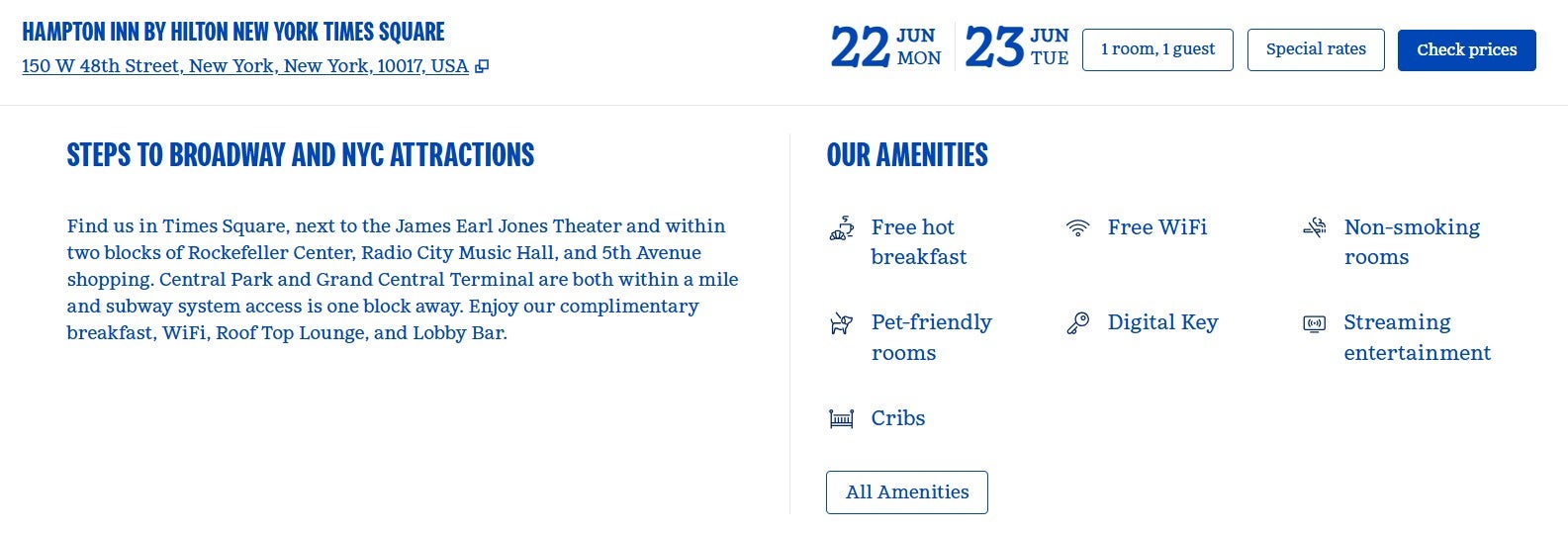
However, confirming before booking a stay is always a good idea. You can check your hotel’s official website and scroll down to the amenities section to quickly determine whether your property offers free breakfast for all guests. For example, here’s the amenities section for a Hampton by Hilton in New York City:
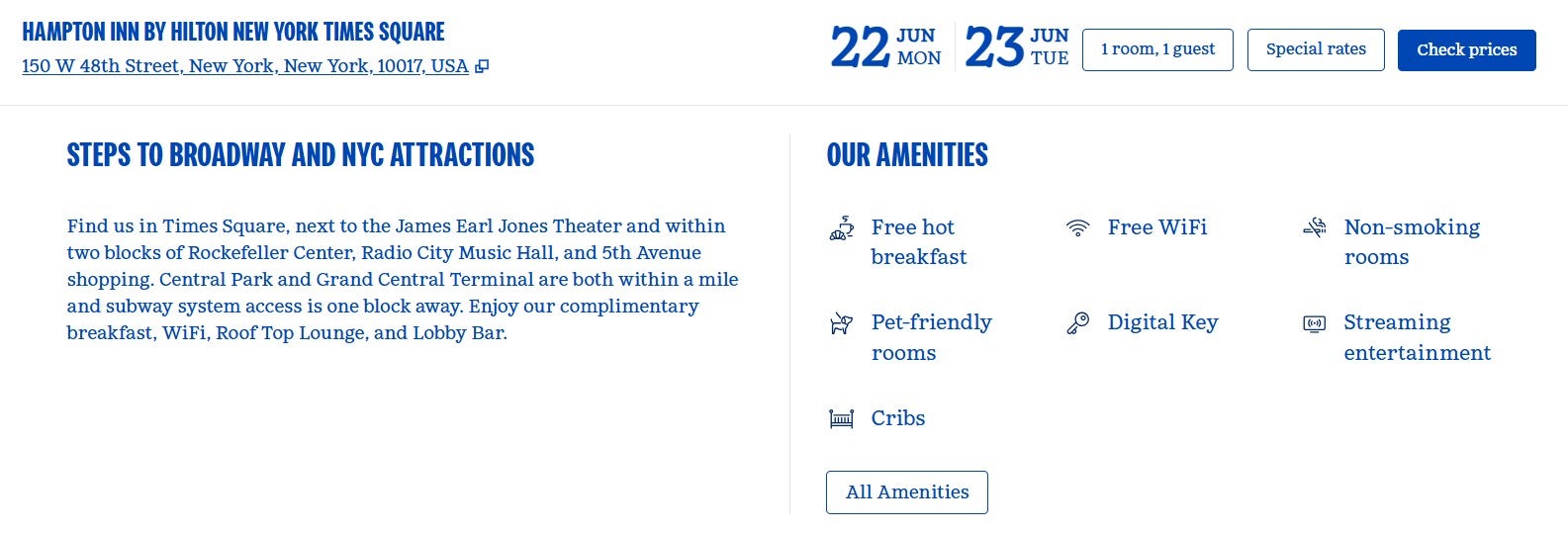
Breakfast is listed as an amenity at this Hampton by Hilton
HILTON

If complimentary breakfast for all guests is a must, you can filter by properties that offer free breakfast when searching for a hotel on the Hilton website. Here’s a sample of Hilton hotels in New York City that offer complimentary breakfast:
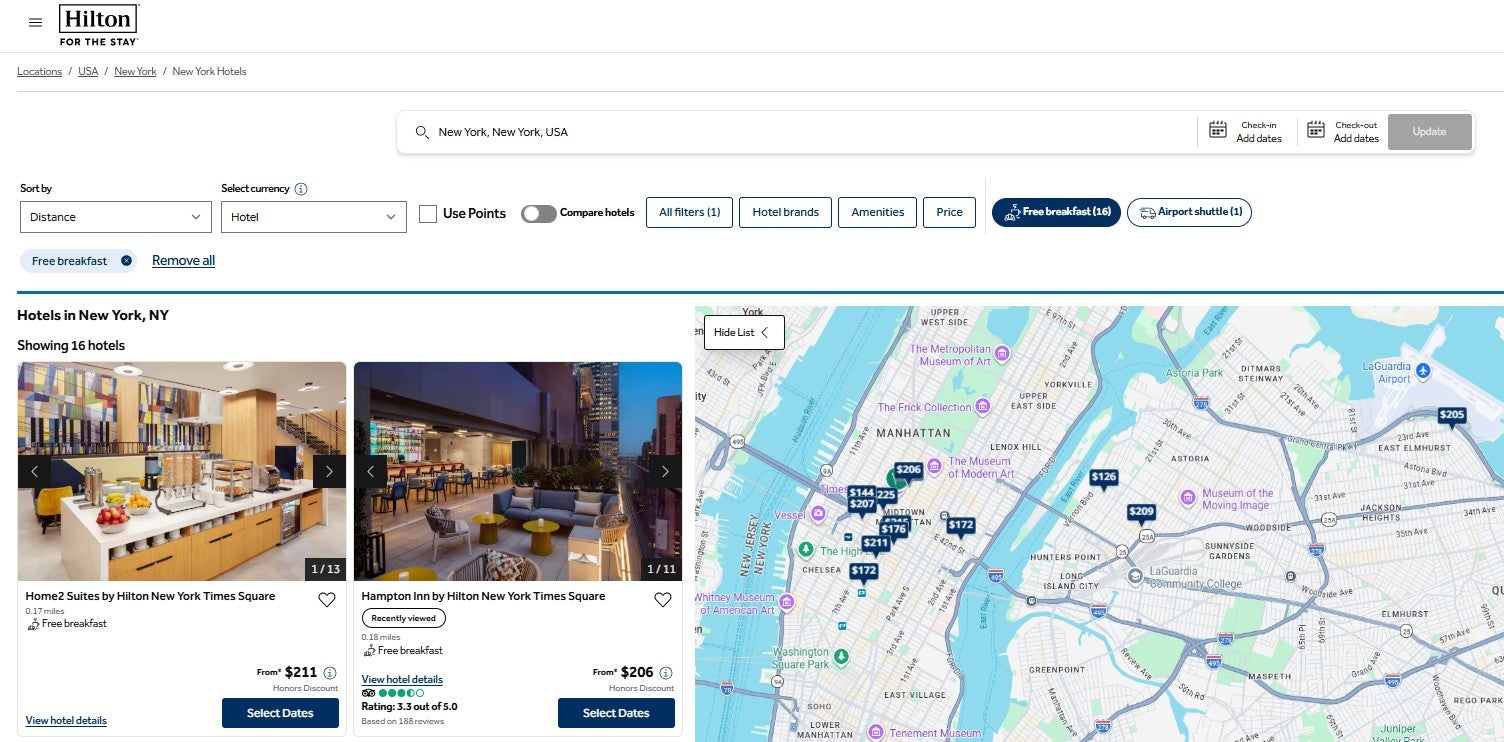
Filter Hilton hotels by those that offer free breakfast
HILTON

If you’re traveling with friends or family members, staying at a hotel that offers free breakfast for all guests can save you serious money.

Related: Which hotel has the best free breakfast? TPG ate 10 meals to find the winner

Breakfast for Hilton Honors elite members

You and up to one additional guest registered to your room may be eligible for one of the following as part of your MyWay benefits if you have Hilton Honors Gold, Diamond or Diamond Reserve status:

Reward your inbox with the TPG Daily newsletter

Join over 700,000 readers for breaking news, in-depth guides and exclusive deals from TPG’s experts

  • Daily food-and-beverage credit: At select brands in the U.S. and at Motto by Hilton globally; not provided if you have complimentary lounge access and breakfast is provided in the lounge
  • Complimentary continental breakfast: At select brands outside the U.S. and Small Luxury Hotels of the World properties globally

Hilton Maldives Amingiri Habitat
Breakfast at Hilton Maldives Amingiri Resort & Spa. KATIE GENTER/THE POINTS GUY

To get elite benefits, including these MyWay benefits, you must book directly with Hilton or through a qualifying global distribution service. Unfortunately, this typically excludes most credit card travel portals (although American Express Fine Hotels + Resorts and The Edit by Chase Travel℠ bookings should be eligible).

Now, let’s take a closer look at each option.

Complimentary continental breakfast

Hilton Gold, Diamond and Diamond Reserve members can enjoy complimentary continental breakfast as a MyWay benefit for stays at the following brands:

  • Canopy by Hilton (only at properties outside the U.S.)
  • Conrad Hotels & Resorts (only at properties outside the U.S.)
  • Curio Collection by Hilton (only at properties outside the U.S.)
  • DoubleTree by Hilton (only at properties outside the U.S.)
  • Hilton Garden Inn (only at properties outside the U.S.; must be selected online instead of bonus points)
  • Hilton Hotels & Resorts (only at properties outside the U.S.)
  • Graduate by Hilton (only at properties outside the U.S.)
  • LXR Hotels & Resorts (only at properties outside the U.S.)
  • NoMad (only at properties outside the U.S.)
  • Signia by Hilton (only at properties outside the U.S.)
  • Small Luxury Hotels of the World
  • Tapestry Collection by Hilton (only at properties outside the U.S.)
  • Tempo by Hilton (only at properties outside the U.S.)
  • Waldorf Astoria Hotels & Resorts (only at properties outside the U.S.)

At these properties, Hilton Gold, Diamond and Diamond Reserve members and up to one additional guest staying in the same room can enjoy breakfast in the hotel’s designated restaurant.

Related: Which credit card should you use for Hilton stays?

Hilton food-and-beverage credit

Hilton Gold, Diamond and Diamond Reserve members can enjoy a daily food-and-beverage credit as a MyWay benefit for stays at the following brands:

  • $25 per person, per night: Conrad Hotels & Resorts (within the U.S.), LXR Hotels & Resorts (within the U.S.), NoMad (within the U.S.) and Waldorf Astoria Hotels & Resorts (within the U.S.)
  • $15 per person, per night ($18 per person, per night in Boston; Chicago; Washington, D.C.; New York City; San Francisco; Key Largo and Key West, Florida; the city of Los Angeles; and the state of Hawaii): Canopy by Hilton (within the U.S.), Curio Collection by Hilton (within the U.S.), DoubleTree by Hilton (within the U.S.), Graduate by Hilton (within the U.S.), Hilton Hotels & Resorts (within the U.S), Signia by Hilton (within the U.S.), Tapestry Collection by Hilton (within the U.S.) and Tempo by Hilton (within the U.S.)
  • $10 per person, per night: Hilton Garden Inn (within the U.S.; you must designate this as your MyWay benefit online)
  • Varies by property: Motto by Hilton
Breakfast at Graduate by Hilton Princeton
Breakfast at Graduate by Hilton Princeton in New Jersey. ERIC ROSEN/THE POINTS GUY

These credits apply to Gold, Diamond and Diamond Reserve members and up to one additional guest registered to the same room. However, if you have complimentary lounge access and breakfast is provided in the lounge, you won’t receive the food-and-beverage credit.

Lounge access

Hilton Diamond and Diamond Reserve members, and up to one additional guest staying in the same room, get executive lounge access at properties with executive lounges. Plus, Hilton Honors Gold members who secure an upgrade to a room on the executive floor or room type that confers executive lounge access benefits enjoy lounge access along with up to one additional guest staying in the same room.

Meanwhile, Diamond Reserve members also get access to premium club lounges (see the list here) along with up to one registered guest. However, this access excludes the enclave category rooms at all-inclusive resorts.

Conrad Seoul executive lounge
Conrad Seoul executive lounge in South Korea. CLINT HENDERSON/THE POINTS GUY

If you have lounge access, you may get breakfast in the lounge. However, you won’t receive a food-and-beverage credit during stays in the U.S. if you have complimentary access to a lounge that offers breakfast.

Related: Here’s why lounge access is my favorite hotel elite status perk overseas

How to earn Hilton Honors elite status

To earn Hilton Gold status, you need 25 nights, 15 stays or $6,000 in eligible spending per calendar year. Meanwhile, you need 50 nights, 25 stays or $11,500 in eligible spending per calendar year to earn Hilton Diamond status. And to earn Hilton Diamond Reserve status, you need 80 nights or 40 stays, plus $18,000 in eligible spending per calendar year.

But some credit cards offer automatic Hilton Honors elite status. Here are the cards that provide Hilton status as a cardmember perk and their current welcome offers:

Card Annual fee Hilton Honors elite status benefit Current welcome offer

Complimentary Diamond status

Earn 175,000 bonus points after spending $6,000 on purchases in the first six months of card membership. This offer ends July 29.

$0 introductory annual fee for the first year, then $150 (see rates and fees)

Complimentary Gold status; upgrade to Diamond status through the end of the next calendar year when you spend $40,000 on eligible purchases in a calendar year

Earn 130,000 bonus points after spending $3,000 on purchases in the first six months of card membership. This offer ends July 29.

$0 introductory annual fee for the first year, then $195 (see rates and fees)

Complimentary Gold status; upgrade to Diamond status through the end of the next calendar year when you spend $40,000 on eligible purchases in a calendar year

Earn 130,000 bonus points after spending $8,000 on purchases in the first six months of card membership. This offer ends July 29.

Complimentary Gold status; enrollment through American Express required

Find out your offer and see if you are eligible for as high as 175,000 bonus points after spending $12,000 on purchases in the first six months of card membership. Welcome offers vary, and you may not be eligible for an offer.

Complimentary Gold status; enrollment through American Express required

Find out your offer and see if you are eligible for as high as 300,000 bonus points after spending $20,000 on purchases in the first three months of card membership. Welcome offers vary, and you may not be eligible for an offer.

Complimentary Silver status; upgrade to Gold status through the end of the next calendar year when you spend $20,000 on eligible purchases in a calendar year

Earn 100,000 bonus points and a $100 statement credit after spending $2,000 on purchases in the first six months of card membership. This offer ends July 29.

So, even if you don’t stay with Hilton brands frequently enough to earn Hilton status organically, you can still secure status as a benefit of one of the above cards.

Related: Comparing the best hotel elite status tiers and how to earn them

Bottom line

Some Hilton properties include breakfast for all guests; you can easily filter your search results on Hilton’s website to only show properties offering free breakfast.

If you have Hilton Honors Gold, Diamond or Diamond Reserve status, you’ll usually get complimentary continental breakfast at hotels abroad and a daily food-and-beverage credit at hotels within the U.S. The food-and-beverage credit at many U.S. properties and international Motto by Hilton hotels often isn’t enough to cover breakfast, but you may like it if you usually don’t eat breakfast and prefer to have drinks or food at the hotel later in the day.

While TPG’s Carly Helfand loves Hilton’s approach to breakfast, I think Hilton Honors should give members a choice. If the food-and-beverage credit is meant to give members flexibility, then the program should let them choose between a continental breakfast and a food-and-beverage credit when checking in to each stay.

As a Diamond member, I usually avoid staying with Hilton when I know I’ll get a food-and-beverage credit instead of complimentary breakfast. I’ve had some excellent Hilton stays and breakfasts outside the U.S., with international Hilton hotels often offering access to the full buffet instead of just the required continental breakfast.


Source link

Leave a Reply

Subscribe to Our Newsletter

Get our latest articles delivered straight to your inbox. No spam, we promise.

Recent Reviews


PowerBI with SQL Server- Table of Content

What is Power BI?

Power BI is indeed a set of software tools, applications, and interfaces which works together to transform disparate data sources into logical, visualizations, and engaging information. The information could be in the form of an Excel spreadsheet or even a set of blended data warehouses which are both cloud-based and on-premises. Power BI makes it simple to link to various data sources, display and uncover what matters, and share your findings with whomever you choose.

  Become a Power BI Certified professional by learning this HKR Power BI Training !

Power BI’s elements:

Beginning with the three fundamentals, Power BI is made up of various components working together:

  • Power BI Desktop for Windows is a desktop app.
  • The Power BI service is a cloud-based SaaS (Software as a Service) application.
  • In iOS, Windows, & Android smartphones, there are Power BI mobile apps.

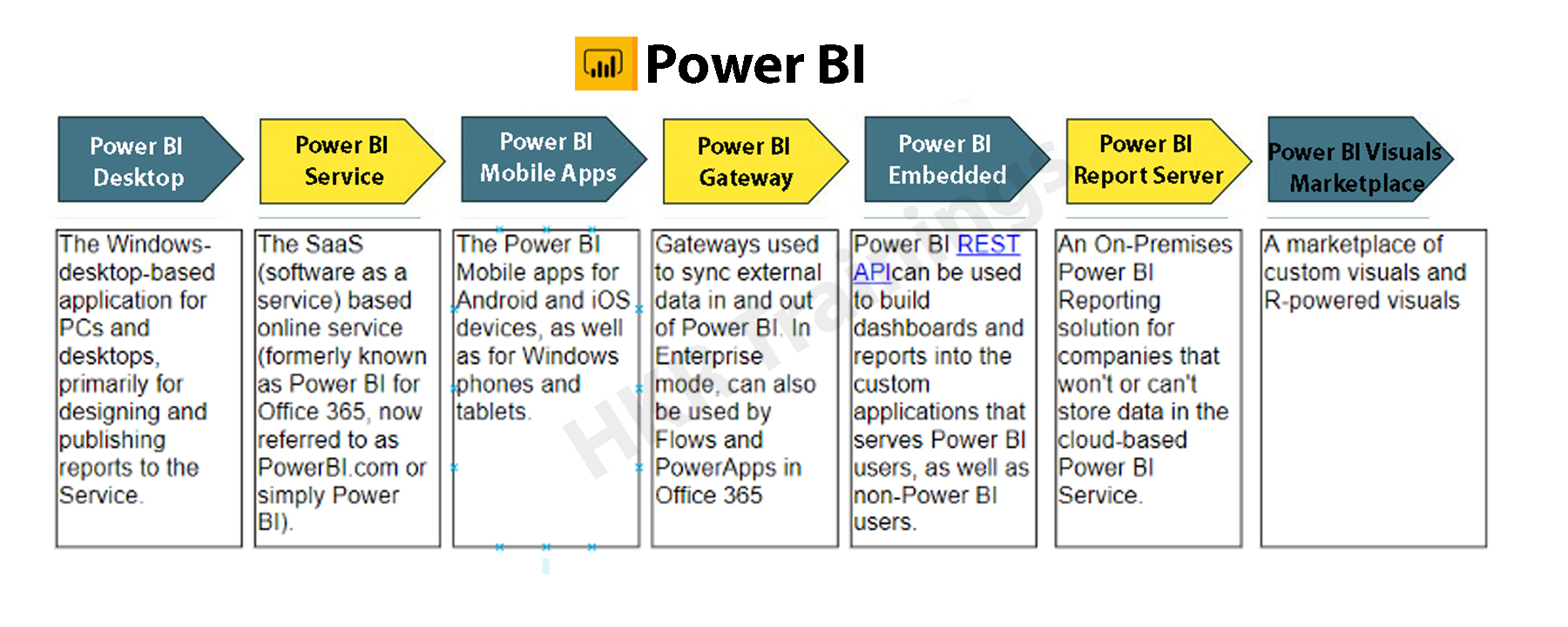
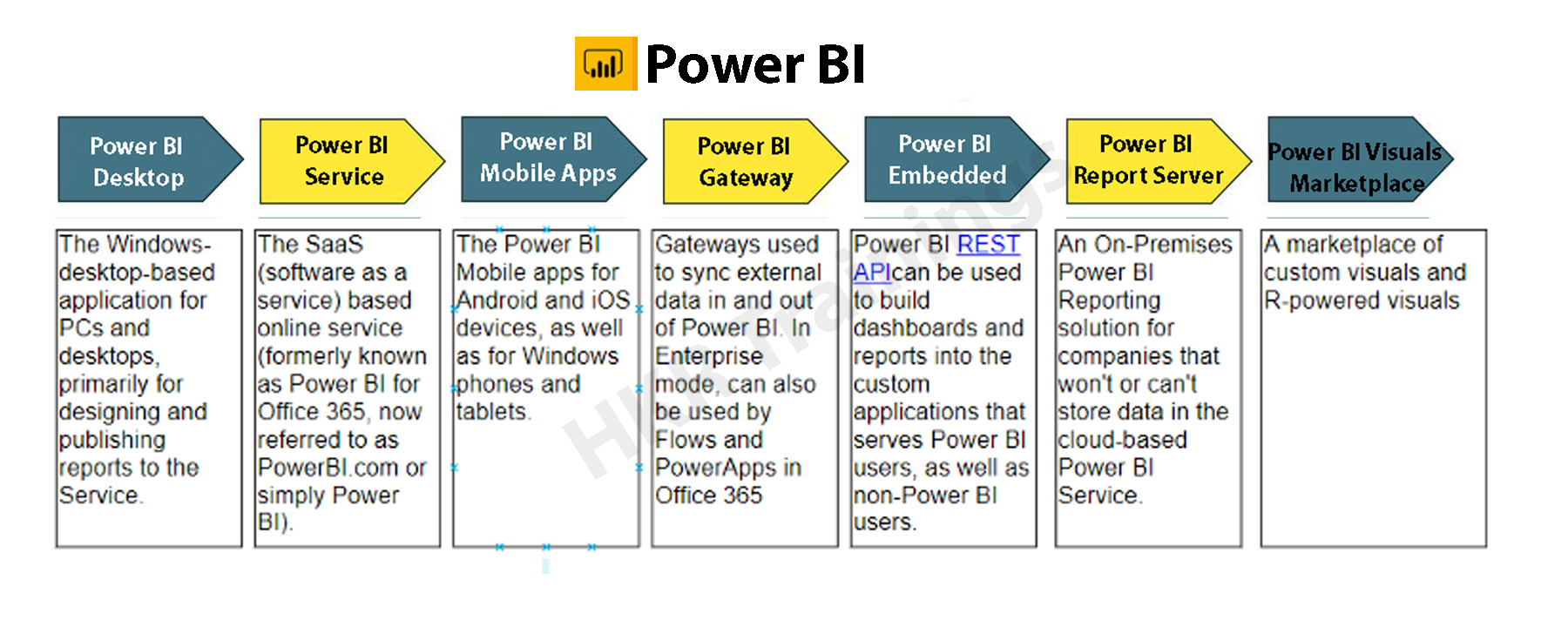
Power BI Desktop, the platform, as well as the mobile applications, are all intended to help you generate, distribute, and utilize market intelligence in the most efficient way possible.Apart from them, Power BI has two more characteristics: the Power BI Report Builder, which allows you to create paginated reports that you can distribute through the Power BI service, and the Power BI Data Warehouse. On-premises data server powered by Power BI. After developing your Power BI reports in Power BI Desktop, you may upload them to Power BI Report Server, a report server.Power BI's elements

The Benefits of Power BI

Power BI has a number of features that set it apart from other analytical tools:

  • It has both a cloud-based and a desktop interface.
  • Data warehousing, analytic tools, and interactive dashboards are some of the features available.
  • Customized visualizations can be loaded.
  • It’s simple to scale throughout the entire company.

Become a Sisense Certified professional by learning this HKR Sisense Training

What is SQL Server?

SQL (Structured Query Language) is a crucial skill in the field of data science, and it’s quite simple to master. Most people, however, overlook the fact that SQL is more than just generating queries, but that’s only the first step. It’s a different matter to ensure that inquiries are efficient or even that they match the environment in which you’re working.

Microsoft’s SQL Server is a relational database management system (RDBMS). It was created largely to compete with the MySQL and Oracle databases. The standard SQL language is supported by SQL Server. T-SQL, SQL Server’s own version of a SQL language, is included (Transact-SQL).  T-SQL stands for Transact-SQL, a Microsoft proprietary language. It also has the ability to declare variables, handle exceptions, and run stored procedures, among other things. Another important interface tool for SQL Server is SQL Server Management Studio (SSMS), which works in both 32-bit and 64-bit settings.

SQL Server helps to run several services at the same time, each with its own ports, logins, databases, and so on. These are separated into two categories:

  • Primary Instance.
  • Instances with a Name

There are two methods for gaining access to the primary instance. We can start with the server name. We can also utilize its IP address. By attaching a backslash and the instance name, you can access named instances.

Is SQL important for Power BI?

Power BI Desktop’s ability to conduct T-SQL queries gives you useful resources for retrieving SQL Server data. Perhaps you’ll be able to get the most out of the SQL Server query engine, and you’ll also be able to reduce the amount of the datasets are imported into Power BI Desktop and the number of modifications you have to do.

To take this technique, you’ll need to know how to utilize T-SQL, and if you do or can find someone who does, you’ll have a lot of flexibility when dealing with SQL Server data. Even if you extract data table by table, you still have a variety of powerful tools for interacting with SQL Server data & organizing it for use in Power BI visualizations. Whereas the Power BI service allows you to retrieve data from a variety of sources, it will not have a SQL Server data connector. One could export SQL Server files and then import them into the service, but you can’t connect immediately from service to SQL Server, regardless of the fact that SQL Server seems to play a crucial role in many organizations today. The more you know about importing and transforming SQL Server data in Power BI Desktop, the better.

Prerequisites to connect Power BI To SQL Server

  • Before you begin, join up for the free trial of Power BI, in case you do not even already have one.
  • On the local computer, install the Power BI Desktop.
  • Download SQL Server within a local computer and recover a backup of the demo database.
  • In the local computer as SQL Server, install the data gateway.
  • Consult a network administrator in the organization if you aren’t a network administrator and wouldn’t want to set up a gateway yourself. They’ll be capable of creating the data source configuration needed to link your dataset to the SQL Server database. Import Data connectivity mode must be used if you’re going to employ a saved procedure.

Step by Step approach to Connect Power BI to SQL Server

1. Power BI Desktop and installation

Power BI Desktop seems to be a free tool that you can download and install on your computer. It may link to a variety of data sources. Normally, an analytical project starts with report development in Power BI Desktop. The data is subsequently uploaded to the Power BI service, where it may be associated with the Power BI Mobile applications, allowing users to access the reports on their mobile devices.

Power BI Desktop and installation

Installation

Power BI is only available on Windows computers. Users on Macs may either create a Windows VM on Azure and install Power BI there, including using Turbo.net, that could broadcast Power BI instantly towards the Mac from either the cloud.

There are two ways to use Power BI:

  • We can download this from the Microsoft Store as an application and simply login in and get going. This would be the device’s digital equivalent.
  • We often have to operate with the information in offline mode. In these kinds of cases, download the software first rather than install it locally. Take the time to read through the entire installation guide.

Download the application to the system, based on the products you’ve chosen. Check the installation via selecting the Power BI Symbol after approving the license agreement. If the screen below shows, you’re ready to begin.

Power BI Symbol

2. Workspace

Let’s have a look at how Power BI Desktop works now. We’ll have a look at it in another part to get an idea of how it works.

The graphic below depicts the key characteristics of Power BI’s workspace..

Workspace

Click here to learn Power BI Tutorial

Power BI Training

  • Master Your Craft
  • Lifetime LMS & Faculty Access
  • 24/7 online expert support
  • Real-world & Project Based Learning

3. Data Source

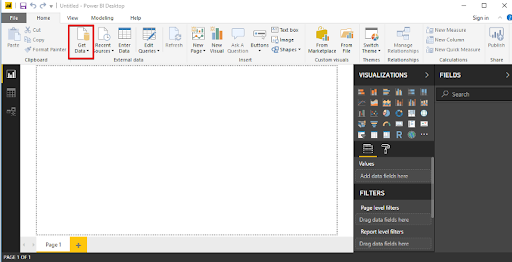
A variety of data sources could be connected to Power BI. The Get Data button toggles all of the data sources that may be used to import data into Power BI.

Data Source

4. Connecting to SQL Server

Let’s look at an example of connecting a SQL server dataset to Power BI Desktop and using that to examine the data.

Database Example

We’ll have to use a publically available SQL Server installation on AWS for the demonstration, as well as a database built from the Superstore dataset.

Our goal as Data Analysts would be to assess the data and identify significant areas of concern inside this hypothetical firm. 

Getting into the sample database

SQL Server Management Studio should be installed (SSMS). SSMS seems to be a free and fully integrated management environment for every SQL system. SSMS allows you to install, manage, and modify the data-tier components that your applications rely on, and also create inquiries and workflows.

After you’ve downloaded and installed the software, you’ll see the page below, which will prompt you for particular credentials.

Connecting to SQL Server

1. Insert the given information:

Server Name: ec2-52-14-205-70.us-east-2.compute.amazonaws.com

Authentication: SQL Server Authentication

Login: SQL

Password: SQL

The ‘SuperStoreUS’ database will indeed be accessible as a ‘Read Only’ user. As our sample, the instance is ec2–52–14–205–70.us-east

2. compute.amazonaws.com, the databases are SuperstoreUS and Test, and the tables inside the SuperstoreUS database are Customers, Orders, and so on. As a result, there could be lots of instances, each of which can have multiple databases, each of which would contain various tables.

SQL Server Authentication

5. Importing SQL data into Power BI

The data is organized into searches by Power BI Desktop. It implies that all of the information is organized in a table-like format.

Making the connection

Proceed to the start button by opening Power BI Desktop. The Get Data tab pane gives you a number of options when it comes to sources of data that could be linked to the Power BI Desktop. We’ll establish a connection to the SQL Server.

connection to the SQL Server

When you select SQL Server, a fresh screen will appear, asking again for the server with which we wish to connect our Power BI Desktop. Fill in the blanks, and you’re finished. We could now inspect the details of the selected table by clicking on it. For uploading a certain table, merely check the box beside it click the load button.

SQL Server

Modes of Data Connectivity

Power BI Desktop may link to a SQL database in two distinct ways, both of which display on the homepage.

Import

The import technique, as the title suggests, ‘imports’ the chosen tables onto Power BI Desktop. The imported data is therefore used by Power BI to create a visualisation or perform any adjustments. We must reload the data to view any modifications in the data, which re-imports the full data set.

DirectQuery

No information is incorporated or transferred to Power BI Desktop if DirectQuery is selected as an option. Power BI Desktop searches the fundamental data source while we generate or process the information through visualisations, ensuring that we’re still dealing with the most recent data. Nevertheless, unlike the importing method, this approach has restricted data processing capabilities.

Power BI Desktop

6. Query Editor

All of the chosen tables would be imported into Power BI Desktop & displayed in the Data view as distinct datasets. .

Query Editor

We can make changes to our datasets from here. We’ll use the Query Editor to accomplish this. The query generator could be used to edit datasets regardless of the data source. The query editor allows us to perform operations such as rebranding a dataset, eliminating a single or several columns, and so on.

 rebranding a dataset

The number of functional inquiries is displayed on the left pane, while the Query Settings pane on the right provides all of the stages related with a query.

Advanced  Editor

The script for the inquiry that has been run against the source of data is displayed in the Advanced Editor. The syntax is M, which stands for Power Query Formula Language. It is also possible to write your own code.

Make a backup of your work

Choose Close & Apply from the Query Editor’s File menu once you’ve made the appropriate data changes in the query editor. The adjustments will be applied to the data in Power BI Desktop.

data in Power BI Desktop

 Top 50 frequently asked Power BI Interview Questions !

Business Intelligence & Analytics, powerbi-with-sql-server-description-4, Business Intelligence & Analytics, powerbi-with-sql-server-description-14

Subscribe to our YouTube channel to get new updates..!

7. Merging Datasets

When we wish to integrate one or maybe more datasets into one, merging datasets proves useful. The Query Editor can also assist with this merger. We’ll pull multiple tables(3) from the SuperstoreUS database this time.  Customers, Orders, and Returns are the three tables.

Merging Datasets

The three specified tables are listed in the Fields column. Now, go to the Edit Queries option and click the Combine option from the dropdown menu, which will reveal the Merge option. We’ll use the merged existing queries to construct a new query.

Merge option

We pick the tables to be combined as well as the kind of join we need in the Merge dialogue box. Columns that are similar to both tables must be chosen.

Let’s start by creating a new query called Orders and Customers. Through this query, we’ll join the Orders and Customers tables. All of the key columns from the orders table, as well as correlation columns from either the customer’s table, were included in the new query. Except for the last one, which reflects the Customers query, eliminate all the correlation columns. Next, from the Customers query, choose columns to merge into the newly merged query.

Customers query

The merged query is composed of a single database that has all of the required columns. Rather than operating with several data sources, which might cause confusion, you could now easily interact with one single database.

8. Building & Publishing a Dashboard

We may begin the Dashboard construction process since we had the dataset prepared along with all the alterations completed. The Power BI dashboard often referred to as a canvas, is a single sheet that contains multiple visualizations that serve to convey a narrative. The reports’ visuals, known as tiles, are attached to the dashboard.

Now just to see what recommendations we can glean from the superstore data set.

  • States seeking profit
  • Profit & Sales by Segment

Building & Publishing a Dashboard

Region-by-Region Sales and Profit

Sub-Category Sales

Profits by location

Quantity

We’ll obtain a dashboard that looks like the one below after we’ve formatted the size, look, and colour.

dashboard

Publishing
Data would be only valuable if it can be transferred across individuals or groups. By publishing the Dashboard or reports to the Power BI Service, they can be shared with others. The Dashboards/Reports can then be seen or interacted with using the Power BI Apps.

Publishing

Power BI Training

Weekday / Weekend Batches

Conclusion:

When SQL and Power BI are combined, data analysis is carried out properly. We can integrate SQL Server to Power BI with ease and retrieve information right into it. Customers can switch connections with a single click in Power BI to execute in-memory searches to a bigger dataset. SQL is a handy tool that, when combined with Power BI’s expertise, may assist in monitoring and reporting more effectively and informative.

Related Articles:

  1. KPI in Power BI
  2. Looker vs Power BI
  3. MSBI vs Power BI


Source link