Clicks Shows Off Its Communicator Smartphone With A Blackberry-Like Keyboard


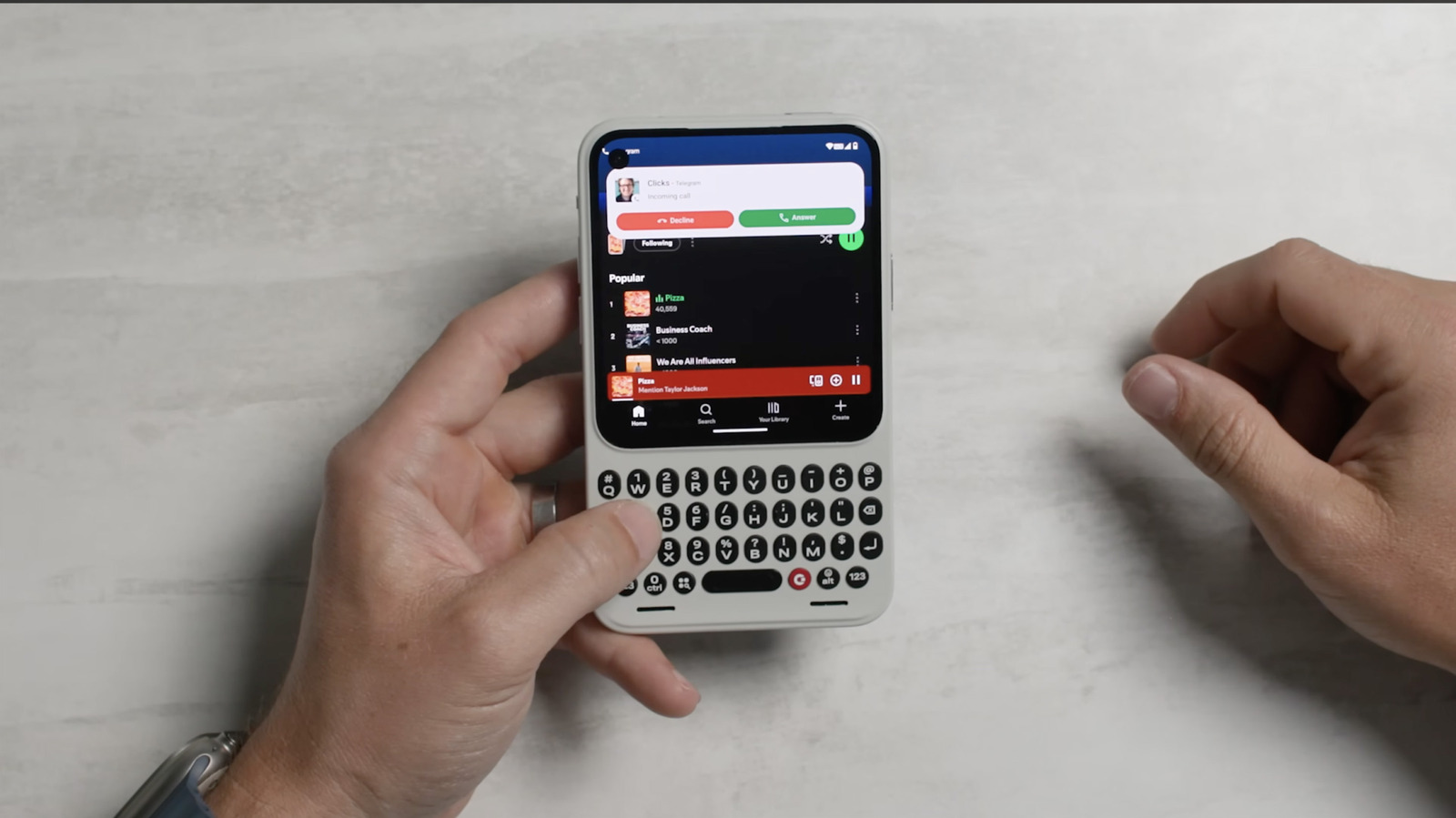
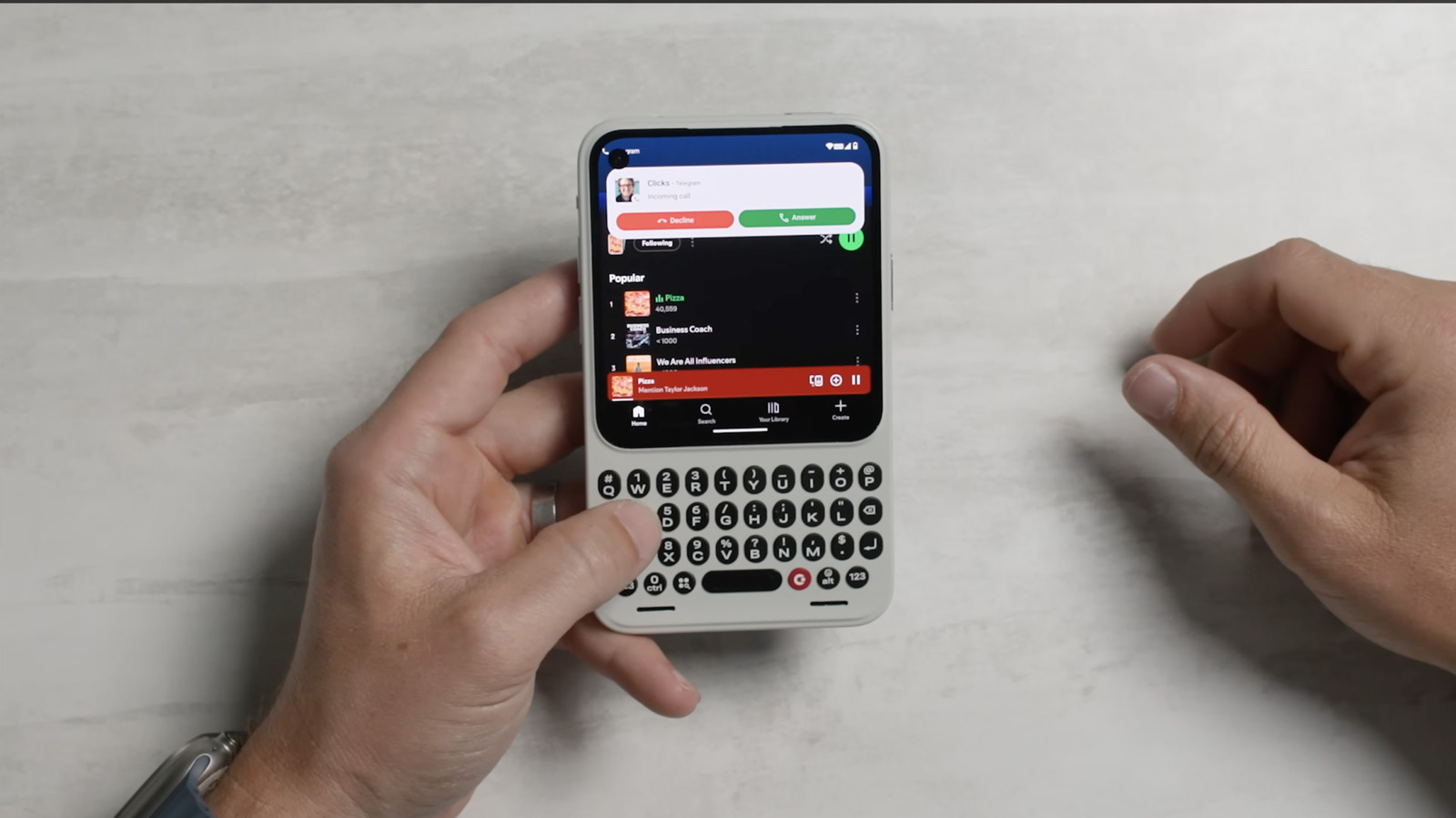
Clicks charmed us at CES this year with its Blackberry-like Communicator smartphone that offers a real hardware keyboard and custom Android interface. We liked the idea, but since the device was a non-functional dummy at the time, couldn’t say much else about it. Now, Clicks has released its first hands-on YouTube video of the Communicator and it looks ideal for anyone who loves a retro vibe and real keyboard. 

As we detailed earlier, Communicator is a smartphone built on Android 16 with a 4-inch OLED display, 3.5mm headphone jack, expandable microSD storage and, of course, a tactile keyboard. Clicks sees it as a second device for most people, and thinks “content capture” is still best done via your primary device. Nonetheless, it comes with everything you’d expect in a new phone, like 50MP main and 24MP front cameras, NFC for Google Pay, Bluetooth, Wi-Fi, a 4,000 mAh battery and both USB-C and wireless charging. 

In its demo by marketing VP Jeff Gadway, Clicks showed us its custom interface based on the Niagara Launcher, letting you select and reorganize apps using a ribbon-style interface on the right or by just typing on the keyboard. The demo also showed how you take calls, switch between apps and do other chores. 

The company also detailed some hardware features, like the fingerprint sensor incorporated into the spacebar and 3.5mm headphone jack on the top, along with the three microphones (top, bottom and back), speakers and a barometric pressure sensor. The USB-C port recess helps to remove the back cover (available in multiple colors), where you can access the SIM and microSD ports. 

Clicks, co-founded by YouTuber Michael Fisher (MrMobile) is known best for its physical iPhone keyboard cases and Power Keyboard, so it seems well-positioned to build such a device. The company promised to show off other features in future demos and is targeting a sales launch by Q4 2026 at $499 price point.


Source link

Leave a Reply

Subscribe to Our Newsletter

Get our latest articles delivered straight to your inbox. No spam, we promise.

Recent Reviews


Apple announced iOS 27 on Monday at the company’s annual Worldwide Developers Conference. The tech giant said the upcoming iPhone software will include an AI-integrated Siri, called Siri AI, and more ways to refine Liquid Glass on your device. And iPhones dating back to the iPhone 11 lineup will be able to run the upcoming software. 

Apple’s WWDC announcement said it will release iOS 27 to the general public in the fall. Historically, Apple has released upcoming major iOS updates shortly after company’s September hardware event, so the company will likely release the software around then. Developers can download a beta version of iOS 27 now, and Apple will release a public beta version of iOS 27 in July.

Here are some of the new features iOS 27 will bring to your iPhone.

An AI-integrated Siri is everywhere

After months of rumors, Apple confirmed at WWDC that iOS 27 will integrate AI into your iPhone’s digital assistant Siri. This update is the biggest change in iOS 27, and it will touch seemingly everything on your device. 

Siri AI

Apple has finally unveiled its revamped voice assistant.

CNET/Screenshot

Almost the entirety of Apple’s presentation focused on how Siri AI will be able to help you across your device in different ways. You’ll be able to swipe down on your iPhone’s Dynamic Island to search or start a conversation with Siri AI. The assistant will be able to take actions in apps like Messages, Music and Reminders, too. 

Apple wrote online that Siri AI will be available on Apple Intelligence-enabled iPhones, like the iPhone 16 Pro, later this year.

New Siri AI app

Siri App

The Siri AI app is a memory bank for all of your past requests and conversations.

Apple

Siri was such a big star at WWDC, Apple announced the personal assistant will also have its own separate app that you will be able to access in iOS 27. 

“A dedicated app brings together all your conversations in one place, so you can ask a question on your iPhone and pick up where you left off on your iPad,” Apple wrote online. “You can also pin conversations for easy access or start a new one.”

This turns Siri AI into an AI chatbot similar to ChatGPT and Claude.

Siri comes to your Camera

Apple said its digital assistant will also be in your Camera app with the new Siri Mode in iOS 27. Once you activate this new mode, you’ll be able to point your camera at something around you and get information about it on your iPhone. 

Updated Image Playground app

With iOS 27, your iPhone’s Image Playground app gets an update which will allow you to create photorealistic images.

Apple introduced its AI-image generator in 2024 when it released iOS 18.2.

Liquid Glass changes

screenshot-showing-liquid-glass-slide

Apple unveiled its new Liquid Glass slide that lets you toggle between Ultra Clear and Tinted Glass.

Apple

Apple showed off a Liquid Glass slider at WWDC on Monday that lets you change the Liquid Glass elements across your device. You’ll be able to make those elements semi-translucent, opaque or something in between. 

Apple introduced the Liquid Glass design in 2025 alongside iOS 26. It’s the first major visual change on iPhones since iOS 7 in 2013.

Health app supports tracking menopause and perimenopause

The Apple Health app on a phone screen.

Primakov/Shutterstock

Apple said that your iPhone’s Health app’s cycle tracking feature will support both menopause and perimenopause. You’ll be able to log symptoms related to both within the app, and the app will have educational content available to help you learn more about your body.

Those are a few of the new features iOS 27 is expected to bring to iPhones this fall. Developers can try these features now, and Apple said public beta testers will get access to the software in July.

For more Apple news, here’s everything Apple announced at WWDC 2026.


Source link