South Shetlands Antarctica

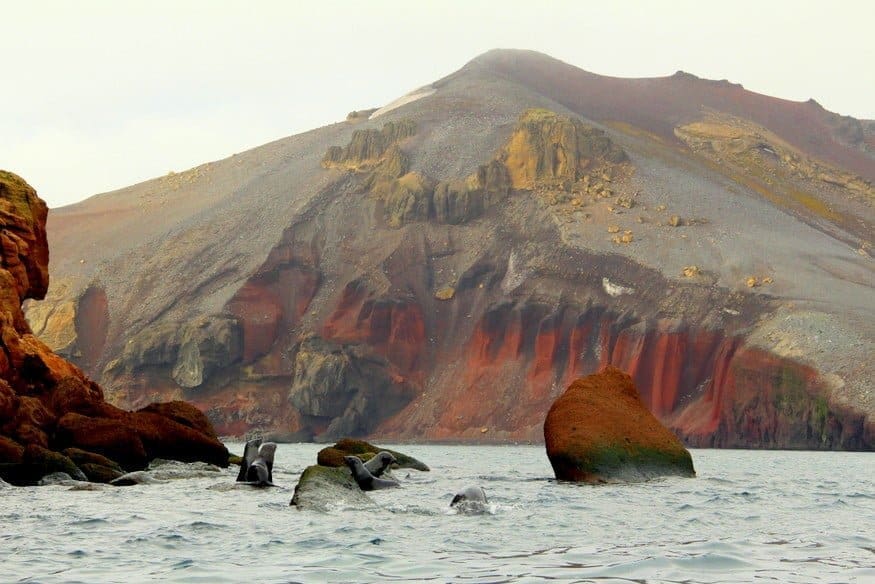
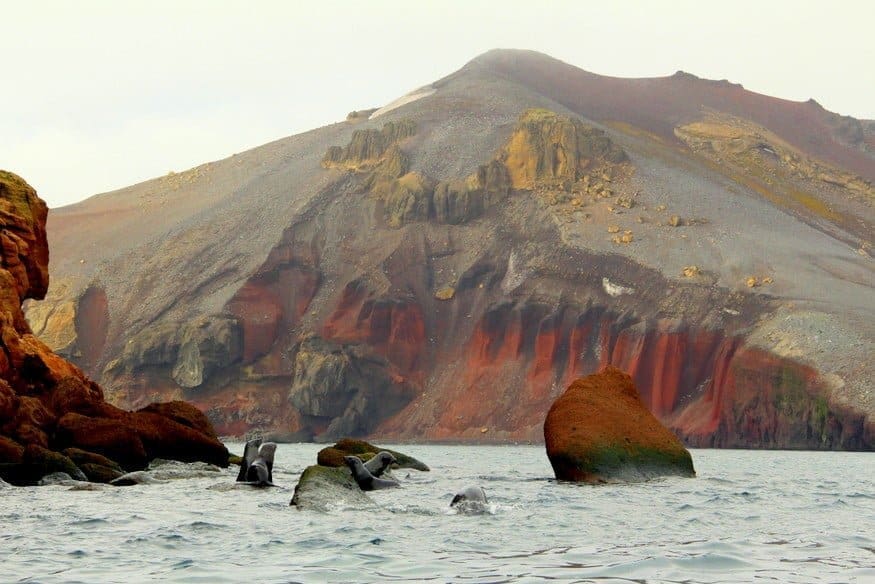
After four days navigating the icebergs and glaciers of the Antarctic Peninsula, we pull into the polar opposite: Deception Island, a red-rimmed volcano peeking out of the sea. The geothermal activity melts the usual thick blanket of ice, revealing layers of oxidized iron and black ash, with a sprinkle of snow on top. We peeled ourselves from the bow of our expedition ship and geared up for a very different side of the region…The South Shetlands, Antarctica.

(Catch the beginning of our Antarctic expedition in our first and second posts)

Kayaking Deception Island
Kayaking South Shetlands

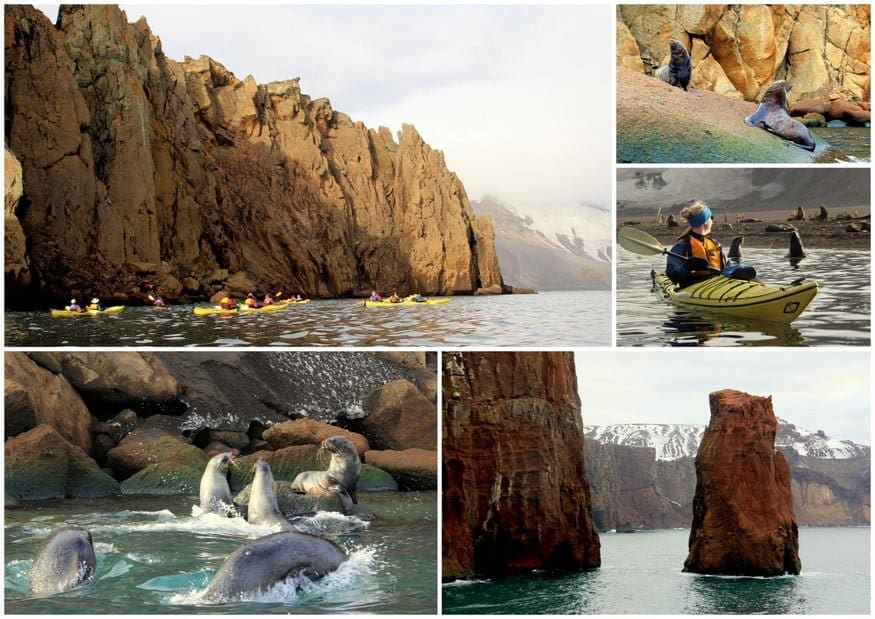
Most of the Quark Expedition passengers hopped into zodiacs for a marine safari while our small group prepared to kayak. Kayaking is an extra fee, but paddling Cierva Cove and Deception Island reaffirmed it’s the best way to get in touch with Antarctic nature. Quiet, small, and stealthy, a kayak can glide past sunbathing fur seals without disturbing them or even inspiring a bit of play. When the curious teenage seals took note of us, they rode in our wake, dove under our bow, and popped up for staring contests. We paddled towards Neptune’s Bellow, the opening of the flooded caldera, then the volcanic micro-climate gave us the nod to head in.

Whalers Bay
Deception Island Ruins

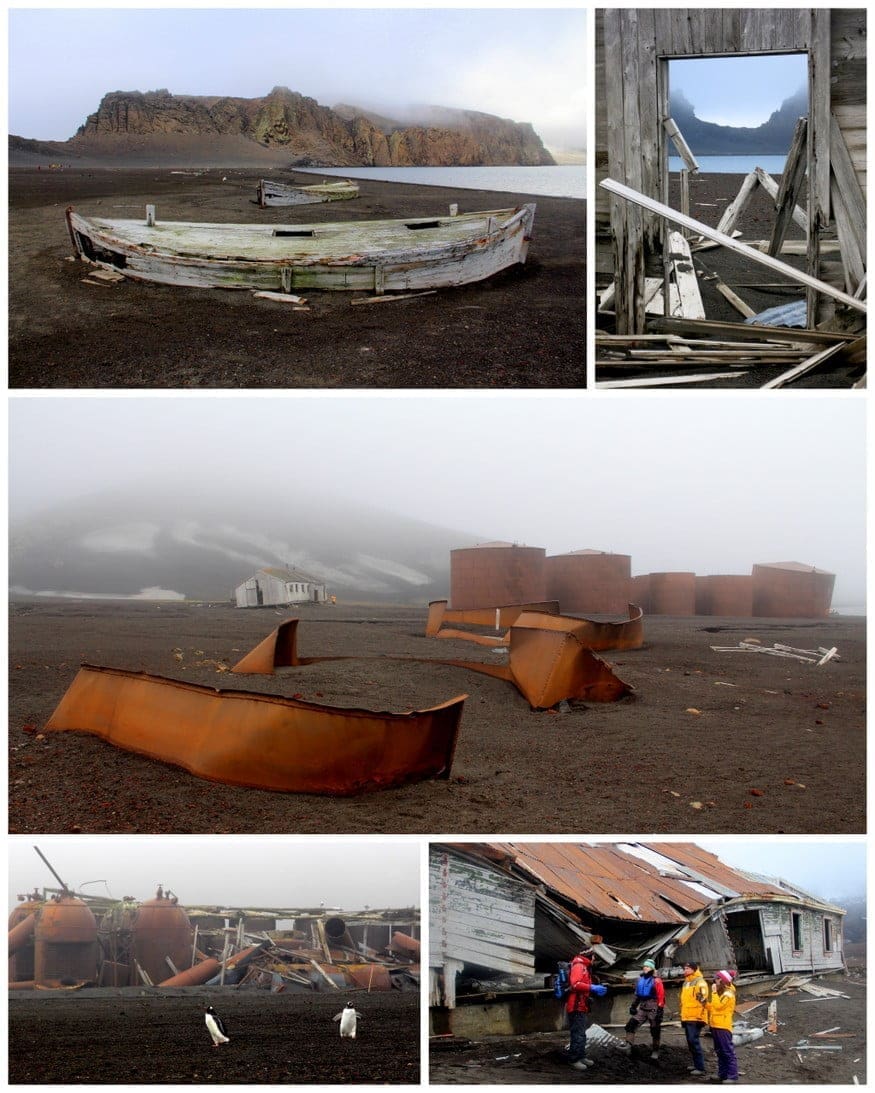
A Zodiac brought us onto the storied beaches of Whalers Bay. In the early 20th century, this whaling station had 12 factory ships, 27 whale-catching boats, and 200 workers processing 5,000 whales a season. It later housed Chilean, Argentine, and British research stations until 1969, when a volcanic eruption turned this island into a time capsule. Mangled buildings, corroded blubber boilers, whalebone graveyards, and ships that have splintered into oblivion are all that remain.

Just when you think Doomsday has arrived, you see penguins, seals, and birds thriving in all their adorableness. The contrast of life and death, mixed with dense fog and volcanic steam, is simply mesmerizing. We wandered the island, peering into cockeyed buildings and exploded vats, thinking about the people who once exploited this land, and we were reminded…nature always wins.

Orca & Fin Whale Watching
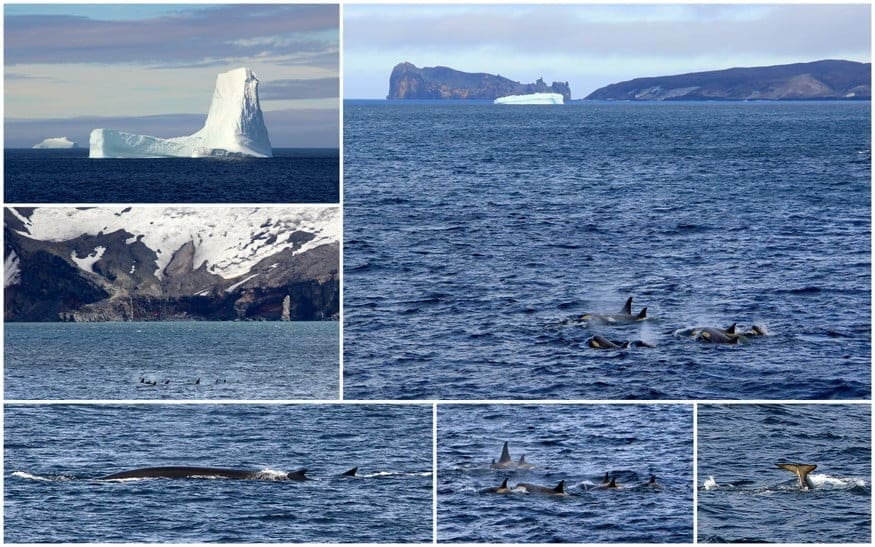
Orca Whales Antarctica

As we sail away from Deception Island, the captain spots a pod of Orcas in the distance. One of the benefits of exploring Antarctica on a smaller ship with an adventurous mindset is that you can change course when opportunity strikes. From a healthy distance, we observed this group of 20+ Killer Whales (FYI, they’re actually in the dolphin family) dive in unison, flashing their tall dorsal fins and Shamu spots.

Just when we thought this episode of Animal Planet was over, we see three Fin Whales off the starboard side! The second largest mammal in the world, the fin whale can grow up to 90 feet long. (You grasp the size when you see its head dive under, and seconds later, its dorsal follows.)

Livingstone Island
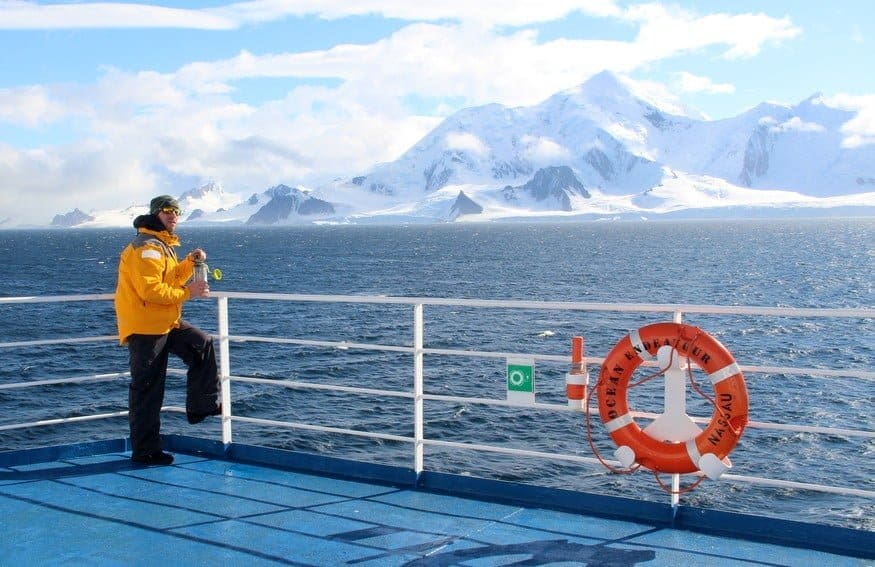
Ocean Endeavor Deck

You’d think all this aforementioned action would have happened over the course of a week in Antarctica…but it wasn’t even lunchtime. Sometimes, there is so much excitement in a given day that you need the downtime just to soak it all in. As we sailed toward our next excursion, we headed outside to feel the sun, breeze, and beauty wash over us.

For anyone comparing expedition routes for Antarctica tours, Wildfoot Travel is a great place to explore different cruise styles, itineraries, wildlife-focused trips, and ways to experience the Antarctic Peninsula and the South Shetland Islands.

Barrientos Penguin Colony

When your Expedition Leader, who’s explored just about every island around the Antarctic Peninsula, says, “The Aitcho Islands are my absolute favorite stop,” you know it’s going to blow your mind. We docked at the penguin-covered Barrientos Island with stadium-sized icebergs floating on one side and mythic mountains on the other. We had amazing penguin encounters all week, but this was by far the most up-close-and-personal.

After months of continuous feeding by the mamas, the chubby adolescents are left to fend for themselves. A little hangry about the situation, they go on squawking, chasing each other for scraps, and approaching visitors for any love at all. We squatted down for some eye-level observation and were completely surrounded; one even took a nibble at Mike’s camera! Just watch the video.

Zodiac Cruising The Aitcho Islands
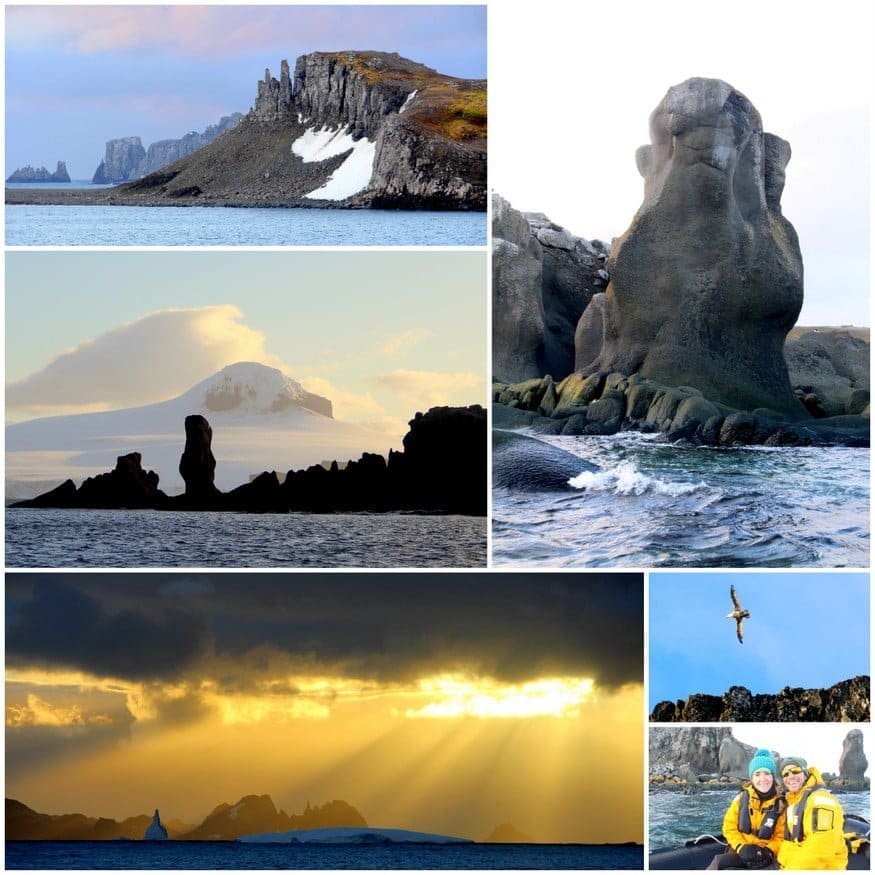
Aitcho Islands Antarctica

Upon leaving the penguin colony, we scrubbed down our boots (it’s mandatory to ensure diseases aren’t spread around the continent) and began our zodiac safari around the Aitcho Islands. The sheer cliffs and sculptural rocks had formations reminiscent of Easter Island, with the sunset light, shadows, and strong winds making everything more dramatic. We ended the day with a long sit in the sauna, watching the islands get smaller in the distance, feeling an immediate longing for Antarctica.

Rocking & Rolling Towards the South Shetlands, Antarctica

Quark Expeditions Party

How do you cope with the waves and melancholy of a return trip on the Drake Passage? A Drake Shake of our own. The Quark staff hosted a Rock ‘ n ‘ Roll costume party, and we danced ourselves silly with our new friends until 3AM. We may have known this group for only ten days, but we shared an experience that’s beyond words and best expressed through interpretive dance and ear-to-ear smiles.

Tierra del Fuego National Park, Argentina
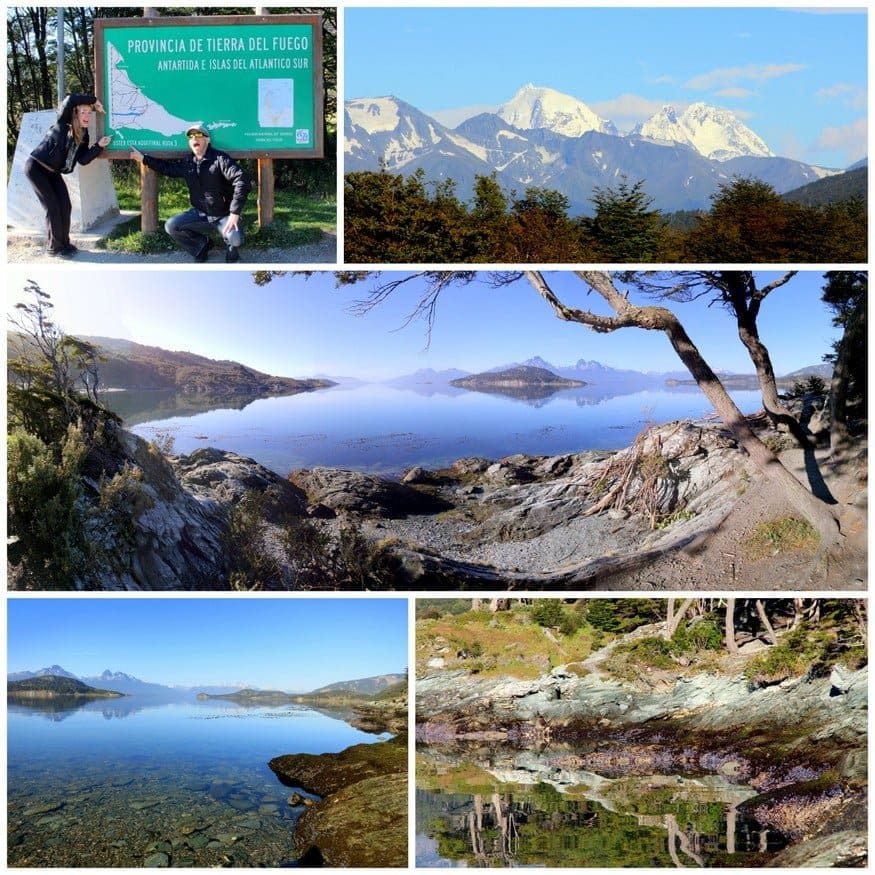
Quark Antarctica side trips

After two days of relaxing, reminiscing, a photo contest (Mike got 3rd place :), a charity auction, and Captain’s Farewell Feast, we disembarked in Ushuaia, Argentina…The End of the World. We said goodbye to the Expedition Team and joined Quark’s day trip to Tierra del Fuego National Park. Fortunately, the park’s spectacular mountains, lakes, and sunshine helped wean us from otherworldly Antarctica.

Anarctica sunset

Antarctica is as close to utopia as it gets. The Antarctic Treaty was signed in 1959 by 12 nations (now 53) to share and preserve this land for the common good and scientific advancement. In a world rife with war, environmental exploitation, and gross inequality, Antarctica is a chance to do things right, to set ego and greed aside, and make decisions in the best interest of the Earth. While the weather might keep us from moving to Antarctica full-time, its peace and prosperity will always remind us how to live.


Source link

Leave a Reply

Subscribe to Our Newsletter

Get our latest articles delivered straight to your inbox. No spam, we promise.

Recent Reviews


Alteryx Macros – Table of Content

What is alteryx macros

Macro is a class of tools which are built into a single tool, and which can be inserted into another workflow. For saving the analytic process you perform repeatedly to create a macro. Without having to recreate the analytic process, when we are using each time the macro within the workflow. To use in the designer or uploaded for sharing in alteryx analytics or private gallery, Save a macro as.yxmc file.

Become a master of Alteryx Tools by going through this HKR Alteryx Training!

For creating standard macro first open the alteryx designer, then select macros option in configuration pane. Go to the interface option and select macros input, which gives input value either manually or from the file. We can use the macro with other databases, when we have to follow similar operations and steps. To use macros, we may have inserted macros which are saved in the local system. Select the test and insert it into the workflow, after mapping run you will see the desired result. With the help of configuration pane, you can map the fields as per your requirements, then you have final output.

Alteryx Training

  • Master Your Craft
  • Lifetime LMS & Faculty Access
  • 24/7 online expert support
  • Real-world & Project Based Learning

Types of Macros

Standard macro: This kind of macro is created for a package of the process in workflow, as a tool which can be inserted in a workflow.

How to create a standard macro

It has two ways for a standard macro creation in Alteryx design. One of them is by inserting a macro input interface tool that is used to get the output in macro output and the other one is as shown below. 

It Generally contains two input methods. One of them is for the file input and the other one is for the text input. And this tool of input may be defined with the help of an abbreviation and the tool may be named. 

How to create a standard macro

2.Then we need to Verify that we now have a macro by clicking on the canvas and navigating it to the Workflow pane. And we should be able to see that the Type of workflow is a Standard Macro.

workflow is a Standard Macro

3. Then require to design our workflow and then add a macro output at the end of our workflow.

macro output

4. Next we need to Save our workflow with .ymxc file extension, which we may customize the macro Icon by clicking (Ctrl+Alt+D) the interface Alteryx designer – Properties

Alteryx designer

5. Then it allows us to Open a new workflow and then click on right for inserting a macro, and we can use our macro to insert a multiplier value which comes out of the data that is used to calculate the monthly margin.

multiplier value

We may also save and share a macro for future use. That can be saved with the same name for a specific location. In Alteryx designer, we can design a macro repository mapped to a location on our computer or network,  simply save macros and use them in a workflow.

Business Intelligence & Analytics, alteryx-macros-description-0, Business Intelligence & Analytics, alteryx-macros-description-6

Subscribe to our YouTube channel to get new updates..!

Batch macro: It can run multiple times in a workflow, designing an output after the completion of each run. It runs once for each selected group of records in data, which requires a control parameter tool like an input.

Interested in learning Tableau Advanced Training? Click here to learn Tableau Online Training from Experts!

How to create a batch macro

  1. select the Macro > Batch Macro From the Workflow Configuration tab, in the Type section. When we save the workflow as a Batch Macro, every tool in the workflow gets a lightning bolt anchor, Interface Tools can connect to these anchors.
  2. We need to Configure the connected Control Parameter tool.
  3. Then Configure the Batch Macro Properties through the Interface Designer Window (Ctrl+Alt+D), and  accessed through View > Interface Designer. later choose the gear icon to view the Properties.

Select either the default Standard Icon or the Custom Icon to upload our own.

Iterative macro: This type of macro runs in the workflow, the number of times set continuously until it meets a condition.

How to create an Iterative macro
  1. First Start with a completed workflow.
  2. Then the From Workflow Properties, choose the Iterative Macro from the Workflow Type dropdown list. Later we save the workflow as an iterative macro, every tool in the workflow gets a lightning-bolt anchor. The Interface tools only connect to these anchors. And the anchor indicates that interface elements and actions are updating a workflow tool.
  3. Finally Configure the Iterative Macro Properties, and found in the Interface Designer window (ctrl+alt+D) or accessed from the View menu. Then select the wrench icon to view the properties.

Location optimizer macro: a kind of macro which is an iterative macro which can be used in network analysis for identifying an optional location.

How to create Location optimizer macro

First we need to Set up our workflow to be a Location Optimizer workflow,

  1. select the Workflow tab in the Configuration window.
  2. And then from the dropdown Location Optimizer Macro  select Macro, Under Type.
  3. Later the workflow is saved as a Location Optimizer macro, and every tool in the workflow gets a lightning-bolt anchor, that indicates it, there are Interface elements and actions updating a workflow tool. The Interface tools may connect to those kinds of anchors.

[Related Article: Alteryx tools ]

How alteryx macros helps business

Series of functions which act linearly on your data, you may see it as a module which can be kept separately from main libraries. Alteryx uses the macros within the workflow without having recreation of the analytic process every time. They are useful for our businesses by reusing workflow, single point of maintenance and split tasks.

  • Re using workflow: It creates a macro for saving the analytic process, which you can perform repeatedly, you can design workflow, run it and confirm that it is working and realise that you have to run it every week with a slight difference in input of your data, you may apply different calculations for processing data. You can create a different workflow for each analysis, just by inserting the reformation macro, which is followed by a different group of calculations.
  • Single point of maintenance: For sharing different types of data for the preparation part, we need single input, instead of having more steps for sharing processes. Envision an upgrade at the department from where you are receiving data, and all the workflow which we use will be updated immediately that modifies all our dependent workflow with a single change.
  • Split task: It expands the scenario to workflow with various groups of sections and tools, each person may work on the single piece of analysis and everything to be combined for final workflow. When several people are going to be developing the workflow, it can be useful to split it into tasks that each can develop independently.

Become a master of Alteryx Tools by going through this HKR Alteryx Training in hyderabad

Advantages of Macros

They decrease human errors and help us for processes which are required and involve a lot of steps to complete a single objective. Its ease of use allows those who are nontechnical business users to directly create their own solutions without using any other additional resources.

  • It shortens the time of beginning to analyze data, searching for insights and minimizing the task which does not give value to our business and minimizing the analysis phase. It speeds up the time of obtaining insights on data, it is one of the best, complete and great customer service which is more experienced by software companies.
  • It provides very strong solutions for the business, which are involved in the product, that helps to make the usage simple and help us find answers and provide a lot of good customization of capabilities. The design of the tool is simple to use without using code that we can appreciate.

Disadvantages of macros

  • There is a big change in terms of pricing between license tiers, the solutions which are provided lack in terms of visualizing data.There is a big change in terms of pricing between license tiers. The solutions which are provided lack in terms of visualizing data. Which helps to pick up the slack, when data visualization added it would be very good and complete.
  • There are no ready models available for using analytics, some statistical packages are difficult to understand as packages are not straightforward and they require learning. It may give the outputs of tabular data extraction, but it is not capable of reading similar text.
  • It does not support users when multiple users try to access the same workflow of the server, as it becomes unstable and frequent cashes.It does not support users when multiple users try to access the same workflow of the server, as it becomes unstable and frequently crashes.

[ Related Article: Alteryx training ]

Alteryx Training

Weekday / Weekend Batches

Conclusion

We can reduce the time spent manually updating the data into excel sheets using Alteryx Macros. Also, it helps to convert data into better levels for reporting and analysis purposes. Moreover, we can perform multiple tasks using Alteryx analytics, such as predictive modeling to build data visualizations, develop analytical apps, and extract reports. Hence, it reduces the time spent developing new features by creating logic for reusing them across workflows.


Source link