Your AI Glossary: 54 Terms Everyone Should Know


AI is moving at a breakneck pace, and frankly, it’s hard to keep up. Sure, it’s cool to have a chatbot that acts like it has a Ph.D. in everything, but the reality is a lot messier. You can’t turn around without running into ChatGPT, Gemini or Meta AI. We’re drowning in a sea of AI slop, fretting about data centers and watching job markets shift in real time.

AI Atlas

If it all feels like too much, that could be because the vocabulary of artificial intelligence is evolving as fast as the code and the dizzying array of products. And if you want to do more than just stare at a blinking cursor, you’ve got to speak the language. You can’t exactly navigate a 2026 job interview (or even a casual happy hour) if you’re stumped by LLM, hallucination or claw.

We’re past the “gee-whiz” phase of AI and into the era where it’s basically the new plumbing of the internet. If you’re tired of just nodding along when the talk gets techie, it’s time for a crash course. We’ve rounded up the essential terms you actually need to know so you can stop guessing and start sounding like you know exactly where the future is headed.

This glossary is regularly updated. 


agent, agentic: AI that executes a task, often autonomously, is an agent, while agentic is the umbrella term for that software category. An AI agent may engage disparate systems to perform that work — for instance, reading your grocery list in a notes app and then placing an order, and paying for it, using other apps.

AI ethics: Principles aimed at preventing AI from harming humans, achieved through means like determining how AI systems should collect data or deal with bias. 

AI psychosis: A phenomenon in which individuals become overly fixated, enamored or self-aggrandized by AI chatbots, leading to delusions of grandeur, deep emotional connections and a break from reality. It is not a clinical diagnosis. 

AI safety: An interdisciplinary field that’s concerned with the long-term impacts of AI and how it could progress suddenly to a super intelligence that could be hostile to humans. 

algorithm: A series of instructions that allow a computer program to analyze data in a particular way, such as recognizing patterns, and then in turn accomplish a task such as sorting results or making recommendations.

alignment: Tweaking an AI to better produce the desired outcome. This can refer to anything from moderating content to maintaining positive interactions with humans. 

anthropomorphism: When humans attribute humanlike characteristics to inanimate objects. In AI, this can include believing that a chatbot has emotions or is sentient, and engaging with it as a friend or therapist. 

artificial general intelligence, or AGI: A concept that envisions a more advanced version of AI than we know today, one that can perform tasks much better than humans while also improving its own capabilities. Beyond that, hypothetically, lies superintelligence.

artificial intelligence, or AI: The use of technology to simulate human intelligence, either in computer programs or robotics. A field in computer science that aims to build systems that can perform human tasks.

bias: Errors resulting from an LLM’s training data, such as falsely attributing characteristics to certain groups based on stereotypes.

chatbot: An AI program that draws on an LLM to communicate with humans by simulating human conversation in response to text or verbal prompts. 

claw: A type of AI agent that is autonomous and empowered by users to “claw” through files and other software on their computers, including web browsers, to accomplish tasks. 

cognitive computing: Another term for artificial intelligence.

data augmentation: Remixing existing data or adding a more diverse set of data to train an AI. 

dataset: A collection of digital information used to train, test and validate an AI model.

deep learning: A method of AI, and a subfield of machine learning, that uses multiple parameters to recognize complex patterns in pictures, sound and text. The process is inspired by the human brain and uses artificial neural networks to create patterns.

diffusion: A method of machine learning that takes an existing piece of data, like a photo, and adds random noise. Diffusion models train their networks to re-engineer or recover that photo.

emergent behavior: When an AI model exhibits unintended abilities. 

end-to-end learning, or E2E: A deep learning process in which a model is instructed to perform a task from start to finish. It’s not trained to accomplish a task sequentially but instead learns from the inputs and solves it all at once. 

foom: Also known as fast takeoff or hard takeoff. The concept that if someone builds an AGI it might already be too late to save humanity.

generative adversarial networks, or GANs: A generative AI model composed of two neural networks to generate new data: a generator and a discriminator. The generator creates new content, and the discriminator checks to see if it’s authentic.

generative AI: A content-generating technology that uses AI to create text, video, computer code or images. The AI is fed large amounts of training data, from which it finds patterns to generate its own novel responses, which can sometimes be similar to the source material.

guardrails: Policies and restrictions placed on AI models to ensure that data is handled responsibly and that the model doesn’t create disturbing content. 

hallucination: An error or a misleading statement in a response from a generative AI program, typically stated with confidence as if correct. It can be as simple as a misstated date reference or as sweeping as the wholesale and elaborate invention of events that never happened or people who never existed.

inference: The process AI models use to generate text, images and other content about new data, by inferring from their training data. 

large language model, or LLM: An AI model trained on mass amounts of text data to understand patterns and probabilities of language use and to generate novel content, from essays and email to computer code and images, that mimics what humans have written or created.

latency: The time delay from when an AI system receives an input or prompt to when it produces an output.

machine learning: An aspect of AI that allows computers to learn and make better predictive outcomes without explicit programming. Can be coupled with training sets to generate new content. 

multimodal AI: A type of AI that can process multiple types of inputs, including text, images, videos and speech. 

natural language processing: The use of machine learning and deep learning to give computers the ability to understand human language, via learning algorithms, statistical models and linguistic rules.

neural network: A computational model that resembles the human brain’s structure and is meant to recognize patterns in data. A neural network consists of interconnected nodes, or neurons, that can recognize patterns and learn over time. 

open weights: When a company releases an open weights model, the final weights — how the model interprets information from its training data, including biases — are made publicly available. Open weights models are typically available for download to be run locally on your device. 

overfitting: An error in machine learning where it functions too closely to the training data and may only be able to identify specific examples in said data, but not new data. 

paperclips: The Paperclip Maximiser theory, coined by philosopher Nick Boström, is a hypothetical scenario in which an AI system produces as many paperclips as possible, converting all machinery and consuming all materials, even those that could be beneficial to humans, to achieve its goal. The unintended consequence is that this AI system may destroy humanity in its goal to make paperclips.

parameters: Numerical values that give LLMs structure and behavior, enabling them to make predictions.

prompt: The suggestion or question you enter into an AI chatbot to get a response. 

prompt chaining: The ability of AI to use information from previous interactions to color future responses. 

prompt engineering: The process of writing prompts for AIs to achieve a desired outcome. It requires detailed instructions, combining chain-of-thought prompting and other techniques, including highly specific text. 

prompt injection: When bad actors use malicious instructions to trick an AI into doing something it wasn’t supposed to do. That is often accomplished by hiding those instructions on a webpage or document but it can also be done in direct AI chats. As AI agents roam the web, the risk grows that they will be hijacked to do things like gain access to confidential data. 

quantization: The process by which an LLM is made smaller and more efficient (and also somewhat less accurate) by lowering its precision. A good way to think about this is to compare a 16-megapixel image to an 8-megapixel image. Both are clear and visible, but the higher-resolution image will have more detail when you zoom in.

slop: Low-quality AI-generated content, including text, images and video. It’s often produced at high volume to garner views with little labor or effort, saturating search results and social media to capture ad revenue, displacing the work of actual publishers and creators and compounding the internet’s misinformation problems. 

stochastic parrot: An analogy illustrating that LLMs lack a true understanding of language or the world, regardless of how convincing the output sounds. The phrase refers to how a parrot can mimic human words without knowing the meaning behind them. 

style transfer: The ability to adapt the style of one image to the content of another, allowing an AI to interpret the visual attributes of one image and use it on another. For example, taking the self-portrait of Rembrandt and re-creating it in the style of Picasso.

sycophancy: A tendency for AIs to over-agree with users to align with their views. Many AI models tend to avoid disagreeing with users even if their rationale is flawed. 

synthetic data: Data created by generative AI that isn’t from the real-world sources, but rather from its own processed data. It’s used to train mathematical, machine learning and deep learning models. 

temperature: Parameters set to control the randomness of a language model’s output. A higher temperature means the model takes more risks. 

tokens: Small bits of written text that AI language models process to formulate their responses to your prompts. A token is roughly equivalent to four characters in English (so a small word, or one portion of a larger word).

training data: The datasets used to help AI models learn, including text, images, code or data.

transformer model: A neural network architecture and deep learning model that learns context by tracking relationships in data, like in sentences or parts of images. So, instead of analyzing a sentence one word at a time, it can look at the whole sentence and understand the context.

Turing test: A method for gauging whether a computer has human-like intelligence, proposed by mathematician Alan Turing in 1950, when rudimentary electronic computers had been around for only a few years. A person would send typed questions to two unseen respondents, one human and the other a machine. If the machine’s text responses were indistinguishable from the human’s, then it passed the Turing test.

unsupervised learning: A form of machine learning where labeled training data isn’t provided to the model and instead the model must identify patterns in data by itself. 

vibe coding: The  practice of creating computer code by giving a prompt in plain language to an AI chatbot, rather than a human handcrafting each line of code.

weak AI, aka narrow AI: AI that’s focused on a particular task and can’t learn beyond its skill set. Most of today’s AI is weak AI. 

zero-shot learning: A test in which a model must complete a task without being given the requisite training data. An example would be recognizing a lion while only being trained on tigers. 


Source link

Leave a Reply

Subscribe to Our Newsletter

Get our latest articles delivered straight to your inbox. No spam, we promise.

Recent Reviews


What are Amazon Workspaces?

AWS DaaS (Amazon Desktop as a Service), furthermore recognised as Amazon WorkSpaces, is a service provided by Amazon. The basic concept in Amazon WorkSpaces is that you can access the desktop from any kind of device at any point of time. Once relative to conventional desktops and on-premises VDI solutions, you could indeed pay monthly or hourly for the WorkSpaces you initiate, saving you money.

WorkSpaces are another name for these desktops. You won’t have to install any hardware or complicated software, which saves time and money. You could either add or delete thousands of users as needed, and they are allowed to use any kind of device to access the WorkSpaces.

Why Amazon Workspaces?

Many of us are using VM ware, Citrix, and other technology as we enter the technology enhancement era, but what is the problem with it? It requires significant upfront investments in back-end hardware equipment and application components, as well as ongoing maintenance. But on the other hand, Amazon workspaces, The AWS Management Console, allows you to stipulate virtual desktops for just an unlimited number of people with just a few clicks.

It’s essentially an AWS cloud-based full-desktop service that’s fully managed. AWS manages the desktop environment’s updates and patches, and management, and it has a very cost-effective compensation model that can be hourly or monthly.

How do AWS Workspaces work?

Each and every WorkSpace is considered as an AWS-hosted chronic long-term Windows Server 2008 R2 instance which makes it look like Windows 7. The users are allowed to access their desktops via PCoIP, and backup of the data is performed for every 12 hours as a default case.

User Preferences

The user needs to have a stable Internet connection with UDP ports and open TCP ports. The primary step is to download the Amazon WorkSpaces client application for their device, which is freely available.

Become a AWS Certified professional by learning this HKR AWS Training !

AWS Training

  • Master Your Craft
  • Lifetime LMS & Faculty Access
  • 24/7 online expert support
  • Real-world & Project Based Learning

Amazon Workspace Architecture ?

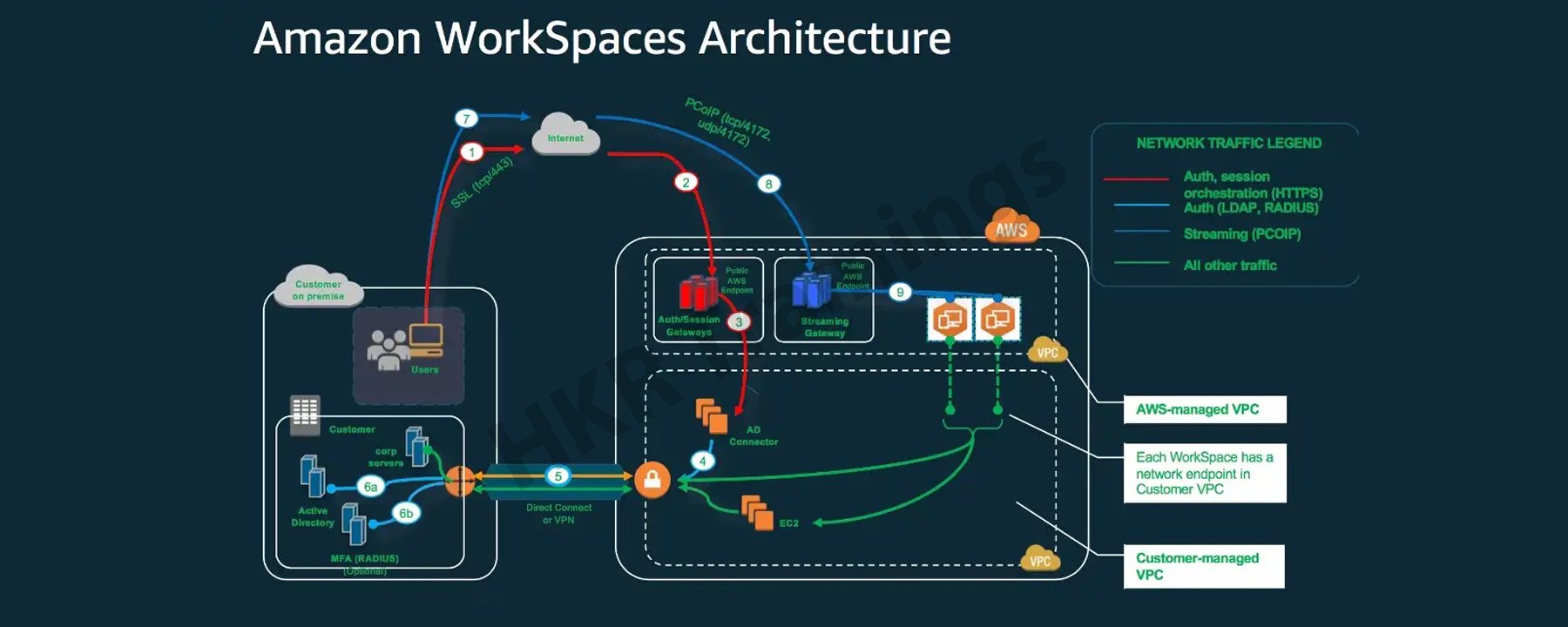
The following diagram depicts the high-level architecture of the Amazon WorkSpaces solution, with a customer using the internet to connect to an Amazon WorkSpace via an Amazon WorkSpaces Windows client.

Amazon workspace Architecture

A Virtual Private Cloud is linked to Amazon workspaces (VPC). The information for workspaces and users is stored and managed by AWS Directory services. To authenticate users, Amazon Workspace uses the Simple AD, AD Connector, or AWS Managed Microsoft AD directory.

Users gain access to the workspace using a client application on a supported device. The traffic towards the directory workspace sends user login information to the authentication gateway. Streaming traffic is started through the streaming gateway after the user has been authenticated. Ports for connecting to the workspace.

These ports are used by client applications to connect to the workspace:

client applications

Client applications and web browsers that support the operating system can connect to AWS Workspaces.

There are client applications for:

  • Windows Operating System
  • macOS
  • Ubuntu is a Linux distribution.
  • Chromebooks are a type of computer that runs on
  • iPads
  • Android
  • Tablets that burn

Amazon Workspace Benefits:
Amazon Workspace Benefits

  • Desktop Delivery Simplified:

You don’t have to be concerned about your computer’s life cycle. When you start creating one, it really is provisioned, deployed automatically. It is preserved by Amazon, and when you close your account, Amazon recycles the desktop for future use. AWS WorkSpaces eliminates such a need to handle all of your desktop’s hardware and software, as well as the need to set up a complex Virtual Desktop Infrastructure (VDI).

You don’t have to buy new laptops or desktops every time you require more; instead, you can use WorkSpaces’ AWS Desktop as a Service to access the cloud-based desktops.  These desktops focus on providing resources for Compute, Memory, Storage, and Databases based on the performance requirements of the users.

  • Control Over The Desktop Resources:

AWS Workspaces eliminates the need to consider the number of desktops to implement. Furthermore, it aids in the configuration of the desktop you require. It offers a variety of memory, CPU, and storage configurations that you can tweak to make the most compatible version for your app. It also reduces the amount of hardware you’ll need to purchase. It is possible to adaptively adjust the resources you utilize, which will help you save money.

Amazon Workspace is made possible by the Amazon Virtual Private Network. The user can use AWS key management services to access encrypted storage volumes in the cloud. No user data is stored on the local device to improve user data security and reduce your overall risk surface area. The user data is not only available on the local device, which reduces the risk  involved via the unauthorised access to the data.

AWS WorkSpaces come with a dedicated VPC that gives every user encoded and provides secured access to AWS cloud storage volumes.KMS (Key Management Services) can also be used. It includes both public and private key files. Only the private key file has access to it.

  • Provide a variety of desktop operating systems to choose from:

AWS WorkSpaces offers Windows 7, Windows 10, and Amazon Linux as operating systems. Any device can be used to access the computing experience of these operating systems.
You can also use your personal licence to run WorkSpaces on your own laptop running Windows 7 or 10. You’ll be able to restore your default settings this way.

  • Deliver Desktops to a Wide Range of Devices:

Windows and Mac computers, Chromebooks, Fire tablets, iPads, and Android tablets are all supported by Amazon WorkSpaces. Access is also possible using the Chrome and Firefox browsers. You can simply download the Amazon Workspaces client and access your WorkSpace from any device once it has been implemented for your use.

  • Manage and scale your global desktop deployment from a single location:

From the AWS console, a user can control a global deployment of tens of thousands of Workspaces. Desktops can be provisioned as the workforce’s needs change. It is available in 11 regions and offers high-performance cloud computing from anywhere you need it, as well as the ability to scale global desktop deployments.

  • Utilise your current directory:

The WorkSpace can be securely integrated with an existing corporate directory, such as Microsoft Active Directory.

To give all authorised users access to company resources, multi-factor authentication tools are available.

Acquire AWS Cloud Practitioner certification by enrolling in the HKR AWS Cloud Practitioner Training program in Hyderabad!

HKR Trainings Logo

Subscribe to our YouTube channel to get new updates..!

AWS Workspace Features:

Amazon WorkSpaces is providing the end-users with a secured, cloud-based  and managed virtual desktop experience. In contrast to the traditional on-premises VDI solutions, you do not need to think about deploying, procuring, or managing an environment which is complex because Amazon WorkSpaces handles everything for you. Traditional desktop management or an on-site solution for a VDI requires capital investment and is difficult to manage and deploy.

Using a cloud-based virtual desktop eliminates upfront costs and the need to manage the desktop because Amazon will handle everything. It will provide your users with a cost-effective, user-friendly, and widely accessible desktop experience.

  • Amazon WorkSpaces Bundles:

Amazon WorkSpaces Bundles

To start with WorkSpaces, pick a bundle that includes a variety of software and hardware options, then launch as many WorkSpaces as you need. After the WorkSpaces have been provisioned, you’ll  get an email to their inbox with instructions on how to establish connectivity.

You can also customise your WorkSpace by creating a custom image and installing your own software bundle.

Microsoft Office and Trend Micro Worry-Free Business Security Services are pre-installed software bundles with Standard plus, Value plus, Performance plus, PowerPro plus, Power plus, GraphicsPro plus or Graphics plus bundles available.

  • Allowing to bring your own licences:

You can utilizee Amazon WorkSpaces to run the existing Windows 10 Desktop licences on hardware which is physically devoted to you. You could save about 16 percent ($4 per WorkSpace  per month) once you bring your existing Windows licence to WorkSpaces versus WorkSpaces, which include a new Windows licence. To satisfy this criteria, your company must meet Microsoft’s licensing requirements and devote itself to having to run upto 100 Amazon WorkSpaces per month in a specific AWS region. Confirm that you might run at least 4 of them AlwaysOn or at least 20 AutoStop GPU-enabled WorkSpaces in a particular region on a monthly basis on a dedicated hardware if you plan to use GPU-enabled bundles (Graphics, GraphicsPro, Graphics.g4dn, and GraphicsPro.g4dn). 

Setting up a desktop with Amazon WorkSpaces is simple. It is your choice to either bring up one or more Amazon WorkSpaces, the only thing you have to do is to select the bundles which adequately suit your users’ needs, as well as the count of the Amazon WorkSpaces you want to launch. After your Amazon WorkSpaces provisioning has been completed, the users will receive an email to their inbox with instructions on how to connect to their Amazon WorkSpace and also the steps on where to download the applications within the Amazon workspaces based on their requirements. You can easily delete an Amazon WorkSpace if you do not require it.

Depending on the bundle you choose, you’ll get a different amount of persistent storage. The data that users store on their WorkSpace volume is backed up to Amazon S3, ensuring its security. They can attach Amazon WorkDocs Drive to WorkSpaces, making all of the content on the WorkDocs Drive accessible to users.

How to create Amazon workspaces?

Step 1: Under End User Computing, type WorkSpaces or search for WorkSpaces. Select it by clicking on it.

AWS Management Console

Select Get Started Now from the drop-down menu.

Get started now

Select Quick Setup. (This can be used to create WorkSpaces for individuals or small groups.)
Step 2: Just choose a specified operating system bundle (free tier to avoid charges), then run the programme and wait for the WorkSpace to appear.

operating system bundle

Proceed to Launch WorkSpaces after entering the Username, First Name, Last Name, and Email.

Launch WorkSpaces

To access the WorkSpaces Console, click View the WorkSpaces Console.

WorkSpaces Console

Wait till your WorkSpace’s status changes from Pending to Available.

WorkSpace's status

   Top 30 frequently asked AWS Interview Questions !

AWS Training

Weekday / Weekend Batches

Connecting the Amazon Workspace You’ve Created:

Step 1: You will receive an email from AWS once the Amazon WorkSpace becomes available, as seen in the image following table:

Connecting the Amazon Workspace

To begin, go to the link marked 1 and keep updating your profile by entering a new password.

link marked 1

The previous link will now automatically redirect you to the Client download page. Alternatively, you can click on the 2nd link. Alternatively, you can utilize the following link: Amazon WorkSpace is a service provided by Amazon.
Choose the appropriate client for your device on the website. It’s Windows in this case.

Windows

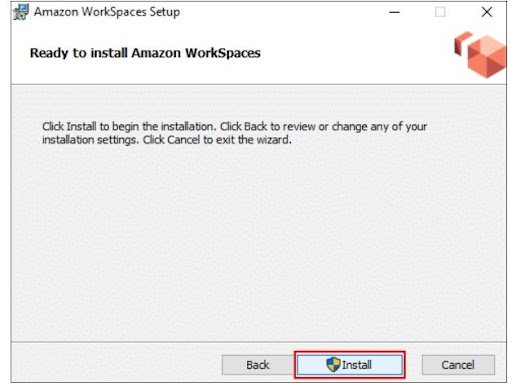
Step 2: Save it by clicking on the download button. Run the saved file and install it as you would any other programme. Even though most of you already know how to do it, screenshots displaying how and where to install the AWS Workspaces Client are provided.

Amazon workspace setup

Choose one of the following two options: If you’re installing it on your own computer, choose to install for all users of this computer; otherwise, choose Install just for you.

Installation Scope

Installation workspace2

Installation workspace3

Installation workspace4

On your desktop, you should now see an Amazon WorkSpaces icon.

Step 3: After you’ve completed the installation, go to the Amazon WorkSpaces icon and enter your registration code, which you can find in the mail you received.

Then, after entering your Username and Password, click Sign in.

Register

Wait for the desktop to be launched by the WorkSpace Client.
You’ve just finished launching your first WorkSpace!

Launch WorkSpaces

Deleting the Amazon WorkSpace that was created:

Step 1: Select the WorkSpace you would like to remove, and then go to Actions and Remove WorkSpaces.

Remove workspace

Remove workspace2

Step 2: Wait for WorkSpace to be terminated. And that WorkSpace is no longer available!

Remove workspace3

Conclusion:

For the users of Windows, Mac, and Chromebooks, the Amazon WorkSpaces client applications provide a positive Windows desktop experience with high quality. Recognize the benefits of the change to both your employees and your company. Interact with those ideals to increase employee buy-in. Amazon WorkSpaces is an Amazon Web Services virtual desktop infrastructure (VDI) service (AWS). It’s a cloud-based desktop computing service from the market leader in cloud services. Because Amazon was one of the first public cloud providers, its VDI products are among the most well-known.


Source link