
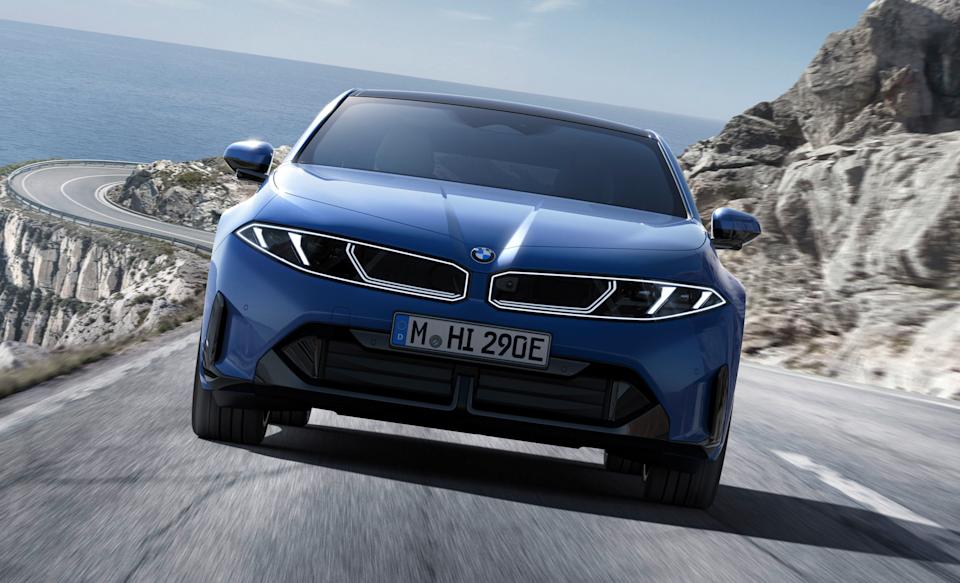
BMW’s i3 is reborn as a sporty 440 mile range EV sedan


After letting us drive a prototype around in the snow earlier this month, BMW has fully unveiled its all-new i3 electric vehicle. It’s a far cry from the original funky hatch launched way back in 2013, offering more of everything including power, range and space. It also looks like you’d hope a 3-series EV would: a sporty sedan, minus the polarizing grille on the gas-powered M3.

The i3 uses BMW’s Neue Klasse platform and indeed borrows inspiration from the company’s Vision Neue Klasse concept unveiled in 2023. With motors on the front and rear in the 50 xDrive configuration, along with the 800-volt electrical system, it delivers a combined 463 HP and 476 lb-ft of torque, just a touch less than BMW’s G80 M3.

BMW's i3 has been reborn as a sporty 440 mile range EV

BMW

That will make the BMW quick (the automaker didn’t say how quick yet), but it will also be efficient. BMW estimates that the i3 will go 440 miles on a charge according to EPA guidelines and offer quick energy replenishment as well via DC charging speeds up to 400kW — up to 30 percent faster than its previous Gen5 tech. The battery pack will also be directly integrated into the chassis to reduce weight and increase torsional rigidity, while allowing bidirectional charging so you’ll be able to use it as a battery on wheels to power your home in a blackout.

Styling-wise, the i3 is much simpler up front with the grille and headlights incorporated as a single unit. A recess down the center of the hood draws your eye to the badge, while giving the EV muscle car allure. The side intakes add to that impression, as do the bulgy fenders, “Le Catellet Blue” metallic paint and optional lighting animations (Relaxed, Excited and Balanced).

BMW's i3 has been reborn as a sporty 440 mile range EV

Fabian Kirchbauer Photography

On the tech side, the i3 supports BMW’s Digital Key Plus so you can open the doors or trunk with a smartphone or smartwatch. The interior, meanwhile, looks as futuristic as I’ve seen in any recent EV thanks to the 17.9-inch Panoramic Vision display that’s angled toward the driver, along with an optional 3D heads-up display. The system features a self-learning voice assistant with Amazon Alexa+ AI and supports customizable themes, colors and background images. It also includes a wireless charging pad for your smartphone or other devices.

Inside, you can choose between multifunction and M Sport seats trimmed in different themes, including imitation leather in Agave Green, Digital White, Castanea or Black, or an M Design World theme in Black Veganza with M Performtex material. Alternatively, you can go for the BMW Individual scheme with real black Merino leather. For controls, BMW is using a hybrid system with physical buttons for the hazard lights and parking brake and “Shy Tech” buttons on the steering wheel that activate only when required.

BMW will start i3 production in August 2026 and deliveries later in the fall, with pricing set to be revealed around that time. From what we’ve seen so far it’s going to offer outstanding performance and range, but don’t expect it to be cheap.

BMW's i3 has been reborn as a sporty 440 mile range EV

Fabian Kirchbauer Photography


Source link

Leave a Reply

Subscribe to Our Newsletter

Get our latest articles delivered straight to your inbox. No spam, we promise.

Recent Reviews


Lost a crucial document because your system crashed before you could save it? Worry no more! Microsoft Word has introduced an automatic save option that regularly backs up your work, so you’ll never lose your progress again.

Users will now be able to manage their Word documents without thinking about saving them manually. The new Microsoft Word update allows users to automatically save their documents to the cloud as soon as they start documenting any content piece.

Raul Munoz, the Senior Product Manager at Microsoft, has stated about the new feature, “We are modernizing the way files are created and stored in Word for Windows! Now you don’t have to worry about saving your documents: Anything new you create will be saved automatically to OneDrive or your preferred cloud destination.

Microsoft additionally hints at introducing similar features for Windows Excel and PowerPoint, which are now live.

How Does the Auto-save Feature Work?

The auto-save option can be accessed and used effectively with the compatible Word for Windows version. Let’s understand how the process works-

Primarily, users need to create a fresh document in Word and switch the AutoSave option on. Unlike the previous default document name- DocumentN, the autosave feature saves the files with the date.

Microsoft Word Update - Step 1

Source: Microsoft Tech Community

To change the name of the file and its location, users need to select Save or press Ctrl+S. After selecting the file name and location, press Confirm to save the changes.

Microsoft Word Update - Step 2

Source: Microsoft Tech Community

In case users try to close the file before it gets saved, a dialog displays on the screen asking whether they intend to Discard or Keep the file. If users try to close empty files, Word discards them without asking for confirmation.

Microsoft Word Update - Step 3

Source: Microsoft Tech Community

Availability of the Auto-Save Feature of Microsoft Word Update-

The AutoSave feature of Microsoft Word update is available to users with Version 2509 (Build 19221.20000) or newer. This advancement is set to enhance accessibility and address the challenge of lost files. Similar features have been introduced on Windows Excel and PowerPoint as well.

Advantages of the Latest Microsoft Word Update

Microsoft Word’s new auto-save feature will unlock several benefits for users. Alongside increased security, it offers flexible file management capabilities. Let us discuss other significant advantages-

Flexibility in File Storage and Control: Users can store and manage their files more flexibly than ever. As users are in charge of the documents, they can adjust file names and locations to save, organizing the files according to convenience.

Never Lose Your Files: The auto-save feature in Microsoft Word addresses the challenge of losing files due to not saving them manually. As soon as you start making progress in a file, it automatically gets saved.

Enhanced Security and Compliance: Files saved in your organization’s cloud servers already adhere to the set security guidelines and practices. Hence, users do not need to think about protecting the files separately.

Increased Accessibility: The auto-save feature enables enhanced accessibility of Word files. It can be accessed from diverse types of devices and platforms once shared, including Android, iOS, and web browsers. Changes made to the file will get synced on all devices and platforms.

Better Collaboration: The AutoSave feature has made collaboration within and across teams easier. Users can easily share the cloud file and initiate collaboration by making changes, adding comments, and resolving comments in real time.

Agentic AI Support: The Word files are now equipped with Copilot agentic AI support. Users can unlock AI-powered capabilities whenever they need to improve or update their documents. Nevertheless, to use Copilot in Word, a Microsoft 365 Copilot license is needed.

Additional Tips: 

  • Users will be able to easily change the location for new documents. Right-click on any cloud folder in the File section of Word, then select Set as Default Location to choose the location.
  • Users can manage how their files are created, whether in the traditional manner or automatically in the cloud, in the Save tab of Word Options, and opt in or opt out for Create new files in the cloud automatically.

Key Elements to Keep in Mind-

  • When a new Word session is started while another is running, the new file does not autosave. Hence, users need to close the previous file to enable the auto-save option for new files.
  • Users may sometimes encounter a delay in refreshing the recent files list while changing the name of a document.
  • If users disable the option for Show the Start screen when this application starts, remember that the first file they create will not autosave automatically.

Concluding Remarks!

Microsoft has been making significant advancements in its 365 Office platforms for better collaboration and enhanced productivity of diverse teams within an organization. With the integration of Copilot and flexible features, the firm is aiming to boost user experience and accessibility of the tools, including Word for Windows.

Learn about the major technological shifts and practices with KnowledgeNile!


FAQs:

1. What is the AutoSave feature in Microsoft Word?

Answer: The AutoSave feature in Microsoft Word lets users save their files automatically.

2. What is the purpose of AutoSave?

Answer: The AutoSave feature aims to reduce the challenges of data loss in unwanted circumstances, such as power shortages and device failures.

3. Where are AutoSave Word documents stored?

Answer: Automatically saved Word files are stored in cloud storage, like OneDrive.


Recommended For You:

Oracle identity cloud vs Microsoft Active Directory: Which to opt for and why?


Source link







