

There's not much Republicans and Democrats agree on nowadays. But efforts to improve transparency around proposed data center projects in Minnesota are earning rare bipartisan support at the state legislature.
One bill would prohibit local government officials from entering into non-disclosure agreements, or NDAs, with private entities.
A second proposal would require local governments to hold public hearings and identify the developer and end-user of data center proposals. They'd also have to disclose the size of the facility, how much electricity it would consume, and other information.
This isn’t “about how we feel about data centers,” said State Sen. Erin Maye Quade, DFL-Apple Valley, who authored versions of both bills.
“It's about government transparency. Minnesotans have a right to know what their elected officials are doing. We cannot let code names, aliases and NDAs become the norm in Minnesota.”
More than a dozen hyperscale data centers have been proposed around the state, although only one so far is under construction – a Meta facility in Rosemount.
Some of Maye Quade’s constituents live near that development. She said they never had the chance to weigh in on the proposal.
“In fact, there were many planning commissioners and city council members who didn't even know what they were approving as it moved through,” she said.
Tech giants including Google, Microsoft and Amazon are building giant data centers around the country to host the huge number of servers needed to power AI and cloud computing.
The projects are controversial because they require huge amounts of electricity and oftentimes a lot of water to cool the facilities. Local residents have also voiced concerns about noise and light pollution and the possibility that living near a massive data center could depress property values. But concerns over a lack of transparency have perhaps struck the strongest nerve.
Meanwhile, proponents argue the facilities can provide enormous sums of local tax revenue to fund local schools, parks, public safety and other services. They’re also forecast to create large numbers of well-paying construction jobs.

Most of the projects proposed in Minnesota were born in secrecy, with code names such as Project Bigfoot in Rosemount, Project Loon in Hermantown, Project Deacon in North Mankato and Project Skyway in Pine Island, a small town north of Rochester.
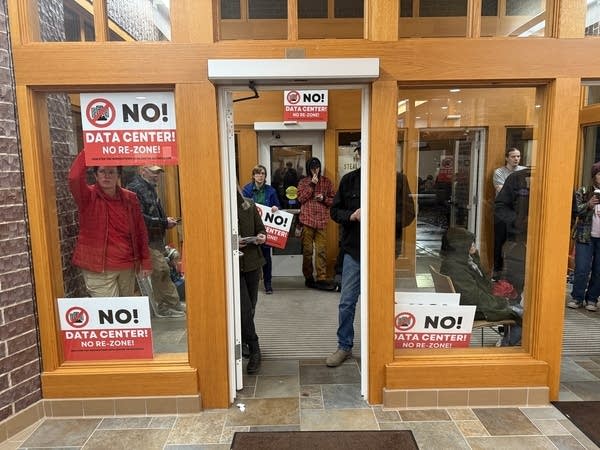
Aubree Derksen of Pine Island first learned last September what Project Skyway actually was– a three million square foot data center proposed within a mile of her home. Just four months later, the city council approved it, long before Google finally announced that it is the big tech company behind the project.
"I know what it is to be kept in the dark, being a resident desperately fighting to be heard, even in a small town of fewer than 4,000 people,” Derksen told the state Senate’s state and local government committee Wednesday.
City officials and the developer were working on the project behind the scenes for more than two years. But local residents didn't know anything about it because those public officials had signed non-disclosure agreements, which prohibited them from sharing any details.
"The democratic process where my voice is supposed to matter has been hijacked by big tech,” Derksen testified.
The Pine Island data center is located in the senate district of Steve Drazkowski, R-Mazeppa, in southeast Minnesota. Last month, after months of speculation, it was revealed that Google was behind the project, and that Xcel Energy would provide the enormous amount of electricity it requires.
Drazkowski said he didn’t hear the news until the day before the press release was issued. “The guy from Xcel Energy came into my office and said, it's going to be Google, and it's going to be us."
Drazkowski is a co-sponsor of the senate bill to ban NDAs. In an interview with MPR News, he said he doesn't oppose data centers. In fact, he said he doesn't support a bill being pushed by Democrats to place a two-year moratorium on the facilities in the state.
"But I have strong beliefs around whether government should be open to its people or operating in secret,” he said. “And obviously, I believe that it should be open to its people and not operating in secret."
“Democracy is dying in the dark in these communities,” Drazkowski added. He said Minnesota has a strong tradition of open, transparent government, and these bills seek to protect that.

The bills at the state legislature related to data centers and transparency have garnered unusual bipartisan support in a time of increasing political divisiveness.
In the Minnesota House of Representatives, the proposal to ban NDAs is co-authored by Emma Greenman, DFL-Minneapolis, and Drew Roach, R-Farmington.
“There's not many bills in the legislature that are Greenman-Roach bills,” Rep. Greenman said during a House Elections Finance and Government Operations Committee hearing last week.
“But we both introduced bills on this topic because we're hearing from our constituents and folks across the state about the need to protect the public's right to know,” Greenman said.
Rep. Roach represents the city of Farmington, where there has been strong public pushback against a proposed $5 billion data center. He said there should be 100 percent transparency with the public.
“So I'm just really excited to be a part of this. We represent our constituents and not special interests.”
But there is some Republican opposition to the proposals.
Sen. Andrew Mathews, R-Princeton, said the city of Becker in his district was transparent about its pursuit of an Amazon data center, which he said would help replace the jobs and tax revenue that will be lost when the massive Sherco coal plant closes in 2030. But because it was discussed publicly, he says opponents were able to organize and worked to block it.
"And now my district is facing the double whammy of we don't have those things built out that can help fill in…the dropoff to the city's revenues,” Mathews said. “But the land is now just sitting in private ownership, and no one else can build anything else there, either."
Business leaders and economic development officials argue that NDAs are common and important tools used during early stages of project development discussions.
"Companies often need to share sensitive information about their business operations,” said Jonathan Cotter, director of health care and commerce policy at the Minnesota Chamber of Commerce. “If businesses cannot rely on some level of confidentiality, economic development opportunities will be impacted."
Drazkowski said he expects amendments to be introduced to address some of those concerns.
The bill banning non-disclosure agreements was passed by the House Elections Finance and Government Operations Committee last week by voice vote, and now heads to the chamber floor. The Senate companion bill is scheduled to be taken up in a committee later this week.
The Senate bill requiring local governments to hold public hearings and disclose information about data center proposals passed the state and local government committee on an 8-2 vote. It heads next to the judiciary committee.










