In a throwback to Apollo, NASA’s Artemis II mission will send four astronauts on a lunar fly-around. They’ll hurtle several thousand miles beyond the moon, hang a U-turn and then come straight back. No circling around the moon, no stopping for a moonwalk — just a quick out-and-back lasting less than 10 days.
NASA promises more boot prints in the gray lunar dust, but not before a couple practice missions. The upcoming test flight by Artemis astronauts Reid Wiseman, Victor Glover, Christina Koch and Jeremy Hansen is the first step in settling the moon this time around.
Here’s a snapshot of the Artemis II mission.
A full moon is seen shining over NASA's SLS (Space Launch System) and Orion spacecraft atop the mobile launcher in the early hours of Feb. 1 at NASA's Kennedy Space Center in Florida.
Sam Lott | AP File
The Artemis astronauts are a diverse and international crew
The moon is about to welcome its first woman, first person of color and first non-American.
Koch already holds the record for the longest single spaceflight by a woman. During her 328-day mission at the International Space Station spanning 2019 and 2020, she took part in the first all-female spacewalk.
Glover, a Navy test pilot, was the first Black astronaut to live and work aboard the space station in 2020 and 2021. He also was one of the first astronauts to launch with SpaceX.
The Canadian Space Agency’s Hansen, a former fighter pilot, is the lone space rookie. Their commander is Wiseman, a retired Navy captain who lived aboard the space station in 2014 and later headed NASA’s astronaut corps. They range in age from 47 to 50.
The Space Launch System is more powerful than the Saturn V rocket
NASA’s new Space Launch System rocket stands 322 feet (98 meters), shorter than the Apollo program’s Saturn V rocket but more powerful at liftoff thanks to a pair of strap-on boosters. Atop the rocket is the Orion capsule carrying the astronauts.
Made of salvaged space shuttle engines and other parts, the SLS uses the same fuel — liquid hydrogen — as the shuttles did. Hydrogen leaks repeatedly grounded the shuttles as well as the first SLS rocket test without astronauts aboard in 2022. More than three years later, Artemis II suffered the same hydrogen leaks during a February fueling practice run, missing the first launch window. A repeat of helium-flow issues bumped the mission into April.
How Artemis II will fly around the moon
After liftoff, the astronauts will spend the first 25 hours circling Earth in a high, lopsided orbit. They’ll use the separated upper stage as a target, steering their Orion capsule around it as docking practice for future moonshots. Instead of fancy range finders, they'll rely on their eyes to judge the gap, venturing no closer than 33 feet (10 meters) to the stage.
“Sometimes simple stuff is the best,” Wiseman said.
If all goes as planned, Orion's main engine will hurl the crew to the moon some 244,000 miles (393,000 kilometers) away. This free-return trajectory made famous in Apollo 13 relies on the moon and Earth’s gravity, minimizing the need for fuel.
On flight day six, Orion will reach its farthermost point from Earth as it sails 5,000 miles (8,000 kilometers) beyond the moon. That will surpass Apollo 13’s distance record, making Artemis astronauts the most remote travelers. After emerging from behind the moon, the crew will head straight home with a splashdown on flight day 10 — nine days, one hour and 46 minutes after liftoff.
What to expect during the Artemis flyby
The Artemis II crew may behold never-before-seen regions of the lunar far side — with the moon appearing the size of a basketball at arm’s length during the closest part of the roughly six-hour flyby. They’ve been poring over maps and satellite images of the lunar far side and anticipate a photo frenzy. Their lunar mentor is NASA geologist Kelsey Young, who will monitor the flyby from Mission Control in Houston.
“The moon is like such a unifying thing,” she said. “What we're doing with this mission is going to bring that a little closer to everybody around the world.”
Besides professional cameras, they’ll carry the latest smartphones. NASA’s new administrator Jared Isaacman added smartphones to the mission for “inspiring” picture-taking.
While NASA and private companies have focused over the years on reaching the moon's near side — the side that constantly faces Earth — only China has planted landers on the far side. That makes the astronauts' observations of the lunar far side all the more valuable for NASA.
NASA's Artermis II moon rocket sits on Launch Pad 39-B at the Kennedy Space Center at sunrise Sunday in Cape Canaveral, Fla.
Terry Renna | AP
Artemis astronauts will splash back down to Earth
Like Apollo, the Artemis mission ends with a splashdown homecoming into the Pacific.
All eyes will be on Orion’s heat shield as the capsule plunges through the atmosphere. It’s the part of the spacecraft that took the biggest beating during 2022’s test flight, with charred chunks gouged out. The heat shield is being retooled for future capsules but remains the original design for Artemis II.
NASA is limiting the heat exposure during reentry by shortening the capsule’s atmospheric descent. Navy recovery ships will be stationed off the coast of San Diego as Orion parachutes into the ocean.
Have you ever visited a site that just drags? You click a link, and it takes forever to load. Images appear one by one, and the site feels like it is lagging behind your mouse. It is frustrating, right? As a website owner, that is the last impression you want to leave on your visitors.
In today’s digital world, speed is not a necessity; it is a requirement. People expect websites to load instantly. In fact, studies show that even a 2-second delay in loading a website makes people leave your site by 32%. So, it is not just about user experience. It is about keeping your visitors and growing your business.
One of the biggest causes for slowing down of websites is something called unused JavaScript. That is just extra code sitting on your site that doesn’t actually do anything useful. It is like carrying a heavy backpack full of stuff you don’t need on a long hike, it slows you down. Your browser still has to download, read, and run all that extra code, even if it is not being used. This can come from:
Old plugins or themes that add features you don’t use.
Third-party tools like social media buttons or trackers.
Outdated or messy code that is no longer relevant.
All of this adds weight to your site and makes it slower for users to interact with it.
Here the question arises: can you fix it easily? The answer is cleaning up unused JavaScript is totally doable, even if you are not a developer. Let’s understand how to remove the unnecessary code and give your site a serious speed boost.
What Is Unused JavaScript?
Unused JavaScript is simply extra code taking up space on your site that doesn’t really do anything helpful. When a person comes to your site, their browser loads all the code including these unneeded pieces, slowly creeping along. Imagine packing for vacation and bringing stuff you never use. It only makes everything heavier and slower.
Where Does This Extra Code Come From?
Themes & Plugins: WordPress themes and plugins tend to have features that you may not even need.
Third-Party Tools: Things such as social media buttons or analytics can introduce additional code.
Old Code: As your site gets larger, there will be some code that becomes outdated or obsolete.
Why Remove It?
Faster Website: There will be shorter loading times with less code.
Improved User Experience: Visitors won’t get frustrated waiting for your site to load.
Lower Resource Consumption: Conserves bandwidth and decreases server load.
Simpler Maintenance: Neat code is simpler to maintain and modify.
How to Identify Unused JavaScript?
Google PageSpeed Insights
Go to PageSpeed Insights
Enter your site URL and press “Analyze”
Check under “Opportunities” for “Remove unused JavaScript”
It will display which files are slowing you down
GTmetrix
Visit GTmetrix
Enter your site URL and perform a test
Check the “Waterfall” tab → “JS” section
You will see which JavaScript files are the biggest and when they load.
How to Remove Unused JavaScript from Your Website?
1. Identifying the Culprit: The First Step to a Speedier Site
You should know what you are working on before you can fix it. Imagine it like cleaning out your closet. You need to take everything out so that you can look at what is there and what you really use. For your site, Google PageSpeed Insights and the Chrome DevTools Coverage tab are your friends. They are free and amazingly powerful. The Coverage tab, in fact, will give you a visual representation of how much of your JavaScript is actually being executed. It color-codes your code, so you can immediately see what’s running (green) and what’s idle, taking up space (red). It is an eye-opener! Knowing precisely which scripts are the heaviest and are used the least is the initial and most important step on any optimization path.
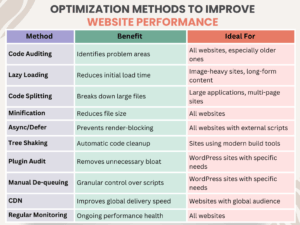
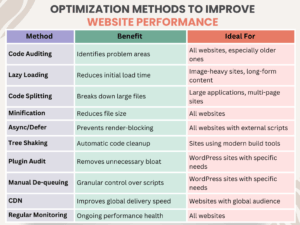
2. Lazy Loading: A Clever Approach to Heavy Content
Suppose you are browsing a long article with several images. Do you actually need to load all your images the second the page loads? Most likely not. Lazy loading is the exact same idea but applied to your JavaScript files. Rather than loading all your scripts immediately, you can make them load only when they are used, such as when a user scrolls down to a certain section or presses a button. This is particularly helpful for such things as image galleries, video players, or comment streams that are “below the fold” (i.e., not on the first screen). It has a massive impact on the initial page load time, so your site can be snappy and responsive right out of the box.
3. Code Splitting: Disassembling the Big Bloat
Do you remember trying to push a massive piece of furniture by yourself? It is almost impossible. But if you divide it up into smaller, bite-sized chunks, the work is a whole lot simpler. The same concept can be applied to your site’s JavaScript. Code splitting is the process that divides your massive JavaScript files up into smaller, specialized “chunks.” The browser only needs to download the code it requires for the current page instead of the whole codebase. This is a game-changer for single-page applications and big sites.
For instance, on an online shop, you might have one bundle of code for the homepage, a second for the product pages, and a third for the checkout process. Then, a visitor on the homepage would not need to download the checkout code until they are about to make a purchase, resulting in their first experience being much quicker. This is one of the best ways to remove unused JavaScript from the first load.
4. Async and Defer: The Easy Solution for Smoother Loading
This is an easy but effective trick. When you insert a script into your website, the browser will normally pause everything else to download and execute that script. This is referred to as “render-blocking” and is a significant source of slow loading. The async and defer attributes are like nice requests you send to the browser.
Async: This instructs the browser to download the script in the background as it proceeds to load the rest of the page. The browser will suspend once the script is ready and run it. This is perfect for scripts that don’t rely on other scripts, such as an analytics tracker.
Defer: This also instructs the browser to download the script in the background but does not run the script until the rest of the page is loaded. This is ideal for scripts that require the rest of the page’s content to be available, such as a script that resizes the page’s layout.
One little modification to your script tag can make a huge difference.
5. Minification and Compression: Squeezing Your Code
Imagine minification and compression as two methods of packing your code tighter. Minification is the removal of all unnecessary characters from your code, such as comments, unnecessary spaces, and line breaks. They serve the developer but are entirely useless to the browser. It is similar to taking a well-written book and reducing it to the text itself, none of the formatting. Compression takes an algorithm such as Gzip or Brotli and compiles your code files into something smaller, just like you zip a folder on your machine.
When applied together, these two methods can significantly minimize the size of your JavaScript file, in some cases up to 70%, making browsers download it much quicker. This is an important step in any attempt to remove unused JavaScript and optimize your website.
6. Tree Shaking: The Digital Gardener
Suppose you have a massive library of functions, yet your website makes use of just a few of them. “Tree shaking” is a method employed by today’s build tools (such as Webpack) to automatically strip out the unused code from your final bundle. It’s similar to having a digital gardener trim out the unnecessary branches on your tree of code, so that only the healthy, working pieces are left. It’s a great way to automatically remove unused JavaScript you may not even be aware is present. It works particularly well when you’re using big third-party libraries.
7. Audit Your Plugins and Themes: Less is More
At times, the best things in life really are simple. The majority of websites, particularly those on sites such as WordPress, have themes and plugins that include a whole lot of unnecessary baggage. A plugin may contain a whole library of code for something you don’t even have implemented. Auditing your plugins and themes on a regular basis is a requirement. If you have a plugin that you no longer use, or a theme with functions you don’t want, uninstall it. You’d be amazed at how much dead weight can be cut this way. Just don’t forget to back up your site first before uninstalling anything!
8. Manual De-queuing and De-registering
For those with a bit more technical know-how, an effective means of remove unused JavaScript is to de-queue or de-register it manually. This is standard practice on sites like WordPress where plugins tend to load scripts on every single page, even though they’re only required on one. For instance, a contact form plugin might load its script on your homepage, blog, and product pages, despite the form only being present on your “Contact Us” page. With a single line of code, you can instruct your site to not load that script on alternate pages, which can save considerable bandwidth and processing.
9. Using a CDN: Getting Your Code in Front of Your Users
A Content Delivery Network, or CDN, is an array of servers dispersed throughout the globe. When someone browses to your site, the content is delivered from the nearest server. This makes your website load in a fraction of the time before. Although a CDN doesn’t explicitly remove unused JavaScript, it speeds up delivery of your website’s files so quickly that it can have the appearance of having been optimized. It’s an excellent supporting tactic to the remaining tips on this list.
10. Keep Current and Track Performance
Your website isn’t a “set it and forget it” kind of thing. The internet keeps changing, and your site should grow with it. That’s why it’s important to regularly check how well your site is performing. You can use free tools like Google Lighthouse, GTmetrix, or WebPageTest to do this. These tools give you detailed reports and helpful tips, like pointing out to remove unused JavaScript that might be slowing things down.
By making performance checks a regular part of your website maintenance, you’ll keep your site fast, clean, and ready for whatever comes next. It is like giving your site a regular health check to make sure it’s always in top shape.
Common Optimization Methods to Improve Website Performance
Wrapping up!
By following these simple steps, you can remove unused JavaScript and change your website speed. You can free up your site from that clunky experience into a fast, responsive, and delightful one. A faster website will keep your visitors happy and will improve your search engine rankings. It will help you to achieve your business goals. So go ahead, give your website the spring cleaning it deserves!
Answer: Unused JavaScript is an additional code on your website that actually does nothing. It simply exists on your website and slows down the speed of the site.
2. Does deleting unused JavaScript break my website?
Answer: No, removing the wrong code can create problems, but if you only delete those scripts that are not in use, it will help your site perform better and load faster.
To provide the best experiences, we use technologies like cookies to store and/or access device information. Consenting to these technologies will allow us to process data such as browsing behavior or unique IDs on this site. Not consenting or withdrawing consent, may adversely affect certain features and functions.
Functional
Always active
The technical storage or access is strictly necessary for the legitimate purpose of enabling the use of a specific service explicitly requested by the subscriber or user, or for the sole purpose of carrying out the transmission of a communication over an electronic communications network.
Preferences
The technical storage or access is necessary for the legitimate purpose of storing preferences that are not requested by the subscriber or user.
Statistics
The technical storage or access that is used exclusively for statistical purposes.The technical storage or access that is used exclusively for anonymous statistical purposes. Without a subpoena, voluntary compliance on the part of your Internet Service Provider, or additional records from a third party, information stored or retrieved for this purpose alone cannot usually be used to identify you.
Marketing
The technical storage or access is required to create user profiles to send advertising, or to track the user on a website or across several websites for similar marketing purposes.