
Replacing a smartphone every two years is partially why billions of phones go into landfills each year. If stacked flat atop one another, that many handsets would reach farther than the ISS. But we’ve become accustomed to that 24-month time frame because wireless carriers often push an upgrade on biennial contracts, and many smaller phone makers only offer software support for two years. But now, with longer software commitments from major manufacturers, along with growing right-to-repair legislation, many newer phones can stay in our pockets for closer to seven trips around the sun. Here’s how you can extend the lifespan of your smartphone and avoid shelling out hundreds before it’s absolutely necessary.
How to make your smartphone last longer

Amy Skorheim for Engadget
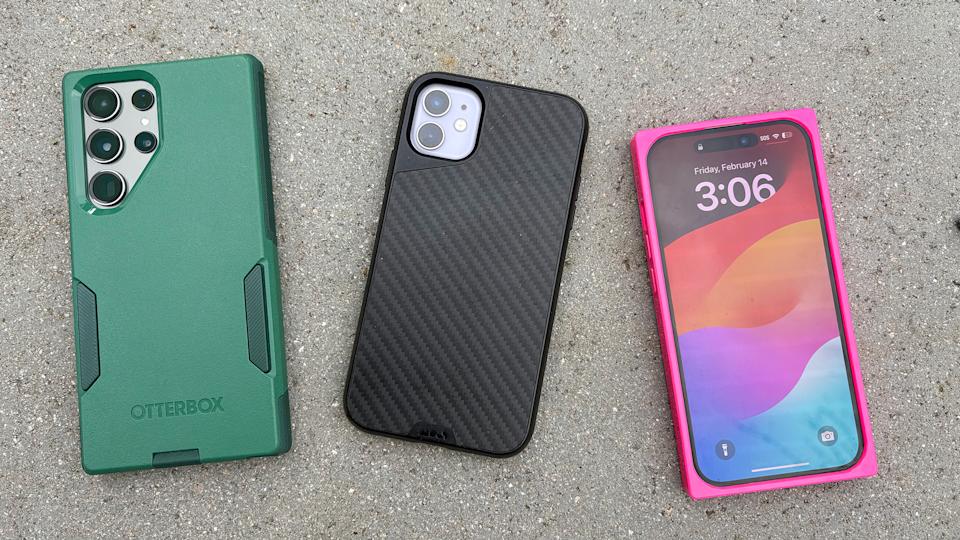
Use a case
It’s a flashy move to carry a naked phone around, but the chances of a handset making it through a tumble go up dramatically when you employ extra protection. We recommend a few in our guide to iPhone cases. In my family, we’ve been happy with Mous cases. Though we’ve never subjected our phones to the brutality seen in the company’s ads, I can say that these cases have seen my partner’s aging Samsung Galaxy through some pretty gnarly spills and I credit the cases for getting my iPhone 11 to 2025 in working condition.

Take care of the built-in battery (or use a power bank)
Since a phone’s battery is often the first thing to show signs of age, it’s worth it to follow recommendations for extending its lifespan. Lithium-ion batteries don’t perform well in heat and you should avoid charging them if it’s hotter than 95 degrees — doing so can degrade the battery quickly and even cause them to malfunction. They’ll tolerate cold weather better, but can get sluggish when things get too chilly.
If you’re storing a phone for a while, it’s best to do so with the battery at half charge, rather than full or empty. In fact, Li-ion cells last longer when they spend less time being either completely discharged or full — that’s why battery optimization features in iPhones and Pixel phones delay overnight charging to 100 percent until about an hour before you typically grab your mobile. And while it’s sometimes necessary to charge a battery quickly, a slower charging method when speed isn’t critical will put less stress on the ionic components and help extend the cell’s life.
But over time, any battery will eventually wear down. And if you’re traveling, relying heavily on navigation or using the phone as a hotspot, you might need more juice to get through a day. We recommend many options in our best power banks guide but the battery I grab most often is the Anker Laptop Power Bank. It’s got built-in USB-C cables and delivers enough charge to give any device (including laptops, extra hours of life). But for something smaller, I like the reliability of Statik’s semi-solid state MagSafe battery.
If you really want to give your phone a new lease on life, a new internal battery could be the ticket. For Pixel phones, you can go through Google’s official channel for either a walk-in or mail-in repair, you can look for an authorized repair partner or you can pick the DIY route with iFixit’s Pixel repair kits and instructions.
For iPhones, you can start with Apple’s official page, go through Best Buy or other authorized third-parties, or try iFixit’s methods. Samsung also has an in-house option but both iFixit and Best Buy ended their repair relationships with Samsung in 2024. Depending where you go and the model of your phone, the price for a new battery and installation will likely run you between $60 and $150 — still far less than ditching your handset for something brand new.
Clean up your phone’s storage
Most advice on how to declutter your phone and make it run faster centers on one thing: freeing up space. Your phone’s OS will likely have suggestions for clearing up storage space, like automatically offloading unused apps or deleting year-old messages. You can also do things manually by deleting any apps you don’t use. Next, consider the photos and videos you’re storing locally and either opt to pay for cloud storage or transfer the files to a computer or an external backup device. You can also consider getting rid of any music and movies you may have downloaded for offline use, and deleting old messages and large attachments. A good rule is to keep your storage at around 80 percent capacity. Once you’ve deleted and transferred what you can, restart your phone to give it a chance to clear up its temporary memory.
Why you can (and should) extend the life of your smartphone
Photo by Sam Rutherford/Engadget
The e-waste stream grows each year and doesn’t do great things for human or planetary health. Smartphone companies are offering better and more consistent trade-in deals, but even some electronic recycling has its faults. Simply hanging onto a device instead of opting for a new one is the most efficient way of cutting back on a phone’s environmental impact — plus it’ll save you money.
While every giant phone maker would like you to believe that upgrading annually is critical, it’s worth noting that new generations of phones often bear strong resemblance to the prior year’s model. Engadget editors see this time and again with the countless smartphones they review — there’s a new button, a few new AI tricks, but the technology generally doesn’t leap forward each year to create something wildly different than what came before.
With only minor hardware upgrades, the more exciting new features come via over-the-air software updates. Starting with the release of the Pixel 8 in 2023, Google promised security and software updates for a full seven years. So those who buy a Pixel 10 in 2026 could still be using the same phone in 2033. Samsung’s Galaxy S26 has the same length of promised support. Apple committed to five years of support to comply with EU regulations, but iPhones were already known for their extended support — when iOS 26 came out, support was cut for the iPhone XR and earlier, but that meant the 2018 models had enjoyed around seven years of updates from launch.
When Apple launched the iPhone 15, the company doubled its estimation for the handset’s battery life saying a handset should retain 80 percent of the original full charge after 1,000 cycles. And Apple said the placement of the larger battery in the iPhone 16 makes replacing it easier. Overall, battery technology has improved in capacity over the years, but longevity hasn’t gone up across the board, as a study by PhoneArena makes clear.
More advancements in battery life spans may be on the horizon particularly as the EV industry grows, which also relies on lithium-ion cells. For now, declining battery health is usually the most noticeable issue affecting older phones. In 2023, the European Council of the European Union adopted new guidelines for battery-powered devices, which includes a mandate to allow consumers to “easily remove and replace” batteries. That won’t go into effect until 2027, and there will be plenty of interpretation as to what “easily” means. But EU mandates are what made Apple finally ditch Lightning ports on iPhones in favor of USB-C, so this could eventually be a step towards (once again) having smartphones with swappable batteries.
Right-to-repair bills have been passed or introduced in all 50 states. Some of these laws have already gone into effect, and will require manufacturers to do things like providing repair tools and documentation, and selling components for a certain number of years after the last new model for higher priced devices.
Currently, a number of phones have decent repairability scores, according to the online repair community iFixit (The FairPhone 6 gets the highest marks.) Until more companies start making it easier to fix things ourselves, authorized repair is an option, while self-repair remains an option for the more industrious.
Check out more from our spring cleaning guide.

Stephan is the sports journalist for the Maple Grove Report.