It’s worth repeating here, but over 80% of all TVs sold in the world right now are 4K TVs, and the differences between them goes beyond pure resolution. With all of the technical terms and jargon associated with television technology, it can be tough to figure out what’s important. Here’s a quick guide to help cut through the confusion.
Picture quality: Broadly speaking, the type of display technology helps dictate how good a TV’s picture quality is, but OLED is typically the best display technology, and this is followed by LCD (including QLED, and Mini LED). OLED tends to look the best because it doesn’t need a backlight, and every pixel can be either on or off, leading to great black levels. In comparison, each LED in a backlight illuminates multiple pixels at a time so it isn’t as precise — it’s not yet 1:1. Even so, look for full-array local dimming, mini-LED and 120Hz refresh rate, which (unlike some other extras) do help improve the picture in my experience. Additionally, if a TV uses Quantum Dots it often leads to better color performance, whether it’s an OLED or an LCD.
Brightness: One of the biggest variables when buying a TV is how bright it can get. In general, LCD and LED tend to be the brightest types with up to 3,000 nits of brightness in my testing, which is very bright. As a comparison, HDR streaming on Netflix is usually capped at 1,000 nits, and this is enough for most people. Paying more for a TV usually means you’re paying for a brighter picture, and 4K Blu-rays and consoles can make the most of this extra brightness.
Price: 4K TVs range in price from around $400 to more than $2,000. Smaller screens are cheaper, well-known brands are more expensive, and spending more money can also get you better image quality. Most entry-level TVs have a good enough picture for most people, but TVs last a long time, so it might be worth spending more to get a better picture. It’s also best to shop for a TV in the fall when prices are lower.
Screen size: Bigger is better in our book. We recommend a size of at least 43 inches for a bedroom TV and at least 55 inches for a living room or main TV — and 65 inches or larger is best. More than any other “feature,” stepping up in TV screen size is the best use of your money. One of the most common post-TV-purchase complaints we’ve heard is from people who didn’t go big enough. We rarely hear people complain that their TV is too large.
Features: Among entry-level 4K TVs, the most important feature is what kind of smart TV system the TV uses. Among midrange models, look for a feature including full-array local dimming, mini-LED and 120Hz refresh rate, which (unlike some other extras) do help improve the picture in our experience. Among high-end TVs, OLED technology is your best bet.
For more TV buying advice check out our page on how to buy a TV.
Microfocus UFT, formerly known as QTP, offers software applications with regression and functional automation. Compared to the anticipated outcomes of the app under evaluation, it lets testers detect bugs, gaps, or defects. UFT will be renamed UFT One with the new update.
UFT uses the Visual Basic Scripting (VBScript) language to define the test process and manipulate the testing objects and application controls. Using a UFT tool, developers can evaluate all three layers of the program’s operations through a single console: service layer, database layer, and GUI.
History of UFT
QTP was originally published and subsequently acquired by HP (Hewlett-Packard) by Mercury Interactive. Its original name was Astra Quick Test and later named Quick Test Professional, but the latest version is Unified Functional Tester (UFT).
HP Testing Service and UFT 11.5 merged HP QuickTest Professional into a single bundle of software, which was made accessible until 2016 and then sold to Micro Focus as HP Software Division. UFT One 15.0.2 is the most recent edition of UFT.
Now, let’s look at the version history of QTP/UFT.
Astra Quicktest first version (1998)
QuickTest Professional v6.5 (2003)
HP QuickTest Professional v9.1 (2007)
Hp-Unified Functional Testing v11.5 (2012)
Micro Focus UFT v14.3 (2019)
Micro Focus UFT One v15.0.1 (2020)
Why is UFT/QTP the best automation testing tool?
UFT One is probably the most commonly used automation platform on the market. It is renowned for its ease of use and the support of automation testers from a wide group. It is a tool that is user-friendly.
Let’s explore a couple of points that make it the best automation tool:
All can use the UFT Micro Focus (both technical and non-technical)
Alongside web-based applications, you can test the desktop.
UFT facilitates different environments for software development, such as Oracle, SAP, etc.
VB Script is supported by QTP.
In QTP, there is a built-in object repository.
Using the UFT app, you can perform functional automation testing without interruption.
UFT/QTP Features
New features are included in the most latest UFT version:
AI-based testing: Improves the coverage and speed of your test.
New Test Objects: In PDF, Salesforce Lightning, JavaFX, and more, you can find some new objects.
New Test Objects: You can find some new objects in PDF, Salesforce Lightning, JavaFX, and more.
Web extensibility support: Provides extra assistance for third-party and custom controls.
PDF Report Makeover: HTML results-generated PDFs look better than ever and are easier to use. The norms of the test can be easily understood.
Technology stack: You can use new versions of SAP NWBC, Java, Bamboo, TortoiseGit, and many more that are supported.
Installation of UFT
We’ll see how to install the trial version of UFT in this section. There is a 30-day trial offered by Micro Focus UFT One.
Step 1: Navigate to the free trial page of Micro Focus https://www.microfocus.com/en-us/products/uft-one/free-trial first and fill in the required information.
UFT Training
Master Your Craft
Lifetime LMS & Faculty Access
24/7 online expert support
Real-world & Project Based Learning
Step 2: On the next screen, you will receive a successful registration message. And go to your inbox and confirm Micro Focus UFT One’s text.
Step 3: Next, on the login screen, enter your email details, and click on the sign-in button.
Step 4: Your dashboard will appear after you create your free trial account and select UFT’s download option.
Step 5: Click on UFT_14.03_Setup.exe on the next screen.
Step 6: Open it in a folder after the download process is completed and start the installation process by double-clicking on it on your PC.
Step 7: Click on the Next button.
Step 8: The installation process starts
Step 9:In the next screen, select Microsoft Office Access database engine 2010 and click the OK button. Then it will start installing.
Step 10:Then, click the Next button when the Welcome screen will appear.
Step 11: Accept the terms, and then click Next.
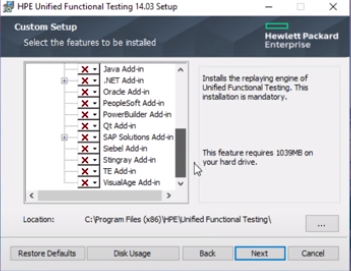
Step 12: Next, all the add-ins are selected by default. Click on the option next to it.
Step 13: Select all checkboxes and click on the install option.
Step 14: After the installation process is finished, click on the finish option.
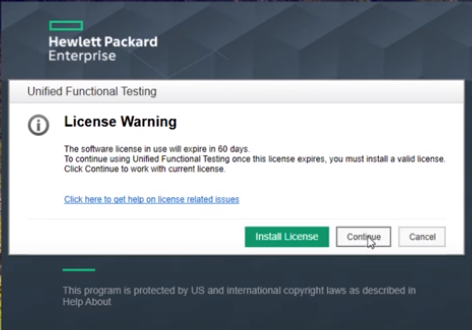
Step 15: On the desktop, select the HPE UFT Icon and select the Continue button.
Step 16: On the next screen, click OK and the HPE UFT Dashboard appears as shown below.
Subscribe to our YouTube channel to get new updates..!
Advantages of UFT/QTP
The most important benefit of using UFT is that it is simple to use, and because it includes the language of VBScript, no high-level programming language is needed.
An excellent method of Object Recognition.
Recording and playback assistance, and the ability to edit scripts after recording.
Numerous add-ins are supported, such as Java, .Net, Oracle, SAP, and many more.
Common automation frameworks are endorsed, such as the data-driven testing approach, keyword-driven testing strategy, hybrid frameworks, modular testing strategy, etc.
Integration is easily supported by UFT with test management tools such as QC, Test director, and more.
It comes with loads of QTP’s inbuilt properties and methods as well as VBScript’s inbuilt functions.
Extensible to Several Development Environments.
Enhanced Code Reusability.
Quick Scripting Process.
UFT Certification
One of the most demand certifications in the testing world is the Micro Focus UFT certification. Obtaining Micro Focus UFT certified opens ample opportunities for your career development if you want to step forward in a testing career.
The certification exam available for UFT is the Unified Functional Testing (UFT) Certified Professional Exam. This exam verifies and validates the aspirant’s knowledge of Unified Functional Testing (UFT) version 14.x. Application. The cost to attempt the exam is $200.
Scope of UFT/QPT
Testers over the globe broadly utilize small-scale Center UFT to automate their processes. This tool makes it simpler for QA pros to carry out different testing, including regression and functional testing. The testers can assist in composing the test scripts utilizing the VBScript version, which streamlines the method of controlling the objects and application controls. As numerous organizations automating the testing method, the demand for UFT is increasing at a regular pace.
Therefore the long run of UFT looks broad and provides plenty of opportunities.
UFT Training
Weekday / Weekend Batches
Conclusion
In the current software testing market, the UFT has been a very prominent tool. By supporting only the Windows environment, UFT enables you to generate test scripts using the user interface. Thus we have reached the tutorial’s end and have provided you with all the essential information about the UFT concepts and functionalities.
To provide the best experiences, we use technologies like cookies to store and/or access device information. Consenting to these technologies will allow us to process data such as browsing behavior or unique IDs on this site. Not consenting or withdrawing consent, may adversely affect certain features and functions.
Functional
Always active
The technical storage or access is strictly necessary for the legitimate purpose of enabling the use of a specific service explicitly requested by the subscriber or user, or for the sole purpose of carrying out the transmission of a communication over an electronic communications network.
Preferences
The technical storage or access is necessary for the legitimate purpose of storing preferences that are not requested by the subscriber or user.
Statistics
The technical storage or access that is used exclusively for statistical purposes.The technical storage or access that is used exclusively for anonymous statistical purposes. Without a subpoena, voluntary compliance on the part of your Internet Service Provider, or additional records from a third party, information stored or retrieved for this purpose alone cannot usually be used to identify you.
Marketing
The technical storage or access is required to create user profiles to send advertising, or to track the user on a website or across several websites for similar marketing purposes.