
25 best all-inclusive resorts in the world


Listen up: All-inclusive resorts have changed for the better. It’s well worth considering a visit to one — whether right here in the U.S. or on a beach in Mexico — if you want a seamless vacation where you know exactly what you’ll pay.

Nowadays, all-inclusive resorts have great food (even multicourse tasting menus), deliciously crafted drinks and fresh, modern rooms. Find the best all-inclusive resorts in the world, ranked by TPG’s expert frequent travelers, below.

Related: The best Marriott all-inclusive resorts to book with points

Impression Isla Mujeres by Secrets

Impression Island Mujeres by Secrets
ELLIE NAN STORCK/THE POINTS GUY

A 45-minute luxury catamaran ride from Cancun, Mexico, complete with butlers and bar service, sets the tone for Impression Isla Mujeres by Secrets, a luxury Hyatt all-inclusive resort on a small island that’s just a hop, skip and a jump away from Cancun’s bustling Hotel Zone.

Here, guests will find impeccable service, seven excellent restaurants and five lively bars, a spa, multiple pools (including an infinity pool with a swim-up bar) and design-forward, modern rooms that feel like home away from home.

Or, as put by Ellie Nan Storck, TPG’s managing editor of hotels, who reviewed the property last year: “If this is what all-inclusive vacationing can be like, then I get the hype.”

Rates at Impression Isla Mujeres by Secrets start around $1,000 per night, based on double occupancy. A World of Hyatt Category F property, the resort also offers award bookings for standard rooms that start at 42,000 World of Hyatt points a night.

W Punta Cana, Adult All-Inclusive

TANNER SAUNDERS/THE POINTS GUY

Winner of the TPG Award for Best New All-inclusive Points Hotel, the Dominican Republic’s W Punta Cana is the very first W-branded all-inclusive resort in the world. It’s also a game changer in the all-inclusive space, thanks to its chic design, wonderful food and ultrafriendly staff.

Dining here ranges from rooftop Japanese food overlooking the ocean to experiential tasting menus and a speakeasy bar you have to be “in the know” to access. Top it off with a beautiful spa, an infinity pool facing the ocean and pristine beaches and a beach club, and you’re set for an idyllic, sun-filled vacation.

Reward your inbox with the TPG Daily newsletter

Join over 700,000 readers for breaking news, in-depth guides and exclusive deals from TPG’s experts

Rates at W Punta Cana start at $700 per night, based on double occupancy. Award nights start at 137,000 Marriott Bonvoy points per night.

Sandals Royal Caribbean

Sandals Royal Caribbean
SANDALS

Staying in an overwater bungalow is at the top of many travelers’ must-experience lists, but did you know you don’t have to travel all the way to the Maldives or Bora Bora, French Polynesia, to experience it? You can actually stay in one at the all-inclusive, adults-only Sandals Royal Caribbean in Montego Bay, Jamaica. Not only do you get that dreamy overwater bungalow, but the bungalows are actually built into the shape of a heart on a private island off the main resort.

Beyond that, guests can enjoy food ranging from Thai to French to Indian to Caribbean at nine different restaurants on the property, as well as premium liquor at most of the on-site bars. Add that to top-notch pools, water and land activities like land chess and volleyball, live entertainment and the option to get PADI scuba certified. What else could you possibly need?

But if you do need more, guests can also access all the food and activities at the property’s sister resort, Sandals Montego Bay.

Sandals Royal Caribbean is currently closed for renovations until Dec. 18, though bookings are open. Rates start at $328 per person, per night.

Paws Up Montana

PAWS UP MONTANA

Maybe you’d rather have a vacation surrounded by beautiful snowcapped mountains and miles of hiking trails where you can witness horses, cattle and bison. Head to Greenough, Montana, for an all-inclusive experience out on the range. Paws Up Montana, the property within which the famed Green O at Paws Up is situated, has it all: tricked-out glamping tents, luxury cabins and elegant, spacious ranch homes with views of the glorious Montana wilderness.

Activities are endless, ranging from daylong fly-fishing trips to horseback rides through forests or lazy afternoons spent relaxing in the spa. Want a little more excitement? Why not join a cattle drive to learn the true art of the cowboy or take to the adventure course for a ropes course challenge?

Food is as diverse as the activities, with a focus on elevated ranch cuisine served in a number of beautiful spots. You can dine lakeside, sit for a meal inside a Western-style dining room or even enjoy dinner served from a chuck wagon, the real cowboy way.

Rates at Paws Up Montana start at $2,750 per night.

Impression Moxche by Secrets

Beach Club Pool
IMPRESSION MOXCHE BY SECRETS/HYATT

Part of Hyatt’s new high-end all-inclusive brand, Impression Moxche by Secrets is one that our reviewer said might be the “best all-inclusive resort in Playa del Carmen.” It’s easy to see why since this stunning resort in Mexico only offers suites that start at nearly 1,000 square feet; some have outdoor hot tubs or beautiful views of the ocean, and there’s even a two-story penthouse that feels like it’s fit for royalty.

If you decide to leave your beautiful rooms, there’s plenty to do: Explore the resort’s hidden coves and cenotes, dance in a tucked-away speakeasy, go snorkeling to get face-to-face with exotic sea life, head to the spa for a relaxing treatment or just lounge by the pool to soak up some sun. Just don’t forget to look at the entertainment calendar so you don’t miss live music, pool volleyball and more.

What really sets this resort apart is its dedication to great food, which ranges from fine French dining to an open-fire grill and even a modern Japanese restaurant with teppanyaki tables. Just be sure to stop by Teodoro for a seven-course dining experience unlike anything you’ve had at an all-inclusive resort before. (Extra fees apply at certain restaurants.)

Rates at Impression Moxche by Secrets start at $518.50 per person, per night. As a Category F in Hyatt’s all-inclusive chart, the resort also offers award nights that start at 42,000 World of Hyatt points per night.

Alila Ventana Big Sur

Alila Ventana Big Sur
Alila Ventana Big Sur in California. ZACH GRIFF/THE POINTS GUY

There are many reasons to love this adults-only, luxury Hyatt resort on the rugged coast of California. One major reason is that, back in 2020, it converted to an all-inclusive model. The 59 guest rooms and suites are chic and cozy. Each comes with a balcony or private deck, scenic views, a stocked minibar, a walk-in shower and a soaking tub. Many rooms even have fireplaces and hot tubs.

With Ventana’s inclusive offerings, guests can enjoy modern American meals at The Sur House, which uses local ingredients and organic produce grown on the property. Note that alcohol is not included in the package.

Guests can unwind with yoga, daily hikes or reserved access to indoor or outdoor wellness studios. Take the day to chill in the sun at one of the pools, slip away to the Japanese hot baths for some mountainside serenity or hit up Spa Alila — the first in the U.S. — for a Body Renewal Ritual starting at $330.

Rates at Alila Ventana Big Sur start at $2,000 per night for double occupancy, including all meals and various activities. World of Hyatt members can book this Category 8 property for as little as 35,000 points per night.

Hyatt Zilara Cap Cana and Hyatt Ziva Cap Cana

Hyatt Zilara Cap Cana
Hyatt Zilara Cap Cana in the Dominican Republic. TANNER SAUNDERS/THE POINTS GUY

At Hyatt’s sister Zilara and Ziva resorts in Cap Cana (an upscale, gated resort area in Punta Cana), adults can take advantage of both areas of the dual-branded property. Children are restricted to the Ziva side. Kids (and kids at heart) will enjoy the Canapolis water park, which has a handful of adrenaline-inducing slides. Adults looking for something more relaxing can hit up the cenote-inspired spa.

The resort is truly massive, with more than 700 ocean-view suites split between Ziva and Zilara; these include swim-up suites, one-bedroom options and even rooms with direct beach access. There are almost more restaurants and bars than you can imagine. Some highlights are French-Polynesian restaurant Brando’s, an Indian restaurant in a trainlike setting and an Asian joint with teppan grills. There are also multiple buffets and coffee shops, as well as beach, pool, sports and martini bars. Also, 24-hour room service will help with those late-night cravings.

Rates at Hyatt Zilara Cap Cana and Hyatt Ziva Cap Cana start at $500 a night, based on double occupancy. As a Hyatt All-Inclusive Category E property, the properties also offer award nights that start at 35,000 World of Hyatt points per night for double occupancy. Additional guests require an extra 17,500 to 23,000 points per person, per night.

Al Maha, a Luxury Collection Desert Resort & Spa, Dubai

Room service at Al Maha, a Luxury Collection Desert Resort & Spa, Dubai
KATIE GENTER/THE POINTS GUY

Dubai is known for its towering skyscrapers and over-the-top hotels. However, just 45 minutes outside of the overwhelming hustle and bustle is a desert oasis where guests can bask in the heat of the Dubai Desert Conservation Reserve or go for a sand-filled adventure. At this resort, part of Marriott’s Luxury Collection, each of the 42 suites features a plunge pool, a private deck and the utmost privacy. Plus, guests will have the chance to see gazelles and Arabian oryxes roaming in the wild.

While visiting, take a camel ride through the desert, learn the art of falconry or go on a desert drive to see some wildlife. If you need to relax, opt for a specialized treatment from the Timeless Spa — just don’t forget that two desert activities are included with full board.

Don’t worry about going hungry: Food is a serious business at Al Maha. Dining options are more gourmet than you might expect from an all-inclusive resort. Al Diwaan, the international restaurant, serves three meals a day with views of the reserve. Hajar Terrace Bar is the perfect place to sit back and take in the power of the desert, drink in hand.

Rates at Al Maha, a Luxury Collection Desert Resort & Spa, Dubai start at $732 a night for double occupancy or 108,000 Marriott Bonvoy points per night.

Grand Velas Los Cabos

TANNER SAUNDERS/THE POINTS GUY

Mexico’s Grand Velas Los Cabos has a lot to offer guests spending a few nights in Baja California. It’s an all-suite property where every room has stunning ocean views, a spa-style bathroom with a Jacuzzi, and a large terrace to soak up the salty air.

Outside the rooms, guests can enjoy delicious food from seven upscale restaurants. Options include a 10-course tasting menu of international flavors at Cocina de Autor; French, Mexican and Italian spots; and a buffet.

The resort also offers Mexican cooking classes, yoga and a kids club. Paid activities range from whale-watching to off-roading on all-terrain vehicles to camel excursions on the beach. Undercurrents prevent swimming at the resort’s beach, but there are three infinity pools — including a family-friendly one — overlooking the ocean. At the 35,000-square-foot SE Spa by Grand Velas, a spa valet can make all your wellness dreams come true.

Rates at Grand Velas Los Cabos start at $1,482 a night, based on double occupancy.

Castle Hot Springs
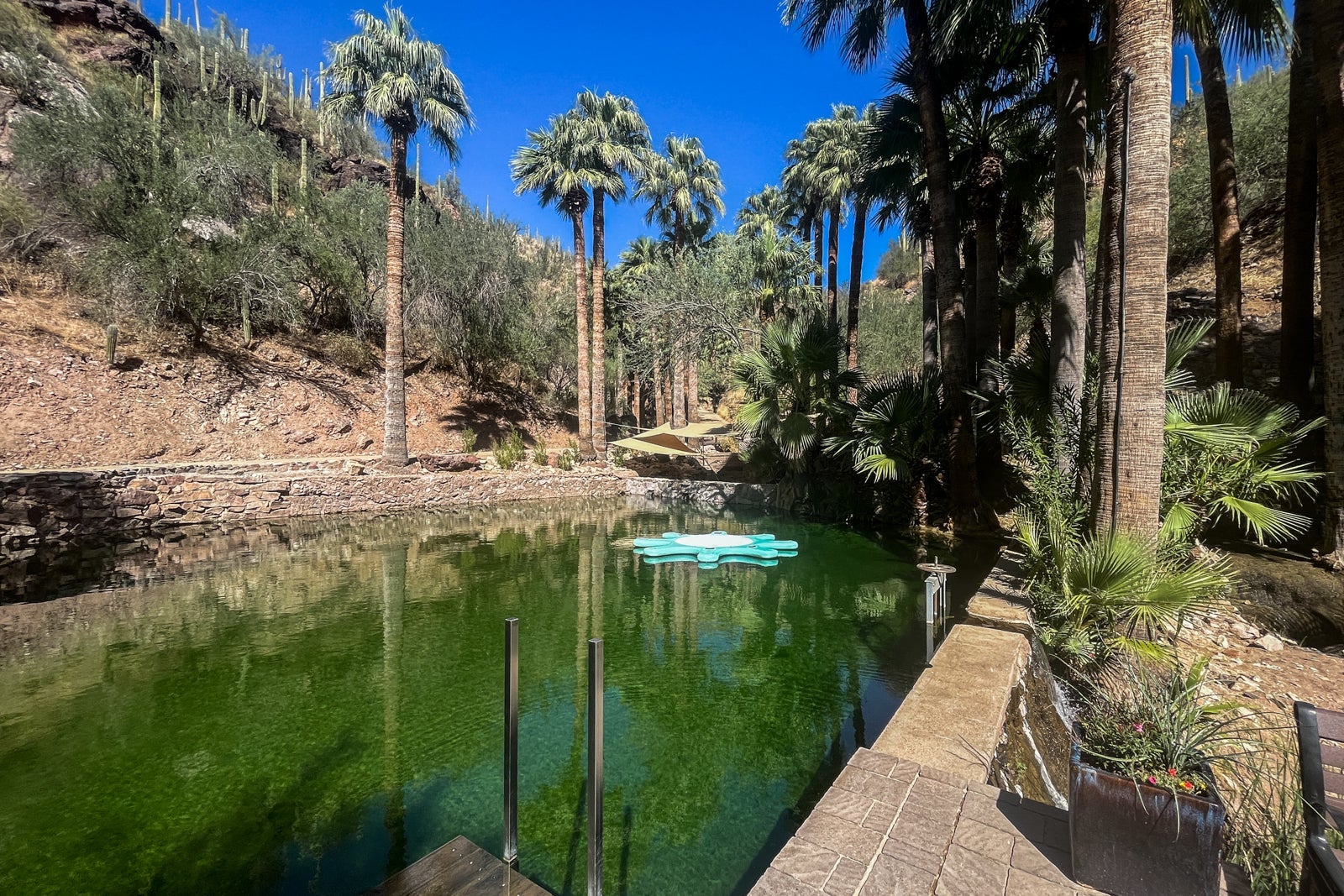
BECKY BLAINE/THE POINTS GUY.

Castle Hot Springs — a grand desert oasis about an hour north of Phoenix — is one of the best all-inclusive resorts in the country. Its 30 stand-alone bungalows and cabins are tucked away in a lush setting full of palm trees spread across 1,100 acres. Dating back to the late 1800s, the resort’s natural hot springs (which range from 86 to 106 degrees) have been helping people stay healthy and relaxed for decades.

Stays at Castle Hot Springs include breakfast, lunch and a five-course tasting menu for dinner each evening, all crafted with select ingredients grown at the resort. A $25 daily drink credit is available per guest. The rate also includes activities like yoga, meditation, farm tours, guided hikes and exclusive access to the hot springs. Additional experiences, including spa and wellness treatments, are available for a fee. More adventurous options include ATV tours, as well as the elevated adventure course and aerial walkway.

Rates at Castle Hot Springs start at $1,250 per night, based on double occupancy.

The Westin Reserva Conchal, an All-Inclusive Golf Resort & Spa

THE WESTIN RESERVA CONCHAL/MARRIOTT

All-inclusive resorts in Costa Rica just hit different, thanks to the combination of beautiful beaches and tropical rainforests. At The Westin Reserva Conchal resort, you get the best of both. Set on 2,400 acres, the resort has a lagoon-style pool and access to a championship golf course, tennis courts and pristine beaches.

With 406 rooms — ranging from entry-level deluxe junior suites with balconies to club-level suites (with access to the club lounge and private pool) and larger family suites — there’s plenty of room for the entire family to spread out. Families can take advantage of the kids club or go for a three-hour hike in the rainforest. The resort fields a handful of bars and restaurants, including a barbecue joint, seafood options and a steakhouse.

Rates at The Westin Reserva Conchal, an All-Inclusive Golf Resort & Spa start at $446 a night, while Marriott Bonvoy members can book an award night starting at 77,500 points, both based on double occupancy.

Hilton Cancun, an All-Inclusive Resort

Pool at the Hilton Cancun
HILTON CANCUN/VRX STUDIOS/FACEBOOK

In Mexico, Hilton has been opening new hotels left and right, one of which is Hilton Cancun, an All-Inclusive Resort. Each of the resort’s 715 guest rooms and suites has a balcony. Also, select premium suites offer swim-up pools and extra outdoor space. The crafts of local artisans inspire the rooms’ decor, which is full of modern touches like subtle pops of color and plenty of charging ports.

Activities abound at this Hilton. Guests can partake in arts and crafts, beach sports, nightly fiestas with music and themed parties. A kids club is available to occupy young children, as is a designated family pool with a splash playground. A teen club is available for the older ones, too. This resort shares grounds and some facilities with the ultraluxe Waldorf Astoria Cancun.

With 12 dining options, there’s a meal for every appetite. There is traditional Mexican food at Maxal, wood-fired pizza at Italian trattoria La Luce, a Southeast Asian-inspired menu at Auma and an array of globally inspired bites at the buffet-style Vela venue.

Rates at Hilton Cancun, an All-Inclusive Resort start at $354 a night, based on double occupancy. Hilton Honors members can book an award night starting at 80,000 points.

Mohonk Mountain House

aerial photo of castle-like resort near lake with leaves changing colors
MOHONK MOUNTAIN HOUSE

Believe it or not, the Hudson Valley is home to a picture-perfect castle that offers year-round fun for the whole family (or a dreamy romantic retreat) in a fairy-tale setting. This all-inclusive resort sits just 90 minutes from New York City in New Paltz, New York.

Mohonk Mountain House, which dates back to 1869, is set within 40,000 acres of forest. It offers ample space for hiking, horseback riding, learning archery or ax throwing, and canoeing on the lake (where you can bask in the faux Victorian castle’s beauty).

Guests at Mohonk receive three included meals a day (alcohol is additional) from an upscale buffet or one of the specialty restaurants. The main dining room has breathtaking views of the Catskill Mountains to accompany the farm-to-table dishes and wine pairings.

A spa treatment is not included but is worth the splurge. The 60-minute Mohonk Red massage treatment, which uses the distinct “Mohonk Red” witch hazel growing on the property, is a highlight.

When you enter your room, you’ll immediately be transported back to the grand days of the past thanks to traditional decor; gilt wallpaper, sturdy wooden furniture and views of the forest and mountains create a memorable ambience. The move here is to opt for a room with a balcony and a fireplace, like one of the Victorian Rooms, so you can have a special experience. If you’re worried about getting the fire going, ring reception; they’ll send someone up to do it for you.

Rates at Mohonk Mountain House are typically over $1,000 a night, based on double occupancy. Kids under 12 stay and eat for free during select weeks each year (limited to one child per adult guest, with a maximum of two children per booking).

Nihi Sumba

NIHI SUMBA/FACEBOOK

If you want a tailor-made, luxe experience and one that’s all-inclusive, look no further than Nihi Sumba, one of the world’s dreamiest — and most talked about — resorts. It’s a little tough to get to: It requires a trip to Bali, Indonesia, and a connecting flight to Lede Kalumbang Airport (TMC) as well as a more than hourlong car ride or a private helicopter transport. Still, the jet lag quickly fades away once you settle into one of the resort’s 27 villas. Villas have a private pool, canopy beds, views of the Indian Ocean and even handmade chocolate waiting in the minifridge.

Guests who check in to Nihi Sumba can eat at Ombak, an open-air, sandy-floored restaurant serving a la carte breakfast and dinner. Or, they can enjoy fresh-caught fish and pizza made with organic ingredients grown by the property at Nio Beach Club.

As for activities, it’s impossible to decide between swimming with horses, stand-up paddleboarding in the crystal-clear water, hiking to a beautiful waterfall and just lazing by the pool. Luckily, you don’t have to choose — the resort wants you to have it all (though some activities are an extra expense).

Rates at Nihi Sumba start at $1,307 per villa, per night, based on double occupancy.

Miraval Berkshires

sitting area with fire pit in the middle
MIRAVAL BERKSHIRES

Hyatt’s wellness-centered Miraval brand has three locations across the country, and we’re big fans of all of them. We’re exceptionally smitten with the baronial outpost in the Berkshires, though. At this adults-only resort, focusing on yourself is the primary task of any visit. Rates include “life-enhancing wellbeing activities” such as yoga, hiking, aqua barre classes in the pool and nutrition classes. Paid experiences include pottery, archery and even therapeutic sessions with horses.

Accommodations at Miraval Berkshires range from spa-inspired guest rooms stocked with Tibetan singing bowls and meditation cushions to 600-square-foot suites with balconies. The resort’s newest offering, Wyndhurst Mansion, is a Gilded Age stunner with 10 rooms and suites named after famed writers. Rates include three meals daily at the health-conscious restaurant Harvest Moon or through in-room dining. For an extra fee, head to 1894 Restaurant for a four-course prix-fixe menu with dishes like black truffle risotto and dry-aged bison rib-eye served through an interactive experience.

Rates at Miraval Berkshires start at $866 or 57,500 World of Hyatt points per night, both based on double occupancy. Note that every award booking includes a $175 resort credit per person.

Jade Mountain

JADE MOUNTAIN/FACEBOOK

St. Lucia is one of the most beautiful islands in the Caribbean, and Jade Mountain — an independent resort offering all-inclusive pricing options — might be one of the most beautiful resorts. There are picture-perfect views of the island and its geological splendors from each of the 24 unique “sanctuaries” or suites. Every accommodation (except for whirlpool suites) also includes a large private infinity pool, 15-foot-high ceilings and an open fourth wall to allow for unobstructed views of paradise.

Meals of “tropical cuisine” are served around an infinity pool at Jade Mountain Club, helmed by James Beard Award-winning chef Allen Susser. At the Kai en Ciel spa, couples can indulge in “The Alchemy of Two,” a 110-minute experience featuring massages, poetry and handcrafted chocolates.

Rates at Jade Mountain start at $1,530 per night, based on double occupancy.

Blackberry Farm

BLACKBERRY FARM

Tucked away in the foothills of the Smoky Mountains, Blackberry Farm is a 4,200-acre estate that’s one part working farm, one part designer hotel and one part culinary destination that attracts visitors from all over the world to East Tennessee. Stays here include all meals, from dinner on the night of arrival through lunch on the day of checkout. Menus consist of “Blackberry Farm’s Foothills Cuisine,” made with local products and seasonal ingredients grown in the 4-acre garden.

There are just 69 accommodations. The Historic Rooms are decorated with period pieces, while Hill Cottages — which average 1,080 square feet — feature fireplaces, front porch rocking chairs and personal golf carts. For bigger groups, book a self-contained house that has three to five bedrooms.

Activities abound (though they may cost an extra fee). Go hiking, fly-fishing, horseback riding or cycling, or do yoga. You can even try your hand at shooting sporting clays. There’s a spa with a slew of rejuvenating wellness treatments. You can even enjoy concerts with major headliners (like the country group Little Big Town) scheduled throughout the year.

Rates at Blackberry Farm start at $1,200 per night and require a three-night minimum stay.

Excellence Playa Mujeres

EXCELLENCE PLAYA MUJERES/FACEBOOK

Booking an all-inclusive resort in Cancun can be tough because of the sheer number of options, but for an upscale all-inclusive experience, look no further than Excellence Playa Mujeres. Every room is a suite and includes picture windows, outdoor spaces, a romantic oversized Jacuzzi, a rainfall shower and natural design elements. There’s even a club-level option that offers upgraded amenities like Bulgari bath products and top-shelf liquors (not to mention access to a private beach and pools, as well as the club lounge).

At the resort, dining options include The Lobster House, a restaurant specializing in juicy crustaceans. Chez Isabelle serves classic French fare, and Agave offers bold Mexican cuisine. Stop at the lobby bar, Martini, for a stiff take on the eponymous classic, or enjoy a handful of other bars dotting the resort.

With a total of seven pools and a beach, there are plenty of loungers to go around. For even more fun, borrow snorkeling gear, take a dance or Spanish lesson, or head to the theater (and its Stars bar) for a night of live entertainment. When you need some “me time,” head to the Miile Spa for a treatment.

Rates at Excellence Playa Mujeres start at $715 a night, based on double occupancy.

Twin Farms

TWIN FARMS/FACEBOOK

Not everyone loves the all-inclusive spirit. But at Vermont’s Twin Farms, the experience is so unique that even the biggest naysayer will fall in love.

Guests can find seclusion in the 28 individually designed suites, cottages and treehouses decorated with art that stands well above what you’d find in a regular hotel. The various design aesthetics look like they came straight from the pages of a fashion magazine. In addition to rooms, the all-inclusive experience covers meals, wines and spirits at the restaurant or in your suite or cottage. You can even order lunch to be served as a picnic anywhere on the 300-acre property.

Guests can take advantage of the resort’s long activity list, which includes canoeing, kayaking, fly-fishing, snowshoeing, sledding and even skiing on Twin Farms’ private mountain. (The necessary equipment and instruction are included.)

At the fitness center, yoga classes and Peloton bikes are on offer. Meanwhile, the Bridge House Spa’s menu includes facials, massages and in-room rituals for an extra fee. To really let it all go, especially if you visit in the snowy winter, make sure to go for a soak in the Japanese ofuro — a unique experience that’s included with your stay.

Rates at Twin Farms start at $2,950 a night, based on double occupancy.

Hyatt Ziva Los Cabos

TANNER SAUNDERS/THE POINTS GUY

Hotels and resorts are a dime a dozen in and around Cabo San Lucas, Mexico, but Hyatt’s Ziva resort is one of the best all-inclusive options. Thanks to World of Hyatt’s generous points chart, it’s also one of the best places to redeem some Hyatt points for a memorable vacation.

This Ziva has seven restaurants and seven bars to indulge at. Whether you’re getting dinner with a show at the Japanese restaurant Dozo or eating freshly grilled seafood at beachside Casa Cortez, know you’ll go to bed full.

With 591 rooms and suites to choose from, guests can stay in a standard 584-square-foot master king or master double with a furnished balcony and a hydro-massage bathtub. Or, they can opt for a club-level suite, which includes swim-up options, a private check-in area and access to the club lounge.

For families, the KidZ Club has a water park with slides and supervised activities. Meanwhile, parents can hit the adults-only pool and bar area. At the two-story Zen Spa, 19 indoor-outdoor treatment rooms are available for a moment of calm. You might need the relaxation after taking advantage of the resort’s “Olympics” beach games, dance lessons and live shows.

Rates at Hyatt Ziva Los Cabos start at $299 a night, based on double occupancy. As a Category E all-inclusive resort in the World of Hyatt program, the resort’s award nights start at 35,000 points per night, based on double occupancy. Additional guests require an extra 17,000 to 23,000 points per night, per guest.

Breathless Cabo San Lucas Resort & Spa

BREATHLESS CABO SAN LUCAS RESORT & SPA

Some all-inclusive resorts are about sitting back and relaxing. Others, like Breathless Cabo San Lucas, are designed to provide moments of tranquility but are also big on the party scene. Guests can enjoy a robust lineup of entertainment options, from bubble parties to carnival-themed Champagne pool parties — all with a live DJ. When it gets to be too much, guests can retreat to the quieter infinity pool overlooking the marina or visit the spa for a hot stone massage to work out all the knots.

All 169 rooms have either a private balcony or terrace with marina views. Expect chic design, stocked minibars, 24-hour concierge service and room service. You can upgrade to an Xhale club suite and get access to personalized check-in service, the club lounge with premium liquors and snacks, upgraded minibars and even a pillow menu.

There are seven bars and restaurants at this Breathless, including a contemporary tapas bar, Mediterranean and Italian options, and a beachside grill. Speaking of the beach, this resort has one of the few swimmable ones in the area.

Rates at Breathless Cabo San Lucas Resort & Spa start at $453 a night, based on double occupancy. As a Category D all-inclusive resort in the World of Hyatt program, the resort’s award nights start at 25,000 points per night, based on double occupancy. Additional guests require an extra 10,500 to 14,500 points per night, per guest.

The Ranch at Rock Creek

A horse stampede at The Ranch at Rock Creek in Montana.
WYATT SMITH/THE POINTS GUY

A trip to Montana’s beautiful, natural landscape should be on everyone’s must-experience list. At The Ranch at Rock Creek, you can have the best of it all without worrying about every little detail: The resort’s all-inclusive pricing means most of what you want to experience is already paid for.

Guests can choose from 29 accommodation options, which range from glamping tents and cabins to multiroom homes and even a historic barn converted into three suites that can be booked together or separately.

During a visit to The Ranch, guests can enjoy (upscale) cowboy-style food with various dining options for breakfast; they can tuck into lunch at the Buckle Barn and dinners with creative menus that rotate seasonally. For entertainment, there are summer rodeos with a barbecue, autumn dinners with barn dances and tasting menus organized by the chef.

For fun, learn the art of archery, go fly-fishing or try horseback riding. In the winter, enjoy sports like snowboarding and skiing, or simply take in the magic of fresh snow with a ride on a tube. A highly customizable experience, every reservation includes a “Ranch Ambassador” who helps plan every trip detail. All you have to do is show up and have the time of your life.

Rates at The Ranch at Rock Creek start at $2,800 a night, based on double occupancy.

Hyatt Ziva Puerto Vallarta

HYATT

Another entry from Hyatt’s Ziva brand, the Puerto Vallarta, Mexico, property is a force to be reckoned with. Home to five restaurants and five bars, the culinary experience here is a trip across the globe with stops at an Italian trattoria, a beachside East Asian restaurant and an outpost serving Mexican cuisine. The resort has five infinity pools, including an adults-only pool, two kiddie pools and even an infinity-style hot tub. Guests can enjoy live entertainment nightly, as well as activities such as nonmotorized water sports, cooking demonstrations and daily fitness classes.

In the more than 335 rooms and suites, guests can expect ocean views, white marble bathrooms, large TVs and — in select rooms and suites — hydro-massage bathtubs and rainfall-style showers. Club-level rooms and suites are available, offering in-room upgrades, private check-in areas and access to the club lounge. For a really special stay, splurge on a swim-up suite so you can access semiprivate pools directly from your room.

Rates at Hyatt Ziva Puerto Vallarta start at $311 a night, based on double occupancy. As a Hyatt All-Inclusive Category D property, the resort’s award nights start at 25,000 points per night for double occupancy. Additional guests require an extra 13,000 to 17,000 points per person, per night.

Sandals Royal Bahamian

aerial photo of large beach resort, crystal clear blue water and large deck with yacht
SANDALS

From intimate dining venues to rooms with romantic soaking tubs, Sandals Royal Bahamian in Nassau invites travelers into an all-inclusive wonderland designed specifically for couples. Its 10 restaurants appease all palates, and options range from a chophouse with tables under an imposing chandelier to a dreamy seafood restaurant on a wooden pier above the water. For a truly romantic experience, the resort can arrange a private candlelight dinner.

The resort’s 404 accommodations run the gamut in offerings. There are swim-up suites, hideaway villas with private pools, honeymoon suites and options that include butler service. All-inclusive rates at Sandals cover water sports, a comprehensive diving program, pool and beach parties, live entertainment and even a visit to Barefoot Cay, the property’s private offshore island with beaches, snorkeling and a beach club.

Rates at Sandals Royal Bahamian start at $277 per person, per night.


Source link

Leave a Reply

Subscribe to Our Newsletter

Get our latest articles delivered straight to your inbox. No spam, we promise.

Recent Reviews


If you are appearing for the SSRS Developer Interview and looking for expected questions that might be asked in an interview. Then you are in the right place and you can follow the below compiled SSRS Interview Questions and Answers. By going through them, you will be able to crack the SSRS job interview easily. All levels of SSRS Interview questions are available for you here.

SSRS stands for SQL Server Reporting Services which is a server-based report-generating tool from Microsoft. It helps to produce various structured reports using data sources & SQL Server such as tables, graphs, charts, and reports. Further, it stores all reports on a server securely. SSRS is an RDBMS that supports several apps like BI, transaction processing, analytics, etc. Moreover, SSRS has many security features that control access to various reports by individuals.

Most Frequently Asked SSRS Interview Questions and Answers

1) What is SSRS?

Ans: SSRS refers to SQL server reporting service. The complete server-based reporting platform consists of tools and functionalities used to store various data sources. SSRS reporting service offers many operations, such as managing, developing, and delivering reports to multiple sources. It also includes API tools that allow users to process and synchronize custom apps.

2) Explain what data regions are. And mention the different data regions used in SSRS

Ans: The data regions are reporting items that consist of repeated rows of different abridged details from the data sets.

The different types of data regions included are:

1) Chart

2) Gauge

3) List

4) Table

5) Matrix

To gain a keen knowledge of SSRS and master the skills, refer to the curriculum and register for SSRS Training!

3) Mention the important components of SSRS architecture.

Ans: Below are the essential components of SSRS such as;

  • Reporting manager.
  • Reporting designer.
  • Reporting server.
  • Various browser types supported by reporting services
  • Reporting server and many command line outlets.
  • Report server database.
  • Data sources.

4) Mention the different types of servers you can use with SSRS.

Ans: SSRS is a widely used database tool connecting different servers. The following are the various types of servers to use:

  • Oracle
  • Teradata
  • ODBC & OLEDB
  • Hyperion
  • Flat XML files

5) Mention the core components used in SSRS.

Ans: The core components of SSRS include the following;

  • A set of tools used to view, create, and manage the data reports.
  • Various report server elements help host and process the reports in different data formats. They are PDF, HTML, Excel, and CSV data files.
  • Different APIs are used to integrate the various custom apps and create custom reports to build tools.

6) Mention the different types of SSRS Reports.

Ans: Below are the different types of the report such as;

  • Parameterized reports
  • Click through reports
  • Snapshot reports
  • Cached reports
  • Drill through reports
  • Linked reports.
  • Drill down reports
  • Subreports
  • Ad-hoc reports

7) Name the different open-source software you can use as an alternative to SSRS.

Ans: Below is the different alternative software;

  • Jfree reports
  • Jasper report
  • Data Vision
  • Business intelligence reporting tool (BIRT)
  • Open report

8) Explain how you can deploy an SSRS report.

Ans: SSRS reports can be deployed in the following ways;

  • By visual studio way
  • By developing the utility
  • By report server

9) Explain the key features of SSRS.

Ans: The key features of SSRS;

  • SSRS is cheaper software and faster than other platforms.
  • It helps to produce various data reporting types.
  • There is no need for additional skills or training to learn SSRS.
  • It offers secure and quick data integration.
  • SSRS is used to create a UI and can access various parameters.

10) Mention what methods can minimize the overhead of reporting service data reports.

Ans: Cached reports and snapshot methods can reduce the overhead of reporting service data reports.

11) Tabular and Matrix report – Explain the differences.

Ans: Let me explain the differences between Tabular and matrix reports;

  • Tabular report: It is the primary type of report. Here, each column will be chosen from the database.
  • Matrix report: A cross-tabulation report format is used in four data groups.

12) Shed some light on the remarkable highlights of SSRS.

Ans: Let us explore the most notable features of SSRS.

  • The produced reports can be worked on by utilizing social, XML, Excel, or multi-dimensional sources, and information can be recovered from ODBC and OLEDB-related suppliers.
  • In SSRS, clients can make reports in various structures, such as freestyle, graphical, diagrams, and framework structures.
  • It likewise supports online highlights; anybody can decently combine with the report server on the web and see reports in electronic apps.
  • Any number of impromptu reports can be made by utilizing illustrations, pictures, or outer substance and sparing them on a server.
  • All the reports made in the SSRS can be sent out in different arrangements like XML, CSV, TIFF, PDF, HTML, and Excel.
  • It has the mechanized choice for buying in reports to the client’s letter drop, portable, and shared area.
  • It underpins the Simple Object Access Protocol (SOAP).

13) Explain what benefits you get after using the SSRS Services.

Ans: Here is the list of benefits that you get by using the SSRS Service of Microsoft-

  • It is anything but difficult to convey on your existing hardware, as reports are put away in one brought-together web server where clients can run a report from one spot.
  • Since SSRS permits cross-trading reports in different companies, it is simple for additional examination of reports with various document groups.
  • The preparation of conclusive reports on social or multidimensional information is quicker.
  • Data delivery to a business association is quicker, so it helps give better choice help.
  • A pro is not required to oversee SSRS, so there is no requirement for costly pro aptitudes.
  • Business clients can connect with data without including IT experts.
  • Security can be applied to folders just as reports and is overseen in a determined job order manner.

. Shed some light on the significant highlights of SSRS.

Ans: Here is a sneak peek into the most noticeable features of SSRS

  • The generated reports can be worked by utilizing social, XML, Excel or multi-dimensional sources and can recuperate information from ODBC and OLE DB association suppliers.
  • In SSRS clients can make reports in various structures like even, freestyle, graphical, diagrams and framework structure 
  • It likewise bolsters online highlights; anybody can collaborate with the report server on the web legitimately and can see reports in electronic applications. 
  • Any number of impromptu reports can be made by utilizing illustrations, pictures or outer substance and spare them on a server. 
  • All the reports made in the SSRS can be sent out in different arrangements like XML, CSV, TIFF, PDF, HTML, and Excel. 
  • It has the mechanized choice for buying in reports to the client’s letter drop, portable and shared area. 
  • It underpins the Simple Object Access Protocol (SOAP)

. Explain what benefits you get after using the SSRS Services.

Ans: Here is the list of benefits that you get by using the SSRS Service of Microsoft-

  • It is anything but difficult to convey on your existing hardware, as reports are put away in one brought together web server where clients can run a report from one single spot. 
  • Since SSRS permits the cross trading reports in different organizations, it is exceptionally simple for additional examination of reports with various document groups. 
  • The preparing of conclusive reports is quicker on social or multidimensional information. 
  • Delivery of data to a business association is quicker so it is useful in giving better choice help. 
  • There is no requirement for a pro to oversee SSRS, so no requirement for costly pro aptitudes. 
  • Business clients can connect with data without including IT experts. 
  • Security can be applied to folders just as reports and is overseen in a determined job order manner.

SSRS Training

  • Master Your Craft
  • Lifetime LMS & Faculty Access
  • 24/7 online expert support
  • Real-world & Project Based Learning

. Elucidate and explain the multiple kinds of Reporting Life Cycles that are available in SSRS domain.

Ans: In the SSRS environment there are three phases in which the lifecycle of a report is completed. These phases are- 

  • Report Development: in this phase of report generation all the reports are structured and created by report designers 
  • Report Management: in this phase the user usually has to ensure the Database Administrator (DBA), where he needs to confirm
    Only approved clients can get to the reports. 
  • Optimize the information source execution when executing the report 
  • Maintaining the planning of reports to clients 
  • Report Delivery: in this phase of report generation you get the assurance that the created and executed reports would arrive at the business clients for dynamic. In case any imperfections or changes are required in reports, at that point it returns to the improvement stage for the rectification or changes.

. What are the different kinds of SSRS command prompt utilities?

Ans: In SQL Server Reporting Services, there are many command prompt utilities that can be used by a developer to direct the given report server. These utilities will be naturally introduced when you are introducing a report server. The following is the rundown of utilities:

  • RSS Utility: for this utility the command file is ‘RS.exe’, this backings Native and SharePoint advancement modes. RSS Utility the aspect that you can use if you want to play out a scripted activity and furthermore used to send the reports on the report server. 
  • Powershell cmdlets: This backings just SharePoint mode, it will introduce Reporting SharePoint administration and intermediary servers, it additionally gives provisioning and overseeing of Reporting administration application and intermediaries. 
  • Rsconfig utility: for this the command file is ‘rsconfig.exe’, this backings just Native improvement mode. It is utilized to design and deal with the report server association with a storehouse database.
  • RsKeymgmt utility: in this the command file is ‘rskeymgmt.exe’, it bolsters just Native designer mode. It is an encoded key administration device used to reinforcement, erase, apply and reproduce symmetric keys through the order line.

. Explain the concept related to the sub-report.

Ans: In SSRS sub-reports are embedded into the primary part, much the same as a principal report, you additionally pass inquiries and parameters to it. A sub-report can be considered as an augmentation to your principal report, however it comprises an alternate informational collection.For instance,you can set up a report of clients and afterward utilize a sub-report to show a rundown of requests for every client.

. Explain the steps to add a desired chart on a report that has been generated in the SSRS environment.

Ans:

  • Run another graph wizard to add a diagram information locale to your report. The wizard offers line, segment, pie, region, and bar diagrams. 
  • One can easily drag reports to the present dataset fields for both numeric as well as the non-numeric information to the Chart Data sheet of the outline, in the wake of adding a graph information area to the plan surface. 
  • Select the option of the desired chart to speak to the Chart Data sheet with its 3 zones:

Chart Data

. Highlight the cons of using SQL Server Reporting Services?

Ans: Well, SSRS is a great tool, however, it has got some disadvantages,which are as follows- 

  • SSRS is for the most part worked for developers,to utilize all the highlights in SSRS you have to learn SQL code and SSRS capacities. It isn’t reasonable to the normal business clients. 
  • When you are running a gigantic report with bunches of information,it takes up loads of assets in the server. 
  • SSRS runs just in windows, such huge numbers of organizations that are not utilizing windows can’t utilize this device. 
  • A separate Mobile server is required to run reports in cell phones. 
  • There is no alternative to share esteems between primary reports and subreports; you can just pass the qualities from subreport to the fundamental report through parameters. 
  • your organisation will need a specialist to troubleshoot the articulation and custom code.

. What software prerequisites do you need to run SSRS successfully?

Ans: The following is the rundown of least programming prerequisites of SQL Server Reporting Services:

  • Processor: Intel Pentium II or higher processor 
  • Operating System: Windows Server 2003 (Standard or Enterprise release), Windows 2000 or Windows XP Professional with Service pack 4 or higher. 
  • Memory: 256 MB of RAM and 512 MB or increasingly dependent on necessities. 
  • Hard Disk: 50 MB for report server,100 MB for .Net system, 30 MB for report originator, 145 MB for tests. 
  • Database: SQL Server 2000 with administration pack 3 (usual, enterprise, and developer release)

. What is the method to arrange a report in SSRS?

Ans: You can deploy an SSRS report in three ways, they are-

  • By Visual Studio: You can legitimately send the report in Visual Studios through arrangement wayfarer, by pronouncing the report server URL in venture properties at Target Server URL. 
  • By Report Server: By perusing the report from the plate area of the server you can send the report to report server 
  • By making the Utility: Another alternative is to make tweaked utility to convey the report

. What method will you use for reduction in the overhead that gets created in Reporting Services data sources?

Ans: The developer who is working in the SSRS environment can use the Cached reports and Snapshots if he wants to decrease the overhead that has been created on top of the Reporting Services Sources.

. What is the procedure to store a query in a Database server in SSRS reports?

Ans: The orderly storage of SQL inquiries straightforwardly in content organization in the information ought to be maintained a strategic distance from. Rather, it ought to be put away in a put away system in the database server. The bit of leeway is that the SQL would be in an incorporated configuration in a SP and gives all the advantages of SP contrasted with utilizing an impromptu question from the report.

. As a developer when is it that you must use the Null Data-Driven Subscription?

Ans: As a developer I will run commands to prompt a data-driven subscription in SSRS that will utilize the Null Delivery Provider, in this same process the command will determine the Null Delivery Provider as the principal technique for conveyance in the membership.  At that point the report server focuses on the report server database as the conveyance goal and enables you for a particular rendering augmentation called the invalid rendering expansion. 

Contrasted with other conveyance augmentations, we can’t arrange the Null Delivery Provider with the help of a membership definition as it doesn’t have conveyance settings.

. What is the method for fine-tuning of a report?

Ans: Follow the underneath referenced approaches to adjust the Reporting Services:

  • Augment the Server limit or utilizing the detailing administrations of another database server.
  • To experience better insertion of report substance, report application’s rationale and qualities can have a copy duplicate of information. – Replication of information consistently.
  • With the option of enabling the no lock alternative, the challenges of locking can well be settled and the presentation of the question can be progressed.This should be possible by utilizing filthy read at the hour of copying the information is inaccessible.

. Explain the function of a query Parameter.

Ans: The principal motivation behind the inquiry parameter is to channel information during information preparing. Query Parameters in SSRS are characterized in the language structure of an information preparing augmentation.

If you have any doubts on SSRS, then get them clarified from SSRS Industry experts on our SSRS Tutorial

. List out the new features that were introduced in SSRS 2017 version.

Ans: The new features of SSRS are as follows;

  • Excel file export: With the help of an Excel file report used to export the data in the form of excel formats. Before only XLS files were used for this process.
  • Data alerts: This type of data alerts are used to generate a new alert threshold which is available on a user-defined data scheduled. Also, you can see the data alert management system to alert the data administrators.
  • Power view: this is a new interactive business available in the new RDLX data formats.

. What do you understand by the term Matrix?

Ans: The matrix is an information area that shows report information in cells that are assembled into segments and columns. The quantity of Columns and lines in an SSRS collection are controlled by the interesting estimations that are set by the DBA for every column and row gatherings.

. What do you gather by the term Parameterized Report?

Ans:

  • In SSRS the role of  parameterized report is to perform report or information handling by utilizing the input values. 
  • The developer can shift the yield of a report dependent on the qualities that are created while the report runs utilizing a parameterized report. 
  • A parameterized report is quite frequently utilized for connected reports, sub reports, and drill through reports to associate and channel reports with related information.

. What is the method for adding a custom code to an SSRS Report?

Ans: If you wish to include the desired custom code to an SSRS report, all you need to do is to go to the Reports menu. Once you click on it, you will get options, choose the Report Properties submenu option that is present and that is where you will discover the alternatives for custom code.

. What do you gather by the term Snapshot Report?

Ans:

  • In SSRS the concept of Snapshot Report refers to a pre-executed report that contains the format data, and the dataset that is utilized for the report. They are utilized to store the report information dependent on calendars and spared to report servers. 
  • You can generate the Report Snapshots in a review design when a client or application demands it.
  • At the time when you decide for a report depiction for review, the report server gathers the spared report from the report server database and presents the information and design that were present for the report at the time the preview was made.

. What are the benefits of the snapshots report?

Ans: Some benefits of the snapshots report are-

  • Report history – You can assemble a background marked by a report while making a report preview.
  • Consistency – Report previews give reliable outcomes to numerous clients with indistinguishable arrangements of information.
  • Performance – By booking enormous reports to run during off-top hours, you can diminish the preparing sway on the report server during center business hours.

. What do you gather by the term Cached Report?

Ans:

  • An SSRS cached report refers to saving a duplicate of a handled report and shows it when the client opens the report. 
  • the developers use cached reports to improve the exhibition of preparing solicitations to the report processor by shortening the timespan to recuperate huge reports. 
  • Cached Reports have a compulsory lapse period in minutes.

. What do you gather by the term Click through Reports?

Ans:

  • A clickthrough report speaks to a table of related information from a report model when you click the intelligent information contained inside your model-based report. 
  • These reports are made by the report server dependent on the data we delivered while making the report model.

. What do you gather by the term Drill Down Reports?

Ans: The Drilldown reports in SSRS speak to permitting the clients to show or conceal the information by giving in addition to and less images on a book box to control how much detailed information they need to see.

. Explain the concept of Drillthrough Reports.

Ans:

  • In SSRS a drillthrough report is a standard report that is gotten to through a hyperlink on a book box from the first report. They work with the fundamental reportand are the objective of a drill through activity for a report thing, for example, a placeholder graph or a book. 
  • The information in the drill-through report is recovered when the client opens by clicking a connection in the principle report. 
  • If the information for both the drill-through report and the principle report must be recovered simultaneously, consider utilizing a subreport.

. Explain Sub report

Ans: Sub reports in SSRS are added as the main part or the main report, here you can also insert queries and parameters into it. Sub reports can also be considered as the main report in the form of extensions and also it consists of various data sets.

. Explain a Data Set of a report.

Ans: A dataset never contains the first-hand information. It contains the information that is required to recover a specific arrangement of information from an information source.

Datasets can be of two kinds :

Datasets

. Is there going to be any faults while exporting SSRS reports into Microsoft Excel?

Ans: The process of exporting SSRS reports to MS Excel isn’t constantly great. At the point when you send out a report to Excel attempting to re-sort the traded information you will get a blended cell blunder.

  • There are numerous ways by which combined cell issue happens when you trade reports to Excel:
  • If you have anything (pictures, controls, and so on.) put out over your network/table locales.
  • If you combine cells in network/table areas.
  • If controls from the highest point of the report do not lineup with controls from your table.

. Explain the concept of a report subscription.

Ans: A report membership in SSRS is a report preview made on some characterized booked time and conveyed to the target group by the report server. 

  • SSRS empowers you to construct two kinds of memberships. 
  • Standard memberships 
  • Data-driven membership

. What is the functionality of a Report Builder?

Ans:

  • Report Builder in SSRS is a report creating apparatus from the world of Microsoft which permits clients to configure, oversee, and distribute reports to SSRS server.
  • It is an independent application and takes a shot at both SQL Server as well as the Analysis Services information sources.

. When was the report builde introduced?

Ans: In the year 2005. 

. How is it possible by the Report Builder to support the Analysis Services cube?

Ans: In SSRS the report Builder bolsters social SQL as well as the Analysis Services information sources that are present in SQL Server. If you want to make a model to Analysis Services 3D square, you can visit the Report Manager or Management Studio, assemble an information hotspot for your Analysis Services database.

. How are the users of SSRS using a Report Builder in harmony with SQL Server data sources?

Ans: We know that models which give the access that is necessary to SQL Server Analysis Services are consequently produced on the hub of the report server, here the Report Builder can be used to create or change the design models that are based on SQL Server social databases. These model-building ventures are another kind of task inside a Visual Studio-based advancement shell.

. How can the developer force the Report Builder to produce the parameter that they want upon the users who are viewing the report?

Ans: When the filter dialog box appears, you need to click the name of the rules that you might want to provoke the client for when seeing the report.

. Can you run SSRS with SQL Server Express edition?

Ans: Yes, we can easily run SSRS along with SQL Server Express edition.

HKR Trainings Logo

Subscribe to our YouTube channel to get new updates..!

. Elucidate the limitation of SQL Server Express Edition in SSRS?

Ans: The impediments of SQL Server Express Edition in SSRS are recorded beneath: 

  • We can’t store the report server database on a remote server (it must be neighborhood as it were) 
  • Management Studio can’t be utilized to direct a report server 
  • the access to the Report Builder is not there.
  • The available remote server database isn’t accessible for Report Data Source 
  • Cannot be coordinated with SharePoint 
  • the features of Caching, History, and Delivery of Report isn’t accessible. 
  • the feature of SQL Server Agent isn’t accessible 
  • You don’t get access to Scale-out Report Servers 
  • Report Models won’t be accessible 
  • Only named cases are upheld 
  • In SSRS you can only generate the Reports distinctly in PDF, Image, and Excel arranges as it were 
  • Reporting Services won’t have the option to utilize more than 1 GB of RAM 
  • No Subscriptions (Standard and Data-Driven) can be made 
  • No planning is conceivable 
  • Cannot actualize Role-based security

. What is the way to store or backup the SSRS?

Ans:You can take a backup of SSRS in the given ways:

  • Backup the Report Server Databases- the backup that is possible by SQL server reinforcement and reestablish technique. 
  • Backup the Encryption Keys- you can get this backup by utilizing the SSRS Configuration device we can reinforce the symmetric keys. 
  • Backup the Configuration Files- in SSRS Configuration is spared in config documents, which can be duplicated as a major aspect of the reinforcement.
  • Backup Data Files- you can easily back up the documents that you construct and oversee in Report Designer.

. What do you gather by the term Linked Report?

Ans:

  • In SSRS a Linked Report refers to a report server thing which gives access to a unique report.
  • Basically, it is pertinent to a program alternate route that you do to run a program or open a document.
  • A Linked Report is really gotten from a real report in the report director and holds the first report definition. It keeps up the report design and information source properties of the first report.
  • The connected report is made at whatever point you need to make the extra forms of the first report and you need to send a current report with different settings. 

. What is Data visualization and why it is useful?

Ans. Data visualization refers to virtual access or visual representation of the available data. Data can be well-designed in any form such as a graph, chart, table, or report. And to define such data a visual presentation of it is the most simplest and powerful way.

However, data visualization is a simple and swift way to explain usual concepts. The following reasons will tell why data visualization is useful to us:-

  • SSRS helps in identifying important areas that need additional attention to take.
  • We can also use SSRS to evaluate sales volume.
  • It also helps to identify the various factors that affect customer behavior.
  • Also, it allows for faster and more accurate processing of reports that help in decision-making.

. Explain the various features of SSRS.

Ans. Below are the different features of SSRS:-

  • SSRS provides a pluggable architecture and a SOAP application. Here, the term SOAP stands for Simple Object Access Protocol.
  • In SSRS data can be presented in different forms such as tabular, free-form, chart styles, etc.
  • Using SSRS, we can generate and save various ad hoc reports to the server.
  • We can include graphics and images into the reporting system. Here, we can use SharePoint to merge with external material or content.
  • Recovery of data is possible from ODBC (Open Database Connecting), OLE, and database connections.
  • It is easy to save and manage various custom reports in SSRS.
  • The report-processing extension is useful here to build various custom controls.
  • Moreover, to present KPI data, we can use the chart and gauge control features.

. Explain the various Advantages and Drawbacks of SSRS.

Ans.  Let us know the advantages of SSRS:-

  • SSRS is much faster and less expensive to use.
  • No highly expensive & specialized skills are needed to use SSRS Services.
  • In SSRS, the combination of Visual Studio.NET with the default report designer allows us to build applications & reports in the same place.
  • The data stored in both MS SQL Server and Oracle databases are easily accessible for systematic reporting.
  • The security system is managed through a rule-based method that may be applied to folders and reports in SSRS.
  • Reports’ production is much faster on relational and cube data.
  • Also, it offers real-time data to the business that supports better decision-making.
  • Using SSRS, automatic subscription-based reports are sent to users directly.

Below mentioned are a few drawbacks of SSRS:-

  • In SSRS, it is very tough to change the custom code and debug expressions.
  • If you want to print anything, then you need to export the same to PDF, Excel, Word, or any other format. This is because there is no “Print” option available.
  • SSRS doesn’t allow you to include a page number or the number of pages in the report body.
  • It doesn’t provide any method/way to pass values from sub-reports to the main report.
  • The page header develops additional space for every new page.

. Describe the SQL Server Reporting Services or SSRS Architecture.

Ans. The SSRS architecture includes the below components:-

  • Report Designer: The Report Designer tool helps in developing different types of reports. This is a kind of publishing tool hosted on Visual Studio (VS).
  • Report Builder: A report builder tool is useful for publishing an ad-hoc report that runs on the user’s computer. It offers an easy drag-and-drop interface to use it much faster.
  • Report Server: The report server uses the SQL Server database engine that helps to store metadata information.
  • Report Manager: This is a manager and a web-based tool that comes with Reporting Services features and verifies the reports with given needs.
  • Data Sources: Data is recovered from different data sources like relational and multidimensional using reporting services.
  • Report Server Database: This database helps to store metadata, resources, report definitions, security settings, delivery data, and many more.

. Define Data Regions in the context of SQL Server Reporting Services.

Ans. In SSRS, a data region is an object or report item that presents data from a dataset. Report data can be presented in the form of numbers and text in a table, matrix, or list, and also visually in a chart or gauge. 

Here, the Tablix data region is the basis for all tables, matrices, lists, etc., that expands as per the need to show all of the data from the dataset. Moreover, the Tablix data region supports different types of rows and column collections including static and dynamic rows & columns. In different types of chart forms, a chart displays many series and category sets. Similarly, for a dataset, a gauge presents a single value or collective value. Further, spatial data is presented by a map as map elements. This may look different based on the collective data from a dataset.

. What are the various types of Data Regions available in SSRS?

Ans. Let us discuss the different types of data regions in SSRS.

  • Table: Here the first data region we discuss is the Table that shows data in a row-by-row format. A table contains a fixed number of columns and the user can use many columns to build a report. Moreover, Tables can be split into several classes that help to arrange data based on selected fields or expressions.
  • List: A list is a type of data region that displays data for which a user can use text boxes, images, and other spaces to develop a form by organizing report items.
  • Chart: A chart is a visual display of data that includes a bar, pie, line charts, etc. Further, there are many other types available.
  • Matrix: A matrix is a type of crosstab data region where dynamic rows and columns can be present. Further, columns and rows are also useful to classify data and can include various other columns and rows.
  • Gauge: A gauge data region presents data in the form of a range. Here it uses an indicator or a gauge that aims to a particular value in that range. Gauges are also useful to present KPIs and other metrics. The popular examples are Linear and Circular gauges.
  • Map: A map as a data region helps to display data against a geographic set. Map data can also use Microsoft Bing map tiles or Spatial data available in a SQL Server query. 

. What is a Reporting Lifecycle in SSRS?

Ans. A reporting lifecycle in SSRS is a set of plans that every business unit uses to build a report. The following are the three different stages of the reporting lifecycle as- Management, Authoring, and Delivery.

  • Authoring: In this lifecycle, the report’s layout and data source are defined by the authors. Here it uses the syntax to define the report as a report definition language. Further, this lifecycle uses some tools in this process such as SSRS Tools and SQL Server Development Studio. 
  • Management: This is the second stage in the reporting lifecycle that manages a published report available on the websites. Here, a user must develop a role-based security model for the reports that exist on the web interface. This security model is useful to control access to the report and who can view the report. Further, any data source using the data must be updated here frequently. 
  • Delivery: This is the last stage of reporting where we define when the reports will be delivered to customers. It could be on an on-demand basis or as per a pre-defined timetable. Further, you can also add an automatic subscription feature that will produce and send reports to the customers frequently.

. Define the multiple stages involved in Report Processing in SSRS.

Ans. In the SQL Server Reporting Services, we state a report definition file in XML format. This is useful when we produce a report. Further, the RDL file includes all the information necessary for the report processor to combine report data and layout. The following are the different stages through which a report passes when we view it:

  • Compile: Here, it estimates the expressions available in the report definition and saves the produced in an intermediate format on the report server.
  • Process: In this stage, it processes dataset queries and organizes intermediate format with data and layout. This helps to produce a complete product.
  • Render: This stage sends the completely processed report to a renderer extension to present how much information fits on each page to build a report.
  • Export: This stage is the final stage where it exports the report or saves it to a different file format for future sharing.

. What is meant by Paginated reports in SSRS?

Ans. In SSRS/SQL Server Reporting Services, Paginated reports are XML-based report definitions that include data and layout components of reports. Moreover, a paginated report can also be mentioned in terms of a report item on the report server or SharePoint site after its publication. Further, these reports are an attribute of Reporting Services’ in SSRS. To develop mobile reports, SQL Server Mobile Report Publisher is also useful. 

. What are the various types of reports available in SSRS?

Ans. The following types of reports are available in SSRS-

  • Parameterized Reports: These types of reports complete data processing with the help of input values. You can change or alter the report output through parameterized reports by replacing the values placed while the report runs. Moreover, the parameterized reports generally use linked reports, drill-through reports, and subreports that connect and filter reports with associated data.
  • Snapshot Reports: A snapshot report is a type of report that provides data format and query output from a single occasion. These are processed as per timetable and saved to a report server, unlike on-demand reports that procure updated query results as you select the report. 
  • Thus, the report server obtains the stored report from the report server database and presents the data and format that were existing for the report when the snapshot was created. This happens when you select snapshot report for observing
  • Further, the Snapshot reports are not saved in a certain rendering or provided format. Alternatively, when a user or an application queries for the same, then these snapshots are provided in a final viewing format. For example, HTML.
  • Linked Reports: A linked report available on the report server offers a link to the current report. It is close to a file or a program shortcut that you use to initiate a program or open a file. Besides, this type of report is built from an existing report and protects the report definition from the native one. 
  • The report data source & style features of a linked report are always taken from the native report. Further, all the additional features and choices, including security, frameworks, location, subscriptions, etc., can vary from the original or native report. 
  • Cached Reports: A cached report is a duplicate report of a processed report that is stored. These types of reports enhance the speed by reducing the numerous processing requests sent to the report processor and the time taken to get large reports. Further, these reports must expire after a certain period that is usually measured in minutes.
  • Clickthrough Reports: When you click the associated data that is carried inside the model-based report, a clickthrough report presents suitable data from the same. The report server produces such reports using the data provided in the report model. 
  • When these reports are opened, the person who developed the model chooses the fields that are connected and the fields that are restored. Hence, the report-building tools don’t allow users to update some field settings. Further, the clickthrough reports are automatically produced.
  • Drilldown Reports: These reports allow the user to choose detailed data that a user wishes to see by toggling conditionally invisible report elements by hiding the issues. Moreover, the drilldown reports are necessary to recover all the data that can be presented in the report.
  • Drillthrough Reports: The Drillthrough reports in SSRS are constant reports that can be viewed by clicking on a link given in the original report’s text box. These reports are used coincidently with the original reports. They are the aim of a drill through action for a report item such as a chart. Further, these reports link to reports based on the collection in the original report that is provided by measures defined in the chart. 
  • Also, these are different from subreports in that they do not appear within the main report. But the reports open as a new window. Moreover, these reports vary from clickthrough reports which are traditional reports saved on the SSRS report server. They are not automatically produced from the data source. 
  • Subreports: The subreports are reports in SSRS that present a different report within the main report’s structure.  Also, these reports are close to a shape on a web page. The reports are useful to place a report within another report. You can build a subreport from any other report. Further, you can use a variety of data sources in the subreport than in the main/original report. 
  • The report that a subreport presents are usually kept within the same folder as the main report on a report server in SSRS. 
  • However, we repeat a subreport within the data regions through a variable to filter data in each instance. Here, subreports are generally used in concurrence with the parent report as an orientation book of related reports.

. Explain the various advantages of Paginated reports in the SSRS.

Ans. Below points present the various benefits of paginated reports in SQL Server Reporting Services:-

  • We can observe these reports for our use or share them with our team or entity. Here, we can publish them to a report server or SharePoint site using SSRS.
  • After we describe a report, we can use it in different ways. We can export it to different file formats or share it with subscribers/clients as an e-mail attachment.
  • The paginated reports provide a mixed view of data that helps businesses in making decisions.
  • We can easily control report data sources independently from the report definition. For example, we can easily move from a test data source to a production data source without disturbing the actual report.
  • It helps us to define expressions that enable us to customize the report data in a way it is filtered,  sorted, and combined.
  • We can imagine our data in a different connected way through data regions. Further, we can also present this data in different forms like tables, charts, matrices, KPIs,  gauges, maps, etc.
  • To reuse the data visualizations, we can utilize shared data sources, report sections, subreports, etc.
  • Moreover, we can build a free-form format for our paginated reports. The report arrangement here doesn’t bind up to data. 

. Name the various Rendering Extensions available in the SSRS.

Ans. Below are some of the rendering extensions that SSRS makes available to us:-

  • Excel
  • XML
  • CSV/Text
  • HTML
  • Word
  • PDF

. Define Pagination in SQL Server Reporting Services.

Ans. The term Pagination refers to the number of pages available in a paginated report and how these report elements are arranged on those pages. The renderer extension that a user selects to view and send the report impacts pagination under Reporting Services (SSRS). Moreover, pagination rules are important to build an easy and simple report for the users which they can read easily. Also, that can be optimized for the renderer you schedule to use to send that report.

. What data type can we use when we produce a Radio Button Parameter Type in an SSRS Report?

Ans. When we add a query to our report using the bit-type column, then we should change the data type to boolean under parameter properties. Otherwise, there we can see the appearance of a text box for the parameter value in the SSRS report.

. How to produce a Sequence Number for entire records in the SSRS report?

Ans. To get a sequence number for entire records with the SSRS report, you can use the function called row number. For this, you need to insert a new column to the Tablix report and then pivot expressions and write them within the cell.

. Will you utilize an SSRS Report or a database server to keep your query and why?

Ans.  All the SQL queries should only be stored within a database server’s stored procedure. This is due to saving all SQL queries in text format is not considered a good practice. Thus, we should avoid it. Furthermore, SQL would be in a collecting form if such queries were saved in Stored Procedures to a data server. But still, it provides all the benefits of using a Stored Procedure in SSRS.

. Define the Multi-value parameters in an SSRS report.

Ans. To build an SSRS report, you can use the multi-value parameter to enter and pass multiple queries for the parameter. Any report parameters (variables) that we utilize to filter the data and get relevant information for the existing framework. Thus, you have the option to enter static values or get values from the databases in the multi-value parameter.

. Define a suitable method to minimize the overhead of Reporting Services data sources.

Ans. you can use the cached reports and snapshot reports to minimize the overhead of Reporting Server Services. 

. Name a few of the open source software (s) that are an alternative to SSRS.

Ans. Below are a few open-source software that we can use alternatively for SQL Server Reporting Services (SSRS):-

  • Jasper Reports
  • BIRT (BI Reporting Tool)
  • OpenReport
  • JFree Report
  • DataVision

. What are the various servers through which you can use SSRS?

Ans. Let us know the various servers through which we can use SSRS:-

  • Oracle
  • ODBC and OLEDB 
  • Hyperion
  • Teradata
  • Flat XML files

SSRS Training

Weekday / Weekend Batches

. Describe the c-prompt utilities/services useful in SSRS.

Ans. Below are the command prompt (c-prompt) services that are available in SSRS:-

RSS utility: The RSS utility in SSRS is a script that uses the command RS.exe and allows you to run scripted commands. This utility supports Native and SharePoint progress modes well. It has Run Microsoft VB scripts to copy data throughout the report server databases, generate reports, build objects within a report server (SSRS) database, and many more. The utility also performs many scripted activities in SSRS. 

Rsconfig utility: This utility is a script host that uses ‘rsconfig.exe’ as a command file and use to execute many scripted tasks in SSRS. These tasks include producing reports, developing items in a report server database, and setting and managing report server database links. Further, the  Rsconfig utility supports native developer mode only.

Powershell cmdlets: These are getting popularity among power users and IT experts as a preferred language and command-line interface (CLI). Further, the CMdlets are useful to connect with the CLI; in PowerShell, the majority of them are likely written in C language and execute functions that restore a.NET object. Thus, SharePoint modes are only supported here, and it installs SSRS service and proxy servers while it deploys and handles several SSRS apps and proxies.

The below PowerShell cmdlets are the most useful:

  • Get-Command
  • Get-Help
  • Get-Process
  • Get-Member

RsKeymgmt utility: The ‘rskeymgmt.exe’ command is an encryption key management tool mostly useful in database retrieval activities. It only supports the Native advancement mode and by utilizing the command line, you can take backup, apply, rebuild, and remove symmetric keys.

. Define the important things necessary to consider while creating paginated reports in SSRS?

Ans. The following points should be kept in mind or considered while you build paginated reports in SSRS:-

  • Govern the report’s motive for the considered audience. A well-designed SSRS report provides information to the readers that lead to mastery and action. The report variables, layout design, report viewing experience, etc. are determined by the design decisions made throughout this step.
  • Prepare schedules for the related data views. Think about how your report’s viewers or audience can interrelate with it. A useful method for dealing with large-scale data is to use the report’s summary with flexibility. This helps to access the complete data.
  • Permissions must be well designed. Hence, developing a folder system on the report server (SSRS) and giving access to the reports and things associated based on the roles and folder security is an accepted technique here. Thus, develop a master plan for permitting the proper level of access. 
  • Choose the type of query. Select between a universal, shared dataset query and a dataset query customized to a single set of reports. A usual dataset with a general query is simple & easy to carry on for many reports. But each SSRS report builder must filter the data for their own set of reports.
  • Select the relevant data from each data source for usage. Describe the report datasets for each data source. Moreover, each dataset or file has a query that mentions the data that should be used in a report. 
  • Write down the expressions to control the sorting, filtering, collecting, formatting, and presenting data in each section of data. Add report titles, locations, and other recognized data to manage hundreds of reports easily. Moreover, to arrange the layout components on the website, use visual components and boxes.
  • Modify the data along with the layout. Build a report layout that includes the report body, data sources, datasets, data regions, lines, and photos in the report definition section. Hence, rectangles can be used here as layout and graphic element boxes. 

Therefore, you need to keep in mind which parts or elements can be reused. Verify to look whether any of the data sources or queries can be reused in the report section and also check if the data regions can also be reused as report sections.

. Define Physical Pages in SSRS.

Ans. The physical page size is the actual paper size that contains the report. Moreover, the report’s rendering is set by the size of the paper that you select. Reports arranged with a hard page break while printing or viewing a hard page break file format, you can place here page breaks both horizontally and vertically. This is based on the physical page size that will provide an absolute reading experience to the readers. 

Generally, we use soft page break formats in the reports. Place the parallel page breaks based on the physical size of the page. This will offer an excellent reading experience to the report readers in a Web browser.

By default, the page size is set to 8.5 x 11 inches but you have the option to change it within the Report Parameters window, the Properties section, or the Page Setup dialogue box by fixing the properties like Page Height and Width. 

The report body’s contents do not impact the size of a page to increase or decrease. You must check that all the text in the report body must fit the page so that you can print the report on one page. 

In case, it doesn’t fit the page size and you select the format of the hard page break. Then you’ll be required to add extra pages to the same report. A page break is placed in parallel if the report body increases above the exact physical page margin. If the same repeats on the physical page’s bottom edge,  then you need to place a standing page break

. Define what are Logical pages in SSRS.

Ans. Logical pages in SSRS refer to that when a report is split into columns like in a newspaper.  Then the columns are rendered on the same physical page. They are arranged in order from top to bottom, left to right, and each column here is split by white space. Further, you can see each physical page splits into vertical columns where each column is considered a logical page if the report splits into more than a single column.

. What are the various authentication modes available for a database engine?

Ans. There may be various authentication modes available but you must select a specific authentication mode for the Database Engine while setting up. The two options available here are the Windows Authentication Mode and Mixed-mode. 

In the Windows Authentication Mode, Windows Authentication is allowed while SQL Server Authentication is disabled. But Windows and SQL Server authentication are supported in the mixed mode of authentication. You can enable the Windows Authentication mode anytime but you can’t turn it off.

For the built-in SQL Server system admin account, you must provide strong and secure password protection. In case, you select the Mixed Mode Authentication while setting up, then the SQL Server Authentication is utilized by the system admin account to link with it

The setup creates the system admin account for SQL Server Authentication if you select Windows Authentication during the setup. But the same is disabled. However, you need to allow the system admin account if you switch to Mixed Mode Authentication at a later time and intend to use it. 

A system administrator needs to set up any Windows or SQL Server account. You should only allow it if your app needs the same as the system admin account is well-known to all and often targeted by unethical individuals like hackers.

. Explain the various benefits and drawbacks of using SQL Server Authentication in SSRS.

Ans. Below are the benefits of using SQL Server Authentication in SSRS:-

  • It permits SQL Server to work in conditions like mixed Operating systems where all users are not validated via a Windows domain.
  • SQL Server Authentication allows users to connect from different domains that are unknown or unethical. 
  • Also, the SQL Server is allowed to work with many old and third-party apps that need SQL Server authentication.
  • The SQL Server is authorized to support user-developed specifications within the Web-based apps.
  • Moreover, it allows software developers to deploy their programs using a complex authorization hierarchy established on SQL Server logins. These logins are known and pre-configured in the SSRS.

If you have any doubts on SSRS, then get them clarified from SSRS, Industry experts on our SSRS Community !

Below are a few drawbacks of using SQL Server Authentication in SSRS:-

  • The first drawback here is that a Windows domain user having a Windows login and password also should provide another user id and password to connect. Many people find it difficult to monitor the number of user ids and passwords. It can be awkward to contribute SQL Server user credentials every time connecting to the database.
  • Also, some additional password policies are provided for logging into Windows that are not reachable to login to SQL Server.
  • The encrypted SQL Server Authentication login id and password should be provided through the network while connecting.
  • Moreover, the password is saved on the client side by some apps that automatically connect with them. These are the main spots of attack that allow the attackers to hack.

. Explain the various use cases of Snapshot reports in the SSRS’s context.

Ans. The following use-cases we can see in the SSRS for Snapshot reports:-

Report’s History: You may prepare a reported history that represents the change of data over time by gaining a chain of snapshot reports.

Performance: You can minimize the report server’s processing effect during the core business hours by planning large-scale reports that perform during off-peak hours.

Consistency: When you wish to provide compatible results for different users who should work with similar data sets, use these Snapshots. A sought-after report can provide multiple outcomes from one minute to the next while dealing with variable data. 

Further, a snapshot report enables you to compare data from the same occasion to data that comes from other reports or tools.

. Define what is RDL in SSRS services?

Ans. RDL means Report Definition Language which is an XML rendering of SSRS report definition. A report definition includes the data recovery and layout information for a report. However, RDL is built with XML components that follow an SSRS Reporting Services-specific XML language. 

Further, you can add your custom functions for operating report item values, styles, formats, etc. through gaining code assemblies available in the report definition files.

Report Definition Language also stimulates commercial reporting product integration by developing a common schema. This schema enables report definitions to be exchanged. Further, we can use RDL with any other XML-based protocol. 

Below are the different types of components available in an RDL file:-

. What is the process to send an SSRS report from SSIS?

Ans. When an SSIS package finishes the data loading it is usually important to be able to send an SSRS report in Excel, PDF, or in a different format to many users. To start with, you should build a subscription to the SSRS report. You can build an SSRS report addition using the Report Manager. Here you can mention the format of the report and the recipient’s email address when adding to a report. 

Therefore, an SQL Server Agent Job is established when you prepare a plan for an SSRS report to send. Further, you may run the subscription of SSRS reports from SSIS. This requires the use of the command sp_start_job and you can also provide the required job name.

. Define the Cascaded Parameterised Reports.

Ans. The reports having multiple parameters are referred to as cascaded parameterized reports in SSRS.

Furthermore, some parameters may include values or value sets that are based on other parameters or variables. The order in which the parameters are arranged can impact the report’s optimization. 

For an instance, suppose we have a million outcomes for a customer parameter. Then we can apply the filter by adding a gender parameter first that will remove the customer parameter results to half. 

. Distinguish between SQL Server Reporting Services (SSRS) and Power BI.

Ans. The following are the important differences between SSRS and Power BI.

Power BI: Microsoft’s Power BI refers to MS Power Business Intelligence which is a reporting cum data analysis tool. It’s a front-line corporate analytics tool that includes multiple intelligent and user-friendly characteristics. Data connectivity, data preparation, translation, data modeling, reporting, etc., are the other features of Power BI.

Let us know the differences between SSRS and Power Bi:-

  • To run SSRS we need a SQL Server license, but Power BI is free to use. 
  • SSRS’s database is server-based whereas Power BI’s database is cloud-based.
  • Power BI is a more graphical and modern reporting system than SSRS. But SSRS is an old/traditional reporting cum analysis software that needs manual effort and time.
  • Power BI allows you to utilize data from the cloud infra, but SSRS offers only on-premise data for usage.
  • Power BI Report Server (PBIRS) is the important successor to SSRS that includes extra functionality than SSRS. 
  • Cortana integrates with Power BI which is useful for AI-based natural language (AI-NLP), Q&A about your data, and reports. But SSRS doesn’t include such features. 
  • To build reports, Power BI consists of a GUI with easy-to-use drag-n-drop functionality.

. Explain how to Create An SSRS Report?

Ans. Before you start developing & using SSRS reports you need to start by building data sources. To build an SSRS report, you may need one or many datasets as parameters and to create the report’s body. Then you can add some important controls from the toolbox to make it work as a container or box for all datasets. Next, you need to format all the controls that you have added to the report body earlier. Then you must check and authenticate it to deploy the report in SSRS. in this way, you can create a report in SSRS.

. What do you mean by Ad Hoc Report in SSRS?

Ans. An Ad Hoc Report allows users with some restricted technical skills to build their own new, and easy-to-access reports. Generally, these Ad Hoc reports are developed from various report models. Also, users have the option to choose their priorities and needs so that they can save the reports to their server or can share them with others by publishing them to the reporting services (SSRS) center. Further, these reports can produce reports much faster that are built to meet the user’s needs. Also, users can change these Ad hoc reports using dynamic analysis of report data in SSRS.

. Can we apply data mining in SSRS, if Yes, then how?

Ans. Yes, we can implement data mining in SSRS with the help of a DMX designer. This helps us to build data mining queries for SSRS reports.

. Explain How to configure a running aggregate in SSRS.

Ans. Using the Running Value function, you can easily configure a running aggregate in the SQL Server Reporting Services. 

. Define the various disadvantages of reporting in SQL Server Reporting Services.

Ans. Microsoft hasn’t developed any direct solution for many years for reporting with SQL Server. There were only Crystal Reports. But now, Microsoft has introduced SQL Server Reporting Services short SSRS, but it also contains some disadvantages.

The following are some important drawbacks/cons of reporting in SQL Server Reporting Services:

  • Reporting in SQL SRS (SSRS) is a new addition but the same is difficult to understand the overall functionality and structure of it. Many users familiar with Crystal Reports for a long time in the new SSRS complex to use.
  • Moreover, the SQL SRS (SSRS) elements such as Report Builder, Report Designer, etc. are useful for multiple users for multiple aspects of the reporting processes. Thus, a user must have full knowledge and exposure to both platforms to use these functions extensively.
  • Furthermore, many users face some problems when they export large-size reports to MS Excel which sometimes leads to data loss.

. Distinguish between Tabular and Matrix reports in SQL Server Reporting Services?

Ans. The following points differ between Tabular and Matrix reports in SQL server reporting services:

Tabular Report: These are the most fundamental reports in SQL SRS (SSRS) where each column connects to a column selected from the database.

Matrix Report: In SQL Server Reporting Services, this type of report is the cross-tabulation of data having four different groups.

. Define the software needs for the SQL Server Reporting Services framework?

Ans. Below is the list of software that an SSRS framework requires or are prerequisites to run SSRS in a system:

  • OS: SSRS needs the OS- Windows Server 2003 (Either Standard or Enterprise Edition). Further, it can run on Windows 2000 or XP Professional versions with a Service pack 4 or higher.
  • Processor: At least Intel P2 or higher processor is required for SSRS.
  • Hard Disk: The hard disk requirements for SSRS include 50 MB for RS, 100 MB for .NET framework, 145 MB for samples or tests, and 30 MB for report originator.
  • Database: The database needed for the SSRS framework includes an SQL server 2K having the least admin service pack 3 (All editions useful).
  • RAM: It requires at least 256MB RAM for the RS or 256MB RAM and 512MB RAM growingly dependent on further needs.

. Define Mixed Mode Database Security in SSRS.

Ans. When a user installs SQL Server in a system, it’s sharp enough to get another SQL Server user name and password. This is used while logging in to the database server. Here, MS Windows is not viewed to be the most secured database Security option. 

Thus, in SSRS you have the option to enable SQL Server to combine with MS Windows or need your users to keep another SQL Server User-ID and password. Further, the reports will need their username, id, and password to run SQL Server Reporting Services reports.

. Can you edit the RDL code that is related to the linked report in SSRS?

Ans. No, we cannot edit the RDL code as the linked/connected report doesn’t carry any RDL code of its own.

. Are you going to use SQL Server Reporting Services (SSRS) for your new project?

Ans:- The following benefits will help us why someone should use SSRS in their project rather than other reporting tools.

  • SSRS is very cost-effective and faster to process reports.
  • No need to have any additional or special skills to use the SSRS tool.
  • You can integrate Visual Studio .NET very easily and quickly to produce reports in the same space.
  • It’s also useful to produce more effective reports with data existing in any of the databases- Oracle/MS SQL Server.
  • Several security procedures are defined in SSRS depending on various roles.

. Name the programming language used in writing RDL files.

Ans. The RDL (Report Definition Language) files are written in XML (Extensible Markup Language) format.

. Define what is Tablix in SSRS.

Ans. In SSRS, the Tablix is a total number of tables with matrices. Each report we develop using SSRS reporting services is based on the data region called ‘Tablix’. Further, we can say that they can be managed with the combined abilities of a table and a matrix.

. Define the important function of a Query parameter in SQL Server Reporting Services.

Ans. The most important function of a query parameter in SSRS is to filter data within the data source.

. Explain the Fine-tuning method of a Report in SSRS.

Ans. The following fine-tuning method can be applied to adjust the Reporting Services in SSRS.
To get a better experience inserting report contents, the report apps’ features and logic can include a copy of data. Here you can produce duplicate data continuously.
You can add the Server Limit or the detailed reporting services of another database server.
The performance of a query can be improved using no lock by solving several locking problems. It can be possible through the unfair reading when no data is accessible for copying.

. How to improve or enhance the custom code in a Report in SSRS?

Ans. To improve the custom code in that report you can reach – Report Tab > Properties > then you get the options for Custom Code in SSRS.

. Distinguish between Crystal Reports and SSRS.

Ans. 

Crystal Reports: These are supported by IBM, MS Windows, and Sun platforms. Users can access these reports from a personal computer only. Further, it offers support to multiple data sources.

SSRS: It only supports the MS Windows platform and it uses a cloud platform so the reports can be accessed through a web browser. Further, SQL Server Reporting Services support only the Oracle and Microsoft data sources. 

. Can the SQL Server Reporting Services (SSRS) report Cache results?

Ans. Yes, it can as SSRS enables the cache reports through the reporting server. These cache results allow users to gain reports much faster as they are saved in the cache memory.

. Explain Data-Driven Subscriptions in SSRS.

Ans. A data-driven subscription in SSRS offers the solution to use the dynamic addition data that has been recovered during the run time of the external data. The subscription also uses fixed text and default values that are used to mention while the subscription is described.

0. Mention the different types of roles available in SQL Server Reporting Services?

Ans. The following roles you can find in SSRS:-

  • Browser Role
  • Content Manager
  • Report Builder 
  • Publisher

nal words

I hope this blog may help a few to learn and crack any SSRS complex interviews. From this blog, you are able to learn only top interview questions, but to get practical or hands-on experience; you need to attend our HKR SQL server training course. This course is designed by the guidance of industry experts.For more details please log in to HKR Trainings.

About Author

author-image

As a senior Technical Content Writer for HKR Trainings, Gayathri has a good comprehension of the present technical innovations, which incorporates perspectives like Business Intelligence and Analytics. She conveys advanced technical ideas precisely and vividly, as conceivable to the target group, guaranteeing that the content is available to clients. She writes qualitative content in the field of Data Warehousing & ETL, Big Data Analytics, and ERP Tools. Connect me on LinkedIn.

Upcoming SSRS Training Online classes

Batch starts on
21st Apr 2026
Mon & Tue (5 Days)
Weekday
Timings – 08:30 AM IST
Batch starts on
25th Apr 2026
Mon – Fri (18 Days)
Weekend
Timings – 10:30 AM IST
Batch starts on
29th Apr 2026
Mon & Tue (5 Days)
Weekday
Timings – 08:30 AM IST


Source link