New American Heart Association Guidelines Break Down What to Eat—and What to Skip


New Heart Association guidelines recommend avoiding red meat and saturated fat, found in butter.Credit: Bill Davies SA / Getty Images
New Heart Association guidelines recommend avoiding red meat and saturated fat, found in butter.
Credit: Bill Davies SA / Getty Images
  • The American Heart Association has released new dietary guidelines to support heart health.
  • The guidelines recommend a diet rich in fruits and vegetables that emphasizes plant-based proteins.
  • At the same time, the organization advises limiting saturated fat, red meat, and alcohol.

The American Heart Association (AHA) on Tuesday released new dietary guidelines to support heart health, emphasizing plant proteins over meat and limiting full-fat dairy, ultra-processed foods, and saturated fat. The recommendations provide a framework on how to eat to reduce the risk of heart disease, which has been the leading cause of death in the U.S. for more than a century. Here's what you need to know.

What to Eat (and Avoid) to Support Your Heart

About every five years, the AHA updates its nutrition guidance based on a complex review of new research, explained Alice H. Lichtenstein, Dsc, FAHA, volunteer chair of the AHA's writing committee for the new guidelines, and senior scientist and leader of the Diet & Chronic Disease Prevention Directive at the Human Nutrition Research Center on Aging at Tufts University.

The authors of the new guidelines summarized their findings in nine key points:

  1. Adjust energy intake and expenditure to achieve and maintain a healthy body weight. Simply put, try to balance how much you eat with how active you are each day.
  2. Eat plenty of vegetables and fruits, and choose a wide variety. Fruits and vegetables contain essential nutrients for your heart. Eating them in their whole form, rather than juice, also provides much-needed fiber.
  3. Choose foods made mostly with whole grains rather than refined grains. Some common whole grains include whole wheat bread, oats, brown rice, and quinoa.
  4. Choose healthy sources of protein. The guidelines recommend eating more plant-based sources, such as beans, lentils, nuts, and seeds, rather than meat.
  5. Choose sources of unsaturated fats in place of sources of saturated fat. For instance, cook with plant oils—such as olive oil and canola oil—instead of animal fats, like butter or beef tallow.
  6. Choose minimally processed foods instead of ultra-processed foods. Ultra-processed foods are highly manufactured and often contain added sugar, high sodium, preservatives, and additives.
  7. Minimize intake of added sugars in beverages and foods. Diets high in added sugar have been consistently linked with poor heart health and higher cardiovascular disease risk.
  8. Choose foods low in sodium and prepare foods with minimal or no salt. More than 70% of the sodium Americans eat comes from packaged foods or restaurant meals.
  9. If alcohol is not consumed, do not start; if alcohol is consumed, limit intake. In short, the less alcohol consumed, the better.
Credit: American Heart Association

What's Changed

The nine main points are largely the same as the last recommendations from 2021. But the new body of evidence has led to a few important changes. "While it wasn't a major overhaul, the slight shifts aligned with the current understanding of healthy eating guidelines and the majority of clinical research," said Lisa Moskovitz, RD, founder of The NY Nutrition Group and author of The Core 3 Healthy Eating Plan, who was not involved with the new recommendations.

1. Plant Proteins Take Priority Over Meat

Protein is an essential component of a heart-healthy diet, but most people still consume more protein from meat than from plants. While the AHA's previous guidelines simply recommend plant proteins, the new guidance actually says to switch from meat to plant sources, because plant proteins "are higher in unsaturated fat than saturated fat, and rich in fiber, an under-consumed but important nutrient," Lichtenstein told Health.

For animal proteins, the guidelines still recommend fish and seafood—as these lean proteins are also rich in omega-3s—but the authors advise against red meat, which is high in saturated fat. According to Alison Steiber, PhD, RDN, ‪chief mission, impact, and strategy officer at the Academy of Nutrition and Dietetics, current evidence seems to suggest that “increased consumption of red meat—particularly processed meat but also just regular red meat—indicates an increased risk of cardiovascular disease.”

It's worth noting that this guidance departs from the federal government's 2025-2030 Dietary Guidelines for Americans, which encourages the consumption of red meat. “When you’re trying to reduce or prevent cardiovascular disease, you have a little bit of a different emphasis," explained Steiber, who was not involved in the new guidelines. “You want to dramatically reduce saturated fats and increase fiber and micronutrients.”

2. A Broader Emphasis on Unsaturated Fat

While the last AHA guidance on unsaturated fat focused specifically on cooking oils (recommending olive oil over butter, for example), the new guidelines more broadly recommend foods high in unsaturated fat over those rich in saturated fat. Eating more saturated fat can raise your LDL cholesterol (the "bad" one), which increases your risk of heart disease and stroke, Lichtenstein explained.

The extent to which saturated fat affects your heart health has been contested—with some research finding little to no impact for people with low heart disease risk—but the AHA found stronger evidence to back up its recommendation. Moskovitz chalked up the controversy to overlapping risk factors, which can make it difficult to isolate the effects of saturated fat alone.

"Saturated fat can raise bad LDL cholesterol, but high LDLs do not independently determine heart health or cardiovascular disease risk," Moskovitz told Health. "Risk factors are a combination of blood lipids, inflammatory markers, genetics, lifestyle habits, etc."

3. A Recognition of the Full-Fat Dairy Debate

The health impacts of dairy, especially on your heart, are also up for debate. Full-fat dairy is high in saturated fat, but emerging research has found no adverse heart health effects from high-dairy diets, regardless of fat content.

The research is still ongoing, “but it certainly seems to indicate that dairy saturated fat should not be lumped in with, say, red meat," Steiber said. The 2025-2030 Dietary Guidelines for Americans, for instance, specifically recommends full-fat dairy.

While it's still up in the air, the AHA stuck with its recommendation for low-fat and fat-free dairy, which has less saturated fat than full-fat options. But for the first time, the guidelines recognized the debate.

"While still recommending low-fat and fat-free dairy products as a preferred choice, [the AHA] recognizes that the recommendation is not without controversy and will continue to be monitored as new data become available," Lichtenstein said.

4. A Stronger Push to Limit Ultra-Processed Foods

Similar to the AHA's last dietary guidelines, the new recommendations also advised against eating ultra-processed foods. "The major concern with this trend is the strong evidence base linking dietary patterns high in ultra-processed foods to multiple adverse health outcomes, including overweight and obesity, cardiovascular disease, type 2 diabetes, and all-cause mor­tality," Lichtenstein said.

What's different in the new guidelines: calling for a shift in the marketplace to offer healthier options. "We also need to understand the population needs foods that are accessible and affordable," Steiber said, noting that processed foods tend to be less expensive than whole foods. The hope is to have an "increased availability of minimally processed options wherever people buy or eat food," Lichtenstein added.

5. Potassium Is a Bigger Focus For Blood Pressure

Beyond reducing your sodium intake, the new guidelines now recommend getting more potassium as well to help manage blood pressure—as high blood pressure (hypertension) is the No. 1 preventable health risk for cardiovascular disease, Lichtenstein said.

In your body, excess sodium can make you retain water, increasing your blood volume and raising blood pressure. Meanwhile, potassium helps your body excrete sodium in urine and relax blood vessels, bringing down blood pressure.

“Sodium and potassium sort of work like teeter-totters. They’re best in balance," Steiber explained. "But more potassium can have very beneficial blood pressure impacts.”

6. A Stricter Stance on Alcohol

The effects of alcohol on heart health have also been debated, especially when it comes to red wine. Red wine contains antioxidants like resveratrol, which are thought to help lower cholesterol and blood pressure, but no research has established a cause-and-effect link between drinking alcohol and better heart health.

While previous AHA guidelines allowed one to two drinks per day, the new recommendations take a tougher stance and do not specify a safe drinking amount. "When it comes to alcohol consumption, the more you can avoid it, the better," Moskovitz said, explaining the new guidance. "It appears the research is leaning in favor of cutting it out completely for optimal heart health protection."

As research is still ongoing, the recommendations don't ban alcohol entirely for heart health. But for the first time, the guidelines recognize that no amount of alcohol is safe for the risk of certain cancers, including oral, esophageal, breast, liver, and colorectal cancers, Lichtenstein said.

Plus, “we know that binge drinking, chronically high intakes of alcohol can indicate many worse outcomes for weight, mortality, cancer, cardiovascular disease," Steiber added.




Source link

Leave a Reply

Subscribe to Our Newsletter

Get our latest articles delivered straight to your inbox. No spam, we promise.

Recent Reviews


Alteryx Tools – Table of Content

What is Power BI?  

Power BI is referred to as a Software as a service (SaaS) platform, a Business Intelligence tool that helps analyze organizational data and also helps in creating real-time and interactive dashboards. The Power BI business intelligence tool can be installed on any desktop, mobile or can be used online as well. It also helps in collaborating with every peer in the organization. Power BI is a data visualization tool that helps in developing dashboards and BI reports with business intelligence capabilities. Apart from data visualization, it also allows to perform data exploration, helps in establishing reliable and secure connections to the cloud data sources.

Power BI is used by many organizations because of its amazing features like visualization creation. Some of the visualization formats are column charts, area plots, bar charts, line plots, scatter plots, pie charts, treemaps, scatter plots, etc. It also includes a navigation pane that helps in navigating to the dashboards and reports, associated applications, recent work, etc. The Power BI tool also includes inbuilt functions called DAX functions that can be used for data analysis. These are predefined functions that are available in the library. In Power BI, the data can be imported either from a single or multiple data sources. Power BI is also capable of providing extensive support to both structured and unstructured data. It also includes pre-built templates for dashboard creation. You can also create customized dashboards. 

What is Python?

Python is referred to as a high-level, general-purpose, interpreted programming language that includes a set of pre-built functions and libraries which helps in performing complex operations and calculations. It is easy to learn and is used in most fields like data analytics, artificial intelligence, machine learning, etc. 

Python includes two libraries called Matplotlib and Pandas. Matplotlib library consists of the predefined functions that help in plotting the data visualizations while the pandas library also includes the predefined functions that help in working with the data available.

Become a Power BI Certified professional by learning this HKR Power BI Training !

Power BI Training

  • Master Your Craft
  • Lifetime LMS & Faculty Access
  • 24/7 online expert support
  • Real-world & Project Based Learning

Prerequisites for Power BI Python Integration:

Below is the list of the prerequisites required for Power BI Python Integration to take place.

  1. Python runtime installation: The python runtime installation includes the installation of the execution run time through which the Python script operations can be performed.
  2. Libraries installation: It is essential that some of the important libraries have to be installed which increases the robustness of Power BI. Some of the important libraries are Seaborn and Pandas.
  3. Installation of Visual Studio Code: The installation of Visual Studio code is optional. You can also install any other code editor for writing your python scripts. You can also make use of the Power BI script editor to write the scripts.
  4. Power BI settings update: The final step is to update the settings so that you can work efficiently with Python in Power BI. Through this, you can perform the scripting in Power BI. All you need to do is open up the Power BI desktop, click on the file option. Then click on options followed by settings, then navigate to the opportunities which open a new dialogue box in Power BI. Then you can click on the Python scripting, select the path from the directories and IDE of Python. Once done, you will need to click on the OK button.

Understanding the need for Python Integration in Power BI:

By now, you all might have got an idea of what Power BI and Python is for. Yes, Python is referred to as the powerful tool that helps in creating visualizations while Power BI is for creating well-versed dashboards. These dashboards include all the information which helps in providing a complete view of the organization growth, metrics, KPIs, etc. Hence, if Python and Power BI are integrated, it will be a plus for us to utilize the capabilities that Power BI and Python hold.

Apart from the above, Python and Power BI integration includes several other benefits listed below.

  • The users are allowed to run the python scripts directly within the Power BI
  • Through the integration, libraries like Matplotlib and Seaborn can be used in Power BI for data visualization.
  • Python has become a leading technology and all the machine learning frameworks and data science libraries are written in Python. Through the integration, it allows to create of the data analysis scripts using Power BI
  • To perform precise calculations and clear the complexities, some of the enriched libraries like NumPy and Pandas can be used.

Click here to learn Power BI Tutorial

Power BI Python Integration:

In order to solve complex problems in an organization, it requires data and analytics. It also requires future predictions which gives us future insights and helps us clear the bypass of the issues. Through the business intelligence tools, all these predictions and data visualizations are represented in different forms for a better understanding and analysis. With the amazing capabilities that Power BI and Python hold, organizations are being successful with their integration attaining benefits.

Any idea on how the Power BI Python Integration is performed? Well, I will help with the step by step process to perform the Power BI Python integration.

  • Setup the Integrated Environment:

The primary step is to set up an integrated environment ready for the integration process to begin. You will need to have a distribution of Python readily installed in your machine/desktop. I preferred Anaconda for coding related tasks and the base distribution of Python. Sometimes, trying to integrate Anaconda with Power BI is a difficult task.

After the installation process is completed, you will need to install four python packages, each one has its own significance. They are :

Pandas – for data analysis and data manipulation

Matplotlib and seaborn – for plotting purposes

NumPy – for performing scientific calculations

The pip command in the command line tool is used for installing these packages into the machine.

pip install pandas

pip install matplotlib

pip install NumPy

pip install seaborn

Once the above packages are installed, the python scripting needs to be enabled in Power BI. If you want to check, you can open the Power BI and detect whether the python distribution is automatically detected or not. You will need to go to the files, followed by options and settings, then click on options. You will be able to view the home directory for Python under python scripting that is installed in the machine.

Setup the Integrated Environment

Acquire Vagrant certification by enrolling in the HKR Vagrant Training program in Hyderabad!

  • HKR Trainings Logo

    Subscribe to our YouTube channel to get new updates..!

  • Data Importing using the Python script:

It is time for you to check whether Python is working within Power BI by running a sample test. The primary step to perform this function is to import a small dataset using the Python script in Power BI.

To perform this, you will need to navigate to the Home ribbon, then move to the GetData option and click on the other option. Through this, you will be able to import the data from a different set of sources available. Some of the sources are Spark, Hadoop distributed file system, (HDFS), Web, etc. In the below image, I am going to import the Churn Prediction system that is available in my system.

Data Importing using the Python

Once you click on the connect option, you will see a section that allows you to write the Python script.

Python script

You will need to click on the OK button which will further ask you to select the churn data. Once done, you will need to click on the Load option. You can also perform a check whether the data has been loaded or not through the data view option. With this, you are now ready to make use of the power query in order to perform the data transformations.

Using Power Query To Transform the data:

All the individuals who have learned Python would know that data transformation is no longer a single task-based activity.

By using the Power Query editor, the user can shape and transform the data as required with just a single click. The Power BI is also capable of keeping the record of all the transformations and operations that take place or happen during the process of transformation. We will now show you how to use the Power query to understand and know the data transformation capabilities.

Once the data is loaded in the Power BI, you will need to click on the transform data option which is available under the Home tab in order to open the query editor.

Once the query editor is opened up, you will see multiple options to perform the operations like clean, reshape and transform the data.

Power Query To Transform

We will now convert the customer_nw_category variable into a text field because these fields represent the worth category. Also, you need to know that it would not be a continuous variable.

To perform the same, you will need to select the column -> Go to the Data Type, and change the data type to a text format. All the steps will be recorded by the Power query under the applied steps section. You can also rename these steps for a better recall or reference. I will rename this step as nw_cat Text. The next step is to transform the churn column into a logical variable. True here represents for churned (1), whereas False here represents not churned (2). The step can be renamed as Churn True/False.

customer_nw_category

Once the above operation is performed, you will need to click on the close and apply option which will be available on the top left corner so that all the transformations made will be applied.

Using Python’s Statistical within Power BI:

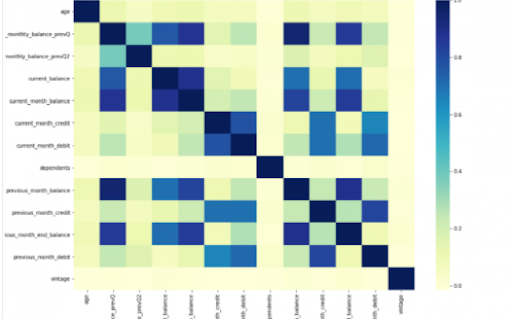
Power BI is considered a library of visualization. Correlation matrix heatmap is an integral component in the data analysis reports.

We will guide you on how to create a correlation matrix heatmap by making use of the Python correlation function. The created heatmap will be available in the reports section in Power BI.

You will need to navigate to the Report section that is available in the Power BI. Then click on the Py symbol which denotes Python visual which is available under the visualizations section. On the left side, you will see an empty Py along with a Python script editor popping up at the bottom of the screen. By this, you might have understood that Power BI is providing an option to create the visualizations with the scripts.

All the value fields will be empty firstly. For correlation heatmap illustration, all the continuous variables will be brought into the value fields, like the age current, previous month balance, monthly balance items, etc. This is considered one of the most essential steps during the integration process. If you forget to perform this step, the Power BI will not be able to recognize the variables.

As the variables are moved into the values fields, the python script will be automatically populated with the below codes.

Let us also write the code for correlation heatmap creation in Python by using the seaborn package.

# import the charting libraries matplotlib and seaborn

import matplotlib.pyplot as plt

import seaborn as sns

# create the correlation matrix on the dataset

corr = dataset.corr()

# create a heatmap of the correlation matrix

sns.heatmap(corr, cmap="YlGnBu")

# show plot

plt.show()

You can now use the run script button and run the script, which will produce a correlation matrix heatmap.

Python’s Statistical within Power BI

Generating analytical reports:

After the heatmap is generated, we can analyze the heatmap and will come to a conclusion.

With the above heatmap, below are the set of conclusions made:

  1. There is no correlation with the other variables for the number of dependents and age.
  2. There is a moderate correlation observed for the average monthly balance in the time span of the last two quarters.
  3. There is a high correlation between the average monthly balance with the previous month balance and the current month balance in the last quarter.
    It is possible to generate a heatmap for the customers who have churned and you can also compare with the customers that do not have. You can apply the filter of churn = False or True so that the heatmap can be observed. Through the analysis, it helps in deriving useful insights from data analysis to the prediction of the behavior.
  4. Power BI Training

    Weekday / Weekend Batches

Conclusion:

Through this article, you have got a clear idea of the process of integration of Python with Power BI. I hope the above information helps you. To get a clear understanding and in-depth knowledge on the subject, you can get trained and certified in Power BI through the Power BI training. The integrated environment will definitely help the organizations to handle and play with the data as and when needed. It focuses on enhancing the power and capitalizing on the benefits that are available in both tools.

related articles 


Source link