6 Ways to Allergy-Proof Your Home Before Pollen Season, According to Allergists


Spring has sprung, which means allergy season has begun. According to the Allergy and Asthma Network, May is the worst month for allergy sufferers in most regions of the US due to elevated pollen counts.

“Allergies to airborne allergens such as pollen can cause symptoms including sneezing, a runny nose, nasal congestion, an itchiness in the nose and throat and red, watery eyes,” explains Dr. Stephanie Kayode, a consultant allergist at Allergy Care London, describing signs of hay fever or allergic rhinitis. “These symptoms occur because pollen allergens provoke inflammation and swelling within the nose, eyes and throat when inhaled.”

When pollen enters our homes, it can cause allergy symptoms even when you’re inside and away from the plants that release pollen, such as trees and grasses. I reached out to allergists to learn how we can allergy-proof our homes and ward off allergies before pollen levels peak.

1. Bring out your air purifier

If your air purifier has been sitting in the back of your closet collecting dust (yikes, another allergen), now is the perfect time to wipe it down and bring it out. 

“Indoor air purifiers, particularly those with high-efficiency particulate air filters, are effective at removing pollens and air pollutants from the air we breathe in our homes, thus improving allergy symptoms,” says Kayode. Air purifiers with higher airflow rates tend to be more effective for this purpose because they filter more air. 

HEPA filters are designed to capture airborne particles, such as pollen, dust, mold and even bacteria and some viruses, as we discovered when the CNET Labs team tested 12 air purifier models to find the best model for preventing illness

Health Tips

Capturing air pollutants other than pollen can help reduce allergies, as Kayode explains, because these pollutants can damage our airways and even alter pollen to make it more allergenic. This means that similar or lower pollen levels can cause more severe allergic reactions.

“Using a filter that’s an appropriate size for your space is important, and some people place them by entryways for maximum effectiveness,” adds Meagan W. Shepherd, founder of The Allergy Aesthetic and owner of Shepherd Allergy.

Placing an air purifier in a high-traffic area, such as a bedroom or living room, can be especially beneficial. However, you’ll want to ensure you replace your filters when needed, as dirty or clogged filters can actually become sources of pollutants and allergens

The top of a white air purifier on a wood floor.

Now is the time to put your air purifier in a high-traffic area of your home.

FanPro/Getty Images

2. Schedule an HVAC tune-up

HEPA filters aren’t just recommended for air purifiers. Your HVAC systems should use them, too, and they should be changed every three months or as needed. You can check your manufacturer’s instructions for this info.

“Make sure to schedule a tune-up before spring starts, and clear debris from around the outer unit,” Shepherd states. “Make sure the condensate drain lines [which remove excess moisture] aren’t clogged.” 

If applicable, set indoor humidity to 40%-50%. You can also do this if you have a humidifier

3. Monitor pollen forecasts

You can keep track of pollen forecasts with apps including Allergy Plus, My Pollen Forecast and Zyrtec AllergyCast. Kayode recommends doing this and limiting outdoor activities when the pollen count is high. This typically happens in the summer and early morning, when warm air makes pollen rise. 

On cooler, rainy days, pollen counts are usually lower because rain washes pollen out of the air. 

An IQAir pollen forecast screenshot showing tree, grass and weed allergens.

What IQAir’s pollen forecast looks like for Los Angeles.

IQAir/Screenshot by CNET

4. Prevent the outside from getting inside

While it’s impossible to avoid pollen completely, there are certain steps you can take to lessen your indoor exposure. For one, Shepherd advises keeping windows and doors closed. If you keep track of the pollen forecast, ensure you do so on high-pollen days. 

“Change clothes after coming indoors, and keep your hair tied back or wear a hat when outdoors,” Shepherd says. Kayode adds that you can also wear sunglasses to reduce pollen exposure to your eyes. 

If you hang laundry outside to dry, you should shake it out before bringing it inside. 

Depending on how bad your allergies are, you may even want to arrange for someone else to mow your lawn or opt for a robot lawn mower to avoid pollen exposure.

Even when you get into your car, you can exercise precautions. “When getting into a hot car, turn on the recirculation system with the AC so cabin air is reused without drawing more pollen into the car,” says Shepherd. You can also keep your car’s windows closed to ward off pollen, Kayode adds.

5. Be extra cautious after thunderstorms

While rain washes pollen out of the air, a particularly powerful thunderstorm combined with a high temperature can have unwanted aftereffects, worsening hay fever. 

“Thunderstorms can stir up pollen from the ground and cause bursts of pollen fragments in the air, which are highly allergenic,” explains Kayode. “During hot days, pollen builds up and is released into the air during storms, increasing the risk of severe hay fever and asthma symptoms.”

A person and baby looking out a closed door during a thunderstorm.

Keep your windows and doors shut on high-pollen days and during thunderstorms.

J_art/Getty Images

6. Keep your medicine cabinet stocked

If you notice allergy symptoms or want to prevent them, you can use a saline nasal rinse to clear inhaled pollen from your nasal passages. My doctor recommended I use the Arm and Hammer Simply Saline Nasal Care Daily Mist for this reason. 

If that’s not enough and your symptoms are interfering with your daily life, Kayode advises you to consult your doctor to discuss starting allergy medications, such as antihistamine tablets and steroid nasal sprays. Your doctor may suggest taking a daytime antihistamine proactively, especially on days with a projected high pollen count. 

The bottom line

While you can’t completely avoid pollen, there are steps you can take to limit your exposure and minimize allergies when inside your home. Using a HEPA filter in both your air purifier and HVAC system can help — just make sure to change the filter and perform timely maintenance. 

If nothing helps and your allergies are running (and ruining) your life, it’s time to schedule an appointment with your doctor.


Source link

Leave a Reply

Subscribe to Our Newsletter

Get our latest articles delivered straight to your inbox. No spam, we promise.

Recent Reviews


Introduction to Kali Linux:

Kali Linux is an open source system available in the Linux operating system. Nowadays, it is considered as a one of the best security Linux packages mainly used for ethical hackers. In this Kali Linux system, all the tools can be differentiated on the basis of different categories. Kali Linux is an advanced penetration testing and security auditing Linux distribution. Kali Linux is named after one of the Hindu Goddesses namely “Maa Kali”. This type of Linux system was first developed by Mati Aharoni is one of the lead Linux developers, trainers, and founders of offensive security. 

Features of Kali Linux:

The following are the important features of Kali Linux:

1. Offers complete customizations.

2. Supports multiple languages.

3. Provides vast wireless device support for multiple machines and compatible with USB devices.

4. Helps to switch from Ubuntu to Debian.

5. Easy upgrade to future versions.

Become a Linux Certified professional by learning this HKR Linux Training !

Why do people use Kali Linux?

The following are the key features of Kali Linux that will benefit the people:

1. Offers advanced penetration testing tool:

Kali Linux supports more than 500+ advanced penetration testing tools across multiple devices. The tools which are used in Linux sometimes cannot be repeated much like “Backtrack”.

2. Available as a free Linux tool:

The kali Linux system is totally free and offers better time services for multiple users. This is one of the huge factors to use this Linux system.

3. It is an open source GIT tool:

The kali Linux is an open source system and can be accessed by multiple users. All the codes which we have developed can be accessed by anyone. The open development source of Kali Linux can make an easy view to the development team.

4. Supportive tool:

Kali Linux offers hierarchical file systems, allows users to locate binaries, packages and supporting files, etc. This is also an important feature of kali Linux when compared to other Linux systems.

 Kali Linux installation and configuration guide:

In this section, we are going to explain the installation and configuration of Kali Linux:

A Back track was the older version of Kali Linux and the latest version of Kali 2016. 1 and it will be updated often.

Kali Linux installation and configuration

To install Kali Linux we have to follow these two steps:

1. Firstly, we have to download the Virtual box and then install it.

2. Then, we have to download and install the Kali Linux distribution software.

Want to know more about Linux, visit here Linux Tutorial !

Now we will discuss each step in brief:

1. Download and install the virtual box:

A virtual box is very useful when you want to test the codes in Kali Linux. Running Kali Linux codes on a Virtual box is safe and you can also know the unknown packages to test the codes.

By using the virtual box you can install Kali Linux on your device along with primary operating systems (like MAC, Windows, and Linux).

Now see the steps to download and install the virtual box:

Step1: To download the virtual box, go to the web page https: //www.virtualbox.org/wiki/Downloads. Now depending on your operating system, you need to select the right package. If you are using windows, you have to follow the below screen shot to know more,

download the virtual box

Step2: Now click on the Next button:

setup Wizard

Step 3: On the next page, you have to choose the location where you want to save the executable file. Now leave that as default and click next,

executable file

Step 4: Click Next and the following custom setup screenshot will pop up ->then select the features that you want to install -> now click the next button.

 custom setup

Step 5: Now click on yes to proceed with other installation processes.

installation processes.

Join our Embedded Systems Product Design Life Cycle Training today and enhance your skills to new heights!

Linux Certification Training

  • Master Your Craft
  • Lifetime LMS & Faculty Access
  • 24/7 online expert support
  • Real-world & Project Based Learning

Step 6: Now ready to install screen will pop up-> then click install.

install screen

Step 7: Now click on the finish button.

 finish button.

The virtual box application screen will pop up. Now we are all set to install the rest of the host file for the manual device and also recommended for professional usage.

 virtual box application

Installing Kali Linux:

We have already installed the virtual box, now move to the next stop then install Kali Linux.

Step1: It’s time to download the Kali Linux package from the Kali official web page https: //www.kali.org/downloads.

Installing Kali Linux

Step2: Now click on virtual box -> select new as shown in the following screenshot,

 click on virtual box

Step 3: Now choose the correct virtual hard disk file -> click on open.

virtual hard disk file

Want to gain knowledge in Gradle? Then visit here to learn Gradle Training!

HKR Trainings Logo

Subscribe to our YouTube channel to get new updates..!

Step 4: you can see the following screenshot, then click on the create button.

 create button.

Step 5: Now start the Kali Operating system, the default username is a root and the password is toor.

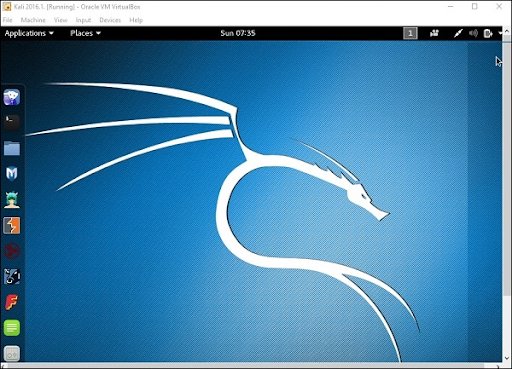
 Kali Operating system

Update the kali software:

Once you finish installing, now it’s time to update the Kali Linux and provide a newer version to get advanced functionalities. The below are the steps involved update the Kali software;

Top 30 frequently asked Linux Interview Questions !

Step1: First go to the application -> then click on terminal-> after that, type “apt-get an update”-> then update the location as shown in the following screenshot.

 Update the kali software

terminal

Step 2: Now it’s time to upgrade the applications and tools -> then type “apt-get upgrade” -> then the packages/libraries will be downloaded.

applications and tools

Step 3: The below screenshot will ask, if you want to continue -> then type “Y” and click “Enter”.

continue

Step 4: To upgrade any newer version of the Linux operating system -> then type “apt-get distupgrade”.

upgrade newer version of the Linux

Laboratory set up:

In this section, we are going to set up the testing machine to perform any test-related applications with the help of Kali Linux tools.

Step1: You need to download metasploitable (this is a Linux machine). This can be downloaded from the official web page of Linux machine Rapid7 : https: //information.rapid7.com/ metasploitabledownload.html? LS (Linux system) = 1631875 & CS = Web.

Laboratory set up

Step 2: Register by supplying the details (as shown in the above screenshot). Once you finish filling the above form, you need to download the software.

Register by supplying

Step 3: Click on the virtual box -> then select new.

he virtual box

Step 4: click on the use of an existing virtual hard disk file -> browse the appropriate file (where you have downloaded the Metasploitable -> then click on open.

 virtual hard disk file

Step 5: Then you will get a screen where you need to create a virtual machine -> click on create.

 create a virtual machine

The default username you have to give is msfadmin and the password is msfadmin.

msfadmin

Linux Certification Training

Weekday / Weekend Batches

 Is kali Linux better than Ubuntu?

The answer would be yes, Kali Linux system is better in the view of a pentester for the basic users it doesn’t require for general-purpose operations go with Ubuntu will all features. If you are in a dilemma about choosing Ubuntu software and having a thought of installing Kali Linux then there are other ways you can do it.

The following are the major points when you want to choose Kali and Ubuntu.

1. If you are looking for the operating system for network security, penetration testing, and other testing techniques, etc. Ubuntu cannot compete with the Kali Linux system.

2. If you are looking for the user –friendly, general-purpose operating system with the best GUI, Ubuntu is the best choice.

Ubuntu system is more suited for personal uses while Kali is best for Hackers, vulnerability testers and nerds, because of the tools they both come bundled with or (you can also install the same set of “Hacking” tools while installing on Ubuntu). Kali was a product of backtrack. Here all the binary packages only meant for Debian could be installed on Kali Linux and this is the power of the Kali Linux system. Kali has come with a number of penetration tools be it Wifi or any other database to be built instantly. One more point to be remembered is that Kali uses the APT for package management.

Become a Msbuild Certified professional by learning this HKR Msbuild Training! 

Conclusion:

In this blog, we have explained the complete installation guide of the Kali Linux system, and also help our audience how to use it. The blog contents have been designed to help beginners who want to start their career as a Linux developer. This blog is also helpful for penetration testing experts. Once you finish this blog, you will be able to work on the moderate level to advanced applications of the Kali Linux system. 

Related Articles:


Source link