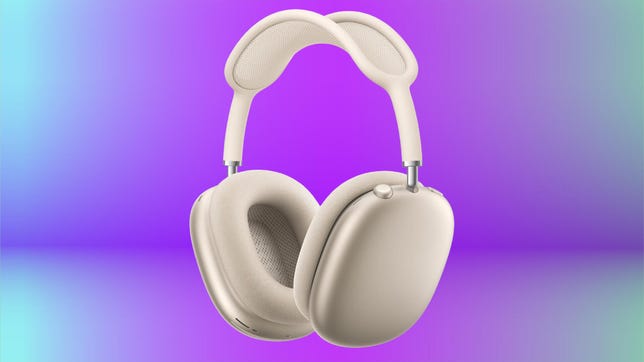


Pros
- Surprisingly comfortable despite being heavy
- Impressive build-quality and sound (improved slightly)
- H2 chip delivers powerful performance and feature upgrades
- USB-C audio for hi-res wired listening
- Personalized spatial audio for Apple devices
- Upgraded amplifier
- Improved adaptive noise canceling and transparency mode are top-notch
- Voice Isolation slightly improves performance for calls
- Automatic switching between iOS devices on your iCloud account (multipoint Bluetooth)
Cons
- Expensive
- No USB-C to 3.5mm cable included for wired use on planes
- Didn’t get Apple’s H3 chip, rumored to be in development
- Android users lose several key features
- Minimalist smart case has same hit-or-miss design and protection
In the fall of 2024, Apple transitioned its original AirPods Max headphones from Lightning to USB-C connectivity. Many people, including me, were surprised that Apple didn’t offer a more significant upgrade, such as swapping the H1 chip for the newer, more powerful H2 chip and improving the headphones’ overall performance and feature set. At that time, the Max were almost four years old, and the AirPods Pro 2 were already using the H2. So it seemed like a logical move. But Apple had other plans.
The AirPods Max 2 in purple.
Which brings us to the AirPods Max 2. Announced out of the blue shortly after Apple released its budget-friendly MacBook Neo ($599) to great fanfare, they’re essentially the Max upgrade I was hoping for 18 months ago. Priced at $549, the same as the original, they look identical to their predecessor but now include a new “dynamic range” amplifier and the aforementioned H2 chip, which adds a host of features already available in the AirPods Pro 2, AirPods Pro 3 and AirPods 4 and helps improve the headphones’ performance in a few key ways.
Understandably, some folks may be disappointed that Apple hasn’t ushered in even more changes with the Max 2, particularly on the design front. While the upgrades may seem perfunctory, they turn out to be more significant than I expected. In my tests, I found the noise-canceling performance noticeably improved, and the sound quality, already quite good, has been leveled up slightly. On top of that, the H2 chip adds useful features and helps enhance voice-calling performance and transparency mode. Though they’re too pricey for most people, they’re easily among the top noise-canceling headphones and offer some real advantages for Apple users, particularly in terms of features and usage. And that’s why I’ve awarded them a CNET Editors’ Choice.
Read more: Best headphones of 2026
The AirPods Max 2 come in the same colors as the AirPods Max USB-C, pictured at left in blue.
What’s the same between the AirPods Max and Max 2
- Design: The Max 2 have the same design and dimensions as the Max. They both weigh 13.6 ounces (or 386.2 grams).
- Case: They come with the same protective smart case that not everyone loves, due to its purse-like aesthetic.
- Color options: They’re available in the same five color options (blue, purple, midnight, starlight, orange).
- Battery life: Both models are rated for up to 20 hours with noise canceling.
- USB-C audio: They both support 24-bit/48kHz lossless audio when connected with the included USB-C cable.
- No cord for in-flight entertainment systems: Apple still doesn’t include a cord with a 3.5mm analog audio connector, so you can plug the headphones into the headphone jack on an in-flight entertainment system (or any headphone jack on any device). You have to purchase a USB-C to 3.5mm cable as an optional accessory for $35. You’d think that such a cable would be included with headphones that cost $549. (Note that a standard USB-C to 3.5mm cable won’t work; you must use Apple’s official cable.)
AirPods Max 2 feature upgrades
The Max 2 now have most of the same features as Apple’s latest earbuds. I’ve always been a fan of Apple’s Conversation Awareness feature, which is similar to Sony’s Speak-To-Chat feature (Sony did it first). When activated, it automatically lowers the volume on the Max 2 when you start to talk and shifts to transparency mode, enabling you to have a conversation with someone without taking the cans off your ears. It’s also worth noting that while the headphones have the same nine-microphone array as the original AirPods Max, the H2 chip does a better job making recorded audio sound cleaner and more natural, which content creators in particular will appreciate. Apple refers to this feature as “studio-quality audio recording.”
I’m not going to go through every new feature in detail, but here’s a quick look at the main additions, most of them courtesy of the H2 chip.
- Adaptive Audio: Based on the noise levels in your environment, the Max 2 automatically adjusts ANC levels and transparency to optimize the audio experience.
- Conversation Awareness: When you start speaking to someone, the volume of whatever you’re listening to is reduced, and the headphones enter transparency mode so you can have a conversation without taking them off.
- Studio-quality audio recording: Allows you to record content with higher-quality audio and a more natural vocal texture (as noted previously, Apple pitches this feature toward content creators).
- Camera Remote: You can capture content at a distance by pressing the Digital Crown to take a photo and start or stop video recording while using the Camera app or compatible third-party camera apps on iPhone or iPad.
- Live Translation: Allows for near real-time translations of what people are saying in another language.
- Loud Sound Reduction: ANC automatically kicks in to prevent exposure to loud environmental noise while preserving the sound signature of what you’re listening to.
- Personalized Volume: Your listening experience is automatically fine-tuned based on your preferences over time.
- Siri interactions: You can respond to Siri announcements by simply nodding your head yes or shaking your head no.
- Low latency over Bluetooth: Playing iOS, MacOS and iPadOS games in Game Mode reduces audio latency when using the Max 2 wirelessly. The AirPods Max (USB-C) offered low latency for gaming but only with a wired USB-C connection.
- Bluetooth 5.3: While the AirPods Max 2 don’t have Bluetooth 6.0, their Bluetooth 5.3 is an upgrade over the Max’s Bluetooth 5.0.
- Voice Isolation: Filters out background noise while isolating your voice so people can hear you better on voice and video calls.
Conversation Awareness is a feature that lends itself well to the AirPods Max 2.
Leveled up noise canceling and transparency mode
The noise canceling of the original AirPods Max was (and still is) very good and was neck-and-neck with Sony’s and Bose’s noise canceling for a few years (the AirPods Max were unveiled in December 2020). Both Bose and Sony moved slightly ahead with their latest models, the Bose QuietComfort Ultra Headphones (Gen 2) and Sony WH-1000XM6. But as I said, the AirPods Max 2’s noise canceling is noticeably improved and is once again right up there with Sony’s and Bose’s, and perhaps even a touch better.
Apple says that based on its measurements, the Max 2’s noise-canceling is 1.5x better. All I can tell you is that the headphones did a really impressive job muffling the cacophony of sounds in the streets of New York City. I could still hear higher-pitched sounds such as sirens, car horns and people’s voices to a certain degree, but lower frequencies were noticeably cut down, and everything was reduced to a low din.
The AirPods Max 2’s ear pads passively seal out a decent amount of ambient sound. They adhere magnetically and are removable and replaceable.
I also do a test with a somewhat noisy HVAC unit in my apartment that creates a low rumble when it pumps out cold or warm air, depending on whether it’s set to heat or cool. When I went to adjust the thermostat to have the heat kick on, I was wearing the headphones. I stood there listening and couldn’t tell whether the unit had flipped on, so I switched to transparency mode and realized that it was indeed running. After I switched back to noise-canceling mode, I could hear a faint hum, but it was barely audible.
Apple’s transparency mode has long been the gold standard, and the Max 2’s transparency mode sounds even slightly more natural. By that, I mean that when you’re in transparency mode, even with the headphones on, you pretty much experience the outside world as if your ears were uncovered.
Slightly cleaner sound with improved bass performance
Comparing the original Max with the Max 2, the differences in sound quality are subtle but noticeable. Apple doesn’t have equalizer settings for you to play around with like most headphones do and instead uses its Adaptive EQ to optimize sound on the fly. The two headphones have a very similar sound signature that’s balanced and pretty accurate. However, the new amp and the H2 chip’s additional processing power (Apple has retuned Adaptive EQ for the H2 chip) allow for a bit cleaner, more natural sound that’s nearly distortion-free.
I didn’t notice that much of a change to the highs and mids. But whenever I hit a track with a harder bass line — or just more bass in general — the quality of the bass jumped out at me. Not only did it seem to hit harder, but it was tighter and more naturally sounding.
The Max 2 sound a little more precise overall and have slightly better separation between instruments so you can hear them a little more distinctly. That extra bit of precision helps with spatial audio, whether you’re listening to music or watching movies. (I listened to a bunch of new tracks recorded in spatial audio using Apple Music, including Gorillaz’ The Mountain album, Harry Styles’ new album Kiss All the Time, Disco Occasionally and the soundtrack to the movie Hamnet).
Apple’s minimalist smart case returns for the next-generation AirPods Max 2. It’s still not my cup of tea.
You do get a little bump in sound quality listening in wired mode with USB-C audio. It’s not a huge difference, but there’s a touch more clarity and depth to the audio. I listened to lossless tracks on Apple Music and Spotify, as well as some FLAC files I have stored on my MacBook Pro. The headphones support 24-bit/48 kHz lossless audio with the included USB-C cable or Apple’s optional USB-C to 3.5mm cable (around $35). (By comparison, the spec for CD quality is 16-bit/44.1 kHz, though some audiophile sites offer 24-bit/192kHz files).
I spent some time comparing the Max 2 to Sony’s WH-1000XM6 headphones, which list for $449 and earned a CNET Editors’ Choice award. The Max 2 offer more clarity and dynamic sound while the XM6s are a little warmer and more forgiving. My ears tend to gravitate toward more revealing headphones, such as the Max 2, but they can make badly recorded tracks sound even worse.
Both the Max 2 and XM6s sound excellent in their own way. Without listening to the Max 2, you’d probably think Sony’s sound is nicely detailed and accurate, with very good bass definition. But flipping back and forth between the two headphones, the Max 2 come across as more aggressive and intimate while the XM6s are a little more laid back.
You get a slight sound quality bump with a wired USB-C connection.
Voice-calling improvements
As I said, Apple didn’t upgrade the microphones, but the H2 chip supports Apple’s Voice Isolation feature. This is a little confusing because you can activate Voice Isolation on your iPhone, but iPhone Voice Isolation uses your phone’s microphones to filter out background noise and isolate your voice. Meanwhile, Voice Isolation on the Max 2 and Apple earbuds such as the AirPods Pro 3 leverage the H2 chip and the headphones’ (or earbuds’) microphones to filter out ambient sound while honing in on your voice using computational audio. This form of Voice Isolation is considered superior.
I made several test calls. Callers said they could hear almost nothing in the background, even when I was in the noisy streets of New York with some wind kicking up now and then. The consensus was that they could hear me fairly clearly the majority of the time, but the tone of my voice would sporadically shift and become low or sound digitized before going back to being more loud and clear. In short, I sounded a little uneven.
In quieter environments, when I was on either a voice or video call, I was told that I sounded great. In all, they offer top-tier voice-calling performance, but from my tests, the Sony WH-1000XM6 are just as good for voice calling, if not slightly better in noisy environments. However, Apple users get added optimization for FaceTime calls with what Apple calls “studio-quality voice,” so that’s worth noting if you use FaceTime regularly.
The digital crown controls playback and allows you to answer and end calls. You can also answer or decline a call with head gestures.
Apple AirPods Max 2 final thoughts
When Apple first announced the AirPods Max 2, I was bit underwhelmed with the upgrades it was touting because they didn’t offer anything new beyond what was already available in the AirPods Pro 3. Also, part of me was hoping that not only would we get some design updates, including a new case, but that the next AirPods Max would be the first AirPods to include Apple’s H3 chip, which was rumored to be in development.
Now that I’ve used the Max 2 for a couple of weeks, I’ve changed my mind a bit. While I still don’t care for their case, the upgrades are more meaningful than I thought and help make the headphones’ high price a little more palatable. (It may take a few months, but I do expect to see the Max 2 discounted on Amazon to closer to what the Max used to cost — around $480 to $500.)
When you factor in the improved noise canceling, sound quality, voice-calling performance and new features, they do seem to be about 20% better than their predecessor. That may not seem like a huge difference, but it’s greater than you may imagine and makes them easier for me to recommend with more enthusiasm.
The truth is that before the Max 2 arrived, I would have told you to get Sony’s WH-1000XM6 headphones instead of the Max, which just seemed a little behind the times. But now that the Max 2 are here, as I said earlier, they do offer some real advantages to Apple users from a features and usage standpoint. So as long as you’re good with the Max 2’s fit, they’re a pretty safe choice if you can afford them.

Stephan is the sports journalist for the Maple Grove Report.