State Laws Against Surveillance and License Plate Cams: What Works Best for Your Privacy


In my coverage of controversial surveillance company Flock Safety and similar license-plate trackers, such as Motorola’s VehicleManager, I mentioned that one of the most effective steps US readers could take to protect their home and vehicles was to encourage their representatives to pass the right privacy protection laws. That’s even more important now that AI recognition capabilities can instantly recognize a car, a person’s face and other identifying information.

That raises a large question: What are the best privacy protection laws? I wanted to provide more details for anyone wondering what to support or what their state is currently doing. One challenge is that every state is different, and there’s no clear guide on what privacy laws work and which have flaws.

I spoke to senior policy counsel and lead for American Civil Liberties Union’s surveillance work, Chad Marlow, to find the best examples. These laws are making the biggest difference in our privacy. 

“Collective action, rather than individual action, is required,” Marlow told me. “I would caution that while Flock is the most problematic ALPR company in America, there are many other ALPR companies, like Axon and Motorola, that present serious privacy risks, so switching from Flock to Axon/Motorola ALPRs at best may constitute minimal harm reduction, but it is far from a solution.”

Which of today’s laws are a better solution? This is a “throw everything against the wall and see what sticks” situation. Let’s talk about what’s sticking. 

The best laws on the books for limiting new surveillance technology

A series of traffic cameras mounted on a post against blue sky.

The details matter when it comes to laws against surveillance. 

Lawrence Glass/Getty

Current privacy laws focus on two recent capabilities of local law enforcement: ALPRs or automatic license plate readers that can identify and track cars, and drone surveillance equipped with AI cameras. Security companies, such as Flock, are also starting to offer more traditional cameras that can provide live views and track people from the ground.

With AI features like Flock’s “Freeform” technology that let police enter any type of search they like to see what cameras bring up, these are powerful tools, and new legislation is required to address them. Let’s go over several categories of laws that make a difference. 

Laws restricting the use of AI detection features

Some of the broadest laws tackle what AI cameras are allowed to do at all. These laws don’t specifically target ALPR cams or drones, but they do limit the searches that police and commercial entities can make. 

Illinois has long been the best example of these privacy laws with its BIPA, or Biometric Information Privacy Act that protects personal ID like fingerprints and facial data, and requires written consent if a company wants to use them. 

That law is so far-reaching that certain camera features like Google Nest’s Familiar Faces technology is completely blocked in Illinois, along with some of Flock’s recognition features. Cities can pass similar legislation, too: Travel to Portland, Oregon and you’ll find that certain facial recognition features won’t work there, either. 

The one issue with laws like these is that they don’t include license plate and vehicle data, at least not yet. That information, which is closely tied to your name and address, needs to be protected by additional legislation or added onto existing biometric laws. So far, the former is more common: California is the only state I’ve noticed that now includes ALPR data as “personal information” for its privacy laws. 

Laws that ban what details police cameras can see

States are also passing new types of laws that allow the use of ALPR cameras, but ban those cameras from being able to record and pass along personal information, or at least make that information confidential in some way — including Florida and New Hampshire. 

These laws can ban cameras from seeing details like the people inside a car, for example, limiting them only to a license plate. Companies like Flock advertise the ability of their cameras to notice other descriptive details above a vehicle such as bumper stickers or roof racks, so laws like these can hamper the use of such AI detection

In a related note, states may add stricter authorization steps for police cameras. For example, rules that require the police chief to sign off on any search using ALPRs make it less likely that the data is misused when collected.

Two officers look at a computer screen.

Police have free reign over AI searches unless constrained by laws and policies.

EvgeniyShkolenko/Getty

Laws that limit the use of ALPRs to certain police activities

A number of states have created laws that allow the use of license plate and AI cameras, but only for specific purposes, such as ongoing investigations involving a murder or kidnapping. Some states have very strict limits on how these cameras can be used, while others have much broader descriptions. 

Laws like these keep ALPR cameras out of the hands of businesses, HOAs and similar organizations, who would otherwise be able to contract with companies like Flock Safety. They may also block cameras from being used in certain areas, such as on public highways. 

Laws requiring that any data collected by cameras be deleted within a certain timeframe

One of the most effective surveillance laws for protecting privacy is the requirement to delete any footage caught by these cameras unless its actively being used in a confirmed investigation. That means police can’t make unauthorized searches or share that data with outside organizations after a certain time.

Laws like these also prevent police departments from creating long-term files about people they want to keep an eye on and note their routines and behaviors. As Marlow said, “The idea of keeping a location dossier on every single person just in case one of us turns out to be a criminal is just about the most un-American approach to privacy I can imagine.”

New Hampshire has the most stringent laws here, requiring the collected data to be deleted within 3 minutes if not used, a far shorter timeline than most, but one the ACLU agrees with.

“For states that want a little more time to see if captured ALPR data is relevant to an ongoing investigation, keeping the data for a few days is sufficient,” Marlow told me. “Some states, like Washington and Virginia, recently adopted 21-day limits, which is the very outermost acceptable limit.” Marlow warned that the longer police keep this data, the easier it is to build patterns of life “that can eviscerate individual privacy.” 

I’ve also seen states with laws that require ALPR data deleted after several years, but at that point it’s largely useless, as the data could easily be compiled and moved to other platforms by then. 

Laws banning police from sharing data outside of the state

States like Virginia and Illinois have passed laws making it illegal to share any ALPR or related data outside the state, including with federal agencies. These laws are typically targeted at the Department of Homeland Security and ICE, which (along with the FBI and other agencies) have been known to request data from local police Flock cameras or be granted backdoor access to Flock search systems. 

Laws that keep data from going out of state prevent that — as long as there are ways to track data transmission and enforce the law, which is “Ideally, no data should be shared outside the collecting agency without a warrant,” Marlow said, “But some states have chosen to prohibit data sharing outside of the state, which is better than nothing, and does limit some risks.”

States like Minnesota have also added requirements to make ALPR searches public so that citizens can check what searches the police have made, an important step for accountability that’s still rare for this technology.

A white surveillance drone with a large camera on a table.

State laws are on the rise to limit the use of surveillance drones, too.

picture alliance/Contributor/Getty

Laws requiring state approval and office certifications for any ALPR camera

There’s another option to manage these high-powered cameras — subject them to an approval process by the state before contracts and installation. The tricky part is that approval process can look completely different depending on the state. 

In Texas, for example, a license is required but these seem relatively easy to obtain — although not everyone has followed that law

Vermont, however, enacted a series of laws to create a lengthy approval process to ensure ALPR cameras could only be used in certain circumstances and that the data was tightly controlled. This approval process was so thorough that local organizations decided to pass altogether: By 2025, no law enforcement agency in the state was using ALPR cams.

Laws requiring warrants before launching surveillance drones

In the past year, I’ve seen a new concern on the rise in neighborhoods in addition to ALPR cameras. There are now surveillance drones equipped with cams that can recognize vehicles or human features (beards, hats, shirt colors and so on) and follow people automatically. Those have required a further set of laws to address. 

States including Alaska, Idaho, Utah and Texas have laws specifically requiring a warrant before drones are used for surveillance. Technically, this should prevent the use of Flock’s automatic drone launches for things like gunshot detection or 911 calls, but local law enforcement appears to have found ways around these laws due to exemptions and other loopholes.

It’s worth noting my state nearly nuked its drone warrant requirements with new legislation in 2025, which ultimately failed to pass, a reminder that the rules are always up for change.

Keep an eye on the legislation in your state

A legislature in session in Louisiana.

State legislation can change, be repealed or added onto — and the details are important. 

John Elk/Getty

New laws are subject to frequent challenges, including companies such as Flock or local police departments outright ignoring them. That requires extensive legal action to address and a buildup of case law that can take years, not mention methods of investigation and enforcement by the state that may not currently exist. 

Proposed legislation can also be subject to many changes, even if it’s likely to be passed, so the details can shift. That means if you want to see specific bans or privacy requirements in your state, you should track ongoing legislation as it passes through approval stages, and continue to contact your senators and representatives.

If you’re not sure what’s in a law, it’s important to read it carefully or find analysis by a legal expert to learn more. Many lesser laws I didn’t include on this list have lots of carveouts, exceptions and latitude in how surveillance cameras can be used, rendering them fangless for privacy purposes.

But that’s not all you can do. I’ve also seen the rise of advocacy initiatives like The Plate Project from the Institute of Justice that you can join, contribute to or just read up on to do more. And don’t forget about the local level — voicing concerns at a city council forum could help limit surveillance contracts before they even begin. 

For more information, check out if your landlord can watch you with a security camera, and if it’s legal to record audio and video in your own home


Source link

Leave a Reply

Subscribe to Our Newsletter

Get our latest articles delivered straight to your inbox. No spam, we promise.

Recent Reviews


Alteryx Tools – Table of Content

What is Power BI?  

Power BI is referred to as a Software as a service (SaaS) platform, a Business Intelligence tool that helps analyze organizational data and also helps in creating real-time and interactive dashboards. The Power BI business intelligence tool can be installed on any desktop, mobile or can be used online as well. It also helps in collaborating with every peer in the organization. Power BI is a data visualization tool that helps in developing dashboards and BI reports with business intelligence capabilities. Apart from data visualization, it also allows to perform data exploration, helps in establishing reliable and secure connections to the cloud data sources.

Power BI is used by many organizations because of its amazing features like visualization creation. Some of the visualization formats are column charts, area plots, bar charts, line plots, scatter plots, pie charts, treemaps, scatter plots, etc. It also includes a navigation pane that helps in navigating to the dashboards and reports, associated applications, recent work, etc. The Power BI tool also includes inbuilt functions called DAX functions that can be used for data analysis. These are predefined functions that are available in the library. In Power BI, the data can be imported either from a single or multiple data sources. Power BI is also capable of providing extensive support to both structured and unstructured data. It also includes pre-built templates for dashboard creation. You can also create customized dashboards. 

What is Python?

Python is referred to as a high-level, general-purpose, interpreted programming language that includes a set of pre-built functions and libraries which helps in performing complex operations and calculations. It is easy to learn and is used in most fields like data analytics, artificial intelligence, machine learning, etc. 

Python includes two libraries called Matplotlib and Pandas. Matplotlib library consists of the predefined functions that help in plotting the data visualizations while the pandas library also includes the predefined functions that help in working with the data available.

Become a Power BI Certified professional by learning this HKR Power BI Training !

Power BI Training

  • Master Your Craft
  • Lifetime LMS & Faculty Access
  • 24/7 online expert support
  • Real-world & Project Based Learning

Prerequisites for Power BI Python Integration:

Below is the list of the prerequisites required for Power BI Python Integration to take place.

  1. Python runtime installation: The python runtime installation includes the installation of the execution run time through which the Python script operations can be performed.
  2. Libraries installation: It is essential that some of the important libraries have to be installed which increases the robustness of Power BI. Some of the important libraries are Seaborn and Pandas.
  3. Installation of Visual Studio Code: The installation of Visual Studio code is optional. You can also install any other code editor for writing your python scripts. You can also make use of the Power BI script editor to write the scripts.
  4. Power BI settings update: The final step is to update the settings so that you can work efficiently with Python in Power BI. Through this, you can perform the scripting in Power BI. All you need to do is open up the Power BI desktop, click on the file option. Then click on options followed by settings, then navigate to the opportunities which open a new dialogue box in Power BI. Then you can click on the Python scripting, select the path from the directories and IDE of Python. Once done, you will need to click on the OK button.

Understanding the need for Python Integration in Power BI:

By now, you all might have got an idea of what Power BI and Python is for. Yes, Python is referred to as the powerful tool that helps in creating visualizations while Power BI is for creating well-versed dashboards. These dashboards include all the information which helps in providing a complete view of the organization growth, metrics, KPIs, etc. Hence, if Python and Power BI are integrated, it will be a plus for us to utilize the capabilities that Power BI and Python hold.

Apart from the above, Python and Power BI integration includes several other benefits listed below.

  • The users are allowed to run the python scripts directly within the Power BI
  • Through the integration, libraries like Matplotlib and Seaborn can be used in Power BI for data visualization.
  • Python has become a leading technology and all the machine learning frameworks and data science libraries are written in Python. Through the integration, it allows to create of the data analysis scripts using Power BI
  • To perform precise calculations and clear the complexities, some of the enriched libraries like NumPy and Pandas can be used.

Click here to learn Power BI Tutorial

Power BI Python Integration:

In order to solve complex problems in an organization, it requires data and analytics. It also requires future predictions which gives us future insights and helps us clear the bypass of the issues. Through the business intelligence tools, all these predictions and data visualizations are represented in different forms for a better understanding and analysis. With the amazing capabilities that Power BI and Python hold, organizations are being successful with their integration attaining benefits.

Any idea on how the Power BI Python Integration is performed? Well, I will help with the step by step process to perform the Power BI Python integration.

  • Setup the Integrated Environment:

The primary step is to set up an integrated environment ready for the integration process to begin. You will need to have a distribution of Python readily installed in your machine/desktop. I preferred Anaconda for coding related tasks and the base distribution of Python. Sometimes, trying to integrate Anaconda with Power BI is a difficult task.

After the installation process is completed, you will need to install four python packages, each one has its own significance. They are :

Pandas – for data analysis and data manipulation

Matplotlib and seaborn – for plotting purposes

NumPy – for performing scientific calculations

The pip command in the command line tool is used for installing these packages into the machine.

pip install pandas

pip install matplotlib

pip install NumPy

pip install seaborn

Once the above packages are installed, the python scripting needs to be enabled in Power BI. If you want to check, you can open the Power BI and detect whether the python distribution is automatically detected or not. You will need to go to the files, followed by options and settings, then click on options. You will be able to view the home directory for Python under python scripting that is installed in the machine.

Setup the Integrated Environment

Acquire Vagrant certification by enrolling in the HKR Vagrant Training program in Hyderabad!

  • HKR Trainings Logo

    Subscribe to our YouTube channel to get new updates..!

  • Data Importing using the Python script:

It is time for you to check whether Python is working within Power BI by running a sample test. The primary step to perform this function is to import a small dataset using the Python script in Power BI.

To perform this, you will need to navigate to the Home ribbon, then move to the GetData option and click on the other option. Through this, you will be able to import the data from a different set of sources available. Some of the sources are Spark, Hadoop distributed file system, (HDFS), Web, etc. In the below image, I am going to import the Churn Prediction system that is available in my system.

Data Importing using the Python

Once you click on the connect option, you will see a section that allows you to write the Python script.

Python script

You will need to click on the OK button which will further ask you to select the churn data. Once done, you will need to click on the Load option. You can also perform a check whether the data has been loaded or not through the data view option. With this, you are now ready to make use of the power query in order to perform the data transformations.

Using Power Query To Transform the data:

All the individuals who have learned Python would know that data transformation is no longer a single task-based activity.

By using the Power Query editor, the user can shape and transform the data as required with just a single click. The Power BI is also capable of keeping the record of all the transformations and operations that take place or happen during the process of transformation. We will now show you how to use the Power query to understand and know the data transformation capabilities.

Once the data is loaded in the Power BI, you will need to click on the transform data option which is available under the Home tab in order to open the query editor.

Once the query editor is opened up, you will see multiple options to perform the operations like clean, reshape and transform the data.

Power Query To Transform

We will now convert the customer_nw_category variable into a text field because these fields represent the worth category. Also, you need to know that it would not be a continuous variable.

To perform the same, you will need to select the column -> Go to the Data Type, and change the data type to a text format. All the steps will be recorded by the Power query under the applied steps section. You can also rename these steps for a better recall or reference. I will rename this step as nw_cat Text. The next step is to transform the churn column into a logical variable. True here represents for churned (1), whereas False here represents not churned (2). The step can be renamed as Churn True/False.

customer_nw_category

Once the above operation is performed, you will need to click on the close and apply option which will be available on the top left corner so that all the transformations made will be applied.

Using Python’s Statistical within Power BI:

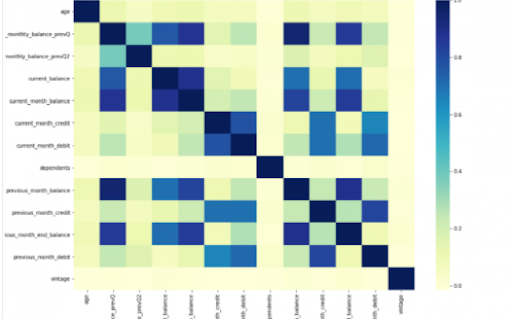
Power BI is considered a library of visualization. Correlation matrix heatmap is an integral component in the data analysis reports.

We will guide you on how to create a correlation matrix heatmap by making use of the Python correlation function. The created heatmap will be available in the reports section in Power BI.

You will need to navigate to the Report section that is available in the Power BI. Then click on the Py symbol which denotes Python visual which is available under the visualizations section. On the left side, you will see an empty Py along with a Python script editor popping up at the bottom of the screen. By this, you might have understood that Power BI is providing an option to create the visualizations with the scripts.

All the value fields will be empty firstly. For correlation heatmap illustration, all the continuous variables will be brought into the value fields, like the age current, previous month balance, monthly balance items, etc. This is considered one of the most essential steps during the integration process. If you forget to perform this step, the Power BI will not be able to recognize the variables.

As the variables are moved into the values fields, the python script will be automatically populated with the below codes.

Let us also write the code for correlation heatmap creation in Python by using the seaborn package.

# import the charting libraries matplotlib and seaborn

import matplotlib.pyplot as plt

import seaborn as sns

# create the correlation matrix on the dataset

corr = dataset.corr()

# create a heatmap of the correlation matrix

sns.heatmap(corr, cmap="YlGnBu")

# show plot

plt.show()

You can now use the run script button and run the script, which will produce a correlation matrix heatmap.

Python’s Statistical within Power BI

Generating analytical reports:

After the heatmap is generated, we can analyze the heatmap and will come to a conclusion.

With the above heatmap, below are the set of conclusions made:

  1. There is no correlation with the other variables for the number of dependents and age.
  2. There is a moderate correlation observed for the average monthly balance in the time span of the last two quarters.
  3. There is a high correlation between the average monthly balance with the previous month balance and the current month balance in the last quarter.
    It is possible to generate a heatmap for the customers who have churned and you can also compare with the customers that do not have. You can apply the filter of churn = False or True so that the heatmap can be observed. Through the analysis, it helps in deriving useful insights from data analysis to the prediction of the behavior.
  4. Power BI Training

    Weekday / Weekend Batches

Conclusion:

Through this article, you have got a clear idea of the process of integration of Python with Power BI. I hope the above information helps you. To get a clear understanding and in-depth knowledge on the subject, you can get trained and certified in Power BI through the Power BI training. The integrated environment will definitely help the organizations to handle and play with the data as and when needed. It focuses on enhancing the power and capitalizing on the benefits that are available in both tools.

related articles 


Source link