Signs and Symptoms of Prader–Willi Syndrome


Medically reviewed by Daniel Combs, MD

Signs of Prader-Willi syndrome can be seen in infancy.Credit: David Espejo / Getty Images
Signs of Prader-Willi syndrome can be seen in infancy.
Credit: David Espejo / Getty Images
  • Early signs of Prader-Willi syndrome (PWS) in infants often include low muscle tone, feeding difficulties, and distinct facial features like almond-shaped eyes.
  • As children grow, signs and symptoms often include constant hunger, rapid weight gain, short stature, and learning or behavioral challenges.
  • If you notice your child has signs and symptoms of PWS, talk to their pediatrician early, as the condition can be managed with medications, therapy, and lifestyle changes.

Prader-Willi syndrome (PWS) is a rare genetic condition that affects how the brain controls hunger, growth, and behavior. Signs and symptoms can vary depending on the stage of life.

Symptoms in Infancy

The earliest signs of Prader-Willi syndrome are often noticeable within the first few weeks of life. They’re sometimes referred to as stage 1 symptoms.

1. Decreased Muscle Tone

Babies with PWS often have low muscle tone, called hypotonia. They may feel unusually “floppy” when held and not have as much strength to support their head. Hypotonia can affect the whole body, which is why these babies may have a weak cry, low energy, and seem unusually sleepy or hard to wake up.

2. Feeding Difficulties

Because of their low muscle tone, many babies with PWS have a weak sucking reflex. Nursing or bottle-feeding takes effort, so they may get tired before they’ve had enough to eat. This can lead to poor weight gain, known as failure to thrive. Some babies need extra support, like special nipples or temporary tube feeding.

3. Distinct Physical Features

Babies with PWS are often born with certain physical traits. These include:

  • Almond-shaped eyes
  • A long, narrow forehead
  • A thin upper lip with a downward slanted mouth

Some children develop strabismus, the medical term for crossed eyes, which is usually noticed in the first few years of life.

In baby boys, the testicles may not have fully descended at birth, a condition called cryptorchidism.

On their own, these features might not raise a red flag, but together with other signs and symptoms, they can suggest a potential case of PWS.

Symptoms in Childhood and Adulthood

As children with PWS grow, the symptoms and challenges they face change. Early feeding issues often improve, but new symptoms, sometimes known as stage 2, emerge.

1. Food Cravings and Weight Gain

Somewhere between ages 2-3, most children with PWS develop an intense, constant urge to eat. This is one of the most well-known signs of PWS. 

Unlike typical hunger, this craving doesn’t go away after a meal. Because the brain doesn’t signal that the stomach is full, children can develop an obsession with food, known as hyperphagia. They may constantly ask for snacks, hide food, or even try to eat things that aren’t food. Without supervision and a managed diet, this can lead to rapid weight gain and obesity.

2. Poor Growth and Short Stature

Even with weight gain, children with PWS are often shorter than expected for their age. This is partly due to lower levels of growth hormone. You may notice smaller hands and feet, as well as slower height growth and less muscle mass. 

Scoliosis, a sideways curve of the spine, is also common and may need treatment and monitoring as people with PWS get older.

3. Underdeveloped Sex Organs

Along with undescended testicles, males may have a smaller penis as they grow, along with an underdeveloped scrotum. In females, the inner labia or clitoris may be smaller than usual or not fully developed. 

As children move into their teen years, puberty is often delayed or incomplete, and fertility problems are common in adulthood.

4. Learning and Development Delays

Children with PWS tend to reach milestones slower than their peers. Sitting up and crawling often occur later than expected. Most don’t walk independently until around age 2, and speech and language often develop slowly as well. 

By school age, children may show signs of cognitive and learning differences that can affect reading, math, and memory. But many do thrive with early intervention, individualized education plans, and support at home.

5. Behavioral and Emotional Problems

Children with PWS may have frequent temper tantrums, difficulty with changes in routine, or strong emotional reactions. Some may show extreme stubbornness and anxiety. 

Obsessive-compulsive tendencies, such as fixating on certain topics and objects, repeating questions, and needing routines, are also common. Some children may pick at their skin, which can lead to wounds or infections if not managed.

Other Signs To Know

Other signs of PWS include:

  • Sleep problems, such as sleep apnea, or feeling very sleepy during the day 
  • Lighter skin, hair, and eyes (iris) than relatives due to reduced pigmentation
  • A delayed realization that they’re uncomfortable or sick since many people with PWS have a higher pain tolerance

Not everyone with PWS will experience all of these signs and symptoms, but they’re helpful to keep in mind.

When To Talk To a Healthcare Provider

If you notice signs of PWS in your child, reach out to their pediatrician early. They can help diagnose the cause and, if necessary, refer you to appropriate specialists, such as a geneticist for testing or a pediatric endocrinologist for hormone-related care. 

There’s no cure for PWS, but many of its symptoms can be managed with medications, diet, supportive therapies, and lifestyle adjustments. 

Going to the appointment with a list of questions can help you get the most out of your child’s medical visit. Consider asking:

  • What tests are needed to confirm PWS?
  • How can we safely manage feeding issues?
  • How can we manage food access at home and school?
  • Could my child benefit from growth hormone therapy, and what does that involve?
  • What types of supportive therapies should my child start now?
  • What information do I need to request support at school for my child right now?
  • What signs should I watch for that would need more urgent attention?
  • What kinds of support are available for caregivers of people with PWS?


Source link

Leave a Reply

Subscribe to Our Newsletter

Get our latest articles delivered straight to your inbox. No spam, we promise.

Recent Reviews


What is Power BI?

Power BI is a cloud-based business analysis and intelligence agency developed by Microsoft. It is a compilation of business intelligence and data analytical techniques, such as software services, applications and data connectors. We can use data sources extracted into Power BI to visualize and analyze data using shared reports, dashboards, and apps.Power BI is a user-friendly tool that offers remarkable drag-and-drop features and self-service abilities.

Become a Power BI Certified professional by learning this HKR Power BI Online Training !

Microsoft is offering three types of Power BI platforms:

  • Desktop Power BI(A desktop application)
  • Power BIService (SaaS i.e., Software as a Service)
  • Mobile Power BI (For iOS and Android devices)

We can also deploy Power BI on both on-site and cloud platforms. 

Why Power BI?

Power BI is an integrated system with several various types of data under its supervision.There seems to be a cloud-based BI service called Power BI Services that is used to display and communicate dashboards.A desktop-based report functionality known as the Power BI Desktop.Another useful service is Power BI Embedded, which keeps running on the Azure cloud platform and can be used for reporting, ETL and data analysis.

Now we discuss why it is an important tool in the present market.

  • One can easily do real time analysis in power bi by creating direct connections with the data sets.
  • Can take the advantage of the custom visualizations.
  • Can get the quick insights of the data.
  • Power BI marketplace as on-site communications make data transfer secure and technology scalable and reliable.
  • You can attach to other services via Power BI, such as SQL Server Analysis Services (SSAS), Microsoft Excel, etc.
  • Power BI is a new age application that helps state-of-the-art technologies such as HTML 5.0, column store databases, cloud computing, mobile apps, etc. This helps to
  • keep Power BI at the top and famous, as it is continuously equipped with the latest features.

Power BI Training

  • Master Your Craft
  • Lifetime LMS & Faculty Access
  • 24/7 online expert support
  • Real-world & Project Based Learning

Now we will get into the power bi components in detail.

Power BI Components:

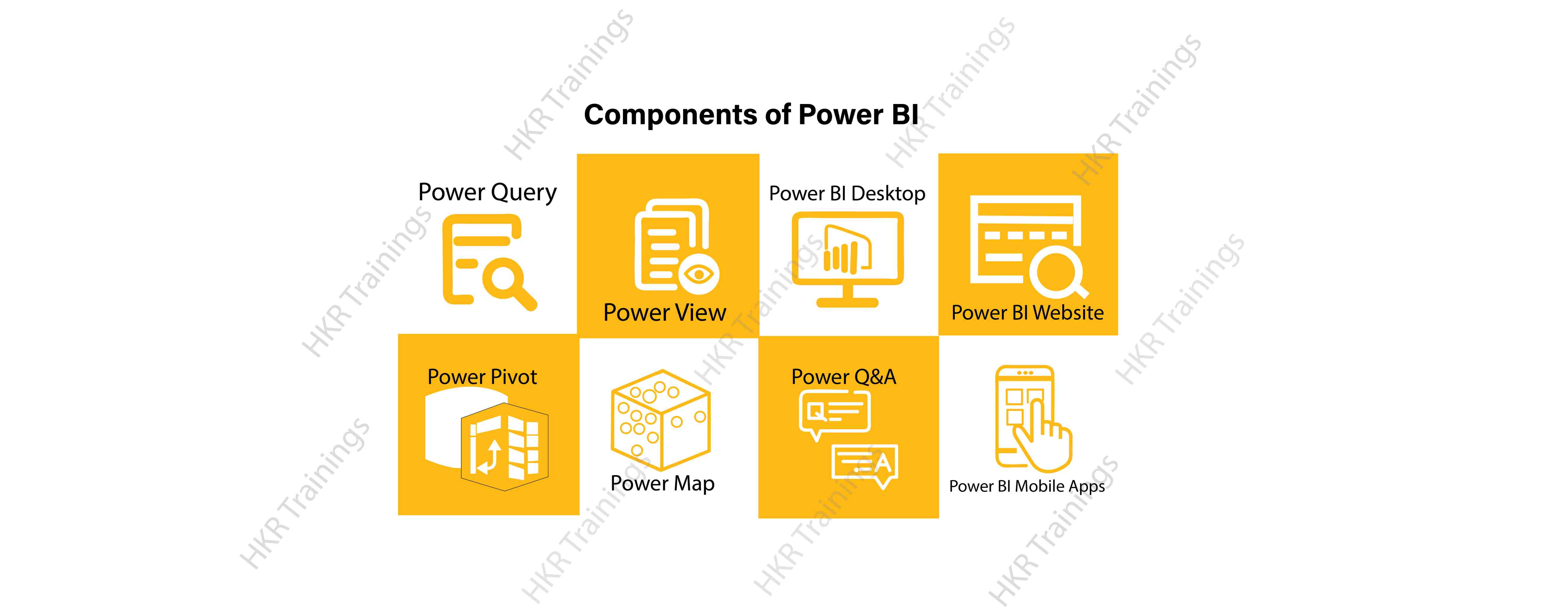
Here are the lists of power BI components. They are:

  • Power Query
  • Power Pivot
  • Power View
  • Power Map
  • Power Q&A
  • Power BI Desktop
  • Power BI Website
  • Power BI Mobile Apps

Power BI Components

Now start discussing each and every component of power BI in detail.

Top 50 frequently asked Power BI Interview Questions !

Power Query:

Power Query is one of the most essential components of Power BI. This would be included in your Excel or could be used as a Power BI Desktop component. Using Power Query, you can uninstall data from multiple data sources and retrieve data from a wide variety of different databases, such as Oracle, SQL Server, MySQL, and other databases. You can also retrieve data from records such as text files, CSV files, etc.

Power BI provides you a powerful GUI so that you really can change and use the information you need, such as date and time changes, add columns, modify types and content, and a variety of options. It includes a small language, Power Query M Formula Language, as a code that is more powerful than a GUI.Power Query Formula Language in Power BI is highly secure and optimized for the development of highly highly scalable mashup queries accessible to Power BI Desktop and Power Query. It has several features that cannot be made available by a GUI.

Power Pivot:

Power Pivot is a data designing and information technology engine. It’s being used to model static and dynamic data. You can establish or generate relations between various tables in Power Pivot and quantify values that can be considered in Pivot tables. It provides a tremendous opportunity to build your design.The language used mostly by Power BI Pivot is Data Analysis Expression (DAX), a highly functional language. 

HKR Trainings Logo

Subscribe to our YouTube channel to get new updates..!

Power View:

Power View is a major aspect of Power BI data visualization. It is an immersive device that connects to data sources and collects metadata that can be used for data collection. There are a lot of image processing blueprints in the Power View list. With Power View, you could even process the data for each visualization element or for the entire report. Slicers can be used to make better dicing of the information.Power View reports are responsive; the user can illustrate some of the data or components in Power View to communicate directly with each other.

Power Map:

Power Map is used to display spatial information in 3D mode. As soon as the visual interface is rendered in 3D mode, it offers some other dimension. In Power Map, one characteristic can be assumed to be the length of a column in 3D and another attribute to be a heatmap view. The data can be illustrated on the basis of a geographical location. Geographical locations may be a country, state, city, or street address.In order to get the best view, Power Map works with Bing Maps related to geographical latitude or longitude or country, state, city or street address data.

Power Q&A:

Power BI Q&A is a common language engine for questionnaires about your data model. After you have assembled and updated your data model on the Power BI website, you or your customers can ask questions, if any, and find solutions to those questions. There are a few shortcut keys and hints for the development of your framework so that it can respond to questions in the most effective manner possible.

For data visualization, Power Q&A works with Power View so that users can ask any questions, such as the amount of clients per state, and the question is responded in the form of a map view with numbers shown as bubbles by Power Q&A.

Want to know more about Power BI,visit here Power BI Tutorial !

Power BI Desktop:

Power BI Desktop is a continuous improvement of the Power BI suit. This is an embedded development tool for Power Query, Power Pivot and Power View. It allows you to build advanced queries, models, and reports. Power BI Desktop makes it easy to advance your BI skills and your data analytics experience.

Power BI Website:

Power BI solutions can be compiled on the Power BI website. You can generate dashboards for your news stories and share them with others, and you can also generate content directly on the Power BI website. With the Power BI website, you can conduct slice and dice online operations using a web browser, and you don’t even need any other tools.

Power BI Mobile Apps

Power BI Mobile Apps has three mobile operating system (OS) providers: Android, iOS, and Windows. These frameworks give you lots of an immersive view of Power BI reports and dashboards. You could even share them with your mobile app. A fraction of the documents can be displayed and a note can be written and shared with others. 

To gain in-depth knowledge with practical experience in Power BI, Then explore hkr’s Power BI Training In Hyderabad !

Power BI Training

Weekday / Weekend Batches

Conclusion:

In the above content, we had covered all the important components of power BI in detail. One can take a sound knowledge in the power BI technology by learning each and every components of the power BI architecture. However, the above stated information is strong enough to make you realize the importance of the power BI in corresponding to the data visualization, data analysis, etc.

Related Articles:


Source link