XElectron Unveils Luminex Smart Projector with Whale OS with Official Netflix, Prime Video, Youtube Certification and 180° Rotatable Design


  • Official Whale OS Integration with Built-in certified OTT Apps
  • Native 1080P Full HD Clarity with 4K Decoding and 250-inch Max Display
  • Fully Automated Setup with Auto Focus, Auto Screen Alignment
  • Auto Keystone, and Obstacle Avoidance
  • Versatile 180° Rotatable Design for Floor-to-Ceiling Cinematic Projection

New Delhi, 16th April 2026: XElectron, one of India’s fastest-growing homegrown consumer electronics and smart home technology brands, has announced the launch of the XElectron Luminex Smart Projector, a smart Full HD projector designed for a premium, hassle-free home cinema experience. Bringing together Native 1080p resolution, official Whale OS for certified Netflix, Prime Video, Zee5, SonyLiv, Youtube  streaming, and a unique 180° rotatable design, the Luminex is priced at ₹14,990. The projector is available for purchase on Amazon India, Flipkart and the brand’s official website, offering consumers a versatile and high-performance theatre setup.

The Luminex  Projector is designed to adapt to any space, featuring a rotatable body that allows for seamless projection on walls or ceilings. By integrating Official Whale OS, the projector provides high-speed, certified access to top OTT platforms including Netflix, Prime Video, Zee5, YouTube, and Jio Hotstar, ensuring a smooth, lag-free streaming experience without the need for external devices.

Commenting on the announcement, Mr. Gagan Sharma, Managing Director, XElectron, said, “With the launch of the Luminex Smart Projector, we are merging high-end software certification with hardware flexibility. Having official Whale OS ensures our users get the best streaming quality, while the 180-degree rotatable design allows for a truly personalized viewing setup. Our aim is to deliver a complete, smart entertainment hub that fits perfectly into the modern Indian home at an accessible price point.”

Features and Specifications

Smart Cinematic Display and Design- The Luminex Smart Projector delivers Native Full HD (1080p) resolution with 4K decoding support, producing sharp and vibrant visuals. Capable of scaling up to a 250-inch screen size, it transforms any room into a private theatre. The projector’s standout 180° rotatable design enables users to easily adjust the projection angle, making it ideal for everything from standard wall viewing to lying down and watching movies on the ceiling.

Official Whale OS & Built-in OTT– Running on Whale OS, the projector comes with all Official Certified OTT Apps, a rarity in its segment. This allows users to stream their favorite content in high definition directly through the built-in apps, which also include Prime Video, Netflix, YouTube, Zee5, SonyLIV and Jio Hotstar, eliminating the need for additional streaming sticks.

Easy Setup with Auto Adjust Features- To simplify the user experience, the Luminex comes equipped with Auto Focus, Auto Keystone Correction, Auto Screen Alignment and Auto obstacle avoidance for screen alignment.

Advanced Connectivity and Sound– The projector features Dual-Band Wi-Fi for stable screen mirroring via Airplay and Miracast. With Bluetooth 5.2, users can enjoy low-latency audio through external speakers or headphones. The device is powered by a 60W LED with a light source life of up to 50,000 hours, ensuring years of maintenance-free entertainment. Physical inputs like HDMI and USB provide further compatibility with gaming consoles and laptops.

Pricing and Availability

The XElectron Luminex Smart Projector is priced at ₹14,990 and is available in India through Amazon, Flipkart and XElectron’s official website. The product comes with a one-year warranty.

About XElectron

Founded in 2011, XElectron is one of India’s fastest-growing homegrown consumer electronics brands. Over the past 14 years, the company has introduced more than 100 innovative consumer tech products, including India’s first Digital Photo Frame with Touch Screen, Wi-Fi, Motion sensor and IPS technology.

Today, XElectron offers a diverse portfolio spanning digital photo frames, portable monitors, LED TVs, projectors, and accessories. The brand remains committed to energy efficiency, sustainability, and affordability, while keeping innovation and customer satisfaction at the heart of its mission.

XElectron’s vision is to make global innovation affordable, accessible, and tailored to Indian lifestyles, transforming homes, offices, and institutions across the country.


Source link

Leave a Reply

Subscribe to Our Newsletter

Get our latest articles delivered straight to your inbox. No spam, we promise.

Recent Reviews


What is Power BI?

Power BI is a cloud-based business analysis and intelligence agency developed by Microsoft. It is a compilation of business intelligence and data analytical techniques, such as software services, applications and data connectors. We can use data sources extracted into Power BI to visualize and analyze data using shared reports, dashboards, and apps.Power BI is a user-friendly tool that offers remarkable drag-and-drop features and self-service abilities.

Become a Power BI Certified professional by learning this HKR Power BI Online Training !

Microsoft is offering three types of Power BI platforms:

  • Desktop Power BI(A desktop application)
  • Power BIService (SaaS i.e., Software as a Service)
  • Mobile Power BI (For iOS and Android devices)

We can also deploy Power BI on both on-site and cloud platforms. 

Why Power BI?

Power BI is an integrated system with several various types of data under its supervision.There seems to be a cloud-based BI service called Power BI Services that is used to display and communicate dashboards.A desktop-based report functionality known as the Power BI Desktop.Another useful service is Power BI Embedded, which keeps running on the Azure cloud platform and can be used for reporting, ETL and data analysis.

Now we discuss why it is an important tool in the present market.

  • One can easily do real time analysis in power bi by creating direct connections with the data sets.
  • Can take the advantage of the custom visualizations.
  • Can get the quick insights of the data.
  • Power BI marketplace as on-site communications make data transfer secure and technology scalable and reliable.
  • You can attach to other services via Power BI, such as SQL Server Analysis Services (SSAS), Microsoft Excel, etc.
  • Power BI is a new age application that helps state-of-the-art technologies such as HTML 5.0, column store databases, cloud computing, mobile apps, etc. This helps to
  • keep Power BI at the top and famous, as it is continuously equipped with the latest features.

Power BI Training

  • Master Your Craft
  • Lifetime LMS & Faculty Access
  • 24/7 online expert support
  • Real-world & Project Based Learning

Now we will get into the power bi components in detail.

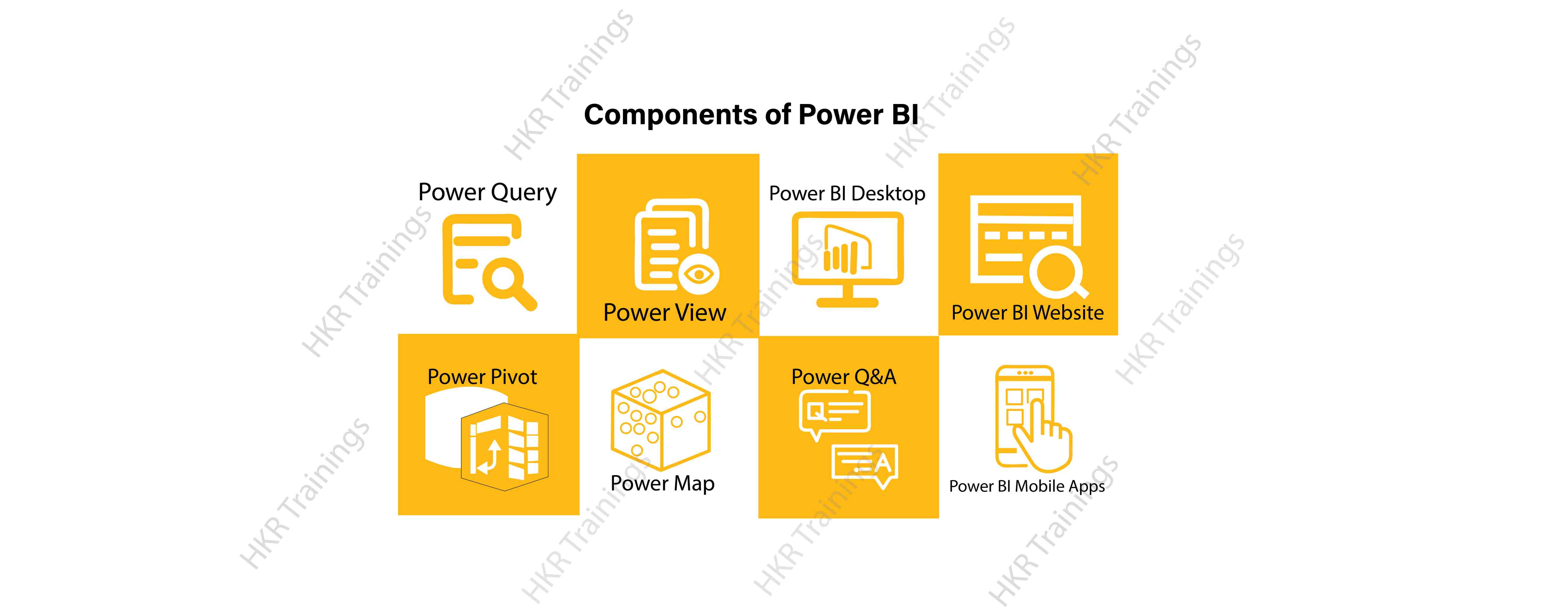
Power BI Components:

Here are the lists of power BI components. They are:

  • Power Query
  • Power Pivot
  • Power View
  • Power Map
  • Power Q&A
  • Power BI Desktop
  • Power BI Website
  • Power BI Mobile Apps

Power BI Components

Now start discussing each and every component of power BI in detail.

Top 50 frequently asked Power BI Interview Questions !

Power Query:

Power Query is one of the most essential components of Power BI. This would be included in your Excel or could be used as a Power BI Desktop component. Using Power Query, you can uninstall data from multiple data sources and retrieve data from a wide variety of different databases, such as Oracle, SQL Server, MySQL, and other databases. You can also retrieve data from records such as text files, CSV files, etc.

Power BI provides you a powerful GUI so that you really can change and use the information you need, such as date and time changes, add columns, modify types and content, and a variety of options. It includes a small language, Power Query M Formula Language, as a code that is more powerful than a GUI.Power Query Formula Language in Power BI is highly secure and optimized for the development of highly highly scalable mashup queries accessible to Power BI Desktop and Power Query. It has several features that cannot be made available by a GUI.

Power Pivot:

Power Pivot is a data designing and information technology engine. It’s being used to model static and dynamic data. You can establish or generate relations between various tables in Power Pivot and quantify values that can be considered in Pivot tables. It provides a tremendous opportunity to build your design.The language used mostly by Power BI Pivot is Data Analysis Expression (DAX), a highly functional language. 

HKR Trainings Logo

Subscribe to our YouTube channel to get new updates..!

Power View:

Power View is a major aspect of Power BI data visualization. It is an immersive device that connects to data sources and collects metadata that can be used for data collection. There are a lot of image processing blueprints in the Power View list. With Power View, you could even process the data for each visualization element or for the entire report. Slicers can be used to make better dicing of the information.Power View reports are responsive; the user can illustrate some of the data or components in Power View to communicate directly with each other.

Power Map:

Power Map is used to display spatial information in 3D mode. As soon as the visual interface is rendered in 3D mode, it offers some other dimension. In Power Map, one characteristic can be assumed to be the length of a column in 3D and another attribute to be a heatmap view. The data can be illustrated on the basis of a geographical location. Geographical locations may be a country, state, city, or street address.In order to get the best view, Power Map works with Bing Maps related to geographical latitude or longitude or country, state, city or street address data.

Power Q&A:

Power BI Q&A is a common language engine for questionnaires about your data model. After you have assembled and updated your data model on the Power BI website, you or your customers can ask questions, if any, and find solutions to those questions. There are a few shortcut keys and hints for the development of your framework so that it can respond to questions in the most effective manner possible.

For data visualization, Power Q&A works with Power View so that users can ask any questions, such as the amount of clients per state, and the question is responded in the form of a map view with numbers shown as bubbles by Power Q&A.

Want to know more about Power BI,visit here Power BI Tutorial !

Power BI Desktop:

Power BI Desktop is a continuous improvement of the Power BI suit. This is an embedded development tool for Power Query, Power Pivot and Power View. It allows you to build advanced queries, models, and reports. Power BI Desktop makes it easy to advance your BI skills and your data analytics experience.

Power BI Website:

Power BI solutions can be compiled on the Power BI website. You can generate dashboards for your news stories and share them with others, and you can also generate content directly on the Power BI website. With the Power BI website, you can conduct slice and dice online operations using a web browser, and you don’t even need any other tools.

Power BI Mobile Apps

Power BI Mobile Apps has three mobile operating system (OS) providers: Android, iOS, and Windows. These frameworks give you lots of an immersive view of Power BI reports and dashboards. You could even share them with your mobile app. A fraction of the documents can be displayed and a note can be written and shared with others. 

To gain in-depth knowledge with practical experience in Power BI, Then explore hkr’s Power BI Training In Hyderabad !

Power BI Training

Weekday / Weekend Batches

Conclusion:

In the above content, we had covered all the important components of power BI in detail. One can take a sound knowledge in the power BI technology by learning each and every components of the power BI architecture. However, the above stated information is strong enough to make you realize the importance of the power BI in corresponding to the data visualization, data analysis, etc.

Related Articles:


Source link