Wolves-Nuggets rivalry resumes again


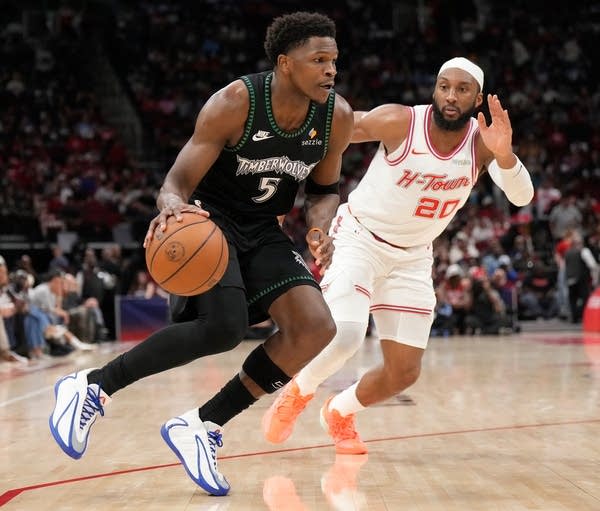
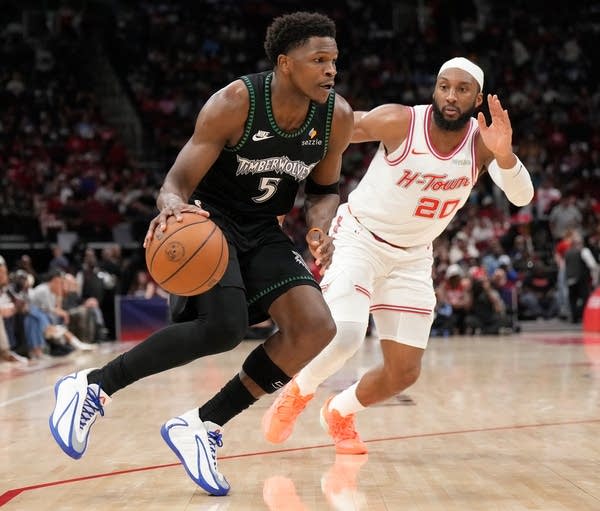
Anthony Edward dribbling against Houston

The main actors remain the same for Minnesota-Denver, Part III. The plot line is similar, too.

“But a totally different movie,” Nuggets coach David Adelman said.

Grab the popcorn and recline back because the headliners always seem to put on a show. The series between the Timberwolves and Nuggets, featuring Anthony Edwards, Rudy Gobert, Nikola Jokic and Jamal Murray, becomes the third installment over the last four postseasons. Each team has won a series.

“I don’t think there’s anything else to call it but a rivalry,” Timberwolves guard Anthony Edwards said of a first-round matchup that kicks off Saturday.

It certainly checks all the boxes to place that rivalry label on it: Close games (14-14 over 28 regular season and playoff contests since 2022). Close proximity (both reside in the Northwest Division). Close relationships (plenty of front office and coaching crossover).

“It’s weird to shake their hands after the series, because you know those guys so well,” Adelman said.

The Nuggets won in five games over the Timberwolves in 2023 on their march to the franchise's first NBA title. A year later, the Wolves erased a 20-point deficit in Game 7 to beat Denver in the second round. Minnesota made it to the Western Conference finals.

“Good teams are built to beat good teams,” Adelman explained.

Good teams also know each other well. The Nuggets will focus on Edwards, who averaged 30.3 points against them this season. He fully expects to draw a crowd.

“But nothing they’re going to throw at me that’s unexpected,” Edwards said.

Jokic, a three-time NBA MVP, will be the center of attention for Minnesota. He's averaged 24.5 points, 10.8 rebounds and 7.3 assists in 42 career regular-season games against Minnesota. Gobert, a four-time Defensive Player of the Year, will draw the responsibility of limiting Jokic. Murray, who is Jokic's pick-and-roll partner, also is a dynamic factor.

“The teams are both just really talented. We’re both physical teams,” Nuggets guard Christian Braun said. “It’ll be a tough first-round matchup.”

The latest chapter of the rivalry has a slightly different supporting cast than the last time they met in the playoffs. In for the Nuggets is Cameron Johnson instead of Michael Porter Jr. Taking the floor for the Timberwolves is Julius Randle as opposed to Karl-Anthony Towns.

“The players are really locked in,” Timberwolves coach Chris Finch said. “We should have fun. This is why we're playing. It's our job to keep the guys on point, focused and a little bit on edge. That's when we're at our best."

There are so many ties between the franchise as well.

First and foremost, Tim Connelly, the president of basketball operations for the Timberwolves whose fingerprints are all over building the Denver roster after his time in the Mile High City.

In the Nuggets front office is Jonathan Wallace, who arrived from Minnesota.

On the sideline, Finch was once an assistant in Denver, while Adelman served as an assistant in Minnesota when his father, Rick, was in charge.

The friendships, though, go on hold for the series.

The Nuggets roll in on a hot streak

When the Nuggets beat Minnesota in 2023, the team was humming along. In 2024, they were limping along. This season, they're rolling along on a 12-game winning streak.

“This team feels very different,” Adelman said. “We’re really confident. I think everybody in the West should be. Anybody in the West can win this thing.”

More experience

Adelman had three games as interim head coach before heading into the playoffs a season ago. He took over for coach Michael Malone after Malone and GM Calvin Booth were let go. Adelman directed Denver to a Game 7 win over the Los Angeles Clippers before being eliminated in seven games by an Oklahoma City team that would win the title. He was promoted after the season.

“Getting to see him be the head of the snake for us has been fun," Braun said.

Going back in time

Hall of Famer Kevin Garnett led the Timberwolves to a 4-1 series win over the Nuggets in 2004. Minnesota would make it to the conference finals before losing to Kobe Bryant and the Los Angeles Lakers.

Wolves take advantage of playoff prep time

The Timberwolves had two play-in games in 2023 before reaching the playoffs. They lost Game 1 to the Nuggets by 29 points. With nearly a full week of rest and practice in 2024, they beat Phoenix by 25 points in Game 1 and swept that first-round series. Last year, same thing – avoiding the play-in games helped them face the Lakers fresh and win Game 1 by 22 points and take that series in five games.

They’re hoping the extra time will help them again this year against the Nuggets.

“My body definitely needed it," Randle said. "It was a great way to recharge. I’m excited to go into the playoffs again healthy and recharged.”




Source link

Leave a Reply

Subscribe to Our Newsletter

Get our latest articles delivered straight to your inbox. No spam, we promise.

Recent Reviews


Introduction to Array length in JAVA:

The length of the array describes the number of elements used in Java. As java is not a Size associated, so Array length helps to overcome it.

Here length applies to array in java, and Size applies to a Java   ArrayLISTcollection object.

Wish to make a career in the world of Java? Start with HKR’S  Java Training ! 

Java ‘Length’ Attribute:

The number of elements is used in the array during its declaration; we can call it as Size or length of the array. For example;

int len1 = myArray.length1;

The below program illustrate the length attributes of the Array elements in JAVA:

Import java.util.*; // built-in library

Class Main1

{

   Public static Void main1 (string [] args)

    {

      Integer [] intArray1 = {1, 3, 5, 7, 9}; // integer value

       String [] strArray1 = { “one”, “two”, “three”}; // string array elements

                   //Print each array and their corresponding length

        System.out.printIn (“integer array contents: “+ Array.to string (intArray1));

        System.out.printIn (“the length of the Integer array stored: “+intArray1.length);

       System.out.PrintIn (“string Array contents: “+ Arrays. ToString (strArray1));

       System.out.PrintIn (“The length of the String array: “+ strArray1. Length);

      }

}

 The output:

Integer Array Contents: {1, 3, 5, 7, 9}

The length of the Integer array: 5

String Array Contents: [one, two, three]

The length of the String array: 3
The above java program reads the length of the given elements and displays the length along with the contents of two different arrays (integers and strings).

Till now I have explained the simple program, now it’s time to learn how to use array in different situations.

They are:

·        Mainly to search for the specific element value in the array.

·        While searching for minimum or maximum values in the array.

Let’s discuss these two different situations in details:

Searching for a value using Length attributes:

As we discussed earlier, iterations can be done through an array using its length attributes. The loop condition in any program will iterate all the array elements one by one until it reaches (length-1) elements. (Since array count in java starts from 0).

Here we are going to use Loop condition to search if a specific value is present in the array or not. To do this, you need to traverse through the whole array until the loop reaches the last element. While performing traversing, each element in the condition will be compared with the existing value to be searched. If any value matches then loop traversing will be stopped as well as program will be terminated.

The below program explains the searching for a data value in an Array:

Import java.util.* ; //built-in library

Class Main

{

Public static void main (string [] args)

      {

         String[] strArray1 = { “UNIX” , “Python”, “ Ruby”, “ Java”, “C” }; // array of string


   // searching for the string using a search value function 


System.out.printIn (searchValue (strArray, “R”)?” value R found” : “value Java not found”);

 System.out.printIn (searchValue (strArray, “Ruby”)?” value Ruby found”: “value Ruby not found”);

}

 Private static Boolean search value (String [] search array, string lookup)

   {

    If (searchArray! = null)

          {

          int arraylength = searchArray. Length; // compute array length

             for (int i=0; I
                {

                    String value = searchArray[i];

                     If (value. Equals (lookup))

                             {

                                 Return true;

                             }

                    }

        }

 Return false;

       }

The Output:

Value R not found

Value Ruby found

Top 20 frequently asked EMC Interview Questions !

Java Certification Training

  • Master Your Craft
  • Lifetime LMS & Faculty Access
  • 24/7 online expert support
  • Real-world & Project Based Learning

In the above program example, we have an array of a few programming language names. We have used the function “search value”, this function searches the particular programming language names. In this example, we have used the for loop in the search value function to iterate through the array and it will be searched for the specified names.

Once the correct name is found, then the SearchValue function returns true. If the name is not found then the SearchValue function returns false.

Related Article: Java Full stack Developer Skills !

Find the Minimum and maximum values in an Array:

In this section, here you can also traverse the array values using the attribute lengths and which enables you to find the minimum and maximum elements in an array.

As we know that the array may or may not be sorted. To perform this finding minimum and maximum the array elements, you have to do the comparison with each element once all the elements in an array get exhausted and at last, you can find the maximum or minimum elements in an array, the following programs explain the concept.

The below programming example is for minimum elements in an array.

Import java.util. *;

Class Main

 {

Public static void main (String [] args)

    {

      Int [] intArray1 = {72, 42, 21, 10, 53, 64};   //int array

          System.out.printIn (“the given array: “+ Arrays. ToString (intArray));

       Int min_val = intArray1 [0];            //assigning first element to min value

       Int length = intArray1. Length;

        For (int I = 1; I
       {

                Int value = intArray1 [i];

                 if (value
              {

               Min_val = value;

            }

   System.out.printIn ( “ the min value in the array: “ +min_Val);


       }

}


Output:

The given array: [72, 42, 21, 10, 53, 64]

The minimum value in the array is: 10

In the above programming example, we have the array elements as a reference element. Then we compare all the elements in a program one by one with the reference element which we have already mentioned in the program. The SearchValue function will be picking one by one until we reach the end of the array in a program.

The next program explains how to find the largest element in an array. The program logic is similar to the previous program, but instead of finding the element which is less than the reference element, we find the greater element than the reference.

The below program illustrates how to find the greater element;

Import java.util.* ; // built-in library

Class Main

   {

  Public static void main (String [] args)

   {

      Int [] intArray1 = {72, 42, 21, 10, 53, 64};  // inserting int array elements

      System.out.printIn (“the given array elements are: “ + Arrays.tostring (intArray1));

     int max_val = intArray1 [0]; //reference elements

     int length = intArray1.length;

     for (int i=1; I
    {

       Int value = intArray1 [i];

        If (value > max_val)

          {

                 Max_val = value;

           }

      }

      System.out.printIn (“the highest value in the array: “+max_val);

   }

 }

The output:

The given array elements are: [72, 42, 21, 10, 53, 64]

The highest value in the array: 72
In the array length, not only int elements, but we can also find the length of floating-point numbers and string elements.

The syntax is as follows:

Float size = array. Length []  // float value length

String size = array. Length [] // string values length

Acquire Liferay Fundamental certification by enrolling in the HKR Liferay Fundamentals Training program in Hyderabad!

Programming & Frameworks, array-length-in-java-description-0, Programming & Frameworks, array-length-in-java-description-1

Subscribe to our YouTube channel to get new updates..!

Programming example:

Public class test1

 {

Public static void main (string [] args)

  {

      Int [] array = new int [5]; //array name is of integer type

      Float [] array = new float [0.1]; //array name is of float type

         String [] array = new string [5]; // array name is of string type

          System. Out. PrintIn (“the size of “+ “the array is “+ array. Length);

         System. Out. PrintIn (“the size of “+ “the array is “+array. Length);

          System. Out. PrintIn ( “ the size of “+ the size of “ + “ the array is “ + array. Length);

 }

}


Output:

The size of the array is 4 // integer value

The size of the array is 0.09 // floating-point integer

The size of the array is [4] // string value
One important thing is that the array in java does not any methods to get the length of an element.

The following program illustrates the use of the function to get the length of an array.

Public class ArrayLengthJava

  {

  Private static void printArraylength (String [] myArray1)

  {

    If (myarray1 == null) // to find whether the array values are empty or not

    {

          System.Out.print (“the length of the array can’t be determined. “);

         }

    Else

{

    Int arraylength = myArray1. Length;

System. Out.printIn (“ the length of the array is: “ + arraylength);

  }

 }


Public static void main(String [] args)

  {

   String [] javaArray1 = { “ My”, “name”, “Adam”};

   String [] javaArray2 = { “K”, “A”};

String [] javaArray3 = {“1”, “2”, “3”, “4”};

String [] javaArray4 = { “Java”};

   PrintArrayLength (null);

   PrintArrayLength (JavaArray1);

   printArraylenghth (javaArray2);

PrintArraylength (javaArray3);

 PrintArraylength (javaArray4);

}

}

The output:

The length of the array can’t be determined.

The length of the Array1 is: 3

The length of the Array2 is: 2

The length of the Array3 is: 4

The length of the Array is: 1

If you want to access the length of an empty or any null object, a NullPointerException is raised.

Do you want to collaborate in the Java Spring world? Begin by learning Java Spring Training!

Java Certification Training

Weekday / Weekend Batches

Conclusion:

In this blog, I have explained the Array length in Java with a few programming illustrations. Array length in java is mainly used to find the number of elements used in the program. I hope this blog may help a few of you to learn the basic concepts of java and its examples.

Related Articles :


Source link