Array length in JAVA | How to Find Array Length in Java


Introduction to Array length in JAVA:

The length of the array describes the number of elements used in Java. As java is not a Size associated, so Array length helps to overcome it.

Here length applies to array in java, and Size applies to a Java   ArrayLISTcollection object.

Wish to make a career in the world of Java? Start with HKR’S  Java Training ! 

Java ‘Length’ Attribute:

The number of elements is used in the array during its declaration; we can call it as Size or length of the array. For example;

int len1 = myArray.length1;

The below program illustrate the length attributes of the Array elements in JAVA:

Import java.util.*; // built-in library

Class Main1

{

   Public static Void main1 (string [] args)

    {

      Integer [] intArray1 = {1, 3, 5, 7, 9}; // integer value

       String [] strArray1 = { “one”, “two”, “three”}; // string array elements

                   //Print each array and their corresponding length

        System.out.printIn (“integer array contents: “+ Array.to string (intArray1));

        System.out.printIn (“the length of the Integer array stored: “+intArray1.length);

       System.out.PrintIn (“string Array contents: “+ Arrays. ToString (strArray1));

       System.out.PrintIn (“The length of the String array: “+ strArray1. Length);

      }

}

 The output:

Integer Array Contents: {1, 3, 5, 7, 9}

The length of the Integer array: 5

String Array Contents: [one, two, three]

The length of the String array: 3
The above java program reads the length of the given elements and displays the length along with the contents of two different arrays (integers and strings).

Till now I have explained the simple program, now it’s time to learn how to use array in different situations.

They are:

·        Mainly to search for the specific element value in the array.

·        While searching for minimum or maximum values in the array.

Let’s discuss these two different situations in details:

Searching for a value using Length attributes:

As we discussed earlier, iterations can be done through an array using its length attributes. The loop condition in any program will iterate all the array elements one by one until it reaches (length-1) elements. (Since array count in java starts from 0).

Here we are going to use Loop condition to search if a specific value is present in the array or not. To do this, you need to traverse through the whole array until the loop reaches the last element. While performing traversing, each element in the condition will be compared with the existing value to be searched. If any value matches then loop traversing will be stopped as well as program will be terminated.

The below program explains the searching for a data value in an Array:

Import java.util.* ; //built-in library

Class Main

{

Public static void main (string [] args)

      {

         String[] strArray1 = { “UNIX” , “Python”, “ Ruby”, “ Java”, “C” }; // array of string


   // searching for the string using a search value function 


System.out.printIn (searchValue (strArray, “R”)?” value R found” : “value Java not found”);

 System.out.printIn (searchValue (strArray, “Ruby”)?” value Ruby found”: “value Ruby not found”);

}

 Private static Boolean search value (String [] search array, string lookup)

   {

    If (searchArray! = null)

          {

          int arraylength = searchArray. Length; // compute array length

             for (int i=0; I
                {

                    String value = searchArray[i];

                     If (value. Equals (lookup))

                             {

                                 Return true;

                             }

                    }

        }

 Return false;

       }

The Output:

Value R not found

Value Ruby found

Top 20 frequently asked EMC Interview Questions !

Java Certification Training

  • Master Your Craft
  • Lifetime LMS & Faculty Access
  • 24/7 online expert support
  • Real-world & Project Based Learning

In the above program example, we have an array of a few programming language names. We have used the function “search value”, this function searches the particular programming language names. In this example, we have used the for loop in the search value function to iterate through the array and it will be searched for the specified names.

Once the correct name is found, then the SearchValue function returns true. If the name is not found then the SearchValue function returns false.

Related Article: Java Full stack Developer Skills !

Find the Minimum and maximum values in an Array:

In this section, here you can also traverse the array values using the attribute lengths and which enables you to find the minimum and maximum elements in an array.

As we know that the array may or may not be sorted. To perform this finding minimum and maximum the array elements, you have to do the comparison with each element once all the elements in an array get exhausted and at last, you can find the maximum or minimum elements in an array, the following programs explain the concept.

The below programming example is for minimum elements in an array.

Import java.util. *;

Class Main

 {

Public static void main (String [] args)

    {

      Int [] intArray1 = {72, 42, 21, 10, 53, 64};   //int array

          System.out.printIn (“the given array: “+ Arrays. ToString (intArray));

       Int min_val = intArray1 [0];            //assigning first element to min value

       Int length = intArray1. Length;

        For (int I = 1; I
       {

                Int value = intArray1 [i];

                 if (value
              {

               Min_val = value;

            }

   System.out.printIn ( “ the min value in the array: “ +min_Val);


       }

}


Output:

The given array: [72, 42, 21, 10, 53, 64]

The minimum value in the array is: 10

In the above programming example, we have the array elements as a reference element. Then we compare all the elements in a program one by one with the reference element which we have already mentioned in the program. The SearchValue function will be picking one by one until we reach the end of the array in a program.

The next program explains how to find the largest element in an array. The program logic is similar to the previous program, but instead of finding the element which is less than the reference element, we find the greater element than the reference.

The below program illustrates how to find the greater element;

Import java.util.* ; // built-in library

Class Main

   {

  Public static void main (String [] args)

   {

      Int [] intArray1 = {72, 42, 21, 10, 53, 64};  // inserting int array elements

      System.out.printIn (“the given array elements are: “ + Arrays.tostring (intArray1));

     int max_val = intArray1 [0]; //reference elements

     int length = intArray1.length;

     for (int i=1; I
    {

       Int value = intArray1 [i];

        If (value > max_val)

          {

                 Max_val = value;

           }

      }

      System.out.printIn (“the highest value in the array: “+max_val);

   }

 }

The output:

The given array elements are: [72, 42, 21, 10, 53, 64]

The highest value in the array: 72
In the array length, not only int elements, but we can also find the length of floating-point numbers and string elements.

The syntax is as follows:

Float size = array. Length []  // float value length

String size = array. Length [] // string values length

Acquire Liferay Fundamental certification by enrolling in the HKR Liferay Fundamentals Training program in Hyderabad!

Programming & Frameworks, array-length-in-java-description-0, Programming & Frameworks, array-length-in-java-description-1

Subscribe to our YouTube channel to get new updates..!

Programming example:

Public class test1

 {

Public static void main (string [] args)

  {

      Int [] array = new int [5]; //array name is of integer type

      Float [] array = new float [0.1]; //array name is of float type

         String [] array = new string [5]; // array name is of string type

          System. Out. PrintIn (“the size of “+ “the array is “+ array. Length);

         System. Out. PrintIn (“the size of “+ “the array is “+array. Length);

          System. Out. PrintIn ( “ the size of “+ the size of “ + “ the array is “ + array. Length);

 }

}


Output:

The size of the array is 4 // integer value

The size of the array is 0.09 // floating-point integer

The size of the array is [4] // string value
One important thing is that the array in java does not any methods to get the length of an element.

The following program illustrates the use of the function to get the length of an array.

Public class ArrayLengthJava

  {

  Private static void printArraylength (String [] myArray1)

  {

    If (myarray1 == null) // to find whether the array values are empty or not

    {

          System.Out.print (“the length of the array can’t be determined. “);

         }

    Else

{

    Int arraylength = myArray1. Length;

System. Out.printIn (“ the length of the array is: “ + arraylength);

  }

 }


Public static void main(String [] args)

  {

   String [] javaArray1 = { “ My”, “name”, “Adam”};

   String [] javaArray2 = { “K”, “A”};

String [] javaArray3 = {“1”, “2”, “3”, “4”};

String [] javaArray4 = { “Java”};

   PrintArrayLength (null);

   PrintArrayLength (JavaArray1);

   printArraylenghth (javaArray2);

PrintArraylength (javaArray3);

 PrintArraylength (javaArray4);

}

}

The output:

The length of the array can’t be determined.

The length of the Array1 is: 3

The length of the Array2 is: 2

The length of the Array3 is: 4

The length of the Array is: 1

If you want to access the length of an empty or any null object, a NullPointerException is raised.

Do you want to collaborate in the Java Spring world? Begin by learning Java Spring Training!

Java Certification Training

Weekday / Weekend Batches

Conclusion:

In this blog, I have explained the Array length in Java with a few programming illustrations. Array length in java is mainly used to find the number of elements used in the program. I hope this blog may help a few of you to learn the basic concepts of java and its examples.

Related Articles :


Source link

Leave a Reply

Subscribe to Our Newsletter

Get our latest articles delivered straight to your inbox. No spam, we promise.

Recent Reviews


Introduction to Kali Linux:

Kali Linux is an open source system available in the Linux operating system. Nowadays, it is considered as a one of the best security Linux packages mainly used for ethical hackers. In this Kali Linux system, all the tools can be differentiated on the basis of different categories. Kali Linux is an advanced penetration testing and security auditing Linux distribution. Kali Linux is named after one of the Hindu Goddesses namely “Maa Kali”. This type of Linux system was first developed by Mati Aharoni is one of the lead Linux developers, trainers, and founders of offensive security. 

Features of Kali Linux:

The following are the important features of Kali Linux:

1. Offers complete customizations.

2. Supports multiple languages.

3. Provides vast wireless device support for multiple machines and compatible with USB devices.

4. Helps to switch from Ubuntu to Debian.

5. Easy upgrade to future versions.

Become a Linux Certified professional by learning this HKR Linux Training !

Why do people use Kali Linux?

The following are the key features of Kali Linux that will benefit the people:

1. Offers advanced penetration testing tool:

Kali Linux supports more than 500+ advanced penetration testing tools across multiple devices. The tools which are used in Linux sometimes cannot be repeated much like “Backtrack”.

2. Available as a free Linux tool:

The kali Linux system is totally free and offers better time services for multiple users. This is one of the huge factors to use this Linux system.

3. It is an open source GIT tool:

The kali Linux is an open source system and can be accessed by multiple users. All the codes which we have developed can be accessed by anyone. The open development source of Kali Linux can make an easy view to the development team.

4. Supportive tool:

Kali Linux offers hierarchical file systems, allows users to locate binaries, packages and supporting files, etc. This is also an important feature of kali Linux when compared to other Linux systems.

 Kali Linux installation and configuration guide:

In this section, we are going to explain the installation and configuration of Kali Linux:

A Back track was the older version of Kali Linux and the latest version of Kali 2016. 1 and it will be updated often.

Kali Linux installation and configuration

To install Kali Linux we have to follow these two steps:

1. Firstly, we have to download the Virtual box and then install it.

2. Then, we have to download and install the Kali Linux distribution software.

Want to know more about Linux, visit here Linux Tutorial !

Now we will discuss each step in brief:

1. Download and install the virtual box:

A virtual box is very useful when you want to test the codes in Kali Linux. Running Kali Linux codes on a Virtual box is safe and you can also know the unknown packages to test the codes.

By using the virtual box you can install Kali Linux on your device along with primary operating systems (like MAC, Windows, and Linux).

Now see the steps to download and install the virtual box:

Step1: To download the virtual box, go to the web page https: //www.virtualbox.org/wiki/Downloads. Now depending on your operating system, you need to select the right package. If you are using windows, you have to follow the below screen shot to know more,

download the virtual box

Step2: Now click on the Next button:

setup Wizard

Step 3: On the next page, you have to choose the location where you want to save the executable file. Now leave that as default and click next,

executable file

Step 4: Click Next and the following custom setup screenshot will pop up ->then select the features that you want to install -> now click the next button.

 custom setup

Step 5: Now click on yes to proceed with other installation processes.

installation processes.

Join our Embedded Systems Product Design Life Cycle Training today and enhance your skills to new heights!

Linux Certification Training

  • Master Your Craft
  • Lifetime LMS & Faculty Access
  • 24/7 online expert support
  • Real-world & Project Based Learning

Step 6: Now ready to install screen will pop up-> then click install.

install screen

Step 7: Now click on the finish button.

 finish button.

The virtual box application screen will pop up. Now we are all set to install the rest of the host file for the manual device and also recommended for professional usage.

 virtual box application

Installing Kali Linux:

We have already installed the virtual box, now move to the next stop then install Kali Linux.

Step1: It’s time to download the Kali Linux package from the Kali official web page https: //www.kali.org/downloads.

Installing Kali Linux

Step2: Now click on virtual box -> select new as shown in the following screenshot,

 click on virtual box

Step 3: Now choose the correct virtual hard disk file -> click on open.

virtual hard disk file

Want to gain knowledge in Gradle? Then visit here to learn Gradle Training!

HKR Trainings Logo

Subscribe to our YouTube channel to get new updates..!

Step 4: you can see the following screenshot, then click on the create button.

 create button.

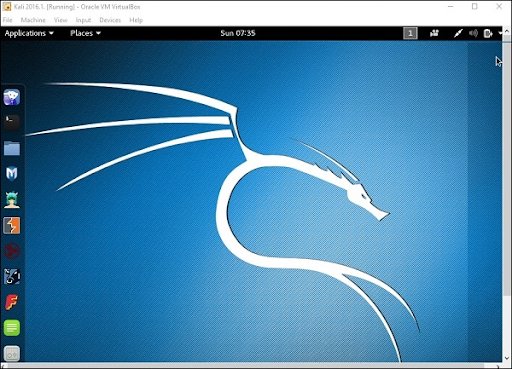
Step 5: Now start the Kali Operating system, the default username is a root and the password is toor.

 Kali Operating system

Update the kali software:

Once you finish installing, now it’s time to update the Kali Linux and provide a newer version to get advanced functionalities. The below are the steps involved update the Kali software;

Top 30 frequently asked Linux Interview Questions !

Step1: First go to the application -> then click on terminal-> after that, type “apt-get an update”-> then update the location as shown in the following screenshot.

 Update the kali software

terminal

Step 2: Now it’s time to upgrade the applications and tools -> then type “apt-get upgrade” -> then the packages/libraries will be downloaded.

applications and tools

Step 3: The below screenshot will ask, if you want to continue -> then type “Y” and click “Enter”.

continue

Step 4: To upgrade any newer version of the Linux operating system -> then type “apt-get distupgrade”.

upgrade newer version of the Linux

Laboratory set up:

In this section, we are going to set up the testing machine to perform any test-related applications with the help of Kali Linux tools.

Step1: You need to download metasploitable (this is a Linux machine). This can be downloaded from the official web page of Linux machine Rapid7 : https: //information.rapid7.com/ metasploitabledownload.html? LS (Linux system) = 1631875 & CS = Web.

Laboratory set up

Step 2: Register by supplying the details (as shown in the above screenshot). Once you finish filling the above form, you need to download the software.

Register by supplying

Step 3: Click on the virtual box -> then select new.

he virtual box

Step 4: click on the use of an existing virtual hard disk file -> browse the appropriate file (where you have downloaded the Metasploitable -> then click on open.

 virtual hard disk file

Step 5: Then you will get a screen where you need to create a virtual machine -> click on create.

 create a virtual machine

The default username you have to give is msfadmin and the password is msfadmin.

msfadmin

Linux Certification Training

Weekday / Weekend Batches

 Is kali Linux better than Ubuntu?

The answer would be yes, Kali Linux system is better in the view of a pentester for the basic users it doesn’t require for general-purpose operations go with Ubuntu will all features. If you are in a dilemma about choosing Ubuntu software and having a thought of installing Kali Linux then there are other ways you can do it.

The following are the major points when you want to choose Kali and Ubuntu.

1. If you are looking for the operating system for network security, penetration testing, and other testing techniques, etc. Ubuntu cannot compete with the Kali Linux system.

2. If you are looking for the user –friendly, general-purpose operating system with the best GUI, Ubuntu is the best choice.

Ubuntu system is more suited for personal uses while Kali is best for Hackers, vulnerability testers and nerds, because of the tools they both come bundled with or (you can also install the same set of “Hacking” tools while installing on Ubuntu). Kali was a product of backtrack. Here all the binary packages only meant for Debian could be installed on Kali Linux and this is the power of the Kali Linux system. Kali has come with a number of penetration tools be it Wifi or any other database to be built instantly. One more point to be remembered is that Kali uses the APT for package management.

Become a Msbuild Certified professional by learning this HKR Msbuild Training! 

Conclusion:

In this blog, we have explained the complete installation guide of the Kali Linux system, and also help our audience how to use it. The blog contents have been designed to help beginners who want to start their career as a Linux developer. This blog is also helpful for penetration testing experts. Once you finish this blog, you will be able to work on the moderate level to advanced applications of the Kali Linux system. 

Related Articles:


Source link