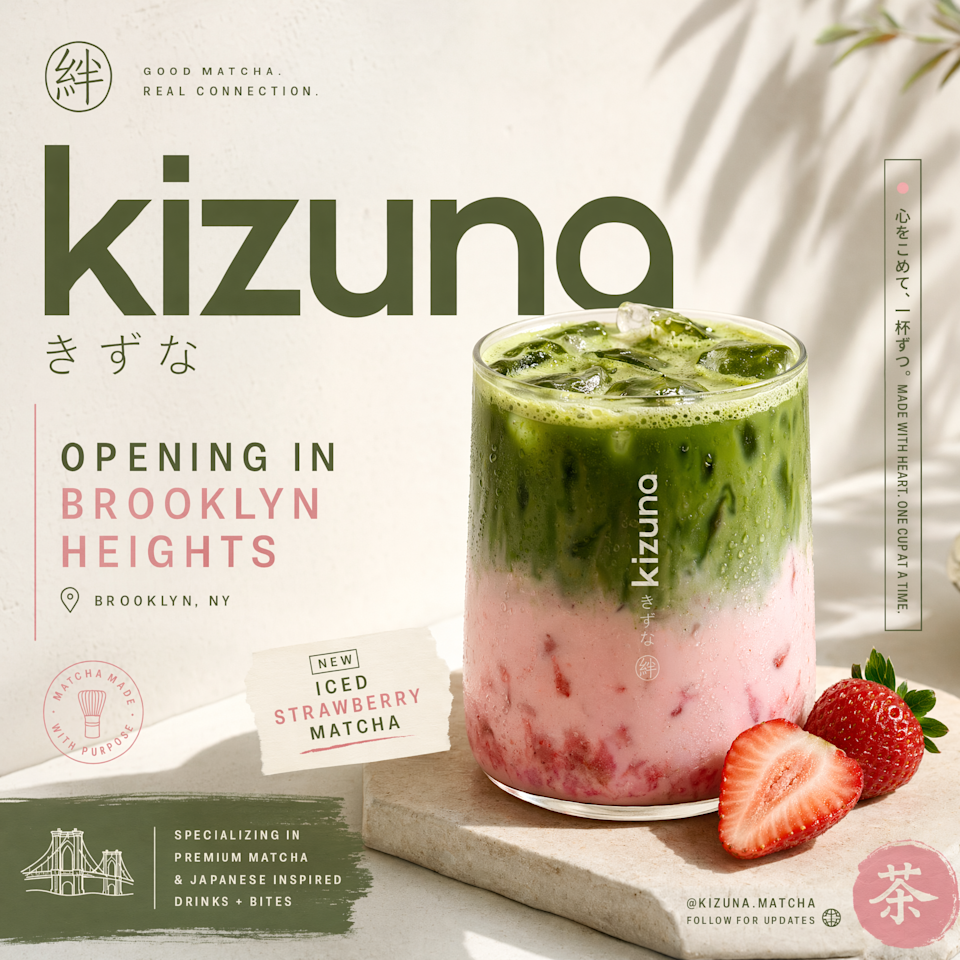
ChatGPT Images 2.0 is better at rendering non-Latin text


A little more than a year after OpenAI gave ChatGPT users the option to create images and designs directly from its chatbot, it’s now releasing ChatGPT Images 2.0. OpenAI describes the new system as a “step change” for image generation models, particularly when it comes to the tool’s ability to follow instructions in detail, render dense text and place and relate objects in a scene. For the first time, OpenAI has also built an image model with reasoning capabilities, giving the system the ability to do things like search the web and verify its outputs. According to the company, those capabilities should translate to a tool that’s more reliable when accuracy, consistency and visual cohesion are essential.

An example of ChatGPT's new non-Latin rendering abilities.

An example of ChatGPT’s new non-Latin rendering abilities. (OpenAI)

OpenAI says it has also put in a lot of work to make Images 2.0 better at understanding and rendering non-Latin text, with “significant gains” when it comes to the model’s ability to handle Japanese, Korean, Chinese, Hindi and Bengali. At the same time, the company claims the new model is better at faithfully recreating the specific characteristics of different visual languages. On this point, OpenAI says that makes Images 2.0 more useful for tasks like game prototyping and storyboarding. Outside of those features, the new model is more flexible when it comes to aspect ratios, allowing it to generate images that are as wide as 3:1 and as tall as 1:3. It can also produce designs at resolutions of up to 2K, and even generate up to eight outputs in one go.

A tortoiseshell cat in the style of Pokemon's third generation of games.

A tortoiseshell cat in the style of Pokemon’s third generation of games. (ChatGPT)

I got a chance to preview Images 2.0 ahead of its public release. For my first prompt, I asked ChatGPT to generate an image of a tortoiseshell cat in the pixel art style of Pokémon’s third generation. I thought this would be a good test because AI models typically struggle with pixel art, and the Game Boy Advance Pokémon games are iconic for their art style, so much so that if ChatGPT merely approximated that style, it wouldn’t do. The result is the image you see above, and I think ChatGPT did a commendable job there. I then tasked the new model with converting that image into a transparent PNG. For one last test, I asked ChatGPT to create a four-page manga about my cat enjoying a sunny day by an idyllic city stream.

Notice how the cat isn't render exactly like the one above it.

Notice how the cat isn’t render exactly like the one above it. (ChatGPT)

Of those three tests, ChatGPT spent the most time on the second one and the output there was slightly different from the first image it generated, which I felt deviated from my prompt. Still, it managed to generate a proper transparent image, which is something other image models can struggle to do properly. Once more people have a chance to put the model through its paces, we’ll have a better idea of how it compares to Google’s Nano Banana 2, and where OpenAI can make additional improvements.

A manga generated by ChatGPT about a cat enjoying a sunny day.

A manga generated by ChatGPT about a cat enjoying a sunny day. (ChatGPT)

Images 2.0 is available starting today for all ChatGPT users, including those on the company’s Free and Go tiers. Plus and Pro subscribers get access to more advanced outputs. OpenAI is also making the model available through its API service and Codex coding app, which just last week it updated to offer built-in image generation. Notably, Images 2.0 arrives just days after Anthropic waded into the visual design market with its own design assistant.


Source link

Leave a Reply

Subscribe to Our Newsletter

Get our latest articles delivered straight to your inbox. No spam, we promise.

Recent Reviews


Winautomation Tutorial- Table of Content

What is Winautomation?

WinAutomation is an effective and user-friendly Windows-based application tool for developing Software Robots. These Software Robots will completely automate all of your desktop and web-based tasks.On a Windows machine, this tool is used to automate processes.This tool can develop an excel file, read data from the file, and write data to almost the same file. This can create files, delete copies, and so on on its own on a Windows machine. It can even completely run the Windows environment by itself.

Why Winautomation?

  • WinAutomation extends the advantages of robotic process automation to your desktop. 
  • It provides the much more potent, flexible, and user-friendly Windows-based software for automating highly repetitive tasks. 
  • WinAutomation assists users in lowering costs while improving the potential performance and quality of enterprise applications.

The winautomation tool mainly automates the web and windows applications.It supports the following list of client and server operating systems in order to run the applications. They are:Windows 7, windows 8, windows vista, windows 10, windows 2012, windows 208, windows 2016, etc.
       Become a WinAutomation Certified professional by learning this HKR WinAutomation Training !

Editions of the Winautomation Tool

Winautomation supports three types of editions mainly:

  • Basic edition,
  • Professional edition and 
  • Professional plus edition

Basic edition:

In the basic edition less number of features are offered and also the basic functionalities like basic actions and basic triggers are given to the users.

Professional edition:

The professional edition adds some extra features when compared with the basic edition such as autologin, error handling,secure screen feature, maximum running time, and robot omplier, etc.

Professional plus edition:

In the professional plus edition, some attractive features are presented to the users along with the features in professional and basic editions.

others, winautomation-tutorial-description-0

       Become a Eggplant Certified professional by learning this HKR EggPlant Training !

Winautomation Training

  • Master Your Craft
  • Lifetime LMS & Faculty Access
  • 24/7 online expert support
  • Real-world & Project Based Learning

Installation guide of the Winautomation Tool:

Step1: one cannot directly download the winautomation software from the website, first you need to download the free trial version for 30 days. 

Step2: Now download the winautomation free trial software from the official website.You will be taken to a page where there is a download button available click on it.

Step3: Immediately after clicking you will be notified with a confirmation email and with download link as well.

Step4:After clicking on the above link you will ask to save the winautomaiton.exe and then click on the vae option.

Step5:Now double click on the winautomaiton.exe, click on the next button , tick the check box and click on the next option until you find the finish button.

Step7: The tool is successfully installed and now open the winautomation console window in order to know the tool’s prominent features.

others, winautomation-tutorial-description-0, others, winautomation-tutorial-description-1

Subscribe to our YouTube channel to get new updates..!

Features of Winautomation

Winautomation comes with distinctive features such as:

  • It supports several data types and variables.
  • One can monsito the real time eperformance of the robots.
  • Helps in performing dynamic debugging.
  • Just schedule tasks and they are done on time.

Winautomation Training

Weekday / Weekend Batches

Conclusion

In the winautomation tutorial, all the concepts are covered in detail and helps the aspirants to get full details as well. Most preferably every organization needs the winautomation software for th eprocessing making the tasks easier and simpler.If you find any doubts please go ahead of the comment section and drop your message there. We will definitely resolve your queries.


Source link