AI Marketing Agents for Small Business


By Pallav Tamaskar, CEO and Co-founder, Turgo.ai

Small business marketing has operated under a capacity ceiling for twenty years. A Fortune 500 brand runs five specialists across inbound, outbound, calling, media, and operations. A small business owner runs all five jobs alone, at half the quality, after closing the books. AI marketing agents for small business are the first technology to close that gap.

After deploying AI marketing platforms across more than 30 small and mid-market businesses in 2026, five data points stand out. Each one should change how you plan the next quarter, especially if you are working with the average marketing budget for your industry (the U.S. Small Business Administration notes that B2B services companies typically spend around 6.9 percent of revenue on marketing, while retailers spend closer to 4 percent).

Key Takeaways

  • AI marketing agents remove the capacity ceiling by letting small business owners run campaigns in 4 minutes instead of 3 days, creating a new level of operating leverage.
  • Modern AI agents handle five marketing jobs at once—inbound, outbound, calling, media buying, and operations—shifting from assistance to full execution.
  • Voice follow-ups with real conversations book 4x more meetings than email, unlocking higher conversion rates for service businesses.
  • AI platforms enable 100 percent market coverage every 90 days and cut software costs by 50%, helping small businesses scale faster with fewer tools.

1. Campaigns run in 4 minutes, not 3 days

A traditional small business marketing campaign takes three days when one owner juggles it across four to five tools: a data source, an email platform, a CRM, a content tool, and an analytics dashboard. When AI agents own the pipeline, the same campaign runs in four minutes end to end.

AI-agents

This is not a productivity gain. It is a different category of operating leverage. A four-minute cycle lets a small business run the same activity cadence as a 50-person marketing team.

2. AI handles 5 marketing jobs, not 1

Most AI marketing tools help with one task. Modern AI marketing agents handle five: an Inbound agent makes content and captures leads, an Outbound agent finds new buyers and sends personalized sequences, a Calling agent holds real phone conversations with leads, a Media Buyer runs paid ads across Meta, LinkedIn, and TikTok, and an Ops agent scores leads and tracks revenue impact.

The difference between AI tools and AI agents is execution versus assistance. Tools help you do work faster. Agents do the work instead of you. For small businesses, that distinction is the entire story.

3. Voice follow-ups book 4x more meetings than email

When AI calling agents follow up email outreach with real voice conversations, meetings booked jump 4x compared to email-only campaigns. Not voicemails. Actual conversations that answer questions and put meetings on the calendar.

Most small businesses never call their leads because nobody has time. When AI takes the call, conversion rates jump dramatically. For service businesses, consultants, and agencies, this is the single biggest revenue unlock of 2026.

4. Full market coverage every 90 days replaces quarterly scramble

Most small businesses reach only 5 to 10 percent of their total addressable market in a full year. AI marketing agents let a small team reach 100 percent of their addressable market every 90 days.

If one competitor stays at 10 percent annual coverage while another hits 100 percent quarterly, the growth gap compounds fast. Within two years, one business has a pipeline problem and the other has a hiring problem. The SBA’s guide to AI for small business outlines how AI tools are increasingly accessible to SMBs who want to punch above their weight class.

Big impact on cash flow of a electrical services company call

5. Consolidated AI platforms cut software costs by 50%

Most small businesses pay for five to seven overlapping marketing subscriptions costing between $30 and $200 each per month. Email tools, CRMs, scheduling, analytics, social schedulers, landing page builders. Consolidating to a single AI-first platform typically cuts total software cost in half while doubling output.

The savings often fund the transition. Audit your current stack before anything else. The ROI calculation usually settles the decision.

A 30-day playbook for small business owners

Three steps, in order.

Week one: write your ideal customer in one paragraph. Who buys most often, pays on time, and refers others? AI marketing agents need a target. Vague audiences produce vague results. Free SBA marketing planning resources can help you structure this if you have never done it before.

Week two: audit every marketing tool you pay for each month. Count the overlaps. Compare total cost against an AI-first platform alternative.

Weeks three and four: deploy one AI agent, not five. The Outbound agent usually has the fastest payback because it generates meetings within two to three weeks. Prove it works, then layer on the Calling agent next. Starting with all five at once is the fastest way to quit. Small business owners did not get a better marketing deal in 2026. They got a completely different deal.

Want to learn the proven strategies top businesses use? Try searching ‘small business consulting‘ to connect with an expert in your area!

Frequently Asked Questions

1. What are AI marketing agents and how are they different from AI tools?

AI marketing agents execute full marketing workflows such as inbound content, outbound outreach, calling, media buying, and operations. Unlike AI tools that assist with tasks, agents perform the work end-to-end without requiring constant input.

2. How do AI marketing agents improve small business marketing performance?

AI marketing agents improve performance by running campaigns in minutes instead of days, increasing lead coverage, and boosting conversions through automated outreach and voice follow-ups. This allows small businesses to operate at the level of larger marketing teams.

3. What is the fastest way for a small business to start using AI marketing agents?

The fastest way is to start with one agent, typically outbound, to generate meetings within a few weeks. Once results are proven, additional agents such as calling or media buying can be added gradually.

About the Author

Pallav Tamaskar builds brands and the systems that scale them. Over twenty years at P&G, PepsiCo, ESPN, and Merrell, he led growth across beauty, sports, media, and footwear. He co-founded Turgo to solve the problem he kept running into at every stage: marketing ambition outpacing execution capacity. As CEO, he leads an autonomous AI platform that fuses brand storytelling with performance rigor, turning one marketer into a full team. Fortune 500 operator, investor-backed founder, and builder of teams that move faster than the market expects.

scaling small businesses with Google Business Page


Source link

Leave a Reply

Subscribe to Our Newsletter

Get our latest articles delivered straight to your inbox. No spam, we promise.

Recent Reviews


SD Tables in SAP:

The SAP SD module is built on tables and uses them to store data. We’ll go through SAP SD tables and their relationships in this tutorial. SAP SD tables are critical storage for corporate data connected to SAP ERP software’s sales and distribution activities. The SD tables are basically divided into three parts:

These are the SD module’s building blocks, and it’s only natural to address tables in this sequence. Please look at the slides to see how the tables from different blocks were connected. Being an expert in SAP SD necessitates an understanding of these relationships. 

 Become a SAP SD Certified professional by learning this HKR SAP SD Training !

1) Sales

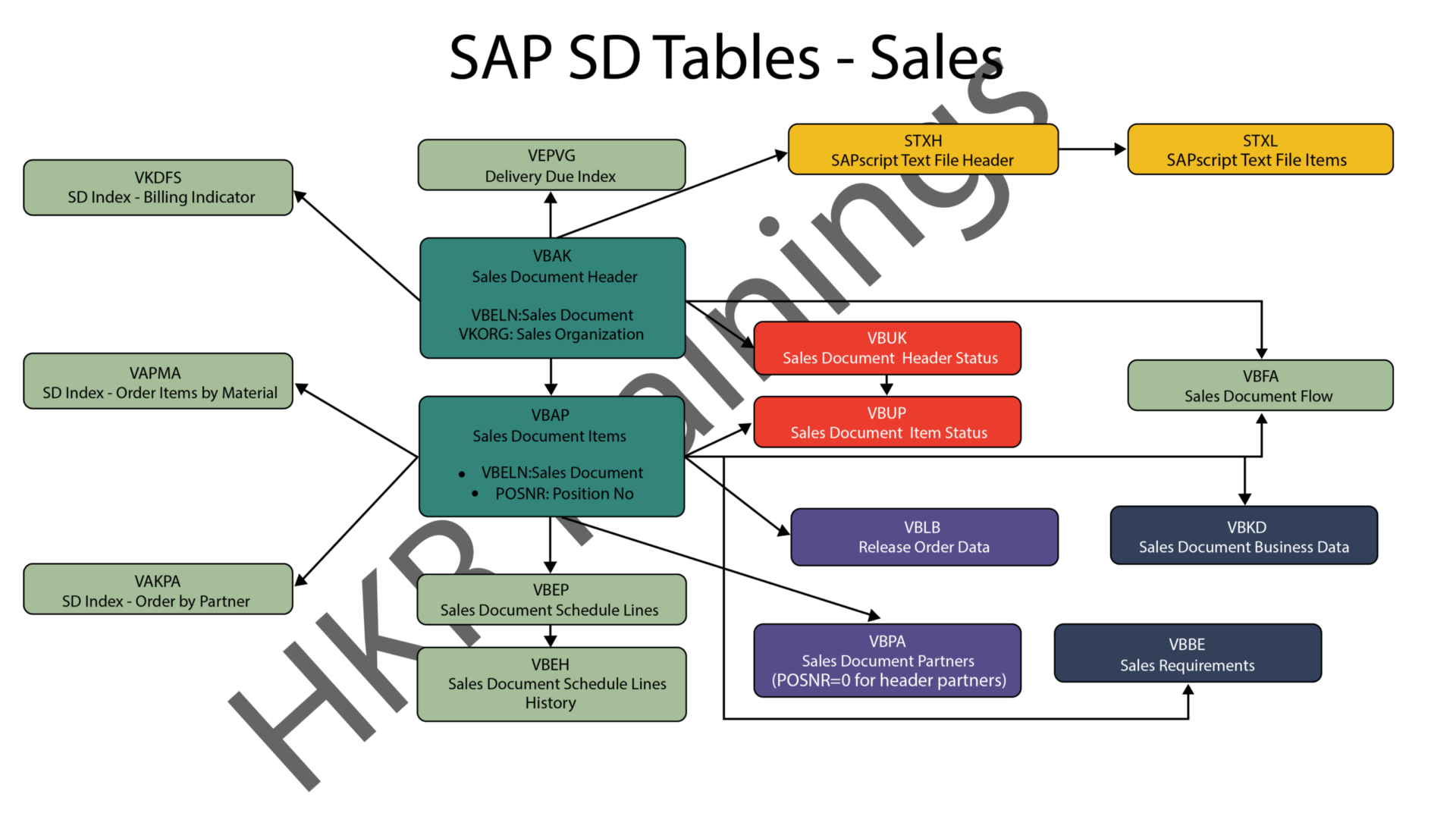
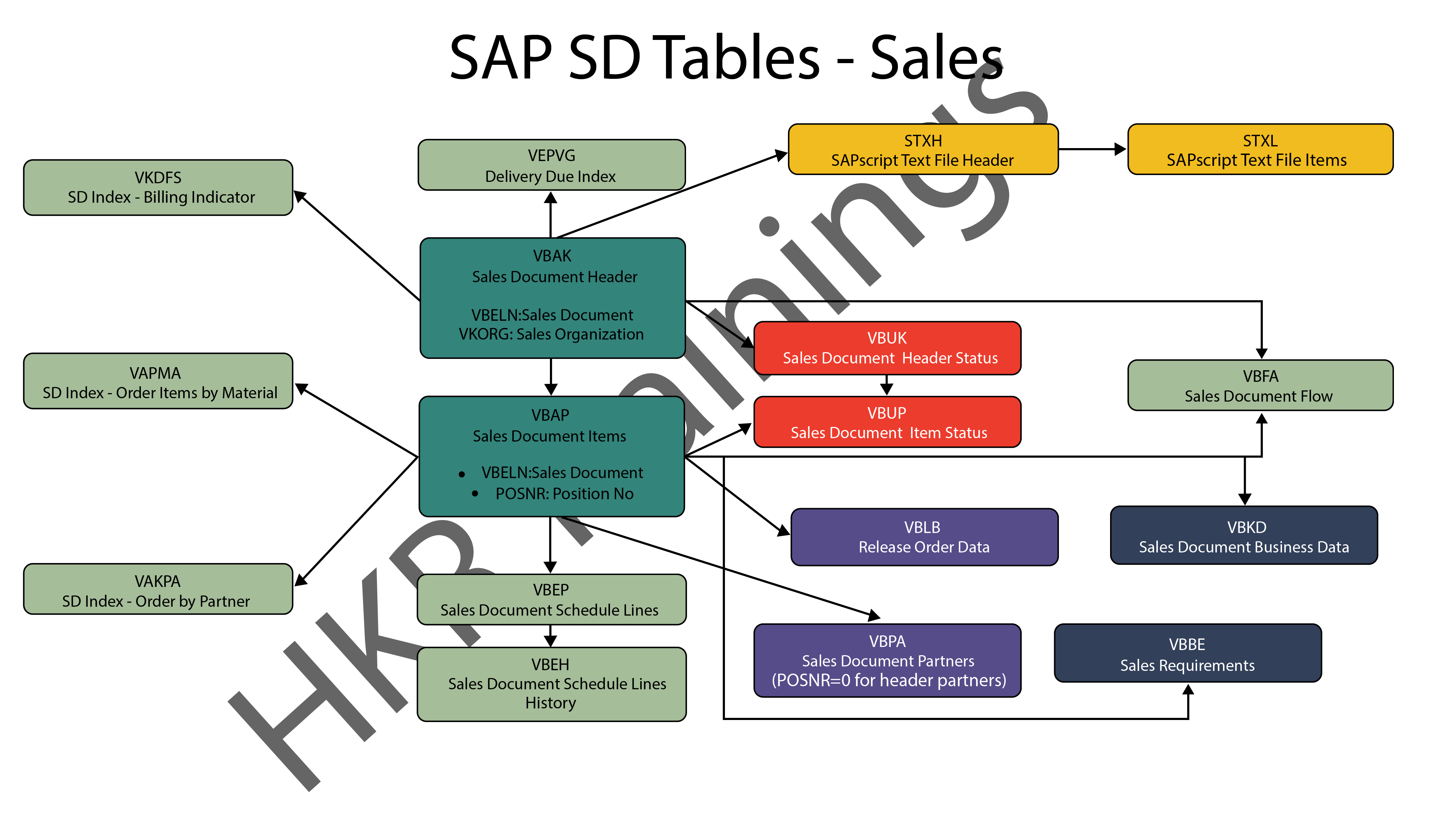
In SAP SD, the first block is about sales procedures.This indicates that the SAP SD tables in this block would be related to sales orders, quotations, and other similar transactions. We designed a visual slide that lists all of the tables and their relationships. 

SAP SD Sales

2) Shipping

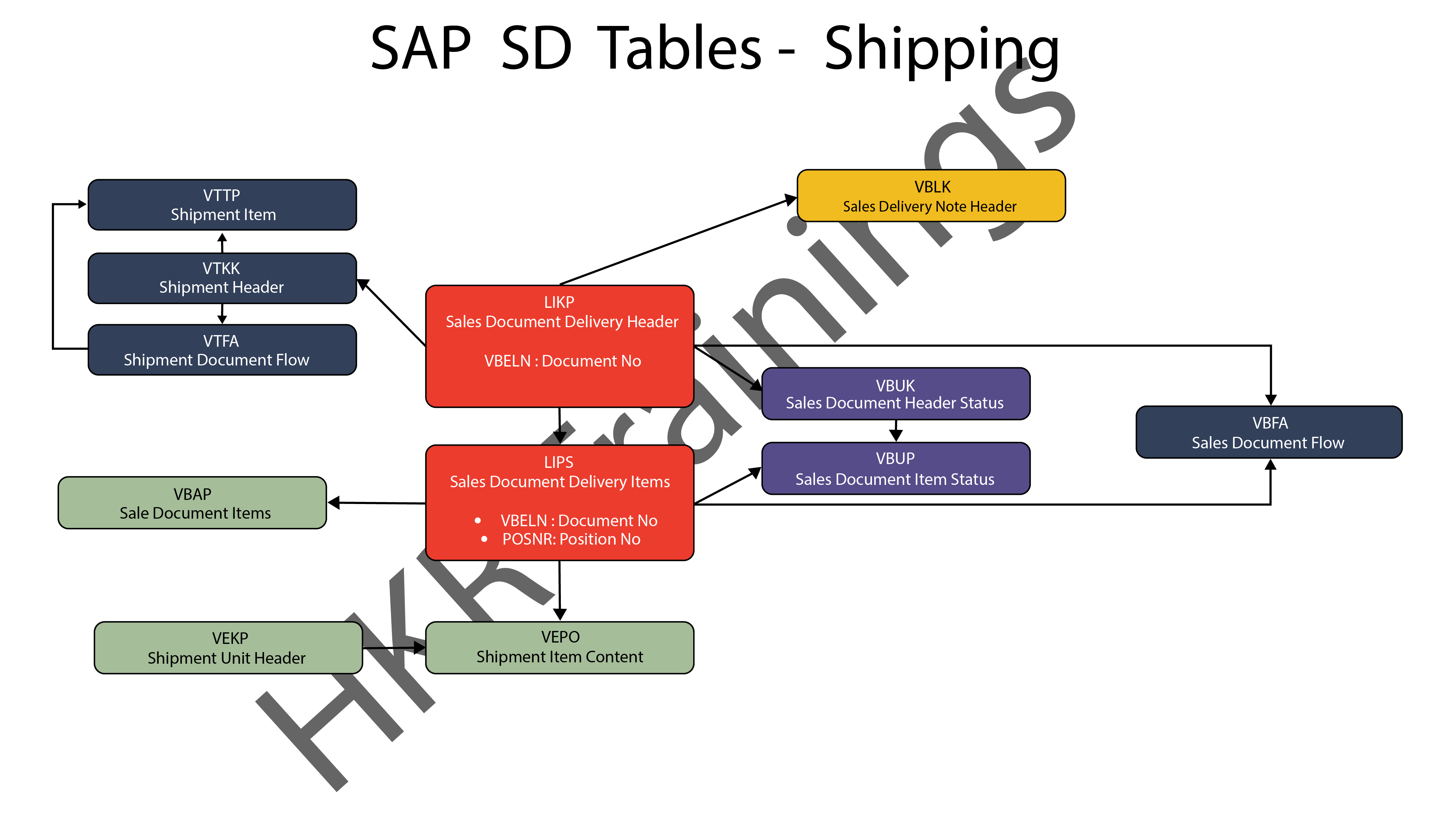
ThIs section is about SAP SD’s shipping processes. In this section, SAP SD tables deal with inbound and outbound deliveries, as well as shipments. Likewise, we’ve created a visual slide with links illustrating table relationships. 

SAP SD Shipping

SAP SD Training

  • Master Your Craft
  • Lifetime LMS & Faculty Access
  • 24/7 online expert support
  • Real-world & Project Based Learning
3) Billing

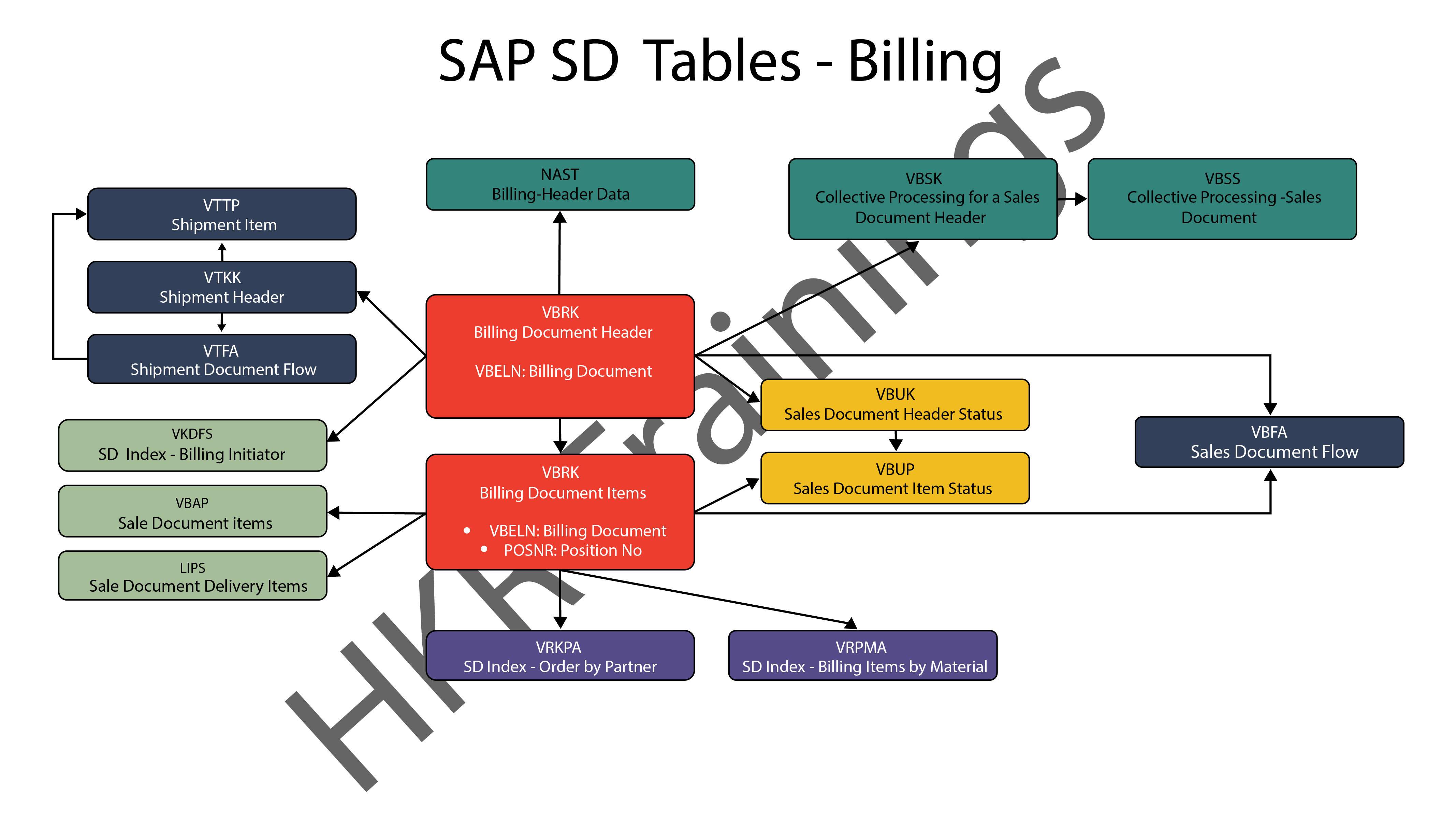
The billing feature of SAP SD is the last but not least. SAP has a variety of tables which are used to support a company’s billing procedures. Billing documents, as well as other related data, such as output conditions, are saved in these tables by SAP. 

SAP SD Billing

Want to know more about SAP SD,visit here SAP SD Tutorial !

SAP SD Significant Tables for Sales and Distribution

The following are the SAP SD tables for customers, sales documents, delivery documents, billing documents, shipping unit.

1) Customers

KNA1: General Data

KNB1: Customer Master – Co. Code Data (payment method, reconciliation acct)

KNB4: Customer Payment History

KNB5: Customer Master – Dunning info 

KNBK: Customer Master Bank Data

KNKA: Customer Master Credit Mgmt.

KNKK: Customer Master Credit Control Area Data (credit limits)

KNVV: Sales Area Data (terms, order probability)

KNVI: Customer Master Tax Indicator

KNVP: Partner Function key

KNVD: Output type

KNVS: Customer Master Ship Data

KLPA: Customer/Vendor Link

2) Sales Documents

VBAKUK: VBAK + VBUK

VBUK: Header Status and Administrative Data

VBAK: Sales Document – Header Data

VBKD: Sales Document – Business Data

VBUP: Item Status

VBAP: Sales Document – Item Data

VBPA: Partners

VBFA: Document Flow

VBEP: Sales Document Schedule Line

VBBE: Sales Requirements: Individual Records

Top 30 frequently asked SAP SD Interview Questions !

3) SD Delivery Document

LIPS: Delivery Document item data, includes referencing PO

LIKP: Delivery Document Header data

4) Billing Document

VBRK: Billing Document Header

VBRP: Billing Document Item

5) SD Shipping Unit

VEKP: Shipping Unit Item (Content)

VEPO: Shipping Unit Header

Acquire SAP Basis certification by enrolling in the HKR SAP Basis Training in Pune!

SAPS, sap-sd-tables-description-2, SAPS, sap-sd-tables-description-4

Subscribe to our YouTube channel to get new updates..!

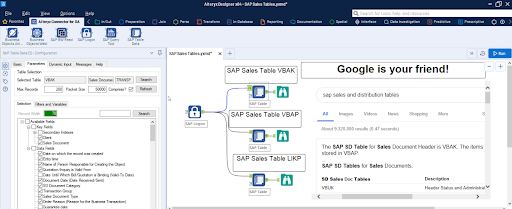
The most significant SAP Sales and Distribution (SD) tables for Alteryx users

For users of Alteryx and the DVW Alteryx Connector for SAP, we’ll now look at the most significant SAP Sales and Distribution (SD) tables 

SAP Sales and Distribution table

Related Articles SAP SD Modules !

The following SAP systems contain SAP Sales and Distribution tables:

  • SAP ECC 
  • SAP ERP
  • SAP S/4HANA

SAP Transaction Tables for Sales and Distribution (SD)

The SAP SD transaction tables for sales, delivery and billing process is as follows: 

1) Sales Document Tables

The documents of SAP Sales include:

  • Inquiries
  • Quotations
  • (Sales) Orders
  • Contracts
  • Credit Memo Requests
  • Debit Memo Requests 

The following are the most important tables in a sales document:

  • VBAK – Sales Document: Header Data
  • VBAP – Sales Document: Item Data 

SAP SD Training

Weekday / Weekend Batches


2) Delivery Document Tables

The documents of SAP Delivery include:

  • Delivery / Shipping Notifications
  • Deliveries

The key Delivery Document tables are:

  • LIKP – SD Document: Delivery Header Data
  • LIPS – SD document: Delivery: Item data 

Related Articles SAP SD Flow ! 

3) Billing Document Tables

The documents of SAP Billing include:

  • Invoices
  • Credit Memos
  • Debit Memos
  • Intercompany Invoices

The key Billing Document tables are:

  • VBRK – Billing Document: Header Data
  • VBRP – Billing Document: Item Data

Master Data Tables for SAP Sales and Distribution (SD)

  • KNA1 – General Data in Customer Master
  • KNB1 – Customer Master (Company Code)
  • KNKK – Customer master credit management: Control area data
  • KNVV – Customer Master Sales Data 

Data Tables for SAP Sales and Distribution (SD) Configuration

  • TVFK – Billing: Document Types
  • TVFKT – Billing: Document Types: Texts
  • TVKO – Organizational Unit: Sales Organizations
  • TVZB – Customers: Terms of payment 
  • TVZBT – Customers: Terms of Payment Texts

Conclusion:

We hope this blog is very helpful in knowing various tables discussed on SAP SD.   


Source link