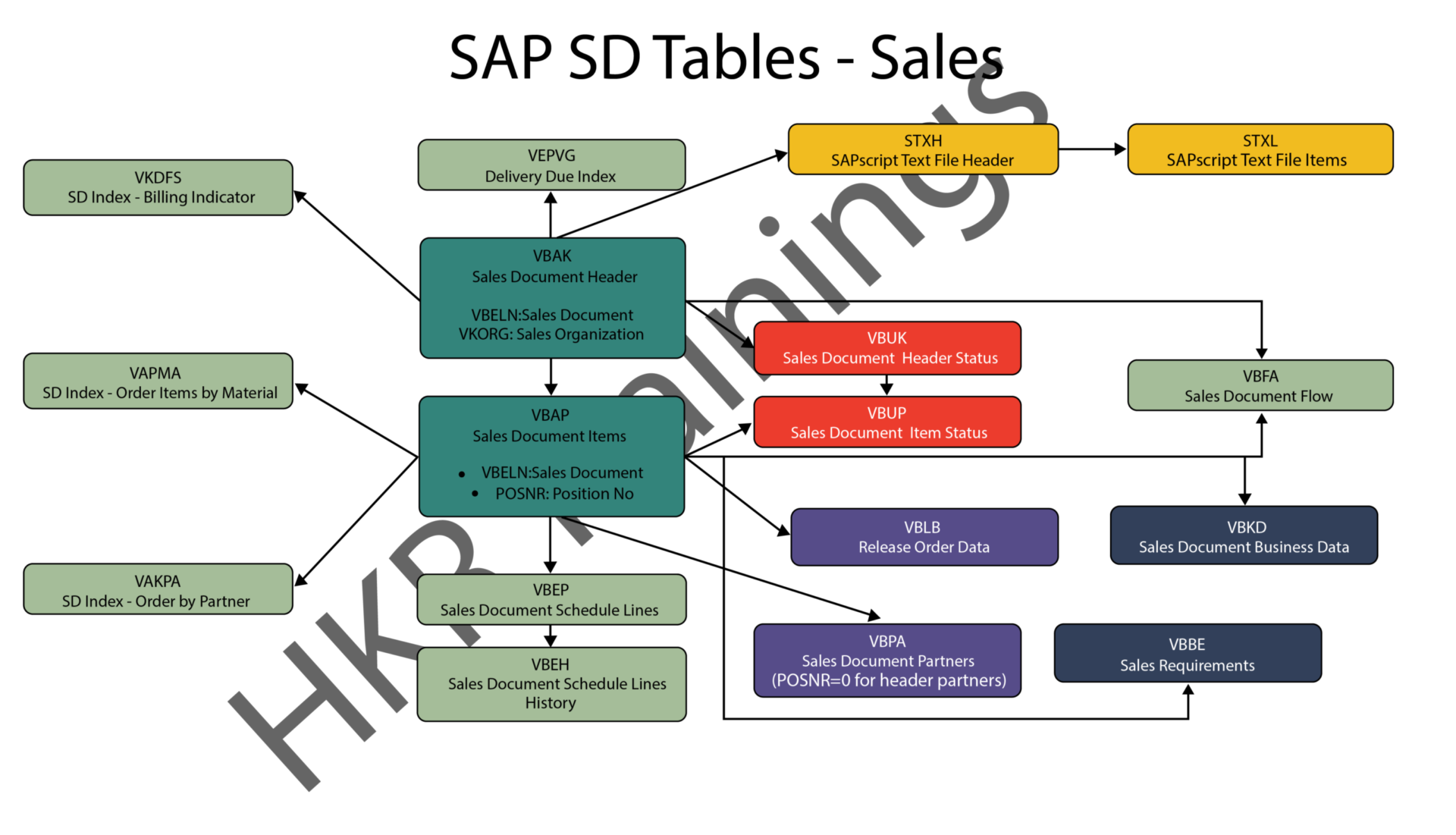
SAP SD Tables | Complete Guide on SAP Sales & Distribution Tables


SD Tables in SAP:

The SAP SD module is built on tables and uses them to store data. We’ll go through SAP SD tables and their relationships in this tutorial. SAP SD tables are critical storage for corporate data connected to SAP ERP software’s sales and distribution activities. The SD tables are basically divided into three parts:

These are the SD module’s building blocks, and it’s only natural to address tables in this sequence. Please look at the slides to see how the tables from different blocks were connected. Being an expert in SAP SD necessitates an understanding of these relationships. 

 Become a SAP SD Certified professional by learning this HKR SAP SD Training !

1) Sales

In SAP SD, the first block is about sales procedures.This indicates that the SAP SD tables in this block would be related to sales orders, quotations, and other similar transactions. We designed a visual slide that lists all of the tables and their relationships. 
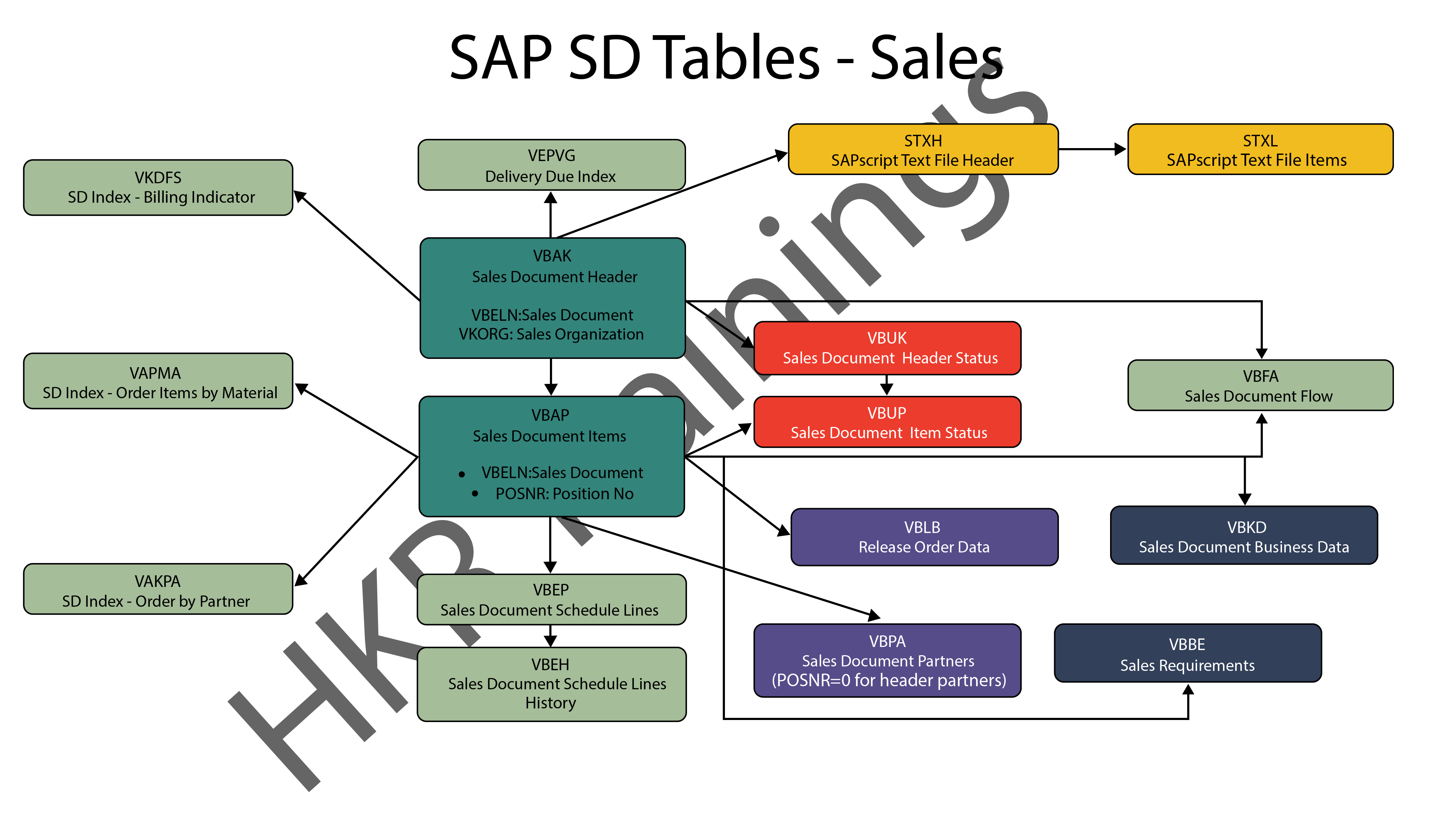
SAP SD Sales

2) Shipping

ThIs section is about SAP SD’s shipping processes. In this section, SAP SD tables deal with inbound and outbound deliveries, as well as shipments. Likewise, we’ve created a visual slide with links illustrating table relationships. 
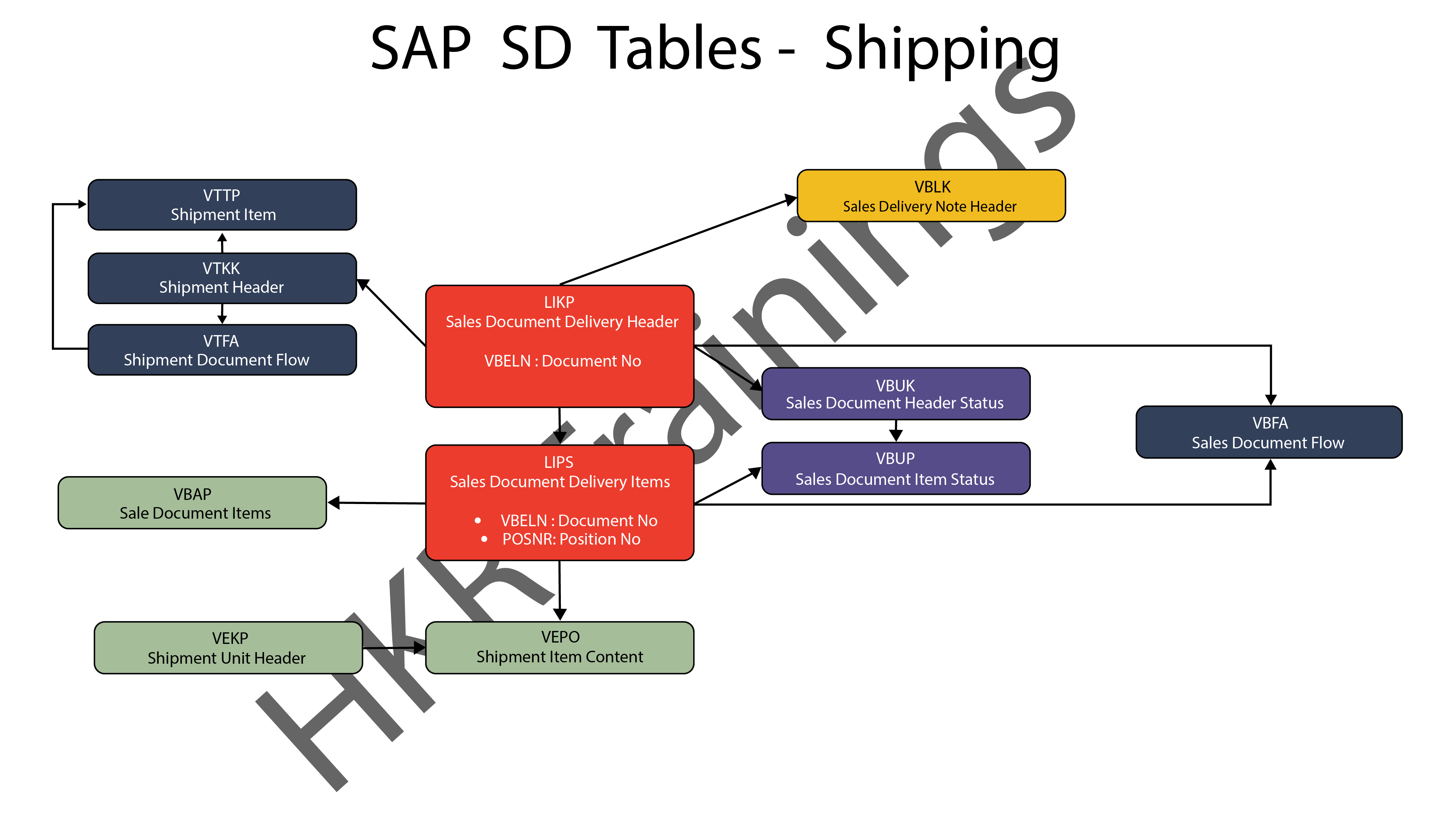
SAP SD Shipping

SAP SD Training

  • Master Your Craft
  • Lifetime LMS & Faculty Access
  • 24/7 online expert support
  • Real-world & Project Based Learning
3) Billing

The billing feature of SAP SD is the last but not least. SAP has a variety of tables which are used to support a company’s billing procedures. Billing documents, as well as other related data, such as output conditions, are saved in these tables by SAP. 
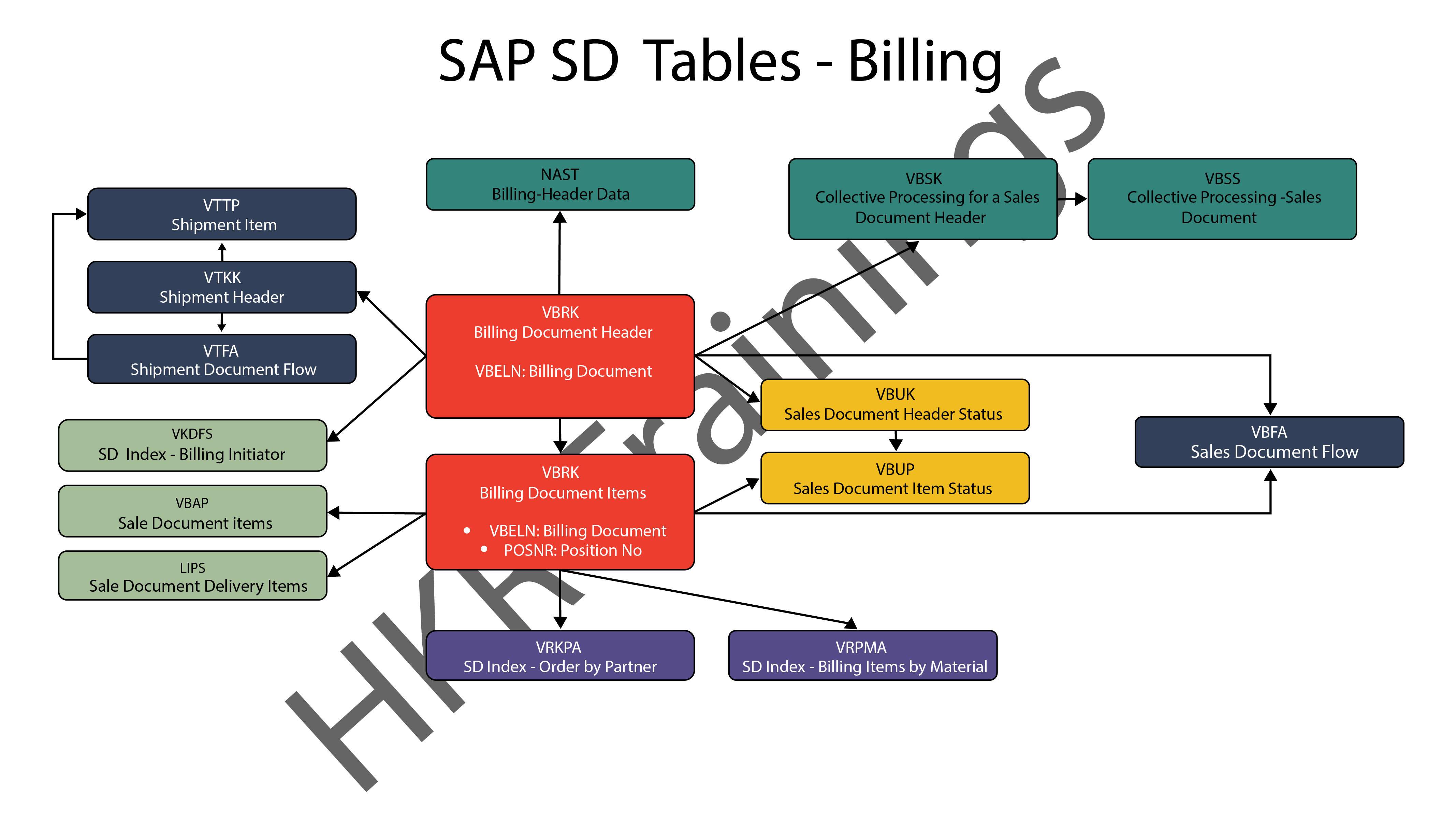
SAP SD Billing

Want to know more about SAP SD,visit here SAP SD Tutorial !

SAP SD Significant Tables for Sales and Distribution

The following are the SAP SD tables for customers, sales documents, delivery documents, billing documents, shipping unit.

1) Customers

KNA1: General Data

KNB1: Customer Master – Co. Code Data (payment method, reconciliation acct)

KNB4: Customer Payment History

KNB5: Customer Master – Dunning info 

KNBK: Customer Master Bank Data

KNKA: Customer Master Credit Mgmt.

KNKK: Customer Master Credit Control Area Data (credit limits)

KNVV: Sales Area Data (terms, order probability)

KNVI: Customer Master Tax Indicator

KNVP: Partner Function key

KNVD: Output type

KNVS: Customer Master Ship Data

KLPA: Customer/Vendor Link

2) Sales Documents

VBAKUK: VBAK + VBUK

VBUK: Header Status and Administrative Data

VBAK: Sales Document – Header Data

VBKD: Sales Document – Business Data

VBUP: Item Status

VBAP: Sales Document – Item Data

VBPA: Partners

VBFA: Document Flow

VBEP: Sales Document Schedule Line

VBBE: Sales Requirements: Individual Records

Top 30 frequently asked SAP SD Interview Questions !

3) SD Delivery Document

LIPS: Delivery Document item data, includes referencing PO

LIKP: Delivery Document Header data

4) Billing Document

VBRK: Billing Document Header

VBRP: Billing Document Item

5) SD Shipping Unit

VEKP: Shipping Unit Item (Content)

VEPO: Shipping Unit Header

Acquire SAP Basis certification by enrolling in the HKR SAP Basis Training in Pune!

SAPS, sap-sd-tables-description-2, SAPS, sap-sd-tables-description-4

Subscribe to our YouTube channel to get new updates..!

The most significant SAP Sales and Distribution (SD) tables for Alteryx users

For users of Alteryx and the DVW Alteryx Connector for SAP, we’ll now look at the most significant SAP Sales and Distribution (SD) tables 
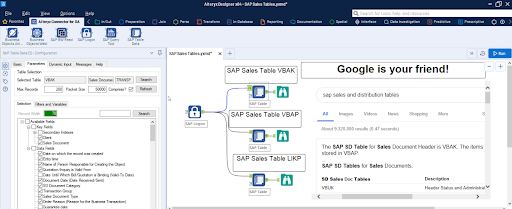
SAP Sales and Distribution table

Related Articles SAP SD Modules !

The following SAP systems contain SAP Sales and Distribution tables:

  • SAP ECC 
  • SAP ERP
  • SAP S/4HANA

SAP Transaction Tables for Sales and Distribution (SD)

The SAP SD transaction tables for sales, delivery and billing process is as follows: 

1) Sales Document Tables

The documents of SAP Sales include:

  • Inquiries
  • Quotations
  • (Sales) Orders
  • Contracts
  • Credit Memo Requests
  • Debit Memo Requests 

The following are the most important tables in a sales document:

  • VBAK – Sales Document: Header Data
  • VBAP – Sales Document: Item Data 

SAP SD Training

Weekday / Weekend Batches


2) Delivery Document Tables

The documents of SAP Delivery include:

  • Delivery / Shipping Notifications
  • Deliveries

The key Delivery Document tables are:

  • LIKP – SD Document: Delivery Header Data
  • LIPS – SD document: Delivery: Item data 

Related Articles SAP SD Flow ! 

3) Billing Document Tables

The documents of SAP Billing include:

  • Invoices
  • Credit Memos
  • Debit Memos
  • Intercompany Invoices

The key Billing Document tables are:

  • VBRK – Billing Document: Header Data
  • VBRP – Billing Document: Item Data

Master Data Tables for SAP Sales and Distribution (SD)

  • KNA1 – General Data in Customer Master
  • KNB1 – Customer Master (Company Code)
  • KNKK – Customer master credit management: Control area data
  • KNVV – Customer Master Sales Data 

Data Tables for SAP Sales and Distribution (SD) Configuration

  • TVFK – Billing: Document Types
  • TVFKT – Billing: Document Types: Texts
  • TVKO – Organizational Unit: Sales Organizations
  • TVZB – Customers: Terms of payment 
  • TVZBT – Customers: Terms of Payment Texts

Conclusion:

We hope this blog is very helpful in knowing various tables discussed on SAP SD.   


Source link

Leave a Reply

Subscribe to Our Newsletter

Get our latest articles delivered straight to your inbox. No spam, we promise.

Recent Reviews


What is Network Security?

The planning and implementation of network security procedures to preserve the integrity of networks and programs against hacking and illegal access is indeed a subcategory of information/cyber security. It defends the organization’s IT structure and network-accessible services against a wide range of cyber threats, including viruses, Trojan, spyware, spam ware, malware, and more. Network security includes user credentials, internet connectivity, firewalls, backups, and encryption. A network security professional’s goal is to make the system more secure by offering technical assistance using intrusion detection systems, encrypting, firewalls, and digital certificates, among other things.

Wish to make a career in the world of JNCIA? Start with JNCIA Training !

What is Cyber Security? 

Cyber security is a broad word that refers to all areas of the internet. It is a subcategory of data security that is concerned with defending the authenticity of systems, devices, and programs against assault, damage, or illegal access from the outside. It refers to a collection of approaches, technologies, and procedures for defending systems and networks from cyber-attacks. It protects networks against unwanted electronic access by putting in place a variety of security mechanisms and controls. All inbound and outbound network traffic is monitored by cyber security professionals to limit the danger of cyber assaults while also protecting the firm from unauthorized system use.

Wish to make a career in the world of Cyber Security? Start with Cyber Security Training! 

Cyber Security Training

  • Master Your Craft
  • Lifetime LMS & Faculty Access
  • 24/7 online expert support
  • Real-world & Project Based Learning

(Network Security vs Cyber security) Difference Between Both

1. Definition

Cyber security is a branch of information security that refers to a set of strategies and methodologies for preventing harm, attack, or illegal access to networks, devices, programs, and data. Cyber security, to put it simply, is the process of defending internet-connected devices and networks against digital threats. The process of safeguarding files and folders in a computer network from misuse, hacking, and illegal access to the system is known as network security. Network security is a subcategory of cyber security that guards against unwanted access to your system and network-accessible resources.

2. Security

While the phrases are interchangeable, they are vastly distinct in nature of security. If you see an organization as a walled castle, network issues are associated with keeping the peace within the castle walls and defending the organization’s sovereignty from network-related threats. Cyber security, on either hand, safeguards a company against external risks such as those posed by the internet. It defends an organization’s systems, networks, and applications against all types of digital attacks, such as phishing, baiting, and so on. The goal of network security is to secure an organization’s IT infrastructure from internet dangers such as viruses.

Wish to make a career in the world of Forescout Administrator ? Start with Forescout Administrator Training

3. Data

Network security becomes a component of cyber security, but cyber security is indeed a broad word like data security. While the authenticity of data and programs is the most important factor in both circumstances, cyber security emphasizes threat monitoring and detection to a higher extent. Network security is primarily concerned with protecting an organization’s IT network from the inside, while cyber security is concerned with protecting an organization’s information security technologies (ICT) against cybersecurity threats that exploit system weaknesses. Network security includes firewalls, user names and passwords, backup, and encryption.

If you have any doubts on Cyber Security, then get them clarified from Industry experts on our Cyber Security Tutorial !

Acquire Cyber Security certification by enrolling in the HKR Cyber Security Training in Banglore!

HKR Trainings Logo

Subscribe to our YouTube channel to get new updates..!

4. Security Expertise

Cyber security experts or analysts are those who, by their knowledge and experience of databases, firewalls, network security, and encryption, are fully responsible for defending network infrastructure and related systems. An expert in cyber security control, detection, and recovery is a cyber security professional. A security professional’s primary responsibility is to monitor all inbound and outbound traffic and to collaborate with other departments within the company to manage risk assessment tools and technology. A network security professional’s job includes securing the organization’s IT infrastructure, which contains data assets, financial data, and other confidential data

Network security and Cyber security

frequently asked Cyber security Interview questions and Answers !!

Cyber Security Training

Weekday / Weekend Batches

Conclusion

In brief, cyber security is an important part of information security dealing with data security during retention and transmission, while network security is indeed a subdivision of cyber security concerned with securing an organization’s IT infrastructure and limiting access to it. Both phrases are frequently used interchangeably, with the exception that cyber security is a much larger term, whereas network security is one component of information/cyber security.

Related Articles

  1. Cyber Security VS Data Science
  2. Cyber security Technologies


Source link