
Google’s New Wearable Doesn’t Have A Screen


Google I/O hasn’t even started yet, but the company is getting ahead of things with its recently teased wearable strap. The Fitbit Air is a screenless device that you can put in a wristband or a chest strap. If you’re deep into fitness wearables, you’ll notice it looks like the Whoop, but with jazzier strap colors. Weighing in at a mere 12 grams (0.42 ounce, it’s available for pre-order today for $100.

Central to the Air experience is the Google Health Coach, which has been in public preview since last October. This is a Gemini-powered interface that can offer personalized suggestions based on your data. The Health Coach will create “dynamic, tailored fitness plans that fit your goals”, apparently. Expect to hear more on all the AI features when the strap eventually lands on May 26.

Each purchase of the Fitbit Air (including a $130 Special Edition) includes 3 months of Google Health Premium. After that, expect to pay $10 a month for access to the most advanced, AI-infused features.

– Mat Smith

The biggest stories you might have missed

DJI’s Osmo Mobile 8P gimbal has a detachable remote with a screen
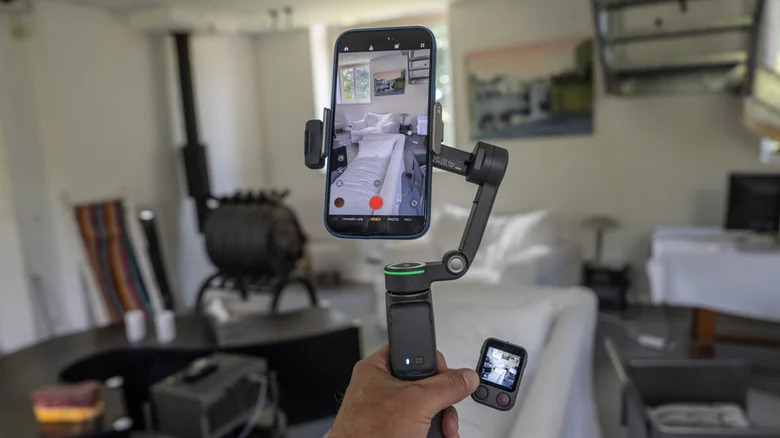
In the opposite direction of Google’s faceless wearable, DJI’s latest camera gimbal comes with a detachable remote with its own screen. The Osmo Mobile 8P remote lets you capture video solo and also features DJI’s latest tracking tech to keep vloggers in frame. DJI’s Osmo Mobile 8P is a more professional version of the Osmo Mobile 8 that arrived late last year and it hooks directly into Apple’s DockKit, like rival gimbals from Insta360 and GoPro.

The handle houses the detachable “Frametap” remote control, with a built-in screen, joystick controller and record button. It lets you tilt and rotate the gimbal and activate smartphone camera recording from over 150 feet away.

DJI’s Osmo Mobile 8P is now available in Europe, starting at £135/€145 in the standard combo or £169/€169 in the Advanced Tracking Combo with the Multifunctional Module 2. It’s not yet available in the US.

Continue reading.

reMarkable Paper Pure review

The Paper Pure is a gorgeous, repairable writing slate that offers the best monochrome writing experience out there. However, in reMarkable’s quest for “distraction-free” purity, they’ve omitted a backlight and doubled down on the company’s clunky file-sync workflow that feels increasingly archaic. With the company pivoting toward enterprise sales and trimming its sails, the Pure is a stunning tool for a specific (and well-lit) niche.

Continue reading.

Snap’s $400 million deal with Perplexity is dead

Snap’s deal with Perplexity to put the AI search engine directly in Snapchat is dead. The two companies “amicably ended the relationship” earlier this year, Snap disclosed in its latest earnings report. In a statement, a spokesperson for Perplexity said that the planned feature was “not the right fit” for either company.

Read More.


Source link

Leave a Reply

Subscribe to Our Newsletter

Get our latest articles delivered straight to your inbox. No spam, we promise.

Recent Reviews


SD Tables in SAP:

The SAP SD module is built on tables and uses them to store data. We’ll go through SAP SD tables and their relationships in this tutorial. SAP SD tables are critical storage for corporate data connected to SAP ERP software’s sales and distribution activities. The SD tables are basically divided into three parts:

These are the SD module’s building blocks, and it’s only natural to address tables in this sequence. Please look at the slides to see how the tables from different blocks were connected. Being an expert in SAP SD necessitates an understanding of these relationships. 

 Become a SAP SD Certified professional by learning this HKR SAP SD Training !

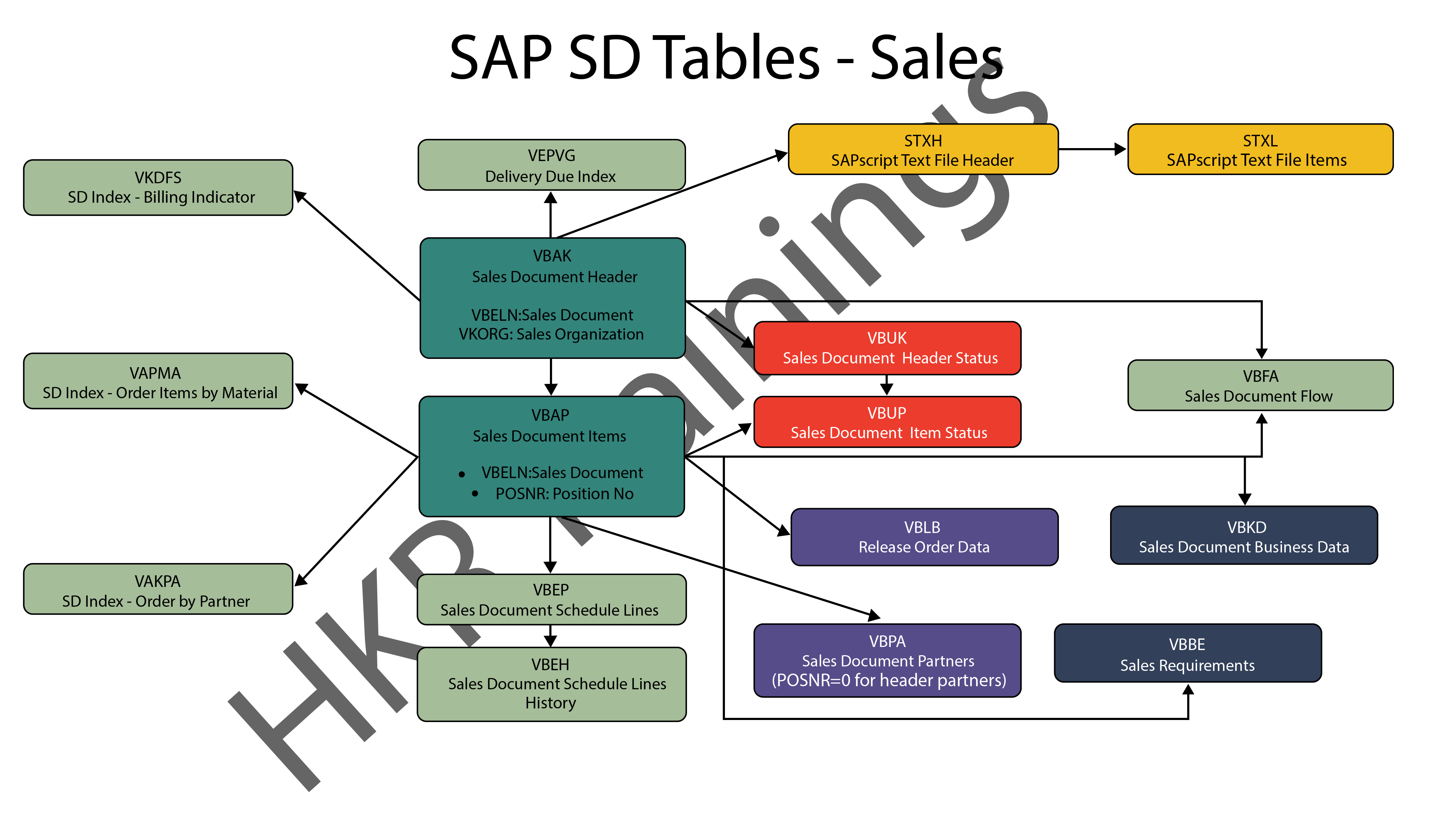
1) Sales

In SAP SD, the first block is about sales procedures.This indicates that the SAP SD tables in this block would be related to sales orders, quotations, and other similar transactions. We designed a visual slide that lists all of the tables and their relationships. 

SAP SD Sales

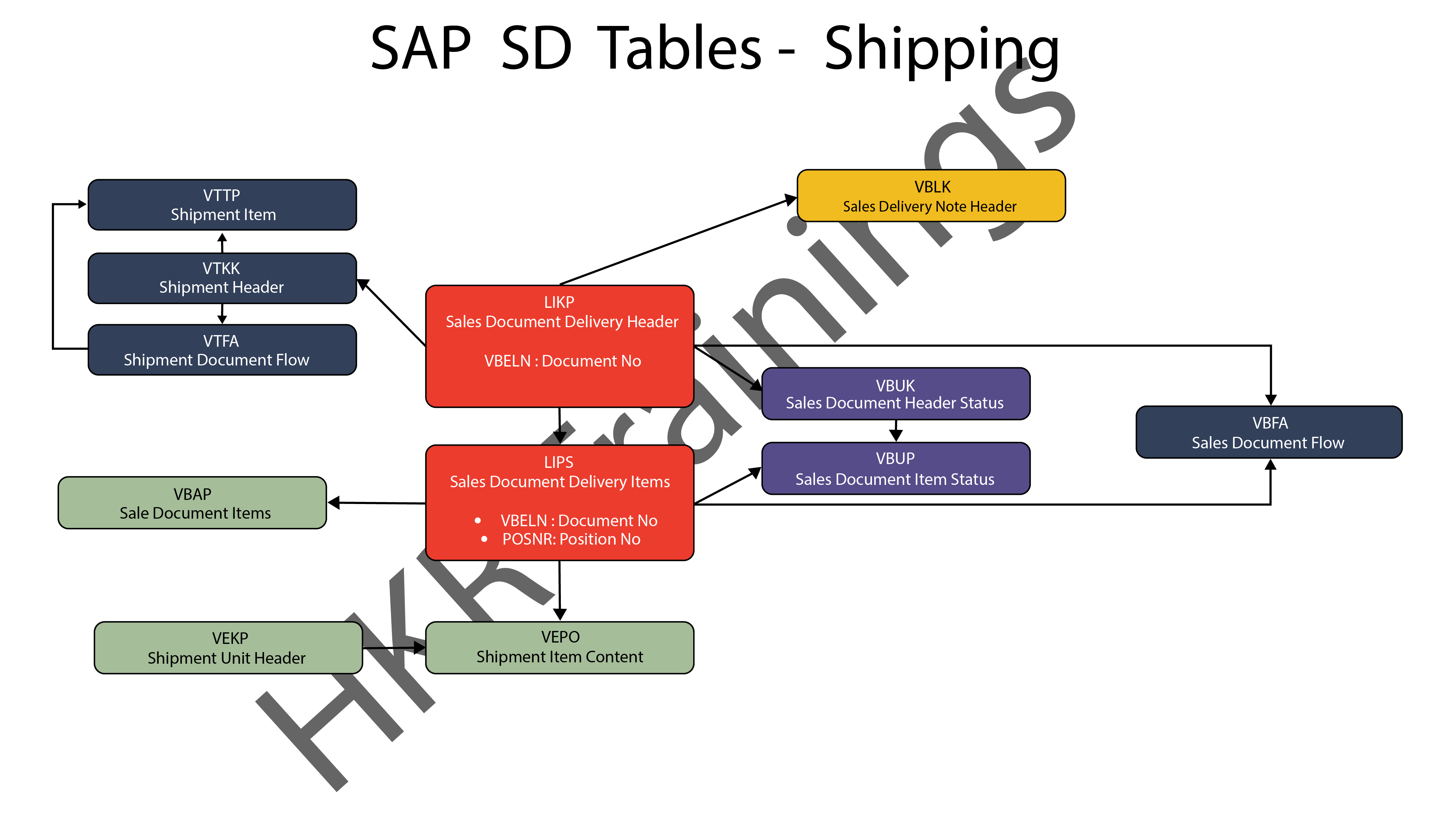
2) Shipping

ThIs section is about SAP SD’s shipping processes. In this section, SAP SD tables deal with inbound and outbound deliveries, as well as shipments. Likewise, we’ve created a visual slide with links illustrating table relationships. 

SAP SD Shipping

SAP SD Training

  • Master Your Craft
  • Lifetime LMS & Faculty Access
  • 24/7 online expert support
  • Real-world & Project Based Learning
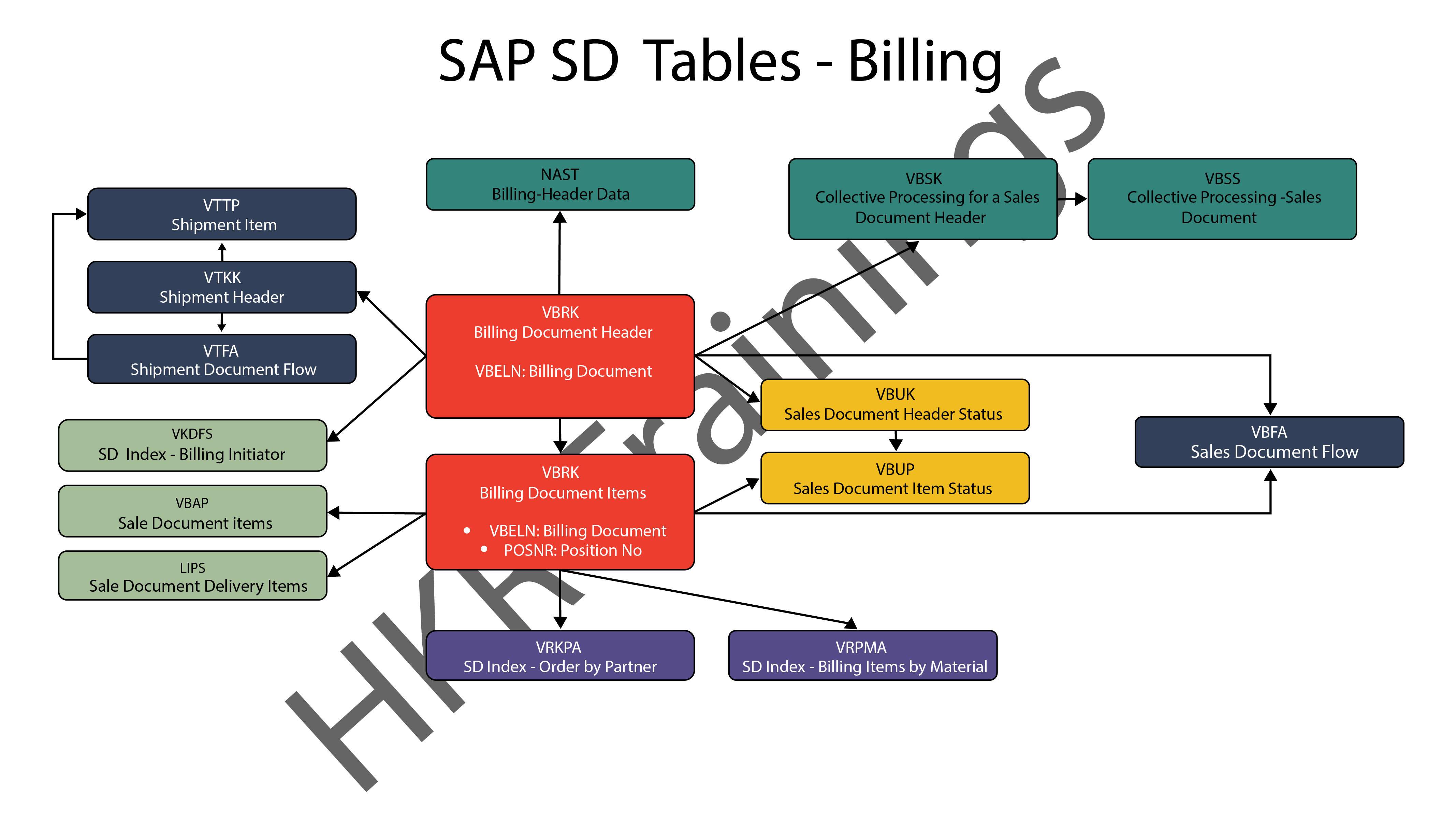
3) Billing

The billing feature of SAP SD is the last but not least. SAP has a variety of tables which are used to support a company’s billing procedures. Billing documents, as well as other related data, such as output conditions, are saved in these tables by SAP. 

SAP SD Billing

Want to know more about SAP SD,visit here SAP SD Tutorial !

SAP SD Significant Tables for Sales and Distribution

The following are the SAP SD tables for customers, sales documents, delivery documents, billing documents, shipping unit.

1) Customers

KNA1: General Data

KNB1: Customer Master – Co. Code Data (payment method, reconciliation acct)

KNB4: Customer Payment History

KNB5: Customer Master – Dunning info 

KNBK: Customer Master Bank Data

KNKA: Customer Master Credit Mgmt.

KNKK: Customer Master Credit Control Area Data (credit limits)

KNVV: Sales Area Data (terms, order probability)

KNVI: Customer Master Tax Indicator

KNVP: Partner Function key

KNVD: Output type

KNVS: Customer Master Ship Data

KLPA: Customer/Vendor Link

2) Sales Documents

VBAKUK: VBAK + VBUK

VBUK: Header Status and Administrative Data

VBAK: Sales Document – Header Data

VBKD: Sales Document – Business Data

VBUP: Item Status

VBAP: Sales Document – Item Data

VBPA: Partners

VBFA: Document Flow

VBEP: Sales Document Schedule Line

VBBE: Sales Requirements: Individual Records

Top 30 frequently asked SAP SD Interview Questions !

3) SD Delivery Document

LIPS: Delivery Document item data, includes referencing PO

LIKP: Delivery Document Header data

4) Billing Document

VBRK: Billing Document Header

VBRP: Billing Document Item

5) SD Shipping Unit

VEKP: Shipping Unit Item (Content)

VEPO: Shipping Unit Header

Acquire SAP Basis certification by enrolling in the HKR SAP Basis Training in Pune!

SAPS, sap-sd-tables-description-2, SAPS, sap-sd-tables-description-4

Subscribe to our YouTube channel to get new updates..!

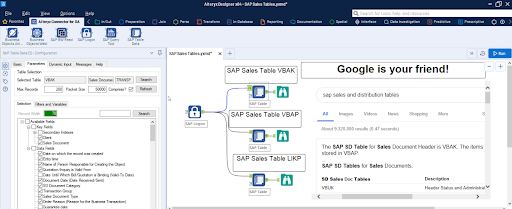
The most significant SAP Sales and Distribution (SD) tables for Alteryx users

For users of Alteryx and the DVW Alteryx Connector for SAP, we’ll now look at the most significant SAP Sales and Distribution (SD) tables 

SAP Sales and Distribution table

Related Articles SAP SD Modules !

The following SAP systems contain SAP Sales and Distribution tables:

  • SAP ECC 
  • SAP ERP
  • SAP S/4HANA

SAP Transaction Tables for Sales and Distribution (SD)

The SAP SD transaction tables for sales, delivery and billing process is as follows: 

1) Sales Document Tables

The documents of SAP Sales include:

  • Inquiries
  • Quotations
  • (Sales) Orders
  • Contracts
  • Credit Memo Requests
  • Debit Memo Requests 

The following are the most important tables in a sales document:

  • VBAK – Sales Document: Header Data
  • VBAP – Sales Document: Item Data 

SAP SD Training

Weekday / Weekend Batches


2) Delivery Document Tables

The documents of SAP Delivery include:

  • Delivery / Shipping Notifications
  • Deliveries

The key Delivery Document tables are:

  • LIKP – SD Document: Delivery Header Data
  • LIPS – SD document: Delivery: Item data 

Related Articles SAP SD Flow ! 

3) Billing Document Tables

The documents of SAP Billing include:

  • Invoices
  • Credit Memos
  • Debit Memos
  • Intercompany Invoices

The key Billing Document tables are:

  • VBRK – Billing Document: Header Data
  • VBRP – Billing Document: Item Data

Master Data Tables for SAP Sales and Distribution (SD)

  • KNA1 – General Data in Customer Master
  • KNB1 – Customer Master (Company Code)
  • KNKK – Customer master credit management: Control area data
  • KNVV – Customer Master Sales Data 

Data Tables for SAP Sales and Distribution (SD) Configuration

  • TVFK – Billing: Document Types
  • TVFKT – Billing: Document Types: Texts
  • TVKO – Organizational Unit: Sales Organizations
  • TVZB – Customers: Terms of payment 
  • TVZBT – Customers: Terms of Payment Texts

Conclusion:

We hope this blog is very helpful in knowing various tables discussed on SAP SD.   


Source link