What is a star schema?

Star schemas are the most basic structure for storing data in a data warehouse. A star schema’s centre is made up of one or more “fact tables” that index a series of “dimension tables.” To fully comprehend star schemas, as well as snowflake schemas, fact tables and dimension tables must be thoroughly examined.

What is a Snowflake schema?

A snowflake schema’s purpose is to normalise the denormalized data in a star schema. This eliminates the write command slowdowns and other issues that are commonly associated with “star schemas.”

A “multi-dimensional” framework seems to be the snowflake schema. At its heart are fact tables which communicate the data gleaned in dimension tables, which radiate upwards and like a star. The snowflake schema’s dimension tables, on the other hand, start dividing themselves into multiple tables. This results in the snowflake pattern.

Become a Snowflake Certified professional by learning this HKR Snowflake Training !

Snowflake Training

  • Master Your Craft
  • Lifetime LMS & Faculty Access
  • 24/7 online expert support
  • Real-world & Project Based Learning

Star schema vs snowflake schema:

The following are the key differences between the start schema and snowflake schema across multiple factors.They are:

1. Working and organizing the data

Data orgaing in star schema:

The goal of a star schema is to separate numerical “fact” data about a business from descriptive, or “dimensional” data. Price, weight, speed, and quantities that is, data in a numerical format will be included in fact data. Colors, model names, geographical locations, employee names, salesperson names, and so on will be included in dimensional data, in addition to numerical information.

The factual data is organised into fact tables, while the dimensional data is organised into dimension tables. In the data warehouse, fact tables are the integration points at the centre of the star schema. They enable machine learning tools to analyse the data as a whole, and they allow other business systems to access the data as well. Dimension tables store and manage data (both numerical and nonnumerical) that flows through fact tables to form the data warehouse.

From a technical point of view, fact tables make note of numeric data related to various events. They could, for instance, include numeric values as well as foreign keys that map to additional (descriptive and nonnumerical) information in dimension tables. To get more analytical, fact tables keep a low level of granularity (or “detail”), which means they record information at a more atomic level. This could result in a large number of records being added to the fact table over time.

Data organizing in snowflake:

The snowflake schema normalises the dimension tables it connects with using this “snowflaking” method by (1) removing “low cardinality” attributes (that appear multiple times in the parent table); and (2) splitting the dimension tables into multiple tables until the dimension tables are completely normalised.

The snowflake database, like snowflake patterns in nature, becomes extremely complex. The schema can generate complex data relationships in which child tables have multiple parent tables.

Get ahead in your career with our Snowflake Tutorial !

2. Dimension table normalisation

The snowflake schema is a data structure that has been fully normalised. Separate dimensional tables are used to store dimensional hierarchies (such as city > country > region).Because it saves space, it can be used when the Dimension Table is relatively large.

Star schema dimensions, on the other hand, are denormalized. The repetition of the same values within a table is referred to as denormalization.It can be used when the Dimension Table contains fewer rows.

3. Redundancy in data

Snowflake schema fully normalizes dimension tables and avoids data redundancy, whereas star schema stores redundant data in dimension tables.Because the Snowflake Schema does have low data redundancy, it is cheaper to update and change.

A star schema, for example, would repeat the values in the field customer address country for each order from the same country.The Star Schema does have a high level of data redundancy, making it hard to maintain and modify.

The denormalization vs normalisation schema design causes redundancy, or duplicated entries.

4. Complexity of the query

A straightforward star schema relates to straightforward query creation. Analysts do not need to write multiple joins because the fact table is joined to only one level of dimensional tables.It is easy to understand  and has low query complexity.

Snowflake schemas, but on the other hand, necessitate a more complex query design. More joins are required to link the additional tables due to the complex relationships between the fact table and its dimensional tables. This adds to the overhead when writing analytical queries.

5. Performance of queries

Star schemas have a faster query execution time. Because dimensional tables require a single join between a fact and its set of attributes, a star schema functions almost as a single table for query lookups.

Snowflake schemas, on the other hand, necessitate complex joins of dimensional tables with their own sub-dimensional or supra-dimensional tables. This slows query processing and may have an impact on other OLAP products such as cube processing.

6. Hard drive space

Star schemas may run queries faster, but due to data redundancy, they require more storage space than snowflake schemas.

7. The integrity of data:

Star schemas put data integrity at greater risk than snowflake schemas. Because data is stored redundantly, multiple copies of the same data exist in the dimensional tables of the star schema. This means that new inserts, updates, or deletes can jeopardise data integrity.

The snowflake schema, on the other hand, is less vulnerable to data integrity issues because it fully normalises dimensional tables, storing dimension data only once in the appropriate table.

8. Installation and upkeep

Snowflake schema is a bottom up model.Star schemas are simpler to develop and implement. Since they are depicted by straightforward relationships, creating a suitable star schema is simple for a database developer or data architect.

Star schemas, but on the other hand, are more tough to sustain than snowflake schemas. Star schemas become more difficult to maintain and check for data integrity violations as new information is consumed into the data warehouse.Star schema is a top -down model.

Data Warehousing & ETLs, star-schema-vs-snowflake-schema-description-0, Data Warehousing & ETLs, star-schema-vs-snowflake-schema-description-1

Subscribe to our YouTube channel to get new updates..!

Benefits of star schema:

The following advantages are provided by star schemas:

  • Because all of the data connects through the fact table, the multiple dimension tables are treated as one large table of information, making queries simpler and easier to perform.
  • Easier reporting of business insights: Star schemas make it easier to pull business reports such as as-of-as and period-over-period reports.
  • Better-performing queries: By expelling the bottlenecks of a highly normalised schema, query speed and read-only command performance improve.
  • Data is provided to OLAP systems: Star schemas can be used to create OLAP cubes in OLAP (Online Analytical Processing) systems.

Top 30 frequently asked snowflake interview questions & answers for freshers & experienced professionals

Benefits of snowflake schema:

Snowflake schemas have the following advantages over standard star schemas:

  • Many OLAP database modelling tools are compatible with it: Certain OLAP database tools, such as those used by data scientists for data analysis and modelling, are particularly developed to function with snowflake data schemas.
  • Reduces the need for data storage: Normalizing data that would normally be denormalized in a star schema could indeed result in a significant reduction in disc space requirements. Largely, this is due to the fact that you are converting long strings of non-numerical data into numerical keys, which are significantly less taxing in terms of storage.

Challenges of snowflake schema:

There are three potential problems with snowflake schemas:

  • Snowflake schemas, as you could expect, add many levels of complexity while normalising the attributes of a star schema. As a result of this complexity, source query joins become more complicated. Snowflake’s ability to provide a more efficient way of storing data may result in performance degradation when browsing these complex joins. Nonetheless, advances in processing technology have resulted in improved snowflake schema query performance in recent years, which is one of the reasons why snowflake schemas are becoming more popular.
  • Slower cube information systems: Complex joins inside a snowflake schema result in slower cube data processing. In a broad sense, the star schema is preferable for cube data processing.
  • Low concentrations of data integrity: While snowflake schemas provide greater normalisation and fewer risks of data corruption after performing UPDATE and INSERT commands, they do not provide the level of transnational assurance that a traditional, highly-normalized database structure does. As a result, when loading data into a snowflake schema, it’s critical to be cautious and double-check the information’s quality after loading.

Snowflake Training

Weekday / Weekend Batches

Challenges faced by star schema:

Working to improve read queries as well as analysis in a star schema may present the following challenges:

  • Data integrity is compromised: Because of denormalized data structure, star schemas do not start enforcing data integrity quite well. Although star schemas employ steps to prevent anomalies from forming, a straightforward insert or update command could still result in data inconsistencies.
  • Database design creates and optimises star schemas for different analysis needs, making them less able to handle vast and varied queries. They work the best with a fairly narrow set of simple queries because they are denormalized data sets. A normalised schema, on the other hand, allows for a much broader range of more complex analytical queries.

Conclusion:

Which one of the two kinds of data warehouse schema will you be using?

Star schemas, on the other hand, are easier, running applications faster, and are simple to set up.Snowflake schemas, but on the other hand, are much less vulnerable to data integrity issues, are cheaper to update, and take up less space.

Premised on the tradeoffs discussed above, it really is up to you to determine which advantage (or disadvantage) better serves your company’s use situations.

Related Articles:


Source link

Leave a Reply

Subscribe to Our Newsletter

Get our latest articles delivered straight to your inbox. No spam, we promise.

Recent Reviews


Denodo Tutorial – Table of Content

This tutorial covers a wide range of Denodo Platform features. We’ll start with an overview of fundamental definitions like what is Denodo and why the Denodo platform is used and then will explore the topics of Data Virtualization, Data Services, integrating big data system to Denodo platform, implementing agile BI for Data Virtualization, what are 3C principles of Denodo, and how to create and deploy the web services.

Let’s go through the Denodo concepts in detail.

1. What is Denodo?

Denodo Express is Denodo Technologies, Inc.’s newest product, a free data virtualization utility with a graphical user interface-based studio. Denodo Express connects to and integrates structured, unstructured, and big data sources on-premises and in the cloud. End-users have access to these sources, as well as enterprise apps, dashboards, portals, Intranet, search, and other tools.

                 Take your career to next level in Denodo with HKR. Enroll now to get Denodo Training!

2. Why the Denodo Platform?

The Denodo Platform offers breakthrough performance in big data, logical data warehouses, and operational scenarios; it accelerates adoption via cloud data virtualization. It streamlines business users’ data through self-service data discovery and searches.

3. Basics of Data Virtualization

3.1 Why data virtualization?
Data virtualization produces a single virtual layer that connects different data and allows consuming apps to have uniform access to it. These apps will take advantage of the virtual layer’s semantic components and reuse them as necessary. Your applications would be independent of the physical sources where the data is kept in this manner.

The Denodo Platform offers the following features:

  • Data services are simple to create.
  • Data Services that are not dependent on a physical source (s).
  • Control your data sources from a single point.
  • Development cycles are short and agile.
  • Little to no coding!
  • Simple needs require intuitive solutions.
  • All clients will be able to reuse your models.

3.2 Installation & Bootstrapping 
This section explains the prerequisites for utilizing Denodo, and also how to configure your Denodo setup and get started with Denodo Data Virtualization.

  • Denodo Platform 8.0 – Download the installer and license from https://community.denodo.com/ express.
  • MySQL 5.0 or higher – Some of the data sources used in the lesson will require MySQL (or another relational database). It’s available for download here: http://dev.mysql.com/downloads/mysql/
  • MySQL Connector/J 5.0 or higher – Denodo will be able to connect to MySQL using this JDBC driver: http://dev.mysql.com/downloads/connector/j/
  • MySQL Workbench 5.0 or higher – These are some handy MySQL tools that you might want to use, although they aren’t necessarily required for the tutorial:
    http://dev.mysql.com/downloads/tools/workbench/
  • Denodo Tutorial Files – Download and extract the contents of the zipped Tutorial files to a handy local directory, which will be referred to as in this guide.

3.3 Initial Steps
The following are the first steps in using the Denodo Platform, which cover the most fundamental functionality:

  1. Starting the Denodo server and applications.
  2. Find out how to use the Denodo Administration tool.
  3. Make a database for development.
  4. Make folders to help you organize your database.
  5. Relational databases should be imported.
  6. Run the queries.
  7. Make an easy combination view.

3.4 Advanced Operations
You’ll combine the unified customer view you’ve created with this billing information in this section to create a report that shows the total amount due for each of your clients.

  • Create a data source for a Web Service.
  • A hierarchical system that has been flattened.
  • See how Tree View is used to create derived views.
  • Make a view that brings together data from various sources.
  • Create a view for aggregation.

3.5 Using your application to connect
The Denodo Platform is built on a client-server model, in which clients send requests to the server. One of the following interfaces could be used to send these requests:

  • JDBC: Denodo’s proprietary JDBC driver is provided.
  • ODBC: An ODBC interface is provided by Denodo (additional components must be installed).
  • ADO .Net: The Npgsql ADO.Net provider for PostgreSQL is compatible with Denodo.
  • RESTful web service (XML, JSON, HTML outputs): For apps that can’t connect to Denodo through JDBC or ODBC.

Several methods for accessing Denodo from outside apps are discussed in this section:Using a JDBC Client via a Third Party.

  • Using ODBC.
  • Use a Denodo RESTful Web service to consume it.
  • Browse through Linked Data.

3.6 Performance of an Agile
Data through users. ItAfterata Virtualization software accesses and pulls data from target sources at runtime, then blends it in real-time to provide the desired outcome. Denodo is too vital, although not exclusive, part of any data management architecture. When assessing performance, it’s critical to determine which elements constitute bottlenecks.

4. Data Services

The Data Services layer is an abstraction layer that can supply data to various users on an enterprise-wide scale. Using the views in the virtual layer, Data Virtualization software can quickly develop new Data Services. A uniform, consistent, and scalable data services infrastructure is required in many projects.

What are the most prevalent problems that these services encounter?

  • Complex architectures make it difficult and time-consuming to integrate different systems.
  • Rigid infrastructure that makes it difficult to respond swiftly to customer requests with new services.
  • Excessive reliance on the IT department.

Advantages of a Data Services layer

  • Every business application can access all information through a single data layer.
  • Many issues can be solved by relying solely on the Data Services layer.
  • As though all sources were homogeneous, you can access them all.
  • Simple ESB software plugins

Defining contracts/interfaces

An interface is a form of view in Denodo that consists solely of the description of fields and their data types. The most typical application is in a top-down design, where you create the fields first and then associate the interface implementation(data).

SOAP Web services 

Web services are software solutions that enable interoperable machine-to-machine communication via the internet. SOAP Web services would be covered in this section. To exchange messages, these Web services employ the SOAP (Simple Object Access Protocol) protocol. The messages are as follows, according to the specifications:

REST Web services

As you may know, Web services are software solutions that enable interoperable machine-to-machine communication over a network. In this section, we’ll discuss REST Web services, which are different kinds of Web services. This type of service communicates through HTTP and uses the REST (REpresentational State Transfer) architectural style as the messaging protocol.

Publish Web services

The Web Container Status Window in the Denodo Administration Tool is used to manage REST and SOAP services. To bring up this window in the workspace, go to Tools > Web services container in the menu bar. A table will appear in the Administration Tool, listing the Web services generated in a certain Denodo Database.

Invocation of services

REST services work in the same way as RESTful services, however, you only have access to the views built with this REST service in this case. A SOAP client is used to call SOAP Web services.

Change Web service Implementation

It’s to make a derived view and use it to implement the i_client_info interface. You’ll set up the i_client_info interface to utilize client_info_impl as its implementation view in this section.

Denodo Training

  • Master Your Craft
  • Lifetime LMS & Faculty Access
  • 24/7 online expert support
  • Real-world & Project Based Learning

5. Big Data

The marketing department compiles a list of possible new clients on a regular basis. An Apache Hadoop distribution is in place to process the input data and produce the needed outputs in order to construct this list of prospects. You’ll learn how to integrate a Big Data system into the Denodo Platform in this section.

Using Hive for creating JDBC Data Source

Apache Hive is a piece of software that makes querying and handling massive datasets in distributed storage easier. HiveQL is a SQL-like language that allows you to project structure onto this data and query it.

Connecting to Other Big Data systems

This explains using Denodo Platform 8.0 to access various Big Data platforms. Because Denodo Platform connects to so many different data sources, the following list is the best options that are used for connecting to these systems from Denodo Platform:

  • Apache Impala
  • HBase
  • Presto
  • SparkSQL
  • HDFS
  • Splunk
  • MapReduce

Using the REST API for Accessing HCatalog

HCatalog is a Hadoop table and storage management layer that makes reading and writing data easier. Users can get a relational view of their data on HDFS with HCatalog, and they don’t have to worry about where or how their data is stored.

6. Agile BI

Denodo Agile BI will go through the basics of leveraging Data Virtualization tools, as well as how the Denodo Platform analyzes enterprise data for operational insight. This article will demonstrate the key advantages of adopting Data Virtualization rather than connecting BI tools directly to data sources.

Agile BI we’ll go through the following stages:

  1. Presenting the use case.
  2. Implementing Solutions with Denodo.
          1) Connecting Data Sources.
          2) Blending the Data.
          3) Generating Final Reports for Publishing Data for Clients
  3. Using a BI tool for consuming data.

Business problem

Traditional methods to business intelligence sometimes result in the same logic being built over and over again across many BI and Reporting systems in order to generate similar results. The business logic required to build all of the reports will be centralized by the Data Virtualization layer, allowing it to be simply maintained and modified, as well as easily shared with a range of external BI tools without having to duplicate code across them.

Connecting to Data Sources

All data is organized into a unified perspective of marketing promotion performance. This is how the procedure will go:

  1. Connect Denodo to your data sources for real-time data retrieval.
  2. Combine the information after applying the necessary transformations and normalizations.
  3. Prepare final reports for consumption.
  4. Publish the client application’s data.

Combining the data

We can begin combining all of the data now that we have the data sources and base views in place. The first step is to create a denormalized, standardized view of each data source so that we can create a set of foundation business entities from which we may build more complex reports later.

Publishing the data for clients

This BI tool connects to Denodo through ODBC and sends regular SQL queries. Denodo automatically delivers all views (base and derived) over JDBC and ODBC by default; we just need to perform manual publishing procedures when establishing web services.

Using a BI tool

A client tool is used to access the views we developed in the Denodo Platform. We’ll use Tableau, however, Denodo may be accessed using the JDBC, ODBC, or Web Services interfaces by any standard tool.

7. The 3 Cs Principles of Denodo

Data virtualization is a layer that allows organizations to integrate real-time data from multiple sources and make it available to them without exposing any technical details (e.g., data center, database, data source, data structure, etc.). Denodo’s approach is based on the “Three Cs principle.”

  • Connect — Connecting any data source (e.g. APIs, files, databse, etc.).
  • Combine — Since the goal of data virtualization is to collect data from different sources and blend it to meet a business need, this layer is designed to do just that. A developer is expected to define the data transformation and combination to suit business requirements in this layer.
  • Consume — Finally, a method/medium for making real-time data available to data consumers. Denodo offers a number of options for users to access data, including an ODBC interface, JDBC drivers, and web services (SOAP/REST).
7.1 Steps to Get Started with the Denodo Admin Tool

Let’s have a look at Denodo’s 3 Cs implementation in practice after finishing the installation of Denodo installation.

1) After installation, open the Denodo Admin Tool.

Denodo Admin Tool

HKR Trainings Logo

Subscribe to our YouTube channel to get new updates..!

2) Connect to the Denodo Admin Tool by logging in, providing login credentials, and clicking “connect.” On the admin tool, you should be able to see the landing view (as shown below).

 Denodo Admin Tool landing view

Note: Denodo’s default databases are Admin and itpilot. You should keep them instead of deleting them.

3) The best method to get started on a new project is to build a new database. Go to Menu -> Administration -> Database management -> New to create a new database.

Database management

4) Denodo’s nomenclature is split into layers — Derived View, Web Service, Data Source, Base View. Create these folders with the specified nomenclature in the new database (Right-click on database name-> New-> Folder). This will make it easier to maintain the various elements based on their functions.

7.2 Connect
Let’s take a look at Denodo’s first C Principle, which is “Connect.” To connect to the desired data source, we’ll construct a data source here.

Steps for Creating a Data Source

  • Right-click on the Data Source folder -> New -> Data source -> JDBC.

Steps for Creating a Data Source

  • Give the data source a name.
  • As the database adaptor, select “MySQL 5.”
  • To match the local MySQL installation, change the Database URI.
  • Enter in the login and password for the database.
  • Select “Connection Pool configuration” and make a connection test with “Test connection.”

Connection Pool configuration

Note: We’ve only dealt with relational data sources so far, but Denodo also supports files, NoSQL databases, APIs, and other data sources.

7.3 Combine
The second key C premise is this. In this section, we’ll learn how to make a base view. The base view would connect to the data source created in “Connect” and give a variety of operations on Base Views that can be used to generate Derived Views.

Steps for Creating a Base View

  1. Double click on the Data Source -> Create Base View.
  2. Choose the table/view from which to build the base view.
  3. Choose which columns should be included in the base view. The developer can choose which data to display on the Base View.

Steps for Creating a Base View

Steps for Testing the Base View

  1. Right-click on Base View -> VQL Shell -> Select -> Execute.
  2. On the right side of the element tree, you must see a select query that returns real-time results.

Steps for Testing the Base View

Note: Derived Views could be built by querying one or multiple Base Views after the Base View has been created.

Derived Views

Derived Views are simple views produced by combining single/multiple Base Views with various operations like JOIN/UNION/MINUS, and so on.

Steps for Join Operation

  • Right-click on Base View -> New -> Join. A new view window will open.
  • The views can be dragged and dropped from the element tree.
  • Connect the join column of one view to the join column of other views by dragging it from one view to the other’s join column. Denodo supports multiple join procedures, so you can join various views to reach the desired result. On Client_id, the client and address are joined, as shown in the screenshot below. On client_type and code, Client and client_type are joined.

Steps for Join Operation

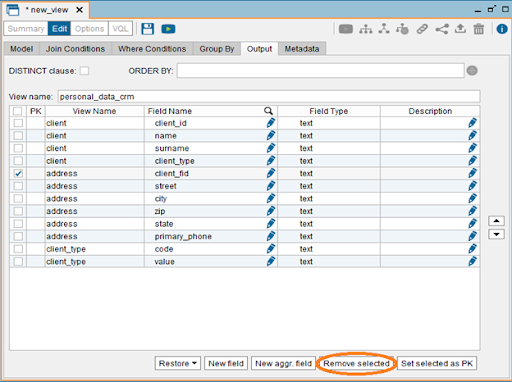
  • To choose only the required columns from these three views, go to the Output tab and use the checkbox to delete the non-required columns.
  • Click the save button or press ctrl + s to rename the view to a logical name.

checkbox to delete

Aside from the JOIN operation, Denodo offers a variety of other relational operations: SELECTION, AGGREGATION, UNION, PROJECTION, FLATTEN, MINUS/INTERSECTION

Using the same steps as before, new views can be generated by Right-click-New Operation.

7.4 Consume
This is Denordo’s third important C principle. The adoption of this idea would provide real-time data to business users/enterprise applications.

Let’s examine how Denodo plans to make the data available to users. Denodo is a company that focuses on client-server architecture. It offers an ODBC interface, JDBC drivers, RESTful Web Services (with HTML, XML, JSON outputs).

Now you will see how to use Denodo’s RESTful Web services. Denodo’s web services are built on REST (Representational State Transfer) architecture principles and use HTTP.

  1. Using HTTP verbs (GET, POST, PUT, or DELETE), define a set of operations.
  2. The data is usually returned in HTML, XML, or JSON format.
  3. Every view in Denodo can be published as a REST web service, allowing external applications to access the data.
  4. ODATA 4.0 web services are also supported by Denodo.

8. Creating a Web Service
  • Right Click on the Derived View/BaseView -> New -> Data services -> REST Web Service.

Creating a Web Service

  • This will display the view from which the web service was built. On use case Demand, several views can be introduced as part of a single web service.
  • Give your web service a logical name and choose from JSON, XML, or HTML to represent the data.

HTML to represent the data.

9. Deploying Web Service
  • Deploy the web service by right-clicking it.
  • This step will deploy the web service and provide you with the URL where you can access it.

Deploying Web Service

Denodo Training

Weekday / Weekend Batches

Conclusion

We hope this tutorial is very useful to you and with this, you have mastered the concepts of implementing the 3 C’s principles of Denodo to connect, combine and consume. Initially, we have covered the concepts like basics of Data Virtualization and its operations, the data services like REST and SOAP, and other Big data and Agile BI so as to make you understand it from scratch.

Related Articles:


Source link