7 Foods With More Magnesium Than a Bowl of Oatmeal


Medically reviewed by Kierra Brown, RD

Oats are a good source of magnesium, but seeds are also good sources.Credit: Arx0nt / Getty Images
Oats are a good source of magnesium, but seeds are also good sources.
Credit: Arx0nt / Getty Images
  • Magnesium is a vital mineral that supports healthy sleep, bone strength, and muscle function.
  • There are several foods with more magnesium than oats, including various seeds and nuts, spinach, and avocados.
  • Simple additions to meals, like sprinkling chia on yogurt, can easily boost your intake.

Oatmeal contains about 60 milligrams per cup, but several foods have more magnesium than oats. Eating foods high in magnesium supports your muscles, nerves, and bones.

1. Pumpkin Seeds

Credit: Arx0nt / Getty Images

Magnesium: 168 milligrams (mg) in 1 ounce

Snacking on pumpkin seeds is an easy way to boost your magnesium intake. These seeds are also rich in zinc and iron, nutrients that help support your immune system. You also get a decent 8.5-gram dose of protein in every serving.

You can eat pumpkin seeds raw or roasted. They make a great topping for salads and soups, and you can try mixing them into yogurt for added texture.

2. Spinach

Credit: bhofack2 / Getty Images

Magnesium: 157 mg in 1 cup cooked spinach, 23 mg in 1 cup fresh spinach

Leafy greens like spinach are rich in nutrients and essential minerals. You also get a healthy boost of iron and vitamin K.

You can stir cooked spinach into soups, stews, and curries. You can also eat raw spinach in salads and sandwiches.

3. Whole Wheat 

Credit: Daniel Gigliotti / 500px / Getty Images

Magnesium: 117 mg in 100 grams of whole wheat flour

Whole wheat flour is made from the entire grain seed. It keeps the healthy outer layers, preserving the nutritious fiber and minerals. Processing wheat into white flour removes these parts and strips away minerals, like magnesium. Whole wheat flour has about three times as much magnesium as white flour.

You can easily swap refined grains for whole wheat options. Choose whole wheat bread for your toast or sandwiches. When baking muffins or pancakes, try using whole wheat flour to boost the nutrition.

4. Chia Seeds

Credit: CatLane / Getty Images

Magnesium: 95 mg in 1 ounce

Chia seeds absorb liquid and turn into a gel. This makes them ideal for naturally thickening foods. They are also rich in fiber and healthy fats. The gel-forming fiber helps move food through your digestive system and supports regular bowel movements.

You can make chia pudding for a simple breakfast. Simply mix 1/4 cup of chia seeds with 1 cup of water or milk. You can also try sprinkling chia seeds onto yogurt or toast and into fruit smoothies.

5. Almonds

Credit: bong hyunjung / Getty Images

Magnesium: 77 mg in 1 ounce

In addition to magnesium, almonds provide vitamin E (around 7 mg per ounce) and beneficial fats.

It's simple to add almonds to your daily routine. Pack a small bag for a convenient snack on busy days or chop them to add crunch to yogurt, cereal, or salads. Spreading almond butter on toast is another delicious way to enjoy this nutrient-dense food.

6. Quinoa 

Credit: Elizaveta Antropova / Getty Images

Magnesium: 118 mg in 1 cup cooked quinoa

Quinoa is a seed that cooks like a grain. It is a complete protein source. This means it provides all nine essential amino acids your body needs. Quinoa is also high in fiber and naturally gluten-free.

Use quinoa as an alternative to rice or as a base for your grain bowls. It absorbs dressing well in fresh salads. You can also eat it warm as a hearty breakfast cereal mixed with fruits and nuts.

7. Avocados

Credit: Inna Dodor / Getty Images

Magnesium: 67 mg in 1 cup raw

Avocados are a creamy, nutritious fruit full of healthy fats and are low in sugar. They provide plenty of fiber and potassium to support digestion and heart health.

Eating avocados has health benefits, including reducing inflammation, improving cholesterol levels, and helping you feel satisfied after meals.

Slice fresh avocado onto your morning toast or add it to salads or sandwiches. You can even blend it into smoothies for a rich texture.

How To Meet Your Daily Magnesium Requirements

Magnesium helps your body complete over 300 different processes. These include building proteins, controlling blood sugar, and regulating blood pressure. It keeps your muscles and nerves healthy. It also protects your bones and ensures a steady heartbeat.

Your magnesium needs depend on your age and sex:

  • Men need 410 to 420 milligrams daily.
  • Women need 310 to 320 milligrams daily.
  • During pregnancy, you need up to 400 milligrams per day, and 360 milligrams when lactating.

Getting enough magnesium is straightforward, yet about half of American adults fall short of the goal. Eating the right foods can provide all you need. Small changes to your daily meals can make a big difference, so try these simple swaps and additions:

  • Add a handful of almonds into yogurt or oatmeal.
  • Use whole wheat instead of white bread in sandwiches.
  • Add spinach to smoothies, salads, or pasta dishes.
  • Include quinoa in soups and grain bowls.
  • Keep pumpkin seeds on hand to sprinkle over salads.
  • Mix chia seeds into pancake or muffin batter when baking.


Source link

Leave a Reply

Subscribe to Our Newsletter

Get our latest articles delivered straight to your inbox. No spam, we promise.

Recent Reviews


What is UFT/QTP?

Microfocus UFT, formerly known as QTP, offers software applications with regression and functional automation. Compared to the anticipated outcomes of the app under evaluation, it lets testers detect bugs, gaps, or defects. UFT will be renamed UFT One with the new update.

UFT uses the Visual Basic Scripting (VBScript) language to define the test process and manipulate the testing objects and application controls. Using a UFT tool, developers can evaluate all three layers of the program’s operations through a single console: service layer, database layer, and GUI. 

History of UFT 

QTP was originally published and subsequently acquired by HP (Hewlett-Packard) by Mercury Interactive. Its original name was Astra Quick Test and later named Quick Test Professional, but the latest version is Unified Functional Tester (UFT).

HP Testing Service and UFT 11.5 merged HP QuickTest Professional into a single bundle of software, which was made accessible until 2016 and then sold to Micro Focus as HP Software Division. UFT One 15.0.2 is the most recent edition of UFT.

Now, let’s look at the version history of QTP/UFT.

  • Astra Quicktest first version (1998)
  • QuickTest Professional v6.5 (2003)
  • HP QuickTest Professional v9.1 (2007)
  • Hp-Unified Functional Testing v11.5 (2012)
  • Micro Focus UFT v14.3 (2019)
  • Micro Focus UFT One v15.0.1 (2020)

Why is UFT/QTP the best automation testing tool?

UFT One is probably the most commonly used automation platform on the market. It is renowned for its ease of use and the support of automation testers from a wide group. It is a tool that is user-friendly.

Let’s explore a couple of points that make it the best automation tool:

  • All can use the UFT Micro Focus (both technical and non-technical)
  • Alongside web-based applications, you can test the desktop.
  • UFT facilitates different environments for software development, such as Oracle, SAP, etc.
  • VB Script is supported by QTP.
  • In QTP, there is a built-in object repository.
  • Using the UFT app, you can perform functional automation testing without interruption.

UFT/QTP Features

New features are included in the most latest UFT version:

  • AI-based testing: Improves the coverage and speed of your test.
  • New Test Objects: In PDF, Salesforce Lightning, JavaFX, and more, you can find some new objects.
  • New Test Objects: You can find some new objects in PDF, Salesforce Lightning, JavaFX, and more.
  • Web extensibility support: Provides extra assistance for third-party and custom controls.
  • PDF Report Makeover: HTML results-generated PDFs look better than ever and are easier to use. The norms of the test can be easily understood.
  • Technology stack: You can use new versions of SAP NWBC, Java, Bamboo, TortoiseGit, and many more that are supported.

Installation of UFT 

We’ll see how to install the trial version of UFT in this section. There is a 30-day trial offered by Micro Focus UFT One.

Step 1: Navigate to the free trial page of Micro Focus https://www.microfocus.com/en-us/products/uft-one/free-trial  first and fill in the required information.

STEP A

UFT Training

  • Master Your Craft
  • Lifetime LMS & Faculty Access
  • 24/7 online expert support
  • Real-world & Project Based Learning

Step 2: On the next screen, you will receive a successful registration message. And go to your inbox and confirm Micro Focus UFT One’s text.

STEP%20B

Step 3: Next, on the login screen, enter your email details, and click on the sign-in button.

STEP C

Step 4: Your dashboard will appear after you create your free trial account and select UFT’s download option.

STEP D

Step 5: Click on UFT_14.03_Setup.exe on the next screen.

STEP E

Step 6: Open it in a folder after the download process is completed and start the installation process by double-clicking on it on your PC.

Step 7: Click on the Next button.

STEP F

Step 8: The installation process starts

STEP G

Step 9: In the next screen, select Microsoft Office Access database engine 2010 and click the OK button. Then it will start installing.

STEP H

Step 10: Then, click the Next button when the Welcome screen will appear.

STEP I

Step 11: Accept the terms, and then click Next.

STEP J

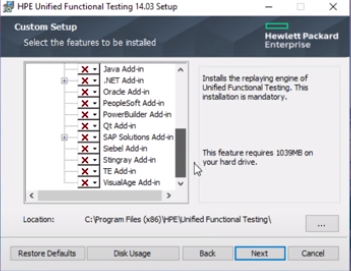
Step 12: Next, all the add-ins are selected by default. Click on the option next to it.

STEP K

Step 13: Select all checkboxes and click on the install option. 

STEP 13

Step 14: After the installation process is finished, click on the finish option.

STEP L

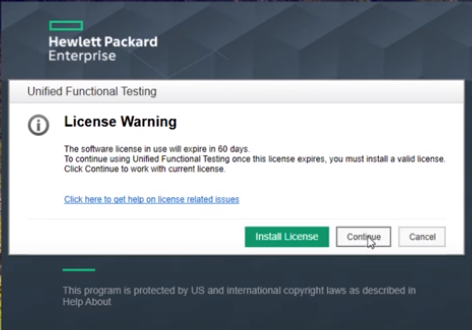
Step 15: On the desktop, select the HPE UFT Icon and select the Continue button.

STEP M

Step 16: On the next screen, click OK and the HPE UFT Dashboard appears as shown below.

STEP N

others, uft-tutorial-description-1, others, uft-tutorial-description-16

Subscribe to our YouTube channel to get new updates..!

Advantages of UFT/QTP 

  • The most important benefit of using UFT is that it is simple to use, and because it includes the language of VBScript, no high-level programming language is needed.
  • An excellent method of Object Recognition.
  • Recording and playback assistance, and the ability to edit scripts after recording.
  • Numerous add-ins are supported, such as Java, .Net, Oracle, SAP, and many more.
  • Common automation frameworks are endorsed, such as the data-driven testing approach, keyword-driven testing strategy, hybrid frameworks, modular testing strategy, etc.
  • Integration is easily supported by UFT with test management tools such as QC, Test director, and more.
  • It comes with loads of QTP’s inbuilt properties and methods as well as VBScript’s inbuilt functions.
  • Extensible to Several Development Environments.
  • Enhanced Code Reusability.
  • Quick Scripting Process.

UFT Certification

One of the most demand certifications in the testing world is the Micro Focus UFT certification. Obtaining Micro Focus UFT certified opens ample opportunities for your career development if you want to step forward in a testing career.

The certification exam available for UFT is the Unified Functional Testing (UFT) Certified Professional Exam. This exam verifies and validates the aspirant’s knowledge of Unified Functional Testing (UFT) version 14.x. Application. The cost to attempt the exam is $200.

Scope of UFT/QPT

Testers over the globe broadly utilize small-scale Center UFT to automate their processes. This tool makes it simpler for QA pros to carry out different testing, including regression and functional testing. The testers can assist in composing the test scripts utilizing the VBScript version, which streamlines the method of controlling the objects and application controls. As numerous organizations automating the testing method, the demand for UFT is increasing at a regular pace.

Therefore the long run of UFT looks broad and provides plenty of opportunities.

UFT Training

Weekday / Weekend Batches

Conclusion

In the current software testing market, the UFT has been a very prominent tool. By supporting only the Windows environment, UFT enables you to generate test scripts using the user interface. Thus we have reached the tutorial’s end and have provided you with all the essential information about the UFT concepts and functionalities.


Source link