Lobbyist Bradley Peterson started the Minnesota legislative session with a quarter-billion-dollar ask. That’s how much money he said was needed to keep funding the replacement of lead service lines, which connect water mains to buildings.
It’s going to cost about a billion dollars total to replace all of the lead lines in Minnesota, and the money initially invested into the program is drying up. The state has already capped the money available for new projects.
Still, Peterson, who represents more than 100 local governments in the Coalition of Greater Minnesota Cities, knew that asking for that much more money would probably be a hard sell.
“The state's fiscal situation has changed, and so any dollar ask is going to be tough,” he said in February, referring to forecasts of future budget deficits. “But on lead service lines specifically, we think if the Legislature is going to spend money on anything, it should be something like this.”
As the legislative session started, the coalition lowered the request from $250 million down to $100 million.
But what they took away was far less.
When lawmakers finally passed the $1.2 billion buzzer-beater bonding bill in the waning hours of the legislative session, funding for the state’s lead replacement program came in at $15 million.
That’s 6 percent of what the coalition initially wanted.
“That's a pretty big disappointment, frankly," Peterson said. “A lot less work will be done. I mean, I'm sure the work won't stop completely, but you're just going to be able to do a lot less, and that's just math.”
Minnesota has taken the lead on lead
The Environmental Protection Agency’s Lead and Copper Rule requires lead service lines to be replaced by 2037. Minnesota’s goal is to get it done by 2033.
According to the state’s online inventory, water systems have identified more than 87,000 service lines in Minnesota that need to be replaced because they are either made of lead or galvanized steel, which can contain lead particles that enter drinking water.
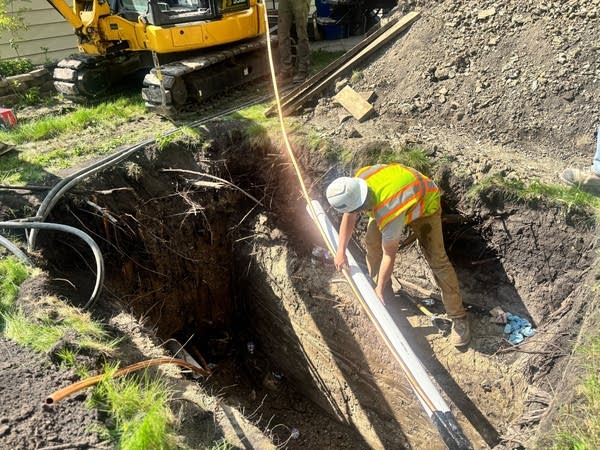
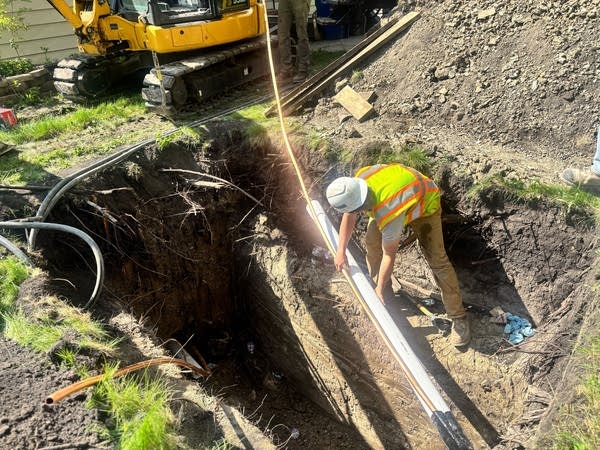
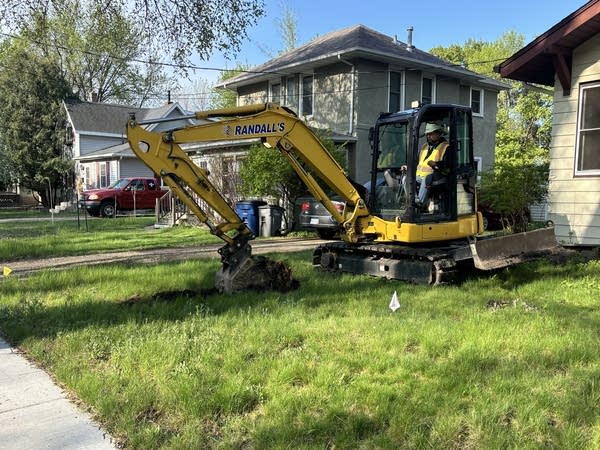
Contractors break ground on a project to replace a lead service line in Moorhead, Minn., on May 20.
Harshawn Ratanpal | MPR News
Another 200,000 are made of unknown material and may contain lead.
Sometimes the pipes are easy to categorize — building records may contain info and the homeowner may be able to visually determine the material. But some pipes aren’t visible without digging deep underground.
In Moorhead for example, about 250 lead lines have been identified, and about 1,000 lines are unknown.
“There's a lot of work that needs to be done to fulfill that remaining portion, and that's going to be a couple years before we're done,” said Marc Pritchard, water plant manager at Moorhead Public Service.
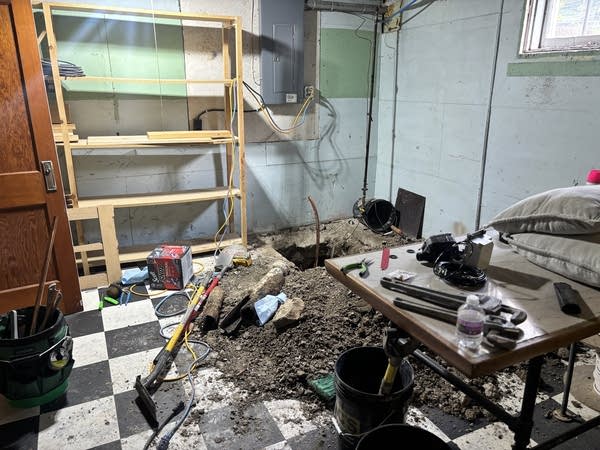
A contractor begins cutting into the concrete of a basement in Moorhead, Minn. to replace the home’s lead service line on May 20.
Harshawn Ratanpal | MPR News
In the meantime, Moorhead has begun to replace some lines. In 2024, a pilot project funded the replacement of 12. Another project last year funded the replacement of 30 lines, and that work is being wrapped up this spring.
Those projects were fully funded through the Minnesota Drinking Water Revolving Fund. Each one costs around $8,000 – $12,000, according to Jake Long, water distribution manager at Moorhead Public Service.
He said the process consumes a full day of work that involves a full crew of contractors and supervisors who dig holes in the basement and the front yard before installing a new copper service line.
“We've been able to receive the funding that works for Moorhead Public Service to replace the lines that we want to each summer,” Long said. “Of course, it could be different in the future with available funding, but it's been very, very nice to receive that funding to make these projects successful.”
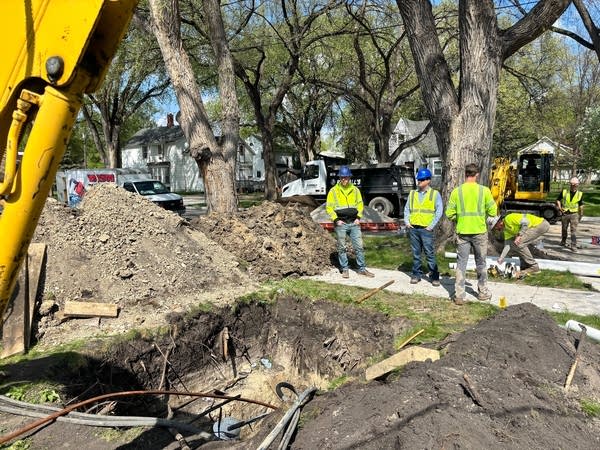
Construction crews and inspectors stand near mounds of dirt and a pit in the front yard of a Moorhead home as they replace a service line made of lead on May 20.
Harshawn Ratanpal | MPR News
Smaller cities, like nearby Dilworth, haven’t begun replacing any lines yet. Their inventory process was done by a local contractor, Moore Engineering, and they found 34 lines that need to be replaced and more than 700 made of an unknown material.
“A lot of the records are just inconclusive, or they didn't have sufficient detail to determine precisely what the materials were, and so it's quite an undertaking to continue to refine those details,” said Andrew Aakre, project manager at Moore Engineering. “That's kind of where we're at … just continuing to refine the inventory to reduce the number of unknowns.”
Aakre said he expects replacements to begin “in the next year or so” but his firm doesn’t have any active contracts with the state.
And as more cities begin actually replacing lead lines, Long is worried the $15 million passed by the Legislature won’t be enough to sustain projects across Minnesota. According to the Minnesota Department of Health, most of the remaining funding will likely be used by the end of the 2027 construction season.
“I think to really make this successful, to really continue these lead service line replacement projects, there will need to be more funding available,” Long said. “It is costly for a homeowner to get it replaced, and, if the Minnesota Department of Health and the EPA really push to get these replaced, we're going to need grant funding to make it happen.”
Lead program already low on funds
In a document highlighting its intended use for the Drinking Water State Revolving Fund, the Public Facilities Authority has a long list of lead pipe replacement projects, but “the demand for funds exceeds available resources” and a “cap will be placed on the amount available to systems.”
That cap could have been removed if the Legislature appropriated more funds early this year, according to the document.
“The resources are tight, and the work has begun,” Peterson said. “There are lines that are being removed and cities have plans in place, and they're continuing to do the inventories to figure out what the last ones are that need to be identified, so it's a pretty significant disappointment that we couldn't have done better this session.”
The longer it takes to get those projects up and running, Peterson worries it will be tougher for Minnesota cities to retain the labor needed to complete them.
A newly-installed copper service line sticks out of a basement in Moorhead, Minn., on May 20.
Harshawn Ratanpal | MPR News
“We were actually probably nationally on the leading edge of that effort,” he said. “Now other states are catching up, and what that means is that the contractors and the workforce that we've been working with — if the money isn't there to continue the work into ‘27 and ‘28 — they'll go find work in other states, and it's really hard to get that momentum back once you lose it.”
Plus, the longer the lead lines stay in place, the longer people are exposed to lead, a toxic metal with no safe amount of exposure. Particularly damaging to children, lead exposure can cause brain damage, developmental problems and, in rare cases, death.
“Your total effects from lead are going to be from all of your cumulative exposures, so that would be from exposure over time,” said Stephanie Yendell, supervisor of the Health Risk Intervention Unit at the Minnesota Department of Health. “A longer duration of exposure is going to increase those effects.”
In the meantime, Peterson said he and the Coalition of Greater Minnesota Cities will try again next session.
“The next governor and the next Legislature are going to have to figure out how to reprioritize that issue and maybe look at something along the lines of a dedicated funding source, so that we don’t have to rely on the back and forth, ups and downs, maybe, maybe not, of a bonding bill from year to year,” he said.
VB.NET refers to Visual Basic. Network Enabled Technologies. VB.Net is called as a simple, high-level object-oriented programming language that was developed by Microsoft in the year 2002. The VB.Net programming language is specifically designed to create and deploy a wide range of applications, which could be web, windows, and mobile applications built on the .Net framework. The VB.Net programming language first release took place in the year 2002 as said, which is a replacement for Visual Basic 6.0. VB.Net is called the object-oriented programming language as it provides its extensible support to the different features of Object-oriented programming called inheritance, polymorphism, encapsulation, and abstraction.
VB.Net is designed so that it runs on the .Net framework allowing access to the different .Net libraries available. It is built so that it is easy to understand irrespective of the individual trying to work on it. VB.Net works explicitly on the .Net framework, and there is high scalability and reliability as the programs will be written in the VB.Net language. VB.Net also provides the flexibility to interoperate with the programs written in the other programming languages like Visual C#, Visual C++, and visual J#.
Hence, it is true that the VB.Net language will help in developing simple, robust, high performance, secure applications. VB.Net also supports all the different primitive data types like the other object-oriented programming languages. VB.Net is not a case sensitive language. VB.Net allows you to create a fully object-oriented application that is the same as the application that is created using other languages like C#, Java, C++. All the programs or applications built using VB.Net are flexible to run on the Windows operating system and on the Mac Operating system and Linux.
History of VB.Net:
It is good to know the history of VB.Net, different versions of it, and the advancements and improvements in each updated version. Let me give you a brief idea of the history of the VB.Net programming language.
Microsoft first developed VB.Net language in 2002, which is referred to as a multi-paradigm programming language. It is launched as a replacement for the Visual Basic language. The first version of VB.Net language is VB.Net 7.0, which relies on the .Net version 1.0.
The next version of VB.Net was released in the year 2003, which is VB.Net 7.1, which relied on the .Net version 1.1. Every version has come up with the advancements. This version came up with improvements that include the improved performance and reliability of the .Net IDE. This version that was released in 2003 has also been made available in the academic version of visual studio.net and is furthermore distributed to the different countries for free.
The next version of vb.net is vb.net 8.0, which was released in the year 2005. This version was also named Visual Basic 2005. It has come up with the different features that would make it different from the C language. The features like generics, operator overloading, unsigned integer support, partial classes, etc. are made available to the Rapid application developers. The VB.net 8.0 version has also come up with the introduction of the is not operator.
The next version of vb.net called VB 9.0 was introduced in the year 2008. This release has come up with some features like anonymous types, XML literals, extension methods, lambda expressions, etc.
The next version of vb.net is called VB 2010 which has come up with the dynamic language runtime, they have opted for the core evolution strategy sharing between the C# and VB.net which is bringing two languages together.
A version of the vb.net called VB 2012 has come up in the year 2012. It came up with the .Net 4.5 It has come up with the different features like iterators, asynchronous data programming with different statements like await statement and async statement and the Global keyword in the namespace statements.
The next version of vb.net is VB 2015, and this version was released along with the Visual Studio 2015. This version also came up with the introduction of the ?. operator used to do the inline null checks. It also came up with the string interpolation feature that will help in formatting the strings inline.
1. Vb.net is referred to as an object-oriented programming language that helps follow all the various concepts like abstraction, polymorphism, inheritance, etc. Vb.net programming language is referred to as an object.
2. The vb.net programming language is helpful in providing its extensible support to the Rapid application development Toolkit. This will help the developers not write the code again and again and utilize the various codes that can be automatically found in the libraries.
3. The vb.net programming language in designing the user interface for different modes like mobile, Windows and web-based applications.
4. The vb.net programming language is not a case sensitive language like the other programming languages like C + +, Java, etc.
5. Vb.net Programming Language also provides support for the boolean conditions in order to make the right decisions that are made in the programming.
6. As it is an object-oriented programming language, it also provides its extensible support to multithreading concepts in which you are allowed to do the multiple tasks simultaneously.
7.This Programming Language also uses the external object as a reference that can be used in the vb.net application.
8. It has also come up with the feature help in initializing an automatic garbage collection.
9. Vb.net programming language is also responsible for providing simple event management in the .net applications.
10. It is also helpful in following structure and extensible programming language that helps error detection and recovery.
11. It also includes a conditional compilation, and it is also easy to use to generate classes used in the object-oriented programming languages.
Basic Syntax of VB.net:
The vb.net is an object-oriented programming language that is responsible for building web-based, mobile applications. When it comes to object-oriented programming methodology, it usually consists of objects, classes, methods, and variables. All the objects will be interacting with each other in a program. The actions of the object will be performed as methods.
When coming to the vb.net program, it can be defined or referred to as the collection of the objects that will help in communicating or invoking each other’s methods. Let me give you a brief description of the different parameters that are used in the vb.net program.
1. Object: An object in a program will have its own state and behaviour. Let’s take an example of a dog which will have its state at a scanner or name and breathe as well, which is referred to as a behaviour. It is also referred to as an instance of a class.
2. Class: A class is referred to as a template or a blue print that will help describe their behaviour or the states of the objects of its type.
3. Methods: A method is referred to as behaviour. The class consists of a different number of methods. The logic is written in the methods where the data will be manipulated, and all the actions will be executed.
4. Instance Variables: Every object will have its own set of instance variables. The state of an object is created by the value assigned to the instance variables.
Structure of VB.Net program:
Vb.net program usually consists of the following different parts. They are:
1. Namespace Declaration
2. Class or a module
3. One or more Procedures
4. Variables
5. Main procedure
6. Statements and expressions
7. Comments
Simple code representing a message:
Let me help you with a Simple code that would print a message.
Imports System
Module ExampleModule
'This program will display Welcome to HKR Training.
Sub Main()
Console.WriteLine("Hi! Welcome to HKR Training")
Console.ReadKey()
End Sub
End Module
Let me give you an explanation of each and every part of the program.
1. The first part of the program is the imports system which is specifically to include the system namespace in the program.
2.The next part is the Module declaration which is named as the module model example. The program in the vb.net programming language model of a class will contain the data and procedures that the program will make use of.
3. Classes or modules will generally contain more than one procedure. The procedures usually contain the executable code as they define the behaviour of the class.
4. The main procedure will specify the behaviour within the statement.
Console.WriteLine(“Hello World”) the control class method that is defined in the System namespace. This statement will allow the message welcome to HKR training to be displayed on the screen.
5. The last line consists of the console.ReadKey() which is used for the vs.net users. This will help prevent the screen from running and closing quickly when the program is launched from the visual studio.net.
Compilation and execution of the vb.net program:
If you are specifically using the Visual studio.net IDE, then you need to follow The below steps.
1. Start the Visual Studio
2. Navigate to the menu bar and choose the File option followed by new followed by the project.
3. You will need to choose the Visual Basic from the templates.
4. Then you need to choose the console application.
5. Specify the project’s name and location using the browse button and then click on the ok button.
6. This new project will then appear in the solution explorer
7. Write the code in the code editor.
8. Finally click on the run button or the F5 key, which will help in running the project. A command prompt window will appear on your screen, which contains a message welcome to HKR training.
You can also compile the vb.net program in the command line rather than using the visual studio IDE. Below are the set of steps to be followed in the command line.
1. Open up the text editor and add the mentioned code.
2. You need to save the file as welcometohkr.vb.
3.You need to open the command prompt tool then and go to the directory where you have saved the file.
4. Type vbc.welcometohkr.vb and press enter for the code to get compiled.
5. If there are no errors identified in your code in the command prompt, it will take you to the next line and generate the welcometohkr.exe file.
6. You need to then type welcometohkr to perform the execution of the program.
7. You will now see the message: welcome to HKR on your screen.
Let us take an example of a rectangular class in VB.net. It consists of different attitudes like Length and width. Based on the design, it requires a phrase for accepting the values for these attributes and also calculating the area and displaying the details.
Below is the code that will help in the implementation of the rectangular class.
Imports System
Public Class Rectangle
Private Len As Double
Private Wid As Double
'Public methods
Public Sub AcceptDetails()
Len = 4
Wid = 3
End Sub
Public Function GetArea() As Double
GetArea = Len* Wid
End Function
Public Sub Display()
Console.WriteLine("Length is : {0}", Len)
Console.WriteLine("Width is: {0}", Wid)
Console.WriteLine("Area is: {0}", GetArea())
End Sub
Shared Sub Main()
Dim r As New Rectangle()
r.Acceptdetails()
r.Display()
Console.ReadLine()
End Sub
End Class
After compilation and execution, the below output will be reflecting.
Length is: 4
Width is : 3
Area is: 12
Subscribe to our YouTube channel to get new updates..!
Differences between Visual Basic and VB.Net:
There are some differences between Visual Basic and VB.Net. They are explained below.
VB.Net:
Vb.net stands for visual basic. Network enables Technology. Vb.net is developed by Microsoft and is based on the Dot Net Framework. Vb.net is specifically designed for the VB developers.
Visual Basic:
Basic is referred to as a programming language developed by Microsoft as well as the fastest development of the windows-based operating system and the applications.
VB.NET:
Net is referred to as a modern and fully object-oriented programming language which is a replacement for the Visual Basic 6.
Visual Basic:
Repertoire has a predecessor of the VB.Net and is not an object-oriented programming language. There is no active maintenance.
VB.Net:
VB.net utilizes the common language runtime component of the.net Framework during the runtime. Vb.net has some advanced features and design implementation when compared to the VB runtime.
Visual basic:
Visual Basic utilizes the VB Runtime environment.
VB.Net:
Vb.net is a compiler-based oriented language and also a safe-type language.
Visual Basic:
Visual basic is an interpreter based oriented language but not a safe-type language.
VB.Net:
Vb.net is not flexible to provide it support for backward compatibility.
Visual Basic:
Visual basic is flexible to provide it support for backward compatibility.
VB.Net:
The Data handling is based on the ADO.Net Protocol in the VB.net.
Visual Basic:
The data handling and data connectivity is based on the RDO, DAO and ADO.
VB.Net:
The parameters are passed by default value in VB.Net.
Visual Basic:
In visual basic, the parameters are passed based on the reference.
VB.Net:
VB.Net allows you to develop a multithreaded application.
Visual Basic:
Visual Basic does not allow you to go through the multithreading concepts.
Advantages of VB.net:
1. The vb.net programming language will help you in creating and executing a program in such a way that it runs under the common language runtime which will help in creating a robust, stable and Secure application.
2. Vb.net is referred to as a purely object-oriented programming language that is based on the objects and classes. This features that are available in VB.net are not available in the previous version of Visual Basic 6. Hence Microsoft has launched vb.net language.
3. Vb.net programming language is using the .net Framework which developed a small program that will be working faster than expected and also will be flexible to work with the last test of NY Publications is referred to as a software framework it consists of the large number of libraries which is for the helping in developing more robust applications.
4. Using the Visual Studio IDE, you are also allowed to develop the small programs which should be for working faster than expected.
5. The vb.net programming language makes use of the drag and drops elements to create the web forms in the.net applications.
6. Visual basic.net also allows you to connect one application to another application that can be created in the same language run on the Dot Net Framework.
7. VB.Net also makes use of a new concept of error handling in the Visual Basic .Net Framework. It uses the try, catch, and finally a method to handle the different exceptions as a unit. Whenever an error Encounters, it is responsible for making the necessary actions.
8. The visual basic.net language is responsible for transferring the data between the different layers of the.net architecture so that the data is passed as simple text strings.
9. Vb.net has the flexibility to structure the code automatically.
Disadvantages of VB.net:
1. The vb.net programming language is not capable of handling the pointers directly. Vb.net programming language requires slot programming, and it is not easy to manage every address by the pointer. Also, it requires additional coding to read the CPU cycles, increasing the processing time. This would result in the slowness of the business application that is developed in VB.Net programming language.
2. Vb.net programming language makes use of an intermediate language compilation that is used for easy decompilation, but there is nothing that is preventing applications for disintegrating.
3. VB.net programming language is easy to learn, which is increasing a larger competition between the programmers, and it is further leading to employment opportunities or projects in VB.net.
4. Vb.net programming language consists of a large collection of the libraries for the JIT compiler that will help in interpreting the application. The distributed libraries will utilize a vast space in the system which will move further and take more computing time.
5. JIT compiler: JIT compiler refers to the just-in-time compiler which is referred to as a process through which the computer will interpret the intermediate language compilation and is also required to run the application.
.NET Training Certification
Weekday / Weekend Batches
Conclusion:
With the technology change, there is a high demand for application development and one of the most important sources for the organizations for their growth. Hence, most organizations are looking forward to the individuals who have been trained and certified in developing the applications that meet customer requirements in a short span of time. I would suggest you get trained and certified in VB.net programming language and VB.net training to help you achieve a successful career.
To provide the best experiences, we use technologies like cookies to store and/or access device information. Consenting to these technologies will allow us to process data such as browsing behavior or unique IDs on this site. Not consenting or withdrawing consent, may adversely affect certain features and functions.
Functional
Always active
The technical storage or access is strictly necessary for the legitimate purpose of enabling the use of a specific service explicitly requested by the subscriber or user, or for the sole purpose of carrying out the transmission of a communication over an electronic communications network.
Preferences
The technical storage or access is necessary for the legitimate purpose of storing preferences that are not requested by the subscriber or user.
Statistics
The technical storage or access that is used exclusively for statistical purposes.The technical storage or access that is used exclusively for anonymous statistical purposes. Without a subpoena, voluntary compliance on the part of your Internet Service Provider, or additional records from a third party, information stored or retrieved for this purpose alone cannot usually be used to identify you.
Marketing
The technical storage or access is required to create user profiles to send advertising, or to track the user on a website or across several websites for similar marketing purposes.