Guidelines suggest colorectal cancer screening for average-risk people beginning at age 45. Credit: Jacob Wackerhausen / Getty Images
New ACS guidelines add blood-based and updated at-home tests to expand colorectal cancer screening participation.
Colonoscopy remains the most comprehensive screening option and the only test that can remove precancerous polyps.
Blood-based screening tests are intended for patients who decline or do not complete preferred screening methods.
New colorectal cancer screening recommendations, released today by the American Cancer Society, may help millions more Americans test for the disease.
The updated guidelines will now allow for a blood-based screening test, taken in a doctor's office, if a patient declines or does not complete one of the other preferred screening options, like a colonoscopy or a home-based stool test. In addition to the new blood-based test, the guidelines now include one updated and one new home-based test.
Experts say expanding the number of screening options could help improve participation, especially as colorectal cancer rates continue to rise in younger adults.
“We need to increase our emphasis on colorectal cancer as a highly preventable disease as much as a treatable one,” Robert Smith, PhD, senior vice president of early cancer detection science at the American Cancer Society, said in a news release. “By offering more screening tools in our guideline update, more eligible adults will be able to participate in lifesaving colorectal cancer testing, helping to close the screening gap and catch more cancers at an earlier, treatable stage.”
What's New in the Updated Guidelines
Experts say the most effective screening test for colorectal cancer is one that a patient will actually complete. While a colonoscopy is still the most accurate tool for colorectal cancer screening, the updated guidelines include additional new and updated tests to expand participation. Colonoscopy also remains the only screening test that can both detect and remove precancerous polyps during the same procedure.
Home-based stool tests:
Cologuard: An updated version of a current at-home mt-sDNA (multi-target stool DNA) test that analyzes stool samples for specific DNA mutations and biomarkers associated with cancer or precancerous polyps.
ColoSense: A new at-home mt-sRNA (multi-target stool RNA) test that analyzes stool samples for specific RNA biomarkers and hemoglobin.
Blood-based tests:
Shield: A new blood-based screening test used to detect tumor DNA in the blood. Compared with established stool-based tests, these blood-based tests have a lower sensitivity for both advanced precancerous lesions and early-stage cancers.
The updated guidelines stress that the blood-based test is, essentially, a last resort for people who decline or do not complete other preferred screening tests. That's because of their lower sensitivity for detecting both advanced precancerous lesions and early-stage cancers. Studies also predict they are less effective in reducing colorectal cancer incidence and mortality. Additionally, any abnormal result from a stool- or blood-based screening test should be followed up with a colonoscopy.
“No matter which test you choose, what’s most important is to get screened, and that includes underserved, rural, and minority populations,” William Dahut, MD, chief scientific officer at the American Cancer Society, said in a news release. “These changes were developed to add to the colorectal cancer screening arsenal and help ensure preventive cancer care is available to all.”
What's Staying the Same
The ACS still recommends that everyone at average risk of colorectal cancer begin regular screenings at age 45, and continue through age 75 if they are in good health and expected to live more than 10 years. Screening is no longer recommended after age 85. People at a higher risk of colorectal cancer may need to begin screenings before age 45, have screenings more often, or only do specific tests.
Colonoscopy remains the most comprehensive screening option, but average-risk individuals who choose an approved stool test or a visual exam instead of the blood test have several options.
Home-based stool tests:
High-sensitivity guaiac-based tests (gFOBT), every year
High-sensitivity fecal immunochemical tests (FIT), every year
Multi-target, stool DNA (mt-sDNA) tests, every three years
Multi-target, stool RNA (mt-sRNA) tests, every three years
Visual exams:
Colonoscopy, every 10 years
Flexible sigmoidoscopy (similar to a colonoscopy, but only examines the lower third of the colon), every five years
Computed tomography (CT) colonography (a test that creates 3D images of the colon and rectum to detect polyps or cancer), every five years
The guidelines also acknowledge the role affordability and accessibility play in colorectal cancer screening and prevention.
“Expanding screening options only matters if people can actually access them,” Lisa A. Lacasse, president of ACS CAN, a nonprofit, nonpartisan advocacy affiliate of the American Cancer Society, said in a news release. “Coverage and affordability remain among the biggest factors in whether eligible individuals get screened for colorectal cancer."
She added that ACS CAN "will continue pressing for policies that eliminate out-of-pocket costs and other barriers, so everyone has a fair opportunity to get the evidence-based screening they need.”
Webassessor is an online credential management service that allows you to apply for examinations,track certification status, and take proctored exams.You must first build a profile on the ServiceNow Webassessor site before you can apply for a Mainline exam.
Registering /Scheduling a Remote/Online Proctor Exam
The below are the instructions which have to be followed to get registered or schedule enrolment for an online (remote proctored) exam.
Become a Servicenow Certified professional by learning this HKR Servicenow Training !
Scheduling or Registering an Online Proctored Exam
1. For candidate exam registration, each Test Sponsor has a branded Webassessor portal. To access your Test Sponsor’s unique link, go to their certification, testing, or training program page.
2. If you don’t already have an account, press Create Account and fill out the registration form.Enter your username and password and click Login if you already have an account.
3. Click on the “Exam Catalog” tab.
4. Look for the Online Proctored option on the exam you’d like to register for. (This delivery form is not available for all exams).
5. Next to Online Proctored, click the Buy Now or Get Now button.
6. Using the calendar, find an available testing date. The dates that are available are bolded.
7. From the list on the right, select start time.
8. Check the box below after carefully examining your Test Sponsor’s instructions.
9. Then click ‘Select”.
10. Complete the transaction’s payment section.
11. You will get an email confirmation of your enrollment, along with exam-specific details.
12. Complete the Online Exam System Check to test the system settings HERE
Note: Single-Sign-On (SSO) can be used by some Test Sponsors to connect you directly to Webassessor through their Learning Management or other internal systems. Once you’ve signed in to the LMS, you’ll be able to enter the Exam Portal for these Test Sponsors.
To register for a Webassessor Mainline Exam, follow the steps below.
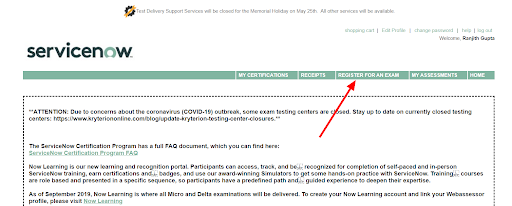
Step 1: Navigate to the REGISTER FOR AN EXAM tab after logging into Webassessor.
Step 2: Select Mainline Exams Including Retakes.
Step 3: Select the + icon next to the exam you want to finish.
Step 4: Next to Onsite Proctored or Online Proctored (depending on the delivery you wish you to complete), click Buy Now.
Onsite Proctored exam
Completed at one of the Kryterion Testing Network’s Testing Centers. Select a testing center that is available (filter based on your location). Choose the date and start time. If this is your first time taking the exam, use the voucher code you got after finishing the training to get the exam fee waived at checkout.
Online Proctored exam:
The exam was conducted entirely online. If you choose this option, make sure you follow Kryterion’s online proctoring requirements Choose a time zone, a date, and a starting time. If this is your first time taking the exam, use the voucher code you got after finishing the training to get the exam fee waived at checkout. On all confirmation and reminder communications, the exam start time will be specified in 24-hour clock format.
Creating a ServiceNow Webassessor account
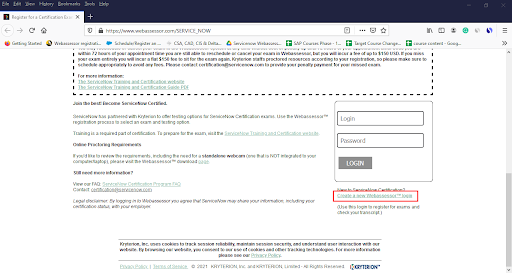
Simply go to “https://www.webassessor.com/SERVICE_NOW”
If you already have a Webassessor account, you can log in from here.
If you don’t already have a Webassessor account, click Create a New Webassessor Login Now, and then enter your details to create your account on this screen.
There are a lot of fillers that need to be filled. The most important point to remember is that your Webassessor login must be an email address, and it is advisable for you to use your personal email address instead of your work email address since you don’t want to lose access to your Webassessor login if you change jobs.
Then you enter your name, email address, and use your personal email address to create your own free developer account linked to your Salesforce account.Enter your contact details above such as address, city, state, postal code,country, and select yes in the dropdown options for agreeing to add your name and certification statuses to the public certification verification portal and then click Save.
Summary of Webassessor Home Page Participants can view relevant and important ServiceNow announcements on the home page after logging into Webassessor. Take a look at the summary of the Webassessor home page as discussed below:
My Certifications: Check the status of your ServiceNow Mainline certifications.
Receipts: Send a receipt for a scheduled or completed exam to your primary Webassessor email.
Register for an Exam: Schedule a ServiceNow Mainline exam.
My Assessments: Exams that are scheduled, in progress, or completed can be found here.
Home: Return to the main ServiceNow announcements homepage.
Edit Profile: Change your primary email address and other personal details.
Accessing ServiceNow Webassessor Overview
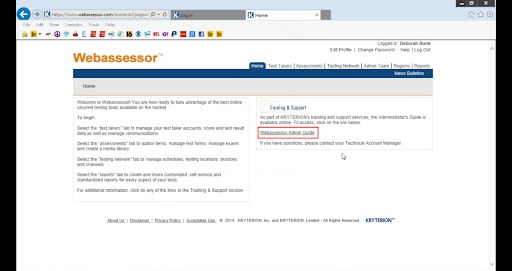
Now we are going to cover the overview of moving around in web Assessor. The URL for the web Assessor is “webassessor.com,” and it will take you to this screen which is shown below. You can log in with your username and password, and if you forget your password, we will email it to you so you can schedule a demo or get technical support.
These are the things you’ll see when you log in to the Web Assessor. The first thing you can do is edit your profile. Make sure you have all of the necessary details in there, and the administrator will assign you a password for the web Assessor system. It would be best for you to go in and design a password for yourself which would be a “change password”. There is also your help box for any web assessing assistance you can need.
Working in web Assessor is a “Web Assessor admin” guide that will take you through the various phases of working in web Assessor.
We’ll now go through the different tabs and features available in web Assessor.
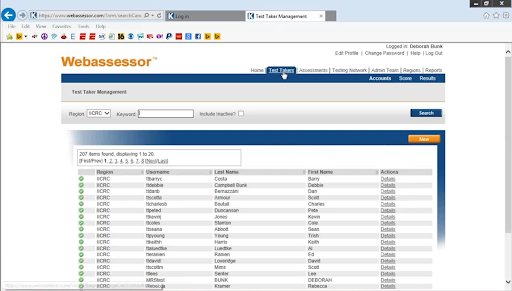
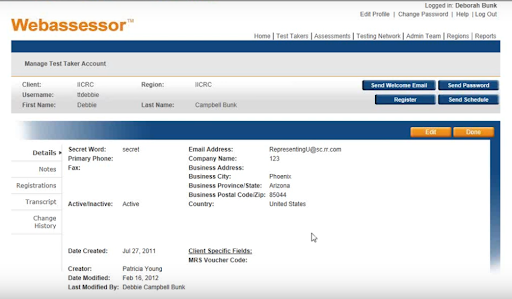
You’ll find all of the test takers, whether they’re taking the test online or in a testing center, under the test takers tab at the top of the page. The details of each of these test-takers are shown inside these screens.
This will provide them with your company’s phone number and passwords. any notes you may make, any registrations for tests they may have taken, and the test transcripts. When a test taker contacts you for a password or assistance with registering or scheduling, this was also a test taker mode.
Assessments:
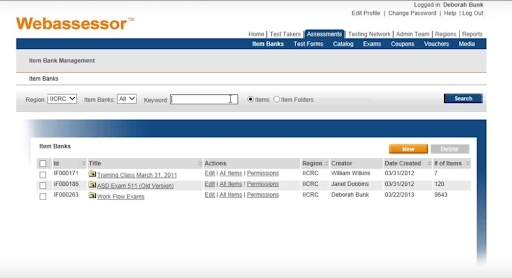
You’ll spend the most time on “assessments”. You have your item banks inside assessments and then You build your own “test forms”. All of the ICR scenes item tests are under the workflow exams in your item banks.
You can see them coated with the exam’s original time and then coded them with the new date as we make changes.
Test Forms:
Your “test forms” will be where you will build your test. This is where you’ll take the items and put them into a test form,whether you’re taking an online test,a test center test, or printing some paper. One thing to keep in mind is that once these are locked, you won’t be able to make any more changes to the test forms.
Catalog:
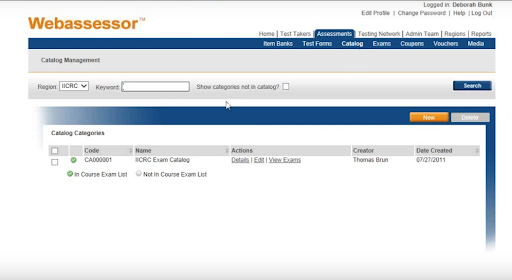
The active exams will be displayed in the “catalog”. The catalog of all the exams we have is related to the MRS (mold removal specialist) test.These are the various tests that we went through in order to establish form A and B of our exams. These are the exams that are performed at a test center.
Enroll in our Fortiweb Training program today and elevate your skills!
Subscribe to our YouTube channel to get new updates..!
Exams:
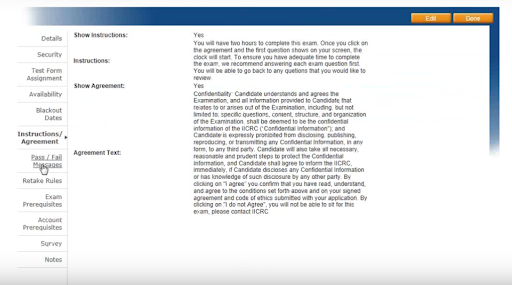
The “exams” tab will show you the details of the exam as shown in the below screen.
These details will include the cost, the security parameters, the test form alignment assignment, and the test’s availability. There are no end dates or blackout dates for these assessments if they can’t be administered at a certain time.
It also contains any “instructions” for the test-taking student. The pass and fail messages are where we establish pass and fail if you take an online test and get your results right away. There are retake rules, such as how many times you should take the exam. If we perform any surveys or have any notes on this, we will conduct an exam or account prerequisites survey. All of these can be found under exams, which is under the actual exam. The mold removal specialist is the one that we’re utilizing an outside service.
Voucher:
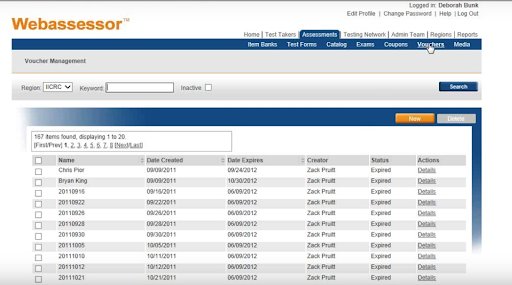
A “Vouchers” tab is where the staff assigns a code to a test taker after they have met the requirements, their application has been accepted, and they have submitted their payment, and we tend to allocate them by date. This code will be used to register for the test at a testing center.
Media Center:
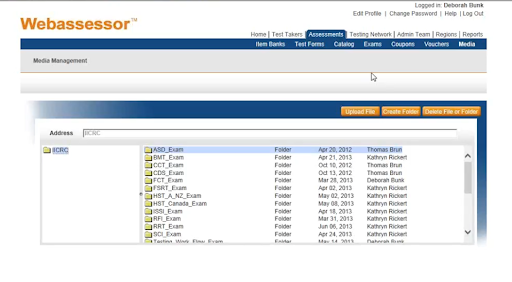
The media center will take a few moments to load because it contains all of the pictures and graphics from the test.Any item that uses it is broken down by the exam for which it is associated. All media must be uploaded here before it can be added to a test item and then transferred to a test forum.
So assessments are where you’ll be developing your items, evaluating them, updating them, and converting them to a test form to see whether you want to export them to paper and pencil or place them online. As a result, it will be used for computer-based tests, and you’ll have your voucher so that those who have paid for the test will take it.
Admin Team:
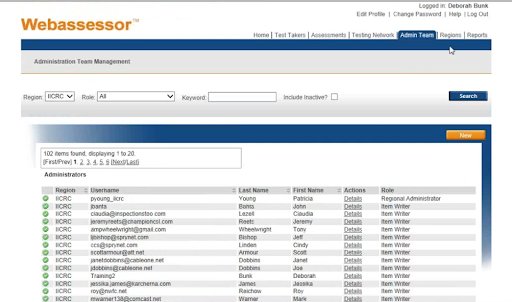
The “admin team” is the next tab. This is where volunteers and workers of the IICRC can access the web Assessor system and make changes to the item database, exams, profiles, and passwords. The original administrator, the assessment manager, the item writer, the registration manager, the private scheduler, the supervisor, and the test taker administration are the seven different roles that can be defined for the test-taker. This is where each of these roles will be developed.
Regions:
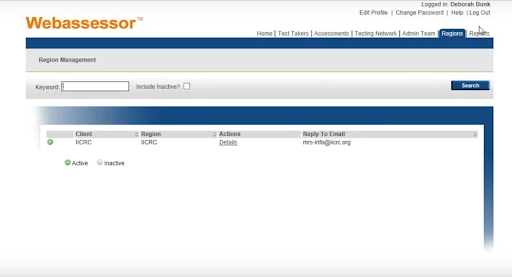
The regions are the separate entities within an organization. They can represent a variety of departments,geographic areas, and even teams. You have one region to find but if you do need additional regions to establish then you need to contact the technical Account Manager.They’re a wonderful tool for creating web pages in multiple languages or different branding elements for different business units within the same company.
Report:
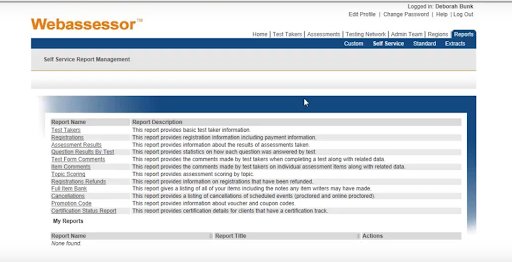
Any system standard reports that you want to keep track of on a regular basis can be saved to custom reports. The self-service reports are those that have already been developed by the web Assessor system, and you can pull various reports depending on the details that you’re looking for. Despite the fact that each report has its own set of fields and selection criteria, the reports share a lot of similar attributes.
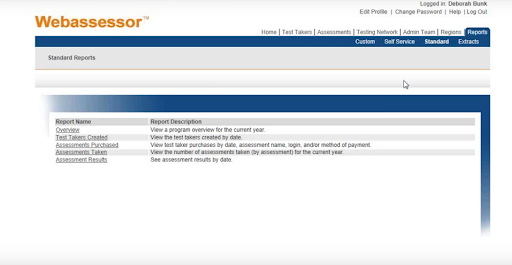
The standard reports are those that are also created with the web Assessor and are generated directly from the assessments.
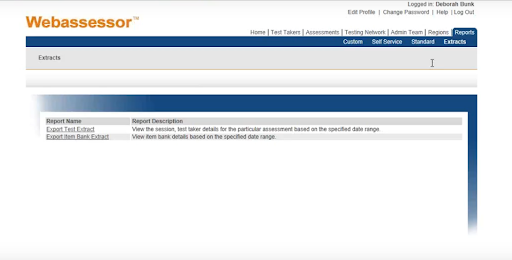
The extract reports are the reports in which you would enter specifics on what you were looking for,and the data would be extracted into a CSV file, which you could then manipulate and display in various documents.
As an example,the committee members are working on their exams and need to see an updated printed version of the exam. You could review it by placing it into an approved mode, turning it into an exam, or extracting a report.Extract the data into Excel, manipulate it, and then convert it to a Word document that displays the same information to them.It will also provide them with the additional details they need to provide their source definition,documentation,and teaching point or evidence statement.
Conclusion:
We have covered the basic overview of the web Assessor system and all its features. We hope this blog has helped you with all the essential details on how to use the ServiceNow Webassessor for scheduling the exams.
To provide the best experiences, we use technologies like cookies to store and/or access device information. Consenting to these technologies will allow us to process data such as browsing behavior or unique IDs on this site. Not consenting or withdrawing consent, may adversely affect certain features and functions.
Functional
Always active
The technical storage or access is strictly necessary for the legitimate purpose of enabling the use of a specific service explicitly requested by the subscriber or user, or for the sole purpose of carrying out the transmission of a communication over an electronic communications network.
Preferences
The technical storage or access is necessary for the legitimate purpose of storing preferences that are not requested by the subscriber or user.
Statistics
The technical storage or access that is used exclusively for statistical purposes.The technical storage or access that is used exclusively for anonymous statistical purposes. Without a subpoena, voluntary compliance on the part of your Internet Service Provider, or additional records from a third party, information stored or retrieved for this purpose alone cannot usually be used to identify you.
Marketing
The technical storage or access is required to create user profiles to send advertising, or to track the user on a website or across several websites for similar marketing purposes.


:max_bytes(150000):strip_icc():format(jpeg)/GettyImages-2229538647-dc835c7db85d40bfa4ed482dca563265.jpg "Tablet, checkup and woman with doctor in hospital for healthcare records with treatment plan. Digital technology, consultation and medical worker with patient for research on diagnosis in clinic.")